Our readers keep the lights on and my smoothie glass nicely filled. As an Amazon Associate, I earn from qualifying purchases.
The gap between your phone screen and a physical photograph has never been smaller, yet the sheer number of pocket-sized photo printers makes choosing one surprisingly hard. Every model promises vivid colors and instant results, but the printing technology underneath — dye-sublimation versus ZINK versus Instax film — determines whether your memories look sharp or soft, fade-resistant or fragile, waterproof or vulnerable to a single coffee spill.
I’m Mohammad Maruf — the founder and writer behind WellFizz. I’ve spent years analyzing portable printing hardware, from thermal dye transfer engines to zero-ink crystallized papers, so you get a buying guide built on real specs rather than marketing claims.
Whether you need sticky-backed prints for a journal or 4×6 keepsakes for a frame, this guide breaks down the essential specs of every best camera printer on the market to help you match the right printing system to your actual needs.
How To Choose The Best Camera Printer
Picking a portable photo printer comes down to understanding the printing engine inside it. The three main technologies — dye-sublimation, ZINK, and Instax film — create very different results in color accuracy, durability, and per-print cost. You need to match the technology to how you plan to use the prints: in a scrapbook, on a fridge, in a wallet, or framed on a shelf.
Dye-Sublimation vs. ZINK vs. Instax
Dye-sublimation printers (like the Canon Selphy or HP Sprocket Studio Plus) heat solid dyes into a gas that bonds directly onto the paper, then apply a protective laminate layer. The result is waterproof, smear-proof, and fade-resistant. ZINK (Zero Ink) printers embed dye crystals inside the paper itself; the printer heats specific spots to activate and fix the color. ZINK prints are convenient — no cartridges — but they are less vibrant and can develop a blue or yellow tint over time. Instax printers, like the Fujifilm Mini Link 3, expose actual Instax film using a tiny digital print head. You get the classic analog look — slightly soft, warm, and nostalgic — but each print costs more and the quality depends heavily on the film batch.
Paper Size and Yield
Most pocket printers output 2×3 or 3×4 inch prints — perfect for journals, wallets, or sticking onto a mirror. If you want 4×6 postcard-sized photos that fit in standard frames, you need a larger model like the iDPRT CP4100 or the Canon Selphy CP1500. Check the included sheets: some bundles ship with 50 or 108 sheets, but others include zero. Always verify what is in the box before you place the first order.
Connectivity and App Quality
Bluetooth is the most common wireless protocol for pocket printers, but connection stability varies wildly. Some printers — like the YOTON — create their own Wi-Fi network, bypassing your home router. This is more reliable for printing from a phone but requires switching networks on your device. The companion app matters too: a buggy app with frequent crashes can ruin the entire experience. Look for user reviews that specifically mention how well the app handles image editing, framing, and collage features.
Print Speed and Battery Life
Most portable models print a single photo in 45 to 90 seconds. If you are printing at a party or event, a faster printer like the Canon Ivy 2 (around 50 seconds per print) keeps the line moving. Battery capacity is less critical if you mostly print at home, but for travel, a rechargeable lithium-ion battery that can handle 20 to 30 prints per charge makes a real difference.
Quick Comparison
On smaller screens, swipe sideways to see the full table.
| Model | Category | Best For | Key Spec | Amazon |
|---|---|---|---|---|
| Canon Selphy CP1500 | Premium | 4×6 framed prints | 300 DPI dye-sub, 16.7M colors | Amazon |
| Canon Ivy 2 Mini | Premium | Pocket-friendly ZINK prints | ZINK (zero ink), 50s per print | Amazon |
| HP Sprocket Studio Plus | Mid-Range | Smudge-proof 4×6 photos | Dye-sub with laminate layer | Amazon |
| Liene Amber M110 | Mid-Range | Dual-size printing (4×6 & 3×3) | Dye-sub, dual paper tray | Amazon |
| iDPRT CP4100 | Mid-Range | 4×6 prints with AR video | 300 DPI dye-sub, 60s per print | Amazon |
| HPRT 4×6 Photo Printer | Mid-Range | Desktop dye-sub printing | 300 DPI dye-sub, auto lamination | Amazon |
| Fujifilm Instax Mini Link 3 | Mid-Range | Classic Instax aesthetic | Instax film, grainy look | Amazon |
| YOTON Photo Printer | Budget-Friendly | AR video & 4×6 dye-sub | Dye-sub, built-in Wi-Fi | Amazon |
| Polaroid Hi-Print 2nd Gen | Budget-Friendly | Sticky-back 2×3 prints on the go | Dye-sub, 50s per print | Amazon |
In-Depth Reviews
1. Canon Selphy CP1500 Wireless Compact Photo Printer (Black)

The Canon Selphy CP1500 is the most mature, proven portable photo printer on this list. It uses a proper dye-sublimation engine with a yellow, magenta, cyan, and protective laminate pass, producing 300 DPI prints at 16.7 million colors. The bundled KP-108IN set includes 108 sheets of 4×6 postcard paper plus three ink cartridges, so you can print straight out of the box without ordering additional consumables.
Connectivity is equally versatile — you can print wirelessly via the SELPHY Layout app (iOS/Android), directly from a USB flash drive, or from a memory card via the SD slot. The compact body measures roughly 7 x 5 x 2 inches and supports an optional battery pack for true portability. User reports consistently highlight bright, crisp colors and thick glossy paper that feels notably premium compared to competitor prints.
The main trade-off is that the CP1500 is not pocket-sized; it is a small desktop unit rather than a go-anywhere gadget. The per-print cost of genuine Canon ink and paper sets is also higher than generic options, though the quality consistency is difficult to beat. For anyone serious about producing 4×6 prints that look like they came from a minilab, this is the reference standard.
Why it’s great
- True 300 DPI dye-sub with laminate layer for waterproof prints
- Multiple input methods: Wi-Fi, USB, SD card
- Includes 108 sheets and 3 ink cartridges in the bundle
Good to know
- Desktop form factor — not truly pocket portable
- Genuine Canon paper and ink are more expensive than generic
2. Canon Ivy 2 Mini Photo Printer (Blush Pink)

The Canon Ivy 2 Mini is a ZINK-based printer that eliminates the need for ink cartridges entirely. Embedded dye crystals in the paper activate when heated, producing a 2×3 inch sticky-backed print in roughly 50 seconds. This bundle includes 110 sheets of ZINK paper (2 packs of 50 plus the 10 that ship inside the printer), a protective case, and an LED light bar — enough consumables for heavy journaling or gift-giving sessions.
Canon specifically optimized skin tones and contrast for this second-generation model, addressing the common ZINK complaint of overly blue or washed-out images. The app connection via Bluetooth is reliable, and the printer itself is about the size of a computer mouse, making it the most portable option here. Users report that it travels well in a purse or small backpack without any bulk.
The ZINK technology is the limiting factor: prints are less vibrant and slightly less sharp than dye-sub equivalents, and they may develop a color shift over several years. If you need archival-quality 4×6 photos, the Ivy 2 is not the right tool. But for instant sticky-back memories in a journal, scrapbook, or on a laptop lid, it is hard to beat for convenience.
Why it’s great
- No ink cartridges — only ZINK paper required
- Very small and lightweight, fits in a pocket
- Includes protective case and 110 paper sheets
Good to know
- ZINK prints can develop a blue tint over time
- 2×3 size is too small for standard frames
3. HP Sprocket Studio Plus 4×6 Wireless Instant Photo Printer

HP’s Sprocket Studio Plus brings dye-sublimation to a sub-150-dollar price point, producing 4×6 prints that are tear-resistant, smudge-proof, and waterproof thanks to the clear laminate layer applied during the print cycle. The HP Sprocket app (iOS and Android) allows you to edit with stickers, frames, and filters before printing, and the printer connects over Wi-Fi for a cable-free setup.
One cartridge and paper bundle can yield around 100 prints, which users confirm in real-world use. The print quality is generally excellent for the price, with vibrant colors and sharp details — though some reviewers note that skin tones can be slightly off compared to what they see on an iPhone screen. The printer itself is compact enough to sit on a desk without dominating it.
The biggest downside is the app stability. Multiple users report the Sprocket app crashing or losing connection mid-print, which can waste paper and ink. The print speed is also on the slower side at roughly 60 seconds per print. Still, for anyone who wants 4×6 dye-sub quality without spending premium money, this is the most accessible entry point.
Why it’s great
- Affordable dye-sub with waterproof laminate finish
- Compact desktop footprint
- High yield: about 100 prints per ink/paper bundle
Good to know
- App stability can be inconsistent
- Print speed is slower than some competitors
4. Liene Amber M110 Bluetooth Photo Printer

The Liene Amber M110 stands out with its dual paper tray design — it can switch between standard 4×6 photo paper and 3×3 sticky-backed paper without manually swapping cassettes. This flexibility is rare in the sub-150-dollar segment and makes the M110 ideal for users who want both framed prints and sticker-style photos for journals or gifts.
The thermal dye-sublimation engine delivers vibrant colors and includes a protective laminate layer. Users consistently rate the print quality highly, with natural skin tones and sharp detail. Bluetooth pairing is fast (roughly 13 seconds), and the Liene app offers basic editing tools plus ID photo templates. The build quality feels solid, and the white and orange color scheme is visually distinctive.
The main caveat is that the Liene app is relatively new and has some rough edges — a few users note misspelled interface text and limited creative filters. Per-print costs are also slightly above average because you must use Liene’s proprietary cartridges and paper. If you value dual-size printing and don’t mind a developing app ecosystem, this is a strong mid-range contender.
Why it’s great
- Dual paper tray for 4×6 and 3×3 prints
- Fast Bluetooth pairing in about 13 seconds
- Vibrant dye-sub with laminate protection
Good to know
- App interface has some polish issues
- Proprietary consumables increase per-print cost
5. iDPRT 4×6 Photo Printer CP4100

The iDPRT CP4100 is a 4×6 dye-sublimation printer that bundles a generous 108 sheets of photo paper plus two ink ribbons right in the box. It uses the HeyPhoto app for Wi-Fi direct connection (no router needed), and includes an AR video feature that lets you scan a printed photo with your phone to replay the original 15-second video clip — a clever party trick that adds emotional value to physical prints.
Print speed is roughly 60 seconds per photo, and the 300 DPI resolution produces clean, fade-resistant results. Users report that the app is straightforward for basic edits like filters, text, and stickers. The beige finish is understated enough to blend into most home decor, and the printer weighs just over 5 pounds, making it easy to move between rooms.
The main downsides are the app’s lack of advanced editing features and a somewhat noisy print cycle. Some users also mention that not all photos in their library appear in the app’s selection menu. For families who want to print 4×6 memories with a fun AR novelty factor, the CP4100 delivers solid value with minimal setup friction.
Why it’s great
- 108 sheets and 2 ribbons included
- AR video feature brings prints to life
- Wi-Fi direct connection — no router needed
Good to know
- App photo selection menu can be buggy
- Print cycle is moderately noisy
6. HPRT 4×6 Photo Printer
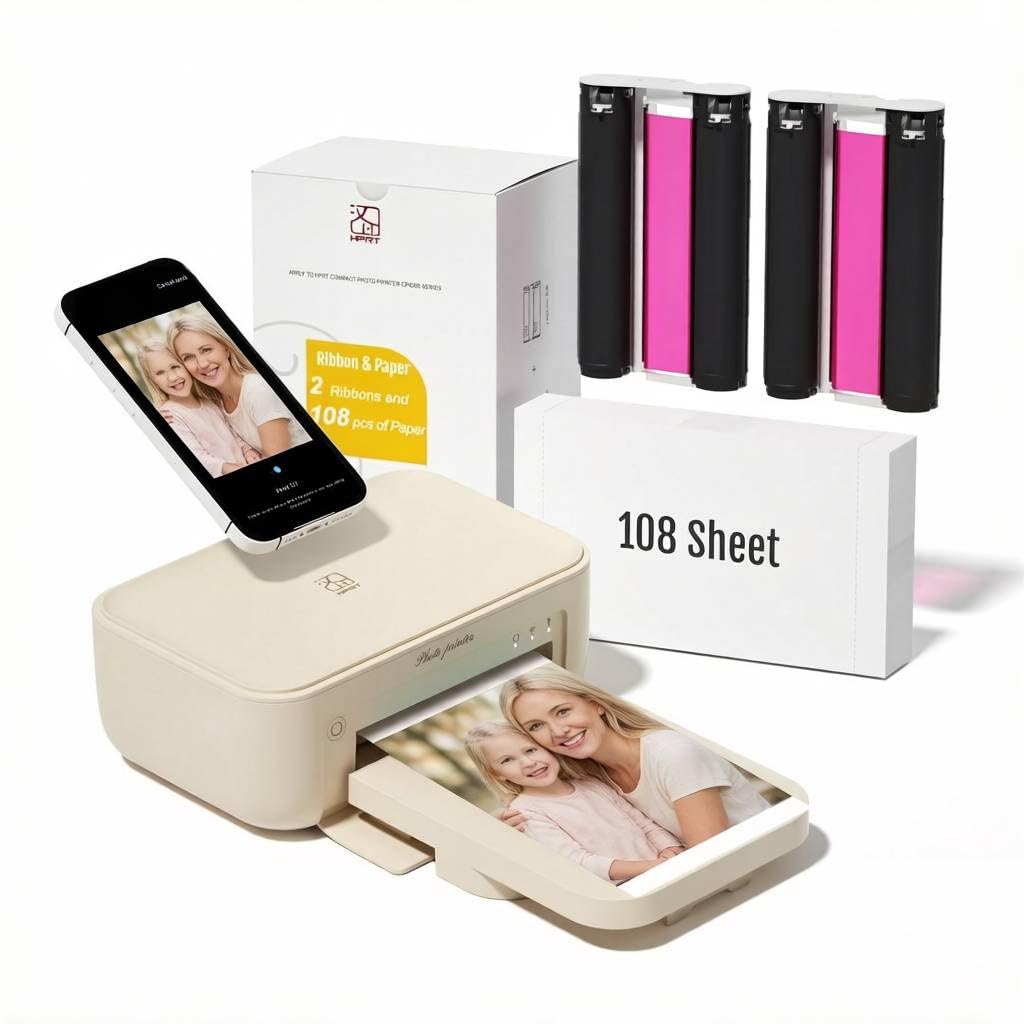
The HPRT 4×6 Photo Printer uses thermal dye-sublimation with automatic lamination to produce prints that resist dust, fingerprints, and water. It ships with 108 sheets of 4×6 photo paper and two ink ribbons, giving you a healthy running start. The HeyPhoto app (same ecosystem as the iDPRT CP4100) connects via Wi-Fi and offers basic editing tools.
Print resolution is rated at 300 DPI, and users report that the quality is noticeably better than typical consumer-grade lab prints — sharp, vivid, and free of banding. The machine is relatively compact at roughly 10 x 7 x 5.5 inches, fitting comfortably on a desk or shelf. Setup is straightforward: plug in the power, download the app, connect to the same Wi-Fi network, and load the paper and ribbon cassette.
The app has persistent complaints of crashing or freezing during editing, which can waste paper if a print command is sent mid-crash. The printer itself is also on the louder side during the dye transfer cycle. For a mid-range 4×6 dye-sub printer with generous included consumables, the HPRT is a solid option if you are willing to tolerate occasional app quirks.
Why it’s great
- 108 sheets and 2 ribbons included in the box
- 300 DPI dye-sub with automatic lamination
- Compact desktop footprint
Good to know
- App is prone to crashing or freezing
- Printer is relatively noisy during operation
7. Fujifilm Instax Mini Link 3 Smartphone Printer

The Fujifilm Instax Mini Link 3 is not a dye-sub or ZINK printer — it exposes actual Instax Mini film using a digital print head, then ejects the developing photo just like a traditional instant camera. The result is the unmistakable Instax look: slightly warm, soft, and grainy in a way that feels nostalgic. If you love the aesthetic of analog instant film, no other printer here replicates it.
The app (Instax Mini Link) allows you to customize prints with frames, filters, and collage modes like “Click to Collage,” which splits a single photo into two Instax frames. Bluetooth pairing is fast, and USB-C charging is a modern convenience. The printer is slightly larger than a phone but fits easily in a bag. Users consistently praise the print quality — as long as the film is fresh and not from a bad batch.
The practical downsides are real: Instax film is expensive per print (around to per sheet), the prints are small (roughly 2.1 x 3.4 inches), and the image quality depends heavily on the film’s storage conditions. Also, the printer does not include any sample film in the box — you must buy a separate pack before you can make your first print. For the pure Instax experience, it is unmatched; for cost efficiency, it is the most expensive option here.
Why it’s great
- Authentic Instax analog look and feel
- Fun collage and framing modes in the app
- Fast Bluetooth pairing and USB-C charging
Good to know
- Highest per-print cost among all options
- No film included in the box
- Image quality depends on film freshness
8. YOTON Photo Printer

The YOTON Photo Printer brings dye-sublimation and an AR video printing feature to a sub-100-dollar price point, making it one of the most feature-dense budget options available. The printer uses a built-in Wi-Fi network to connect directly to your phone — bypassing your home router — which makes the connection more stable than Bluetooth in many cases. The included bundle provides 54 sheets of 4×6 paper and one ink ribbon.
The AR video function works by embedding data in the print that the companion app can read with your phone’s camera, replaying up to 15 seconds of video. It is a genuinely novel way to bridge digital and physical memories. Print quality is excellent for the price, with users comparing it favorably to full-size dye-sub printers. The app allows border adjustments, filters, and text overlays.
The setup process is the biggest hurdle. Connecting requires a 2.4GHz Wi-Fi signal, and some users report that USB connection does not work reliably. The app demands extensive permissions (location, network, and photo access) before it will function. Once connected, the print quality is impressive, but the initial friction can be frustrating. For bargain hunters willing to work through the setup, the YOTON punches above its weight.
Why it’s great
- Affordable dye-sub with AR video support
- Built-in Wi-Fi for stable direct connection
- Print quality rivals much more expensive printers
Good to know
- Setup is finicky — requires 2.4GHz Wi-Fi
- App demands extensive permissions to function
9. Polaroid Hi-Print 2nd Generation Pocket Photo Printer

The Polaroid Hi-Print 2nd Generation is a Bluetooth-connected pocket printer that uses dye-sublimation cartridges to produce 2×3 business-card-sized prints with sticky backs. Unlike the classic Polaroid instant cameras, this is a pure digital-to-print device — you take photos with your phone and print them in under 50 seconds. The 2×3 size is perfect for journals, scrapbooks, or sticking onto a laptop or notebook.
The app (Polaroid Hi-Print) supports frames, filters, text, and emoticons, and the print quality is notably crisp and vibrant for the size. Users consistently report sharp details and accurate colors, with the only caveat being slightly boosted contrast. The printer is powered by a rechargeable lithium-ion battery, making it genuinely portable for use at parties or on trips.
The main concern is reliability: several user reports describe paper jams after the first cartridge change, and the printer does not include a starter paper cartridge in the box. The per-print cost of replacement Polaroid cartridge packs is also higher than generic ZINK paper. For a durable, pocketable, dye-sub printer that delivers great 2×3 results, the Hi-Print is excellent when it works, but the risk of recurring jams is worth factoring into the decision.
Why it’s great
- True dye-sub quality in a pocket-sized form
- Sticky-back prints are great for journals and crafts
- Rechargeable battery for on-the-go printing
Good to know
- Paper jams reported after cartridge replacement
- No paper cartridge included in the box
FAQ
What is the difference between dye-sublimation and ZINK printing?
How many prints can I expect from one ink cartridge and paper set?
Can I print from a laptop or PC, or only from a phone?
Why do my ZINK prints look blue or washed out?
What is AR video printing and which printers support it?
Final Thoughts: The Verdict
For most users, the best camera printer winner is the Canon Selphy CP1500 because it delivers proven dye-sublimation quality at 300 DPI, supports multiple input methods (Wi-Fi, USB, SD card), and ships with a generous 108-sheet bundle right in the box. If you want a truly pocket-friendly printer for sticky-back journaling, grab the Canon Ivy 2 Mini — it requires no ink cartridges and fits in a small bag. And for the pure nostalgic Instax film look that no other technology can replicate, nothing beats the Fujifilm Instax Mini Link 3.

Mo Maruf
I created WellFizz to bridge the gap between vague wellness advice and actionable solutions. My mission is simple: to decode the research and give you practical tools you can actually use.
Beyond the data, I am a passionate traveler. I believe that stepping away from the screen to explore new environments is essential for mental clarity and physical vitality.