Our readers keep the lights on and my smoothie glass nicely filled. As an Amazon Associate, I earn from qualifying purchases.
A webcam that makes you look clear and professional during video calls isn’t a luxury—it’s a necessity for remote work, client meetings, and staying connected with colleagues. With so many options on the market, finding the one that delivers reliable quality without complicating your workflow can feel overwhelming.
I’m Mohammad Maruf — the founder and writer behind WellFizz. I specialize in analyzing consumer electronics specifications and real user feedback to identify which products genuinely deliver on their promises for specific use cases.
After comparing specs, reading through thousands of user reviews, and evaluating build quality across dozens of models, I’ve narrowed down the options. I’ve analyzed real user feedback and technical specs to help you find the perfect camera for video conferencing for your specific workspace needs.
How To Choose The Best Camera For Video Conferencing
Not all webcams are built the same, and the one your laptop came with probably isn’t doing you any favors. Here’s what to lookfor in a reliable camera for video conferencing.
Resolution and Frame Rate
1080p at 30fps is the sweet spot for professional video calls. It delivers clear, detailed video without demanding excessive bandwidth. 4K offers more detail but is often unnecessary for standard conferencing and can cause performance issues on slower connections. 60fps is beneficial for streaming but overkill for meetings.
Low-Light Performance
Most home offices don’t have perfect studio lighting. A camera with good low-light correction—often called RightLight or auto light balance—will automatically brighten your image and reduce shadows. Look for larger sensors (like 1/2.8-inch or bigger) and wider apertures (f/2.0 or lower) for better performance in dim conditions.
Microphone Quality
Built-in microphones vary wildly. Dual omnidirectional or noise-canceling mics are a major step up from single mono mics. If you work in a noisy environment, prioritize cameras with noise reduction features. For the absolute best audio, an external microphone is still superior, but a good built-in mic is sufficient for most meetings.
Autofocus vs. Fixed Focus
Autofocus keeps you sharp as you move, which is great for presentations or standing desks. Fixed-focus cameras are simpler and cheaper but require you to stay at a specific distance. For most users, reliable autofocus (like PDAF) is a worthwhile upgrade.
Field of View (FOV)
A wider FOV (around 78-90 degrees) captures more of your background and works well for group calls. A narrower FOV (around 65-70 degrees) focuses more on you and blurs the background naturally. Choose based on whether you want to show your environment or keep the focus on your face.
Privacy Features
A physical privacy shutter is non-negotiable for security and peace of mind. Many cameras now include built-in slide or flip covers. Some premium models offer software-based privacy modes or background replacement for additional security.
Quick Comparison
On smaller screens, swipe sideways to see the full table.
| Model | Type | Best For | Key Feature | Amazon |
|---|---|---|---|---|
| UGREEN 2K Webcam | 2K | Budget-friendly clarity | 2K resolution at 30fps | Amazon |
| NexiGo N60 | 1080p | Entry-level reliability | Noise-canceling mic | Amazon |
| Logitech Brio 101 | 1080p | Brand trust & low light | RightLight auto balance | Amazon |
| Atatat 2K Webcam | 2K | Built-in ring light | Adjustable ring light + PDAF autofocus | Amazon |
| N newline 4K Webcam | 4K | Ultra HD on a budget | 4K resolution + autofocus | Amazon |
| RUWBY FHD 1080P | 1080p | Versatile mounting | Aluminum tripod + dual noise-reducing mics | Amazon |
| OBSBOT Meet 1080P | 1080p | AI-powered framing | AI auto framing + background blur | Amazon |
| EMEET C60E Dual-Camera | 4K | Dual-camera versatility | Wide-angle + telephoto with hybrid zoom | Amazon |
| Logitech C920e | 1080p | Professional reliability | Zoom certified + autofocus | Amazon |
| j5create JVCU360 | 1080p | 360-degree meetings | 360° video + omnidirectional mic | Amazon |
| Insta360 Link 2 Pro | 4K | Premium AI tracking | 4K PTZ + AI tracking + bokeh | Amazon |
In‑Depth Reviews
1. UGREEN 2K Webcam for PC

The UGREEN 2K Webcam punches well above its price point. With an upgraded 2K sensor and 4MP CMOS, it delivers noticeably sharper video than standard 1080p models. The 95-degree field of view is generous, capturing more of your background without distorting your face. Auto light correction helps you look natural even in less-than-ideal lighting, which is a common pain point for home office setups.
Dual built-in microphones do a solid job of picking up your voice while minimizing background noise. The privacy cover is a welcome addition, and the plug-and-play setup means you’ll be up and running in seconds. The 360-degree rotation gives you flexibility in framing, and it sits securely on monitors, laptops, or tripods. For the price, the image quality is genuinely impressive.
User feedback consistently highlights the sharpness and value. One reviewer called it a “best upgrade to my workstation,” noting that Teams shows great resolution without extra software. The only minor complaint is that the indicator light is tiny and not very obvious, but that’s a small trade-off for the overall performance. If you want a significant step up from your laptop’s built-in camera without spending much, this is a strong contender.
Why it’s great
- 2K resolution at a budget-friendly price
- Wide 95° FOV for more background context
- Auto light correction works well in dim rooms
Good to know
- Indicator light is very small and hard to see
- No software for advanced customization
2. NexiGo N60 1080P Webcam

The NexiGo N60 is a straightforward, reliable 1080p webcam that gets the job done without fuss. Powered by a 2MP CMOS sensor with a 3.6mm glass lens, it produces sharp video at 1920×1080 at 30fps. The fixed-focus lens is optimized for distances between 19.6 inches and 13 feet, making it ideal for typical desk setups. Image quality is crisp and natural in normal lighting, which is exactly what you want for professional calls.
The built-in noise-canceling microphone is a standout feature at this price, effectively reducing ambient noise so your voice comes through clearly. The privacy cover slides over the lens when not in use, providing peace of mind. Plug-and-play compatibility with Windows, Mac, Chrome OS, and Linux means no driver hassles. It’s also compatible with Zoom, Skype, Teams, and other major platforms.
User reviews are overwhelmingly positive. One reviewer said, “I was surprised how well the camera worked… the quality was fantastic” for Zoom meetings. Another noted it’s a “great starter webcam for content creators” for YouTube recordings. The only minor downside mentioned is that the video quality could be crisper at the highest settings, but for the price, it’s a fantastic entry point into professional-looking video.
Why it’s great
- Excellent 1080p image quality for the price
- Noise-canceling mic reduces background chatter
- Truly plug-and-play with broad compatibility
Good to know
- Fixed focus, not ideal if you move around a lot
- Not compatible with gaming consoles
3. Logitech Brio 101

The Logitech Brio 101 brings the brand’s trusted quality to a more accessible price point. It features Full HD 1080p resolution with RightLight technology that boosts brightness by up to 50%, reducing shadows and making you look your best even in dimly lit rooms. The built-in microphone is adequate for clear communication, and the integrated privacy slide makes it easy to block the lens when not in use.
One of the most appreciated features is the auto-light balance, which performs admirably in low-light conditions—a common weak point for budget webcams. The camera is made with at least 77% post-consumer recycled plastic, which is a nice sustainability touch. The Logi Options+ app allows you to adjust zoom, framing, and other settings, giving you some control over your image. It also works with the Nintendo Switch 2’s new GameChat mode, adding a fun bonus.
User feedback is largely positive. One reviewer noted it’s “so clear I discovered pores I didn’t even know I had,” praising the sharpness. Another called it a “practical, good quality webcam without the heavy pricetag.” The main criticism is that the field of view feels a bit too zoomed in for some users, requiring them to sit farther back. If you value brand reliability and low-light performance, this is a solid pick.
Why it’s great
- Excellent RightLight for low-light performance
- Integrated privacy slide for security
- Made with recycled plastic
Good to know
- Field of view feels a bit narrow/zoomed in
- No adjustable FOV settings
4. Atatat 2K Webcam

The Atatat 2K Webcam is a feature-packed option that addresses one of the biggest pain points in video conferencing: poor lighting. Its built-in, touch-controlled ring light offers three brightness levels, instantly brightening your face without needing extra desk lamps. The 2K resolution (2688×1520) delivers lifelike detail that surpasses standard 1080p, making you look crisp and professional on every call.
Phase-detection autofocus (PDAF) keeps you sharp as you move, which is a premium feature at this price. The dual noise-canceling microphones filter out background hums effectively. The physical privacy shutter provides security, and the 360-degree horizontal rotation with 90-degree vertical tilt gives you complete control over framing. The 1/4-inch tripod thread adds mounting versatility, and the 180-degree adjustable clip fits any monitor thickness.
User reviews are enthusiastic. One reviewer called it “excellent and very practical image quality,” noting the 2K clarity and useful ring light. Another said the “image quality is incredibly sharp” and the light helps in dark environments. The plug-and-play setup works seamlessly with Zoom, Teams, and Skype. If you frequently take calls in less-than-ideal lighting, this camera’s integrated light is a game-changer.
Why it’s great
- Built-in adjustable ring light for perfect illumination
- 2K resolution with PDAF autofocus
- Flexible mounting with 360° rotation
Good to know
- Ring light may be distracting for some users
- No software for advanced settings
5. N newline 4K Webcam

The N newline 4K Webcam offers ultra-high-definition video at a price that’s hard to beat. With a 4K CMOS sensor and advanced autofocus, it captures crisp, detailed video that makes you look professional on every call. The 77-degree field of view is well-balanced, showing your face and a bit of background without being too wide or too narrow. Auto light correction and white balance help you look natural in various lighting conditions.
Dual built-in microphones ensure clear audio pickup, reducing the need for an external mic. The privacy cover flips up and down to cover the lens, adding security. Plug-and-play USB connectivity means no driver installation is required. The flexible clip mount allows for easy positioning on monitors or laptops, and the adjustable design works for different desk setups.
User feedback is largely positive. One reviewer said it’s a “great camera for work” with crystal-clear image and no delay or lag. Another called it an “excellent camera at an excellent price,” especially when on sale. However, some users noted the autofocus can be inconsistent, with one calling it “meh” in that regard. If you want 4K resolution without breaking the bank and are willing to accept occasional autofocus quirks, this is a compelling option.
Why it’s great
- True 4K resolution for exceptional detail
- Autofocus keeps you sharp
- Dual mics for clear audio
Good to know
- Autofocus can be inconsistent at times
- No software for manual control
6. RUWBY Full HD 1080P Webcam
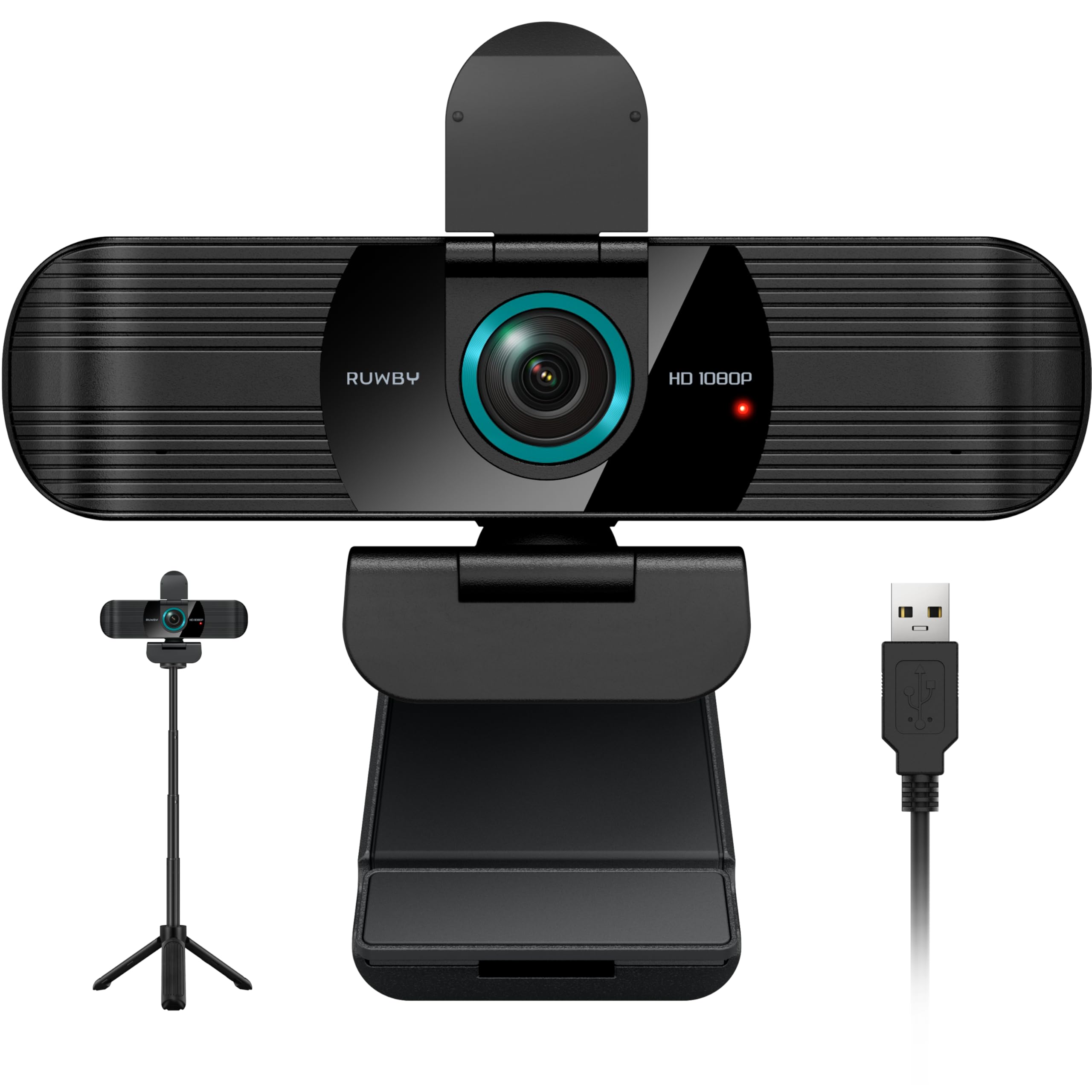
The RUWBY Full HD 1080P Webcam stands out with its inclusion of a detachable aluminum tripod, giving you flexible positioning options beyond just clipping onto a monitor. The 1080p sensor delivers crisp, clear video at 30fps with a wide-angle lens that captures more of your background. Low-light correction technology automatically boosts brightness and restores color in dim environments, which is a nice touch for evening calls.
Dual noise-reducing microphones are effective at filtering out background noise, ensuring your voice is heard clearly. The privacy cover flips closed to protect the lens and your privacy. The 5-foot USB cable gives you some reach, and plug-and-play compatibility means no driver downloads. It works with Windows, Mac, Chrome OS, Linux, and more, making it versatile for different setups.
User reviews highlight the value. One reviewer called it a “great webcam with microphone” with crisp image and built-in light correction. Another appreciated the “wide-angle for multi-person use” and the practical tripod bracket. The autofocus tracks hands well during tutorials, and the build quality feels solid. If you need a webcam that can sit on your desk or clip to your monitor, the included tripod makes this an excellent choice.
Why it’s great
- Includes a high-quality aluminum tripod
- Dual noise-reducing mics for clear audio
- Low-light correction works well
Good to know
- 1080p only, no 4K option
- Some users prefer an external mic for best audio
7. OBSBOT Meet 1080P Webcam

The OBSBOT Meet 1080P Webcam is a smart choice for professionals who want AI-powered features without jumping to the highest price tier. It integrates a Sony 1/2.8-inch CMOS sensor for excellent low-light sensitivity, capturing vivid details even in dim conditions. The standout feature is AI-powered auto framing, which keeps you centered and in focus as you move—perfect for presentations or dynamic meetings. The 86-degree ultra-wide FOV gives you plenty of room to move.
One-tap background blur is incredibly convenient, activated by double-clicking a button on the camera. No software needed. For more control, the OBSBOT app lets you customize background images or blur settings. HDR ensures balanced light and true shadows, and the dual noise-canceling omnidirectional mics deliver clear audio. The 2X digital zoom adds flexibility for close-up views.
User feedback is excellent. One reviewer said it’s “incredible quality” that could fool people into thinking you’re using a DSLR. Another loved the built-in background replacement, saying “I wanted a camera that would do better than just default to a wide view of all the mess.” The only minor issue is that it can sit a bit awkwardly on top of a monitor without a tripod. If AI framing and background control matter to you, this is a standout mid-range option.
Why it’s great
- AI auto framing keeps you centered
- One-tap background blur without software
- Excellent Sony sensor for low light
Good to know
- May need a tripod for best monitor placement
- 1080p only, no 4K
8. EMEET C60E Dual-Camera 4K Webcam

The EMEET C60E is the world’s first dual-camera 4K webcam for streaming, and it’s a fascinating piece of hardware. It features two cameras sharing a 1/2.8-inch CMOS 4K sensor: a wide-angle camera for panoramic scenes and a telephoto camera for detailed close-ups. The 11X hybrid zoom (up to 11X) lets you transition smoothly from full-scene to close-up views without moving the camera. PDAF autofocus keeps everything sharp during zoom transitions.
Smart dual control via the included remote or the EMEET STUDIO app gives you fine-tuned control over zoom, focus, and even RGB lighting. Yes, it has customizable RGB lighting that adds a modern aesthetic and helps you locate the camera. Two omnidirectional microphones capture clear sound within a 9.8-foot radius. The camera works with OBS, Twitch, YouTube, and all major conferencing platforms via plug-and-play USB.
User reviews are strong. One reviewer called it “an excellent camera system for streaming,” noting the sharp image and useful remote. Another said it’s a “solid webcam for work and meetings” with fast autofocus. Some users wished for better instructions, as the camera requires adjusting privacy settings in Windows and Zoom for best results. If you need both wide and close-up views in a single camera, this is a unique and powerful solution.
Why it’s great
- Dual-camera system with 11X hybrid zoom
- Remote control for easy adjustments
- RGB lighting adds personality
Good to know
- Requires some setup and instruction reading
- Zoom not supported in 4K or 60fps modes
9. Logitech C920e

The Logitech C920e is the professional’s choice, certified for Zoom and compatible with Microsoft Teams. It delivers 1080p HD video with built-in autofocus and automatic light correction, ensuring you look clear and well-lit in any environment. The 78-degree fixed field of view is perfectly balanced for individual use, showing your face and enough background to share projects without feeling cramped.
Two integrated omnidirectional microphones capture audio clearly from up to one meter away, so your voice sounds natural. The attachable privacy screen flips up and down for instant security. The sturdy, adjustable clip mounts easily on any laptop or monitor, and the 1/4-inch tripod thread offers additional mounting options. Logitech Sync device management software helps IT departments keep cameras updated across an organization.
User feedback is stellar. One reviewer called it “amazing picture quality” with true-to-life colors and sharpness in varying light. Another praised the “price-performance ratio,” noting it’s a top-notch performer. The C920e is a trusted standard for remote work, and for good reason: it’s reliable, delivers consistent quality, and works seamlessly with all major platforms. If you need a camera that just works for professional use, this is it.
Why it’s great
- Zoom certified and Teams compatible
- Excellent autofocus and light correction
- Professional build quality with privacy shutter
Good to know
- Fixed 78° FOV, not adjustable
- No 4K option
10. j5create JVCU360

The j5create JVCU360 is a specialized solution for group meetings and conference rooms. It offers 360-degree video coverage with six different display modes, including full wrap, two 180-degree views, presenter-focused wrap, and more. The built-in omnidirectional microphone picks up sound from all directions, making it ideal for small to medium-sized meeting rooms where participants are seated around a table.
Full HD 1080p video at 30fz ensures decent quality, though it’s not as sharp as dedicated single-user cameras. The touch bar allows you to specify participant locations, and the camera supports plug-and-play USB connectivity. It works with all major video conferencing apps like Zoom, Teams, Skype, Google Meet, and Cisco. The design is compact and unobtrusive for a conference room setting.
User reviews are mixed but generally positive for the price. One reviewer called it “the only budget 360 conference camera,” noting it’s a good alternative to the much more expensive Meeting Owl. Another said the mic is great indoors and picks up sound well up to 15 feet. However, some users reported issues with Windows 11 compatibility, so check your OS before purchasing. If you need 360-degree coverage on a budget, this is your best bet.
Why it’s great
- 360° video coverage for group meetingsOmnidirectional mic captures everyone around the table
- Multiple display modes for flexible viewing
Good to know
- Image quality is decent but not as sharp as dedicated cameras
- Some users report issues with Windows 11 compatibility
11. Insta360 Link 2 Pro – 4K PTZ Webcam

The Insta360 Link 2 Pro is the pinnacle of webcam technology, designed for professionals who demand the absolute best. It features a large 1/1.3-inch sensor that delivers stunning 4K video with exceptional low-light performance and natural bokeh effects that rival DSLR cameras. AI tracking physically pans and tilts the camera to follow your movements, keeping you perfectly framed whether you’re presenting, walking around, or just shifting in your chair.
The redesigned dual-mic system with beamforming directional pickup isolates your voice and reduces background noise, making it sound like you’re using a dedicated microphone. Gesture control lets you start tracking, zoom, or switch modes with a simple hand wave. Smartphone remote control adds convenience. It integrates with Elgato Stream Deck for creator workflows, and the free Link Controller software gives you fine-tuned control over every setting. Specialized modes like DeskView, Whiteboard, and 4K Portrait make it versatile for any scenario.
User reviews are overwhelmingly positive. One reviewer called it a “worthwhile upgrade from an already excellent Insta360 Link,” praising the better low-light performance and heat management. Another said it’s a “great upgrade for the price” with super easy installation and great tracking during presentations. The only downsides are the short USB cable and the high price point. If you want the absolute best in AI-powered video conferencing, this is the one.
Why it’s great
- Exceptional 4K image quality with bokeh
- AI tracking keeps you perfectly framed
- Beamforming mics for professional audio
Good to know
- Short USB cable out of the box
- Premium price reflects premium features
Understanding the Specs
Resolution: 1080p vs 4K
1080p (Full HD) is the standard for professional video conferencing. It offers clear, detailed video without hogging bandwidth. 4K provides four times the detail, which is great for streaming or future-proofing, but it’s often unnecessary for standard calls. Most conferencing apps cap at 1080p anyway, so 4K is more of a bonus for recording or content creation.
Field of View (FOV)
FOV determines how much of your background is visible. 65-70° is best for solo calls, keeping the focus on your face. 78-86° is the sweet spot for showing a bit of your workspace while still framing you well. 90° and above is good for group shots or if you want to show more of your environment. Wider angles can introduce distortion, so choose based on your typical setup.
Autofocus and Low-Light Performance
Autofocus (especially PDAF) keeps you sharp as you move, which is essential for dynamic presenters. Fixed-focus cameras are simpler but require you to stay at a specific distance. Low-light performance depends on sensor size and aperture. Larger sensors (1/2.8-inch or bigger) and wider apertures (f/2.0 or lower) capture more light, producing brighter, less grainy video in dim conditions.
Microphone Quality
Built-in microphones range from single mono to dual stereo with noise cancellation. Dual omnidirectional mics pick up sound from all directions, while noise-canceling mics filter out background hums. For most users, a good built-in mic is sufficient for clear communication. If you work in a very noisy environment or want the best audio quality, consider an external microphone.
FAQ
What resolution do I need for professional video calls?
Do I need a webcam with a built-in microphone?
Is a privacy cover necessary?
What field of view is best for solo video calls?
Final Thoughts: The Verdict
For most people, the camera for video conferencing winner is the Logitech C920e because it offers proven reliability, excellent image quality, and seamless compatibility with all major platforms. If you want AI-powered features like auto framing and background blur, grab the OBSBOT Meet 1080P. And for the ultimate premium experience with 4K and AI tracking, nothing beats the Insta360 Link 2 Pro.

Mo Maruf
I created WellFizz to bridge the gap between vague wellness advice and actionable solutions. My mission is simple: to decode the research and give you practical tools you can actually use.
Beyond the data, I am a passionate traveler. I believe that stepping away from the screen to explore new environments is essential for mental clarity and physical vitality.