Our readers keep the lights on and my smoothie glass nicely filled. As an Amazon Associate, I earn from qualifying purchases.
Whether you are dialing into a remote team stand-up, live-streaming a creative session, or recording a tutorial, the image your webcam sends is your first impression. A grainy, poorly lit, or blurry face on screen erodes credibility instantly, making the difference between a compelling presentation and a distraction. The market is now packed with options, but cutting through the noise of resolution claims and microphone specs requires understanding what actually matters for your specific setup.
I’m Mohammad Maruf — the founder and writer behind WellFizz. I have spent years analyzing the hardware specifications of PC peripherals, focusing on optical systems, sensor performance, and connectivity standards that define the real-world capability of a camera for pc.
This guide breaks down seven distinct models, from entry-level workhorses to premium streaming rigs, evaluating their autofocus speed, low-light correction, microphone clarity, and mounting flexibility so you can invest in the exact upgrade your workflow demands.
How To Choose The Best Camera For PC
Selecting a webcam involves weighing resolution against lighting adaptability, microphone quality against background noise, and physical design against your monitor thickness. Ignoring any of these factors can leave you with a camera that looks great in a product photo but frustrates you daily.
Resolution and Frame Rate: 1080p vs. 2K vs. 4K
1080p at 30 frames per second is the baseline for clear video calls and suffices for standard Zoom or Teams meetings. If you stream or record content where motion smoothness matters, 1080p at 60 fps or a 2K/4K sensor provides noticeably sharper detail and fluidity. However, higher resolutions demand more USB bandwidth and processing power, so ensure your PC can handle the data stream without lag.
Autofocus Technology: Fixed Focus, CDAF, and PDAF
Fixed-focus cameras keep everything within a defined depth range sharp but blur when you lean in or back. Contrast Detection Autofocus (CDAF) adjusts focus by analyzing contrast in the scene, which works well in good light but hunts in dim conditions. Phase Detection Autofocus (PDAF) is faster and more reliable, locking focus quickly even as you move, making it the superior choice for dynamic presentations or streaming where you gesture and shift position.
Audio Quality: Built-in Mics and Noise Cancellation
A camera’s integrated microphone determines how clearly you are heard. Single mics pick up room echo and keyboard clicks. Dual noise-canceling microphones filter out ambient sounds like fans or traffic, isolating your voice within a 6-10 foot range. For professional calls or quiet streaming environments, dual-mic setups are worth the premium, while solo podcasters may still prefer a dedicated USB microphone.
Field of View and Mounting Flexibility
Field of View (FOV) dictates how much of your background and body appear on screen. A 79-90° FOV is ideal for solo head-and-shoulder framing, while wider angles above 90° suit group calls but introduce barrel distortion. Also check the mount design: a universal clip works on standard monitors, but curved screens or thick bezels may require an adjustable stand or tripod compatibility via a 1/4-inch thread.
Quick Comparison
On smaller screens, swipe sideways to see the full table.
| Model | Category | Best For | Key Spec | Amazon |
|---|---|---|---|---|
| NexiGo N660P Pro 4K | Premium 4K | Live streaming & gaming | 4K / 3DNR / dual noise-canceling mics | Amazon |
| Razer Kiyo V2 X | Premium 1440p | Content creators & streamers | 1440p 60fps / wide angle / privacy shutter | Amazon |
| Logitech HD Pro C920 | Mid-Range 1080p | Reliable daily video calls | 1080p / 3x digital zoom / autofocus | Amazon |
| EMEET C60E Dual-Camera 4K | Mid-Range 4K | Product demos & hybrid meetings | 11x hybrid zoom / dual cameras / remote | Amazon |
| NEWORK 4K with PDAF+CDAF | Mid-Range 4K | Sharp autofocus video calls | 4K 30fps / PDAF+CDAF / dual mics | Amazon |
| PixelForge 2K with Ring Light | Budget 2K | Low-light video calls | 2K / built-in ring light / autofocus | Amazon |
| EMEET C960 1080p | Budget 1080p | Budget-friendly office calls | 1080p / dual noise-reduction mics / privacy cover | Amazon |
In‑Depth Reviews
1. NexiGo N660P Pro 4K Webcam
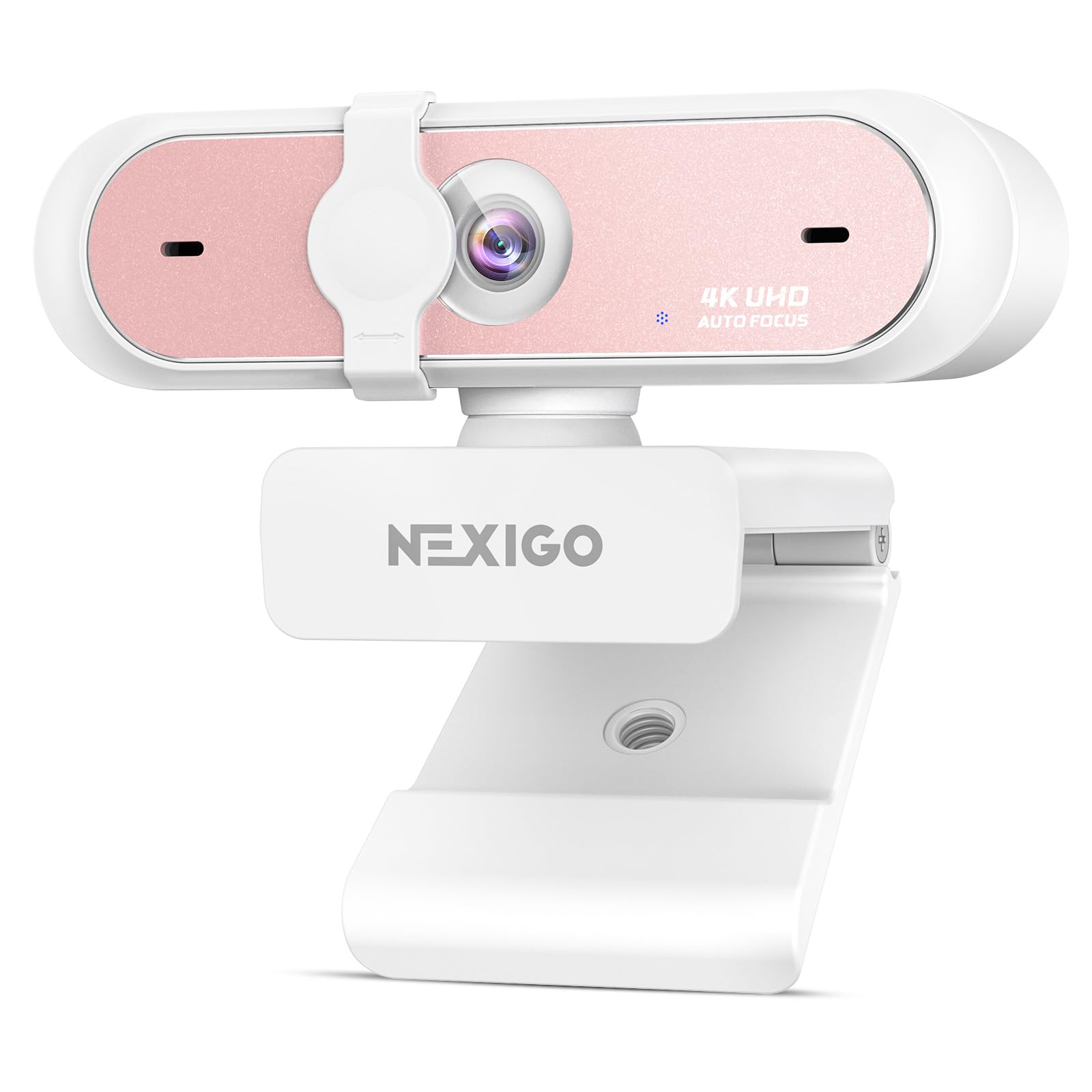
The NexiGo N660P Pro delivers true 4K video with a precision-engineered distortion-free lens that avoids the fisheye warp common in wide-angle webcams. Its 3DNR (3D Noise Reduction) technology actively removes visual grain in real-time, producing a crisp, noise-free image even in challenging lighting conditions — a critical feature for streamers who sit in front of RGB-filled setups.
Beyond image quality, the dual noise-canceling microphones isolate your voice effectively from ambient keyboard clatter or room hum, and the advanced autofocus system keeps faces sharp throughout dynamic movements. The pink color option adds a unique aesthetic, while the 360° swivel mount and integrated 1/4-inch tripod thread offer exceptional mounting versatility on monitors or professional stands.
Some users note the companion software feels clunky, and the wide FOV can capture more of your background than desired unless you zoom in using the 4X digital zoom feature. Despite these minor software quirks, the N660P Pro stands out for its combination of 4K clarity, true-to-life geometry, and robust audio capture at a mid-range premium.
Why it’s great
- Distortion-free lens preserves natural proportions
- 3DNR delivers exceptional low-light clarity
- Dual noise-canceling mics with clear voice isolation
- 360° swivel mount with tripod thread
Good to know
- Software interface is basic and occasionally buggy
- Wide FOV may show too much background by default
2. Razer Kiyo V2 X Streaming Webcam

The Razer Kiyo V2 X pushes the envelope with 1440p resolution at 60 frames per second, delivering exceptionally smooth motion that benefits both live gaming broadcasts and high-energy video calls. The wide-angle lens provides framing flexibility, letting you zoom out to showcase your entire setup or zoom in for a personal close-up without losing sharpness.
Fast and accurate autofocus locks onto faces quickly, minimizing the hunting effect seen in slower webcams, and the built-in microphone produces clear audio good enough for starting streamers. The integrated privacy shutter twists conveniently to cover the lens, and the universal pivoting mount works on monitors or tripods, making it a versatile tool for evolving setups.
The camera performs best when connected directly to your device rather than through a USB hub, as hub connections can degrade performance. Some users report slight fuzziness in very dim environments, but overall the Kiyo V2 X offers an outstanding balance of high frame rate, smooth autofocus, and practical privacy at a premium price point.
Why it’s great
- 1440p at 60 fps for ultra-smooth motion
- Fast, accurate autofocus reduces hunting
- Wide-angle lens with flexible framing
- Twist-to-close privacy shutter
Good to know
- Requires direct USB connection, not hub
- Image quality drops slightly in very low light
3. Logitech HD Pro Webcam C920

The Logitech C920 remains a benchmark for reliable 1080p video calling, and for good reason. Its 15 MP still image capability (interpolated from a true 3-5 MP sensor) and 3X digital zoom offer enough flexibility for daily Zoom, Teams, and Skype meetings without overwhelming your USB bus or CPU. The built-in autofocus and automatic low-light correction produce consistently bright, sharp images across varying room conditions.
Dual stereo microphones capture audio with decent depth, though they can pick up room reverb, making a dedicated mic preferable for serious podcasting. The universal clip fits nearly any monitor or flat surface, and the 45° vertical tilt helps frame your face correctly. RightLight technology adjusts white balance smoothly, though some users note a slight blue cast in mixed lighting.
While the C920 lacks modern 4K or 60 fps capability, its proven reliability, wide software compatibility, and durable build make it the sensible choice for professionals who prioritize consistent, hassle-free performance over bleeding-edge specs. It is a classic mid-range option that still outshines many newer budget models.
Why it’s great
- Proven reliability across years of use
- Automatic low-light correction works well
- Excellent software and platform compatibility
- Durable build with universal clip mount
Good to know
- Only 1080p at 30 fps; no 4K or 60 fps
- Microphone picks up room reverb
4. EMEET C60E Dual-Camera 4K Webcam

The EMEET C60E introduces a unique dual-camera system sharing a single 4K sensor — a wide-angle lens for panoramic scenes and a telephoto lens for detailed close-ups. This design eliminates the need to physically reposition the webcam for product demos, teaching, or hybrid meetings, as you can switch views instantly using the included remote control or EMEET STUDIO software.
The 11X hybrid zoom (combining optical and digital methods) transitions smoothly between full-scene and tight-focus shots, while PDAF autofocus keeps everything sharp throughout the zoom range. The RGB lighting adds a professional vibe with red, green, and blue options that also indicate camera status, and the dual omnidirectional microphones capture clear natural sound within a 9.8-foot radius.
Zoom functionality is not available in 4K or 60 fps modes, limiting its highest-resolution use, and some users find the internal mic adequate for meetings but not for podcast-level audio. However, for anyone who regularly switches between showing a whiteboard, a product, and their face, the C60E’s dual-camera versatility is a game-changer at a mid-range price.
Why it’s great
- Dual wide-angle and telephoto cameras for flexible framing
- 11X hybrid zoom with smooth PDAF autofocus
- Remote control for zoom, color, and camera switching
- RGB lighting adds visual appeal and status indication
Good to know
- Zoom not supported in 4K or 60 fps modes
- Internal mic is decent but not for professional recording
5. NEWORK 4K Webcam with PDAF & CDAF Dual-Autofocus

The NEWORK 4K webcam uses a hybrid autofocus system combining Phase Detection (PDAF) and Contrast Detection (CDAF) to deliver fast, precise focusing even as you move during a call or stream. PDAF handles rapid subject tracking, while CDAF fine-tunes details for crisp close-ups, making this an excellent choice for online teachers, presenters, and streamers who gesture and shift positions frequently.
Video output includes 4K at 30 fps for ultra-sharp detail and 1080p at 60 fps for smooth motion in streaming scenarios. Dual noise-canceling microphones with a 3-meter pickup range filter out background sounds effectively, and the automatic low-light correction helps maintain a clear image in dim conditions without washing out highlights.
The 79° field of view avoids the barrel distortion seen in wider-angle lenses, providing a natural-looking frame that works well for solo presenters and small group calls. Some users note the microphone quality is good but not exceptional for loud environments, and the design lacks a built-in ring light. Nevertheless, the dual-autofocus system and solid 4K output make it a compelling mid-range option.
Why it’s great
- PDAF+CDAF hybrid autofocus for fast, accurate locking
- 4K at 30 fps and 1080p at 60 fps options
- Dual noise-canceling mics with 3m pickup range
- Natural 79° FOV without barrel distortion
Good to know
- No built-in ring light for extreme low light
- Microphone is decent but not top-tier for noisy rooms
6. PixelForge 2K Webcam with Built-In Ring Light

The PixelForge 2K webcam distinguishes itself with a built-in adjustable ring light offering two lighting modes and three brightness levels, solving the perennial problem of uneven or dim facial lighting during video calls. This feature is especially valuable for remote workers who sit in rooms with poor overhead lighting or who take calls at various times of day without consistent natural light.
Video output at 2K (2560 x 1440p) offers a noticeable clarity upgrade over standard 1080p webcams, and the autofocus system keeps faces sharp during movement. The noise-canceling microphone filters out background sounds effectively, and the integrated privacy cover provides peace of mind when the camera is not in use. Plug-and-play setup works seamlessly across Windows and macOS.
Some users report the included stand is poorly designed and recommend using the clip instead, and the microphone can make the user sound slightly distant compared to dedicated mics. The limited swivel range also restricts fine-tuning the angle. However, for its budget-friendly price, the built-in ring light and 2K resolution make it a standout choice for anyone tired of looking washed out on calls.
Why it’s great
- Built-in adjustable ring light for perfect facial lighting
- 2K resolution delivers sharp, detailed video
- Autofocus and noise-canceling mic included
- Privacy cover for security
Good to know
- Included stand is essentially unusable; use the clip
- Limited swivel range and microphone distance issues
7. EMEET C960 1080p Webcam

The EMEET C960 proves you do not need to spend heavily for solid 1080p video quality and reliable audio. Its Full HD 1920x1080p sensor, paired with a 5-layer anti-glare lens, delivers clear and smooth video for Zoom, Teams, and Google Meet calls. The fixed focal length works best between 11.8 and 118.1 inches, ensuring your face stays in focus as long as you stay within that range.
Two omnidirectional noise-reduction microphones pick up your voice while filtering out background noise, creating a noticeable improvement over single-mic budget webcams. Automatic low-light correction technology helps maintain a decent image even in dim conditions, making it functional for home offices without ideal lighting setups. The 90° field of view accommodates two to three people comfortably.
The privacy cover is a thoughtful inclusion, and the plug-and-play USB-A connection works without drivers on Windows, macOS, and Linux. Some users note that it does not sit securely on certain monitors without a separate stand, and low-light performance is grainy compared to premium options. Still, for budget-conscious buyers needing a reliable daily driver, the C960 delivers exceptional value.
Why it’s great
- Affordable 1080p with clear image and dual mics
- Automatic low-light correction for dim rooms
- Privacy cover included for security
- Plug-and-play across multiple operating systems
Good to know
- Fixed focal length requires staying within 12-118 inches
- May need separate stand for secure monitor mounting
FAQ
Is 4K worth it for a PC webcam, or is 1080p enough?
Why do some webcams struggle with low-light conditions?
How important is the privacy shutter on a camera for PC?
Final Thoughts: The Verdict
For most users, the camera for pc winner is the NexiGo N660P Pro 4K because it combines true 4K resolution, a distortion-free lens, and dual noise-canceling mics at a price that undercuts many competitors. If you want the best frame rate for streaming, grab the Razer Kiyo V2 X with its 1440p 60 fps performance. And for a budget-friendly daily driver that still delivers clear video and dual mics, nothing beats the EMEET C960 1080p.

Mo Maruf
I created WellFizz to bridge the gap between vague wellness advice and actionable solutions. My mission is simple: to decode the research and give you practical tools you can actually use.
Beyond the data, I am a passionate traveler. I believe that stepping away from the screen to explore new environments is essential for mental clarity and physical vitality.