Our readers keep the lights on and my smoothie glass nicely filled. As an Amazon Associate, I earn from qualifying purchases.
A camera that constantly hunts for focus or locks onto the wrong subject will sabotage a lecture before you hit record. For instructors filming courses, the difference between a polished lesson and a distracting video is often one spec: reliable autofocus combined with smart subject tracking that handles movement naturally.
I’m Mohammad Maruf — the founder and writer behind WellFizz. I’ve spent years analyzing camera sensors, autofocus algorithms, and microphone arrays to separate marketing claims from real-world performance for content creators.
Whether you shoot hands-on demonstrations at a desk or stand at a whiteboard, finding the right camera for online courses means choosing one that stays sharp as you move and captures audio clearly without extra gear.
How To Choose The Best Camera For Online Courses
Choosing a camera for course creation revolves around three factors: maintaining sharp focus as you move, delivering clear video in typical indoor lighting, and capturing decent audio without a separate microphone. Each of these areas has a specific spec you need to evaluate.
Autofocus and subject tracking
A course camera must keep the instructor sharp whether they are at a desk, writing on a whiteboard, or demonstrating a tool. Look for phase-detection autofocus (PDAF) with face and eye tracking. Contrast-detect AF is slower and tends to hunt in low light, which creates visible pulsing in recorded video. PDAF is faster and smoother.
Sensor size and low-light capability
Most instructors film indoors with available light or basic softboxes. A 1-inch or larger CMOS sensor captures more light, reducing noise and preserving detail in dim conditions. Smaller sensors found in basic webcams produce grainy video when the room isn’t perfectly lit. A Sony STARVIS or similar backside-illuminated sensor is ideal.
Built-in microphone and audio flexibility
Students tolerate average video but walk away from bad audio. Cameras with dual-omnidirectional or beamforming mics pick up voice more clearly and reduce background hum. A 3.5mm microphone jack or Bluetooth support gives you the option to use a lavalier without extra adapters later.
Quick Comparison
On smaller screens, swipe sideways to see the full table.
| Model | Category | Best For | Key Spec | Amazon |
|---|---|---|---|---|
| Insta360 Link 2 Pro | PTZ Webcam | AI tracking & 4K clarity | 4K / 1/1.3″ Sensor | Amazon |
| Elgato Facecam 4K | Studio Webcam | Filter-ready DSLR quality | 4K60 / STARVIS 2 Sensor | Amazon |
| DJI Osmo Pocket 3 | Pocket Gimbal | On-the-go vlogging | 4K120 / 1″ CMOS / 3-Axis | Amazon |
| Canon EOS R50 | Mirrorless Camera | Interchangeable lens courses | 4K / APS-C Sensor / Dual Pixel AF | Amazon |
| Sony ZV-1 II | Vlog Camera | Compact point-and-shoot | 4K / 1″ Sensor / 3-Capsule Mic | Amazon |
| Sony FX30 | Cinema Camera | Pro-level filmmaking | 4K / Super 35 Sensor / Dual ISO | Amazon |
| OBSBOT Tiny SE | AI PTZ Webcam | Tracking at a budget | 1080p100 / 1/2.8″ Sensor | Amazon |
| NexiGo N950P | 4K Zoomable Webcam | Budget 4K with remote | 4K30 / 8.5MP / 5x Digital Zoom | Amazon |
In‑Depth Reviews
1. Insta360 Link 2 Pro

This PTZ webcam combines a large 1/1.3-inch sensor with mechanical pan-tilt-zoom tracking, making it the hands-down best option for instructors who move around a room. The AI tracking physically rotates the camera to follow your body, keeping you centered whether you walk to a whiteboard or demonstration table. Autofocus stays locked on faces even when you turn to gesture.
The beamforming dual-mic system does a remarkable job isolating speech from ambient noise like keyboard clicks or HVAC hum. You can also control the camera with hand gestures or from your smartphone, which is helpful when you are mid-recording and need to zoom in on a prop. The desktop software lets you save preset positions for switching between desk and whiteboard shots instantly.
Out of the box the Link 2 Pro is ready for Zoom, Teams, or OBS with zero driver hassle. HDR mode balances backlit windows, and the natural bokeh effect gives your background separation without a green screen. For instructors who want a professional talking-head video with truly hands-free performance, this is the one.
Why it’s great
- Physical AI tracking keeps you framed without any manual adjustment
- Excellent low-light footage thanks to the large 1/1.3-inch sensor
Good to know
- Not compatible with ARM-based Windows systems
- Requires good lighting for optimal autofocus performance
2. Elgato Facecam 4K

The Elgato Facecam 4K delivers the closest image to a DSLR you can get from a webcam. The Sony STARVIS 2 CMOS sensor paired with Elgato’s Prime Lens produces sharp, vibrant 4K video at 60 FPS. While it uses manual focus rather than autofocus, the fixed lens is set at the factory for a crisp talking head from arm’s length — perfect for seated instructors.
A standout feature is the 49mm filter thread. You can screw on a circular polarizer or neutral-density filter just like on a full-size camera, which eliminates glare from glasses or windows. The free Camera Hub software gives full manual control over exposure, white balance, and sharpness. The camera also stores settings on internal flash memory, so your tweaks survive a reboot.
Footage is uncompressed and supports HDR, giving you rich color out of the camera for OBS or streaming software. The lens is on the wide side at 20mm, so it catches you plus a bit of your desk. For instructors teaching from a fixed position who demand the cleanest possible image, this webcam is a strong pick.
Why it’s great
- DSLR-like image quality with true 4K60 capture
- 49mm lens filter compatibility for reducing glare from glasses
Good to know
- Manual focus only — not ideal for walking around the room
- Requires direct USB-C connection to host PC
3. DJI Osmo Pocket 3

This pocket-sized camera packs a 1-inch CMOS sensor with three-axis mechanical gimbal stabilization, producing buttery-smooth 4K footage at up to 120fps. The ActiveTrack 6.0 mode locks onto your face and follows you as you move, handling side steps and quick turns better than any webcam PTZ system. The 2-inch rotatable touchscreen flips for vertical or horizontal framing instantly.
Battery life hits 166 minutes, which covers most all-day course recording sessions. You can hot-swap via the battery handle accessory without powering down. The built-in stereo recording is decent, but the bundle includes a dual wireless lavalier microphone for cleaner voice pickup. D-Log M 10-bit color lets you grade footage in post without losing dynamic range.
Setup is quick: turn it on, connect your phone or use it standalone, and hit record. The size makes it easy to reposition between takes or toss in a bag for off-site filming. For instructors who record in multiple locations or need gimbal-smooth handheld shots, the Pocket 3 is the most versatile tool in this roundup.
Why it’s great
- 3-axis gimbal eliminates shakiness for handheld shooting
- ActiveTrack 6.0 reliably follows fast or lateral movement
Good to know
- Steep learning curve for new users
- Built-in mic is adequate but lavalier is recommended
4. Canon EOS R50
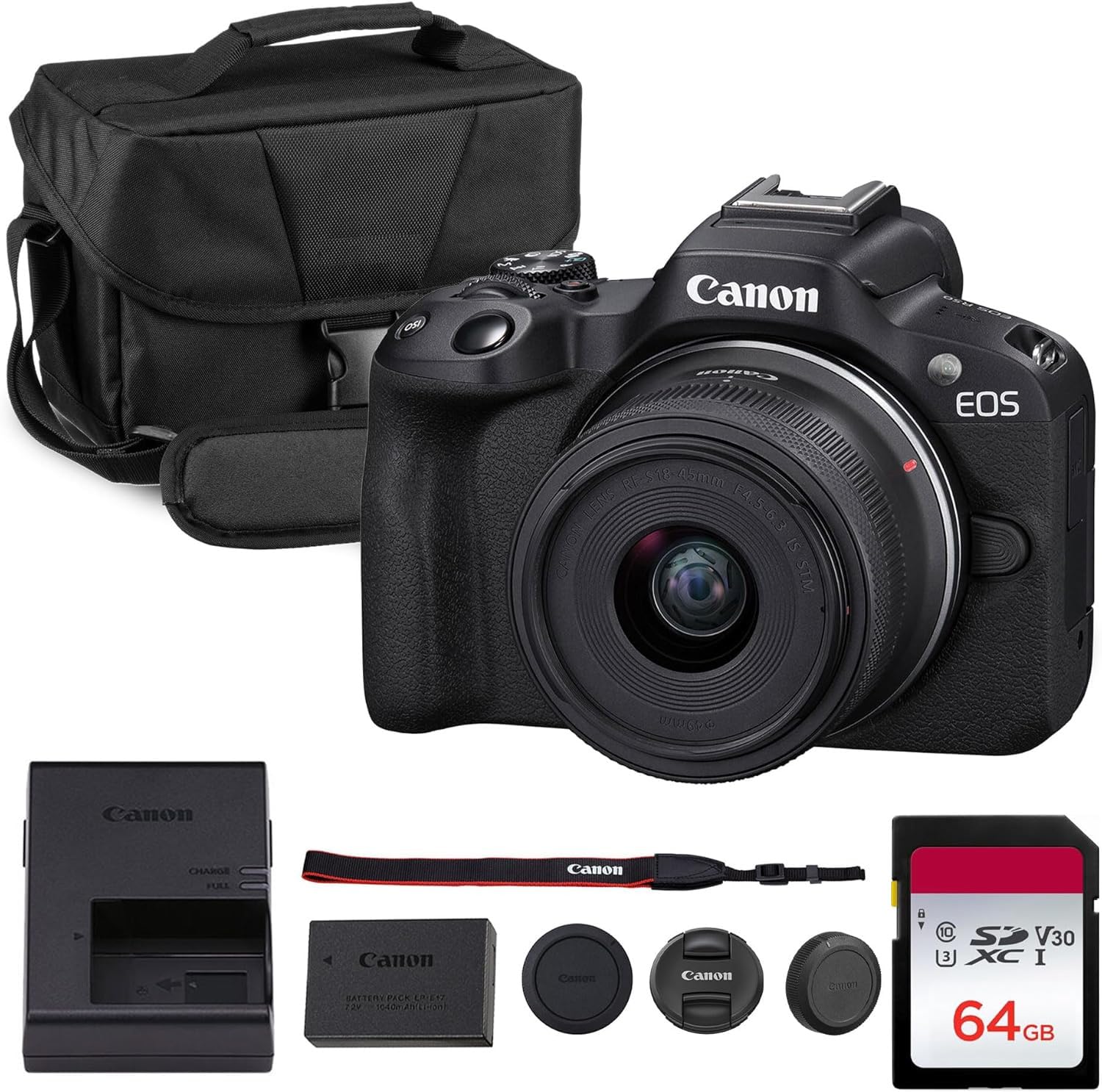
The Canon EOS R50 is a lightweight APS-C mirrorless camera with Dual Pixel CMOS AF II. This is the same phase-detection autofocus system found in Canon’s higher-end bodies. It locks onto faces, eyes, and animals with minimal delay, making it perfect for instructors who gesture, lean in to show something, or hold objects in frame. The 18-45mm kit lens covers wide and portrait-length shots.
Video hits oversampled 4K from the 24.2MP sensor, producing clean footage with natural color. The vari-angle touchscreen allows you to monitor yourself from any angle, which is crucial when you are the sole operator. Creative Assist mode simplifies exposure adjustments for beginners, and vertical video orientation is built-in for social platforms.
The kit includes a shoulder bag and 64GB SD card, giving you an out-of-box recording setup. The R50 is fully compatible with external mics via the 3.5mm jack. For instructors who want the flexibility of interchangeable lenses for static framing, this is the most capable mirrorless body at an approachable level.
Why it’s great
- Reliable Dual Pixel AF II with human face/eye detection
- APS-C sensor delivers excellent low-light performance for indoor use
Good to know
- Kit lens is f/4.5-6.3, which needs good light or a faster prime
- Included bag brand may vary by order
5. Sony ZV-1 II

The ZV-1 II is built specifically for vloggers and content creators. Its ultra-wide 18-50mm lens and large 1-inch sensor give you room to include a desk, props, and full body in the frame without backing up. The real-time eye AF tracks your eye reliably, which means you can hold a prop close to the lens and stay sharply focused without hunting.
Audio quality is a major selling point here. The three-capsule directional microphone has a wind screen accessory and adjustable pick-up area, letting you prioritize voice from the front or capture ambient sound. The product showcase mode instantly transitions focus from your face to an item held near the lens, which is useful for course demonstrations.
Footage is clean and detailed even in typical indoor lighting. USB-C connectivity works seamlessly for webcam-style use on platforms like Zoom or OBS. For instructors who want a dedicated camera with excellent built-in audio and a fast lens for blurring backgrounds, the ZV-1 II delivers in a pocket-friendly package.
Why it’s great
- Very portable with exceptional 3-capsule directional mic for clear audio
- Product showcase mode quickly shifts focus between face and object
Good to know
- Battery life is short; external power recommended for long sessions
- Some advanced settings are locked in certain shooting modes
6. Sony FX30

The Sony FX30 is a cinema camera in a compact body, making it the top choice for instructors who want the absolute best image quality for high-production courses. Its Super 35 (APS-C) sensor oversamples 4K from 6K, and the dual base ISO (800 and 2500) delivers clean footage in dim studios. The S-Cinetone color profile provides a professional cinematic look without grading.
Active cooling prevents overheating during long takes, a known issue with smaller camera bodies. You get dual SD card slots for simultaneous backup recording, and the full-size HDMI output supports external monitors or recorders. The phase-detection autofocus covers 495 points, reliably tracking the instructor during movement.
While the FX30 requires separate lenses and accessories, the kit bundle includes a battery charger and necessary cables. It is heavier and more complex than a webcam, but it is also a true cinema camera that future-proofs your studio for years. For serious course creators building a permanent rig, the FX30 is the right foundation.
Why it’s great
- Dual base ISO provides excellent low-light performance for indoor sets
- Active cooling prevents thermal shutdown during extended recording
Good to know
- Requires external lens purchase — no kit lens included
- Battery lasts only 1-2 hours; external battery pack is needed for all-day shoots
7. OBSBOT Tiny SE

The OBSBOT Tiny SE proves AI tracking is no longer a premium-only feature. This 1080p webcam runs at 100fps and uses a 1/2.8-inch stacked CMOS sensor with dual native ISO for solid low-light performance. The mechanical PTZ gimbal tracks your face and body smoothly, and zone tracking lets you define areas the camera avoids, so it won’t follow a student’s movement in a workshop.
Gesture control works well — hold up a palm to lock tracking, or raise a finger to zoom. The camera rotates between multiple preset positions, and each preset stores separate tracking modes and exposure parameters. This is a major time saver if you switch between a close-up desk shot and a full-body whiteboard shot during the same lesson.
Image quality at 1080p is sharp enough for streaming and recorded courses. The included USB-C cable and adapter make compatibility straightforward. While 4K is absent here, the tracking responsiveness, low-light ability, and sub-hundred price make it an excellent entry point for instructors on a tighter budget.
Why it’s great
- Affordable mechanical PTZ tracking with gesture and zone control
- Excellent low-light performance for a 1080p webcam
Good to know
- 1080p resolution only — no 4K option
- Occasional software glitch may require a restart
8. NexiGo N950P

The NexiGo N950P brings true 4K video to a budget-friendly price point. The 8.5-megapixel Sony Starvis sensor captures 3840×2160 at 30 FPS, giving you crisp detail for slides, text, and product close-ups. Fixed focus keeps the lens sharp at a set distance, and the included RF remote controls zoom, mute, and volume without touching the computer.
The dual stereo mics capture clear audio, though for serious course work a dedicated lavalier will yield better results. Automatic low-light correction adjusts brightness levels in real time, which helps when you don’t have perfect studio lighting. The clip mounts securely on monitors up to 2.5 inches thick, with a threaded base for tripod use.
Zoom certification means it works flawlessly with Zoom software. Compatibility extends to Windows, Mac, Android, and Smart TVs.
Why it’s great
- True 4K resolution at a very accessible price point
- RF remote provides convenient zoom and mute control
Good to know
- Fixed focus means you need to sit at a consistent distance
- Built-in microphone is acceptable but external mic is recommended
FAQ
Is a mirrorless camera better than a webcam for online courses?
What microphone setup is best for recording course videos?
How important is 4K resolution for a course camera?
Final Thoughts: The Verdict
For most users, the camera for online courses winner is the Insta360 Link 2 Pro because it combines the best AI tracking, excellent 4K image quality, and onboard noise-canceling mics in a simple PTZ webcam form factor. If you want a compact travel-friendly camera with gimbal stabilization, grab the DJI Osmo Pocket 3. And for a budget-friendly option that still offers mechanical AI tracking, nothing beats the OBSBOT Tiny SE.

Mo Maruf
I created WellFizz to bridge the gap between vague wellness advice and actionable solutions. My mission is simple: to decode the research and give you practical tools you can actually use.
Beyond the data, I am a passionate traveler. I believe that stepping away from the screen to explore new environments is essential for mental clarity and physical vitality.