Our readers keep the lights on and my smoothie glass nicely filled. As an Amazon Associate, I earn from qualifying purchases.
When you are balancing ledgers or closing the books for the month, the one thing you cannot afford is a calculator that blurs a negative number or jams mid-column. The tactile feedback of a print key and the certainty of a paper trail separate an accounting tool from a student’s gadget. You need a machine that handles cost-sell-margin calculations, runs on standard roll paper, and prints in two colors so a single glance tells you if you are in the black or the red.
I’m Mohammad Maruf — the founder and writer behind WellFizz. Over the past decade I have analyzed hundreds of office machines, parsing print speeds, display technologies, and key-feature sets to find the units that hold up under tax-season stress and daily bookkeeping loads.
Whether you need a compact unit for a home office or a full-size desk machine for a busy accounting firm, this guide cuts through the noise to deliver the best calculator for accounting based on real specs, professional feedback, and years of category-specific research.
How To Choose The Best Calculator For Accounting
Selecting a printing calculator for professional accounting involves more than just a large display. You must consider the print mechanism, the availability of dedicated business keys, and the unit’s ability to audit past entries. Below are the three most important factors.
Print Mechanism: Ribbon vs. Thermal
Ribbon-based printers use replaceable ink cartridges and produce two-color output (black for positives, red for negatives). This color contrast is critical for quickly identifying losses or corrections on a long tape. Thermal printers are quieter and require no ink, but the output is single-color and the paper rolls are often proprietary and more expensive per foot. For high-volume accounting departments, a ribbon model with standard paper is usually the better long-term investment.
Check & Correct Step Memory
Look for a calculator that stores the last 150 to 300 calculation steps. This feature lets you review, edit, and reprint a sequence without starting over. When you are reconciling a column of numbers and realize you typed a digit wrong, a check-and-correct function saves you from wasting several feet of tape and ten minutes of re-entry.
Dedicated Business Keys
A true accounting calculator has keys for Cost, Sell, and Margin (or Profit). Enter any two of those values and the machine computes the third instantly. Tax-rate storage keys, time calculation for billing, and a grand-total key are also marks of a professional-grade unit. Without these, you are stuck doing multi-step arithmetic that invites errors.
Quick Comparison
On smaller screens, swipe sideways to see the full table.
| Model | Category | Best For | Key Spec | Amazon |
|---|---|---|---|---|
| Casio HR-300RC | Mid-Range | Backlit display & low-noise ribbon | 150-step check/correct, backlit LCD | Amazon |
| Sharp ELT3301 | Premium | Ultra-fast thermal printing | 8.0 lines-per-second thermal, no ink | Amazon |
| Victor 1240-3A | Premium | Heavy-duty ribbon workhorse | 4.5 LPS, two-color ribbon | Amazon |
| Sharp EL2630PIII | Premium | Full-size commercial accounting | 4.8 LPS, VFD display, 12-digit | Amazon |
| Canon P170-DH-3 | Mid-Range | Double-check & currency conversion | Double check function, VFD display | Amazon |
| Casio HR-170RC | Budget | Entry-level two-color printing | 150-step check, 12-digit LCD | Amazon |
| Canon P1-DHV-3 | Budget | Compact & portable printing | 7.7-inch width, 11.2 oz weight | Amazon |
In‑Depth Reviews
1. Casio HR-300RC Printing Calculator

The Casio HR-300RC hits the sweet spot for an accounting professional who spends long hours at a desk. Its backlit LCD display stays readable in dimly lit offices, and the 2-color ribbon prints positives in black and negatives in red — a simple but critical safeguard for financial work. The 150-step check-and-correct function lets you scroll through your entries before committing them to tape, which cuts down on wasted paper and re-work.
Dedicated Cost, Sell, and Margin keys streamline profit calculations, and the time-and-date stamping feature adds a layer of audit detail to every tape. The keyboard has a light-touch feel that CPA reviewers specifically praised as reducing finger fatigue during heavy data entry. It is a wired unit with a battery backup, so you don’t lose settings during a power flicker.
One trade-off is that the HR-300RC does not run on battery power alone — it requires AC for operation. It uses standard 2.25-inch paper rolls (IR-40T), which are widely available. The automatic sleep mode after thirty minutes is appreciated, and the unit wakes quickly without losing the current calculation.
Why it’s great
- Backlit LCD stays crisp in any lighting condition.
- 150-step check and correct prevents printing errors.
- Cost, Sell, and Margin keys speed up daily profit analysis.
Good to know
- Requires AC power; no battery-only operation.
- Larger footprint (10.2 inches wide) than compact models.
2. Sharp ELT3301 Thermal Printing Calculator

The Sharp ELT3301 is a thermal-based machine that prints at a rapid 8.0 lines per second — the fastest in this roundup. Because it uses thermal paper instead of ink ribbons, you never deal with smudged or dried-out cartridges, and the print head produces crisp, dark characters consistently. An extra-large backlit LCD can toggle between 12-digit and a 50-percent-larger 10-digit display, which helps when you are dealing with long columns of figures.
Its full-sized keyboard spaces the keys generously to reduce mistypes, a feature that accountants with larger hands will appreciate. Dedicated Cost-Sell-Margin keys, automatic tax keys, and time calculations cover the core business functions. The top-loading paper compartment is far easier to reload than the narrow slots found on older models.
The main drawback is that thermal paper rolls are more expensive and sometimes harder to find than standard 2.25-inch ribbon paper. Also, the printout is monochrome — there is no red ink to flag negative numbers. Accountant reviewers noted the tape is always dark and visible, but the lack of two-color output may require you to scan more carefully.
Why it’s great
- Fastest print speed at 8.0 LPS saves time on long reports.
- Quiet thermal printing with no ink mess or smudging.
- Toggle between 12-digit and extra-large 10-digit display modes.
Good to know
- Thermal paper is more expensive than standard roll paper.
- Single-color output; no red ink for negative numbers.
3. Victor 1240-3A Desktop Adding Machine
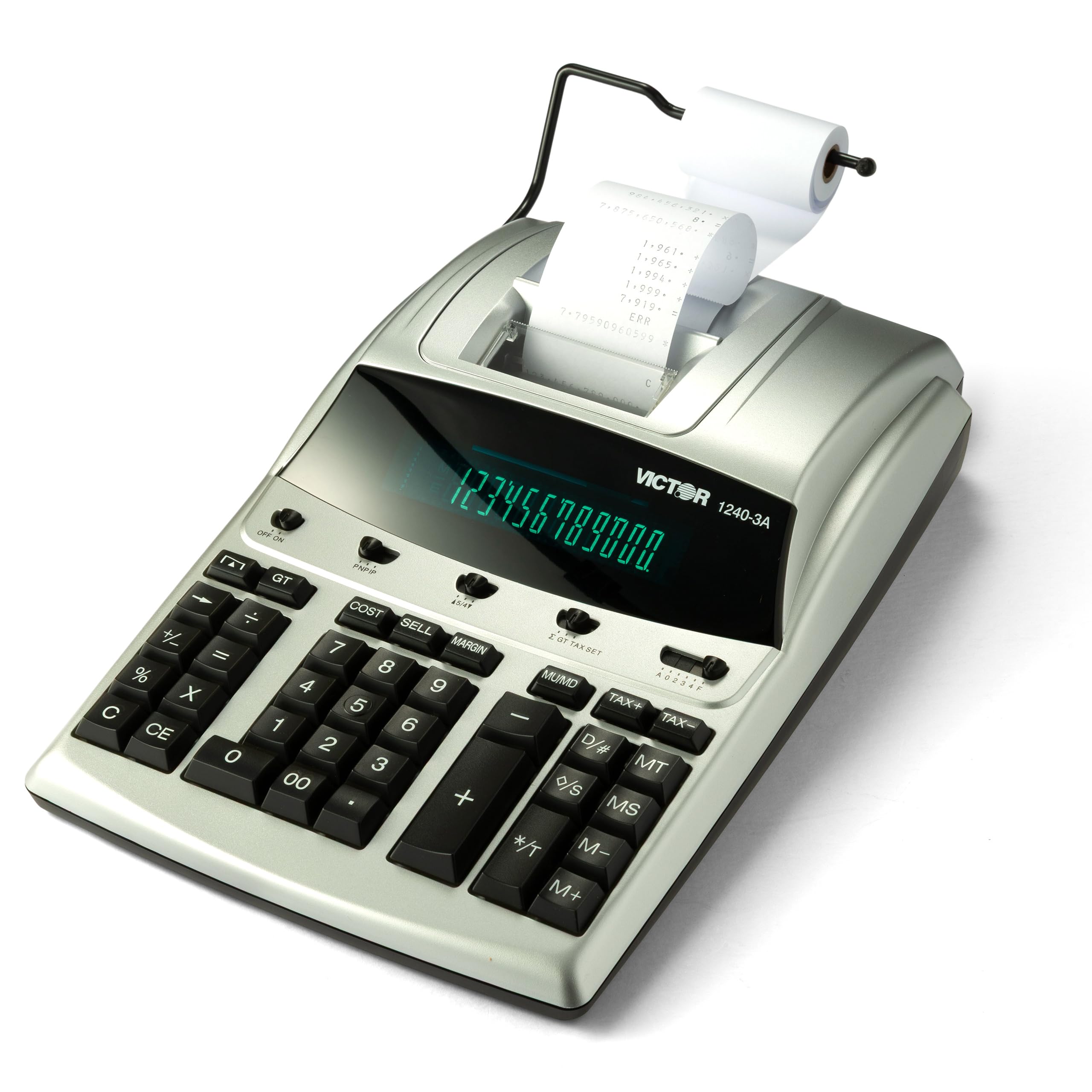
The Victor 1240-3A is the kind of machine that experienced bookkeepers swear by — a full-size, two-color ribbon calculator built to survive tax season after tax season. Its 4.5 lines-per-second print speed is modest, but the black-and-red ink spool gives you immediate visual confirmation of positive versus negative entries. The fluorescent display is bright and easy to read under harsh overhead office lighting.
Cost-Sell-Margin keys are front and center, and the machine includes a backspace key for correcting the last digit entered — a small but useful time-saver. The unit is manufactured with 45-percent recycled plastic, so it carries a lighter environmental footprint than most competitors. Professional users have reported that the Victor holds up for ten years or more with basic ribbon changes.
At 15.6 inches wide, this calculator takes up significant desk real estate, so it is not suited for cramped workspaces. You will also need to buy replacement Victor 7010 ink ribbons and standard adding machine tape separately. Reviews mention the keys feel smooth and quiet for a ribbon machine, which is a plus in shared office environments.
Why it’s great
- Two-color ribbon prints negatives in red for instant spotting.
- Made with 45 percent recycled plastic without sacrificing build quality.
- Proven longevity — many users report a decade of reliable service.
Good to know
- Large footprint (15.6 inches wide) requires dedicated desk space.
- Ink ribbons and paper must be purchased separately.
4. Sharp EL2630PIII Commercial Printing Calculator
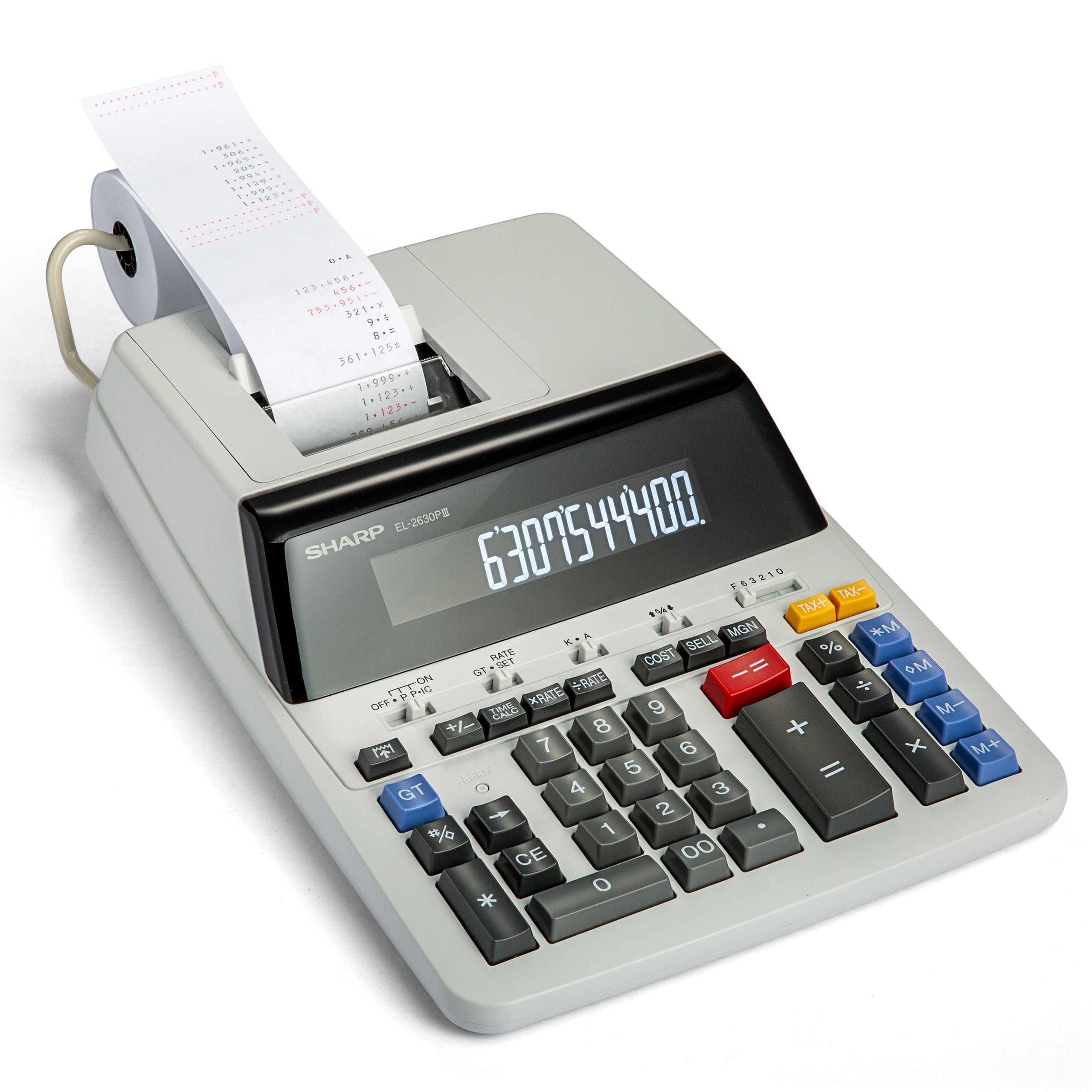
The Sharp EL2630PIII is a commercial-tier ribbon calculator that has been a staple in accounting departments for decades. Its VFD (vacuum fluorescent display) offers excellent contrast, and the 12-digit capacity handles large sums without requiring scientific notation. The 4.8 lines-per-second print speed is competitive for a ribbon unit, and the two-color ink ensures that red negatives stand out clearly.
Business-specific keys include Cost-Sell-Margin, automatic add-ons and discounts, and time calculations — everything a bookkeeper needs for daily invoices and monthly reconciliations. The unit is slightly larger than the Victor at 16.1 inches wide, but it feels solid and does not shift around when you press the keys firmly. Battery backup protects your memory settings during brief power interruptions.
One complaint from long-term users is that the printed tape sits low in the viewing window, and the serrated tear edge can cause uneven tears if you do not pull sharply. The keyboard is comfortable for large hands, but the machine is heavier at 2 pounds, making it a permanent desktop fixture rather than something you move around.
Why it’s great
- Bright VFD display with exceptional legibility in any light.
- Two-color ribbon output for quick positive/negative differentiation.
- Decades-long reliability track record in professional accounting.
Good to know
- Serrated tear bar requires a firm, fast pull to avoid tape jams.
- Heavy and wide; not designed for portability.
5. Canon P170-DH-3 Desktop Printing Calculator
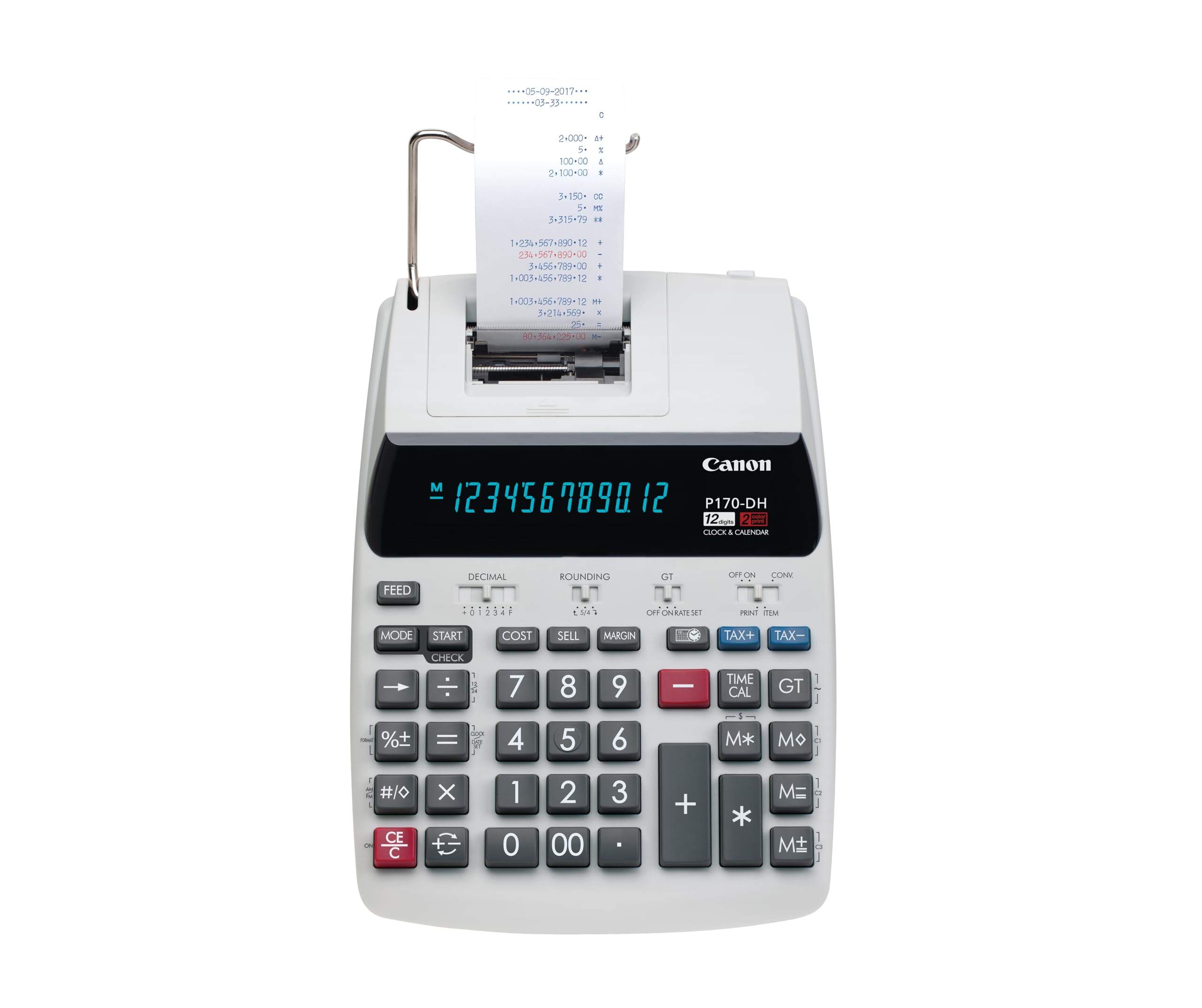
The Canon P170-DH-3 stands out for its Double Check function, which automatically compares your last two calculation results to catch entry errors. For accounting professionals handling large data sets, this built-in verification reduces the chance of an undetected mistake. The VFD display is vivid, and the keyboard includes a Currency Conversion key — a rare feature for those who deal with multiple currencies.
Cost, Selling Price, and Profit Margin keys are present, alongside a time calculation mode for billing. The unit is smaller than the Victor or Sharp commercial models, with a footprint of 14.6 by 9.6 inches, fitting comfortably on a standard desk without dominating the surface. Auto power-off preserves the battery backup, and the previous calculation is saved via the CE/C key.
One drawback is that the sleep mode, while energy-efficient, disables the always-on clock display — a minor annoyance if you rely on the calculator as a desk clock. The included CR2032 backup battery is easy to replace. Some users have noted that the keys are slightly smaller than on full-size commercial machines, which may take a short adjustment period.
Why it’s great
- Double Check function compares last two results for error detection.
- Currency conversion key adds versatility for international accounting.
- Compact footprint fits well on medium-sized desks.
Good to know
- Sleep mode turns off the clock display between uses.
- Keys are slightly smaller than full-size commercial models.
6. Casio HR-170RC Printing Calculator

The Casio HR-170RC is one of the few entry-level printing calculators that still offers a two-color ribbon, a feature often reserved for premium models. Positive numbers print in black and negative numbers in red, which is essential for accurate bookkeeping. A 150-step check and correct function allows you to review your entries before printing, reducing tape waste and error rates.
Cost, Sell, and Margin keys handle basic profit calculations, while the clock and calendar printing function adds a timestamp to your tapes for audit trails. The 12-digit LCD display is clear, and the unit runs on AC power with four AAA batteries included as backup. At 6.5 inches wide, it is one of the most compact options that still accepts standard 2.25-inch paper rolls.
The print mechanism is noticeably louder than thermal or higher-end ribbon models. A few users described it as clunky or rough-sounding, and one reported that the printing initially seemed labored. The paper loading is straightforward, and the included AC adapter means you do not have to hunt for a separate power supply.
Why it’s great
- Two-color ribbon printing at an entry-level price point.
- 150-step check and correct improves accuracy on long lists.
- Compact size (6.5 inches wide) saves desk space.
Good to know
- Print mechanism is louder than average — not ideal for quiet offices.
- Some users report a rough, clunky printing sound initially.
7. Canon P1-DHV-3 Compact Printing Calculator

The Canon P1-DHV-3 is the smallest printing calculator in this lineup, with a width of just 7.7 inches and a weight of 11.2 ounces. It runs on four AA batteries, meaning you can use it anywhere without hunting for a wall outlet. The silver metallic design is more modern than the typical beige or gray office staple, and the LCD display is surprisingly readable for such a compact unit.
Despite its size, it includes a Profit Margin key, stored tax rates, and time calculation functions — enough features for a home-office bookkeeper or a freelance accountant who works from multiple locations. The easy paper loading mechanism lets you swap rolls in seconds, and reviewers consistently praise its durability, with many reporting trouble-free use for years.
The trade-off for portability is a smaller display and tightly spaced keys that may not suit users with larger fingers. The print mechanism is ribbon-based but only prints in a single color (black), so you lose the red-negative warning. For basic tape verification and quick totals, however, this machine punches above its size class.
Why it’s great
- Extremely portable at 11.2 ounces and battery powered.
- Includes profit margin, tax key, and time calculation despite small size.
- Proven durability — many users report years of reliable use.
Good to know
- Single-color printing; no red ink for negative numbers.
- Small keys and display may feel cramped for large hands.
FAQ
Is a thermal or ribbon printer better for accounting?
What size paper roll do most accounting calculators use?
Final Thoughts: The Verdict
For most users, the best calculator for accounting winner is the Casio HR-300RC because it combines a backlit LCD, a 150-step check and correct function, and two-color ribbon printing at a mid-range price that suits both home offices and professional firms. If you want the fastest print speed and zero ink hassle, grab the Sharp ELT3301. And for a heavy-duty workhorse that lasts through a decade of tax seasons, nothing beats the Victor 1240-3A.

Mo Maruf
I created WellFizz to bridge the gap between vague wellness advice and actionable solutions. My mission is simple: to decode the research and give you practical tools you can actually use.
Beyond the data, I am a passionate traveler. I believe that stepping away from the screen to explore new environments is essential for mental clarity and physical vitality.