Our readers keep the lights on and my smoothie glass nicely filled. As an Amazon Associate, I earn from qualifying purchases.
If your Wi-Fi signal is strong but your wired connection stutters during a video call or drops out mid-game, the bottleneck is almost certainly the box the cable company rented you. A rented modem is a recurring fee that buys you the bare minimum hardware—usually a DOCSIS 3.0 unit that can’t keep up with today’s gigabit plans. Replacing it with a properly spec’d unit is the single highest-ROI change you can make to your home network.
I’m Mohammad Maruf — the founder and writer behind WellFizz. I’ve spent over a decade reverse-engineering router firmware, stress-testing DOCSIS 3.1 channel bonding, and analyzing the Broadcom versus Intel Puma chipset debate to separate marketing claims from real-world throughput.
This guide cuts through the compatibility confusion and latency myths to help you find the best cable modem that matches your ISP plan, future-proofs your upload speeds, and eliminates the monthly rental tax without overpaying for features you don’t need.
How To Choose The Best Cable Modem
Choosing the right modem is about matching three things: your ISP’s network (DOCSIS version and plan speed), your home’s peak usage pattern (streaming, gaming, video calls), and the chipset’s reliability record. A mismatch in any of these areas means you’re either paying for speed you can’t use or stuck with a chipset that introduces latency spikes. Here’s what matters most.
DOCSIS Version and Channel Bonding
DOCSIS 3.0 modems bond multiple 6 MHz downstream channels—typically 16, 24, or 32—to reach maximum speeds around 1 Gbps. DOCSIS 3.1 adds OFDM channels, which are much wider (up to 192 MHz each) and more efficient. A 3.1 modem with two OFDM downstream channels can theoretically exceed 5 Gbps, but the real advantage is lower latency under load and much better upstream performance, especially if your ISP has deployed mid-split (204–408 MHz) technology. If your plan is 500 Mbps or faster, skip 3.0 entirely and go with a 3.1 unit.
Chipset: Broadcom vs. Intel Puma
The chipset dictates latency stability. Broadcom’s BCM3390 and BCM3384 families are widely regarded as the gold standard: they handle full-buffer traffic without the “lag spikes” that plagued Intel’s Puma 6 and Puma 7 chipsets. The Puma issue (documented in FCC filings and independent testing) causes periodic latency jumps that ruin real-time applications like video calls and multiplayer gaming. If you’re a gamer or work-from-home user, confirm the modem uses a Broadcom chipset before buying.
Ethernet Port Speed (1 GbE vs. 2.5 GbE)
A modem with a 1 Gigabit Ethernet port caps your wired connection at about 940 Mbps after overhead. If your ISP plan is 1 Gbps or higher, a single 1 GbE port acts as a bottleneck. A 2.5 GbE port allows full throughput on a 1.2–2 Gbps plan, and it also future-proofs your setup as speeds climb. Some modems offer two 1 GbE ports with link aggregation (LAG), which can bond them into a 2 Gbps virtual link—but LAG requires a router that supports it.
Modem-Only vs. Modem-Router Combo
Modem-only units (also called “bridged modems”) are almost always the better choice for anyone who wants reliable speed. They are simpler, run cooler, and let you upgrade your Wi-Fi router separately. Modem-router combos merge a DOCSIS modem and a Wi-Fi router into one box—convenient for space-saving but harder to troubleshoot and outdated faster. If you already own a capable router, buy a modem-only unit. For a small apartment with one or two devices, a combo can work fine, but you lose the flexibility to swap either component independently.
Quick Comparison
On smaller screens, swipe sideways to see the full table.
| Model | Category | Best For | Key Spec | Amazon |
|---|---|---|---|---|
| NETGEAR Nighthawk CM3000 | DOCSIS 3.1 Mid-Split | Highest upload speeds & future-proofing | 2.5 GbE port, 1 Gbps upload, mid-split | Amazon |
| Hitron CODA56 | DOCSIS 3.1 Multi-Gig | 2.5 Gbps plan support with Broadcom chip | 2.5 GbE port, 2.5 Gbps throughput | Amazon |
| ARRIS SURFboard SB8200 | DOCSIS 3.1 Dual-Port | Two 1 GbE ports with link aggregation | 2 x 1 GbE ports, 2 Gbps via LAG | Amazon |
| ARRIS S33-RB | DOCSIS 3.1 Renewed | Multi-gig on a budget (refurbished value) | 2.5 GbE port, 2.5 Gbps max speed | Amazon |
| Motorola MB7621 | DOCSIS 3.0 Value | Plans up to 900 Mbps, Wirecutter pick | 24×8 channel bonding, Broadcom chip | Amazon |
| Hitron CODA (Renewed) | DOCSIS 3.1 Entry | Entry-level 3.1 for gigabit plans | 1 GbE port, 1 Gbps throughput | Amazon |
| NETGEAR Nighthawk CAX30 | Modem-Router Combo | All-in-one for small spaces | WiFi 6, 2.5 sq. ft. coverage | Amazon |
In‑Depth Reviews
1. NETGEAR Nighthawk DOCSIS 3.1 Mid/High-Split Cable Modem (CM3000)

The CM3000 is one of the first consumer DOCSIS 3.1 modems engineered specifically for the mid-split and high-split frequency ranges that ISPs like Xfinity and Cox are rolling out. That means it can achieve up to 1 Gbps upload speeds—roughly 10x what a standard 3.1 modem offers—without needing a separate fiber line. The single 2.5 GbE port delivers full throughput on multi-gig plans up to 2.5 Gbps down.
The unit is purely a modem—no router, no Wi-Fi—which keeps thermals low and reliability high. Reviewers consistently report zero disconnects and immediate activation through ISP apps, even on 2 Gbps Xfinity tiers. The Broadcom chipset inside is the same engineering that runs cable headend equipment, so it handles bufferbloat better than any Intel-based alternative currently on the shelf.
At this price point, you’re paying for the mid-split capability and the 2.5 GbE port. If your ISP hasn’t enabled mid-split yet, you may not see the upload gains immediately, but you’ll be ready the day they flip the switch. That forward compatibility makes the CM3000 the strongest long-term investment for serious home network users.
Why it’s great
- True 1 Gbps upstream with mid-split ISP support.
- Broadcom chipset delivers rock-stable latency.
- 2.5 GbE port removes the 1 Gbps bottleneck.
Good to know
- Mid-split features are ISP-dependent—not all providers support them yet.
- Premium pricing reflects the advanced OFDM hardware.
2. Hitron CODA56 Multi-Gigabit DOCSIS 3.1 Modem

The CODA56 is Hitron’s answer to the multi-gig push. It features a 2.5 GbE port that directly supports internet plans up to 2.5 Gbps, making it a direct competitor to the CM3000 and S33. The core advantage here is the Broadcom chipset: users report stable throughput on Xfinity gigabit-plus tiers with no unexplained reboots or latency spikes during peak hours.
Setup is genuinely a 10-minute affair—plug in coax, attach power, connect Ethernet to a router with a 2.5 GbE WAN port, and call your ISP to provision. The CODA56 runs cool even under continuous load, and its white chassis is compact enough to sit unobtrusively on a media shelf. It’s a modem-only unit, so you’ll need a separate router, but that’s a feature for anyone who wants to avoid the heat and complexity of a combo box.
The trade-off is the web interface. It’s minimal—you get signal statistics and basic status, but no advanced diagnostic tools like full OFDM channel lock logs. For power users who want to dig into signal-to-noise ratios, the S33 or SB8200 offer richer UI. For everyone else, the CODA56 just works, and works fast.
Why it’s great
- 2.5 GbE port fully utilizes 1.2–2 Gbps plans.
- Broadcom chipset keeps latency low.
- Compact, cool-running design.
Good to know
- Web UI lacks advanced signal error logging.
- Requires a router with a 2.5 GbE WAN port to reach full speeds.
3. ARRIS SURFboard SB8200 DOCSIS 3.1 Cable Modem
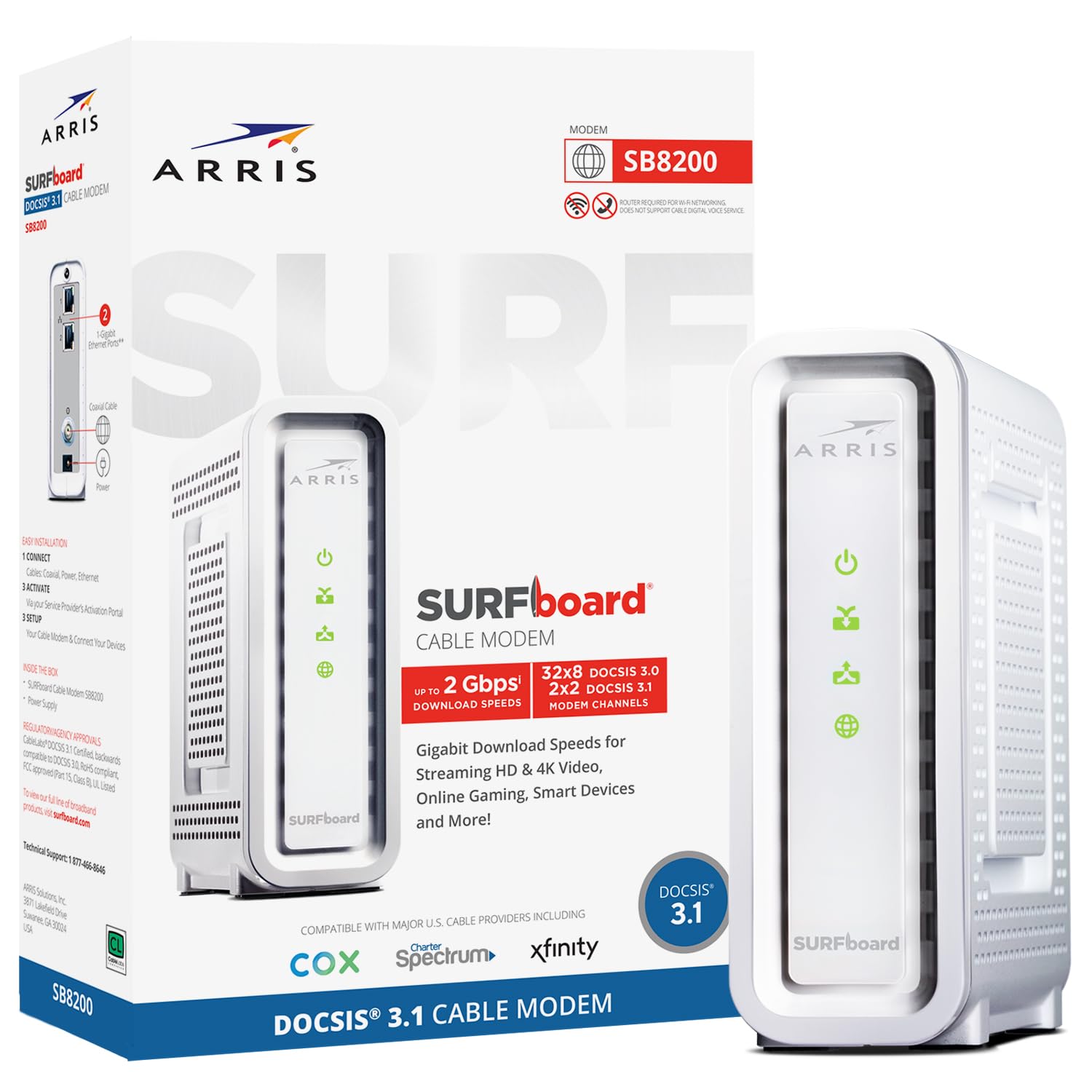
The SB8200 has been a staple in the enthusiast community for years because it offers two Gigabit Ethernet ports with link aggregation support. When paired with a router that supports 802.3ad LAG, you get a virtual 2 Gbps pipe to your local network—a smart alternative to a native 2.5 GbE port if you’re on a plan that delivers 1.2–1.5 Gbps. The unit is compact (5.13 inches wide) and runs cool enough to stack without worrying about thermal throttling.
Setup is straightforward: connect to coax, power on, then activate through your ISP’s website or app. The SB8200 works with Xfinity, Spectrum, and Cox out of the box. Reviewers consistently report getting 930–960 Mbps down on gigabit plans, which is exactly what you’d expect from a well-spec’d 3.1 modem with a Broadcom chip. It’s a modem-only unit with no Wi-Fi, so it imposes zero overhead on your router’s job.
The catch is the upstream. The SB8200 tops out at about 50 Mbps on standard splits; it does not support mid-split, so you won’t see the 200+ Mbps upload that the CM3000 delivers. If your ISP hasn’t deployed mid-split, this is a non-issue, and the SB8200 remains the most reliable dual-port modem on the market.
Why it’s great
- Two 1 GbE ports with LAG for up to 2 Gbps.
- Proven Broadcom chipset, years of reliability data.
- Very compact footprint, silent operation.
Good to know
- No mid-split support—upstream is capped around 50 Mbps.
- White plastic case can feel less premium than metal options.
4. ARRIS (S33-RB) DOCSIS 3.1 Multi-Gigabit Cable Modem (Renewed)

The ARRIS S33 is essentially the SB8200’s more powerful sibling: it swaps the dual 1 GbE ports for a single 2.5 GbE jack, allowing native 2.5 Gbps throughput without needing link aggregation. The S33-RB variant is a factory-renewed unit, which typically saves about a third off the retail price while carrying the same 1-year warranty as a new unit. The hardware is identical—same Broadcom chipset, same thermal design.
Users report that the renewed units arrive in near-mint condition with all accessories, and activation with Xfinity and Optimum is seamless. The S33 supports four OFDM channels (two downstream, two upstream), which gives it excellent headroom for gigabit-plus plans. The web interface is basic but provides clear signal-to-noise and channel lock data for troubleshooting.
The main downside is the lack of mid-split support. Like the SB8200, the S33 does not use the 204–408 MHz upstream range that enables the fastest upload speeds. If you’re on a plan where upload matters more than raw download, the CM3000 is a better fit. But at this price point for a multi-gig-capable 3.1 modem, the S33-RB is hard to beat.
Why it’s great
- Native 2.5 GbE port for full multi-gig speeds.
- Renewed price offers great value for 3.1 hardware.
- Broadcom chipset with four OFDM channels.
Good to know
- No mid-split—upstream limited to standard ranges.
- Refurbished condition may have minor cosmetic wear.
5. Motorola MB7621 Cable Modem

The Motorola MB7621 continues to earn recognition from Wirecutter and other reviewers as the go-to modem for DOCSIS 3.0 plans up to 900 Mbps. It uses a Broadcom chipset with 24×8 channel bonding—that’s 24 downstream and 8 upstream channels—which is more than enough for most cable plans under a gigabit. The full-band capture digital tuner scans and locks onto all available channels, keeping your speed consistent even during peak neighborhood usage.
Setup is genuinely painless: attach the coax, power it on, and call your ISP to activate. Users consistently mention that the MB7621 “just works” with Xfinity and Spectrum, delivering the full speed of their plan with no latency spikes. The rectangular chassis has ventilation slots on all sides, which helps keep the Broadcom chip well within its thermal limits. Many reviewers report years of uptime without a single reboot.
There’s no multi-gig or 3.1 capability here—the MB7621 is a pure 3.0 device. If your plan is under 1 Gbps and you prioritize rock-solid reliability over raw speed ceiling, this is the best value play in the category. It’s also the cheapest way to stop paying rental fees, with users reporting full payback within 6–8 months.
Why it’s great
- Broadcom chipset proven for years of uptime.
- 24×8 channel bonding covers nearly all sub-gig plans.
- Excellent heat dissipation from the fully vented case.
Good to know
- DOCSIS 3.0 only—no OFDM channels for future plans.
- Single 1 GbE port caps throughput at ~940 Mbps.
6. Hitron CODA DOCSIS 3.1 Modem (Renewed)

The base Hitron CODA is the cheapest way to get into DOCSIS 3.1 without buying used gear from unknown sellers. It supports internet plans up to 1 Gbps with a single Gigabit Ethernet port, which makes it a drop-in replacement for older 3.0 modems on typical gigabit-tier plans. The renewed version on Amazon often arrives looking brand new, with all original accessories and a clean MAC sticker.
Users report that the CODA runs noticeably cooler than the Arris SB8200, and its white chassis measures about 6.7 inches square, making it a compact addition to any entertainment center. The OFDM channels provide lower latency than equivalent 3.0 modems, which is a real benefit during video calls or gaming. Setup is identical to other modem-only units: plug in, call ISP, done.
The limitation here is the lack of a 2.5 GbE port. If your plan is exactly 1 Gbps, the CODA will deliver full speeds, but you have no headroom for multi-gig upgrades. The web interface is also minimal—no advanced SNR or error-rate diagnostics. For users who just want a reliable, cheap 3.1 modem to stop paying rental fees, the CODA fits perfectly.
Why it’s great
- Lowest entry cost for DOCSIS 3.1 hardware.
- Runs cool, reliable OFDM performance.
- Easy activation with major ISPs.
Good to know
- Only a 1 GbE port—no multi-gig headroom.
- Web UI lacks detailed diagnostics.
7. NETGEAR Nighthawk WiFi 6 Cable Modem Router (CAX30)

The CAX30 is NETGEAR’s DOCSIS 3.1 modem-router combo with WiFi 6 (AX2700), designed for a single-box solution that covers up to 2,500 square feet. It eliminates the need for a separate router, reducing cable clutter and simplifying setup. The built-in DOCSIS 3.1 modem supports plans up to 2 Gbps, and the four Gigabit Ethernet ports provide wired connections for consoles and PCs.
For its price, you get solid performance: users report consistent 600–800 Mbps over Wi-Fi on Xfinity gigabit plans, with low latency for streaming and gaming. The Nighthawk app makes initial setup and ongoing management straightforward—you can run speed tests, monitor data usage, and manage guest networks from your phone. The internal antenna design keeps the footprint relatively small.
The catch is the very reason combo units get a mixed reputation: if either the modem or router side fails, the whole unit must be replaced. Upgrading to a faster Wi-Fi standard (like WiFi 7) also means replacing the entire box. For a small apartment or a backup connection, the CAX30 works great. For anyone who wants to upgrade components independently, a separate modem and router setup is the smarter long-term play.
Why it’s great
- Single unit saves space and reduces cable mess.
- WiFi 6 covers 2,500 sq. ft. with good throughput.
- Easy setup and management via Nighthawk app.
Good to know
- Combined unit means no independent upgrades.
- Runs warm under load—needs good ventilation.
FAQ
Will a DOCSIS 3.1 modem work with my current 3.0 ISP plan?
What is mid-split upload and why does it matter for my cable modem?
How do I activate a new cable modem with my ISP?
Should I buy a modem-router combo or separate units?
Final Thoughts: The Verdict
For most users, the best cable modem winner is the NETGEAR Nighthawk CM3000 because it combines mid-split upload performance, a Broadcom chipset, and a 2.5 GbE port in a modem-only chassis that will stay relevant for years. If you want proven reliability at a lower price point, grab the ARRIS SURFboard SB8200—its dual 1 GbE ports with LAG offer great flexibility for sub-gig plans. And for a pure budget-friendly DOCSIS 3.0 option that still delivers Wirecutter-level reliability, nothing beats the Motorola MB7621.

Mo Maruf
I created WellFizz to bridge the gap between vague wellness advice and actionable solutions. My mission is simple: to decode the research and give you practical tools you can actually use.
Beyond the data, I am a passionate traveler. I believe that stepping away from the screen to explore new environments is essential for mental clarity and physical vitality.