Our readers keep the lights on and my smoothie glass nicely filled. As an Amazon Associate, I earn from qualifying purchases.
A copier that jams every fifty pages or produces streaky blacks isn’t just a nuisance — it’s a direct drain on your team’s hourly output. Whether you run a law firm, a medical practice, or a shared coworking space, the machine sitting in the corner needs to deliver crisp, fast, and reliable copies without service calls every other week.
I’m Mohammad Maruf — the founder and writer behind WellFizz. I’ve spent hundreds of hours analyzing toner yields, duty cycles, and real-world jam rates to separate the office-ready workhorses from the frustrating paperweights that waste your budget.
Whether you need tabloid-size prints, mobile portability, or a fleet-grade monochrome beast, this guide to the best business copier machines breaks down the specs that actually affect your daily workflow and total cost per page.
How To Choose The Best Business Copier Machines
Choosing a copier for a business environment means balancing upfront hardware cost against the recurring expense of toner and the downtime risk of repairs. The wrong machine can cost more in frustration and replacement cartridges within its first year than the purchase price suggests.
Match the Duty Cycle to Your Monthly Volume
Every copier has a recommended monthly page volume (duty cycle) and a maximum rating. If you routinely exceed the recommended figure, the machine will wear out faster — gears strip, fusers fail, and paper path rollers lose grip. For a small team printing 500–1,000 pages per month, a duty cycle around 2,000–3,000 pages is sufficient. A mid-sized office pushing 3,000–6,000 pages per month needs a machine rated for 4,000–8,000 pages.
Evaluate Total Cost Per Page, Not Just Sticker Price
The hidden expense in any copier is the cost per page (CPP). A low-cost printer that uses expensive, low-yield cartridges can quickly surpass a premium model’s ownership cost. Look for high-yield or super-high-yield toner options and calculate CPP by dividing the cartridge price by its page yield. Laser copiers typically offer lower CPP than inkjets, especially for monochrome documents.
Prioritize Duplex and Document Feeder Capabilities
In an office setting, single-pass duplex scanning — scanning both sides of a document in one pass — is a major productivity differentiator. A machine that forces you to manually flip pages for scanning or copying wastes significant labor. Similarly, automatic duplex printing saves paper and time. The speed of the automatic document feeder (ADF) in images per minute (IPM) is a spec that directly impacts how fast you process multi-page contracts and reports.
Quick Comparison
On smaller screens, swipe sideways to see the full table.
| Model | Category | Best For | Key Spec | Amazon |
|---|---|---|---|---|
| HP LaserJet Pro MFP 4101fdw | Monochrome Laser | High-volume B&W offices | 42 ppm monochrome | Amazon |
| HP Color LaserJet Pro MFP 3301fdw | Color Laser | Small teams needing color | 26 ppm color/B&W | Amazon |
| Brother MFC-L3780CDW | Color Laser | Value-focused color office | 31 ppm both sides | Amazon |
| Brother MFC-L8730CDW | Color Laser | Growth-stage businesses | 33 ppm, 80-page ADF | Amazon |
| Epson EcoTank ET-15000 | Supertank Inkjet | Low CPP on 13×19 prints | 17 ppm B&W, 9 ppm color | Amazon |
| HP OfficeJet 250 | Mobile Inkjet | Travel and remote work | 20 ppm B&W, battery-powered | Amazon |
| Canon imagePROGRAF TC-21M | Large Format Inkjet | Plotters and posters | 24″ wide roll feed | Amazon |
| Brother MFC9340CDW | Color LED | Reliable duplex scanning | 23 ppm, single-pass duplex | Amazon |
| HP Color LaserJet Enterprise M751n | Enterprise Color Laser | High-volume color production | 40 ppm, 12×18 support | Amazon |
In‑Depth Reviews
1. HP LaserJet Pro MFP 4101fdw

The 4101fdw is the monochrome powerhouse that most small-to-medium offices need. At 42 pages per minute in black and white, it clears through large batch jobs without slowing the workflow. The built-in duplex ADF scans both sides of a document in a single pass — a feature that saves significant time when processing contracts, invoices, or multi-page reports.
HP’s Wolf Pro Security provides enterprise-grade protection for sensitive data, and the intelligent Wi-Fi auto-selects the best connection band to stay online. The recommended monthly duty cycle of up to 4,000 pages makes it a solid fit for offices with 5–10 users who rely heavily on monochrome output for daily operations.
Some users have reported occasional hiccups with the HP smartphone app getting stuck on jobs, and like most modern HP lasers, this machine uses cartridge authentication that blocks third-party toner. For a busy office that values speed and security over lowest-cost consumables, this is the goldilocks choice.
Why it’s great
- Industry-leading 42 ppm monochrome speed
- Single-pass duplex scan saves time on multi-page sets
- Built-in security features protect sensitive network data
Good to know
- Phone app can occasionally lock up during wireless printing
- Uses chipped cartridges that block third-party alternatives
- Bulky footprint needs dedicated desk or cart space
2. HP Color LaserJet Pro MFP 3301fdw

The 3301fdw is HP’s answer for small teams that need professional color documents without moving to a bulky production unit. Using next-generation TerraJet toner, it produces vivid, high-contrast color prints that make charts, proposals, and marketing materials look polished. Print speeds reach 26 pages per minute in both color and monochrome, so there’s no penalty for switching modes.
The feature set includes auto duplex printing, a single-pass duplex ADF for scanning, and a 250-sheet input tray that handles most daily loads. Setup is straightforward through the HP Smart app, and users consistently praise the crisp text quality and vibrant color output in real-world use.
The main drawback is HP’s cartridge lock-in — the machine will reject non-HP cartridges, and firmware updates reinforce this restriction. A few early units experienced severe print defects requiring replacement. For a business that relies on color output and is willing to buy genuine HP toner, the 3301fdw delivers reliable, professional results.
Why it’s great
- Rich, vivid color output with TerraJet toner technology
- Fast 26 ppm speed in both color and black
- Single-pass duplex scanning for efficient document handling
Good to know
- Firmware blocks use of non-HP toner cartridges
- Some units have experienced severe print defects early on
- Standard-yield toner runs out faster than expected
3. Brother MFC-L3780CDW

The Brother MFC-L3780CDW offers the fastest print speed in its class — 31 pages per minute in both color and black — and pairs it with a single-pass duplex ADF that scans both sides of a document in one pass. That combination makes it a serious productivity tool for small offices that handle multi-page color documents regularly.
Brother’s setup is famously straightforward: users report AirPrint working instantly and network configuration taking minutes. Print quality is excellent for business documents, with sharp text and acceptable color for internal reports and client presentations. The machine supports Brother’s high-yield TN229XXL cartridges, which helps lower the cost per page compared to standard-yield alternatives.
Potential buyers should be aware of Brother’s Refresh subscription program — some users report service interruptions if credit cards expire. The standard-yield toner it ships with runs out quickly, so budgeting for high-yield replacements from the start is wise. Overall, it’s the best value color laser for a busy office.
Why it’s great
- Fast 31 ppm color and monochrome output
- Single-pass duplex scanning saves major time
- Reliable, easy setup with AirPrint support
Good to know
- Refresh subscription can cause printing interruptions if payment fails
- Starter toner cartridges drain quickly
- Photo quality is acceptable but not photo-lab grade
4. Brother MFC-L8730CDW

The MFC-L8730CDW is built for growing businesses that need higher throughput and a larger paper capacity than typical desktop units provide. With 33 pages per minute output, an 80-page automatic document feeder, and a recommended duty cycle around 4,000 pages per month, this machine can handle a busy workgroup without breaking a sweat. The 3.5-inch color touchscreen supports up to 48 customizable shortcuts for repeat tasks.
Brother has packed advanced features into this model, including NFC badge authentication for secure release printing and support for scan-to-cloud services like SharePoint and OneDrive. The machine is 25 percent smaller than its predecessor despite the added capacity, making it easier to fit in tight office layouts. Build quality feels robust, and the included high-yield starter cartridges (3,000 pages black, 1,800 color) reduce the immediate replacement cost.
The downside is the aggressive chip-lock on toner cartridges — third-party alternatives are blocked, and Brother’s own high-yield replacements are expensive. Some users report that the machine enforces toner replacement even when cartridges aren’t fully empty. For offices willing to pay for genuine Brother supplies, this is a powerful and future-proof copier.
Why it’s great
- 80-page ADF with fast duplex scanning (104 ipm)
- NFC card reader for secure employee print release
- Compact footprint for its paper capacity and speed
Good to know
- Blocks third-party toner cartridges entirely
- Brother-brand toner replacements are pricey
- Weighs over 50 pounds — needs two people to position
5. Epson EcoTank ET-15000

The EcoTank ET-15000 is the only inkjet on this list, and it earns its place by delivering tabloid-size (13×19 inch) printing at a fraction of the cost per page that laser copiers can match. The ink bottle system provides enough black ink for thousands of pages before refills — users report black ink costing around per bottle and lasting over 1,000 pages. Color prints also benefit from vibrant, saturated output that rivals many entry-level laser units.
Built-in Wi-Fi, Ethernet, and USB give flexible connectivity, and the duplex printing works automatically for standard letter sizes. The large scanner bed accommodates oversized originals, making it ideal for architects, craft businesses, or anyone who needs to copy or scan documents larger than legal size. Setup is straightforward, with a color touchscreen that guides the ink-filling process.
The document feeder is the weak point — several users report jams and clicking noises on the first real use, and Epson’s support is limited to email. For a business that needs affordable tabloid-size printing and is willing to accept slower inkjet speeds (9 ppm color), the ET-15000 offers unbeatable operating costs.
Why it’s great
- Extremely low cost per page with bottle ink system
- Prints borderless up to 13×19 inches
- Large scanner bed for oversized originals
Good to know
- Document feeder prone to jams on first use
- Color print speed is slow at 9 ppm
- Customer support is email-only with limited hours
6. HP OfficeJet 250

The OfficeJet 250 is the only truly portable all-in-one on the market that includes a built-in battery, allowing you to print, scan, and copy from a car, client site, or remote location without needing a wall outlet. At roughly 16 inches wide, it fits into a carry-on bag or a dedicated carrying case, and the battery charges to full in about 90 minutes when the printer is off. Print speeds reach 20 ppm in black and 19 ppm in color — impressive for a device this small.
Wireless connectivity is robust, with HP Auto Wireless Connect enabling setup without a router, plus support for AirPrint and the HP Smart app. Scanning to email is a standout feature, especially for mobile notaries, real estate agents, and field service professionals who need to send signed documents immediately. The ink system uses standard HP 62 cartridges, which deliver decent page yields for a mobile unit.
The scan unit has proven unreliable for some users — multiple replacements were needed within a year for scanning malfunctions, though copy and print functions remained solid. HP’s support when things go wrong is frequently described as frustrating. If your job requires printing away from the office, this is the only viable all-in-one option, but the scan module may not survive heavy daily use.
Why it’s great
- True portable printing with integrated rechargeable battery
- Compact enough for carry-on luggage
- Scan-to-email works well for remote document processing
Good to know
- Scan module has limited durability in heavy use
- HP ink is expensive and blocks third-party cartridges
- No automatic duplex printing
7. Canon imagePROGRAF TC-21M
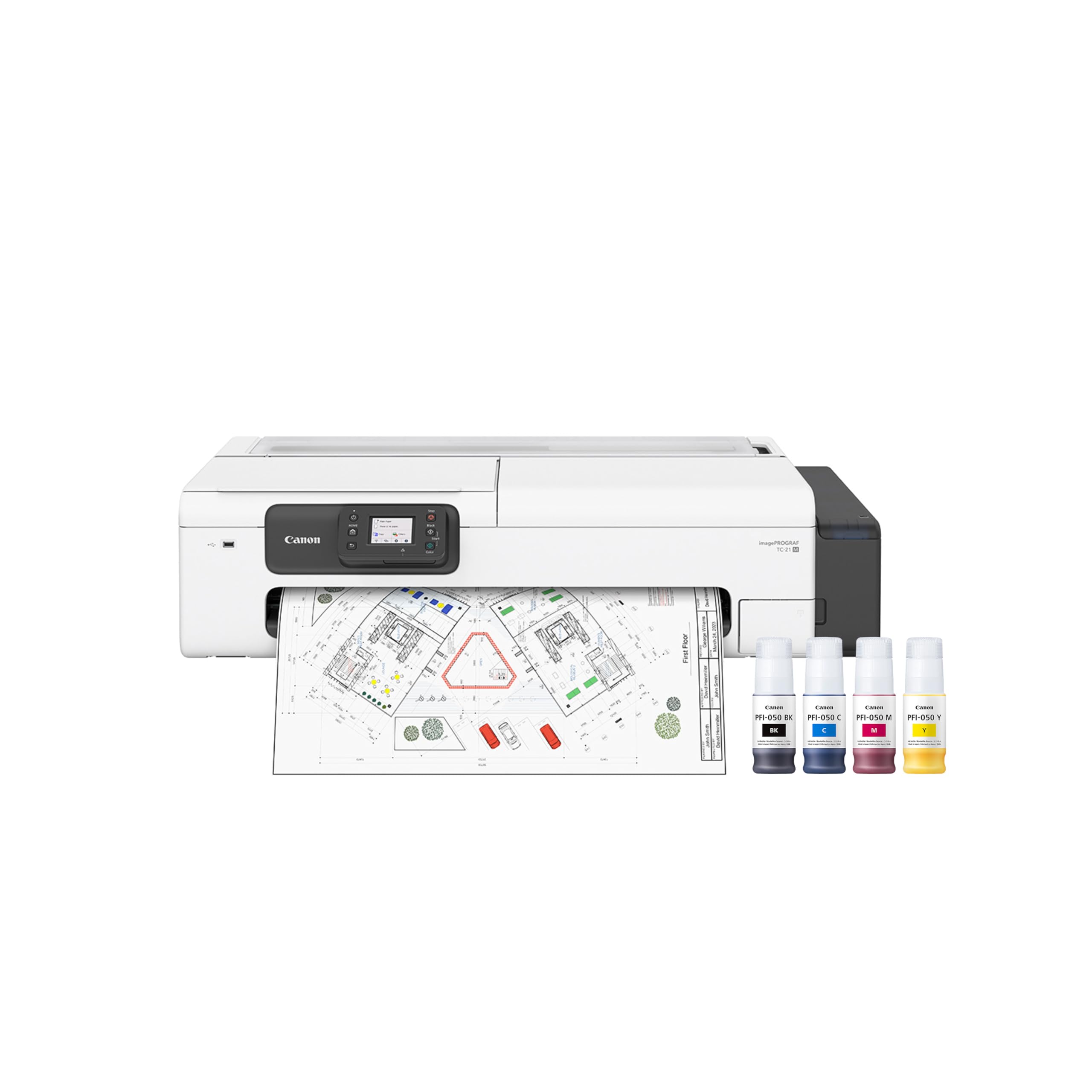
The imagePROGRAF TC-21M is a specialized multifunction printer designed for businesses that need wide-format output — architectural plans, posters, engineering drawings, or signage — without the massive footprint of a production plotter. It supports both automatic roll feed and cut-sheet paper loading up to 24 inches wide, giving it the flexibility to handle long continuous prints as well as individual sheets. The auto sheet feeder holds 100 sheets of letter-size paper for everyday office tasks.
This Canon unit includes a built-in flatbed scanner for enlarging smaller originals directly from the glass, a USB flash drive port for walk-up printing, and cloud printing capability via the 2.7-inch tiltable touchscreen. Users report excellent print quality for both fine-line technical drawings and vibrant color posters, with ink bottles that last significantly longer than cartridge-based alternatives.
A key limitation is that the flatbed scanner only accommodates letter-size originals (8.5×11 inches), which surprises those expecting a 24-inch scanning bed. A few users have reported “paper cannot feed” errors after several months of use. For an architectural firm or marketing team that needs wide-format output combined with basic scanning, the TC-21M is a compact, cost-effective solution.
Why it’s great
- Prints up to 24 inches wide with roll feed support
- USB flash drive port for direct large-format printing
- Long-lasting ink bottles reduce ongoing costs
Good to know
- Flatbed scanner is only letter-size (8.5×11), not wide format
- Some users report feed errors after 5 months of use
- Slow print speeds (8 ppm color) for large jobs
8. Brother MFC9340CDW

The MFC9340CDW is a proven workhorse that offers some of the best duplex scanning capabilities in its class. The single-pass duplex ADF allows you to feed a stack of two-sided documents and receive fully scanned digital copies without manual flipping — a feature that dramatically improves efficiency in legal, accounting, and administrative settings. Print speeds of 23 pages per minute in both color and black are adequate for most small offices.
Brother’s LED print technology delivers crisp text and consistent color output without the warm-up time associated with laser fusers. Connectivity options are generous, including USB, Ethernet, dual-band Wi-Fi, and Wi-Fi Direct, plus support for AirPrint and Google Cloud Print. The color touchscreen interface is intuitive, and the ability to scan directly to USB flash drives or cloud services like Evernote and Dropbox adds flexibility.
Paper jams during duplex scanning have been reported by some users, and the starter toner cartridges deplete quickly. The upfront investment is higher than comparable models, but the long-term reliability — several users report years of trouble-free operation — makes it a solid choice for offices that prioritize scanning throughput over raw print speed.
Why it’s great
- Excellent single-pass duplex scanning for two-sided docs
- Reliable LED print technology with no warm-up delay
- Flexible connectivity: USB, Ethernet, dual-band Wi-Fi, Wi-Fi Direct
Good to know
- Some units experience frequent paper jams in duplex mode
- Starter toner cartridges run out quickly
- Photo quality is inferior to inkjet alternatives
9. HP Color LaserJet Enterprise M751n

The M751n is HP’s production-level color laser for offices where print quality, speed, and security are non-negotiable. Delivering 40 pages per minute in vivid color, it handles high-volume jobs like marketing collateral, client proposals, and large-format reports up to 12×18 inches. The 2.7-inch color LCD display provides intuitive control, and HP’s Enterprise security suite — over 200 embedded features — protects against malware and unauthorized access.
Build quality is exceptional, with a robust paper path that handles heavy stock without jamming, and the enhanced color mode provides an extra level of gloss and vividness for client-facing documents. Users consistently praise the professional-grade output — posters and graphics come out with gallery-quality color accuracy. The one-year next-business-day onsite warranty provides peace of mind for mission-critical environments.
The machine is print-only — no scanning or copying — so offices will need a separate scanner or MFP for document digitization. It does not include Wi-Fi as standard. There have been isolated reports of print defects (black streaks) and poor HP service response for repair. For a busy creative agency or corporate department that needs high-speed, high-quality color output, the M751n is a powerful addition to the fleet.
Why it’s great
- Fast 40 ppm color output with superb print quality
- Supports 12×18-inch media for oversized documents
- Enterprise-grade security with 200+ embedded features
Good to know
- Print-only — does not include scanner or copier
- No built-in Wi-Fi; requires Ethernet or USB
- Some users report print defects and lengthy repair times
FAQ
How much toner does a business copier use per month?
Is a laser copier better than an inkjet for an office?
Should I buy a service contract for my copier?
Final Thoughts: The Verdict
For most users, the best business copier machines winner is the HP LaserJet Pro MFP 4101fdw because it delivers the best balance of speed (42 ppm), security features, and long-term reliability for a small-to-medium office. If you need professional color output on a budget, grab the Brother MFC-L3780CDW. And for high-volume color production at enterprise scale, nothing beats the HP Color LaserJet Enterprise M751n.

Mo Maruf
I created WellFizz to bridge the gap between vague wellness advice and actionable solutions. My mission is simple: to decode the research and give you practical tools you can actually use.
Beyond the data, I am a passionate traveler. I believe that stepping away from the screen to explore new environments is essential for mental clarity and physical vitality.