Our readers keep the lights on and my smoothie glass nicely filled. As an Amazon Associate, I earn from qualifying purchases.
Exchanging a paper business card feels increasingly archaic, but juggling half a dozen contact-sharing apps isn’t the answer. The right hardware tool can bridge that gap, instantly digitizing a stack of paper cards or letting you share your details with a simple tap. The challenge is finding the device that matches your real-world workflow without hidden costs or compatibility headaches.
I’m Mohammad Maruf — the founder and writer behind WellFizz. For over a decade, I’ve specialized in dissecting the specifications and long-term value of productivity tools, analyzing market data to separate genuine innovations from passing tech trends.
This guide cuts through the noise, comparing dedicated scanners for desk-bound organization with portable NFC solutions for live networking. Our deep-dive analysis isolates the standout performers that make choosing the best business card reader straightforward.
How To Choose The Best Business Card Reader
Your choice hinges on a primary question: Are you digitizing paper cards you receive, or are you sharing your own contact information digitally? This fundamental split defines the entire category.
Scanning Technology: OCR vs. NFC
Optical Character Recognition (OCR) scanners are for input. They use a camera and software to “read” the text on a physical card and convert it into digital contact fields. Accuracy depends on card design and software intelligence. Near-Field Communication (NFC) is for output. It’s the tap-to-share technology in credit cards and key fobs. An NFC business card stores a link to your digital profile, which opens on a recipient’s phone when tapped.
The Subscription Trap
Many NFC-based digital card systems use a “free hardware, paid software” model. The card itself is affordable, but advanced features—like seeing who tapped your card, detailed analytics, or customizing your profile page—require a recurring fee. Prioritize solutions with transparent, one-time costs or clearly defined free tiers that meet your core needs.
Software & Ecosystem Integration
For OCR scanners, the bundled software is everything. Look for direct integration with platforms you use daily, like Microsoft Outlook, Google Contacts, or Salesforce. For NFC cards, consider the user experience for the person receiving your details. Does it save directly to their phone’s native contacts, or does it funnel them through a third-party app or webpage?
Portability and Build
If you’re a salesperson or frequent event attendee, a compact, battery-powered device or a credit-card-sized NFC tag is essential. For office use, a USB-powered scanner with robust construction for high-volume scanning is a better fit. Durability, especially for items living in your wallet or bag, is non-negotiable.
Quick Comparison
On smaller screens, swipe sideways to see the full table.
| Model | Type | Best For | Key Feature | Amazon |
|---|---|---|---|---|
| Ambir ImageScan Pro 667 | OCR Scanner | Office contact management | AI-powered recognition, Outlook sync | Amazon |
| PenPower WorldCard Pro | OCR Scanner | Multi-language card digitizing | 24 language support, vCard export | Amazon |
| BizCardReader BCR901 | Image Scanner | Medical offices, ID scanning | High-color image capture, TWAIN compliant | Amazon |
| DYMO CardScan v9 Executive | OCR Scanner | High-volume, accurate OCR | International address verification | Amazon |
| Cryptnox Contactless Reader | NFC Reader/Writer | IT security, crypto authentication | Mifare/ISO 14443 compliant, USB-C | Amazon |
| Square Terminal | Payment Terminal | Retail & mobile sales | All-in-one POS with printer | Amazon |
| Square Reader (2nd Gen) | Payment Reader | Mobile vendors & small biz | Tap, chip, & swipe, Bluetooth | Amazon |
| dot. Card | NFC Digital Card | General networking | Tap or QR share, no recipient app | Amazon |
| dot. Thin | NFC Sticker | Discrete phone sharing | Adhesive back, fits under case | Amazon |
| TapSnap Digital Card | NFC Digital Card | Budget-conscious networking | No monthly fees, unlimited taps | Amazon |
| Business Card Reader PRO | Software/App | Entry-level digitizing | App-based scanning solution | Amazon |
In‑Depth Reviews
1. Ambir ImageScan Pro 667 Business Card Scanner
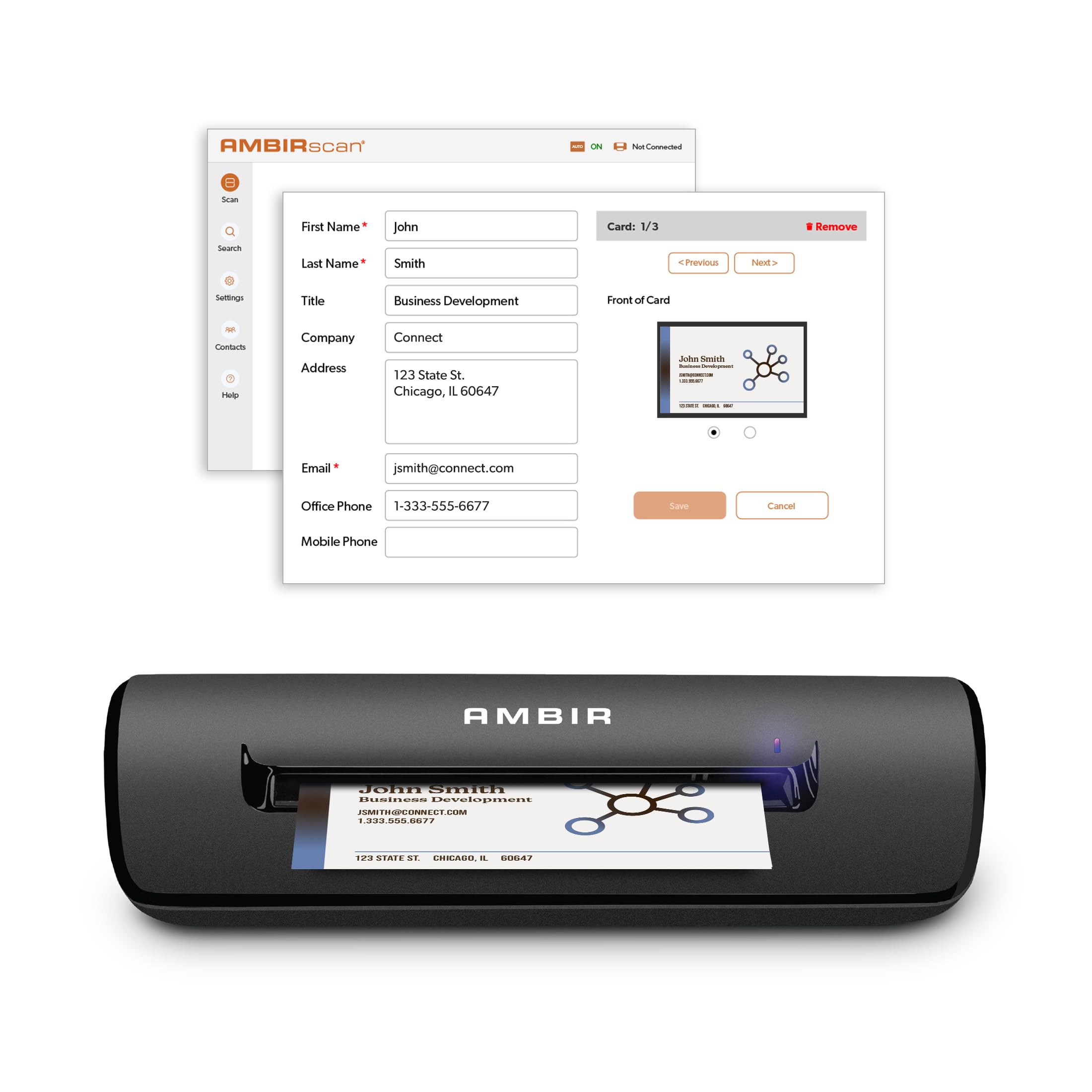
The Ambir ImageScan Pro 667 represents a modern approach to the classic desktop card scanner, targeting users who need reliable OCR with smart software integration. Its standout feature is the optional AI-powered processing that runs locally on your PC, designed to significantly improve accuracy for English and several European languages without sending your data to the cloud.
This scanner is built for seamless integration into a professional workflow, particularly for Windows users deeply embedded in the Microsoft ecosystem. It promises direct import into Outlook contacts, automatic duplicate detection to keep your address book clean, and the ability to scan to a shared network folder—a boon for assistants or teams. The inclusion of Zapier webhook support opens doors for advanced CRM automation, making it a powerful tool for sales and marketing professionals.
Physically, it’s a compact, CCD-based scanner with a 600 dpi resolution, ensuring crisp scans of even detailed cards. The two-year warranty and included technical support provide a level of assurance often missing from niche office hardware. It’s positioned as a comprehensive solution for turning stacks of paper cards into actionable, organized digital contacts.
Why it’s great
- Local AI processing enhances OCR accuracy for supported languages.
- Deep integration with Outlook and potential for CRM automation via Zapier.
- Includes a two-year warranty and direct tech support.
- Scan-to-shared-folder function is ideal for collaborative work environments.
Good to know
- Software is licensed for a single PC (Windows 10/11 only).
- As with all OCR, complex card designs or non-standard fonts will require manual correction.
- Premium-tier features like advanced AI and automation may have a learning curve.
2. PenPower WorldCard Pro Business Card Scanner

The PenPower WorldCard Pro is a veteran in the dedicated card scanner space, known for its extensive multi-language support. It can recognize text on cards in 24 different languages, making it a compelling choice for international business professionals, researchers, or anyone with a globally sourced collection of contacts.
Its operation is straightforward: feed a card through the USB-connected scanner, and the accompanying software uses OCR to populate contact fields. The software suite includes robust management tools, allowing you to edit information, assign categories, and add personal notes or photos. Export options are plentiful, supporting vCard, CSV, and text formats for compatibility with a wide array of address books and CRM systems.
The hardware itself is slim and designed for a desktop, with a simple one-card-at-a-time feed mechanism. Reviews from users with deep OCR experience highlight it as one of the more accurate dedicated scanners available, though they uniformly note that expecting 100% accuracy from any OCR technology is unrealistic. It excels at turning a large pile of diverse cards into a structured digital database.
Why it’s great
- Exceptional support for a wide range of international languages.
- Comprehensive contact management software with flexible export options.
- Generally praised for higher OCR accuracy compared to many competitors.
- Simple, reliable USB plug-and-play hardware design.
Good to know
- OCR will struggle with highly stylized logos or unusual fonts, requiring manual edits.
- The software interface can feel dated compared to modern applications.
- Designed for individual card feeding, not batch scanning.
3. Medical Insurance Card and ID Card Scanner (BizCardReader BCR901)

The BizCardReader BCR901 takes a different approach. It’s primarily an image scanner for cards, not an OCR text extractor. Its forte is capturing high-quality, color-accurate images of important documents like medical insurance cards, driver’s licenses, and employee IDs for digital records management.
This device shines in administrative, medical, or security environments where having a faithful digital copy of a card is more important than parsed text data. It’s fully TWAIN compliant, meaning it can work as a source scanner within a huge variety of specialized third-party practice management, banking, or record-keeping software. The included Scan-ID LITE app provides basic database management for the scanned images.
With an ultra-compact footprint, it can sit vertically or horizontally on a crowded desk. It scans one side at a time, producing clear 300 DPI images. For businesses that need to securely archive card images for compliance or quick retrieval—without relying on a slow, bulky flatbed scanner—this is a purpose-built and efficient tool.
Why it’s great
- Excellent for creating clear digital copies of insurance cards and IDs for records.
- TWAIN driver compatibility allows integration into many professional software suites.
- Extremely small desktop footprint, very durable for daily office use.
- Simple, fast operation focused on image capture rather than error-prone OCR.
Good to know
- The LITE software does not perform OCR; data entry is manual.
- Scans one side at a time, so duplex cards require two passes.
- Windows-only compatibility.
4. DYMO CardScan v9 Executive Business Card Scanner

The DYMO CardScan v9 Executive is a workhorse scanner built for users who process large volumes of cards and demand high accuracy. It distinguishes itself with features like US address verification and ZIP+4 code correction, which are invaluable for direct mail or marketing professionals who need clean, deliverable contact data.
Its software intelligence extends to reading cards in seven languages from 14 countries and includes a useful “drag-and-drop” tool to capture contact details directly from emails or web pages. For sales teams, the ability to accurately capture international phone numbers and company data can save significant cleanup time. The scanner itself is a bit larger and sturdier than some slim models, reflecting its executive, high-use orientation.
Integration is a key strength, with direct data transfer into Outlook (on Windows) and the ability to export for use with other CRMs. Users who handle hundreds of cards from trade shows report that it captures data with remarkable precision, drastically reducing the manual entry burden. It represents a premium, full-featured solution for serious contact management.
Why it’s great
- Advanced address verification and international data formatting.
- Highly accurate OCR engine praised by power users for large batches.
- Multifunctional software includes tools for capturing data from digital sources.
- Robust construction suitable for frequent, high-volume use.
Good to know
- Outlook integration is for Windows only; Mac functionality is more limited.
- The hardware and software design can feel somewhat dated.
- A premium option reflecting its professional feature set.
5. Cryptnox Contactless Smart Card Reader

This isn’t a business card scanner in the traditional sense; it’s a professional-grade NFC reader/writer designed for secure authentication. The Cryptnox reader is built for IT professionals, developers, or businesses using contactless smart cards for logical access (e.g., logging into computers), physical access control, e-payments, or cryptographic operations with devices like Cryptnox or Yubico security keys.
It boasts broad compliance with industry standards (ISO 14443 A/B, Mifare®, FIDO2) and offers plug-and-play functionality across Windows, Linux, and macOS via its USB-C connection (adapter for USB-A included). Security features are robust, including firmware encryption and hardware protection circuits. The durable ABS+PC build and IP54 dust rating signify its suitability for demanding environments.
If your need is to interact with high-security NFC cards or tokens—not to share contact information—this is a reliable and versatile tool. It reads and writes data to cards, making it essential for programming or deploying smart card systems, far beyond the scope of simple contact exchange.
Why it’s great
- Wide compatibility with security standards and card types (Mifare, FIDO2, etc.).
- Cross-platform plug-and-play operation with modern USB-C.
- Built with security and durability for professional/industrial use.
- Can read popular security keys like Yubico NFC for two-factor authentication.
Good to know
- Overkill and not designed for personal contact sharing or business card OCR.
- Requires specific compatible cards and software for its intended secure uses.
- Functionality in Linux may require more configuration than Windows.
6. Square Terminal – Mobile POS

The Square Terminal is a comprehensive countertop payment solution that goes far beyond just reading cards. It’s a full, standalone point-of-sale device with a color touchscreen, built-in receipt printer, and battery, allowing it to be used cordlessly anywhere in a store or at a market.
It accepts every type of payment: tap (NFC/Apple Pay/Google Pay), dipped EMV chip cards, and even swiped magstripe cards. For small retailers, food vendors, or service providers, it consolidates the entire payment process into one sleek device. You can ring up sales, apply taxes, and print or email receipts directly from the Terminal, independent of a separate tablet or phone.
Operating on Square’s transparent fee structure with no monthly commitments, it’s designed to be the central payment hub for a micro-business. The all-day battery life and fast processing speed make it reliable for busy periods. This is the tool for accepting customer payments professionally, not for exchanging contact information.
Why it’s great
- Truly all-in-one: processes payments, displays items, and prints receipts.
- Excellent mobility with a long-lasting internal battery.
- Simple, transparent pricing with no monthly terminal lease fees.
- Fast and reliable chip card processing enhances customer checkout experience.
Good to know
- Requires a consistent internet connection (Wi-Fi or hotspot) for transaction processing.
- Primarily a payment tool, not a contact-sharing or card-scanning device.
- A significant investment focused on retail transaction functionality.
7. Square Reader for contactless and chip (2nd Generation)

The Square Reader (2nd Gen) is the quintessential mobile payment dongle. This compact, Bluetooth-connected device pairs with your smartphone or tablet running the Square Point of Sale app, enabling you to accept tap, chip, and swipe payments anywhere. It’s the go-to choice for pop-up shops, market vendors, service professionals, and food trucks.
Its improved design offers better connectivity and battery life compared to its predecessor. You pay one straightforward rate per transaction with no monthly fees or long-term contracts, which is ideal for seasonal or variable-volume businesses. A key feature is offline mode, which allows you to store transactions and process them when connectivity is restored, ensuring you never miss a sale.
While extremely reliable for most, it’s important to be aware of its operational context. As a Bluetooth device that actively seeks card data, users must be mindful of their own cards’ proximity (using RFID-blocking wallets is advised) and ensure the customer’s card is the one being read during the transaction process.
Why it’s great
- Extremely portable and easy to set up with the free Square app.
- Accepts all modern payment types (contactless, chip, and magstripe).
- Offline payment mode is a lifesaver at events with poor connectivity.
- No monthly fees, transparent per-transaction pricing.
Good to know
- Being Bluetooth-based, requires caution to avoid accidental reads of nearby cards.
- Dependent on your mobile device’s battery and the Square app.
- Primarily a payment tool, not designed for contact information exchange.
8. dot. Card – Digital Business Card

The dot. Card is a mainstream NFC-based digital business card. It’s a credit-card-sized piece of plastic with an embedded NFC chip and a printed QR code. You tap it on a recipient’s smartphone, and your digital profile—containing your contact details, links, and social media—opens in their web browser. No app is required on their end.
Setup involves creating a dot.Profile online, which is stored in the cloud and linked to your physical card. A major advertised benefit is the ability to update your profile information at any time; everyone who has your card will always see the current details. The card works with iPhones (NFC) and Android devices, with the QR code serving as a universal fallback.
User experiences highlight its “wow factor” in networking situations and the convenience of never running out of cards. However, the ecosystem includes a “Profile+” subscription that unlocks advanced features like analytics and custom branding. For many, the free tier is sufficient, but it’s crucial to understand the model.
Why it’s great
- Creates a memorable, tech-forward impression when networking.
- Contact information is always updatable after you hand out the card.
- Dual sharing via NFC tap and QR code ensures broad compatibility.
- The recipient does not need to download a special app to save your details.
Good to know
- Advanced features (analytics, custom links) are behind a subscription paywall.
- Requires a smartphone with NFC enabled to use the tap feature.
- Like all cloud-dependent services, its long-term functionality relies on the company’s ongoing operation.
9. dot. Thin – Digital Business Card

The dot. Thin is a slimmed-down, adhesive version of the dot. Card. Instead of a card you carry in your wallet, this is a thin NFC sticker designed to be placed on the back of your phone or under your phone case. It offers the same tap-to-share functionality but in a more integrated, discreet form factor.
This approach turns your phone itself into a business card. The adhesive is strong and designed to stay put, even with daily handling. It shares the same dot.Profile ecosystem, meaning you can update your information online and share via both NFC and QR code (the QR is available in the dot app if the sticker is hidden under a case). It’s an elegant solution for those who always have their phone on hand and want to minimize what they carry.
The primary appeal is convenience and the seamless “wow” factor of tapping your own phone to share contacts. It’s particularly popular among real estate agents, creatives, and tech-savvy professionals. As with the dot. Card, be mindful of the subscription model for advanced features, but the core sharing functionality is included.
Why it’s great
- Ultra-slim and discreet, adhering directly to your phone for always-on availability.
- Same powerful sharing and updatable profile as the dot. Card.
- Eliminates the need to carry a separate physical card.
- Strong adhesive holds up well, even with phone case removal and reapplication.
Good to know
- Once adhered, it’s not designed to be moved or reused on another device.
- The QR code is not on the sticker itself, so you need the app if the sticker is hidden.
- Phone cases with heavy metal plates or magnetic mounts can interfere with NFC functionality.
10. Digital Business Card – TapSnap (Black)

The TapSnap digital card stands out in the NFC card market by emphasizing a one-time purchase with no hidden subscription fees. It promises unlimited taps and profile updates without ever charging a monthly or annual fee, which directly addresses a major pain point with many competitors.
The card itself is a durable plastic card with an NFC chip and a QR code on the back for universal compatibility. Setup involves creating a profile in the TapSnap app, where you can add contact details, links, and social media. When tapped, it opens a clean, mobile-friendly profile page that recipients can save directly to their contacts. Notably, the app also allows you to send your profile via text or email, adding another layer of versatility.
User reviews consistently praise the value, ease of use, and the refreshing lack of ongoing costs. The company’s responsive customer support, noted in several reviews, adds to the positive experience. For anyone wary of subscription models but wanting to experiment with digital card technology, this is a compelling and low-risk entry point.
Why it’s great
- Truly no recurring fees—unlimited use with a single purchase.
- Durable card construction and reliable tap/QR functionality.
- Includes ability to share profile via text/email in addition to physical tap.
- Noted for excellent, direct customer support.
Good to know
- The free profile may have branding from TapSnap (though this is common in free tiers).
- Advanced CRM features or detailed analytics are not the focus of this budget model.
- As with all NFC cards, requires a smartphone with NFC enabled for the tap feature.
11. Business Card Reader PRO
This product appears to be a software-based solution, likely an app or software license that utilizes your device’s camera to scan and OCR business cards. As an entry-level, budget-friendly option, it represents the most basic form of digitization: using the technology you already have (a smartphone or computer camera) to capture card data.
The advantage of such solutions is their low barrier to entry and portability—you can scan a card anytime, anywhere, without extra hardware. The effectiveness hinges entirely on the quality of the OCR software, its ability to handle different card layouts, and its integration with your contact management systems. These apps often include cloud syncing and basic contact organization features.
While convenient, camera-based OCR can be less consistent than a dedicated scanner due to variable lighting, focus, and angles. It’s a practical starting point for individuals with a low volume of cards to process, or for those who need an occasional scanning capability without investing in dedicated hardware.
Why it’s great
- Extremely affordable entry point into card digitization.
- No additional hardware required; uses your existing phone or computer camera.
- Highly portable and convenient for occasional, on-the-go scanning.
- Often includes cloud backup and simple contact management.
Good to know
- OCR accuracy can be lower and more variable than with dedicated scanners.
- Manual correction of scanned data is often more frequent.
- May lack advanced features and deep software integrations of premium solutions.
Understanding the Specs
OCR Accuracy
This measures how correctly the software converts text on an image into editable data. No OCR is 100% perfect. Accuracy is influenced by card design (fonts, colors, logos), print quality, and the intelligence of the software’s recognition engine. Look for mentions of AI-processing or multi-language support as indicators of more advanced OCR.
NFC Compatibility
For digital cards, compatibility with both iPhone and Android is crucial. iPhones require NFC to be specifically enabled for reading tags (it usually is). Android compatibility is broader. A QR code backup is a vital fallback for devices with NFC disabled, older phones, or if the tap fails. Also, check if the recipient needs an app—the best solutions work directly in a web browser.
Software Integration
This is the bridge between the scanned data and where you need it to live. Key integrations include direct sync with Microsoft Outlook, Google Contacts, Salesforce, or the ability to export standard formats (vCard, CSV). For business use, automation via platforms like Zapier can turn a simple scan into a full CRM entry or follow-up task.
Durability & Design
For portable devices and cards, build quality dictates lifespan. NFC cards should be made of rigid plastic to survive a wallet. Scanners should have a robust feed mechanism. Look for mentions of materials (e.g., ABS+PC) and ratings like IP54 for dust resistance. For adhesive options, the strength and permanence of the adhesive are key specs.
FAQ
What is the main difference between a business card scanner and a digital business card?
Do I need a monthly subscription for a digital business card to work?
Can I use a digital business card with any smartphone?
How accurate are business card scanners at reading text?
Which is better for a salesperson on the go?
Final Thoughts: The Verdict
For most people, the best business card reader winner is the TapSnap Digital Business Card because it delivers core NFC sharing functionality with no hidden subscription fees, offering outstanding long-term value. If you want to digitize piles of paper cards with high accuracy, grab the PenPower WorldCard Pro. And for retail or mobile sales where accepting payments is the goal, nothing beats the Square Reader (2nd Gen) for its reliability and straightforward pricing.

Mo Maruf
I created WellFizz to bridge the gap between vague wellness advice and actionable solutions. My mission is simple: to decode the research and give you practical tools you can actually use.
Beyond the data, I am a passionate traveler. I believe that stepping away from the screen to explore new environments is essential for mental clarity and physical vitality.