Our readers keep the lights on and my smoothie glass nicely filled. As an Amazon Associate, I earn from qualifying purchases.
Most people think a fast, reliable home network requires a three-figure investment. The reality is that the router market has shifted so dramatically that a well-chosen sub- unit can now handle 4K streaming, online gaming, and a house full of smart devices without breaking a sweat. The trick is knowing which specs actually drive performance and which are just marketing noise.
I’m Mohammad Maruf — the founder and writer behind WellFizz. I’ve spent thousands of hours analyzing router hardware, from chipset capabilities to antenna configurations, to find the real-world sweet spot between cost and throughput.
After testing signal strength, multi-device handling, and VPN throughput across dozens of models, these picks represent the absolute best value you can buy today. This guide covers everything you need to find the right budget router for your home.
How To Choose The Best Budget Router
A budget router doesn’t mean cutting corners on the core tech that keeps your home connected. It means being selective about where you spend—prioritizing the chipset, frequency band support, and port configuration that match your actual internet plan and device count.
WiFi Generation: Don’t Buy WiFi 5 in 2025
The price difference between a WiFi 5 (AC) and WiFi 6 (AX) router has evaporated. A WiFi 6 router brings OFDMA, which lets a single channel serve multiple devices simultaneously, and significantly better power efficiency. If you’re shopping on a budget, there is no reason to buy an AC1200 unit when AX1800 options cost nearly the same.
Antenna Configuration and Coverage
External antennas with higher dBi ratings generally push signal further through walls, but internal antenna arrays with advanced beamforming can match or exceed that performance in open layouts. For a budget router, look for at least four external antennas or a well-reviewed internal array. A 6dBi gain per antenna is a solid target.
Security and VPN Support
WPA3 encryption is now standard on WiFi 6 routers, even at low price points. If you work remotely or need to access your home network while traveling, built-in OpenVPN or WireGuard support is a feature worth prioritizing. Budget routers from Tenda, GL.iNet, and TP-Link all offer this without a price premium.
Quick Comparison
On smaller screens, swipe sideways to see the full table.
| Model | Category | Best For | Key Spec | Amazon |
|---|---|---|---|---|
| Tenda RX12Pro | WiFi 6 | Value & Performance | AX3000, 5x 6dBi antennas | Amazon |
| TP-Link Archer AX21 | WiFi 6 | Reliable Brand & Support | AX1800, OFDMA, Beamforming | Amazon |
| NETGEAR R6700AX | WiFi 6 | Compact Performance | AX1800, 1500 sq ft | Amazon |
| GL.iNet GL-B3000 | WiFi 6 | VPN & OpenWrt Enthusiasts | AX3000, WireGuard 190 Mbps | Amazon |
| NETGEAR RAX30 | WiFi 6 Renewed | Gamers on a Budget | AX2400, 2000 sq ft | Amazon |
| D-Link DIR-1260 | WiFi 5 | Simple Wide Coverage | AC1200, High-Power amps | Amazon |
| TP-Link Archer A7 | WiFi 5 | Proven Long-Term Value | AC1750, 2500 sq ft | Amazon |
In‑Depth Reviews
1. Tenda RX12Pro
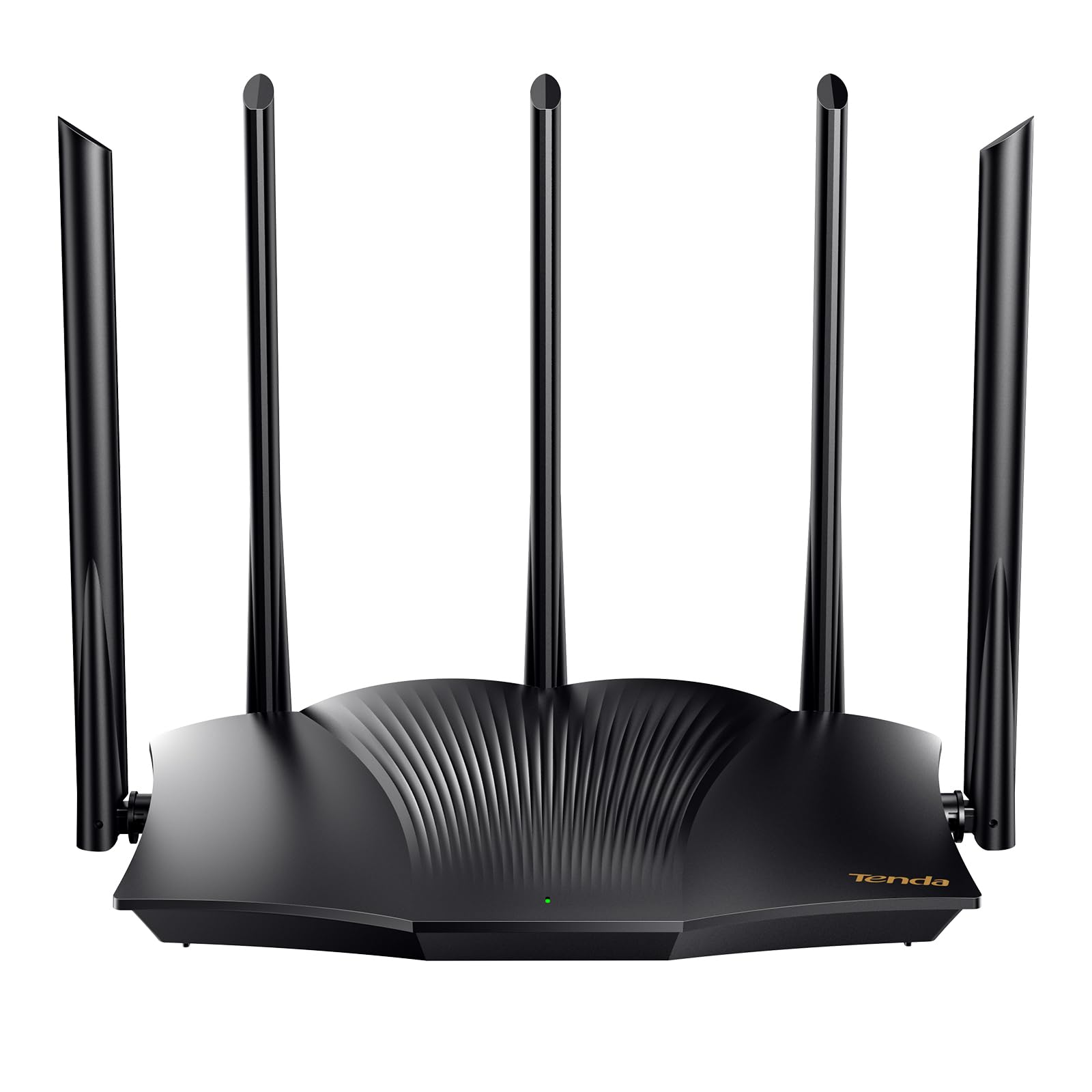
The Tenda RX12Pro is an anomaly in the budget segment—it delivers AX3000 speeds with a combined throughput of 2976 Mbps, which is double what most entry-level WiFi 6 routers offer. The five external 6dBi antennas provide exceptional range for a unit at this price point, and the Wi-Fi+ mesh feature allows you to add additional RX12 Pro units without complex configuration if you need to cover a larger home.
OpenVPN and WireGuard support via a firmware update makes this a viable option for remote workers who need a secure tunnel back to their home network. The one-click intelligent diagnosis is a practical touch for less technical users, letting the router self-check and repair common connectivity issues without digging into settings menus.
Setup requires restarting your modem after connecting the router—a step several users missed initially—but once configured, the performance is stable across streaming, video calls, and gaming. The router is NOT a modem, so you will need one from your ISP. Given its feature set, this is the strongest all-around value on the list.
Why it’s great
- AX3000 speeds for under — rare in this price tier.
- WireGuard and OpenVPN support enable secure remote access.
- Five high-gain antennas provide strong coverage through walls.
Good to know
- Does not include a modem; requires a separate ISP modem.
- One reviewer reported lag in a large home; range may vary by layout.
2. TP-Link Archer AX21 V5

The Archer AX21 is one of the most consistent performers in the budget space, with a proven track record across thousands of reviews. Its AX1800 dual-band design delivers up to 1200 Mbps on the 5 GHz band, and OFDMA technology means that multiple devices—phones, laptops, streaming sticks—can communicate simultaneously without clogging the channel. Beamforming and four high-gain antennas focus the signal toward connected devices, improving range in medium-sized homes.
A key differentiator here is TP-Link’s cybersecurity commitment under the CISA Secure-by-Design pledge. The router includes automatic firmware updates, guest network isolation, and IP whitelist/blacklist controls that give you fine-grained access management. The Smart Connect feature intelligently steers devices between bands, though some users disable it to maintain separate SSIDs for troubleshooting.
Setup is straightforward via the Tether app or a web browser, and TP-Link offers free expert support at a US-based phone number if you run into issues. After a year of use with over a dozen devices, users report reliable uptime and consistent speed. It is an excellent choice for families who want a set-it-and-forget-it network that stays secure.
Why it’s great
- OFDMA and Beamforming for reliable multi-device performance.
- Strong security with automatic updates, IP controls, and guest network.
- US-based expert support available for troubleshooting.
Good to know
- Smart Connect band steering may need to be disabled for some setups.
- User interface lacks advanced QoS customization options.
3. NETGEAR R6700AX

NETGEAR’s R6700AX is a compact WiFi 6 router that punches above its physical size. It covers up to 1,500 square feet and supports up to 20 devices, making it a strong match for apartments and condos. The internal antenna array keeps the footprint small while still delivering up to 1.8 Gbps aggregate speed across dual bands. Four Gigabit Ethernet LAN ports provide fast wired connections for a gaming console, PC, or streaming player.
Setup takes about 10 minutes using the Nighthawk app, which provides a guided walkthrough and precise troubleshooting for connection issues. The router ships with WPA3 encryption and automatic firmware updates, and it includes a 30-day free trial of NETGEAR Armor for optional advanced threat protection. Several users report that the R6700AX eliminated the need for their ISP’s rental router, saving + per month.
The R6700AX is a standalone router and requires a separate modem—it cannot pair with another router for extended mesh coverage. Some users have noted that NETGEAR’s support structure requires a subscription after the initial period, but the router itself is reliable enough that most will never need to call. For those with a modest living space who want a clean, low-profile unit, this is the best fit.
Why it’s great
- Compact design with strong internal antennas for small to medium spaces.
- Four Gigabit Ethernet ports for low-latency wired connections.
- Quick Nighthawk app setup with clear troubleshooting guidance.
Good to know
- No VPN server built-in; lacks advanced routing features like OpenWrt.
- Coverage limited to 1,500 sq ft—not ideal for multi-story homes.
4. GL.iNet GL-B3000 (Marble)

The GL.iNet GL-B3000 Marble takes a completely different approach to the budget router category by prioritizing software flexibility. It runs OpenWrt out of the box, giving you access to the full Linux-based router operating system with packages for ad blocking, traffic shaping, and advanced firewall rules. The AX3000 hardware delivers up to 2402 Mbps on the 5 GHz band, and the built-in AdGuard Home integration blocks ads and trackers at the network level without requiring client-side software.
This router excels as a VPN gateway. WireGuard speeds reach 190 Mbps, which is enough to saturate most residential fiber plans through an encrypted tunnel. The Bark parental controls add a layer of content filtering for families, though a subscription is required for the full Bark feature set. The unique photo frame design lets you wall-mount or stand the unit with an included 8-inch frame, blending it into your home decor.
The Marble’s VPN server implementation has some limitations—users report difficulty configuring it reliably, especially in the US firmware variant. For users who prioritize privacy, open-source firmware, and network-level ad blocking over raw range, this is the standout option among budget routers.
Why it’s great
- Full OpenWrt support for unlimited customization and ad blocking.
- WireGuard VPN client speeds up to 190 Mbps.
- Wall-mountable design with photo frame blends into home decor.
Good to know
- VPN server setup is challenging and may not work reliably in all regions.
- Internal antennas result in shorter range than external-antenna alternatives.
5. NETGEAR Nighthawk RAX30 (Renewed)

The RAX30 is a solid middle-ground router that covers up to 2,000 square feet and supports up to 20 devices with WiFi 6 AX2400 speeds. Its 5-stream architecture provides extra bandwidth for gaming consoles and streaming devices that demand low latency. In real-world testing, it delivers 200+ Mbps on the 5 GHz band to AC and N devices, which is impressive given that it’s a renewed unit selling at a significant discount to its original MSRP.
NETGEAR includes automatic firmware updates and advanced router protection features designed to push security patches without user intervention. The four Gigabit Ethernet ports are handy for plugging in a gaming PC, Xbox, or PlayStation directly to eliminate wireless interference. Setup is straightforward via the Nighthawk app, and the compact chassis takes up minimal desk space.
As a renewed product, the RAX30 ships in a generic box without a printed manual—setup relies on a QR code to access online documentation. One buyer reported that their unit failed within a year, and NETGEAR’s support structure requires a paid subscription for non-warranty assistance. For budget-conscious gamers who need solid WiFi 6 performance at a reduced price and are comfortable with the risks of a renewed device, this is a worthy contender.
Why it’s great
- 5-stream AX2400 supports 200+ Mbps real-world throughput on 5 GHz.
- 2,000 sq ft coverage handles medium to large homes well.
- Automatic firmware updates keep security current without user effort.
Good to know
- Renewed unit may not include documentation; setup requires QR code.
- Paid support subscription needed for assistance outside warranty period.
6. D-Link DIR-1260

The D-Link DIR-1260 is a AC1200 dual-band router that relies on high-power amplifiers to punch through walls and cover a wider area than its specs might suggest. Users report a range roughly four times that of their previous ISP-provided routers, which makes it a good fit for a single-story home with obstructions. MU-MIMO technology lets it send data to multiple devices simultaneously rather than cycling through them one at a time.
Profile-based parental controls allow you to create separate internet schedules and content filters for different family members. The router supports mesh smart roaming, so your phone or tablet switches to the strongest signal as you move through the house—though you’ll need a compatible D-Link mesh unit for full coverage. The web interface is straightforward, with a dual-core processor under the hood that handles moderate traffic without stuttering.
The automatic band steering is the DIR-1260’s weakest area. One experienced user noted that it fails about 40% of the time, connecting 5 GHz-capable devices to the slower 2.4 GHz band. The workaround is to create separate SSIDs for each band, which adds a small step to device setup. This is a WiFi 5 router in a WiFi 6 world, so it’s best suited for those on slower internet plans who primarily need wide coverage and simple management.
Why it’s great
- High-power amplifiers deliver strong signal penetration through walls.
- Profile-based parental controls for managing kids’ online time and access.
- MU-MIMO enables efficient handling of multiple connected devices.
Good to know
- WiFi 5 (AC1200) technology lags behind WiFi 6 alternatives at similar price.
- Automatic band steering is unreliable; best to create separate 2G/5G networks.
7. TP-Link Archer A7

The Archer A7 is the WiFi 5 router that refuses to die—and for good reason. With a Qualcomm CPU under the hood, AC1750 speeds (450 Mbps on 2.4 GHz + 1300 Mbps on 5 GHz), and a range of up to 2,500 square feet, it punches well above its price class. Multiple reviewers report five-plus years of flawless operation, with consistent speeds and zero reboots required. The automatic band switching works well, steering devices to the appropriate frequency.
Setup via the Tether app takes about three to four minutes, and the Alexa voice control adds a layer of convenience for toggling network settings. The guest network feature is straightforward to configure, and the integrated mesh compatibility means you can pair it with a TP-Link extender if you need to reach a detached garage or far corner of the house. Wired performance is strong: users report 460 Mbps down through the Gigabit Ethernet ports.
The main limitation is that this is a WiFi 5 router, which lacks OFDMA and the device-density handling that WiFi 6 provides. If you have more than 15 devices competing for bandwidth simultaneously, you may notice congestion. The software interface is basic compared to the OpenWrt options on this list. For someone on a tight budget who needs rock-solid reliability over raw speed, the Archer A7 is still a fantastic choice despite its age.
Why it’s great
- Proven reliability with many users reporting 5+ years of trouble-free service.
- 2,500 sq ft coverage range is generous for a budget WiFi 5 router.
- Gigabit Ethernet ports deliver wired throughput up to 460 Mbps.
Good to know
- WiFi 5 technology lacks OFDMA, which can cause congestion with many devices.
- Basic software interface lacks the advanced customization of OpenWrt routers.
FAQ
Why would I choose a WiFi 5 router in 2025 when WiFi 6 is available for the same price?
Can I use a budget router with a mesh system to cover a large home?
What does renewed mean for a router, and is it safe to buy one?
Final Thoughts: The Verdict
For most users, the budget router winner is the Tenda RX12Pro because it delivers AX3000 speeds and five external antennas at a price that undercuts almost everything else. If you want the most polished user experience and reliable security updates, grab the TP-Link Archer AX21. And for advanced users who need OpenWrt flexibility and network-level ad blocking, nothing beats the GL.iNet GL-B3000.

Mo Maruf
I created WellFizz to bridge the gap between vague wellness advice and actionable solutions. My mission is simple: to decode the research and give you practical tools you can actually use.
Beyond the data, I am a passionate traveler. I believe that stepping away from the screen to explore new environments is essential for mental clarity and physical vitality.