Our readers keep the lights on and my smoothie glass nicely filled. As an Amazon Associate, I earn from qualifying purchases.
Finding a gaming mouse that delivers responsive tracking, a comfortable shape, and durable switches without breaking the bank is the core challenge for any PC gamer on a tight budget. The market is flooded with options that either skimp on sensor quality, feel flimsy, or die after a few months, making the search for a reliable performer a minefield of disappointment.
I’m Mohammad Maruf — the founder and writer behind WellFizz. I’ve spent years analyzing the specs and real-world user feedback on budget peripherals, focusing on the critical metrics like sensor DPI accuracy, switch longevity, and polling rate stability that separate a genuine gaming tool from a standard office mouse.
After hours of filtering through technical data and thousands of user reports, I’ve identified the top contenders that prove you don’t need to spend a fortune. This guide breaks down the best options to help you find the ideal best budget mouse for gaming without wasting money on a subpar device.
How To Choose The Best Budget Mouse For Gaming
Choosing a budget gaming mouse requires a shift in focus from flashy features to core performance. You want a sensor that tracks accurately without acceleration, a polling rate that delivers low latency, and a switch that will survive your most intense gaming sessions. Ignoring these fundamentals can lead to frustration, even if the mouse has great RGB lighting.
Sensor and DPI Quality
Don’t be fooled by sky-high DPI numbers. A budget sensor that can produce 12,000 DPI is worthless if it introduces smoothing or jitter. Look for an optical sensor from a known manufacturer (like the Logitech HERO or a PixArt variant) that offers consistent tracking. For most gamers, a reliable 800-3200 DPI range with zero acceleration is far more valuable than a 26,000 DPI spec that feels unstable.
Switches and Build Durability
The mechanical switches are what you click thousands of times per hour. Budget mice often use generic switches rated for 5-10 million clicks, while higher-tier options use Omron or mechanical spring-tensioned switches rated for 20-50 million clicks. Check for specific switch ratings in the fine print; this is a direct indicator of how long the left and right buttons will last before double-clicking issues arise.
Connectivity and Latency
A wired connection (USB-A) is the simplest, most reliable, and often the most budget-friendly way to guarantee a 1000Hz polling rate (1ms response time). Wireless options at budget prices are improving, but you must verify they support 2.4GHz (not just Bluetooth) to achieve competitive latency. Bluetooth-only gaming mice often suffer from noticeable input lag and are best avoided for fast-paced shooters.
Quick Comparison
On smaller screens, swipe sideways to see the full table.
| Model | Category | Best For | Key Spec | Amazon |
|---|---|---|---|---|
| Logitech G203 | Wired | Reliable all-around entry | 8,000 DPI / 1000Hz Polling | Amazon |
| Logitech G305 | Wireless 2.4GHz | Lag-free wireless on a budget | 12,000 DPI / 250h Battery | Amazon |
| Razer Basilisk V3 | Wired | Ergonomic customization | 26,000 DPI / 11 Buttons | Amazon |
| Redragon M908 | Wired | MMO keybinding | 12,400 DPI / 18 Buttons | Amazon |
| AULA SC580 | Tri-Mode Wireless | Multi-device flexibility | 12,000 DPI / 500mAh Battery | Amazon |
In‑Depth Reviews
1. Logitech G203 Wired Gaming Mouse

The Logitech G203 is the gold standard for the entry-level wired gaming mouse. Its 8,000 DPI optical sensor provides zero smoothing or filtering, delivering raw, accurate tracking that outperforms many office mice at a similar cost. The 1000Hz polling rate ensures that every movement is communicated to your PC with minimal latency, a critical feature for competitive gaming.
Build quality is surprisingly robust for its price point, featuring mechanical primary buttons that use metal springs for crisp, tactile clicks. The LIGHTSYNC RGB lighting is a nice bonus, allowing for customization through the G HUB software, though the mouse is fully functional plug-and-play. The six-button layout is simple but effective, with the standard left, right, wheel, two side buttons, and a DPI cycle button.
While the cable is less flexible than premium braided options, it is durable enough for a stationary desk setup. The G203’s consistency over years of use, backed by its mechanical switch design, makes it the most reliable budget pick you can buy. Some users have reported scroll wheel issues after 1-2 years, but for this price, the performance per dollar is unmatched.
Why it’s great
- Zero smoothing 8,000 DPI sensor is accurate and responsive.
- Mechanical spring-tensioned buttons for crisp, durable clicks.
- Full plug-and-play functionality with optional RGB software.
Good to know
- Cable feels a bit thin and stiff compared to high-end wired mice.
- Side buttons are on the smaller side, not ideal for all hand sizes.
2. Logitech G305 Lightspeed Wireless Mouse

The Logitech G305 redefines what budget wireless gaming looks like. It packs Logitech’s HERO sensor, which delivers 12,000 DPI with incredible power efficiency, allowing a single AA battery to last up to 250 hours in performance mode. This isn’t just a gimmick; it’s a real competitive advantage, offering lag-free LIGHTSPEED wireless with a 1ms report rate for a fraction of the cost of premium wireless mice.
At only 3.4 ounces (with the battery), the G305 is lightweight and highly maneuverable, making it perfect for fast-paced FPS games. The compact shape is comfortable for claw and fingertip grips, though larger hands may find it a bit small for palm grips. The six programmable buttons, including two on the left side, are responsive and easy to map via the G HUB software, with onboard memory to save your profiles.
There’s no RGB lighting here, which likely contributes to the stellar battery life and keeps the cost down. The nano receiver stores inside the mouse body, making it a great travel companion for gaming laptops. The G305’s combination of wireless freedom, top-tier sensor performance, and exceptional battery longevity makes it the best value wireless gaming mouse on the market.
Why it’s great
- Lag-free 1ms wireless performance with the HERO sensor.
- Incredible 250-hour battery life on a single AA battery.
- Lightweight at just 3.4 oz for easy maneuverability.
Good to know
- No charging cable; uses a replaceable AA battery.
- Shape is compact and may not suit users with large hands.
3. Razer Basilisk V3 Wired Gaming Mouse

The Razer Basilisk V3 is a wired powerhouse that brings premium ergonomics and features down to a mid-range price. Its contoured shape with a thumb rest is designed for extended gaming sessions, significantly reducing hand fatigue. The Focus+ 26,000 DPI optical sensor is one of the best on the market, providing pixel-precise accuracy with zero smoothing, ideal for both twitch shooters and slow-paced strategy games.
The standout feature is the HyperScroll tilt wheel, which can switch between a free-spin mode for rapid scrolling and a tactile mode for precise weapon or skill selection. The 11 programmable buttons, including a DPI clutch, give you extensive macro and shortcut options. The 11-zone Chroma RGB lighting is highly customizable and can sync with over 150 games for an immersive experience.
Razer’s Gen-2 optical mouse switches provide a crisp 0.2ms actuation with a 70-million click lifespan, eliminating the risk of double-click issues common with mechanical switches. It does require the Razer Synapse software for full customization, which can be a bit heavy. The Basilisk V3 is the best choice for gamers who prioritize comfort and features without jumping to a high price bracket.
Why it’s great
- Premium ergonomic design with a dedicated thumb rest.
- Innovative HyperScroll wheel for fast or tactile scrolling.
- Optical switches rated for 70 million clicks prevent double-clicking.
Good to know
- Large shape may not be comfortable for users with small hands.
- Requires Razer Synapse software for full customization features.
4. Redragon M908 Impact MMO Gaming Mouse
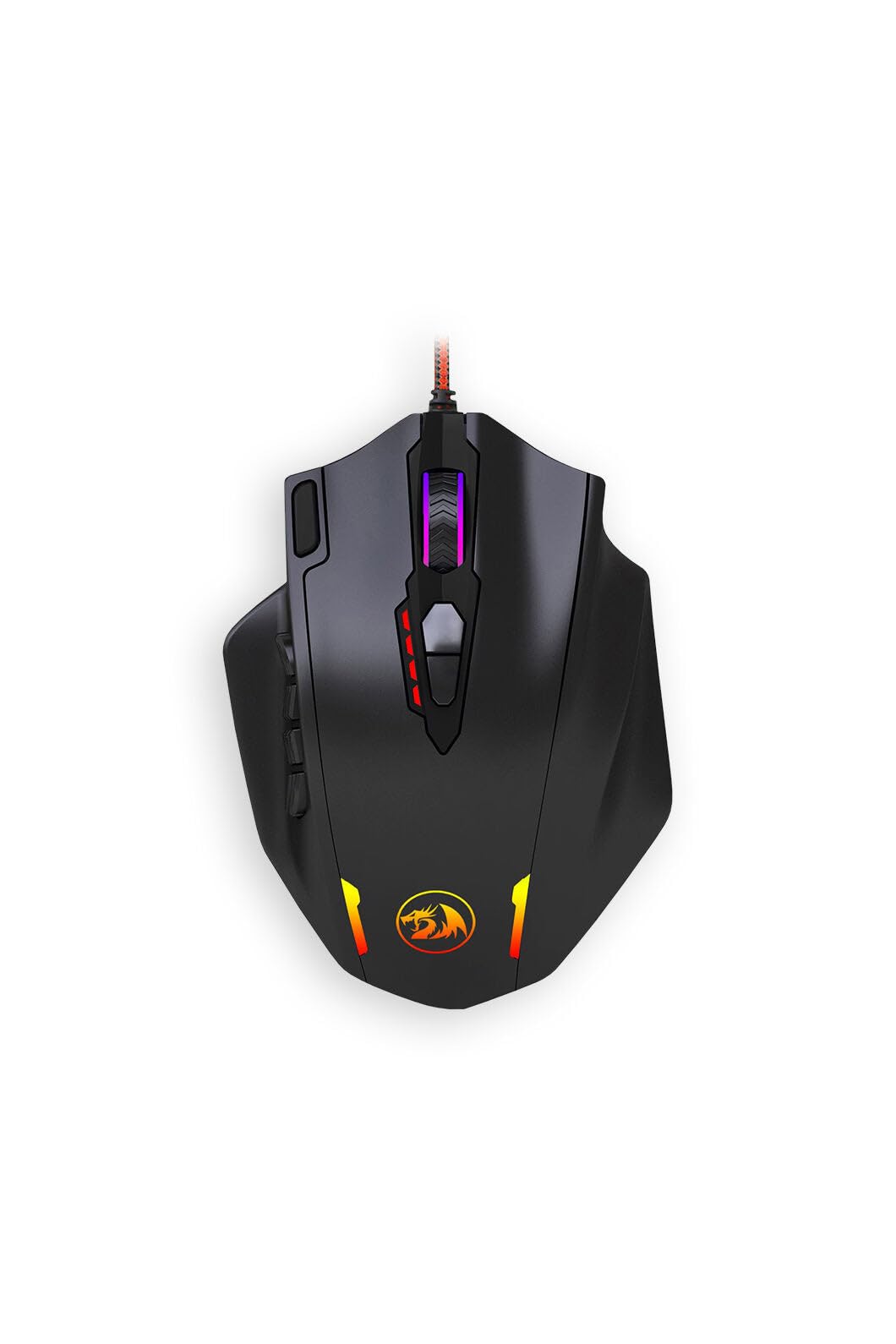
The Redragon M908 is a dedicated MMO mouse that offers an incredible 18 programmable buttons, including a 12-button side panel. This layout is a game-changer for MMO players who need instant access to skills, macros, and abilities without reaching for the keyboard. The 12,400 DPI optical sensor is adjustable in 100 DPI increments via software, giving you fine control over sensitivity.
It includes a weight tuning cartridge, letting you adjust the mouse’s heft to find your perfect balance — a feature rarely seen at this price point. The build is solid, combining metal and plastic, and the RGB backlighting adds a budget-friendly gamer aesthetic. While the sensor isn’t as smooth as the Logitech HERO, it performs admirably for its target audience of RPG and strategy gamers where absolute perfection is less critical.
The main drawback is the software, which is functional but less polished than Logitech’s G Hub. The side buttons can also take some time to get used to, as distinguishing them by feel alone is challenging at first. For players who want a massive number of buttons for complex macros or MMO rotations, the Redragon M908 provides unbeatable value and functionality.
Why it’s great
- 18 programmable buttons for MMO and macro-heavy games.
- Includes weight tuning cartridge for customized feel.
- Solid metal and plastic construction at a very low cost.
Good to know
- Software is basic and not as user-friendly as major brands.
- 12-button side panel is crowded and requires practice to use by touch.
5. AULA SC580 Tri-Mode Wireless Gaming Mouse

The AULA SC580 is an entry-level wireless mouse that excels in flexibility thanks to its tri-mode connectivity: 2.4GHz, Bluetooth 5.0, and USB-C wired. This makes it a fantastic option for gamers who also need a mouse for productivity across multiple devices like a PC, laptop, or tablet. The 12,000 DPI sensor and 1000Hz polling rate in 2.4GHz mode ensure low-latency performance adequate for most gaming genres.
Its lightweight 82-gram design and ergonomic right-handed shape are comfortable for long sessions, and the included anti-slip stickers are a thoughtful touch for sweaty hands. The built-in 500mAh rechargeable battery offers decent life, with many users reporting 10-14 days of moderate use. The 6 programmable buttons allow for basic macro assignments, though customization software is only available for Windows.
While the sensor and build quality don’t match the Logitech G305’s refinement, the SC580 offers excellent value for users who want wireless freedom and multi-device switching. The main trade-off is that Bluetooth mode introduces noticeable input lag, so competitive gamers should stick to the 2.4GHz dongle. For a budget-friendly, jack-of-all-trades wireless mouse, the AULA SC580 is a compelling and affordable choice.
Why it’s great
- Tri-mode connectivity (2.4GHz/BT/USB-C) for multi-device use.
- Lightweight 82g ergonomic design with anti-slip stickers.
- Rechargeable 500mAh battery with decent longevity.
Good to know
- Bluetooth mode has noticeable input lag, not ideal for competitive gaming.
- Software is Windows-only and offers limited customization.
FAQ
Is a 12,000 DPI budget mouse better than an 8,000 DPI model?
Can I use a budget gaming mouse for office work?
Why does a 1000Hz polling rate matter for budget gaming?
Will a budget wireless mouse have input lag?
Final Thoughts: The Verdict
For most users, the best budget mouse for gaming winner is the Logitech G203 because it delivers a proven, zero-smoothing sensor, durable mechanical switches, and a reliable wired connection at the lowest cost. If you want a lag-free wireless experience, grab the Logitech G305. And for gamers who need extensive macro options and an ergonomic shape without spending much, nothing beats the Razer Basilisk V3.

Mo Maruf
I created WellFizz to bridge the gap between vague wellness advice and actionable solutions. My mission is simple: to decode the research and give you practical tools you can actually use.
Beyond the data, I am a passionate traveler. I believe that stepping away from the screen to explore new environments is essential for mental clarity and physical vitality.