Our readers keep the lights on and my smoothie glass nicely filled. As an Amazon Associate, I earn from qualifying purchases.
Your stream’s audio quality is the first thing viewers judge, and a headset mic just doesn’t cut it once you’re past your first few broadcasts. The right USB condenser or dynamic mic eliminates background noise and captures your voice with clarity, transforming your audio without needing a complicated XLR setup or a massive budget.
I’m Mohammad Maruf — the founder and writer behind WellFizz. I’ve spent years analyzing the market for streaming microphones, evaluating specifications like pickup patterns, sample rates, and noise rejection to separate genuine value from marketing hype.
After comparing dozens of models under based on real build quality and audio performance, I’ve identified the mics that deliver professional-level streaming audio without emptying your wallet. This is the definitive guide to finding the best budget mic for streaming in 2024.
How To Choose The Best Budget Mic For Streaming
Streaming microphones live and die by their ability to isolate your voice from the chaos of a gaming room. For budget buyers, the choice often boils down to two variables: the mic capsule type (condenser vs. dynamic) and the connectivity you need (USB-only vs. dual USB/XLR). Here’s what matters most when building your audio setup on a budget.
Condenser vs. Dynamic Capsules for Streaming
Condenser mics are more sensitive, capturing subtle vocal detail and higher frequencies — ideal if you have a treated or quiet room. They excel at picking up voice from a distance. Dynamic mics, by contrast, are less sensitive and naturally reject ambient noise like keyboard clicks and fan hum. For a shared or noisy streaming space, a dynamic capsule (like the one in the MAONO PD100X) can save you hours of post-processing. Condenser mics (like the FIFINE AM6) offer richer sound but require closer proximity and quieter surroundings.
USB vs. XLR Connectivity on a Budget
Pure USB mics are the gold standard for plug-and-play convenience. They connect directly to your PC, don’t require an audio interface, and work with Discord, OBS, and Twitch right out of the box. Dual USB/XLR mics (like the MAONO PD100X) cost a bit more but give you a future upgrade path to professional mixers and preamps. The catch: many dual-connection mics lose hardware controls like mute buttons and RGB when used in XLR mode, so confirm your intended primary connection method before buying.
Polar Pattern and Noise Rejection
Cardioid is the standard for streaming — it picks up sound from the front while rejecting noise from the sides and rear. This pattern works well for a single speaker sitting directly in front of their monitor. Supercardioid patterns (found on Razer Seiren V2 X) offer even tighter side rejection but require more precise positioning, as they also pick up a small amount of sound from the rear. If you share a room or have loud peripherals, prioritize a supercardioid or dynamic capsule with a tight pickup angle.
Quick Comparison
On smaller screens, swipe sideways to see the full table.
| Model | Category | Best For | Key Spec | Amazon |
|---|---|---|---|---|
| Razer Seiren V3 Chroma | Premium | Streamers who want RGB ecosystem | Supercardioid, 96dB S/N | Amazon |
| Razer Seiren V2 X | Mid-Range | Pure PC gaming with noise rejection | Supercardioid, 25mm capsule | Amazon |
| FIFINE AmpliGame KS5 Bundle | Premium | All-in-one streaming setup | Dynamic capsule, XLR+USB | Amazon |
| HyperX SoloCast 2 | Mid-Range | Plug-and-play convenience | 24-bit / 96kHz condenser | Amazon |
| MAONO PD100X | Value | Versatile USB/XLR workflows | Dynamic, 24-bit / 48kHz | Amazon |
| FIFINE AmpliGame AM6 | Mid-Range | Game/voice balance control | Condenser, dual noise cancellation | Amazon |
| InnoGear Gaming USB Mic | Budget | First-time streamers on a tight budget | Cardioid, 20Hz-20KHz | Amazon |
In‑Depth Reviews
1. Razer Seiren V3 Chroma

Razer’s Seiren V3 Chroma is the undisputed premium pick for streamers who want their mic to be part of the show. The supercardioid condenser capsule captures voice detail with impressive accuracy while suppressing room noise like typing and mouse clicks better than standard cardioid mics. The built-in digital gain limiter automatically prevents clipping during loud moments, and the shock absorber dampens desk vibrations that would otherwise ruin a stream.
The standout feature is the multi-function tap-to-mute sensor on top, which can be programmed for double and triple tap commands — adjust lighting or toggle the gain limiter without touching software. The stream- and game-reactive RGB lighting syncs with Chroma-integrated games and Twitch events, creating a truly immersive visual experience. A built-in headphone jack enables zero-latency monitoring, which is critical for maintaining audio levels while live.
At 96dB signal-to-noise ratio and 20Hz-20KHz frequency response, the audio quality rivals mics twice its price. The USB plug-and-play design works seamlessly with Discord, OBS Studio, and XSplit, and Razer Synapse software unlocks deeper customization for bit rates and stream volume mixes. The all-metal build feels dense and durable on the desk, though the plastic base is lighter than the body suggests.
Why it’s great
- Supercardioid rejection keeps keyboard clicks out of streams
- Stream-reactive RGB integrates with games and alerts
- Digital gain limiter prevents audio peaking automatically
- Tap-to-mute sensor offers customizable shortcuts
Good to know
- Razer Synapse software requires some configuration out of the box
- Plastic base feels less premium than the metal body
- No onboard gain knob — adjustments require software
2. Razer Seiren V2 X

The Razer Seiren V2 X is a no-nonsense USB condenser mic built for pure PC gaming audio. Its 25mm condenser capsule and supercardioid pickup pattern deliver a tight focus on your voice, making it one of the best budget options for rejecting ambient noise without needing third-party software. The integrated digital limiter automatically catches peaking, so you won’t sound distorted even when you get loud during clutch moments.
Physical controls are minimal but effective: a gain control knob and mute button sit on the body, giving you direct access to your audio levels without alt-tabbing. The built-in shock absorber does a respectable job of dampening desk bumps and accidental knocks, a crucial feature for a mic that sits on a shared desk. USB-C connectivity replaces the outdated micro-USB of earlier models, and the longer braided cable adds flexibility for desk placement.
Mic monitoring via the headphone jack lets you hear yourself in real time, which is invaluable for maintaining consistent voice levels. The plastic enclosure keeps the weight down, and the compact footprint fits easily in crowded gaming setups. Reviewers consistently note that the supercardioid pattern requires you to speak directly into the top for optimal clarity, but within that sweet spot, the audio quality punches well above its weight class.
Why it’s great
- Supercardioid pattern excels at rejecting side and rear noise
- USB-C cable with longer length for flexible placement
- Hardware mute and gain controls without software
- Built-in shock absorber reduces desk vibration
Good to know
- Plastic build feels less sturdy than metal alternatives
- Requires close speaking distance for best performance
- Gain knob spins freely without end stops
3. FIFINE AmpliGame KS5 Bundle

FIFINE’s AmpliGame KS5 is the only complete bundle in this lineup, pairing a dynamic XLR/USB mic with a dedicated audio mixer for comprehensive audio control. The dynamic capsule is inherently better at rejecting background noise than condenser mics, making this the go-to choice for streamers in noisy environments. The included mixer gives you individual mute controls, headphone monitoring, and volume faders for separate input and output channels — capabilities normally reserved for setups costing several times more.
The bundle’s audio mixer supports four channels with controllable RGB lighting that can match your streaming theme. The XLR connection to the mixer delivers cleaner, noise-free audio transmission compared to USB, but the mic also works as a standard USB device if you don’t need the mixer. All function keys (mute, RGB, monitoring, volume knob) are only active in USB mode — XLR mode strips those controls, so plan your primary connection method accordingly.
Reviewers praise the KS5 for its ease of setup: the included XLR cable and USB-C cables make it truly plug-and-play. The dynamic capsule’s natural noise reduction means you can stream without obsessively gating background noise in OBS. The mixer’s volume faders feel smooth despite the plastic build, and the RGB effects add visual flair. It’s the most complete starter solution for someone who wants to grow into professional streaming without replacing hardware.
Why it’s great
- Complete bundle includes mixer with individual channel control
- Dynamic capsule inherently rejects room noise
- XLR connection provides cleaner audio than USB
- Multiple RGB effects match any streaming aesthetic
Good to know
- Hardware controls disabled in XLR-only mode
- Mixer is basic — no onboard voice changers or effects
- Bulky compared to standalone USB mics
4. HyperX SoloCast 2

HyperX’s SoloCast 2 is the definition of minimalist streaming audio done right. It’s a USB condenser mic with a cardioid polar pattern and a built-in pop filter and shock mount integrated into the body — no extra accessories needed to get studio-quality sound. The 24-bit / 96kHz sampling rate is the highest in this peer group, delivering exceptional audio detail for voiceovers, commentary, and light podcasts.
The tap-to-mute sensor on top features a red LED that illuminates when the mic is live, a simple but effective visual cue for avoiding broadcast accidents. The tiltable stand has a weighted base that keeps the mic planted during intense gaming sessions, and the built-in 3/8″ and 5/8″ threads let you mount it on a boom arm without an adapter. Audio filters (high-pass, low-pass, voice enhancement) are customizable via HyperX NGENUITY software and can be saved directly to the mic for consistent sound across different PCs.
The compact footprint (1.52 x 1.7 inches) saves desk space without sacrificing stability. The cardioid pattern captures your voice clearly from the front while rejecting side noise reasonably well, though reviewers note it is sensitive to loud keyboard clicks without noise suppression enabled. The USB-C to USB-A cable is 3 feet long, which may require a USB hub for deeper desks. It’s the ideal choice for streamers who value clean looks and plug-and-play simplicity over adjustable features.
Why it’s great
- Studio-grade 24-bit / 96kHz audio in a small package
- Built-in pop filter and shock mount eliminate extra purchases
- Tap-to-mute with clear red LED indicator
- Saveable audio filters via NGENUITY software
Good to know
- Sensitive to background noise without software processing
- USB-C port on back is not secured; may disconnect with cable tugging
- No onboard gain control — adjustments are software-only
5. MAONO PD100X

The MAONO PD100X is a dynamic USB/XLR microphone that punches well above its price point, offering 24-bit / 48kHz sampling with a 40Hz-16KHz frequency response. The dynamic capsule provides natural ambient noise rejection that condenser mics can’t match, making it an excellent choice for streamers who game in shared or noisy rooms. MAONO claims a 50% improvement in sound detail over competitors with 16-bit / 48kHz specs, and real-world tests confirm the audio is warm and clear with minimal post-processing needed.
The dual USB/XLR connectivity gives you flexibility: plug it directly into your PC for immediate streaming use, or connect it to an audio interface or mixer via XLR for professional-grade recording. The MaonoLink software allows you to adjust noise reduction levels to fit your specific environment, which is a level of customization rarely seen at this price tier. Customizable RGB lighting offers 3 modes and 8 color options, all controllable via the MaonoLink desktop app or the button on the bottom of the mic.
The 2-in-1 smart knob independently controls gain and monitoring volume, and the tap-to-mute function silences the mic instantly. The built-in headphone jack enables real-time monitoring so you can hear exactly how you sound to your audience. The mic sits on a sturdy included desktop stand, and the metal and plastic enclosure feels robust. Note that RGB and function key controls are only available in USB mode — XLR mode disables these features entirely, so choose your connection method based on your primary use case.
Why it’s great
- Dynamic capsule naturally rejects keyboard and fan noise
- Customizable noise reduction via MaonoLink software
- Dual USB/XLR for easy upgrades to professional setups
- Independent gain and monitoring volume controls on mic
Good to know
- Hardware controls disabled in XLR-only mode
- Requires close proximity to mic for best results
- RGB effects only work via USB connection
6. FIFINE AmpliGame AM6
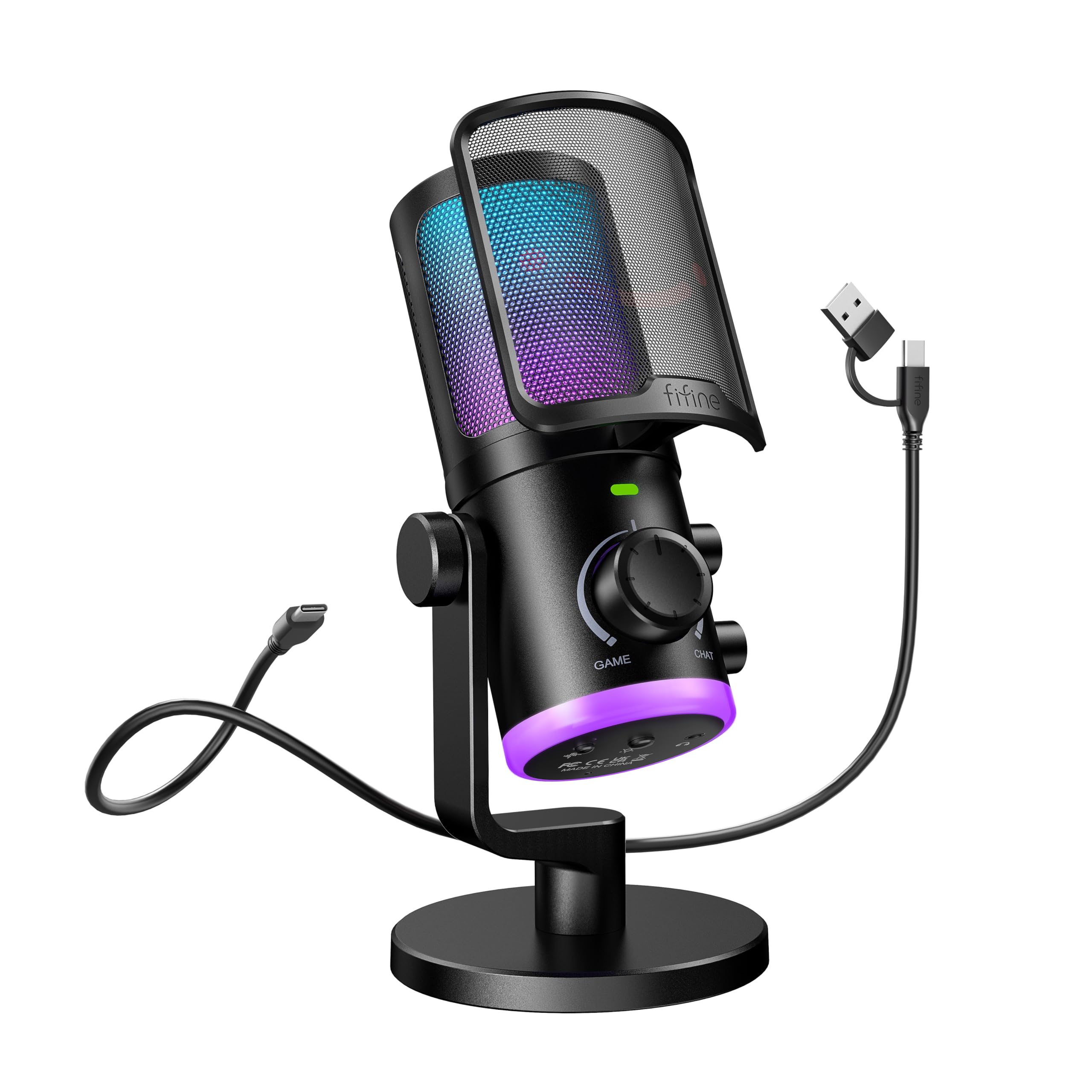
FIFINE’s AmpliGame AM6 is a USB condenser mic with a unique ChatMix dial that lets you balance game audio and voice chat volume directly on the mic — no alt-tabbing required. This feature alone makes it a top contender for competitive streamers who need to hear footsteps while maintaining clear communication with their squad. The dual-mic noise cancellation technology synthesizes two signals (voice and ambient) to actively filter out background noise without sacrificing vocal clarity.
The RGB lighting is split into top and bottom zones, creating a layered aesthetic that syncs with your keyboard and mouse lighting. Function keys include a tap-to-mute button, real-time monitoring control, gain knob, and separate headphone volume control. Setup is true plug-and-play: the USB-C cable works with PS4, PS5, Mac, and Windows without drivers. The ChatMix dial is only functional on desktop PCs — it’s disabled on consoles, which is an important caveat for console streamers.
Reviewers consistently praise the sound quality for its price, noting that the noise cancellation effectively blocks fan and keyboard noise when engaged. The cardioid pattern captures voice from the front with warmth, though some users with deeper voices found the built-in noise suppression created an underwater effect in Discord. The metal frame and removable pop filter add to the premium feel, and the long USB cable (6.5 feet) provides ample reach for most desk setups. It’s the best option for streamers who prioritize game audio balance over absolute vocal purity.
Why it’s great
- ChatMix dial adjusts game/voice balance without software
- Dual-mic noise cancellation actively filters background hum
- Separate gain and headphone volume controls
- Layered RGB with top and bottom lighting zones
Good to know
- ChatMix dial only works on PC, not consoles
- Noise suppression can distort deeper vocal tones
- Real-time monitoring not active by default on Windows
7. InnoGear Gaming USB Mic

The InnoGear Gaming USB Microphone proves that entry-level pricing doesn’t have to mean unusable audio. It features an upgraded cardioid condenser capsule that captures voice clarity with a 20Hz-20KHz frequency response, delivering surprisingly warm and natural sound for its cost bracket. The noise cancellation mode minimizes background noise effectively, making it a viable starter mic for Twitch newcomers and Discord users who want to step up from a headset without a significant investment.
The touch-sensitive mute button on top and a large gain control knob at the base provide basic audio management that’s intuitive even for first-time users. Zero-latency monitoring ensures you can hear yourself in real time, though the headphone output quality is basic. The RGB lighting offers four modes (solid, multi-color gradient, single-color breathing, and transitions), adding visual appeal to any gaming setup. The USB-C connection with a 6.56-foot cable provides flexibility for placement, and the included shock mount and pop filter are generous additions at this price point.
The metal frame feels more durable than many mics in its tier, and the desk clamp holds firm during use. The cardioid pattern picks up voice well from a few feet away, but the noise cancellation struggles with very loud background noise. The mic is not compatible with Xbox, which limits its use for console streamers. Customers consistently mention that the value far exceeds the price, making it a fantastic entry point for anyone building their first streaming setup on an ultra-tight budget.
Why it’s great
- Exceptional value with shock mount and pop filter included
- Touch-sensitive mute with clear visual feedback
- Four RGB modes for customizable desk aesthetic
- Metal frame feels premium for the price
Good to know
- Not compatible with Xbox consoles
- Noise cancellation struggles with very loud environments
- Stand can loosen over time with frequent adjustments
FAQ
Do I need a mixer for a budget streaming mic?
Why does my budget condenser mic pick up my keyboard clicks?
Can I use these mics with a PS5 or Xbox for streaming?
Final Thoughts: The Verdict
For most users, the best budget mic for streaming winner is the Razer Seiren V3 Chroma because its supercardioid condenser and stream-reactive RGB deliver premium audio and visual impact without requiring an external mixer. If you want maximum noise rejection for a loud room, grab the MAONO PD100X for its dynamic capsule and customizable MaonoLink software. And for a complete all-in-one starter setup with hardware controls, nothing beats the FIFINE AmpliGame KS5 Bundle.

Mo Maruf
I created WellFizz to bridge the gap between vague wellness advice and actionable solutions. My mission is simple: to decode the research and give you practical tools you can actually use.
Beyond the data, I am a passionate traveler. I believe that stepping away from the screen to explore new environments is essential for mental clarity and physical vitality.