Our readers keep the lights on and my smoothie glass nicely filled. As an Amazon Associate, I earn from qualifying purchases.
Choosing a mesh WiFi system on a tight budget means walking a tightrope between coverage and speed. Many entry-level kits deliver wide coverage but choke under the load of modern streaming and video calls, while others cap your internet plan well below its potential. The real challenge is finding a system that balances these trade-offs without forcing you to upgrade again next year.
I’m Mohammad Maruf — the founder and writer behind WellFizz. I’ve spent years analyzing home networking hardware, scrutinizing data sheets, and studying real-world performance patterns to help buyers make sense of crowded market shelves.
This guide breaks down the specific specs that separate a good budget pick from a frustrating one, with clear recommendations for every home size and use case. If you are shopping for the best budget mesh wifi system for your home in 2026, these are the options that actually deliver on their promises.
How To Choose The Best Budget Mesh WiFi
When every dollar matters, picking the wrong system can waste both your money and your time. Here are the three most important factors to evaluate before you buy.
Wi-Fi Generation: AC1200 vs AX3000
The generation of Wi-Fi hardware determines how efficiently your devices communicate. AC1200 (Wi-Fi 5) systems are the most common in the budget tier — they handle basic browsing and HD streaming for a handful of devices without issue. AX3000 (Wi-Fi 6) systems cost slightly more but offer better efficiency, which means faster real-world speeds when multiple devices compete for bandwidth. For households with more than 20 connected devices, skipping Wi-Fi 6 is a false economy.
Real Coverage vs. Marketing Claims
Manufacturers often quote coverage in ideal, open environments with minimal interference. In a typical home with walls, floors, and appliances, real coverage is roughly 50 to 70 percent of the advertised number. A system that claims 4,500 square feet may realistically cover a 2,500-square-foot house with a single node. The key spec to check is the number of nodes in the pack: two nodes generally handle 2,000–3,000 square feet, while three nodes push toward 4,000+ square feet in practice.
Ethernet Backhaul Support
Wired backhaul lets nodes communicate over Ethernet instead of using the wireless spectrum. This frees up airtime for your devices and significantly improves performance, especially in budget dual-band systems where the same radio handles both client traffic and node-to-node communication. If your home has Ethernet runs or you are willing to run a single cable between two rooms, prioritize a system that supports wired backhaul — it turns a merely adequate budget mesh into a rock-solid network.
Quick Comparison
On smaller screens, swipe sideways to see the full table.
| Model | Category | Best For | Key Spec | Amazon |
|---|---|---|---|---|
| TP-Link Deco X55 Pro (1-Pack) | AX3000 | Small homes needing Wi-Fi 6 | 2x 2.5G WAN/LAN ports | Amazon |
| TP-Link Deco S4 (2-Pack) | AC1900 | Large houses on a strict budget | 3,800 sq. ft. coverage (2-pack) | Amazon |
| Google WiFi (2-Pack) | AC2200 | Easy setup and parental controls | 3,800 sq. ft. (Wi-Fi 5) | Amazon |
| Amazon eero 6 (3-Pack) | AX1800 | Zigbee smart home hub integration | 4,500 sq. ft. / 75+ devices | Amazon |
| Linksys Atlas MX20MS3 (3-Pack) | AX3000 | Very large homes up to 6,000 sq. ft. | 60,000 sq. ft. dual-band AX3000 | Amazon |
| NETGEAR Nighthawk MK72 | AX3000 | Gamers needing low latency | 3,000 sq. ft. + 35+ devices | Amazon |
| Google WiFi Refurbished (3-Pack) | AC1200 | Max coverage per dollar | 4,500 sq. ft. (certified refurbished) | Amazon |
| Tenda Nova MW5G (3-Pack) | AC1200 | Rock-bottom entry price | 3,500 sq. ft. / 80 devices | Amazon |
| NETGEAR Nighthawk MK6W | AX1800 | Small home Wi-Fi 6 upgrade | 4,500 sq. ft. dual-band | Amazon |
In‑Depth Reviews
1. TP-Link Deco X55 Pro (1-Pack)

The Deco X55 Pro punches well above its weight by offering 2.5-gigabit multi-gig ports — a feature usually found on routers costing twice as much. This single unit covers 2,500 square feet and handles up to 150 devices with its AX3000 Wi-Fi 6 architecture, making it ideal for a 1+ Gbps internet plan or a connected home with dozens of IoT gadgets.
Setup through the Deco app is fast, and the AI-driven mesh intelligence optimizes channel selection automatically. IT professionals have confirmed that placing it in Access Point mode behind an existing router works flawlessly, giving you advanced Wi-Fi 6 without replacing your primary router’s NAT and firewall.
The single-pack limitation means you will need additional units for larger homes, but the 2.5G ports allow wired backhaul at full multi-gig speed. Solid throughput and a strong security framework (TP-Link HomeShield) make this the best foundational node for a budget mesh that can grow.
Why it’s great
- 2.5-gigabit ports for future-proof wired backhaul
- AI-driven mesh optimizes channels automatically
- Connect up to 150 devices without slowdown
Good to know
- Single unit covers only 2,500 sq. ft.
- Requires multiple units for whole-home coverage
- Subscription needed for advanced HomeShield features
2. TP-Link Deco S4 (2-Pack)

The Deco S4 strikes a rare balance: it combines wide coverage (3,800 square feet with the 2-pack) with a price that leaves room in your budget for an extra node. This AC1900 system uses three streams per band to sustain throughput even with 75 devices attached — a real advantage for crowded households.
Real-world reports from owners of large brick homes confirm that the S4 reliably ends dead zones that extenders never fixed. One user measured 450–550 Mbps near a node and 220–300 Mbps in far corners of a 4,800-square-foot home on a 500 Mbps fiber line, with 14 months of uptime and zero reboots.
The absence of a dedicated backhaul band means performance drops when nodes rely on wireless links, but wired Ethernet backhaul support turns this into a non-issue. Parental controls are robust, and the Deco app keeps management simple. For sheer square-footage-per-dollar, the S4 is hard to beat.
Why it’s great
- Excellent coverage at 3,800 sq. ft. (2-pack)
- Wired Ethernet backhaul boosts stability
- Proven long-term reliability with zero reboots
Good to know
- No dedicated wireless backhaul band
- Web interface is basic and limited
- Only two Ethernet ports per node
3. NETGEAR Nighthawk MK72 (AX3000)

The Nighthawk MK72 delivers Wi-Fi 6 speeds up to AX3000 with a dedicated router and satellite that cover 3,000 square feet. The included NETGEAR Armor software provides an automatic security shield with VPN support, making this the most security-conscious option in the budget range. Setup takes roughly 20 minutes through the Nighthawk app.
Users report strong 4K streaming and gaming performance, with the mesh handoff handling video calls without stutter. The dual 1-gigabit Ethernet ports on both the router and satellite give you wired connections for a console, PC, or streaming device without needing an extra switch.
A subset of owners experienced random disconnects after two months, and the initial setup sometimes requires a Spectrum modem bridge configuration. The MK72 is a strong performer when it works, but the firmware stability track record is less consistent than TP-Link or Google alternatives at this tier.
Why it’s great
- NETGEAR Armor adds real-time security and VPN
- Wi-Fi 6 delivers low latency for gaming
- Expandable with additional MS70 satellites
Good to know
- Some units develop random disconnects after 2 months
- Setup may require ISP modem bridge configuration
- Coverage limited to 3,000 sq. ft. stock
4. Linksys Atlas MX20MS3 (3-Pack)

The Linksys Atlas 6 delivers the largest coverage footprint in this lineup: a 3-pack covers up to 6,000 square feet, supporting more than 75 devices on a dual-band AX3000 architecture. The advanced Qualcomm chipset keeps latency low enough for console gaming, and Intelligent Mesh Technology dynamically maximizes speed across all nodes.
Setup through the Linksys app is straightforward, and users report seamless coverage from basement to backyard with no buffering. The semi-wired configuration — where nodes connect to a switch via Ethernet while devices connect wirelessly — allows full ISP-speed delivery to phones and laptops without complexity.
Some long-term owners note that power outages require reboots or factory resets, and the app occasionally disconnects. The Atlas 6 is best for large homes where coverage is the top priority, but the intermittent stability issues mean it is not the set-and-forget choice for every buyer.
Why it’s great
- Largest coverage: 6,000 sq. ft. with 3-pack
- Qualcomm chipset ensures low-latency gaming
- Easy app-based setup and parental controls
Good to know
- Power outages may force a factory reset
- App connectivity can be unreliable
- No dedicated wireless backhaul band
5. Google WiFi AC1200 3-Pack (Snow) — Certified Refurbished

This certified refurbished Google WiFi 3-pack provides 4,500 square feet of dual-band AC1200 coverage at a fraction of the original retail price. Each puck covers 1,500 square feet, and the Google Home app delivers a setup experience that takes under 10 minutes — no technical knowledge required.
Users praise the seamless whole-home coverage for outdoor security cameras and the ability to prioritize bandwidth for specific devices during events like NFL streaming. The system handles 2-story homes effectively, with one owner expanding to 4 nodes for multiple Nanit baby cameras without any dropped feeds.
The 90-day limited hardware warranty on refurbished units is shorter than new products, and the AC1200 Wi-Fi 5 standard caps throughput compared to modern Wi-Fi 6 alternatives. For buyers who need maximum coverage at a minimum price and can accept 2016-era hardware, this is a very compelling deal.
Why it’s great
- Lowest cost for 4,500 sq. ft. of mesh coverage
- Setup takes under 10 minutes via Google Home app
- Reliable for security cameras and IoT devices
Good to know
- 90-day warranty on refurbished units
- AC1200 Wi-Fi 5 limits peak speed
- No Ethernet backhaul option
6. Google WiFi AC2200 (2-Pack)
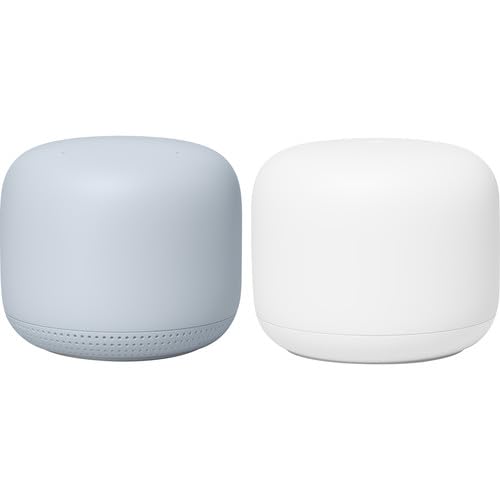
This new-manufacture Google WiFi 2-pack offers 3,800 square feet of coverage with AC2200 dual-band speeds. The same simple Google Home app setup applies, and the system works seamlessly with Starlink and other ISP equipment. Devices automatically hand off between nodes as you move through the home.
Owners report that the system stays dependable with minimal management, offering informative notifications and the ability to pause Wi-Fi for specific devices. The compact design blends into any room, and the parental controls let you manage screen time for children without complex configuration.
The 2-pack limitation means very large homes or multi-story houses with concrete floors may need a third point for complete coverage. AC2200 speeds are adequate for most internet plans up to 1 Gbps, but Wi-Fi 6 features like OFDMA and better device density handling are absent.
Why it’s great
- Plug-and-play simplicity with Google Home app
- Works reliably with Starlink and other ISPs
- Clean, compact design fits any decor
Good to know
- No Wi-Fi 6 — AC2200 limits multi-device efficiency
- 2-pack may not cover very large homes
- Lacks Ethernet backhaul support
7. Amazon eero 6 (3-Pack)

The eero 6 3-pack supports internet plans up to 500 Mbps and covers 4,500 square feet with Wi-Fi 6 (AX1800). Its standout feature is the integrated Zigbee smart home hub, which lets Alexa-enabled devices connect directly without a separate bridge — a rare feature in the budget tier.
Setup is famously simple: plug in, open the eero app, and follow the steps. Users report excellent coverage for cameras in distant outbuildings and a reliable signal for 4K streaming across multiple rooms. The system also gets better over time through automatic firmware updates that bring security patches and performance improvements.
The 500 Mbps speed cap means this system cannot leverage gigabit internet plans, and the lack of a dedicated backhaul band reduces throughput in larger homes where nodes rely on wireless links. For subscribers with plans at or below 500 Mbps who also use Alexa smart home devices, the eero 6 is a uniquely well-integrated choice.
Why it’s great
- Built-in Zigbee hub eliminates need for separate bridge
- Very easy setup and automatic updates
- Reliable 4,500 sq. ft. coverage with 3-pack
Good to know
- Capped at 500 Mbps internet plan support
- No dedicated wireless backhaul band
- Occasional video call freezing reported
8. Tenda Nova MW5G (3-Pack)

The Tenda Nova MW5G is the most affordable 3-pack in this guide, covering up to 3,500 square feet with AC1200 dual-band speeds and supporting up to 80 devices. MU-MIMO and Beamforming technologies help maintain consistent throughput even when multiple devices stream simultaneously.
Real-world buyers confirm that three units can cover a house plus a distant creek area 250 feet away, with one unit sacrificed to a power surge and easily replaced. The app-based setup works in minutes, and the system reliably delivers 100–300 Mbps on a 400 Mbps plan throughout a multistory home.
The lack of a browser-based interface, no WPS pairing, and the inability to manually select channels will frustrate power users. The MW5G is strictly an entry-level solution for those who want dead-zone-free browsing without any configuration headaches or advanced control.
Why it’s great
- Very low entry price for a 3-pack mesh
- MU-MIMO and Beamforming for multi-device use
- Simple app setup with no technical knowledge needed
Good to know
- No browser interface or manual channel control
- No WPS pairing for legacy devices
- AC1200 limits peak throughput
9. NETGEAR Nighthawk MK6W

The Nighthawk MK6W provides a Wi-Fi 6 (AX1800) mesh that covers up to 4,500 square feet at a price that undercuts most Wi-Fi 6 systems. The dual-band design supports speeds over 100 Mbps and includes a router with two satellites, giving you three nodes to spread across a large home.
Users who switched from rented ISP equipment saved per month and found the MK6W performed noticeably better for streaming and multi-device use. The Nighthawk app provides quick setup and advanced settings, including RSSI monitoring for troubleshooting weak connections.
Reliability is a significant concern: multiple owners report random satellite failures that require proximity resets, and one user experienced a firmware update failure that led to a prolonged RMA ordeal with only partial hardware return. The MK6W is a budget Wi-Fi 6 option best suited for buyers comfortable with occasional troubleshooting.
Why it’s great
- Three nodes for wide 4,500 sq. ft. coverage
- Wi-Fi 6 performance at a budget tier price
- Quick setup via Nighthawk app
Good to know
- Frequent satellite failures requiring reset
- Firmware update failures can lead to lengthy RMA
- Inconsistent reliability across units
FAQ
Can I mix different brands of mesh nodes in the same network?
Will a budget mesh system work with fiber internet over 500 Mbps?
How many mesh nodes do I actually need for a 2,500-square-foot home?
Final Thoughts: The Verdict
For most users, the best budget mesh wifi winner is the TP-Link Deco S4 (2-Pack) because it delivers wide 3,800-square-foot coverage with Ethernet backhaul support at an entry-level price. If you want Wi-Fi 6 with multi-gig ports for future-proofing, grab the TP-Link Deco X55 Pro. And for maximum coverage per dollar across very large homes, nothing beats the Linksys Atlas MX20MS3 (3-Pack).

Mo Maruf
I created WellFizz to bridge the gap between vague wellness advice and actionable solutions. My mission is simple: to decode the research and give you practical tools you can actually use.
Beyond the data, I am a passionate traveler. I believe that stepping away from the screen to explore new environments is essential for mental clarity and physical vitality.