Our readers keep the lights on and my smoothie glass nicely filled. As an Amazon Associate, I earn from qualifying purchases.
If you’re tired of your inkjet printer guzzling expensive cartridges or drying up between prints, you’re in the right place. A laser printer is the reliable, cost-effective workhorse you need for documents, homework, and reports. This guide cuts through the noise to find models that offer real value without hidden, long-term expenses.
I’m Mohammad Maruf — the founder and writer behind WellFizz. My expertise lies in dissecting market trends and analyzing technical specifications and user data to identify which products deliver genuine, long-term value over flashy marketing.
We’ve analyzed dozens of models, focusing on real-world reliability, connectivity, and the total cost of ownership, not just the sticker price. For sharp, reliable documents without the ongoing expense, finding the best budget laser printer is a game-changer for any home or small office.
How To Choose The Best Budget Laser Printer
Selecting the right printer isn’t just about finding the lowest upfront cost. The best value comes from a machine that matches your print volume, offers the features you’ll actually use, and keeps ongoing supply costs manageable. Let’s break down the key decision points.
Print Speed & Expected Volume
Measured in pages per minute (PPM), speed dictates workflow efficiency. For light home use, 19-30 PPM is ample. For a small office or heavy homework loads, look for 35+ PPM. Also check the printer’s recommended monthly duty cycle—this indicates its built stamina for consistent use without wear.
Connectivity: Wireless vs. Wired
Wireless (Wi-Fi) printing offers fantastic flexibility for printing from laptops, phones, and tablets anywhere on your network. Ethernet provides a stable, fast connection for a shared office printer. Simple USB-only models are often the most affordable and plug directly into one computer.
Function: Printer Only vs. All-in-One
Do you need to scan or copy? A multifunction (All-in-One) printer includes a flatbed scanner, and often a copier. Higher-end models add an Auto Document Feeder (ADF) for scanning multi-page documents. If you only need to print, a single-function model saves money and desk space.
Paper Handling & Duplexing
A standard 250-sheet tray handles a full ream of paper. A manual feed slot is crucial for printing envelopes or labels. Automatic duplexing (two-sided printing) saves paper and is a premium feature on many budget models, well worth seeking out.
The Real Cost: Toner & Longevity
The printer’s price is just the start. Research the cost and page yield of replacement toner cartridges. Some brands use more affordable third-party toner, while others, like HP, may use chips that encourage pricier genuine supplies. A higher-yield starter toner is a major bonus.
Quick Comparison
On smaller screens, swipe sideways to see the full table.
| Model | Type | Best For | Key Feature | Amazon |
|---|---|---|---|---|
| Brother HL-L2460DW | Laser | Home Office | Auto-Duplex, Wireless, 36 PPM | Amazon |
| HP LaserJet MFP M234sdw | Laser MFP | Small Teams | Auto Doc Feeder, Duplex, Wireless | Amazon |
| Brother MFC-L2820DW | Laser MFP | Small Office | ADF, Touchscreen, Fax, Duplex | Amazon |
| Canon imageCLASS LBP172dw | Laser | Speed & Simplicity | 35 PPM, Auto-Duplex, Wireless | Amazon |
| Xerox B310DNI Printer | Laser | High-Volume Home Office | 42 PPM, Duplex, Wireless | Amazon |
| HP Laserjet Pro 3001dw | Laser | Office Shared Use | 35 PPM, Duplex, Robust Security | Amazon |
| Xerox B230/DNI Printer | Laser | Wireless-First Homes | 36 PPM, Wireless, Duplex | Amazon |
| Brother HL-L2405W | Laser | Compact Home Use | 30 PPM, Wireless, Compact | Amazon |
| Canon imageCLASS MF3010 VP | Laser MFP | Basic USB Setup | Scan/Copy, USB, Includes Toner | Amazon |
| HP LaserJet MFP M139w (Renewed) | Laser MFP | Entry-Level Multifunction | Wireless, Scan/Copy, Compact | Amazon |
| HP LaserJet Pro 400 M401n (Renewed) | Laser | High-Volume Value | 35 PPM, 250-Sheet Tray, Ethernet | Amazon |
In‑Depth Reviews
1. Brother HL-L2460DW Wireless Laser Printer

The Brother HL-L2460DW strikes a remarkable balance, offering premium features like automatic two-sided printing and versatile connectivity at a mid-range point. It’s engineered for the home office or small team that needs efficiency without complexity. With a print speed of up to 36 pages per minute, it handles document batches swiftly, and the 250-sheet paper capacity means less frequent reloading.
Connectivity is a strong suit, with built-in dual-band Wi-Fi for stable wireless printing, an Ethernet port for a wired network connection, and a USB interface. The Brother Mobile Connect app allows for easy management and mobile printing. Users consistently praise its reliable Wi-Fi performance and straightforward setup process, often getting it running on multiple devices in minutes.
This model builds on Brother’s reputation for dependable laser engines and affordable long-term costs. The included TN830 toner cartridge offers a solid page yield, and replacement Brother Genuine or compatible toners are widely available and budget-friendly. It’s a compact, no-nonsense workhorse that delivers exactly what most people need from a monochrome laser printer.
Why it’s great
- Automatic duplex printing saves paper and time.
- Triple connectivity (Wi-Fi, Ethernet, USB) offers maximum flexibility.
- Fast 36 PPM speed is ideal for moderate print volumes.
- Known for reliable performance and low cost-per-page.
Good to know
- The small display and navigation can be slightly fiddly for initial Wi-Fi setup.
- Some users advise being cautious with the optional EZ Print subscription service.
2. HP LaserJet MFP M234sdw Wireless All-in-One

For small teams that need to print, scan, and copy, the HP M234sdw is a standout professional choice. Its key advantage is the built-in auto document feeder (ADF), which allows for hands-free scanning or copying of multi-page documents—a huge time-saver over placing pages one by one on a flatbed. It also boasts automatic two-sided printing, making it a fully featured hub for document management.
Performance is brisk at up to 30 pages per minute, and HP’s dual-band Wi-Fi with self-reset technology aims to maintain a stable connection. Setup is streamlined through the HP Smart app, which also enables easy mobile printing and scanning to cloud services. Users working in small business environments highlight its speed, professional print quality, and the convenience of the ADF for daily tasks.
This printer is eligible for HP’s Instant Ink subscription, which can automate toner deliveries, though you can also choose to buy cartridges traditionally. Its security features, like HP Wolf Pro Security on some models, add a layer of protection for business data. It represents a step up in functionality and is worth the premium for users whose workflow regularly involves scanning.
Why it’s great
- Auto Document Feeder is essential for scanning/copying multi-page documents.
- Comprehensive feature set with duplex print and wireless connectivity.
- Fast print speeds and reliable output quality for professional use.
- HP Smart app provides excellent mobile and cloud integration.
Good to know
- A premium option within the budget category.
- Some users note the paper tray can feel less sturdy than the main body.
- HP’s toner ecosystem may encourage use of genuine supplies.
3. Brother MFC-L2820DW All-in-One Laser Printer

The Brother MFC-L2820DW is the most capable all-in-one in this guide, designed for a small office that needs everything: print, copy, scan, and even fax. Its standout hardware includes a generous 50-page auto document feeder and a responsive 2.7-inch color touchscreen. The touchscreen vastly simplifies navigation and provides direct access to scan-to-cloud services like Google Drive and Dropbox.
It doesn’t sacrifice print performance for features, offering speeds up to 34 ppm and automatic duplex printing. The connectivity suite is complete with Wi-Fi, Ethernet, and USB. For businesses that still handle faxes, having an integrated laser fax machine eliminates the need for a separate device. Users transitioning from older models appreciate the speed boost and the seamless integration of all office functions into one reliable unit.
While it occupies a higher tier, the value is evident if you utilize all its functions. The long-term running costs remain low thanks to Brother’s affordable toner platform. It’s a compact powerhouse that can serve as the central document hub for a growing team without taking over your desk.
Why it’s great
- Comprehensive all-in-one with fax, large ADF, and intuitive touchscreen.
- Direct scan-to-cloud functionality streamlines workflow.
- Fast print speeds and robust paper handling for office environments.
- Brother’s reliability and cost-effective supplies.
Good to know
- The premium option with a price to match its extensive features.
- Larger and heavier than basic printers or simpler MFPs.
4. Canon imageCLASS LBP172dw Wireless Laser Printer

If your primary need is fast, efficient printing and you don’t require a scanner, the Canon LBP172dw is a top contender. It focuses on doing one thing exceptionally well: delivering monochrome pages at a rapid 35 per minute, complete with automatic two-sided printing. This makes it perfect for printing long reports, manuscripts, or homework assignments in a flash.
Its wireless connectivity is straightforward, supporting Canon’s PRINT app, Apple AirPrint, and Mopria for Android devices. The 250-sheet cassette ensures you can tackle big jobs without interruption. Users who prioritize speed and duplexing over multifunction capabilities find this model to be a straightforward, effective tool that gets out of the way and performs.
Setup can involve downloading drivers from Canon’s website, which some find more technical than app-based setups, but it’s a one-time process. The printer is ENERGY STAR and EPEAT Silver certified, reflecting good energy efficiency. It’s a modern, speed-focused printer that excels at its core task.
Why it’s great
- Very fast 35 PPM print speed for quick turnarounds.
- Automatic duplexing is standard, promoting paper savings.
- Solid wireless printing support for all major mobile platforms.
- Energy-efficient design with relevant certifications.
Good to know
- Setup may require manual driver downloads from Canon’s site.
- A small number of users report connectivity issues requiring troubleshooting.
- Print-only function (no scan/copy).
5. Xerox B310DNI Wireless Laser Printer
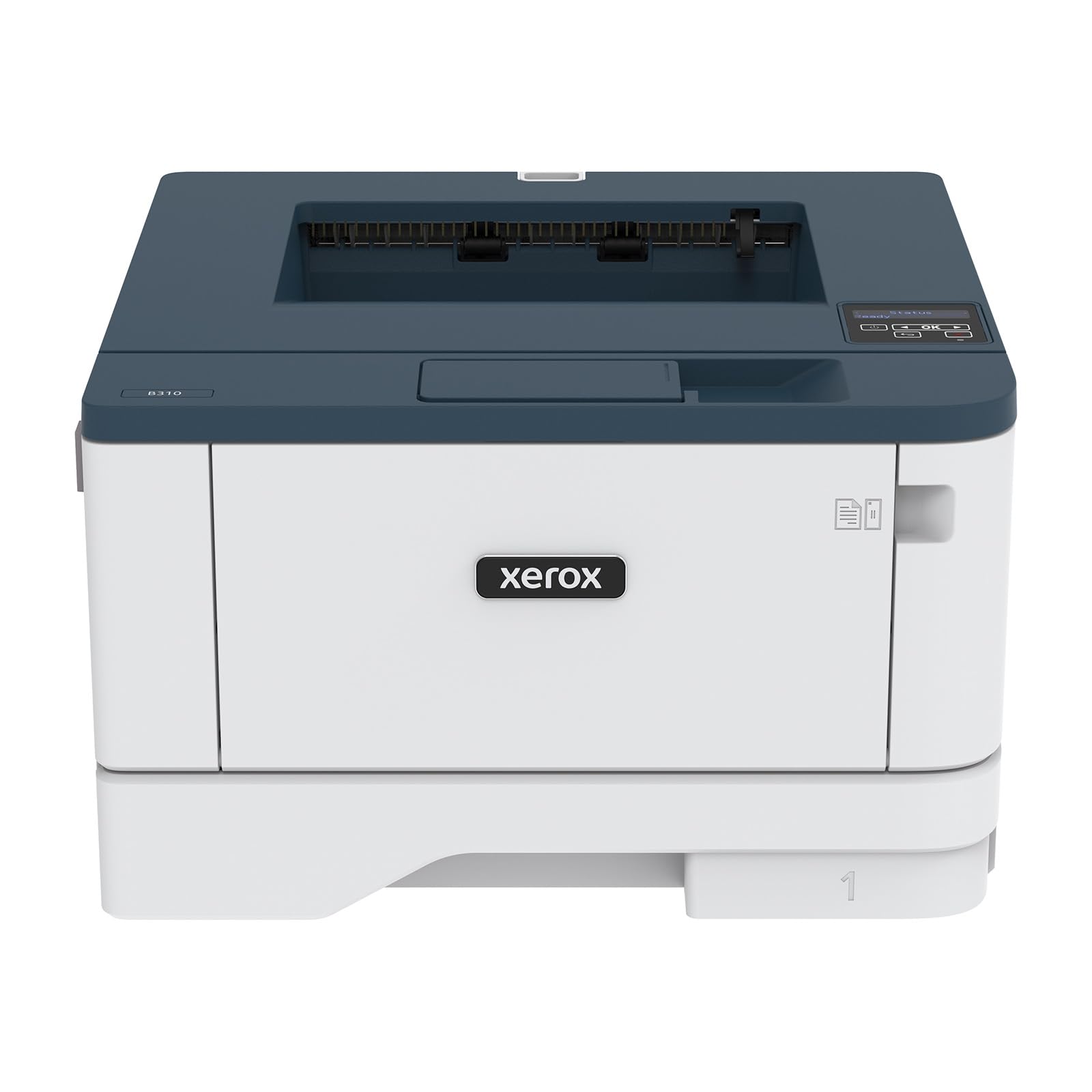
The Xerox B310DNI is the speed champion of this list, boasting an impressive 42 pages per minute. It’s built for a home office or small team with heavier print demands where time is critical. Alongside its blistering speed, it offers automatic duplex printing, wireless connectivity, and a robust 250-sheet tray, all in a relatively compact footprint.
This printer feels substantial and business-ready. Setup typically involves a mobile app or QR code, and once connected, users report very stable Wi-Fi performance. The print quality is sharp, making it suitable for text-heavy documents as well as graphics. It’s a no-frills, high-performance engine designed for users whose main metric is how quickly they can get a stack of pages printed.
As a print-only device, it focuses all its engineering on output speed and reliability. While the starter toner yield is standard, it’s a workhorse meant for consistent use. If your definition of “budget” includes getting the highest performance for your investment, the B310DNI makes a compelling case.
Why it’s great
- Extremely fast 42 PPM print speed leads the category.
- Solid, durable construction suitable for daily use.
- Includes automatic two-sided printing and wireless connectivity.
- Reliable performance for high-volume tasks.
Good to know
- Operational noise level is noted to be higher than some competitors.
- Toner cartridge yields may not be class-leading relative to the speed.
- Print-only function (no scan/copy).
6. HP Laserjet Pro 3001dw Wireless Printer

The HP LaserJet Pro 3001dw is built for small office environments where the printer may be shared among several users. It combines a fast 35 PPM engine with automatic duplexing and robust connectivity options, including Ethernet for reliable network integration. HP also emphasizes security with its Wolf Pro Security features, which can be important for businesses handling sensitive information.
Its “intelligent Wi-Fi” is designed to seek the best connection and stay online, aiming to reduce frustrating downtime. The large paper capacity supports shared use without constant refills. Users in office settings appreciate its speed and the professional quality of its output, finding it a dependable daily driver for team printing needs.
As with many HP models, it operates within HP’s ecosystem of supplies and security. Setup is generally smooth via the HP Smart app. While a few users have reported inconsistencies with the duplexing function, most find it to be a capable and secure printer ready for a collaborative workspace.
Why it’s great
- Designed for shared use in small offices with fast print speeds.
- Includes advanced security features to help protect network data.
- Intelligent Wi-Fi aims for maximum connectivity uptime.
- Supports automatic two-sided printing.
Good to know
- Some isolated reports of duplex printing errors in specific use cases.
- Firmware and supply ecosystem is tightly managed by HP.
7. Xerox B230/DNI Wireless Laser Printer

The Xerox B230 offers a compelling blend of good speed (36 PPM) and wireless convenience at a competitive mid-range point. It’s marketed as an easy-to-set-up solution for homes and small offices, with support for AirPrint, Mopria, and Chromebook printing right out of the box. For many users, the experience is plug-and-play, connecting to their network with minimal fuss.
It includes automatic two-sided printing, a significant paper-saving feature at this level. The compact design helps it fit into tighter spaces. Positive reviews frequently highlight how seamlessly it integrates into Apple environments and how quickly it prints everyday documents. It’s a straightforward, modern printer that covers the essential bases well.
As with any device, experiences can vary; a small subset of users found the Wi-Fi setup process on the small screen to be tedious, and others noted that replacement cartridges can be an expense to factor in. However, for most, it represents reliable wireless performance and good speed.
Why it’s great
- Strong wireless performance with broad mobile device support.
- Fast 36 PPM printing with automatic duplex capability.
- Often praised for simple, quick setup and operation.
- Compact form factor suitable for smaller desks.
Good to know
- Navigating Wi-Fi setup on the small display can be challenging for some.
- Replacement toner cartridges are noted to be on the pricier side.
8. Brother HL-L2405W Wireless Laser Printer

The Brother HL-L2405W is the more compact sibling to our top pick, offering excellent value for homes and home offices that don’t need automatic duplexing. It delivers sharp prints at a very respectable 30 pages per minute and connects via dual-band Wi-Fi for stable wireless performance. Its smaller footprint is a major advantage for tight spaces.
Users consistently report that it exceeds expectations for clarity and speed, especially coming from older or inkjet printers. Setup is typically quick, taking about ten minutes via the Brother Mobile Connect app. It embodies the core Brother value proposition: reliable laser printing with very affordable ongoing costs thanks to inexpensive, high-yield toner cartridges.
This is a classic “set it and forget it” printer for everyday document needs. It doesn’t have the extra features like auto-duplex or Ethernet, but for a vast number of users who print single pages wirelessly, it is more than sufficient and represents a fantastic entry point into dependable laser printing.
Why it’s great
- Excellent value for reliable, wireless, single-sided printing.
- Compact size perfect for desks with limited space.
- Fast 30 PPM speed and highly regarded print quality.
- Very low cost-per-page with Brother’s toner platform.
Good to know
- Lacks automatic two-sided (duplex) printing.
- No Ethernet port for wired network connection.
- Paper tray feels less robust to some users.
3
9. Canon imageCLASS MF3010 VP Multifunction Printer
10. HP LaserJet MFP M139w (Renewed)

As a renewed product, the HP MFP M139w offers a low-cost gateway into wireless all-in-one laser printing. It combines basic print, scan, and copy functions with Wi-Fi connectivity, all in a compact, space-saving design. For users wanting the convenience of mobile printing without a significant investment, this refurbished model presents a compelling opportunity.
It prints at up to 19 pages per minute and includes a flatbed scanner for digitizing documents. The Auto-On/Auto-Off technology helps manage energy consumption. Being a renewed item, it has been professionally inspected, refurbished, and tested to perform like new, backed by a supplier warranty. Many users report receiving units that look and function perfectly, appreciating the significant savings over a brand-new equivalent.
The trade-off for the lower cost is that it may not include a printed manual, requiring you to find setup guides online. Scanning typically requires the HP Smart app. For the budget-conscious buyer who is comfortable with a refurbished product and needs basic wireless multifunction capabilities, this HP model fills the niche effectively.
Why it’s great
- Extremely cost-effective way to get wireless all-in-one features.
- Compact design ideal for very small desks.
- Professional refurbishment process offers reliable performance.
- Includes energy-saving features.
Good to know
- Renewed product; may not include original packaging or manuals.
- Print speed is slower than many other models on this list.
- Scanning functionality is tied to using the HP app.
11. HP LaserJet Pro 400 M401n (Renewed)

The renewed HP LaserJet Pro 400 is a former office workhorse, now available at an accessible price point. It’s built for speed and volume, offering print speeds up to 35 PPM and a 250-sheet input capacity. Its primary connectivity is Ethernet, making it an ideal choice for a wired small office network or a home office where a stable, fast connection is preferred over wireless.
As an Amazon Renewed product, it undergoes a stringent refurbishment process where key components like rollers and fusers are checked and replaced as needed. It comes with a toner and power cable and is backed by a 90-day warranty. For users with higher print demands who prioritize reliability and network integration, this model offers professional-grade performance without the professional-grade price.
User experiences with renewed products can vary slightly. While many report receiving a printer that works “like new” and serves as a dependable replacement for an aging model, there is a small chance of receiving a unit with occasional paper feed issues, as is inherent with any refurbished electronics. However, for the substantial savings, it represents a calculated risk with high potential reward for the right user.
Why it’s great
- Offers high-volume, fast printing capabilities at a value price.
- Ethernet connectivity provides robust network performance.
- Professional refurbishment includes replacement of wear parts.
- Large paper capacity reduces frequency of refills.
Good to know
- Renewed product with a standard 90-day warranty (vs. 1-year new).
- No wireless connectivity; Ethernet and USB only.
- Isolated reports of paper jams, as can occur with any used hardware.
Understanding the Specs
Pages Per Minute (PPM)
This is the printer’s rated speed. A range of 19-30 PPM is fine for most homes, while 35+ PPM benefits small offices. Real-world speed can be slightly slower, especially for complex documents or when printing over a network.
Monthly Duty Cycle
This number indicates the maximum number of pages the printer is engineered to handle per month reliably. Exceeding it regularly can lead to premature wear. For a family or home office, a cycle of 5,000-10,000 pages is typically ample.
Toner Yield (Page Count)
Usually listed as a number like “1,200 pages,” this is an estimate based on standard page coverage (often 5%). If you print graphics or full pages of text, you’ll get fewer pages. A higher yield cartridge lowers your cost per page over time.
Connectivity Types
USB: Direct connection to one computer. Wi-Fi: Wireless printing from multiple devices on your network. Ethernet: Wired network connection for stable, shared office use. Many models combine two or all three options.
FAQ
Is a budget laser printer actually cheaper than an inkjet?
What does “renewed” or “refurbished” mean for a printer?
Do I need wireless printing on a laser printer?
Final Thoughts: The Verdict
For most people, the best budget laser printer winner is the Brother HL-L2460DW because it perfectly balances essential features like automatic duplex printing and versatile connectivity with reliable performance and low long-term costs. If you want full all-in-one functionality with an auto document feeder, grab the HP LaserJet MFP M234sdw. And for the absolute fastest printing speed on a budget, nothing beats the Xerox B310DNI.

Mo Maruf
I created WellFizz to bridge the gap between vague wellness advice and actionable solutions. My mission is simple: to decode the research and give you practical tools you can actually use.
Beyond the data, I am a passionate traveler. I believe that stepping away from the screen to explore new environments is essential for mental clarity and physical vitality.