Our readers keep the lights on and my smoothie glass nicely filled. As an Amazon Associate, I earn from qualifying purchases.
A lagging video call, a spinning buffer wheel, or a dead zone in the kitchen — the signs are clear when your current router can’t keep up. Upgrading doesn’t mean spending hundreds; today’s budget-friendly WiFi 6 options deliver meaningful speed and coverage gains for everyday homes.
I’m Mohammad Maruf — the founder and writer behind WellFizz. I’ve spent hundreds of hours analyzing component-level specs, third-party chipset benchmarks, and real-world user throughput reports to find the routers that actually deliver on their promised performance without demanding a premium.
Whether you are streaming 4K, running a handful of smart home devices, or just tired of paying rental fees, the best budget home router must balance raw throughput, reliable range, and long-term firmware support without hidden costs.
How To Choose The Best Budget Home Router
Picking the right budget router is about understanding where corners can be safely cut and where they cannot. The cheapest box on the shelf may look like a deal, but poor range, weak QoS, or no WiFi 6 support will cost you in frustration. Here is what actually matters.
WiFi Generation: Why You Want WiFi 6 (802.11ax)
Even at entry-level pricing, a WiFi 6 router offers tangible benefits over its WiFi 5 predecessor. The key technology is OFDMA, which lets the router talk to multiple devices in a single transmission. That means less lag when your laptop, phone, TV, and smart bulbs are all active at once. A WiFi 6 budget router is not just about raw speed — it is about handling a full household without stuttering.
Speed Ratings: AX1800 vs AX3000
These numbers combine the maximum theoretical throughput of both bands (2.4 GHz and 5 GHz). AX1800 (600 + 1200 Mbps) is perfectly adequate for typical 200-500 Mbps internet plans. AX3000 routers add a wider 160 MHz channel on the 5 GHz band, which can boost peak speeds if your devices support it. For pure streaming and browsing, AX1800 is enough; for heavier local file transfers or future-proofing, AX3000 offers more headroom.
Ports and Expandability
Do not overlook the wired side of your network. Every budget router should have at least four Gigabit Ethernet LAN ports for your PC, console, and TV. A router lacking Gigabit ports will bottleneck your wired connection below 100 Mbps. Also consider whether the router supports mesh expansion — some budget units (like the Tenda RX12 Pro) can link with additional nodes later, turning a single router into a whole-home system.
Quick Comparison
On smaller screens, swipe sideways to see the full table.
| Model | Category | Best For | Key Spec | Amazon |
|---|---|---|---|---|
| TP-Link Archer AX21 V5 | WiFi 6 | All-around value | AX1800 dual-band, 4 antennas | Amazon |
| Tenda RX12 Pro | WiFi 6 | Future-proof speed | AX3000, 7 dBi antennas | Amazon |
| Amazon eero 6 | Mesh WiFi 6 | Simple mesh coverage | TrueMesh, Zigbee hub | Amazon |
| NETGEAR R6700AX | WiFi 6 | Small to medium home | AX1800, 1,500 sq ft | Amazon |
| Linksys MR7350 | Mesh WiFi 6 | Expandable mesh | AX1800, Intelligent Mesh | Amazon |
| TP-Link Archer A8 | WiFi 5 | Ultra-budget reliable | AC1900, 1,200 sq ft | Amazon |
| NETGEAR RAX30 (Renewed) | WiFi 6 | Big coverage on a budget | AX2400, 2,000 sq ft | Amazon |
In‑Depth Reviews
1. TP-Link Archer AX21 V5

The Archer AX21 is the sweet spot for budget-conscious buyers who want genuine WiFi 6 benefits without paying for unnecessary extras. Its dual-band AX1800 design delivers up to 1.8 Gbps total bandwidth, and the four external antennas with beamforming focus the signal where your devices are. Users report stable connections for streaming, Zoom, and gaming in homes around 1,500 square feet, with particular praise for the ability to split 2.4 GHz and 5 GHz SSIDs — a key advantage over many ISP-provided gateways.
Setup is refreshingly quick via the TP-Link Tether app or a web browser. The four Gigabit LAN ports handle wired consoles and PCs with ease. The router also supports OpenVPN and PPTP VPN servers, a rare feature at this tier. One user noted that disabling Smart Connect solved a device band-steering issue, giving power users more control over band allocation.
Where the AX21 falls short is advanced QoS customization. The interface is straightforward but lacks the granular traffic shaping you get on pricier gaming routers. A few reviewers mentioned that firmware updates are necessary for peak stability, but the process is automatic via the app. Overall, this is the most balanced package for someone moving from WiFi 5 to WiFi 6 on a tight budget.
Why it’s great
- Strong 1,500 sq ft coverage with beamforming
- Easy app-based setup and VPN server support
- Separate 2.4/5 GHz SSIDs for device control
Good to know
- Basic QoS with limited customization
- Occasional firmware updates needed for full stability
2. Tenda RX12 Pro V3.0
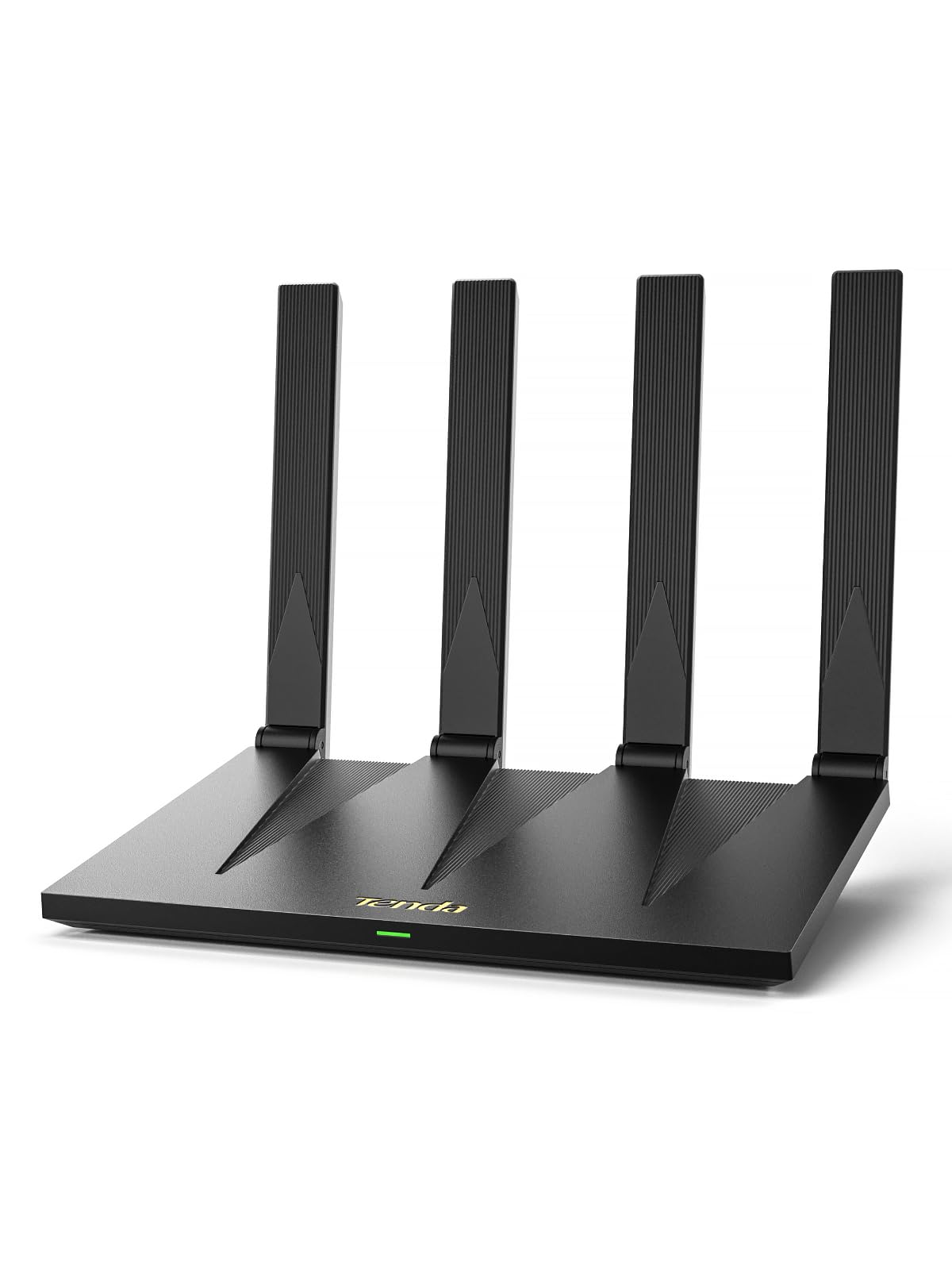
The Tenda RX12 Pro delivers AX3000-class speeds — 2,402 Mbps on the 5 GHz band and 574 Mbps on 2.4 GHz — making it the fastest budget router on this list for local network throughput. Its 7 dBi high-gain 5 GHz antennas are noticeably larger than typical budget units, providing excellent range and wall penetration for a single-router setup. Users consistently report stronger signals than older WiFi 5 routers, with one reviewer noting a 40% improvement compared to a four-year-old unit.
Beyond raw speed, the RX12 Pro includes features typically found on more expensive hardware: a dedicated IoT network for smart home devices, full Gigabit ports with automatic WAN/LAN detection, and support for OpenVPN and WireGuard. The EasyMesh compatibility means you can add another Tenda node later for seamless whole-home coverage. Setup takes minutes via the Tenda app or a browser.
Some users noted that the included NFC sticker for tap-to-connect arrived blank in a few units, and the quick start QR code was broken. These are minor packaging issues that do not affect performance. The router’s angular design and single-plane antenna movement limit placement flexibility slightly, and the Triductor SoC lacks OpenWRT support for enthusiasts. Still, for anyone wanting WiFi 6 at its fastest possible budget price, this is a standout contender.
Why it’s great
- Fastest AX3000 speeds at a budget price
- Dedicated IoT network for smart home security
- EasyMesh expandable for whole-home coverage
Good to know
- NFC sticker and QR code may have packaging issues
- No OpenWRT support for custom firmware users
3. Amazon eero 6 (1-pack)

The eero 6 takes a different approach: instead of raw speed, it prioritizes simplicity and mesh reliability. Rated up to 900 Mbps internet plans and covering 1,500 square feet per unit, it uses TrueMesh technology to intelligently route traffic and banish dead spots. This is the only router on the list that doubles as a Zigbee smart home hub, letting you connect compatible devices without a separate bridge. Setup is dead simple — the eero app walks you through in minutes.
User feedback highlights the eero 6’s ability to handle 75+ connected devices without noticeable slowdown, thanks to WiFi 6’s OFDMA. The automatic updates keep the network secure without any effort on your part, and the app provides clear device monitoring. Multiple reviewers mentioned that replacing their ISP rental with the eero 6 paid for itself within months.
The trade-off is that the eero 6 lacks the advanced port configuration and VPN server options of traditional routers. Its LAN ports are limited, and power users may find the app’s controls too streamlined. Additionally, range is average for a single unit — larger homes will need additional eero nodes. For anyone who values a fuss-free, secure mesh network over raw configurability, this is the best entry point.
Why it’s great
- Exceptional ease of setup and automatic updates
- Built-in Zigbee hub for smart home devices
- TrueMesh effectively eliminates dead zones
Good to know
- Limited LAN ports and advanced features
- Single node coverage may require additional units for larger homes
4. NETGEAR R6700AX

The NETGEAR R6700AX is a compact, no-nonsense AX1800 router designed for small to medium homes up to 1,500 square feet. Its internal antennas keep the footprint small, yet it delivers solid coverage and WPA3 security. The 4-stream design and 1.8 Gbps aggregate bandwidth handle 20 connected devices comfortably, making it ideal for households juggling streaming, video calls, and smart home gadgets.
Setup through the Nighthawk app is straightforward, and the router includes automatic firmware updates for security. Users consistently praise its reliability after replacing ISP rentals, with several reporting faster speeds and better signal strength in condos and apartments. The four Gigabit Ethernet ports provide ample wired connectivity for consoles and PCs.
The R6700AX lacks a USB port, so network-attached storage sharing is not an option. Some users found the Smart Connect band-steering feature could be sticky, occasionally holding devices on the 2.4 GHz band when 5 GHz was preferable. Also, NETGEAR’s paid support subscription has frustrated a few users. For a straightforward, reliable router that just works, this is a fine choice, but its feature set is basic compared to similarly priced competitors.
Why it’s great
- Compact design with internal antennas
- Reliable WPA3 security and automatic updates
- Easy Nighthawk app setup
Good to know
- No USB port for shared storage
- Smart Connect band-steering can be sticky
5. Linksys MR7350

The Linksys MR7350 is an entry-level WiFi 6 router that truly shines as a mesh system. Using Intelligent Mesh technology, it can be paired with additional Linksys nodes to eliminate dead zones across larger homes. It covers 1,700 square feet on its own and supports up to 25 devices. The Qualcomm chipset provides stable throughput, and users often report doubling their speeds compared to older WiFi 5 routers.
Setup is app-driven and generally receives positive feedback for its simplicity. The MR7350 supports OFDMA and 1024 QAM for efficient multi-device handling, and band-steering works well for most scenarios. A user in a one-bedroom apartment noted it handled around 10 devices without breaking a sweat, delivering reliable streaming and browsing.
The router’s main drawback is that it forces app-based setup without an easy web-browser alternative, which some users find inconvenient. It also lacks 160 MHz channel support, capping its top-end WiFi 6 speeds. A few owners reported frustration with warranty issues where the router’s manufacturing date preceded the purchase date, so checking the serial number is wise. For those who plan to build a mesh network gradually, the MR7350 is a solid foundation.
Why it’s great
- Intelligent Mesh allows seamless node expansion
- Reliable Qualcomm chipset with OFDMA support
- Good performance for medium-sized homes
Good to know
- Setup requires app, no easy web option
- No 160 MHz channel support for peak speeds
6. TP-Link Archer A8

The Archer A8 is a WiFi 5 (AC1900) router that still makes sense for the tightest budgets or for secondary networks like a VR setup. It delivers up to 1,300 Mbps on the 5 GHz band and 600 Mbps on 2.4 GHz, covering 1,200 square feet with beamforming. Users have praised its strong signal penetration through difficult obstacles like metal porch roofs, and many use it as a dedicated access point for a Quest 2 or Quest 3 VR headset, reporting smooth wireless PC VR streaming.
Setup via the Tether app is quick, and the three data streams with MU-MIMO keep multiple devices running efficiently. The router supports OneMesh, so it can pair with TP-Link extenders for a more seamless network. The four Gigabit Ethernet ports are a welcome inclusion at this price point. One reviewer who replaced a failing Archer A7 found the A8 to be a perfect drop-in replacement at a low cost.
The obvious limitation is that this is not WiFi 6, so you miss out on OFDMA benefits and higher aggregate speeds. It also lacks a USB port, and the parental controls are basic. It runs slightly warm during continuous use, so airflow is recommended. For a reliable, no-frills WiFi 5 router that costs very little, the Archer A8 remains a viable option for secondary zones or users on sub-200 Mbps plans.
Why it’s great
- Excellent value for a secondary or VR network
- Strong signal penetration with beamforming
- OneMesh compatible for easy extension
Good to know
- WiFi 5 only — no OFDMA
- Runs warm; needs good airflow
7. NETGEAR RAX30 (Renewed)

The NETGEAR RAX30 is a 5-stream AX2400 router that offers the widest coverage in the budget tier — up to 2,000 square feet — thanks to its high-power amplifiers and beamforming. In renewed condition, it becomes a compelling option for those who need large-area coverage without paying a premium. The 2.4 Gbps aggregate speed handles streaming and gaming on up to 20 devices, and the four Gigabit ports provide solid wired backbones.
Users who bought renewed units report excellent condition, often with no visible wear. Setup is quick via the Nighthawk app, and the router supports automatic firmware updates for security. One reviewer who replaced a nine-year-old R7000 found the RAX30 kept up well with modern speeds, delivering over 200 Mbps on the 5 GHz band throughout a 2,000-square-foot house.
The renewed condition means you get a generic brown box and no printed manual, though a QR code for the digital guide is included. Additionally, NETGEAR’s support requires a paid subscription after the initial period, which has drawn sharp criticism. The RAX30 is also a bulkier unit compared to the competition. For those comfortable with renewed products and needing maximum range on a budget, this is a strategic pick.
Why it’s great
- Widest coverage at 2,000 sq ft among budget picks
- Renewed units often arrive in like-new condition
- Strong 5 GHz performance for large homes
Good to know
- Renewed product with limited warranty
- Paid support subscription after initial period
FAQ
Do I need a separate modem with these budget routers?
Will a budget AX1800 router handle gigabit internet plans?
What is the real difference between WiFi 5 and WiFi 6 on a budget router?
How many devices can a budget home router realistically support?
Final Thoughts: The Verdict
For most users, the best budget home router winner is the TP-Link Archer AX21 V5 because it delivers genuine WiFi 6 performance, reliable coverage, and VPN support at a price that undercuts most competitors without sacrificing essential features. If you want faster local speeds and future-proof AX3000 performance, grab the Tenda RX12 Pro V3.0. And for fuss-free mesh coverage with a built-in smart home hub, nothing beats the Amazon eero 6.

Mo Maruf
I created WellFizz to bridge the gap between vague wellness advice and actionable solutions. My mission is simple: to decode the research and give you practical tools you can actually use.
Beyond the data, I am a passionate traveler. I believe that stepping away from the screen to explore new environments is essential for mental clarity and physical vitality.