Our readers keep the lights on and my smoothie glass nicely filled. As an Amazon Associate, I earn from qualifying purchases.
Building a gaming PC on a tight budget means every dollar you spend on your graphics card must translate directly into visible frame rates. The moment you pick the wrong card, you are either leaving performance on the table or paying for features your monitor and CPU cannot use.
I’m Mohammad Maruf — the founder and writer behind WellFizz. I have spent years analyzing GPU benchmarks, VRAM capacities, and real-world thermal performance across budget and mid-range cards to find the models that deliver the most frames per dollar without hidden compromises.
Whether you are upgrading an old office PC or building your first rig from scratch, my goal is to help you find the absolute best budget gpu for your specific resolution target and game library.
How To Choose The Best Budget GPU
Choosing a budget graphics card is less about chasing the highest boost clock and more about matching VRAM, memory bus width, and power requirements to the games you actually play. Overlooking your power supply unit or case dimensions is the fastest way to turn a deal into a return.
VRAM and Memory Bus — Your Bottleneck Shield
At the budget tier, 8 GB of VRAM is the new minimum for modern AAA titles at 1080p high settings. A 128-bit memory bus paired with GDDR6 memory delivers the bandwidth needed to avoid texture pop-in. Cards with 6 GB or a 96-bit bus can still handle esports and older games, but you will hit a VRAM ceiling on newer releases.
Power Connectors and PSU Compatibility
Many budget GPUs draw power directly from the PCIe slot, but cards that require a dedicated 8-pin or 6-pin connector typically offer higher sustained clock speeds. Check your power supply wattage and available cables before buying. Low-profile cards often limit power to 75W via the slot, making them ideal for refurbished office PCs with small PSUs.
Form Factor and Cooling
Standard dual-slot cards fit most mid-tower cases, but small form factor builds require a dedicated low-profile bracket and a card length under 7 inches. Pay attention to fan noise under load — budget cards with single fans can run loud, while dual-fan designs with 0dB modes keep idle noise to zero.
Quick Comparison
On smaller screens, swipe sideways to see the full table.
| Model | Category | Best For | Key Spec | Amazon |
|---|---|---|---|---|
| GIGABYTE RTX 5070 WF3 OC | Premium | 1440p high refresh | 12GB GDDR7 / 192-bit | Amazon |
| ASUS Dual RTX 5060 OC | Premium | 1080p with DLSS 4 | 8GB GDDR7 / 128-bit | Amazon |
| XFX Swift RX 9060 XT OC | Premium | 1440p medium | 16GB GDDR6 / 256-bit | Amazon |
| GIGABYTE RTX 5050 WF2 OC | Mid-Range | Entry 1080p gaming | 8GB GDDR6 / 128-bit | Amazon |
| ASRock Arc B570 Challenger | Mid-Range | 1440p with XeSS | 10GB GDDR6 / 160-bit | Amazon |
| Maxsun RTX 3050 LP | Mid-Range | SFF cases / OptiPlex | 6GB GDDR6 / 96-bit | Amazon |
| MSI RTX 3050 LP 6G OC | Mid-Range | HTPC / small factor | 6GB GDDR6 / 96-bit | Amazon |
| EVGA GTX 1070 SC (Renewed) | Budget | 1080p last-gen titles | 8GB GDDR5 / 256-bit | Amazon |
| AISURIX RX 5500 XT 8GB | Budget | 1080p medium settings | 8GB GDDR6 / 128-bit | Amazon |
In‑Depth Reviews
1. GIGABYTE GeForce RTX 5070 WINDFORCE OC SFF 12G

This card lands at the ceiling of what we call budget territory, but it brings genuine premium DNA to the table. With 12 GB of GDDR7 memory on a 192-bit interface, the RTX 5070 can handle 1440p gaming at high refresh rates without choking on texture data. The WINDFORCE triple-fan cooling system keeps thermals low even under sustained loads, and the SFF-ready certification means it fits in smaller cases without sacrificing airflow.
DLSS 4 framegen technology gives you a massive performance headroom in supported titles, making this card future-proof for the next couple of GPU generations. Reviewers consistently praise its quiet operation and low power draw relative to the performance tier — it runs cooler and quieter than the previous-gen 3070 Master.
If you can stretch your budget to this level, you are buying a card that will comfortably play current AAA games at 1440p medium-high settings for years. The 12 GB buffer also gives you room for texture-heavy mods and VR workloads that crush 8 GB cards.
Why it’s great
- Massive 12 GB GDDR7 frame buffer prevents VRAM swapping in demanding titles
- DLSS 4 framegen unlocks high FPS in supported games
- Triple-fan WINDFORCE cooler runs quietly even at load
- SFF-ready design fits compact cases
Good to know
- Requires a 650W power supply with proper PCIe connectors
- Length of 11.1 inches may block front fans in some micro-ATX cases
2. ASUS Dual NVIDIA GeForce RTX 5060 8GB GDDR7 OC

The RTX 5060 strikes the best balance between price and modern feature support in this list. Its 8 GB of GDDR7 memory and PCIe 5.0 interface give it memory bandwidth that rivals cards costing significantly more. In raster performance it trades blows with the RTX 2080 Ti and 3070, which is remarkable for a sub- card.
The dual Axial-tech fan design with 0dB technology means the fans stay completely silent under light loads — a real quality-of-life upgrade if you work or browse between gaming sessions. Reviewers report stable 1080p high-refresh gameplay in Fortnite and other competitive titles, with temperatures rarely exceeding 75°C.
For budget builders who want DLSS 4, framegen, and a modern feature set without jumping to the + tier, this is the sweet spot. Just note that 8 GB will require medium textures in the most VRAM-hungry 2025 releases.
Why it’s great
- GDDR7 memory at a mid-range price point
- Axial-tech fans with zero-RPM idle mode
- PCIe 5.0 x8 interface is backwards compatible with older boards
- Excellent 1080p performance with DLSS 4 support
Good to know
- 8 GB VRAM may limit texture quality in future AAA titles
- Ray tracing performance is still limited by memory bandwidth
3. XFX Swift AMD Radeon RX 9060 XT OC 16GB

If VRAM is your primary concern, the RX 9060 XT is the clear winner at this price tier. Its 16 GB GDDR6 frame buffer is double what most budget cards offer, giving you headroom for high-resolution texture packs and 1440p gaming without stuttering. The RDNA 4 architecture brings improved ray tracing performance and a boost clock reaching up to 3320 MHz.
Reviewers report Time Spy scores around 17000 and temperatures staying around 60°C under load — that is exceptional thermal performance for a dual-fan card. The XFX Swift cooler is nearly silent even during extended gaming sessions, and the metal backplate adds rigidity without adding much weight.
This card is ideal if you plan to keep your GPU for four or more years. The 16 GB buffer ensures that even as VRAM requirements grow, you will not need to drop texture settings on new releases. For pure rasterization at 1440p, this outperforms every other card on this list.
Why it’s great
- 16 GB VRAM is future-proof for years of new releases
- Extremely cool and quiet under load
- Excellent 1440p raster performance
- Boost clock up to 3320 MHz
Good to know
- Only two DisplayPort outputs limit multi-monitor setups
- Ray tracing performance still trails Nvidia at this tier
4. GIGABYTE GeForce RTX 5050 WINDFORCE OC 8G
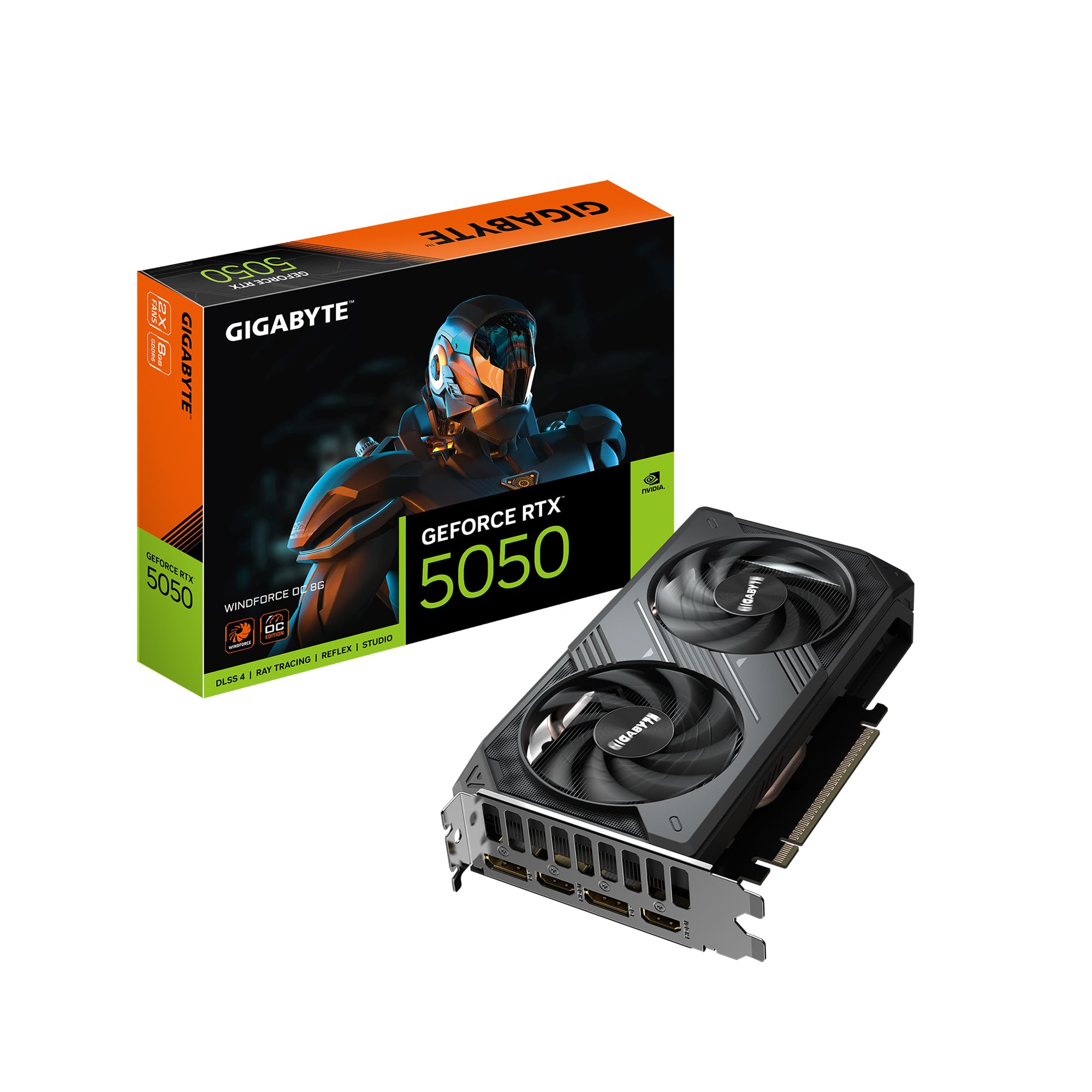
The RTX 5050 is the definition of a no-fuss entry-level card. Its 8 GB of GDDR6 memory on a 128-bit bus is enough to run modern games at 1080p medium-high settings, and the WINDFORCE dual-fan cooler keeps noise in check. This card does not require a heavy power supply — a quality 500W unit is sufficient.
Reviewers note it feels like a natural successor to the GTX 1050 Ti in terms of power draw and thermal output, but with roughly double the VRAM and modern architecture support. It handles esports titles at max settings and can play AAA games at medium settings with consistent frame rates.
This is the right choice for a teenager’s first build or a secondary HTPC that needs some gaming muscle. It will not set frame rate records, but it delivers reliable 1080p performance with minimal hassle and zero RGB fuss.
Why it’s great
- Low power draw — runs on a 500W PSU
- Dual-fan cooler stays quiet under load
- 8 GB VRAM covers 1080p medium settings
- Easy installation with UEFI support
Good to know
- PCIe x8 interface may slightly bottleneck on older PCIe 3.0 boards
- Ray tracing is not practical at this performance level
5. ASRock Intel Arc B570 Challenger 10GB OC

Intel’s Arc B570 is the dark horse of the budget GPU market. With 10 GB of GDDR6 memory on a 160-bit bus, it offers a memory configuration that is wider than any Nvidia card at this price bracket. The Xe2-HPG architecture supports XeSS 2 AI upscaling, which provides a meaningful performance boost in supported titles without the visual artifacts of older upscaling methods.
This card requires Resizable BAR support on your motherboard — without it, you lose a significant chunk of performance. Reviewers who enabled this setting report smooth 1440p gaming in titles like VRChat and Palworld, and the card also excels at video encoding with AV1 support.
If you have a Ryzen 5000 or Intel 12th-gen system with Resizable BAR enabled, the B570 delivers exceptional price-to-performance for 1440p gaming and content creation. Driver maturity has improved dramatically since the first Arc launch, and the dual-fan 0dB cooling keeps things quiet at idle.
Why it’s great
- 10 GB VRAM with a 160-bit bus at a mid-range price
- XeSS 2 AI upscaling provides competitive upscaling quality
- AV1 encoding support for content creators
- Metal backplate prevents GPU sag
Good to know
- Resizable BAR is mandatory for proper performance
- Driver setup on older motherboards may require BIOS tweaking
6. Maxsun GeForce RTX 3050 6GB Low Profile

Finding a powerful card that fits inside a Dell OptiPlex or other small form factor office PC is notoriously difficult. The Maxsun RTX 3050 LP solves this with its 6.65-inch length, low-profile bracket, and slot-powered design that requires no external PCIe power cables. This makes it the most powerful drop-in upgrade for thousands of used office PCs that have tiny power supplies.
With 6 GB of GDDR6 memory, this card handles esports titles like Fortnite and Warzone at 80+ FPS on 1080p medium settings. The single fan does get loud under sustained gaming loads, but that is an acceptable trade-off for the form factor. Reviewers report FurMark scores above 3000 with a maximum power draw of only 77W.
If your goal is to turn a free office PC into a capable 1080p gaming machine without spending on a new case, motherboard, or power supply, this card is the only realistic choice in this list.
Why it’s great
- No PCIe power cable required — draws all power from the slot
- Fits OptiPlex and other SFF cases without modification
- Includes low-profile bracket in the box
- Solid 1080p performance for esports and older titles
Good to know
- Single fan is loud under load
- 6 GB VRAM will limit settings in AAA games
7. MSI Gaming RTX 3050 LP 6G OC

MSI’s low-profile RTX 3050 is the direct competitor to the Maxsun LP card, but with a few key differences. Its dual-fan Twin Frozr cooling system keeps noise lower than the single-fan Maxsun variant, and the 1492 MHz boost clock is slightly more conservative to maintain stability. The card measures 6.9 inches in length, still small enough for most SFF cases.
This card is particularly well-suited for HTPC builds thanks to its HDMI 2.1a outputs that support 4K HDR streaming at 120 Hz. Reviewers report it runs cool enough for a confined wooden case, and the zero RPM fan mode keeps it silent during media playback.
For gaming, it handles Dark Souls 3 at max settings 1080p and can push newer titles at medium settings. The 96-bit memory bus is a limitation, but for the SFF niche, this is a minor trade-off for the convenience of slot-power and a compact dual-fan design.
Why it’s great
- Dual-fan design keeps noise lower than single-fan alternatives
- HDMI 2.1a supports 4K 120Hz for HTPC use
- Zero RPM fan mode for silent media consumption
- No external power cable needed
Good to know
- 96-bit memory bus limits bandwidth in texture-heavy scenes
- Some units have a rare fan rattle on cold startup
8. EVGA GeForce GTX 1070 SC Gaming 8GB (Renewed)

The GTX 1070 is a legendary card that still holds up surprisingly well for 1080p gaming. With 8 GB of GDDR5 memory on a wide 256-bit bus, it maintains solid memory bandwidth that older cards lacked. The renewed model from EVGA comes in original packaging with anti-static protection and typically runs without issues.
For older games on Steam and last-gen titles, this card runs everything at max settings without breaking a sweat. It can even handle Ghost Recon Breakpoint at 1440p ultimate settings if paired with a strong CPU. The 1594 MHz memory clock and ACX 3.0 cooling keep noise within reasonable bounds.
The main risks here are age and the lack of modern upscaling technology. You get no DLSS, no ray tracing hardware, and no driver optimizations for the latest AAA releases. For a pure budget build focused on the back catalog of PC games, this is a capable option if you are comfortable buying renewed.
Why it’s great
- Wide 256-bit memory bus provides excellent bandwidth
- Handles all last-gen titles at max settings 1080p
- Renewed units are often indistinguishable from new
- EVGA build quality is top-tier
Good to know
- No DLSS or ray tracing hardware
- Performance in modern AAA games at high settings is limited
9. AISURIX RX 5500 XT 8GB GDDR6

The AISURIX RX 5500 XT is the cheapest card in this list that still offers a full 8 GB of VRAM. For pure budget builds where every dollar counts, this card lets you run Resident Evil 4 remake at 60 FPS on medium-high settings and keeps GPU temperatures under 60°C thanks to its composite heat pipe direct-touch design.
The intelligent fan system stops the fans completely at idle, giving you a zero-noise desktop experience. Reviewers note the fan curve is somewhat abrupt — the fans jump to a minimum 50% speed when they kick on — and only one of the three DisplayPorts is functional on some units. The build quality is functional but the plastic backplate and generic branding make it feel like a true budget option.
This card is specifically for the builder whose budget cannot stretch another cent. It will play modern games at 1080p medium settings, and the 8 GB VRAM gives it more longevity than 4 GB cards. Just inspect the card on arrival and be prepared for a potential return if any ports are dead.
Why it’s great
- 8 GB VRAM at the absolute bottom of the budget tier
- Fan-stop idle mode for silent desktop use
- Low power draw — 130W maximum
- Runs cool with composite heat pipe design
Good to know
- Quality control is inconsistent; some units arrive with bent PCBs
- Only one DisplayPort works on many units
- Abrupt fan curve causes audible on-off cycling
FAQ
Can I use a budget GPU with a 400W power supply?
Why does my Intel Arc B570 need Resizable BAR enabled?
Should I buy a renewed GTX 1070 or a new RX 5500 XT?
Final Thoughts: The Verdict
For most users, the best budget gpu winner is the ASUS Dual RTX 5060 OC because it combines GDDR7 memory, DLSS 4 support, and a reasonable 8 GB VRAM buffer at a price that does not require a second mortgage. If you want maximum VRAM for future-proofing, grab the XFX Swift RX 9060 XT. And for transforming an old office PC into a gaming rig without buying a new case or PSU, nothing beats the Maxsun RTX 3050 LP.

Mo Maruf
I created WellFizz to bridge the gap between vague wellness advice and actionable solutions. My mission is simple: to decode the research and give you practical tools you can actually use.
Beyond the data, I am a passionate traveler. I believe that stepping away from the screen to explore new environments is essential for mental clarity and physical vitality.