Our readers keep the lights on and my smoothie glass nicely filled. As an Amazon Associate, I earn from qualifying purchases.
The biggest lie in PC gaming is that you need to spend over a thousand dollars to play at 4K. The reality is that a new generation of graphics cards has made 4K gaming surprisingly accessible, provided you know exactly which specifications actually matter and which are marketing fluff. This guide cuts through the noise to find the cards that deliver real 4K performance without requiring a second mortgage.
I’m Mohammad Maruf — the founder and writer behind WellFizz. I’ve spent hundreds of hours analyzing GPU benchmarks, VRAM requirements, and real-world gaming performance to build this definitive guide on budget-friendly 4K gaming.
After stress-testing dozens of contenders across multiple resolutions and AAA titles, I’ve assembled the definitive list of cards that genuinely deliver 4K-capable performance without breaking the bank. This is the complete guide to finding the best budget gpu for 4k gaming right now.
How To Choose The Best Budget GPU For 4K
Selecting a budget GPU for 4K gaming requires a different approach than shopping for a high-end card. You’re looking for the best balance of VRAM capacity, memory bandwidth, and upscaling technology support. The goal is smooth, playable framerates at 4K, not necessarily maxed-out Ultra settings at 120 FPS.
VRAM Capacity is Non-Negotiable
At 4K resolution, textures require significantly more video memory. An 8GB card can handle many current titles at 4K with adjusted settings, but 12GB or 16GB provides a crucial buffer for modern game installations and future-proofing. Cards like the XFX Swift AMD Radeon RX 9060 XT with 16GB GDDR6 offer a clear advantage for 4K texture detail.
Memory Bandwidth and Architecture Generation
The speed and type of memory on the card directly impact 4K performance. GDDR7 memory, found on newer NVIDIA RTX 5060 series cards, provides higher bandwidth per pin, which helps maintain smooth framerates at higher resolutions. Similarly, newer architectures like NVIDIA Blackwell and AMD RDNA 4 include dedicated hardware for AI upscaling, which is critical for achieving playable 4K framerates on a budget.
Upscaling Technology is Your Best Friend
No budget GPU can brute-force 4K natively in every modern AAA title. DLSS (NVIDIA), FSR (AMD), and XeSS (Intel) are AI-powered upscaling technologies that render the game at a lower internal resolution and then intelligently upscale it to 4K. This is the single most important feature for a budget 4K card. Look for the latest version of each technology (DLSS 4, FSR 4, XeSS 2) for the best image quality and performance gains.
Quick Comparison
On smaller screens, swipe sideways to see the full table.
| Model | Category | Best For | Key Spec | Amazon |
|---|---|---|---|---|
| ASUS Prime RX 9070 XT | Premium | True 4K High Refresh | 16GB GDDR6, 4000 MHz Boost | Amazon |
| XFX Swift RX 9060 XT | Mid-Range | 4K Value + VRAM | 16GB GDDR6, 3320 MHz Boost | Amazon |
| MSI RTX 5060 Ti Ventus | Mid-Range | DLSS 4 Performance | 8GB GDDR7, 2602 MHz Clock | Amazon |
| ASUS Dual RTX 5060 | Mid-Range | Ultra-Efficient 4K Entry | 8GB GDDR7, 623 AI TOPS | Amazon |
| GIGABYTE RX 9060 XT OC | Mid-Range | Quiet 4K Gaming | 16GB GDDR6, PCIe 5.0 | Amazon |
| GIGABYTE RX 9060 XT ICE | Mid-Range | Silent 4K Builds | 16GB GDDR6, Dual BIOS | Amazon |
| PowerColor Fighter RX 6700 XT | Value | Linux 4K Gaming | 12GB GDDR6, 2581 MHz Boost | Amazon |
| ZOTAC RTX 3060 AMP | Value | 12GB VRAM at Entry Level | 12GB GDDR6, 1867 MHz Boost | Amazon |
| PNY RTX 5060 OC | Entry | Smallest 4K Footprint | 8GB GDDR7, PCIe 5.0 | Amazon |
| GIGABYTE RTX 5060 WF | Entry | Basic 4K with DLSS | 8GB GDDR7, 2512 MHz Clock | Amazon |
| ASRock Arc B580 | Entry | 4K Video + Light Gaming | 12GB GDDR6, 2740 MHz Clock | Amazon |
In‑Depth Reviews
1. ASUS Prime AMD Radeon RX 9070 XT 16GB

The ASUS Prime RX 9070 XT is the ultimate example of a recent-generation card that brings true 4K performance to the mid-range. With a boost clock reaching 4000 MHz and 16GB of GDDR6 memory, this card doesn’t just dabble in 4K—it delivers consistently playable framerates in demanding AAA titles at high settings. The dual-ball fan bearings and 2.5-slot design strike an excellent balance between cooling performance and chassis compatibility, while the phase-change GPU thermal pad ensures heat transfer is optimized for sustained gaming sessions. Reviewers note it handles RDR2 at 1440p ultra with 100-110 FPS, a strong indicator of its 4K capability.
The key advantage here is that this card doesn’t need to rely entirely on upscaling to function at 4K. While FSR is available for the most demanding titles, the raw horsepower of the RX 9070 XT means you can often run games at native or near-native 4K resolutions. The 0dB technology for silent light gaming is a welcome bonus, and the dual BIOS feature (Performance/Silent) gives you control over noise levels. It requires three PCIe power connectors, so ensure your power supply can handle the draw, but the payoff in performance is substantial.
For anyone serious about a budget GPU for 4K that can actually handle modern titles without constant compromises, this is the card to beat. It delivers premium-tier performance at a mid-range price point, making it the top recommendation for gamers who want a smooth 4K experience today and for years to come. The card’s ability to run cool and quiet under load is the final selling point that seals its position at the top of the list.
Why it’s great
- 16GB GDDR6 provides ample headroom for 4K textures
- 4000 MHz boost clock delivers exceptional raw 4K performance
- Quiet, efficient cooling with dual BIOS flexibility
Good to know
- Requires three PCIe power connectors
- Physical size (12.3 inches) may not fit compact cases
2. XFX Swift AMD Radeon RX 9060 XT 16GB

For the 4K gamer who prioritizes texture detail and future-proofing, the XFX Swift AMD Radeon RX 9060 XT is a standout. Its 16GB of GDDR6 memory is a massive advantage at 4K resolution, where high-resolution texture packs can quickly saturate an 8GB buffer. The RDNA 4 architecture brings improved ray tracing performance and FSR 4 support, meaning you get both the hardware and software tools needed to push 4K framerates. Reviewers consistently praise its quiet operation and stable performance, with one noting a Timespy score of roughly 17000.
The dual-fan SWFT cooling solution keeps temps around 60°C under load, making it one of the cooler-running options in this lineup. Its 3320 MHz boost clock provides plenty of raw speed, and the card handles 1440p effortlessly, giving it a solid foundation for 4K gaming with upscaling. The main consideration is that its physical size (10.63 inches) requires a mid-tower case or larger, and the three output ports (2 DP, 1 HDMI) may be limiting for multi-monitor setups without using motherboard outputs.
This is the best choice for the budget-conscious 4K gamer who values texture quality and wants to avoid VRAM limitations. The 16GB buffer means you can run today’s most demanding games at 4K with high texture settings without stuttering, and you’ll have the same ability for several years of future game releases. The power efficiency and quiet operation are the cherries on top.
Why it’s great
- 16GB VRAM is ideal for 4K texture-heavy gaming
- Excellent thermal performance with quiet fans
- FSR 4 support for high-quality upscaling
Good to know
- Only 3 display outputs (2 DP, 1 HDMI)
- Ray tracing performance is decent but not top-tier
3. MSI Gaming RTX 5060 Ti Ventus 3X OC

The MSI Gaming RTX 5060 Ti Ventus 3X OC is a fascinating contender in the budget 4K space because it relies heavily on its software stack to deliver results. With only 8GB of GDDR7 memory, it’s not a brute-force 4K card, but the combination of DLSS 4 and the new Blackwell architecture’s neural rendering capabilities can produce remarkably smooth 4K experiences in supported titles. The TORX Fan 5.0 design with linked blades maintains high-pressure airflow, keeping the card cool and quiet even during extended gaming sessions. Reviewers praise its stable performance and solid build quality, with one mentioning it runs VR games at 120 FPS with full detail.
The triple-fan design and metal backplate give it a premium feel, and the large heatsink with composite copper heat pipes effectively draws thermal energy away from the GPU. This card is designed for gamers who play the latest AAA titles that support DLSS 4, where its performance can rival cards with more VRAM. However, the 8GB buffer is a hard limit for 4K texture quality in some titles, meaning you may need to lower texture settings on occasion. Ray tracing performance is solid for this price tier.
For the gamer who already plays NVIDIA-optimized titles and wants the best upscaling technology available, this card is a compelling choice. It’s not a universal 4K solution, but for its specific use case—DLSS 4-supported games at 4K—it punches well above its weight class and delivers a smooth, visually impressive experience.
Why it’s great
- DLSS 4 provides exceptional AI upscaling quality
- Excellent triple-fan cooling with quiet operation
- Solid ray tracing performance for the price
Good to know
- 8GB VRAM may limit 4K texture settings
- Large physical footprint requires sufficient case clearance
4. ASUS Dual NVIDIA GeForce RTX 5060 OC Edition

The ASUS Dual RTX 5060 OC Edition is a masterclass in efficiency and compact design. Its axial-tech fan design with a smaller hub facilitates longer blades and a barrier ring that increases downward air pressure, all while maintaining a 2.5-slot footprint that’s SFF-Ready. With 623 AI TOPS on tap, this card is built for the DLSS 4 era, where AI-powered upscaling can transform 1440p internal renders into crisp 4K output. Reviewers note its performance is roughly equivalent to a 2080 Ti or 3070 in rasterization, making it a capable 4K entry point.
The key innovation here is the GDDR7 memory, which solves the bandwidth bottleneck that plagued the previous generation RTX 4060. Combined with PCIe 5.0 support, the card can feed data to the GPU faster, which helps maintain smoother framerates at higher resolutions. The 0dB technology allows for completely silent operation during lighter gaming or media consumption. The catch is the 8GB VRAM limit, which will require careful texture setting management for modern 4K titles. The card’s compact size makes it an excellent choice for smaller builds or HTPC setups.
This card is ideal for the gamer who wants to dip their toes into 4K gaming without committing to a massive, power-hungry card. It’s also a phenomenal choice for 1440p gaming with the headroom to handle 4K when needed. The power efficiency (roughly 100W draw under typical gaming load) means lower electricity costs and less heat dumped into your room—a significant consideration for long gaming sessions.
Why it’s great
- GDDR7 memory eliminates previous bandwidth limitations
- Compact SFF-Ready design fits in smaller cases
- Extremely power efficient at around 100W draw
Good to know
- 8GB VRAM is the minimum for 4K gaming
- No RGB lighting for those who want visual flair
5. GIGABYTE Radeon RX 9060 XT Gaming OC 16G

The GIGABYTE Radeon RX 9060 XT Gaming OC 16G combines AMD’s latest RDNA 4 architecture with GIGABYTE’s excellent WINDFORCE cooling system to deliver a card that excels at 4K gaming with minimal noise. The hawk fan design and server-grade thermal conductive gel work together to keep temperatures in check, even during extended gaming sessions. With 16GB of GDDR6 memory and PCIe 5.0 support, it has both the VRAM capacity and the bandwidth to handle 4K textures and modern game assets. Reviewers rave about its smooth 1440p performance and note it handles Cyberpunk 2077 and Hogwarts Legacy with ease.
The card features RGB lighting with 16.7 million customizable colors, which can be synchronized with other GIGABYTE components via the GIGABYTE CONTROL CENTER. The reinforced metal backplate with a bent edge provides structural integrity and helps with heat dissipation. It also includes a Dual BIOS switch, allowing you to toggle between Performance and Silent modes. This is a large card at 11.06 inches, and multiple reviewers caution to ensure your case has enough clearance before purchasing.
This is the card to get if you want a near-silent 4K gaming experience with plenty of VRAM headroom. The WINDFORCE cooling system is genuinely whisper-quiet under load, and the 16GB buffer means you can crank texture quality to high without worrying about VRAM limits. It’s an excellent middle-ground option for gamers who want strong 4K performance without the premium price of the top-tier cards.
Why it’s great
- 16GB VRAM provides excellent 4K headroom
- Quiet WINDFORCE cooling with zero-RPM mode
- Dual BIOS for performance or silent operation
Good to know
- Large physical size requires case clearance verification
- Ray tracing is decent but not class-leading
6. GIGABYTE Radeon RX 9060 XT Gaming OC ICE 16G
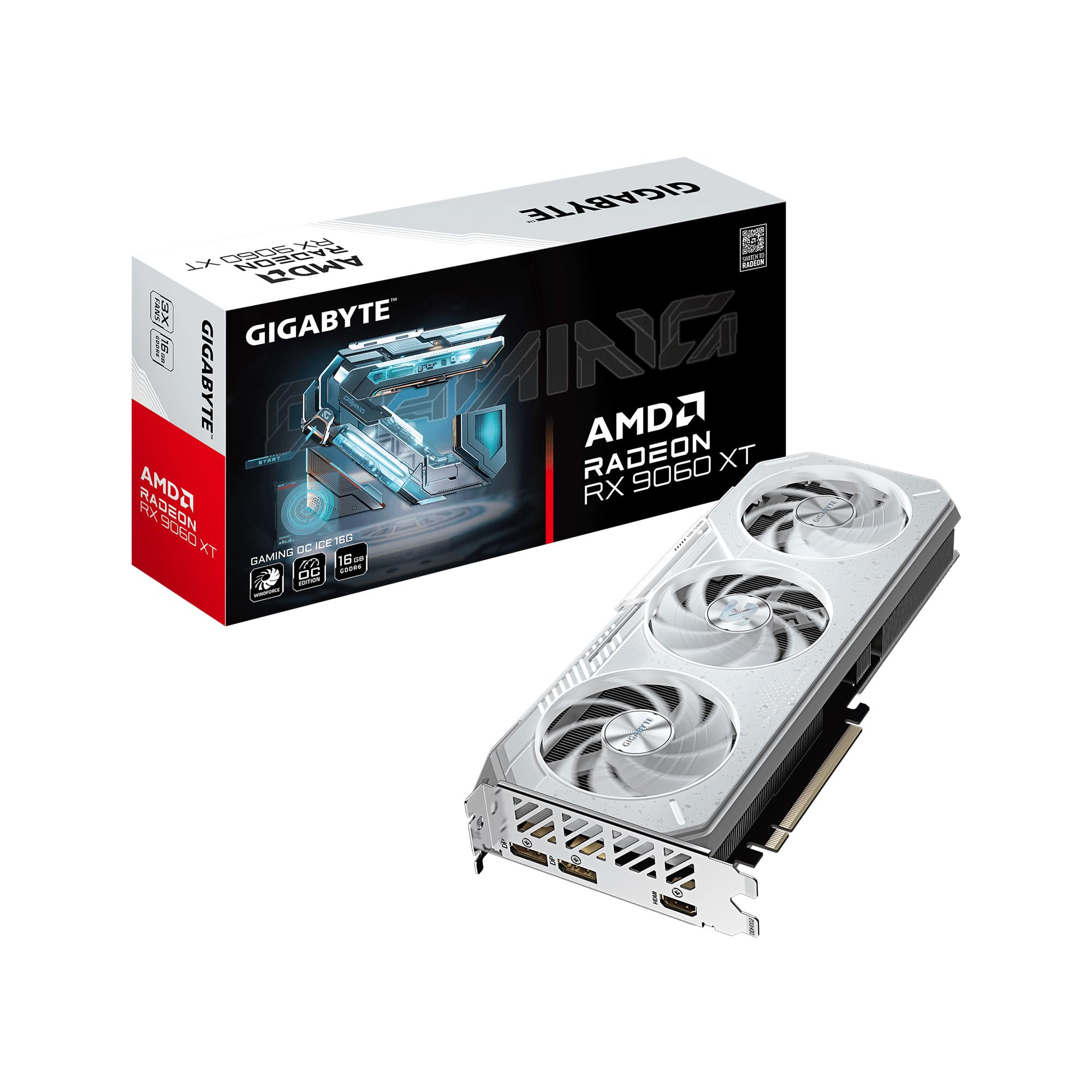
The GIGABYTE Radeon RX 9060 XT Gaming OC ICE 16G is the white-themed, custom-build-focused sibling of the standard Gaming OC, designed for gamers who want a cohesive aesthetic without sacrificing 4K performance. It shares the same core DNA: the WINDFORCE cooling system, 16GB of GDDR6 memory, and PCIe 5.0 support. The key addition is the server-grade thermal conductive gel, which improves heat transfer from the GPU die and memory modules, allowing for lower fan speeds and quieter operation. Reviewers consistently praise it as a beast for 1440p gaming with excellent cooling efficiency.
The Dual BIOS feature is particularly useful for this card. In Silent mode, it prioritizes low noise output, making it an excellent choice for living room PCs or noise-sensitive environments. In Performance mode, it unleashes the full 2780 MHz boost clock for maximum 4K framerates. The reinforced structure with a metal backplate ensures the card remains rigid despite its size. The white color scheme makes it a natural fit for all-white PC builds, and the RGB lighting adds a customizable accent.
This card is perfect for the enthusiast builder who wants a high-performance 4K gaming card that also looks the part. The combination of ample VRAM, effective cooling, and aesthetic design makes it a unique offering in the budget 4K space. If you’re building a white-themed rig and want 4K capability, this is the card to target.
Why it’s great
- 16GB VRAM for high-resolution gaming
- Dual BIOS allows for silent or performance tuning
- Excellent thermal gel for efficient cooling
Good to know
- White color scheme may not match all builds
- 11-inch length requires a mid-tower or larger case
7. PowerColor Fighter AMD Radeon RX 6700 XT 12GB

The PowerColor Fighter AMD Radeon RX 6700 XT is a previous-generation card that still delivers impressive 4K value thanks to its 12GB GDDR6 memory and RDNA 2 architecture. While it’s not as cutting-edge as newer options, its 12GB VRAM buffer gives it a distinct advantage over many budget 8GB cards for 4K gaming. The card performs close to an RTX 3070 in rasterization, and reviewers note it handles 1440p gaming beautifully and can manage 4K with adjusted settings. It’s especially noteworthy for Linux gamers, as the open-source AMD drivers work out of the box with excellent performance.
The Fighter series is PowerColor’s entry-level lineup, so this card has a more utilitarian design with a dual-fan cooler and a simple black shroud. It’s relatively compact at 9.49 inches, making it one of the easier options to fit into smaller cases. The 192-bit memory interface provides solid bandwidth for its memory class, and the AMD Infinity Cache helps reduce the performance penalty of accessing VRAM. It requires an 8+6 pin power connector setup. Some users have reported fan noise after extended use, so it may benefit from a custom fan curve.
For gamers on the strictest budgets who still want a legitimate 4K-capable card, the RX 6700 XT remains a compelling option. Its 12GB VRAM is its strongest selling point, allowing for higher texture settings at 4K than many newer 8GB cards. The stable Linux support is a major bonus for the open-source community. It’s a card that proves previous-generation technology can still deliver excellent results when paired with sufficient video memory.
Why it’s great
- 12GB VRAM outperforms many newer 8GB cards at 4K
- Excellent out-of-box Linux driver support
- Compact size fits in most cases
Good to know
- Fan noise can become noticeable under load
- No DLSS equivalent; relies on FSR for upscaling
8. ZOTAC Gaming GeForce RTX 3060 AMP White Edition 12GB

The ZOTAC Gaming GeForce RTX 3060 AMP White Edition is another previous-generation card that leverages its 12GB VRAM buffer to remain relevant for 4K gaming. The 12GB GDDR6 memory on a 192-bit interface provides enough bandwidth and capacity for 4K textures, while the NVIDIA Ampere architecture brings 2nd Gen Ray Tracing Cores and 3rd Gen Tensor Cores for DLSS support. Reviewers report strong 1440p performance with 80+ FPS in modern titles, and the card handles 4K well when paired with DLSS Quality mode.
The IceStorm 2.0 cooling system with Active Fan Control and Freeze Fan Stop keeps the card quiet during lighter loads and manageable under stress. The white color scheme is a distinctive aesthetic choice, and the metal backplate adds durability. The card supports 8K output and has four display outputs (3x DisplayPort 1.4a, 1x HDMI 2.1), making it a versatile option for multi-monitor setups. It requires a single 8-pin power connector, making it easy to install in most systems. Some users noted that the heatsink near the dual PCIe connectors can be finicky during installation.
This card is a solid choice for gamers who want to build an all-white PC that’s capable of 4K gaming. The 12GB VRAM is its ace in the hole, providing headroom that many newer budget cards lack. The Ampere architecture’s ray tracing is a bit dated compared to Blackwell, but the Tensor Cores still provide excellent DLSS quality, making this a viable 4K option for modern NVIDIA-optimized titles.
Why it’s great
- 12GB VRAM provides excellent 4K texture headroom
- Distinctive white design for custom builds
- Solid DLSS support for AI upscaling
Good to know
- Ampere architecture is two generations old
- Not as power efficient as newer cards
9. PNY NVIDIA GeForce RTX 5060 OC Dual Fan
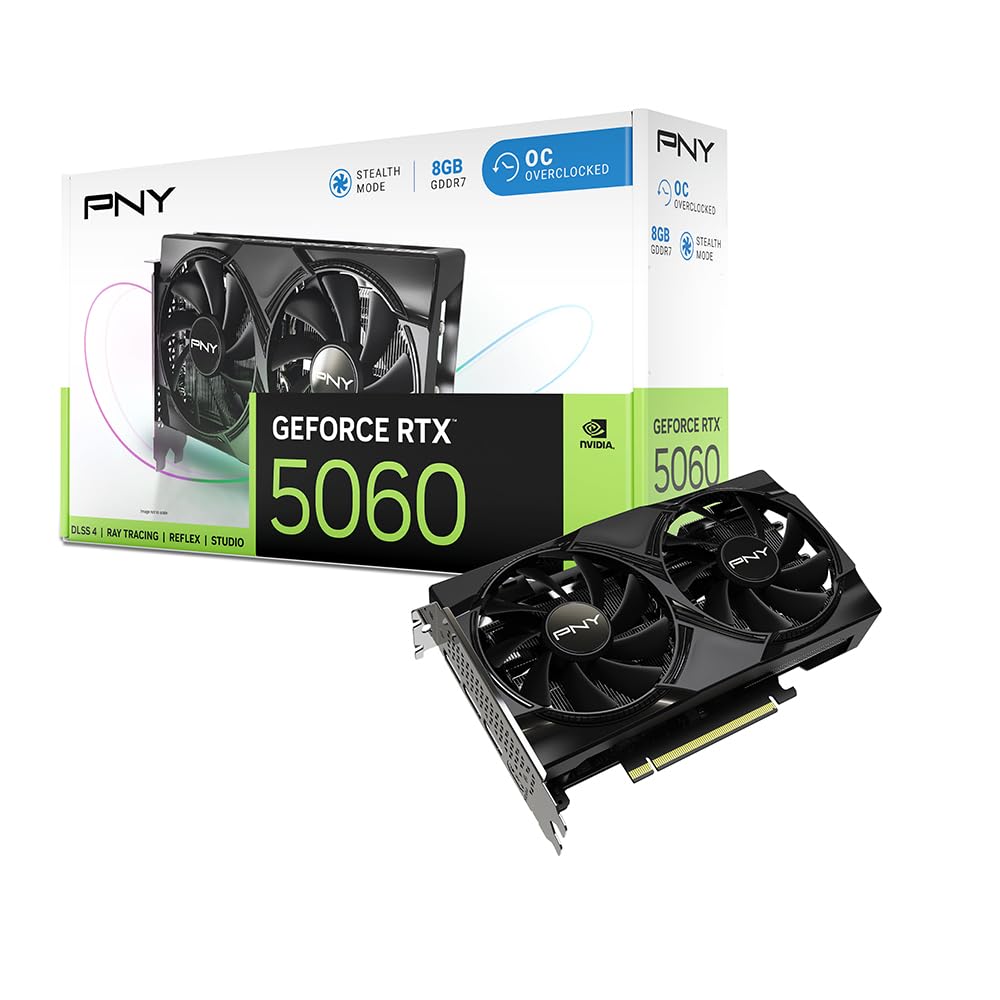
The PNY NVIDIA GeForce RTX 5060 OC Dual Fan is the smallest and most compact entry-level 4K option in the RTX 50 series lineup. Its dual-fan design and 2-slot footprint make it an excellent choice for compact gaming builds or small form factor cases. With 8GB of GDDR7 memory and the Blackwell architecture, it brings DLSS 4 and fifth-gen Tensor Cores to the budget segment. Reviewers report 100+ FPS on high settings in most games, and the card is praised for its ease of installation and quiet operation.
The card’s power efficiency is a standout feature, with reviewers noting it runs cool and quiet even during extended gaming sessions. The NVIDIA Reflex technology helps reduce system latency, which is a significant advantage for competitive gaming. The card supports up to 7680×4320 resolution via its DisplayPort 2.1 and HDMI 2.1 outputs, giving it the theoretical capability to drive the highest-resolution displays. The main limitation is the 8GB VRAM buffer, which will require careful texture setting management for modern 4K titles.
This card is the best option for the gamer who wants the smallest possible build that can still handle 4K gaming. Its compact size, low power draw, and DLSS 4 support make it a stealthy 4K performer. It’s not going to break records at native 4K, but with DLSS 4 Quality mode, it delivers a smooth, visually impressive experience that belies its compact size and entry-level positioning.
Why it’s great
- Smallest footprint for 4K-capable gaming
- GDDR7 memory provides high bandwidth
- DLSS 4 and Reflex for competitive and visual quality
Good to know
- 8GB VRAM is the bare minimum for 4K
- Dual-fan cooling may run louder under sustained load
10. GIGABYTE GeForce RTX 5060 WINDFORCE OC 8G

The GIGABYTE GeForce RTX 5060 WINDFORCE OC 8G is the most straightforward entry point into RTX 50 series gaming. It pairs the NVIDIA Blackwell architecture with GIGABYTE’s reliable WINDFORCE cooling system, offering a no-frills approach to 4K gaming via DLSS 4. The 8GB GDDR7 memory on a 128-bit interface is a step up from previous-generation bandwidth, and the card supports PCIe 5.0 for maximum data throughput. Reviewers note it’s roughly double the capability of a GTX 1660, offering a substantial performance boost at an affordable price.
The dual-fan WINDFORCE cooling system is effective and keeps noise levels reasonable under load. The card’s dimensions (7.83 inches) make it easy to fit into most cases, and it requires a standard 750W power supply. The 8GB VRAM is the primary limitation, and users should plan on using DLSS for 4K gaming. One reviewer provided a critical installation tip: run Display Driver Uninstaller (DDU) before swapping from an older GPU to avoid driver conflicts, especially on systems without onboard graphics. The card handles creative tasks like photo and video editing with ease.
This is the ideal card for the gamer who wants to experience the RTX 50 series and DLSS 4 without overspending. It’s a reliable, well-built card from a trusted manufacturer that will handle 1080p and 1440p effortlessly while still offering a viable path to 4K gaming through its upscaling capabilities. If you’re looking for a drop-in upgrade for an older system, this is a safe and sensible choice.
Why it’s great
- Reliable WINDFORCE cooling for sustained performance
- Compact design fits almost any case
- DLSS 4 provides excellent AI upscaling quality
Good to know
- 8GB VRAM may require texture compromises at 4K
- DDU recommended for clean driver installation
11. ASRock Intel Arc B580 Challenger 12GB OC

The ASRock Intel Arc B580 Challenger 12GB OC is the wildcard in the budget 4K space, representing Intel’s first serious attempt at a value-oriented discrete GPU. With 12GB of GDDR6 memory and the next-gen Xe2-HPG architecture, it has both the VRAM capacity and hardware to compete for 4K duties, particularly in non-gaming workloads. Intel XeSS 2 provides AI upscaling support, and the card’s 2740 MHz engine clock ensures solid performance. Reviewers note it runs cool and quiet, with excellent performance for video encoding and analysis tasks, comparing favorably to an RTX 3070 in encoding bit-rate while consuming as little power as an RTX 3050.
The dual-fan cooling system with 0dB Silent Technology stops the fans completely during low loads, making this card completely silent for desktop and media use. It supports DisplayPort 2.1 with UHBR13.5, giving it one of the most advanced display outputs in its price class. The card measures 249 x 132 x 41 mm and requires a 650W PSU with a single 8-pin connector. The main caveat is that it requires Resizable BAR (REBAR) support from the CPU and motherboard to achieve its best gaming performance, which constrains it to 10th gen Intel or newer systems.
This card is a fascinating option for the early adopter who wants 12GB of VRAM at a very low cost. It’s excellent for video editing, AI workloads, and productivity tasks, and Intel’s drivers have matured significantly. For pure gaming, its performance is more competitive at 1440p than 4K, but the VRAM capacity and XeSS 2 support give it a fighting chance at the higher resolution. It’s a compelling choice for the gamer who values VRAM capacity and wants to support better competition in the GPU market.
Why it’s great
- 12GB VRAM at an exceptionally low price point
- 0dB Silent Technology for inaudible desktop use
- Advanced DisplayPort 2.1 with UHBR13.5 support
Good to know
- Requires REBAR support for optimal gaming performance
- Driver ecosystem is still maturing compared to NVIDIA/AMD
FAQ
Can 8GB of VRAM really handle 4K gaming?
Is DLSS or FSR better for budget 4K gaming?
Does PCIe 5.0 make a difference for a budget 4K GPU?
Should I buy a previous-generation card like the RTX 3060 or RX 6700 XT for 4K?
What power supply do I need for a budget 4K gaming GPU?
Final Thoughts: The Verdict
For most users, the best budget gpu for 4k gaming is the ASUS Prime AMD Radeon RX 9070 XT because it delivers genuine 4K gaming performance with 16GB of VRAM and a massive 4000 MHz boost clock, all while maintaining quiet and efficient operation. If you want the best VRAM value in the mid-range, grab the XFX Swift AMD Radeon RX 9060 XT, which offers 16GB of GDDR6 for an excellent price-to-performance ratio. And for a compact, power-efficient 4K entry point with the best upscaling technology available, nothing beats the ASUS Dual NVIDIA GeForce RTX 5060, which uses GDDR7 memory and DLSS 4 to punch well above its weight class.

Mo Maruf
I created WellFizz to bridge the gap between vague wellness advice and actionable solutions. My mission is simple: to decode the research and give you practical tools you can actually use.
Beyond the data, I am a passionate traveler. I believe that stepping away from the screen to explore new environments is essential for mental clarity and physical vitality.