Our readers keep the lights on and my smoothie glass nicely filled. As an Amazon Associate, I earn from qualifying purchases.
Nothing kills a ranked match faster than a router that chokes under load. When your squad needs low latency but your budget tops out way before the flagship models, every millisecond of jitter and every dropped packet feels personal. The right budget gaming router must balance raw throughout with intelligent traffic prioritization, all while staying stable through a full squad of devices gaming, streaming, and video-calling simultaneously.
I’m Mohammad Maruf — the founder and writer behind WellFizz. I’ve spent years analyzing wireless hardware specifications, from OFDMA stream counts and QoS engines to processor architectures and thermal management designs, to separate what actually moves packets from what just looks aggressive on a box.
After sorting through the latest sub- hardware, the winning model that earns its place as the best budget gaming router must deliver sub-30ms latency in competitive shooters, strong enough beamforming to punch through multiple walls, and a management interface that doesn’t force you onto a buggy mobile app just to change your DNS.
How To Choose The Best Budget Gaming Router
Picking a gaming router on a budget means ignoring marketing hype about raw Gigabit numbers and focusing on the features that actually reduce lag and maintain stability when the household gets busy. You need hardware that handles concurrent streams, manages traffic intelligently, and keeps a cool thermal profile so it doesn’t throttle mid-session.
Wi-Fi Generation and Throughput Reality
Wi-Fi 6 (802.11ax) is the baseline you should target. It brings OFDMA and MU-MIMO, which allow the router to talk to multiple devices in a single transmission window instead of queuing them up. That directly reduces latency variance in gaming. Wi-Fi 5 (802.11ac) can still work, but it lacks the airtime efficiency needed when four devices are hammering the network. A true budget gaming router at this level will offer at least AX3000 speeds — a 2402 Mbps 5 GHz band paired with a 574 Mbps 2.4 GHz band.
QoS and Game Acceleration Engines
Quality of Service (QoS) is the feature that differentiates a general-use router from one suited for gaming. Dynamic QoS automatically detects and prioritizes gaming packets over streaming or downloading traffic. Some manufacturers add a dedicated game acceleration mode that routes all traffic from a console or PC through a low-latency queue. If the router lacks a proper QoS engine, you are simply hoping your ISP and your housemates stay out of your way.
Port Configuration and Wired Backbone
For a budget gaming router, having at least one 2.5 Gbps WAN port is becoming important as ISPs start offering multi-gig plans. On the LAN side, four gigabit Ethernet ports remain the standard. A dedicated gaming LAN port that hardware-prioritizes traffic from your console or desktop is a bonus that many premium models offer, and it filters down into mid-range options. If you game over Ethernet, the port configuration matters more than the antenna count.
Quick Comparison
On smaller screens, swipe sideways to see the full table.
| Model | Category | Best For | Key Spec | Amazon |
|---|---|---|---|---|
| TP-Link Archer AX55 | Mid-Range | Balanced all-around gaming and streaming | AX3000 / 2402 Mbps 5 GHz | Amazon |
| ASUS RT-AX82U | Mid-Range | Mobile gaming with Aura RGB | AX5400 / 5400 Mbps | Amazon |
| NETGEAR RAX36 | Mid-Range | Large home coverage (2,000 sq. ft.) | AX3000 / 3 Gbps | Amazon |
| MSI Radix AXE6600 | Premium | Wi-Fi 6E tri-band for low-latency gaming | 6.6 Gbps / 1.8 GHz Quad-Core | Amazon |
| NETGEAR RS300 | Premium | Future-proofing with Wi-Fi 7 | 9.3 Gbps / 2.5 Gig ports | Amazon |
| TP-Link Archer AX80 | Premium | Multi-gig wired connection and 8K streaming | AX6000 / 2.5 Gbps WAN/LAN | Amazon |
| ASUS TUF Gaming BE6500 | Premium | Wi-Fi 7 with four 2.5GbE ports | 6.5 Gbps / MLO | Amazon |
In‑Depth Reviews
1. TP-Link Dual-Band AX3000 Wi-Fi 6 Router Archer AX55

The Archer AX55 nails the balance between price and real-world gaming performance. Its 2402 Mbps 5 GHz band, combined with OFDMA and MU-MIMO, delivers stable sub-30ms latency in competitive shooters even when the household is streaming 4K video. Users upgrading from older Wi-Fi 5 hardware reported speed jumps of 70-80% in adjacent rooms, with wired throughput exceeding 475 Mbps on standard gigabit plans.
Thermal management is a standout detail here — TP-Link added a larger heat sink and redefined case airflow so the AX55 avoids thermal throttling during extended gaming sessions. The four external high-gain antennas with beamforming push coverage through multiple walls, reaching backyards and metal structures that forced previous routers to require extenders. The router-level VPN client is a welcome addition for privacy-minded gamers, though enabling it drops throughput by roughly half.
Setup is straightforward through the Tether app or a web browser, and the interface includes Smart Connect to unify 2.4 GHz and 5 GHz bands under one SSID. Some users noted that Smart Connect can cause band bouncing on mobile devices and that WPA3 support may break compatibility with older peripherals, but these are minor trade-offs for the price. The HomeShield security suite offers basic threat scanning without a subscription fee.
Why it’s great
- Strong 5 GHz throughput with low latency variance
- Effective cooling design prevents throttling
- Router-level VPN client support
Good to know
- Smart Connect can cause band switching issues on some phones
- VPN at router level reduces speed by ~50%
2. ASUS RT-AX82U AX5400 Dual-Band WiFi 6 Gaming Router

The RT-AX82U brings ASUS’s well-regarded game acceleration engine into a refined package. With speeds up to 5400 Mbps over 160 MHz channels, this unit delivers the fastest wireless throughput in this list. Competitive gamers reported consistent 27-29ms latency in Apex Legends, and the dedicated mobile game mode minimizes lag with a single tap in the ASUS Router app, making it ideal for mobile-first gamers.
The Aura RGB lighting is more than cosmetic — it provides visual feedback for network status and can sync with other ASUS Aura-compatible components. Under the hood, the AiProtection Pro security suite, powered by Trend Micro, offers lifetime subscription-free protection including advanced parental controls and WPA3 support. AiMesh compatibility allows you to build a seamless whole-home mesh if you add another compatible router later.
Some users reported persistent ISP DHCP errors that ASUS has not fully resolved, and the unit runs warm enough to warrant scheduled reboots in hotter climates. IT professionals appreciated the depth of the web interface — port forwarding, USB 3.0 sharing, and VPN client configuration are all accessible without a forced app login. The refurbished unit reviewed includes original accessories and performs identically to new stock.
Why it’s great
- Fastest wireless throughput in this tier at 5400 Mbps
- Lifetime AiProtection Pro security included
- One-tap mobile game mode in the app
Good to know
- Some units experience ISP DHCP errors
- Runs hot; scheduled reboots may be needed
3. NETGEAR Nighthawk WiFi 6 Router RAX36

NETGEAR’s RAX36 targets the gamer who needs strong signal propagation across a larger home. Rated for 2,000 square feet, real-world testing showed it covers a 2,500 sq. ft. home and backyard without dead zones, handling 4 TVs, 5 phones, and multiple gaming consoles simultaneously without slowdowns. The AX3000 speeds (up to 3 Gbps) are paired with internal antennas that keep the footprint compact while maintaining beamforming efficiency.
Setup is quick via the QR code in the box, though advanced users noted the mobile app can be buggy and recommend using the web interface for configuration. Wired performance reaches 550-600 Mbps down and 450-490 Mbps up on gigabit plans. The built-in VPN support and USB 3.0 port add utility for file sharing and secure remote access. One user reported the unit failing exactly 30 days in, requiring a manual firmware update and factory reset — an experience that points to occasional quality control variation.
The RAX36 lacks a 2.5 Gbps port, which limits future-proofing if your ISP upgrades to multi-gig plans. However, for standard gigabit connections, it delivers stable throughput with no DNS failures, a significant improvement over some Netgear predecessors. The lack of a dedicated gaming port means you rely on the app’s QoS settings for traffic prioritization.
Why it’s great
- Exceptional coverage for a mid-range unit
- Stable wired throughput with no DNS drops
- Compact footprint with internal antennas
Good to know
- No 2.5 Gbps port for future multi-gig plans
- Some units required manual firmware recovery
4. MSI Radix AXE6600 WiFi 6E Tri-Band Gaming Router

The MSI Radix AXE6600 brings true Wi-Fi 6E tri-band connectivity into a sub- bracket, unlocking the 6 GHz band for interference-free gaming. The 1.8 GHz quad-core processor handles eight concurrent streams across 2.4, 5, and 6 GHz bands, delivering up to 6.6 Gbps aggregate throughput. Users with 1920s-era homes full of signal-blocking materials reported tripling their far-corner speeds to 150+ Mbps after replacing multiple extenders.
AI QoS is the headline feature — it automatically prioritizes data packets based on application type, giving gaming traffic a clear channel even when other devices are downloading large files. The Mystic Light RGB sync works with MSI components for a unified gaming rig aesthetic. Gamers reported that wireless play on the MSI felt indistinguishable from wired connections, with no noticeable latency spikes during competitive matches.
The downsides are real. The setup instructions are poorly translated and essentially useless — you will need to rely on the MSI Router app or figure out the web interface manually. When wall-mounted, the Ethernet and USB ports sit on top of the unit, which can look messy. The 6 GHz band requires compatible clients (phones and laptops from 2022 or later), so older devices will remain on 5 GHz. Still, for future-proofing and raw tri-band capacity, this is a strong option.
Why it’s great
- True Wi-Fi 6E with dedicated 6 GHz band
- AI QoS auto-prioritizes gaming traffic
- Excellent range through difficult building materials
Good to know
- Setup documentation is poor
- 6 GHz requires compatible client hardware
5. NETGEAR RS300 Nighthawk Tri-Band WiFi 7 Router

The RS300 is the most forward-looking option on this list, delivering Wi-Fi 7 speeds up to 9.3 Gbps over tri-band frequencies. While that raw throughput exceeds what any current ISP plan can deliver, the real-world benefit for gamers is the 2.4x speed improvement over Wi-Fi 6, which translates to faster file transfers and lower baseline latency. The 2.5 Gbps internet port lets you take full advantage of multi-gig cable or fiber plans without the router becoming the bottleneck.
Coverage is rated at 2,500 square feet, and owners confirmed strong signals across 2,700+ sq. ft. homes and yards with no dead zones. The sleek new body has a smaller footprint than previous Nighthawk models but sacrifices some range compared to the older RAX120, especially for downward signal penetration to basements. Refurbished units arrive looking like new and include a standard Ethernet cable and power adapter.
The web and app interface is straightforward, though the router lacks an easy device prioritization feature — you cannot quickly assign priority to a specific gaming console without diving into QoS menus. The included automatic firmware updates and security scanning provide baseline protection without a subscription. For users who want to jump to Wi-Fi 7 without paying flagship prices, the refurbished RS300 represents a strong value proposition.
Why it’s great
- Wi-Fi 7 at a refurbished discount price
- 2.5 Gbps WAN port for multi-gig ISP plans
- Excellent coverage across large homes
Good to know
- Range slightly weaker than older RAX120 models
- Device prioritization buried in deeper menus
6. TP-Link AX6000 Wi-Fi 6 Router Archer AX80

The Archer AX80 brings a 2.5 Gbps WAN/LAN port into the premium mid-range, making it a smart choice for gamers with multi-gig ISP plans. The AX6000 speeds (4804 Mbps on 5 GHz and 1148 Mbps on 2.4 GHz) are delivered through eight high-gain antennas with beamforming, providing strong coverage across three-bedroom homes and even into garages. Users upgrading from older TP-Link Archer models saw consistent 270+ Mbps speeds at the far ends of their homes.
MU-MIMO and OFDMA work together to handle a crowded device environment without latency spikes. The Archer AX80 supports OneMesh, meaning you can add a compatible extenders later to create a seamless whole-home network. The router-level VPN client is useful for geolocation-sensitive gaming, and the HomeShield suite provides free basic threat scanning and parental controls.
The primary limitation is compatibility with satellite internet providers like Starlink — the AX80 cannot bypass Starlink’s CGNAT, resulting in a moderate NAT type that can cause matchmaking delays and lag in Xbox Live titles. For cable, fiber, and DSL users, this is a non-issue. The physical size is larger than average, so check your media cabinet clearance before purchasing.
Why it’s great
- 2.5 Gbps port future-proofs your wired connection
- Eight antennas with strong beamforming coverage
- OneMesh compatibility for easy expansion
Good to know
- Not suitable for Starlink users (CGNAT issue)
- Larger physical footprint than average
7. ASUS TUF Gaming BE6500 WiFi 7 Router
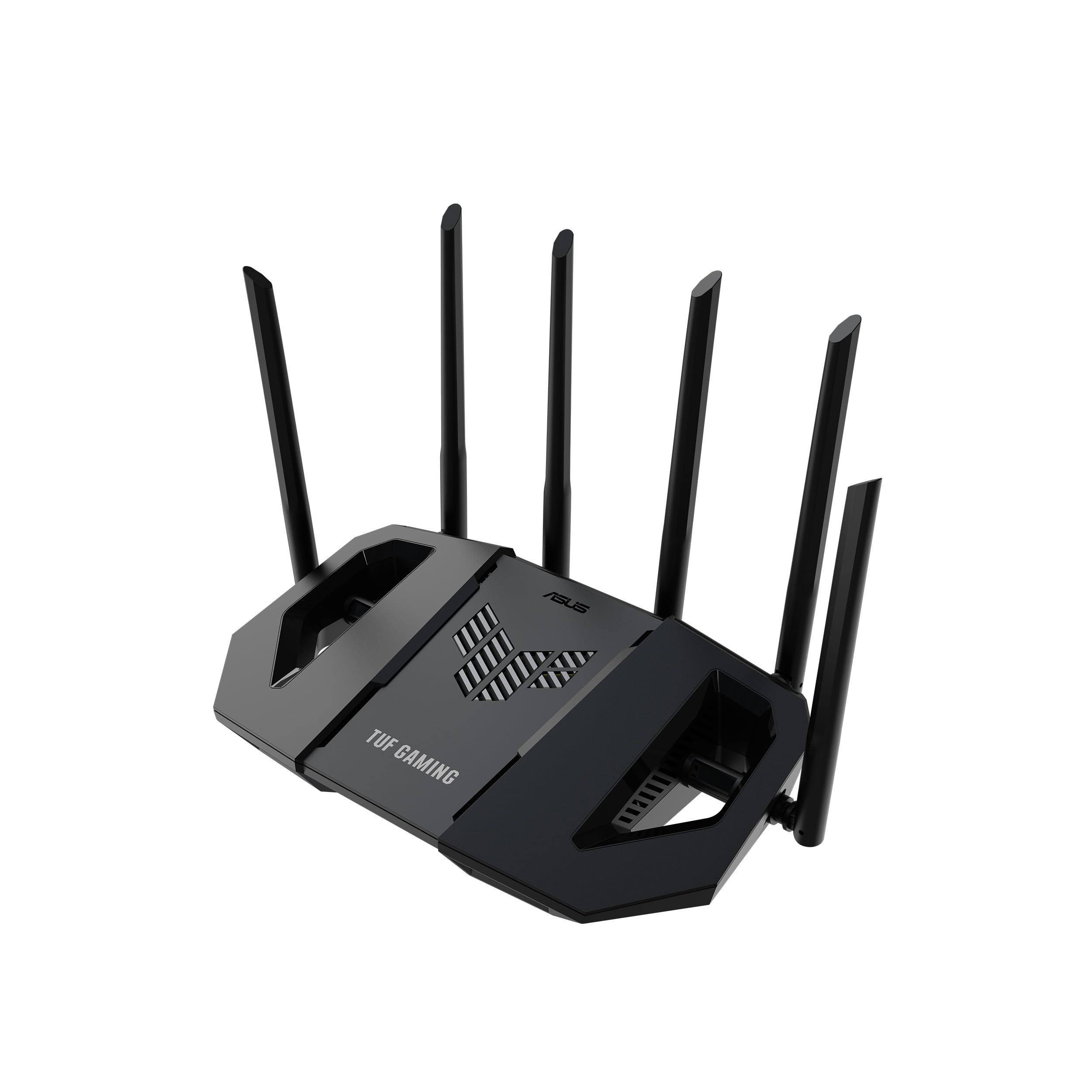
The TUF Gaming BE6500 is built for the gamer who wants every wired device to get multi-gig speed. Four 2.5GbE ports (one WAN, three LAN) mean your gaming PC, console, and streaming device can all enjoy full multi-gig throughput simultaneously. The Wi-Fi 7 standard with 4096-QAM and Multi-Link Operation (MLO) bonds the 2.4 GHz and 5 GHz bands together for a stable connection that reduces latency spikes.
Gaming-specific features include a one-tap mobile game packet prioritization, a dedicated Gaming Port that ensures your primary device stays at the front of the queue, and Open NAT that simplifies port forwarding for multiplayer setups in three steps. Users reported download speeds jumping from 40 Mbps to 800 Mbps after replacing older Wi-Fi 6 routers, while coverage through concrete walls in two-story homes remained excellent. The AiProtection security suite is subscription-free and includes WPA3 support.
The AI web blocking feature can be overly aggressive and may need to be disabled to avoid blocking legitimate game servers. The physical dimensions are substantial — almost 12 inches tall — so placement requires ample shelf space. For users who want a single router that can serve as an access point in an existing mesh or stand alone as a gaming powerhouse, the BE6500 offers the most wired port flexibility in this lineup.
Why it’s great
- Four 2.5GbE ports for multi-gig wired devices
- MLO reduces latency by bonding bands
- Dedicated Gaming Port for priority traffic
Good to know
- Large footprint requires careful placement
- AI web blocking can be overly aggressive
FAQ
What is the minimum Wi-Fi generation I should accept for gaming?
Does a dedicated gaming port actually reduce latency?
I have Starlink — will these budget gaming routers work?
How many devices can a budget gaming router handle before lag becomes noticeable?
Final Thoughts: The Verdict
For most gamers, the best budget gaming router winner is the TP-Link Archer AX55 because it delivers consistent sub-30ms latency, strong coverage through multiple walls, and essential gaming features like OFDMA and VPN client support without breaking the bank. If you want the absolute fastest wireless throughput in the mid-range, grab the ASUS RT-AX82U with its 5400 Mbps speeds and dedicated mobile game mode. And for future-proofing with Wi-Fi 7 and four multi-gig ports, nothing beats the ASUS TUF Gaming BE6500.

Mo Maruf
I created WellFizz to bridge the gap between vague wellness advice and actionable solutions. My mission is simple: to decode the research and give you practical tools you can actually use.
Beyond the data, I am a passionate traveler. I believe that stepping away from the screen to explore new environments is essential for mental clarity and physical vitality.