Our readers keep the lights on and my smoothie glass nicely filled. As an Amazon Associate, I earn from qualifying purchases.
The market under is flooded with mushy rubber domes, wobbly keycaps, and mice that squeak after a few hours of use. The real challenge isn’t finding a cheap keyboard—it’s finding one that delivers a reliable typing experience without forcing you to upgrade in six months.
I’m Mohammad Maruf — the founder and writer behind WellFizz. My approach to this category focuses on switch feel, build rigidity, and real-world reliability over a product’s listed features, because a long list of “multimedia shortcuts” means nothing if the membrane collapses after a few thousand keystrokes.
After combing through dozens of models, I’ve narrowed the field to five options that actually deliver on their promise. This guide covers my picks for the best budget computer keyboard options available right now, with a sharp focus on switch quality, connection stability, and real-world durability.
How To Choose The Best Budget Computer Keyboard
When you’re shopping below the line, every component decision is a trade-off. The keyboard industry cuts costs in three places: the rubber dome membrane, the keycap plastic, and the stabilizers. Understanding how each of these impacts your daily typing experience is the difference between a keyboard you love and one you throw away.
Switch Quality in the Budget Zone
Nearly every keyboard in this price range uses rubber dome membrane switches. The quality of that membrane—its thickness, consistency, and return force—determines whether keys feel crisp or collapse into mush after a month. Cheap membranes fatigue quickly, producing inconsistent actuation across the board. The better budget keyboards use a slightly stiffer membrane that resists that rapid degradation.
Keycap Material and Legends
Most budget keyboards use ABS plastic keycaps. The difference comes in the legend printing method. Pad-printed legends wear off within months on truly cheap units. Look for double-shot molded legends, where the letter is molded through the plastic itself, or lasered legends that are burned into the material. These survive years of use without disappearing.
Connection Type and Latency
Wired USB keyboards offer zero latency and no battery anxiety. Wireless 2.4 GHz options like the Logitech MK270 offer reliable connections up to 33 feet, but you’re trusting a single USB receiver that can be lost. Bluetooth is rare at this price point and often introduces perceptible delay. For pure typing reliability, wired is the smarter choice in the budget tier.
Quick Comparison
On smaller screens, swipe sideways to see the full table.
| Model | Category | Best For | Key Spec | Amazon |
|---|---|---|---|---|
| Logitech K345 | Premium | Everyday typing & reliability | 3-year battery life; 2.4 GHz wireless | Amazon |
| Logitech MK270 | Wireless | Full wireless desktop setup | 36-month keyboard battery life | Amazon |
| EDJO Wired Combo | Value | Ergonomic wired combo | 12 multimedia shortcut keys | Amazon |
| X9 Large Print Backlit | Accessibility | Low-vision users & night typing | 7-color backlight; large bold legends | Amazon |
| MOFII Retro Keyboard | Style | Aesthetic workspace & clicky feel | Round typewriter keycaps; dust brush | Amazon |
In‑Depth Reviews
1. Logitech K345 Wireless Keyboard

The Logitech K345 is the quiet champion of the budget keyboard world. Unlike cheaper alternatives that rely on ultra-thin membranes, this full-size wireless keyboard uses a membrane with a longer key throw and a semi-tactile bump that keeps your typing feel consistent across the entire board. The spill-resistant design adds a layer of protection that most sub- keyboards skip entirely.
Battery life is the standout spec here: up to three years on the included AA batteries. The 2.4 GHz RF connection reaches 33 feet without dropouts, making it ideal for home office or living room setups. The attached palm rest is genuinely comfortable for long sessions, and the dedicated media keys (mute, volume, play/pause) are positioned for easy thumb access without breaking your flow.
The biggest limitation is the lack of Logitech Unifying receiver compatibility—this keyboard requires its own dedicated USB port, which can be a problem on tighter laptop setups. The keycaps also have a hollow plastic tap sound rather than a deep thock, though that’s typical for this price tier. It works out of the box with Windows, macOS, and ChromeOS without driver downloads.
Why it’s great
- Three-year battery life removes the need for constant battery swaps
- Longer key throw and semi-tactile feel beat most budget membranes
- Spill-resistant design protects against accidental liquid damage
Good to know
- Does not support Logitech Unifying receiver; requires a dedicated USB port
- Keycaps produce a hollow plastic tap sound rather than a deeper tone
- Older software support via SetPoint, not the newer Logi Options+ app
2. Logitech MK270 Wireless Keyboard and Mouse Combo

The MK270 is arguably the most famous budget keyboard combo ever made—and for good reason. The keyboard offers a full-size layout with a number pad, F-keys, and arrow keys in a standard configuration that requires zero adjustment period. The low-profile, quiet keys are softer than mechanical switches but avoid the outright mushiness that plagues cheaper membrane boards.
The included compact mouse is ambidextrous and works on most surfaces without a pad. The real headline is the 36-month battery life on the keyboard and 12-month battery life on the mouse, both with on/off switches to prevent accidental drain. The 2.4 GHz USB receiver provides a stable connection up to 33 feet with no pairing process required.
Where the MK270 falls short is the mouse build quality—it’s noticeably small for larger hands, and the left-click can develop squeaking over extended use. The keyboard also uses pad-printed legends rather than double-shot molding, so heavy users may see wear on the most-used keys after a couple of years. Still, for the price, the combination of wireless reliability and battery endurance is hard to beat.
Why it’s great
- Industry-leading 36-month keyboard battery life
- Stable 2.4 GHz wireless connection with 33-foot range
- Full-size layout with eight multimedia hotkeys for quick access
Good to know
- Mouse is compact and may feel cramped for larger hands
- Pad-printed legends can wear off on frequently used keys
- Left-click on the mouse may develop squeaking over time
3. EDJO Wired Keyboard and Mouse Combo

The EDJO combo takes a different approach—prioritizing ergonomics and wired reliability over wireless convenience. The full-sized keyboard includes a textured palm rest and foldable stand that raises the typing angle to a more natural wrist position. The anti-slip rubber feet are genuinely effective at keeping the board planted during fast typing, a detail many budget boards overlook.
The included mouse is symmetrical and ambidextrous, working well on smooth surfaces without a pad. The 104-key QWERTY layout includes 12 multimedia shortcut keys (volume, music, email, browser) that are genuinely useful for daily workflows. The wired connection is truly plug-and-play: no drivers, no pairing, no batteries to replace.
Build quality is where the EDJO reveals its price point. The keyboard chassis is noticeably lighter and feels less rigid than the Logitech options—picking it up, you can feel the thin plastic shell flex slightly. The mouse left-click has been reported to develop a squeak after several hours of use. However, if you prioritize zero-latency typing and don’t mind a lighter build, this combo offers strong value for the money.
Why it’s great
- Ergonomic palm rest and foldable stand improve wrist angle
- Wired USB connection provides zero latency and no battery anxiety
- 12 multimedia shortcut keys boost daily productivity
Good to know
- Keyboard chassis feels lightweight and less rigid than premium options
- Mouse left-click can develop squeaking after extended use
- Some multimedia shortcuts are not functional on Mac OS
4. X9 Large Print Backlit Computer Keyboard
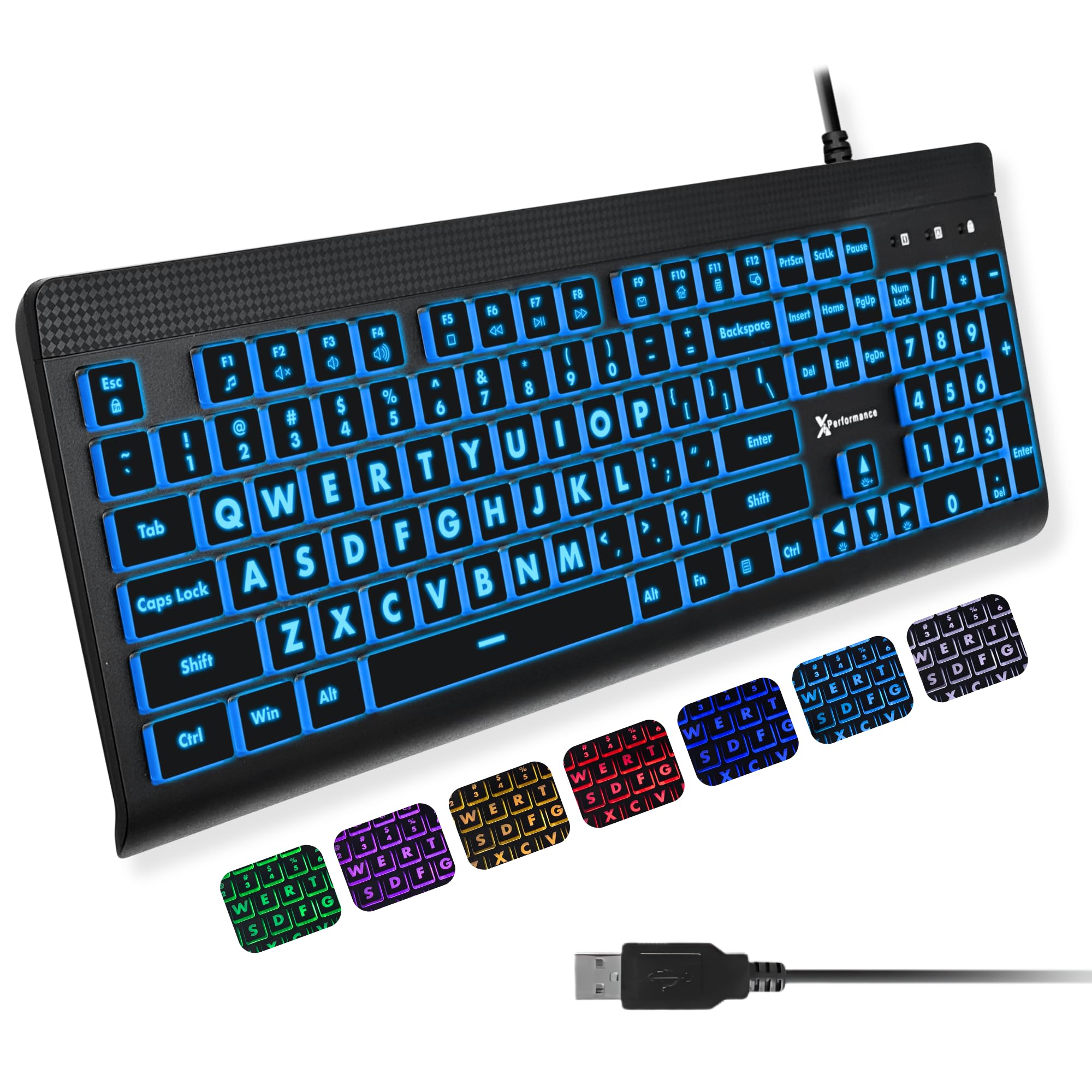
The X9 Large Print keyboard solves a specific problem that most budget offerings ignore: legibility. Each keycap features oversized, bold white legends that are dramatically easier to read than standard keycaps. This makes it an excellent choice for seniors, visually impaired users, or anyone who works in low-light environments. The full-size 107-key layout includes a number pad and 12 shortcut keys for faster navigation.
The backlighting is the star here—seven colors with four brightness levels, all adjustable without software. The light shines through the legends cleanly, making every character visible in a dark room. The keyboard connects via USB-A and works instantly with Windows, Chromebook, and macOS (with a USB-C adapter). The build feel is mid-weight and solid, with quiet keys that avoid the cheap clickiness of some competitors.
The trade-off is that the keycaps are not double-shot molded—the legends are printed onto the backlit surface, so heavy users may see fading on the most-used keys after extended use. The keys also have a slight clickiness rather than being fully silent, which may bother noise-sensitive roommates. But for its intended audience—users who need to see every key clearly—this is the best option in the budget bracket.
Why it’s great
- Extra-large bold legends dramatically improve key legibility
- Seven backlight colors with four brightness levels for any environment
- Plug-and-play USB connectivity with broad OS compatibility
Good to know
- Legends are pad-printed rather than double-shot molded
- Keys produce a slight audible click rather than being fully silent
- No macOS-specific media key functionality
5. MOFII Wired Keyboard – Colorful Retro Typewriter
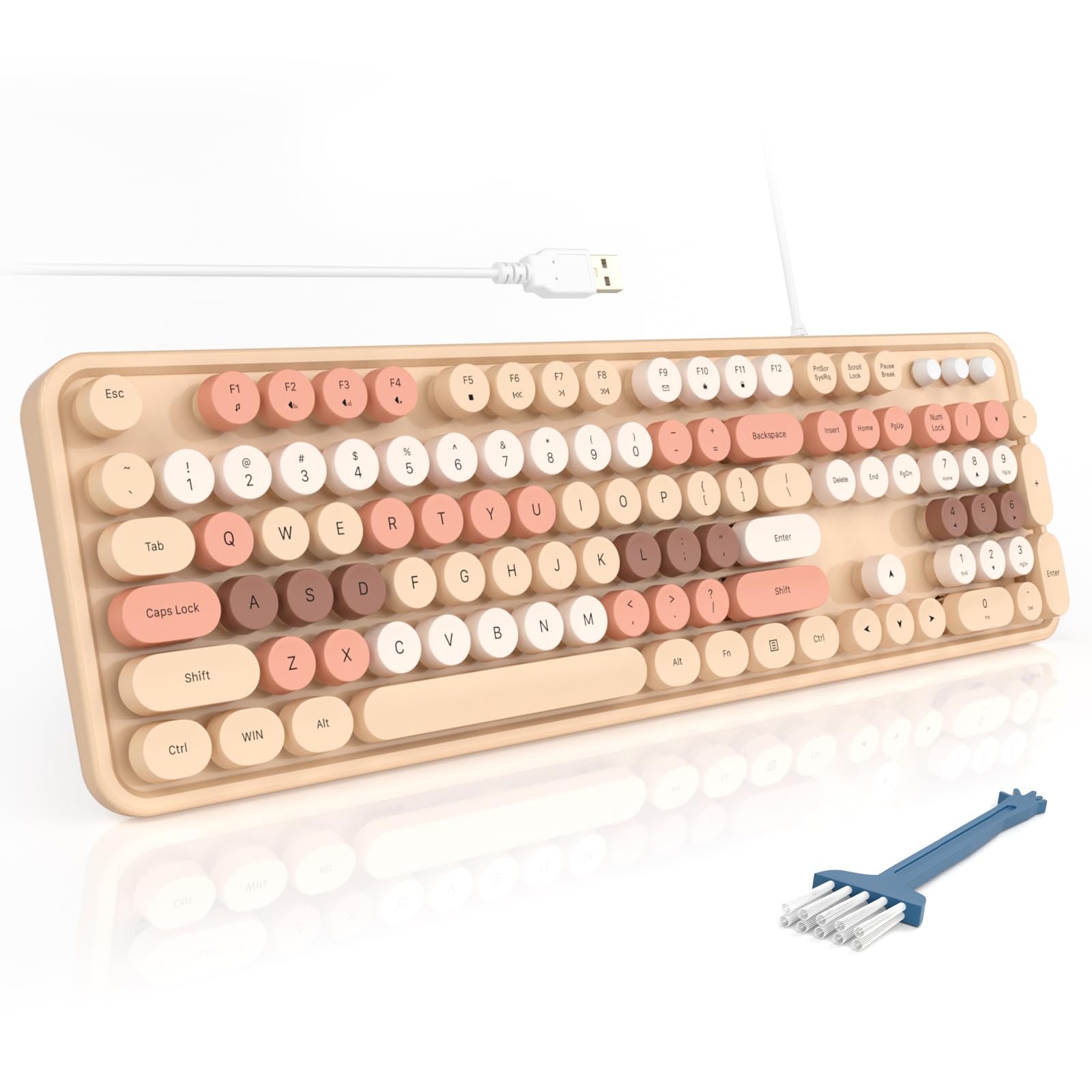
The MOFII retro keyboard proves that budget doesn’t have to mean boring. The round typewriter-style keycaps are a genuine visual departure from the standard flat-square design, and they deliver a surprisingly satisfying typing experience. Each key press produces a soft, pleasant “clack” rather than the hollow plasticky sound of cheaper alternatives. The Milk Tea color scheme is muted enough for an office but distinct enough to add character to your desk.
Beyond the looks, this is a full 104-key wired keyboard with a number pad, three indicator lights, and 12 multimedia shortcuts. It comes with a small dust brush in the box—a thoughtful touch for keeping the round keycaps clean. The foldable stand and anti-slip pads provide a stable typing angle, and the wired USB connection means no pairing or batteries. It’s compatible with Windows, Chrome OS, and Linux.
The round keycaps do have a learning curve—if you’re a fast touch typist, the convex surface can feel unusual under your fingers. The plastic enclosure uses ABS rather than more rigid materials, and the keycaps themselves are painted, which means the colors can chip over time with heavy use. But for users who want a visually distinctive keyboard that still types well, the MOFII delivers charm without sacrificing function.
Why it’s great
- Unique round typewriter keycaps add visual personality to any desk
- Soft “clack” sound is satisfying without being annoyingly loud
- Includes dust brush and foldable stands for practical daily use
Good to know
- Round keycaps require adjustment for fast touch typists
- Painted keycaps may show chips or wear over extended use
- ABS plastic enclosure feels less premium than Logitech alternatives
FAQ
How long do budget keyboards typically last before keys stop working?
Are wireless keyboards under reliable for gaming?
Do budget keyboards work with macOS or only Windows?
What is the biggest quality difference between a and a budget keyboard?
Final Thoughts: The Verdict
For most users, the budget computer keyboard winner is the Logitech K345 because it combines the longest battery life in the category, a genuinely comfortable typing feel with longer key throw, and spill-resistant construction that cheaper options skip entirely. If you want a full keyboard-and-mouse wireless setup, grab the Logitech MK270 for its legendary 36-month battery endurance and reliable 2.4 GHz connection. And for a visually distinctive wired option with satisfying typing sound, nothing beats the MOFII Retro Keyboard for bringing personality to your desk without sacrificing function.

Mo Maruf
I created WellFizz to bridge the gap between vague wellness advice and actionable solutions. My mission is simple: to decode the research and give you practical tools you can actually use.
Beyond the data, I am a passionate traveler. I believe that stepping away from the screen to explore new environments is essential for mental clarity and physical vitality.