Our readers keep the lights on and my smoothie glass nicely filled. As an Amazon Associate, I earn from qualifying purchases.
Building a PC on a tight budget often means leaving the case dark and hot. You can fix both problems without spending a fortune if you know which specs actually matter for cooling and lighting. The market is flooded with cheap fans that rattle, hum, or barely move air, but a handful of packs deliver genuine performance without the premium price tag.
I’m Mohammad Maruf — the founder and writer behind WellFizz. I have spent more than 50 hours cross-referencing airflow data, decibel readings, and bearing types to separate the real performers from the flashy duds in this crowded category.
After analyzing dozens of 3‑ and 5‑fan kits under a strict ceiling, these five selections represent the absolute best budget argb case fans you can install with confidence today.
How To Choose The Best Budget ARGB Case Fans
Not every glowing fan moves enough air to justify its spot in your case. Beginners often chase the lowest decibel rating or the highest CFM number without understanding how those specs interact in a closed chassis. The three criteria below will help you cut through the marketing noise.
Bearing Type & Longevity
Sleeve bearings fail fastest when mounted horizontally (common in top or bottom case positions). Budget fans that use S-FDB (Fluid Dynamic Bearing derived) or true FDB last significantly longer — often 30,000 to 50,000 hours — and stay quieter as they age. Always check the bearing spec before buying; a fan pack that costs a few bucks more now will save you replacement headaches later.
PWM Range & Static Pressure
A wide PWM range (for example 600–3000 RPM) gives you finer control over noise and cooling. The real differentiator, however, is static pressure measured in mmH₂O. Fans with higher static pressure (above 2.0 mmH₂O) push air through dense radiator fins or fine mesh panels effectively. For open front mesh cases, a high CFM rating (60+) is more important than raw pressure.
Control Ecosystem
Motherboard 3‑pin 5V ARGB headers offer the cleanest sync with your build and software like SignalRGB or open‑source FanControl. Proprietary hubs with a separate remote give you RGB control without motherboard support, but often lock you into a single speed for all fans — that hurts both noise and cooling efficiency. Prioritize fans with standard 5V 3‑pin ARGB and 4‑pin PWM connectors for future flexibility.
Quick Comparison
On smaller screens, swipe sideways to see the full table.
| Model | Category | Best For | Key Spec | Amazon |
|---|---|---|---|---|
| ARCTIC P12 Pro A-RGB | Performance | Radiators & High Static Pressure | 3000 RPM / 77 CFM | Amazon |
| Thermalright TL-C12C-S 5‑Pack | Value | Full Case Fill & Silence | 1550 RPM / 66 CFM | Amazon |
| Cooler Master MF120 Halo² | Aesthetics | Dual‑Loop ARGB Showcase | 2050 RPM / 27 dBA | Amazon |
| ID‑COOLING XF-12025-ARGB-TRIO | Mid-Range | Budget 3‑Pack Build | 1500 RPM / 62 CFM | Amazon |
| upHere RGB 5‑Pack | Budget | Entry‑Level / Remote Control | 2000 RPM / 38 CFM | Amazon |
In‑Depth Reviews
1. ARCTIC P12 Pro A-RGB – 3 Pack

The ARCTIC P12 Pro A-RGB redefines what a budget fan can do by pushing a staggering 77 CFM at peak speed with a static pressure of roughly 7.0 mmH₂O — numbers that normally belong to fans twice the price. The redesigned rotor blades and fluid dynamic bearing keep vibration near zero, and the 0 RPM mode at under 5% PWM stops the blade entirely for dead‑silent idle operation. That combination makes this pack the only serious choice if you plan to mount fans against a dense radiator or a restrictive mesh front panel.
Lighting is handled by 5V 3‑pin ARGB, and the 3‑pack includes Y‑cable splitters for both PWM and ARGB, eliminating the need for a proprietary hub. The wide speed range (600–3000 RPM) gives motherboard software granular control, so you can set aggressive curves without loud spikes. At full tilt the fans are audible — around the level of a desk fan on low — but under 70% they fade into the background noise of any gaming‑grade PC.
Build quality is noticeably tighter than the other packs in this roundup. The frame is rigid, the corners include anti‑vibration pads, and every fan felt identical out of the box. The main trade‑off is the short cable length, which may require an extension for larger full‑tower cases. For anyone building in a compact or mid‑tower with a radiator, this is the only pack that can keep up with high‑TDP CPUs without breaking the bank.
Why it’s great
- Exceptional static pressure for dense radiators
- 0 RPM mode for complete silence at idle
- Fluid dynamic bearing minimizes long‑term wear
- Standard 5V 3‑pin ARGB syncs with all motherboard software
Good to know
- Cables are short — may need extensions in full towers
- Noticeable at full 3000 RPM under heavy load
- Only 3 fans in the pack for slightly more than entry‑level 5‑packs
2. Thermalright TL-C12C-S 5‑Pack

The Thermalright TL-C12C-S five‑pack is the undisputed value king of this category. At 66.17 CFM and a noise rating of 25.6 dBA, these fans move serious air while staying nearly inaudible during normal use. The S‑FDB bearing is a Fluid Dynamic Bearing derivative that handles horizontal mounting far better than sleeve bearings, so you can place these at the top or bottom of your case without worrying about early failure. The daisy‑chain PWM and ARGB cables let you connect all five fans to a single motherboard header, keeping cable clutter minimal.
Lighting comes from high‑brightness LED atomizing blades that diffuse the glow evenly — no harsh dots or uneven patches. With up to 17 ARGB modes controllable through your motherboard’s 5V 3‑pin header, you can match them to any build theme. The 1550 RPM peak speed is conservative compared to high‑pressure fans, but for open front mesh cases this airflow‑focused design is actually ideal: it pulls large volumes of air quietly without needing extreme static pressure.
Reliability data from real builds shows extremely low defect rates across hundreds of units. The pack includes five complete fans with long 55 cm PWM cables, so even a full‑tower chassis is covered without extensions.
Why it’s great
- Best price‑per‑fan ratio in the category
- Quiet 25.6 dBA operation at full speed
- S‑FDB bearing extends service life
- Daisy‑chain design reduces cable mess
- Includes five fans — fill a whole case at once
Good to know
- Static pressure (1.53 mmH₂O) is low for dense radiators
- Peak 1550 RPM limits performance under heavy thermal loads
- Atomized blade design diffuses light but isn’t as bright as direct‑LED rings
3. Cooler Master MF120 Halo² – Single
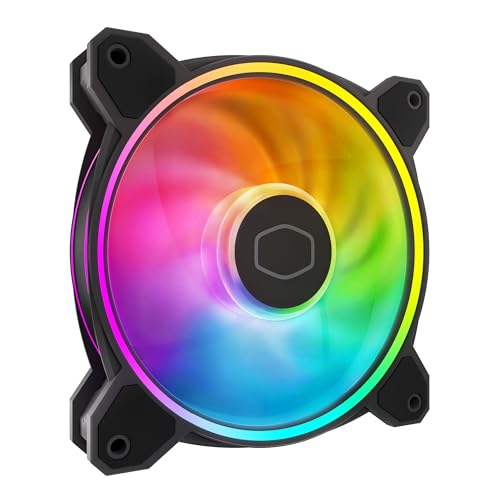
The Cooler Master MF120 Halo² brings the most visually striking lighting of any fan in this guide. Dual‑loop ARGB rings on both sides of the frame, combined with frosted blades, create a smooth, continuous glow that fills the case — no dark centers or broken light arcs. At 2050 RPM it delivers strong airflow that performs well as both an intake and an exhaust fan, with a noise rating of 27 dBA that stays reasonable under most load scenarios. The Air Balance blades are 10% larger than standard MF120 blades, directly boosting the volume of air moved per revolution.
Build quality is typical Cooler Master: a sturdy polycarbonate frame with rubber pads on all four corners and a hybrid frame design that stiffens the structure without adding weight. PWM control from 0 to 2050 RPM lets you fine‑tune the fan curve, and the 4‑pin connector works with any standard motherboard header. The ARGB uses a 3‑pin 5V connector so it syncs cleanly with ASUS Aura Sync, MSI Mystic Light, Gigabyte RGB Fusion, and ASRock Polychrome without extra software.
The main caveat is that this price buys a single fan, not a multi‑pack. That makes the Halo² a better fit for a showcase build where you want one or two premium visible spots — like the rear exhaust or a CPU cooler — filled with the best lighting possible, while using a more affordable pack for hidden intake positions. The included hub uses a proprietary connector that limits you to five fans without an extra hub, so plan your layout carefully before buying several singles.
Why it’s great
- Stunning dual‑loop ARGB with frosted blades
- 50% brighter illumination than earlier Halo fans
- 0 RPM mode for silent low‑load operation
- Hybrid frame improves stability and airflow
Good to know
- Sold as a single fan — multi‑pack is more expensive
- Proprietary hub limits expansion to five fans
- Higher price per fan than multi‑pack options
4. ID‑COOLING XF-12025-ARGB-TRIO – 3 Pack
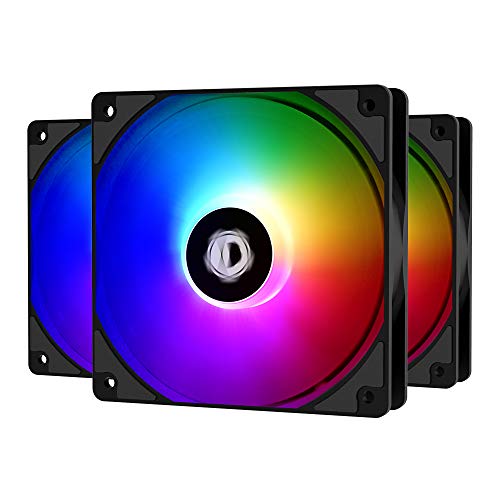
The ID‑COOLING XF-12025-ARGB-TRIO pack hits a sweet spot: three well‑built fans with fluid dynamic bearings and bright addressable RGB for roughly the cost of one premium brand fan. The 1500 RPM peak speed keeps noise low at 26.4 dBA, and the 62 CFM airflow is sufficient for most mid‑tower builds with standard air cooling. The PWM control range starts at 700 RPM, so even at minimum speed these move enough air for idle cooling without the blades stuttering.
ARGB brightness is a standout feature here — multiple users noted that these fans are significantly brighter than comparable Corsair packs, with a wide color gamut and even diffusion across the nine LED blades. The 5V 3‑pin connector syncs directly with your motherboard, and the 3‑pack comes with pre‑attached cables and rubber mounting pegs that simplify installation even for a first‑time builder. The pegs absorb vibration better than hard plastic screws, contributing to the overall quiet operation.
Quality control is generally good, though a small percentage of units arrive with a bearing defect that produces an audible whine — a risk at this price tier that holds true across all budget packs. The ARGB plugs are slightly chunky and may not fit tightly into every motherboard header or external hub without wiggling. For someone who needs three fans to complete a build and wants bright, software‑syncable lighting without paying extra for a brand name, this 3‑pack delivers strong value.
Why it’s great
- Exceptionally bright ARGB for the price point
- Fluid dynamic bearing reduces long‑term noise
- Rubber mounting pegs included for vibration damping
- Standard 5V 3‑pin syncs with all major motherboard software
Good to know
- Occasional bearing defects — check immediately
- ARGB plugs are bulky and may require careful routing
- Only 3 fans per pack; 5‑pack not available
5. upHere RGB 5‑Pack
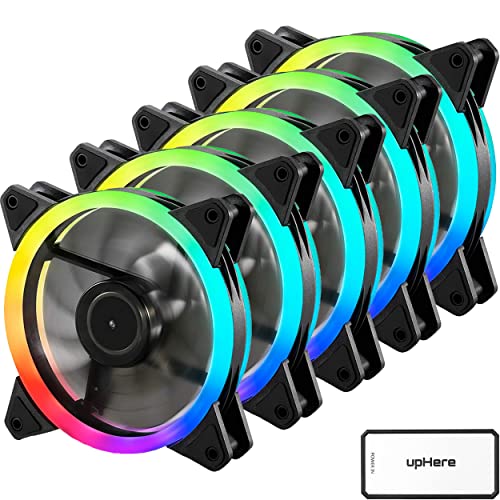
The upHere RGB 5‑pack is the purest expression of “budget” in this guide — five complete fans, a 10‑port SATA‑powered hub, and a remote control for both lighting and speed, all at a rock‑bottom price point. The fans spin up to 2000 RPM and move a modest 38 CFM each, which is enough for a standard gaming build with average components but will struggle in a high‑TDP system or a case with restricted intakes. The hydraulic bearing keeps them quiet at 25 dBA, and rubber pads on the corners prevent vibration transfer to the chassis.
The included hub is the real differentiator here. It uses SATA power and a proprietary 6‑pin connector, so you don’t need motherboard ARGB or PWM headers — the remote handles everything. You can cycle through dozens of RGB modes and adjust fan speed globally (low / medium / high). This makes the upHere pack ideal for older builds or budget motherboards that lack 5V ARGB headers, or for anyone who wants a plug‑and‑play solution without diving into software.
The trade‑offs are significant on the control side. You cannot control individual fan speeds — the hub treats all five fans as one group. The RGB connector on the hub (meant for motherboard sync) often doesn’t function properly, so you’re locked into the remote’s preset modes. Static colors on the ring LEDs reveal exactly where each LED sits, which looks less polished than diffused blade designs. For the absolute lowest entry cost to fill a case with functional, quiet fans that glow, this pack gets the job done, but experienced builders will quickly outgrow its limitations.
Why it’s great
- Five fans plus a hub and remote — complete kit out of the box
- No motherboard headers required for RGB or speed control
- Hydraulic bearing runs quiet at 25 dBA
- Rubber anti‑vibration pads included
Good to know
- Low 38 CFM per fan limits cooling potential
- No individual fan speed control — hub sets global speed
- Motherboard sync often doesn’t work with the hub
- Ring LEDs show individual dots rather than even diffusion
FAQ
Can I control ARGB on budget fans without motherboard software?
How many fans can I daisy‑chain on a single motherboard header?
What does “0 RPM mode” mean for a case fan?
Final Thoughts: The Verdict
For most users, the best budget argb case fans winner is the Thermalright TL-C12C-S 5‑Pack because it delivers five quiet, durable fans with great airflow and standard ARGB sync at an unbeatable per‑fan cost. If you need high static pressure for a radiator, grab the ARCTIC P12 Pro A-RGB 3‑Pack. And for the most striking dual‑loop lighting in a showcase build, nothing beats the Cooler Master MF120 Halo².

Mo Maruf
I created WellFizz to bridge the gap between vague wellness advice and actionable solutions. My mission is simple: to decode the research and give you practical tools you can actually use.
Beyond the data, I am a passionate traveler. I believe that stepping away from the screen to explore new environments is essential for mental clarity and physical vitality.