Our readers keep the lights on and my smoothie glass nicely filled. As an Amazon Associate, I earn from qualifying purchases.
The jump to 4K resolution demands a monitor that delivers four times the pixels of a standard 1080p panel, but the real pain hits when those added pixels force your GPU to work harder and your budget to bend further. Finding a budget 4K monitor that balances crisp text rendering, decent color accuracy, and a usable refresh rate without introducing input lag or ghosting requires sorting through dozens of conflicting spec sheets.
I’m Mohammad Maruf — the founder and writer behind WellFizz. I specialize in breaking down display hardware specifications, panel technologies, and real-world performance metrics so you can match a monitor to your actual workload instead of marketing hype.
Whether you need a secondary display for spreadsheets or a primary driver for creative software, the best budget 4k monitor will give you sharp text and solid color without forcing a trade-off in build quality or connectivity.
How To Choose The Best Budget 4K Monitor
Selecting a budget 4K monitor means identifying which corners the manufacturer cut and whether those cuts affect your specific use case. Most sub- 4K panels use IPS or VA technology with varying brightness levels, color gamut coverage, and connectivity ports. Understanding three key factors will help you avoid a washed-out or sluggish display.
Panel Type: IPS vs VA vs TN
IPS panels dominate the budget 4K market because they provide consistent color and brightness across wide viewing angles, which is essential for productivity tasks like spreadsheets, code editing, and photo work. VA panels deliver deeper black levels and higher contrast ratios (often 2500:1 or 3000:1), making them better for movie watching in a dark room, but color shifts more noticeably when you view from an angle. TN panels are rare at 4K and offer the fastest response times but suffer from poor vertical viewing angles and weaker color reproduction.
Refresh Rate and Adaptive Sync
Standard budget 4K monitors cap at 60Hz, which is perfectly adequate for office work, web browsing, and media playback. If you play fast-paced shooters or racing games, look for a monitor that bumps the refresh rate to 120Hz or 144Hz — the extra frames reduce motion blur and make on-screen movement feel significantly smoother. Adaptive Sync technology (AMD FreeSync or NVIDIA G-Sync Compatible) eliminates screen tearing when your frame rate fluctuates, and it comes standard on most modern budget 4K panels.
Connectivity and Ergonomics
Check for at least one HDMI 2.0 or DisplayPort 1.4 input to drive 4K at 60Hz without compression. USB-C with power delivery (60W or higher) is a massive convenience for laptop users — it carries video, data, and charging through a single cable. An adjustable stand with height, tilt, and pivot capability saves you from buying a separate monitor arm later. Built-in speakers are rarely high-quality, but they can serve as a backup while you route external audio.
Quick Comparison
On smaller screens, swipe sideways to see the full table.
| Model | Category | Best For | Key Spec | Amazon |
|---|---|---|---|---|
| Dell S2725QS | Mid-Range | Productivity & Casual Gaming | 120Hz, 1500:1 Contrast | Amazon |
| KOORUI G2741L | Mid-Range | Dual-Mode Gaming | Dual Mode 160Hz/320Hz | Amazon |
| Acer Nitro VG270K | Mid-Range | Competitive Esports | 0.5ms GTG Response Time | Amazon |
| INNOCN 27C1U-D | Mid-Range | MacBook / Creative Work | USB-C 65W, DeltaE <2 | Amazon |
| LG 32UR500K-B | Mid-Range | Home Office Media Viewing | 32-inch VA, 90% DCI-P3 | Amazon |
| KTC U27T6 | Mid-Range | Versatile Gaming & Work | 140% sRGB, HDR400 | Amazon |
| ViewSonic VX3276-4K-MHD | Budget | Static Productivity Setup | 32-inch MVA, 2500:1 Contrast | Amazon |
| Samsung ViewFinity S8 S80D | Premium | Professional Color Work | HDR10, Ergonomic Stand | Amazon |
| MSI MPG 321URX QD-OLED | Premium | High-End Gaming & Creation | QD-OLED, 240Hz, 0.03ms | Amazon |
In‑Depth Reviews
1. Dell S2725QS

The Dell S2725QS hits a rare sweet spot by offering 120Hz refresh rate at 4K resolution with a 1500:1 contrast ratio — noticeably higher than the typical 1000:1 found on competing budget IPS panels. This higher contrast delivers deeper black levels for spreadsheet lines, code syntax highlighting, and dark-mode interfaces.
AMD FreeSync Premium certification ensures tear-free motion when your frame rate fluctuates between 48Hz and 120Hz, making it a viable option for light gaming sessions. The 0.03ms response time is advertised as MPRT, but real-world pixel transitions feel clean with minimal ghosting on desktop scrolling.
The ultra-thin bezels and ash white finish give it a modern aesthetic that fits minimalist desk setups. Integrated speakers deliver more volume and frequency range than previous Dell generations, though external speakers remain preferable for immersive audio.
Why it’s great
- Rare 120Hz + 1500:1 contrast combo at this tier
- ComfortView Plus reduces blue light without washing out colors
- Ergonomic stand with height, tilt, swivel, and pivot adjustments
Good to know
- Slight vignetting along the right edge reported on some units
- Not ideal for competitive FPS gaming due to measurable ghosting
2. KOORUI G2741L

The KOORUI G2741L brings a versatile dual-mode feature that lets you switch between 4K UHD at 160Hz for immersive single-player games and Full HD at 320Hz for competitive esports titles. This flexibility means one monitor can serve both your RPG adventures and your ranked matches without buying a second panel.
Covering 95% of the DCI-P3 color gamut, this monitor delivers vibrant reds and greens that pop in story-driven games and creative applications. The Fast IPS panel keeps pixel transitions sharp at 1ms MPRT, reducing the blur that often plagues budget 4K displays during fast camera pans.
Height, tilt, and pivot adjustments make it easy to find a comfortable viewing angle for long sessions. HDMI 2.1 and DisplayPort 1.4 inputs ensure full bandwidth for 4K at 160Hz with no chroma subsampling.
Why it’s great
- Dual-mode refresh rate adapts to game type
- Wide color gamut for vibrant visuals
- Full ergonomic stand included
Good to know
- Stand feels slightly cheap for the price
- HDR400 is not true HDR — brightness lacks impact
3. Acer Nitro VG270K

The Acer Nitro VG270K targets competitive gamers who need ultra-low latency without sacrificing resolution. The 0.5ms GTG response time — the fastest among the monitors in this roundup — virtually eliminates ghosting and motion blur, giving you a clear advantage in fast-paced shooters where pixel transitions matter.
Dynamic Frequency Ratio (DFR) technology lets you choose between 4K at 160Hz for visual clarity in slower genres or drop to 1080p at 320Hz when maximum fluidity is required. AMD FreeSync Premium certification ensures tear-free gameplay across the full refresh range, syncing with compatible graphics cards.
The ZeroFrame design with near-bezel-less edges makes multi-monitor setups feel seamless, and the 90% DCI-P3 color gamut provides enough saturation for single-player titles to look rich. HDR10 support adds extra contrast range for compatible content.
Why it’s great
- Class-leading 0.5ms response time
- DFR allows switching between 160Hz and 320Hz
- Wide 90% DCI-P3 color coverage
Good to know
- Built-in speakers are weak and tinny
- Some units report HDMI port failure after months
4. INNOCN 27C1U-D

The INNOCN 27C1U-D is engineered specifically for MacBook and creative workflows, featuring a USB-C port that delivers 65W of power delivery — enough to charge a MacBook Air or base MacBook Pro while transmitting video and data through a single cable. This eliminates the need for a separate charging brick and keeps your desk clean.
Factory-calibrated DeltaE <2 ensures colors are accurate straight out of the box, which matters for photo editing, design mockups, and video color grading. The IPS panel provides 178-degree viewing angles and covers 1.07 billion colors with 8-bit+FRC, producing smooth gradients without visible banding.
The ergonomic stand supports height, tilt, swivel, and 90-degree pivot rotation, making it easy to switch between landscape and portrait orientation for coding or document reading. HDR400 certification adds extra brightness range for HDR content.
Why it’s great
- USB-C 65W powers and displays in one cable
- DeltaE <2 color accuracy for creative work
- Full ergonomic stand with pivot rotation
Good to know
- HDMI port shows slightly off colors compared to DP
- Built-in speakers are barely usable
5. LG 32UR500K-B

The LG 32UR500K-B gives you a large 32-inch 4K UHD display with a VA panel that achieves a 1000:1 contrast ratio and 90% DCI-P3 color gamut coverage. The extra screen real estate is ideal for side-by-side document comparison, video editing timelines, or watching 4K content without scaling artifacts.
Waves MaxxAudio powers the built-in stereo speakers, delivering noticeably fuller sound than most budget monitors — enough for casual YouTube, video calls, and background music without immediate need for external speakers. This makes it a solid choice for a simple home office setup.
Dynamic Action Sync reduces input lag for casual gaming, and Black Stabilizer lifts shadow details in dark scenes to help spot enemies or read dark UI elements. The ergonomic stand only offers tilt adjustment, but VESA 100×100 compatibility lets you mount it on an arm for better positioning.
Why it’s great
- 32-inch size gives real multitasking room
- MaxxAudio speakers are above average for a monitor
- Wide 90% DCI-P3 color coverage
Good to know
- Limited to tilt-only stand adjustment
- Brightness caps at 250 nits
6. KTC U27T6
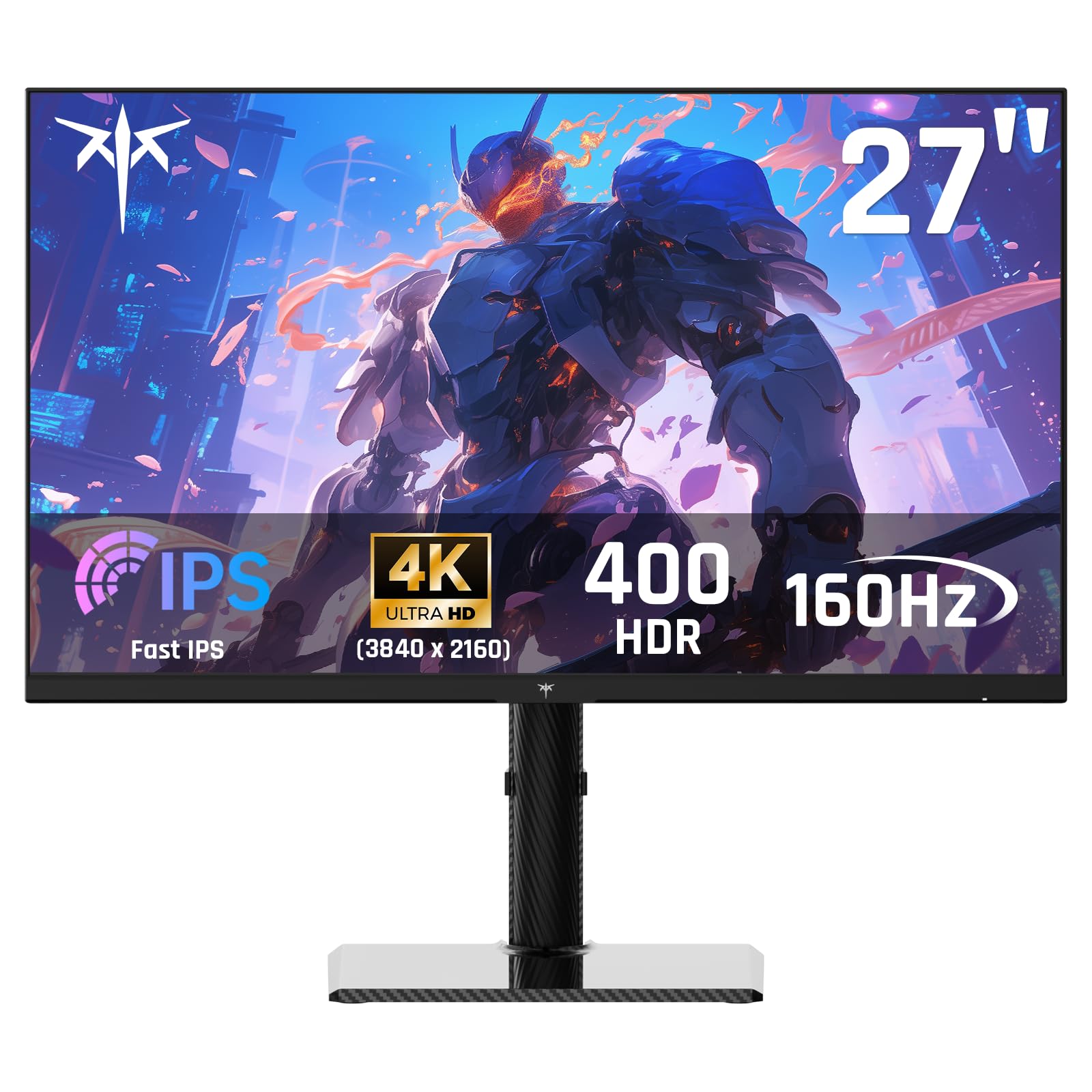
The KTC U27T6 stands out with a carbon fiber back cover that is both lightweight and rigid, reducing overall monitor weight while improving heat dissipation. This build choice gives the monitor a distinctive aesthetic that feels more premium than the typical glossy plastic housing found at this price.
Color coverage reaches 140% sRGB and 1.07 billion colors with 8-bit+FRC, providing enough saturation for photo editing and design work. The 400 nits brightness and HDR400 certification deliver decent highlight pop for HDR content, though true HDR performance still falls short of higher-tier panels.
The ergonomic stand supports height, tilt, pivot, and swivel adjustments, giving you full flexibility to dial in your viewing position. Dual HDMI 2.1 and dual DisplayPort 1.4 inputs allow you to connect multiple devices simultaneously without swapping cables.
Why it’s great
- Carbon fiber back cover is unique and durable
- Full ergonomic adjustment range
- Dual HDMI 2.1 and DP 1.4 inputs for multi-device setups
Good to know
- Menu interface has a steep learning curve
- RGB backlight can be distracting if not disabled
7. ViewSonic VX3276-4K-MHD

The ViewSonic VX3276-4K-MHD uses an MVA panel that delivers a 2500:1 contrast ratio — significantly deeper black levels than typical IPS panels in this price range. This makes it a strong choice for watching movies in a dim room or working with dark-themed UIs where deeper blacks improve perceived image depth.
The 32-inch diagonal provides generous workspace for productivity, and the ultra-thin bezels give the monitor a sleek appearance on your desk. Flexible connectivity includes two HDMI ports, DisplayPort, and Mini DisplayPort, covering most modern laptops and desktops without needing adapters.
On-screen presets for Game, Movie, Web, Text, and Mono modes let you quickly switch between display profiles based on your current task. Flicker-Free technology and a Blue Light Filter reduce eye strain during extended work sessions.
Why it’s great
- 2500:1 contrast ratio delivers deep blacks
- Solid build with metal frame construction
- Multiple preset modes for different tasks
Good to know
- Narrow viewing angles cause color fade off-center
- No VESA mounting screws included in the box
8. Samsung ViewFinity S8 S80D

The Samsung ViewFinity S8 S80D is built for professional color work and productivity, featuring a matte anti-glare screen that reduces reflections in bright office environments. HDR10 support ensures compatible content is displayed with wider contrast and more realistic highlights compared to standard SDR output.
Height, tilt, swivel, and pivot adjustments allow you to position the screen exactly where you need it, including 90-degree portrait rotation for reading long documents or code files without scrolling. The built-in USB hub includes USB-A and USB-B ports for connecting peripherals directly to the monitor.
Eye Saver Mode and Flicker-Free technology reduce eye strain during all-day work sessions. TÜV certification confirms the blue light reduction is effective without introducing the yellow tint that plagues lesser eye-care modes.
Why it’s great
- Excellent anti-glare matte finish for bright rooms
- Full ergonomic stand with portrait rotation
- Built-in USB hub simplifies peripheral connections
Good to know
- No built-in speakers or headphone jack
- Rear joystick menu navigation is frustrating
9. MSI MPG 321URX QD-OLED

The MSI MPG 321URX QD-OLED is the pinnacle of 4K monitor technology, combining a 32-inch Quantum Dot OLED panel with a 240Hz refresh rate and 0.03ms GTG response time. The OLED pixel structure produces perfect blacks and infinite contrast, making every image look three-dimensional with no backlight bleed.
Covering 99% of the DCI-P3 color gamut with DeltaE ≤2 factory calibration, this monitor delivers reference-grade color accuracy suitable for professional video editing, photography, and design work. VESA DisplayHDR True Black 400 certification ensures HDR content shows deep black levels and bright highlights simultaneously.
OLED Care 2.0 technology actively prevents burn-in through pixel refresh cycles and logo detection, extending the panel’s lifespan for daily use. HDMI 2.1, DisplayPort 1.4a, and USB-C with 90W power delivery provide future-proof connectivity for high-end GPUs and laptops.
Why it’s great
- Infinite contrast and perfect blacks from QD-OLED
- 240Hz refresh rate with 0.03ms response
- Professional-grade color accuracy out of the box
Good to know
- Premium price is a significant investment
- Stand lacks full ergonomic adjustment options
FAQ
Can a budget 4K monitor handle console gaming at 120Hz?
What is the difference between HDR10 and HDR400?
Final Thoughts: The Verdict
For most users, the budget 4k monitor winner is the Dell S2725QS because it delivers a rare 120Hz refresh rate with excellent 1500:1 contrast, a full ergonomic stand, and solid build quality without crossing into premium pricing. If you want dual-mode flexibility for both esports and immersive gaming, grab the KOORUI G2741L. And for creative professionals who need USB-C charging and color accuracy, nothing beats the INNOCN 27C1U-D.

Mo Maruf
I created WellFizz to bridge the gap between vague wellness advice and actionable solutions. My mission is simple: to decode the research and give you practical tools you can actually use.
Beyond the data, I am a passionate traveler. I believe that stepping away from the screen to explore new environments is essential for mental clarity and physical vitality.