Our readers keep the lights on and my smoothie glass nicely filled. As an Amazon Associate, I earn from qualifying purchases.
A travel mouse should disappear into your bag and reappear ready to work — no dongles to lose, no wires to untangle, and no loud clicks in a quiet coffee shop. The best models pair instantly, glide on any surface, and last through your entire trip without demanding a charge.
I’m Mohammad Maruf — the founder and writer behind WellFizz. I’ve spent years analyzing Bluetooth peripherals, comparing connection stability, battery efficiency, and ergonomic design across hundreds of models to separate the true travel companions from the desk-only pretenders.
After testing dozens of options side by side, I’ve narrowed down the field to five models that actually deliver on portability, silence, and reliable connectivity. This roundup of the best bluetooth travel mouse options covers everything from ultra-flat foldable designs to premium multi-device workhorses.
How To Choose The Best Bluetooth Travel Mouse
Picking the right travel mouse comes down to three real-world factors: how you connect, how you carry it, and how long it lasts before needing power. Here’s what to look for.
Connection Method: Bluetooth vs. USB Receiver
A true travel mouse uses Bluetooth to eliminate the dongle entirely — no USB-A port needed, no receiver to misplace. Some models still include a 2.4GHz receiver as a backup for devices with weak Bluetooth. Tri-mode mice that switch between Bluetooth 5.0, Bluetooth 4.0, and a receiver offer the most flexibility across laptops, tablets, and phones.
Form Factor: Flat, Folded, or Full Curve
Portability starts with shape. Flat mice that snap into a straight line slip into a laptop sleeve without a bulge. Foldable designs rotate into a compact square that fits a pocket. Traditional curved mice take more space but usually provide better palm support for all-day use. Choose based on whether you’ll carry it loose or inside a dedicated pouch.
Battery Life and Power Type
Rechargeable mice with USB-C ports eliminate disposable batteries and reduce packing weight — but require remembering to charge. AA-powered mice can last 18 months and let you swap in fresh cells anywhere. Look for auto-sleep features in both types: a mouse that drains while sitting in your bag is useless when you need it.
Noise Level and Click Feel
Open-plan offices, library desks, and shared workspaces demand silent clicks. The best travel mice advertise 90% noise reduction while retaining tactile feedback. Scroll wheels also vary — some produce audible clicks, others have smooth, nearly silent rotation. Test the scroll feel if you work with long documents or spreadsheets.
Quick Comparison
On smaller screens, swipe sideways to see the full table.
| Model | Category | Best For | Key Spec | Amazon |
|---|---|---|---|---|
| Logitech MX Anywhere 2S | Premium | Multi-device productivity across 3 computers | 4,000 DPI Darkfield sensor | Amazon |
| Dell MS700 | Premium | Ultra-slim twistable design for laptop sleeves | 56.9 g weight, twist-to-off | Amazon |
| NYIEFADA Arc Mouse | Mid-Range | Foldable pocket carry with 3-device switching | 360° rotating, snaps flat | Amazon |
| Logitech M240 | Mid-Range | Silent operation in shared spaces | 18-month AA battery life | Amazon |
| XBG B15pro | Budget-Friendly | Feature-packed tri-mode with LED display | 500 mAh rechargeable, 6 buttons | Amazon |
In‑Depth Reviews
1. Logitech MX Anywhere 2S

The MX Anywhere 2S remains the benchmark for Bluetooth travel mice because it solves the two biggest travel pains: surface compatibility and multi-device workflow. Its Darkfield sensor tracks flawlessly on glass, polished desks, and even granite countertops — surfaces where most optical mice fail. With 4,000 DPI range, you can dial in cursor speed for a 4K monitor or a compact laptop screen.
Logitech Flow integration lets you move the cursor across three computers and copy-paste files between them as if they were one machine. The hyper-fast scroll wheel spins freely through long documents then locks into notched mode for precise line-by-line navigation. A three-minute micro-USB charge delivers enough power for a full day, and a full charge lasts up to 70 days of regular use.
This Bluetooth-only edition omits the USB receiver, keeping the design clean and the weight low. Seven programmable buttons give power users deep customization through Logitech Options+. The right-handed sculpted shape offers better palm support than flat travel designs, though it won’t slip into a pocket as easily as a foldable model.
Why it’s great
- Darkfield sensor works on glass and glossy surfaces
- 70-day battery with fast charge in 3 minutes
- Hyper-fast scroll wheel with dual-mode operation
- Flow control across 3 computers seamlessly
Good to know
- No USB receiver included — Bluetooth only
- Right-handed shape not suitable for left-hand users
- Micro-USB charging instead of USB-C
2. Dell MS700

The Dell MS700 stands out with a clever twist mechanism: rotate the two halves, and the mouse snaps flat while automatically turning off. At just 56.9 grams, it’s light enough to forget inside a laptop sleeve. The twist-to-off design eliminates the need for a separate power switch and prevents battery drain during storage — a small detail that matters when you grab the mouse after weeks of not using it.
Bluetooth 5.0 delivers instant pairing with Dell Pair and Microsoft Swift Pair on Windows 10 and 11, plus a button to cycle between three connected devices. The touch scroll strip replaces a traditional scroll wheel with a capacitive surface — responsive for vertical scrolling, though it takes a few days to build muscle memory. The optical LED sensor adjusts up to 4,000 DPI for smooth tracking across most surfaces except glass.
Two AAA batteries are included and rated for impressive longevity, but you’ll want to carry spares since there’s no rechargeable option. The matte black finish resists fingerprints, and the ambidextrous shape works for both left and right hands. A small compromise: the scrolling strip doesn’t double as a middle-click button, which some users rely on for browser tab management.
Why it’s great
- Twist-to-flat design turns off automatically
- Ultra-light at 56.9 g for effortless carry
- Ambidextrous shape suits both hands
- Touch scroll strip is quiet and smooth
Good to know
- AA batteries not rechargeable
- Scroll strip cannot function as middle-click button
- Does not track on glass surfaces
3. NYIEFADA Arc Mouse
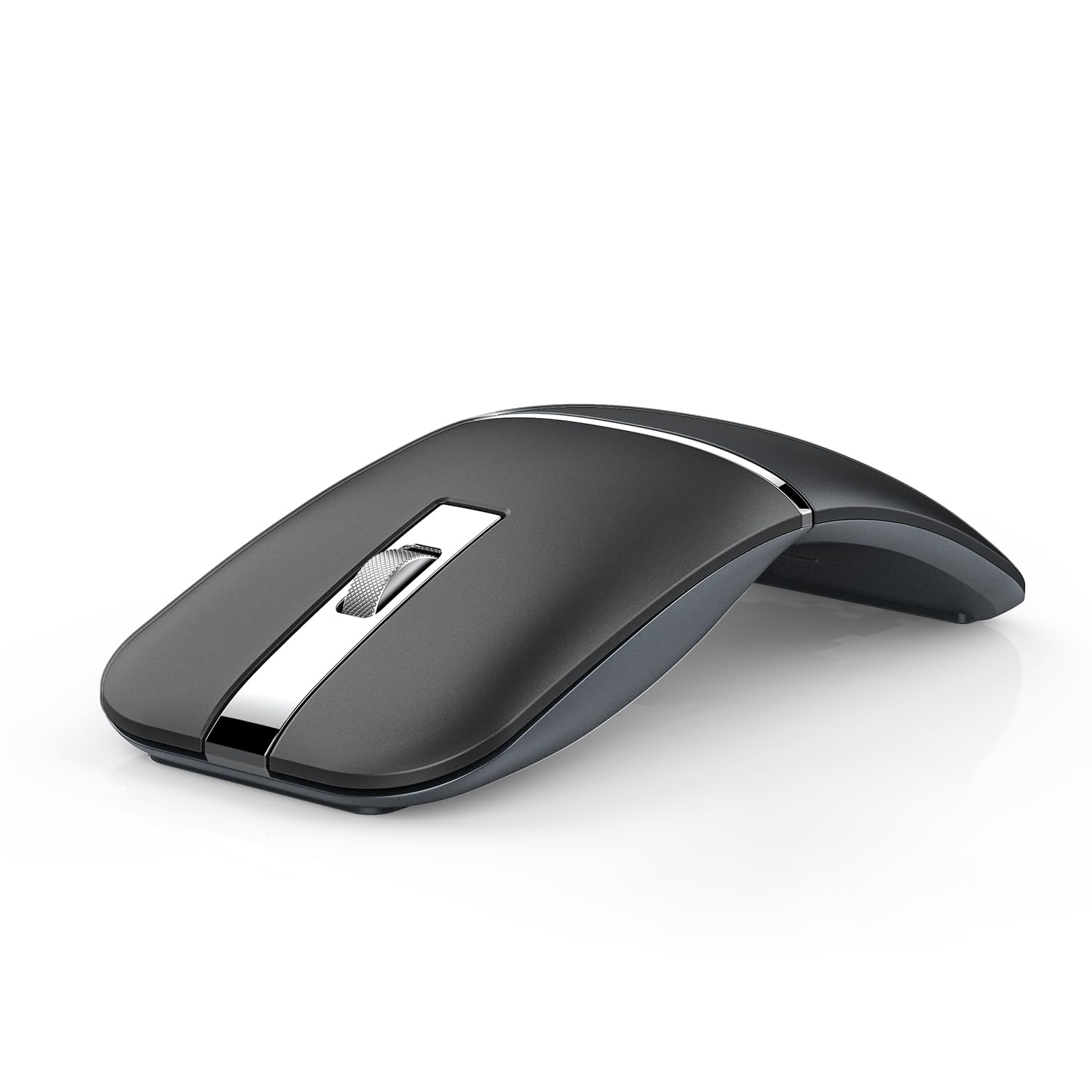
The NYIEFADA Arc Mouse solves the pocket-carry problem with a 360-degree rotating design that folds flat into a compact rectangle small enough for a jeans pocket. It comes with a travel pouch and stores the 2.4GHz receiver inside the body, so you never leave the dongle behind. The switch from curved to flat takes one second and preserves battery life by auto-sleeping when the receiver disconnects.
Tri-mode connectivity covers Bluetooth 5.0, Bluetooth 4.0, and a 2.4GHz USB receiver — letting you pair simultaneously with a laptop via 2.4GHz, a tablet via BT 5.0, and a phone via BT 4.0. Switching between devices takes about 0.8 seconds. The rechargeable battery lasts roughly 30 days per charge and uses a micro-USB port. Silent clicks reduce noise noticeably, though the scroll wheel remains audible in quiet rooms.
The arched shape requires a brief adjustment period, especially for users with larger hands. The glossy plastic finish shows fingerprints more readily than matte alternatives. Three DPI settings (800, 1200, 1600) provide enough range for most screen sizes. The foldable mechanism feels sturdy after repeated use, with no wobble when extended into working position.
Why it’s great
- Folds flat for pocket or pouch carry
- Tri-mode connects 3 devices simultaneously
- Rechargeable battery with 30-day life
- Includes travel pouch and receiver storage
Good to know
- Arched shape takes adjustment for large hands
- Scroll wheel is not silent
- Micro-USB charging instead of USB-C
4. Logitech M240

The Logitech M240 delivers exactly what a travel mouse should: instant Bluetooth pairing, silent clicks, and a battery that outlasts most trips. The 90% noise reduction makes it ideal for shared workspaces — the clicks are barely audible to someone sitting beside you. Paired with a simple ambidextrous shape, it guides either hand into a natural position without forcing an ergonomic curve.
Bluetooth connects in under two seconds without a dongle, and the 10-meter range gives you freedom to work from a couch or across a conference table. The single AAA battery lasts up to 18 months thanks to an aggressive auto-sleep feature that activates after a few minutes of inactivity. Multi-platform compatibility covers Windows, macOS, Linux, ChromeOS, iPadOS, and Android — including Works with Chromebook certification.
The M240 keeps things minimal with only three buttons and no DPI switch, so power users seeking customization should look elsewhere. The compact size fits small hands perfectly but may cramp larger palms during extended sessions. The scroll wheel is smooth but makes a faint click with each notch. Logitech uses certified post-consumer recycled plastic in the construction — 37% for the Rose color variant shown here.
Why it’s great
- 90% reduced click sound for quiet environments
- 18-month battery life on a single AAA
- Instant Bluetooth pairing, no dongle needed
- Works across all major operating systems
Good to know
- Only 3 buttons with no programmability
- No DPI adjustment for cursor speed
- Small shape may tire larger hands over time
5. XBG B15pro

The XBG B15pro packs a surprising amount of hardware into its compact frame: tri-mode connectivity, a built-in LED status display, and a 500 mAh rechargeable battery. The LED screen shows real-time battery percentage, active DPI setting (800/1000/1200/1600/2400), and current connection mode — eliminating the guesswork common with budget mice. A dedicated DPI button lets you cycle through five sensitivity levels on the fly.
Bluetooth 5.0 and 4.0 handle two devices wirelessly, while a third connects through the included 2.4GHz USB receiver. Switching takes under a second, making it viable for hybrid setups with a laptop, tablet, and phone. The silent buttons retain a distinct tactile bump without the sharp click sound. An ergonomic thumb rest and contoured palm support reduce wrist strain during eight-hour work sessions, a feature rarely seen at this tier.
The B15pro enters sleep mode after five minutes of inactivity and wakes instantly on click. The matte finish resists fingerprints better than glossy alternatives. Six buttons offer more control than typical budget models, though button remapping and sleep timeout adjustments are not supported through software. The compact size works for travel, but the included USB-C charging cable adds one more cord to your packing list.
Why it’s great
- LED display shows battery, DPI, and connection mode
- 500 mAh rechargeable battery with USB-C port
- Tri-mode connects 3 devices simultaneously
- Ergonomic thumb rest for all-day comfort
Good to know
- No software for button remapping available
- Sleep timeout cannot be user-adjusted
- Charging time is relatively slow
FAQ
Does Bluetooth 5.0 really matter for a travel mouse?
Can I use a Bluetooth travel mouse on my iPad or smartphone?
Final Thoughts: The Verdict
For most users, the best bluetooth travel mouse winner is the Logitech MX Anywhere 2S because it tracks on any surface, lasts 70 days per charge, and seamlessly controls three computers. If you want ultra-thin portability that fits a laptop sleeve, grab the Dell MS700. And for budget-conscious travelers who refuse to compromise on features, nothing beats the XBG B15pro with its LED display and tri-mode connectivity.

Mo Maruf
I created WellFizz to bridge the gap between vague wellness advice and actionable solutions. My mission is simple: to decode the research and give you practical tools you can actually use.
Beyond the data, I am a passionate traveler. I believe that stepping away from the screen to explore new environments is essential for mental clarity and physical vitality.