Our readers keep the lights on and my smoothie glass nicely filled. As an Amazon Associate, I earn from qualifying purchases.
Bluetooth printers have effectively killed the “lost cable” headache and the “wrong room” frustration, letting you fire off documents, photos, and shipping labels directly from your phone, tablet, or laptop without a single wire in sight. The real challenge today isn’t finding one — it’s picking the right engine for your specific workflow, whether that’s pocket-sized thermal output for a digital nomad or a heavy-duty all-in-one color machine for a home office.
I’m Mohammad Maruf — the founder and writer behind WellFizz. I specialize in disassembling the hype around wireless peripherals and translating raw technical specs into practical buying advice, especially for folks who need their gear to just work without a second thought.
To help you cut through the noise, I’ve put together a detailed breakdown of the best options on the market right now, covering everything from ultra-portable thermal units to full-featured inkjet workhorses. Whether you’re shopping for travel, a small business, or daily home use, this guide to the best bluetooth printer delivers the clarity you need to make a confident purchase.
How To Choose The Best Bluetooth Printer
Choosing a Bluetooth printer isn’t about specs alone — it’s about matching the right print engine to the environment where you’ll use it most. A student printing lecture notes in a café has very different needs than a seller churning out shipping labels in a garage. Here’s what to look for so you don’t overpay or undershoot.
Print Technology: Thermal vs. Inkjet
This is the deepest fork in the road. Thermal printers (like the iDPRT and MUNBYN models) use heat on special paper — no ink cartridges, no smudging, zero consumable costs after the initial paper rolls. They produce sharp monochrome output, making them ideal for shipping labels, receipts, and black-and-white documents. The trade-off? Color is impossible, and the thermal paper is pricier than standard copy paper. Inkjet printers (like the Canon and Epson models) deliver full-color photos and mixed documents but lock you into recurring cartridge purchases and periodic maintenance cycles.
Connection Reliability and Range
Not all Bluetooth chips are equal. Entry-level units sometimes use lower-power radios that drop connection if the device is more than 10 feet away or if a wall sits between you and the printer. Mid-range and premium units implement Bluetooth 5.0, which offers a stable link up to 30 feet in open conditions. Also check whether the printer supports direct USB-C as a backup — if your office Wi-Fi is crowded and the Bluetooth gets flaky, having a wired fallback saves the day.
Paper Handling and Media Support
For a general home printer, look at the sheet capacity (250 sheets is the standard for all-in-ones) and whether it supports borderless photo printing up to 8.5×11″. For a label printer, the critical spec is the maximum label width — 4.1″ to 4.25″ covers standard shipping labels, while narrower units limit you to small address stickers. Thermal printers also handle fanfold and roll labels differently; some require manual calibration when switching between the two.
Quick Comparison
On smaller screens, swipe sideways to see the full table.
| Model | Category | Best For | Key Spec | Amazon |
|---|---|---|---|---|
| Canon PIXMA TS7720 | All-in-One Inkjet | Home photo & document printing | 15/10 ppm, auto duplex, 2.7″ touchscreen | Amazon |
| MUNBYN RW403B | Thermal Label Printer | High-volume shipping labels | 970,000 label lifespan, <0.01% jam rate | Amazon |
| Epson WorkForce Pro WF-3823 | All-in-One Inkjet | Small office productivity | 21/11 ppm, 250-sheet tray, 35-page ADF | Amazon |
| Canon PIXMA TS6520 | All-in-One Inkjet | Budget home scanning & copying | Auto duplex, 1.42″ OLED display | Amazon |
| JADENS Bluetooth Label Printer | Thermal Label Printer | Entry-level shipping label printing | 203 DPI, 1.57″-4.1″ label width range | Amazon |
| iDPRT MT610Pro | Thermal Portable | On-the-go document printing | 300 DPI, 2000mAh battery, 1.2 lbs | Amazon |
| Nelko PP01 Photo Printer | Inkjet Photo Mini | Scrapbooking & instant photo prints | 603 DPI, sticky-back paper, 0.6 lbs | Amazon |
In‑Depth Reviews
1. Canon PIXMA TS7720 Wireless All-in-One Inkjet Printer

The Canon TS7720 nails the sweet spot for anyone who needs a do-everything printer — color documents, borderless photos, scanning, and copying — all without a wired connection. Its automatic duplex printing cuts paper usage in half, a feature you rarely find in this segment, and the 2.7-inch LCD touchscreen makes navigating settings far more intuitive than a bank of cryptic buttons. With print speeds hitting 15 pages per minute in black and 10 in color, it keeps pace with a busy household or a small home office without breaking a sweat.
The hybrid ink system uses just two cartridges (PG-285 black and CL-286 color), which keeps replacement costs reasonable compared to four-cartridge setups. However, some users report that the default auto-off timer can interrupt workflow — a setting that’s fixable in the maintenance menu but not obvious out of the box. The paper input tray is a manual pull-out design, and the lack of an automatic document feeder for the scanner means multi-page copying requires individual handling.
For the price, the TS7720 delivers a level of feature completeness — color printing, duplex, scanning, touchscreen, and reliable Bluetooth/Wi-Fi connectivity — that few competitors match. It’s the strongest all-rounder in this lineup for mixed-use households, especially if you value print quality and ease over extreme speed or niche thermal paper output.
Why it’s great
- Automatic 2-sided printing saves paper and time.
- Sharp text and decent photo color from just two cartridges.
- Intuitive 2.7-inch touchscreen makes setup and daily use simple.
Good to know
- The auto-off default can be annoying until you adjust the setting.
- No auto-feed scanner for hands-free multi-page copies.
2. MUNBYN Bluetooth Thermal Label Printer RW403B

The MUNBYN RW403B is built specifically for small business owners who ship daily and can’t afford print jams or smudged barcodes. Its DAC Dynamic Algorithm auto-calibrates label alignment, achieving a quoted near-zero jam rate below 0.01 percent, and the print head is rated for an impressive 970,000 labels before replacement. At 60 decibels, it’s quieter than a mechanical keyboard, so it won’t disturb a shared workspace or home office while printing batches of labels.
Setup is genuinely fast — the printer connects via Bluetooth 5.0 to iOS, Android, Windows, Mac, and even Chromebook without hunting for driver discs. The companion “Munbyn Print” app offers over 3,500 design elements and 2,000 templates, which helps if you want to customize labels beyond standard shipping formats. The unit supports label widths from 1.57 inches up to 4.25 inches, covering everything from small address stickers to full 4×6 shipping labels.
The RW403B does sacrifice versatility — it prints in monochrome only and relies entirely on thermal paper, so it can’t handle typical office documents or photos. You’ll also need to fine-tune horizontal and vertical alignment settings in the app occasionally when switching between label sizes. For volume shippers, though, the speed (150 labels per minute), the durability, and the zero ongoing ink cost make it a compelling upgrade over general-purpose printers.
Why it’s great
- Extremely low jam rate keeps high-volume workflows smooth.
- Runs on thermal technology, eliminating ink and toner costs.
- Quiet operation at 60 dB works in shared environments.
Good to know
- Monochrome only — no color or document printing capability.
- Alignment may need adjustment in the app when swapping label sizes.
3. Epson WorkForce Pro WF-3823 Wireless All-in-One Printer

The Epson WF-3823 is the heavy lifter of this group, designed for environments where multiple people need to print, scan, and copy throughout the day. Its PrecisionCore Heat-Free Technology delivers a robust 21 pages per minute in black and 11 in color, with a fast first-page-out time that keeps short runs efficient. The 250-sheet paper tray and a 35-page automatic document feeder mean you can load a ream of paper in the morning and process multi-page scans without babysitting the machine.
Connection options are comprehensive — Bluetooth Low Energy for quick smartphone setup, built-in Wi-Fi, Wi-Fi Direct for peer-to-peer printing, and Ethernet for wired networking. The DURABrite Ultra pigment inks produce instant-dry, smudge-resistant prints on plain paper, which is especially useful for documents that get handled immediately after printing. The 2.7-inch color touchscreen and the Epson Smart Panel app make navigation and remote management straightforward, even for non-technical users.
The trade-offs are real. The starter ink cartridges that ship with the printer are very low capacity, so your first replacement cycle comes sooner than expected. Some users report the ADF occasionally pulls multiple sheets or mis-feeds, and the color matching can be inconsistent when printing photos. It’s not a photo lab, but for high-volume text and mixed document output in a small office, the WF-3823 delivers dependable throughput and a low cost per page.
Why it’s great
- Fast print speeds at 21/11 ppm with fast first-page-out time.
- 35-page ADF and 250-sheet tray support uninterrupted workflow.
- PrecisionCore technology delivers durable, smudge-resistant prints.
Good to know
- Starter ink cartridges are low capacity and need quick replacement.
- ADF can occasionally mis-feed or pull multiple pages.
4. Canon PIXMA TS6520 Wireless Color Inkjet Printer

The Canon PIXMA TS6520 strips away unnecessary frills while keeping the essential all-in-one features — copy, scan, and print — in a compact white chassis that fits neatly on a bookshelf. Its 1.42-inch monochrome OLED display provides quick access to ink levels and settings, and the dual-band Wi-Fi (2.4GHz and 5GHz) ensures a stable connection even in crowded network environments. Automatic 2-sided printing comes standard, so you’re not flipping pages manually for double-sided documents.
Print quality is solid for a budget-tier inkjet. The PG-295 black cartridge uses pigment ink, which keeps text sharp and water-resistant, while the CL-286 color cartridge handles photos and graphics with decent saturation. Setup is straightforward via the Canon PRINT app, with support for Apple AirPrint and Mopria for direct mobile printing. The starter cartridges included in the box are enough to get comfortable, but you’ll want to budget for replacements almost immediately.
The TS6520 is not built for heavy volume. Its paper tray is small, and the lack of an automatic document feeder means multi-page scanning is manual. The printer also requires a Canon account for initial setup, which adds friction that some users find frustrating. Still, for light-to-moderate home use where occasional color printing and scanning matter more than speed or capacity, this is a well-rounded pick at a very accessible price point.
Why it’s great
- Auto duplex printing saves paper without manual intervention.
- Compact footprint and OLED screen monitor ink levels at a glance.
- Dual-band Wi-Fi ensures stable connection in busy homes.
Good to know
- Starter ink cartridges run out quickly, raising early costs.
- No ADF means slow multi-page scanning.
5. JADENS Bluetooth Thermal Shipping Label Printer

The JADENS label printer is a no-nonsense entryway into thermal shipping for entrepreneurs just starting their online store. It uses a Japanese-made thermal print head at 203 DPI, which produces crisp, scan-ready text and barcodes on labels ranging from 1.57 to 4.1 inches wide. Setup takes about a minute — connect via Bluetooth to Windows or Mac, or use the “Jadens printer” app on Android and iOS — and the unit works with fanfold and roll labels interchangeably.
It integrates smoothly with major shipping platforms like Amazon, Shopify, Etsy, USPS, ShipStation, and Shippo, so your workflow from sale to label is streamlined. The printer ships with 50 test labels, a USB cable for wired fallback, and a power adapter. The physical footprint is compact at roughly 8 inches wide, leaving plenty of desk space for other tasks.
The limitations come down to polish. The Bluetooth implementation on phones requires using the proprietary app rather than the native OS print dialogue, which adds a step. The 203 DPI resolution is adequate for standard barcodes and text but won’t render very tiny font details as sharply as higher-DPI alternates. And while it handles label changes with a press of the feed button, some users wish the calibration were automatic. For small-scale sellers, though, the JADENS offers dependable thermal printing without a steep learning curve.
Why it’s great
- Simple setup — one minute to first print via USB or Bluetooth.
- Works with fanfold and roll labels from 1.57″ to 4.1″ wide.
- Compatible with Amazon, Shopify, Etsy, and major shipping tools.
Good to know
- Phone prints require the proprietary app, not native print.
- 203 DPI is adequate but not as sharp as 300 DPI alternatives.
6. iDPRT MT610Pro Inkless Portable Thermal Printer
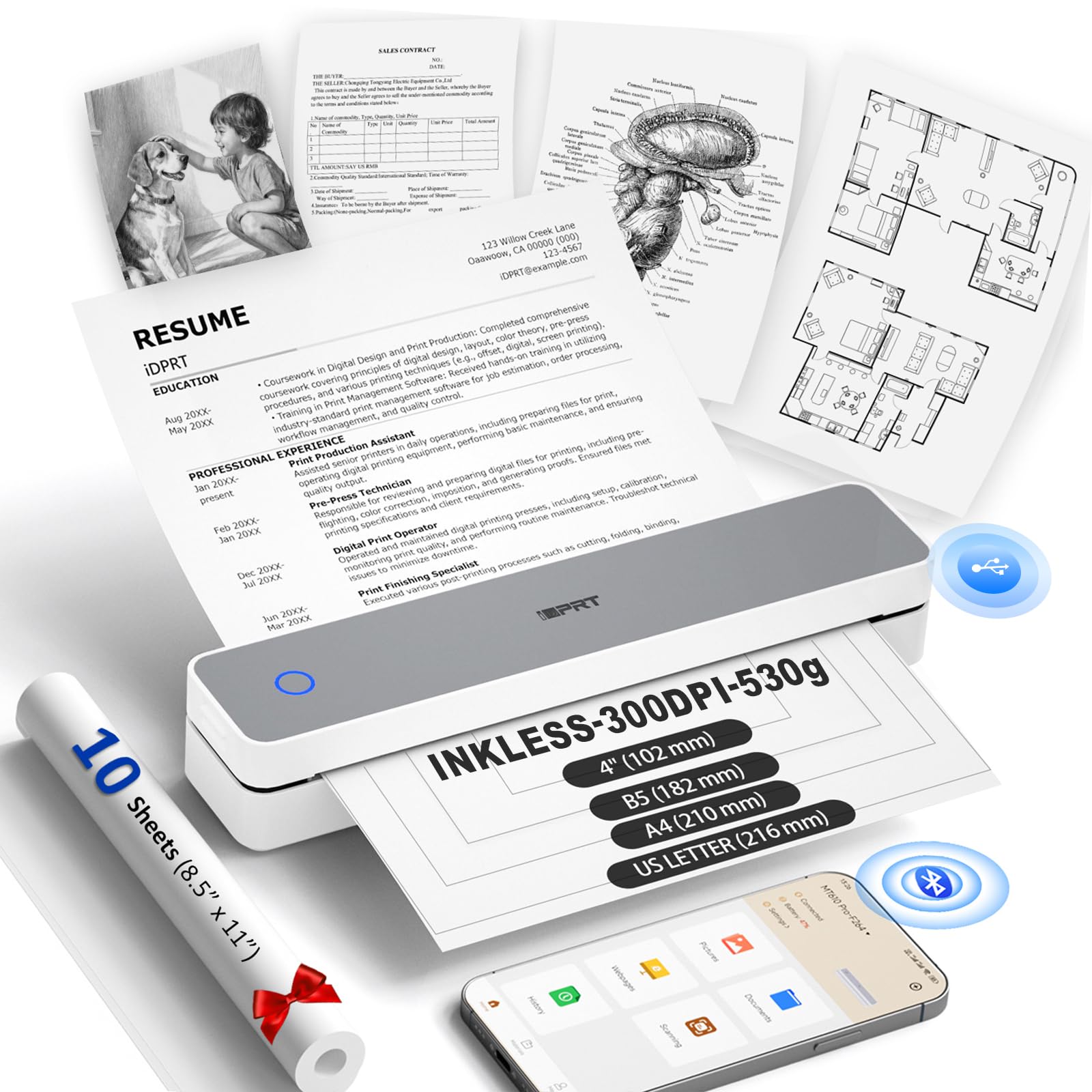
The iDPRT MT610Pro is designed for the mobile professional — it weighs just 1.2 pounds, measures about the thickness of a paperback, and fits into a backpack side pocket without displacing essentials. Its 300 DPI thermal print head produces crisp black-and-white output on US Letter and A4 thermal paper, making it a viable tool for printing contracts, lecture notes, or field reports when a bulkier office printer isn’t an option.
Connection happens via Bluetooth 5.0 or USB-C, and the included “HerePrint” app works reliably on both iOS and Android for document and QR code printing. The 2000mAh rechargeable battery is rated for roughly 200 continuous pages on a full charge, which is enough for a full day of on-the-go printing without hunting for an outlet. The unit also supports smaller sizes like A5, B5, and 4-inch paper, adding flexibility for different document formats.
The most significant constraint is paper dependency: this printer uses thermal paper only, which means you can’t grab standard multi-purpose paper from the supply closet. Thermal paper sheets are available on Amazon but less common at physical office supply stores, so you’ll need to plan ahead. Additionally, the MT610Pro is monochrome only — no color support — and the 35 ppm speed is adequate for short runs but not for bulk jobs. For travelers and students who need a lightweight, inkless document printer, it’s a smart, purpose-built solution.
Why it’s great
- Ultra-light at 1.2 lbs and slim enough for daily backpack carry.
- 300 DPI thermal prints are sharp and smudge-proof.
- 2000mAh battery supports up to 200 pages per charge.
Good to know
- Requires specialized thermal paper, not standard copy paper.
- Monochrome output only — no color printing capability.
7. Nelko PP01 2×3 Portable Photo Printer

The Nelko PP01 is a pocketable inkjet photo printer that targets memory-makers — scrapbookers, travel journalers, party hosts, and anyone who wants wallet-sized prints on the spot. At just 0.6 pounds and about the size of a large phone, it slips into a purse or daypack with ease. It prints at 603 DPI on 2×3 inch sticky-backed paper, delivering vibrant colors with enough detail that fine lines and small text in photos remain clear.
Connection is entirely Bluetooth-driven through the Nelko app on iOS or Android. The app offers a generous set of editing tools — filters, borders, stickers, collage layouts, and AI editing — so you can customize prints before hitting the button. Each print completes in under 63 seconds, and a single ink cartridge is good for roughly 80 full-color prints. The paper itself is smudge-proof, water-resistant, and tear-resistant, which is a big plus for prints that end up handled frequently in planners or on fridges.
The PP01 strictly prints on 2×3 inch sticky-backed sheets, so you can’t use it for larger photos or standard documents. Setting up the ink cartridge requires the printer to be powered on during insertion, which is easy once you know it but not obvious on first try. Long idle periods may also require gently wiping the ink cartridge head to prevent clogs. For its niche — instant, high-quality mini prints that stick anywhere — the Nelko PP01 delivers a satisfying, distraction-free experience.
Why it’s great
- 603 DPI output creates sharp, vibrant wallet-sized photos.
- Sticky-back paper is smudge-proof, water-resistant, and tear-resistant.
- App offers extensive editing tools for custom creations.
Good to know
- Only prints 2×3 inch size — not for documents or larger photos.
- May need occasional ink head cleaning after long idle periods.
FAQ
Can I print from my iPhone or Android without a separate app?
What is the real difference between thermal and inkjet for a Bluetooth printer?
How many pages can I expect before replacing ink or paper in a portable model?
Final Thoughts: The Verdict
For most users, the best bluetooth printer winner is the Canon PIXMA TS7720 because it combines color inkjet printing, automatic duplex, a touchscreen, and broad device compatibility in a single affordable package. If you need dedicated high-volume label output for a small ecommerce business, grab the MUNBYN RW403B. And for on-the-go document printing where weight and size are your biggest constraints, nothing beats the iDPRT MT610Pro.

Mo Maruf
I created WellFizz to bridge the gap between vague wellness advice and actionable solutions. My mission is simple: to decode the research and give you practical tools you can actually use.
Beyond the data, I am a passionate traveler. I believe that stepping away from the screen to explore new environments is essential for mental clarity and physical vitality.