Our readers keep the lights on and my smoothie glass nicely filled. As an Amazon Associate, I earn from qualifying purchases.
Finding a work mouse that balances silent operation, multi-device flexibility, and long-lasting comfort is harder than it seems. Most office mice prioritize low cost, leaving you with loud clicks, awkward ergonomics, or a battery that dies mid-presentation. The real challenge is identifying a model that actually reduces fatigue across an eight-hour shift while keeping your workflow seamless between a laptop, tablet, and desktop.
I’m Mohammad Maruf — the founder and writer behind WellFizz. I’ve spent years analyzing connectivity protocols, sensor accuracy, and ergonomic design across hundreds of pointing devices to identify which specs actually prevent repetitive strain and which are just marketing noise.
After cross-referencing DPI ranges, battery life figures, button counts, and real-world feedback on connection stability, I’ve narrowed the field to the seven mice that genuinely solve real office problems. This guide covers everything you need to make a confident choice for the best bluetooth mouse for work.
How To Choose The Best Bluetooth Mouse For Work
Picking the right work mouse requires focusing on four core areas: how it connects, how long it lasts, how comfortable it is for your hand, and how quiet it operates in shared spaces. These factors directly affect your daily productivity and physical well-being.
Connection Protocol and Multi-Device Support
Bluetooth 5.0 offers lower latency and more stable connections than older versions, but many offices still have legacy PCs that lack Bluetooth entirely. Mice that include both Bluetooth and a 2.4 GHz USB dongle give you the flexibility to switch between devices without re-pairing. Look for models that support at least three paired devices with a dedicated button to toggle between them, saving you the hassle of constantly disconnecting and reconnecting.
Ergonomics and Hand Size
A flat, narrow mouse forces your wrist into an unnatural position, which leads to discomfort over hours of use. Contoured shapes with thumb rests, arched palm supports, and a right-handed or ambidextrous design matter significantly. Trackball mice eliminate wrist movement entirely by keeping your hand stationary while your thumb controls the cursor, making them a strong option for users already experiencing wrist pain.
Battery Life and Charging Convenience
Rechargeable mice with USB-C ports eliminate the recurring expense of disposable batteries and reduce electronic waste. Some premium models deliver a full day of use from just a few minutes of charging, while others last months on a single charge. If you prefer not to think about power at all, mice with AA or AAA batteries can still last six months to two years depending on usage patterns.
DPI and Sensor Performance
DPI determines how far your cursor moves per inch of physical mouse movement. For standard office work across a single monitor, 800 to 1600 DPI is sufficient. For multi-monitor setups or high-resolution displays, 4000 DPI or higher allows you to cover large screens with minimal wrist movement. Darkfield or laser sensors can track on glass surfaces, which is critical for mobile workers who don’t always have a mouse pad.
Quick Comparison
On smaller screens, swipe sideways to see the full table.
| Model | Category | Best For | Key Spec | Amazon |
|---|---|---|---|---|
| Logitech MX Anywhere 3S for Mac | Premium | Mac users & glass-surface tracking | 8K DPI sensor, MagSpeed scroll | Amazon |
| Logitech MX Anywhere 2S | Premium | Multi-computer workflow with Flow | 4K DPI Darkfield, 70-day battery | Amazon |
| Dell MS700 Travel Mouse | Premium | Ultra-portable, twist-to-on design | 56.9g weight, touch scroll | Amazon |
| Nulea M501 Trackball | Mid-Range | Wrist pain relief, narrow workspaces | Thumb-operated trackball, USB-C | Amazon |
| HP 400 Quiet Mouse | Mid-Range | Budget-friendly, eco-conscious buyers | 6000 DPI, 24-month AA battery | Amazon |
| XBG B15pro | Mid-Range | Feature-packed budget, LED display | 500 mAh battery, tri-mode | Amazon |
| ESR MagMouse | Mid-Range | Laptop portability, magnetic storage | 160-hour battery, built-in cable | Amazon |
In‑Depth Reviews
1. Logitech MX Anywhere 3S for Mac

The Logitech MX Anywhere 3S for Mac sits at the top of the work mouse hierarchy because it solves the two biggest office frustrations: noisy clicks and inconsistent tracking. The quiet clicks reduce audible feedback by about 90 percent compared to standard mice, making it ideal for shared workspaces and open-plan offices. Its 8K DPI sensor tracks flawlessly on glass surfaces up to four millimeters thick, so you can work from a café table or conference room desk without a mouse pad.
MagSpeed scrolling is the standout productivity feature here. The electromagnetic scroll wheel can cycle through one thousand lines per second in free-spin mode and then lock into a precise ratchet feel for line-by-line document navigation. That dual-mode wheel eliminates the back-and-forth between mouse and keyboard when moving through long spreadsheets or code files. The USB-C charging cable provides three hours of use from a one-minute charge, and a full charge lasts roughly seventy days.
Build quality is excellent, with 61 percent post-consumer recycled plastic in the Pale Grey finish and a matte texture that resists fingerprints. The compact form factor fits smaller hands well, though users with larger palms may find it slightly undersized for extended gripping. Customization through Logi Options+ allows you to remap buttons per application, which is useful for assigning media controls or copy-paste shortcuts.
Why it’s great
- Silent clicks with tactile feedback for quiet offices
- MagSpeed wheel scrolls 1000 lines per second
- 8K DPI sensor tracks on glass without a pad
- Fast charging delivers hours of use in minutes
Good to know
- Compact size may not suit larger hands for all-day use
- Bluetooth-only design excludes older PCs without BT
- No USB receiver included for non-Mac systems
2. Logitech MX Anywhere 2S

The MX Anywhere 2S remains a compelling option because its Darkfield High Precision sensor tracks on glass and glossy surfaces that cause optical sensors to skip. At 4000 DPI, it covers multi-monitor setups without requiring excessive arm movement. The Bluetooth-only configuration keeps things simple, though it does exclude the USB dongle found in the earlier non-Bluetooth Edition, so verify your device has Bluetooth before purchasing.
Logitech Flow is the killer app for this mouse if you work across multiple computers. You can move the cursor to the edge of your MacBook screen and it seamlessly jumps to a connected Windows desktop, carrying text, images, and files with it using the same copy-paste gesture. That cross-platform continuity eliminates the need for separate mice or third-party KVM software, saving significant time during daily multitasking.
Battery life is rated at seventy days on a full charge, and a three-minute micro-USB top-up provides a full day of use. The compact chassis weighs roughly ninety-nine grams, making it easy to slip into a laptop sleeve. The Hyper-Fast scroll wheel toggles between free-spin and click-to-click modes, though the magnetic feel of the 3S wheel is noticeably smoother than the mechanical ratchet here.
Why it’s great
- Darkfield sensor tracks on glass and glossy surfaces
- Logitech Flow enables seamless cross-computer file transfer
- Seventy-day battery life with quick micro-USB charging
- Compact and lightweight for daily travel
Good to know
- No USB receiver included for non-Bluetooth devices
- Micro-USB charging instead of modern USB-C
- Right-handed orientation, not fully ambidextrous
3. Dell MS700 Travel Mouse
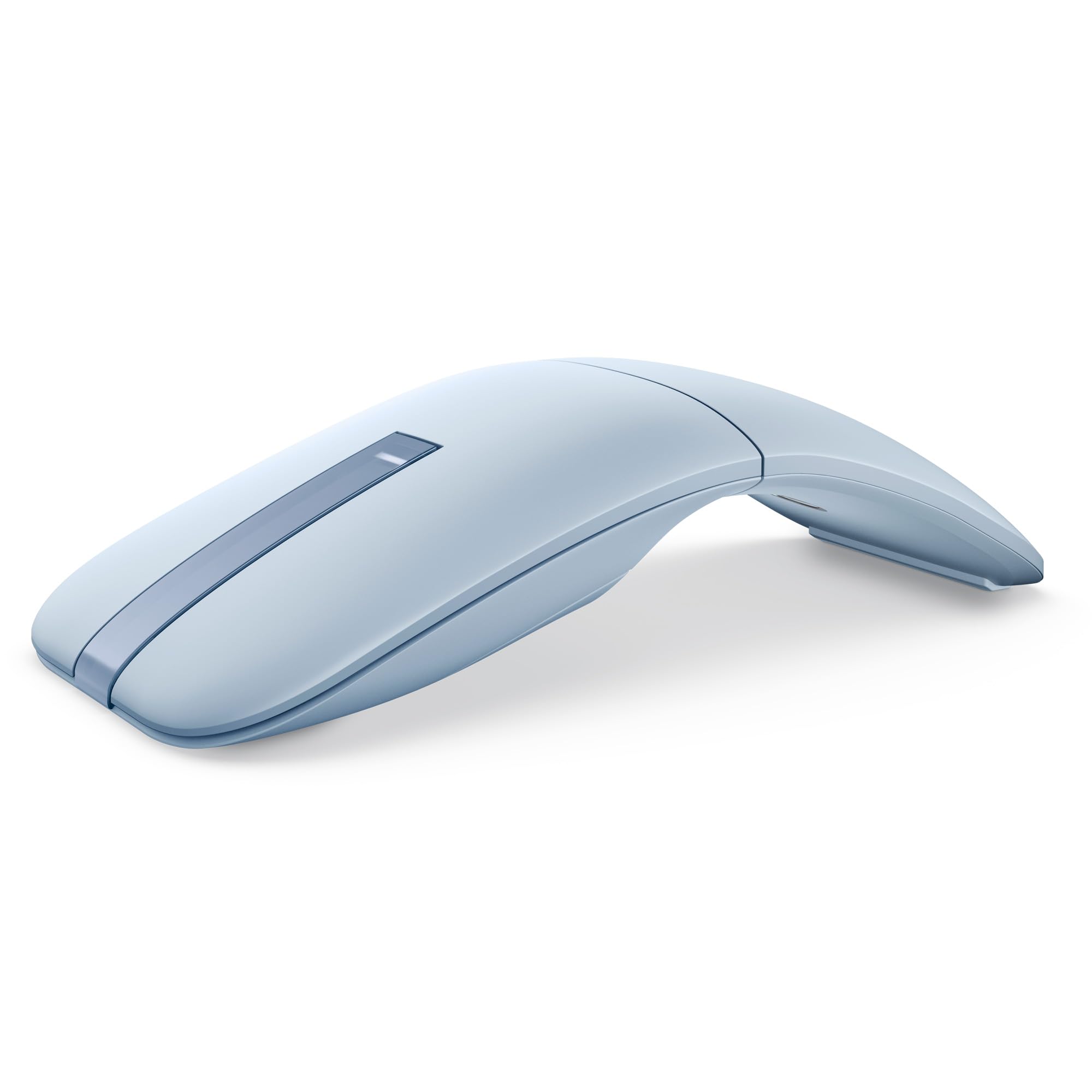
The Dell MS700 is engineered specifically for workers who need a mouse that disappears into a laptop sleeve. Weighing only 56.9 grams, it is significantly lighter than any other model in this comparison, and its twistable design acts as both a power switch and a flat storage mechanism. When twisted flat, the MS700 sits flush in a bag pocket, preventing accidental button presses during transit.
Touch scrolling replaces the traditional scroll wheel with a capacitive strip that responds to finger swipes. This approach eliminates the mechanical wear point of a wheel and allows for both vertical and horizontal navigation with a simple gesture. The strip takes a few hours to develop muscle memory, but once accustomed, it enables faster document scanning than a standard wheel. The optical LED sensor offers adjustable DPI up to 4000, adequate for any standard office resolution.
Connectivity spans three devices via Bluetooth 5.0, with a dedicated button for switching. The MS700 uses two AAA batteries, which Dell rates for up to twenty-four months of life, removing the need for daily or weekly recharging. The ambidextrous shape works equally well for left-handed users, and the magnetically secured battery cover prevents accidental drops when changing cells.
Why it’s great
- Ultra-light 56.9g design perfect for travel
- Twist mechanism doubles as flat storage and power-off
- Touch scroll enables smooth vertical and horizontal navigation
- 24-month battery life from two AAA cells
Good to know
- Touch scroll strip lacks a physical middle-click button
- Non-rechargeable batteries require periodic replacement
- Small footprint may feel cramped for larger hands
4. Nulea M501 Trackball Mouse

The Nulea M501 belongs in any conversation about work mice because it addresses wrist strain directly by eliminating arm movement entirely. Instead of dragging your hand across a desk, you rest your palm on the contoured body and move the cursor with your thumb on the smooth trackball. This zero-wrist-motion design is clinically proven to reduce the risk of repetitive strain injuries, making it a strong choice for users already experiencing discomfort from traditional mice.
Connectivity options are generous for the price tier. The M501 connects via Bluetooth to two devices simultaneously and also includes a 2.4 GHz USB receiver stowed in the battery compartment, allowing a third device connection. The switch button on the bottom cycles between these three sources, and pairing to a new device takes about ten seconds. The built-in rechargeable battery charges via USB-C and lasts several weeks on a single charge with average office use.
Build quality exceeds expectations at this level, with a comfortable thumb rest and textured surface that prevents slipping during long sessions. The six-button layout includes forward and back navigation buttons, though none of the buttons are programmable. The trackball requires a short adjustment period — typically two to three days — before your thumb gains the fine motor control needed for precise cursor placement.
Why it’s great
- Thumb-operated trackball eliminates wrist movement entirely
- Connects to three devices via Bluetooth and USB receiver
- Rechargeable battery with USB-C charging
- Comfortable palm rest for all-day ergonomics
Good to know
- Buttons are not reprogrammable for custom shortcuts
- Right-handed only, no ambidextrous option
- Trackball requires a few days of adjustment
5. HP 400 Quiet Wireless Mouse
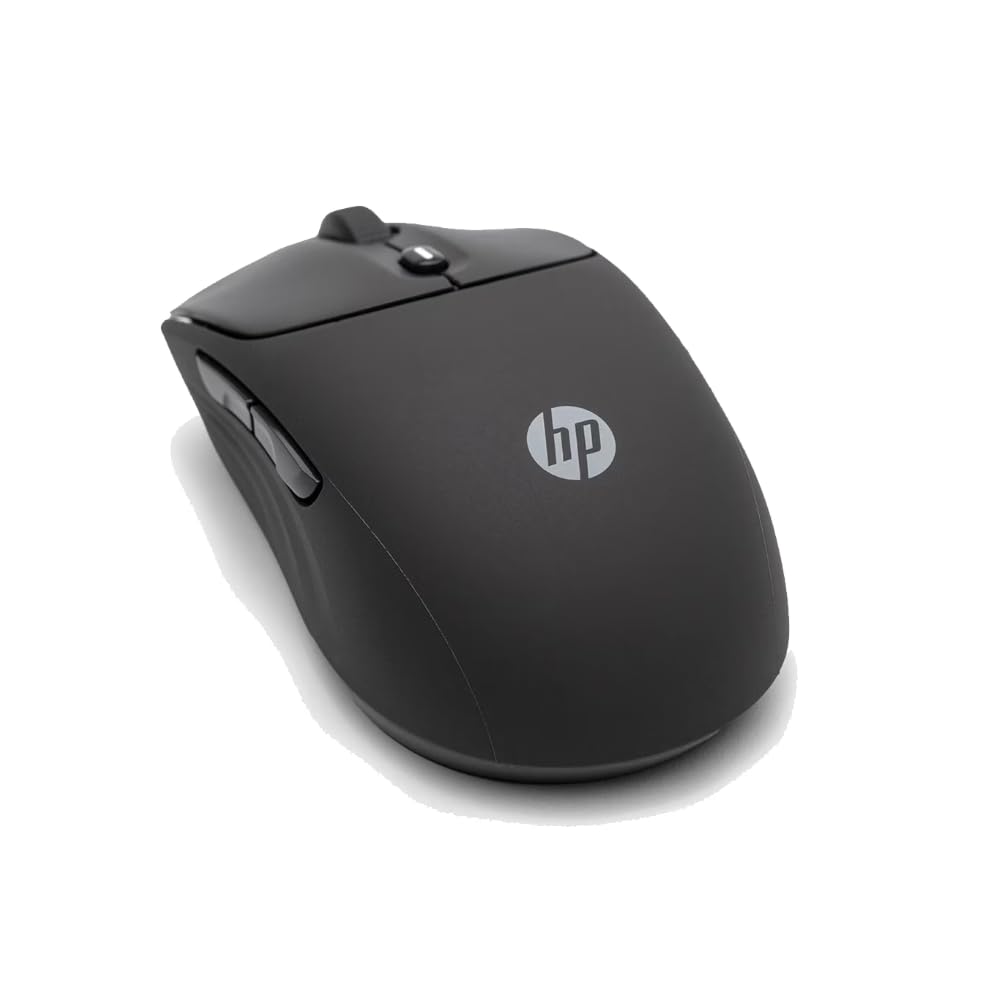
HP has positioned the 400 Quiet Mouse as a sustainable alternative to premium work mice without sacrificing core performance. The shell is constructed with at least forty percent post-consumer recycled plastic, and the packaging is FSC-certified, making this the most environmentally conscious option in the lineup. Despite the eco-friendly materials, the silicone rubber exterior feels soft and grippy, resisting the shiny wear that cheap plastics develop after months of use.
The 6000 DPI sensor is unusually high for a budget-conscious work mouse, providing smooth tracking across large monitors without scale adjustments. Dual connectivity via Bluetooth and a 2.4 GHz dongle gives you flexibility with older office computers, and a dedicated center button activates the Microsoft Wheel shortcut for quick access to timeline and zoom features. The quiet clicks are genuinely muted — loud enough to feel but not loud enough to distract a coworker sitting three feet away.
Battery life is a major selling point here. A single AA battery powers the mouse for up to twenty-four months, which means you will likely replace the battery once during the entire ownership period. The ambidextrous shape works for both left and right hands, though the symmetrical design lacks the palm arch that dedicated right-handed mice provide. Five color options let you match the mouse to your personal workspace aesthetic.
Why it’s great
- 6000 DPI sensor for smooth multi-monitor tracking
- 24-month AA battery life reduces waste and hassle
- Made from 40% post-consumer recycled materials
- Soft silicone grip prevents slipping during long use
Good to know
- Symmetrical shape lacks a dedicated palm rest
- Single AA battery adds minor weight vs. rechargeable models
- No custom button mapping or software suite included
6. XBG B15pro Tri-Mode Mouse

The XBG B15pro packs an unusual number of features into a sub-premium price bracket, starting with a built-in LED screen that displays real-time battery percentage, current DPI level, and active connection mode. This eliminates the guesswork of checking a laptop’s Bluetooth menu or hoping the mouse survives another hour before dying. The five DPI settings range from 800 to 2400, covering everything from precise design work to rapid multi-screen navigation.
Tri-mode connectivity is the headline spec: Bluetooth 5.0, Bluetooth 4.0, and a 2.4 GHz USB dongle. You can pair three devices simultaneously and switch between them in under a second using the dedicated button on the bottom. The 500 mAh rechargeable battery charges via USB-C and lasts roughly one month under normal office use, with automatic sleep mode activating after five minutes of inactivity to preserve power.
Build quality is respectable for the price point, with a contoured thumb rest and arched palm support that reduce fatigue during eight-hour workdays. The matte finish resists fingerprints, and the silent button mechanism retains a satisfying click feel without the audible noise. The lightweight chassis makes it suitable for business travel, though the plastic enclosure lacks the premium heft of metal-reinforced mice.
Why it’s great
- LED screen shows battery, DPI, and connection mode
- Tri-mode supports three devices via BT 5.0, BT 4.0, and 2.4G
- 500 mAh battery provides month-long runtime per charge
- Contoured thumb rest reduces wrist strain
Good to know
- Buttons cannot be remapped for custom workflows
- Plastic build lacks the premium feel of metal-reinforced models
- Dongle storage slot not labeled clearly on the mouse
7. ESR MagMouse

The ESR MagMouse solves a specific problem that frequent laptop users know well: where to put your mouse when you are carrying your machine to a meeting. A magnetic base attaches to the back of your laptop lid via a reusable adhesive pad, allowing the mouse to snap into place magnetically when not in use. This eliminates the need to fish through a bag compartment for a loose mouse, and the adhesive pad leaves no residue when removed.
Built-in USB-C charging cables are embedded directly into the mouse body, so there is no need to carry a separate cable. One minute of charging provides four hours of use, and a full forty-five-minute charge delivers up to 160 hours of runtime. The six DPI levels range from 800 to 4800, and the 4-way scroll wheel tilts sideways for horizontal spreadsheet navigation — a feature that saves significant time when working with wide data tables.
Connection is handled through Bluetooth 5.0 and a 2.4 GHz dongle stored inside the magnetic base. The ergonomic shape is ambidextrous and designed with silent clicks rated for ten million presses. The mouse body itself is lightweight at 113.6 grams, and the magnetic hold is strong enough to stay attached during normal transport but easy to remove with a gentle pull.
Why it’s great
- Magnetic mount attaches securely to laptop lid for easy transport
- Built-in USB-C cable eliminates the need for separate charging wires
- 160-hour battery life from a 45-minute charge
- 4-way scroll wheel with side-tilt for horizontal navigation
Good to know
- Adhesive pad must be oriented correctly on first placement
- Magnetic base adds slight thickness to laptop stack
- Single-button design lacks dedicated forward/back navigation
FAQ
Can I use a Bluetooth mouse with a work laptop that has no Bluetooth?
Is a trackball mouse better than a standard mouse for preventing wrist pain?
How important is DPI for standard office work?
Final Thoughts: The Verdict
For most users, the best bluetooth mouse for work winner is the Logitech MX Anywhere 3S for Mac because it combines silent clicks, an 8K DPI sensor that tracks on any surface, and a MagSpeed scroll wheel that eliminates the need for manual document scrolling. If you want a trackball design that eliminates wrist movement entirely, grab the Nulea M501. And for ultra-portable travel where weight and storage space are the priority, nothing beats the Dell MS700 Travel Mouse.

Mo Maruf
I created WellFizz to bridge the gap between vague wellness advice and actionable solutions. My mission is simple: to decode the research and give you practical tools you can actually use.
Beyond the data, I am a passionate traveler. I believe that stepping away from the screen to explore new environments is essential for mental clarity and physical vitality.