Our readers keep the lights on and my smoothie glass nicely filled. As an Amazon Associate, I earn from qualifying purchases.
A truly satisfying typing experience goes beyond just the click. The feel of a lubricated linear switch, the solid thock of a keycap bottoming out on a gasket-mounted plate, and the seamless freedom of cutting the cord define the modern Bluetooth mechanical keyboard. Finding the right combination of acoustics, build, and wireless stability separates a daily driver from a desk ornament.
I’m Mohammad Maruf — the founder and writer behind WellFizz. I’ve spent hundreds of hours analyzing switch types, gasket structures, wireless chipset stability, and battery capacity across dozens of boards to understand what actually makes a mechanical keyboard worth the desk space.
After hours of cross-referencing specs and real-user feedback on latency, battery life, and typing acoustics, I’ve narrowed the field to the top performers for this guide to the best bluetooth mechanical keyboard.
How To Choose The Best Bluetooth Mechanical Keyboard
Not every wireless mechanical keyboard delivers the same typing feel, sound profile, or connection stability. The best choices balance acoustic tuning, build materials, and wireless performance to match your daily workflow.
Gasket Mount vs. Tray Mount
Gasket mount keyboards sandwich the plate between silicone or foam cushions, creating a flexier, softer bottom-out and reducing hollow ping. This structure is responsible for the deep, creamy sound signature enthusiasts crave. Tray mount boards, common on older designs, feel stiffer and produce a harsher clack.
Switch Types: Linear vs. Tactile vs. Clicky
Linear switches (like Milk or Mint Mambo) offer smooth, uninterrupted travel for fast typing and gaming. Tactile switches (like Keychron Super Brown) give a gentle bump on actuation for typists who want feedback without noise. Clicky switches (like Logitech’s variant) produce an audible click for a classic typewriter feel but can be distracting in shared spaces.
Connectivity: Bluetooth 5.x vs. 2.4GHz vs. Wired
Bluetooth 5.0 or 5.1 offers power-efficient multipoint connectivity for up to three devices but can introduce slight latency. Dedicated 2.4GHz via a USB dongle delivers near-wired responsiveness for gaming. Wired USB-C mode provides zero-latency operation and simultaneous charging. A true tri-mode board gives you all three options in one device.
Battery Capacity and Keycap Material
A larger battery, measured in mAh, directly translates to fewer charging cycles. Look for 4000 mAh as a baseline for extended wireless use. Double-shot PBT keycaps resist shine and wear far better than ABS, keeping legends crisp and the texture consistent over years of heavy typing.
Quick Comparison
On smaller screens, swipe sideways to see the full table.
| Model | Category | Best For | Key Spec | Amazon |
|---|---|---|---|---|
| Logitech MX Mechanical | Premium | Office & Multi-Device Productivity | Low-Profile Clicky Switches | Amazon |
| AULA F99 Pro | Premium | Battery Life & Creamy Sound | 8000 mAh Battery | Amazon |
| Keychron K4 | Mid-Range | Compact Layout with Numpad | 96% Layout, 100 Keys | Amazon |
| YUNZII B87 | Mid-Range | Customization & Wrist Rest | QMK/VIA Programmable | Amazon |
| YUNZII B75 PRO | Mid-Range | Compact 75% with a Knob | 4000 mAh Battery | Amazon |
| Redragon K745 PRO | Budget | Quiet Full-Size Workhorse | 5-Layer Noise Dampening | Amazon |
| Womier M87 Pro | Budget | Retro Aesthetic & OLED Screen | OLED Color Display | Amazon |
In‑Depth Reviews
1. Logitech MX Mechanical

The Logitech MX Mechanical anchors the premium end of the spectrum with its low-profile clicky switches and a metal top plate for a rock-solid chassis. The short key travel reduces finger fatigue over long typing sessions, and the hand-approach backlighting is a refined touch for dim office environments. Connectivity via Logi Bolt or Bluetooth Low Energy is flawless across three devices.
Its compact full-size frame eliminates the numpad stretch, and the USB-C charging delivers up to 15 days with backlighting on or a staggering 10 months with it off. The included Logi Options+ software allows deep customization of Fn keys and per-app profiles, making multi-device workflows seamless. The tactile, audible click is precise and satisfying.
The keycaps, however, are not standard MX-compatible, so replacement options are limited. The metal plate shows fingerprints easily, and the price reflects a professional-tier investment rather than an enthusiast builder’s board. It is designed for productivity above all else, not for switch-modding.
Why it’s great
- Instant multi-device switching with Logi Bolt
- Class-leading battery life with smart illumination
- Low-profile clicky feel reduces wrist strain
Good to know
- Non-replaceable keycaps and switches
- Fingerprint-prone metal top plate
- Premium investment for productivity use
2. AULA F99 Pro

The AULA F99 Pro is a spec-sheet giant with an 8000 mAh battery that runs months between charges, even with RGB enabled. Its gasket mount structure, combined with five layers of sound-dampening foam and PCB single-key slotting, delivers a deep, creamy typing sound with minimal hollow resonance. The pre-lubed linear switches glide smoothly right out of the box.
The 96% layout keeps the full numpad in a compact footprint, saving desk space while retaining productivity essentials. A multifunction knob controls volume or backlit modes, and the tri-mode connectivity (Bluetooth 5.0, 2.4GHz, USB-C) switches between five paired devices. The double-shot PBT keycaps maintain their texture and legend clarity over heavy use.
The board is heavy and chunky, which improves stability but reduces portability. The default sleep timer is short, and adjusting it requires the driver software. Side-printed keycaps may not appeal to everyone, but they reduce shine over time.
Why it’s great
- Massive 8000 mAh battery lasts months
- Creamy, soft typing feel from gasket mount
- Compact 96% layout with full numpad
Good to know
- Heavy build reduces travel convenience
- Short default sleep timer
- Side-printed keycaps may feel different
3. Keychron K4

The Keychron K4 Version 2 packs 100 keys into a condensed 96% frame, preserving the numpad for spreadsheet users without the width of a full-size board. The Keychron Super Brown tactile switch offers a distinct bump at actuation, providing feedback ideal for touch typists who want confirmation without an audible click.
Its aluminum frame gives it a sturdy, premium weight, and the white LED backlight offers a professional, subtle glow. Bluetooth 5.1 connects to three devices, and the 4000 mAh battery lasts up to 240 hours with lights off. The inclusion of extra keycaps for both Mac and Windows layouts right in the box is a practical touch for multi-OS users.
The condensed layout compresses the zero key into a smaller footprint, which can take adjustment for heavy numpad users. The tall profile means a wrist rest is recommended for long sessions, and the lack of a 2.4GHz dongle means wireless performance is limited to Bluetooth latency.
Why it’s great
- Numpad in a space-saving 96% layout
- Distinct tactile bump for precise typing
- Excellent battery life and build quality
Good to know
- Condensed zero key on numpad
- Tall profile needs a wrist rest
- Bluetooth-only wireless; no 2.4GHz option
4. YUNZII B87
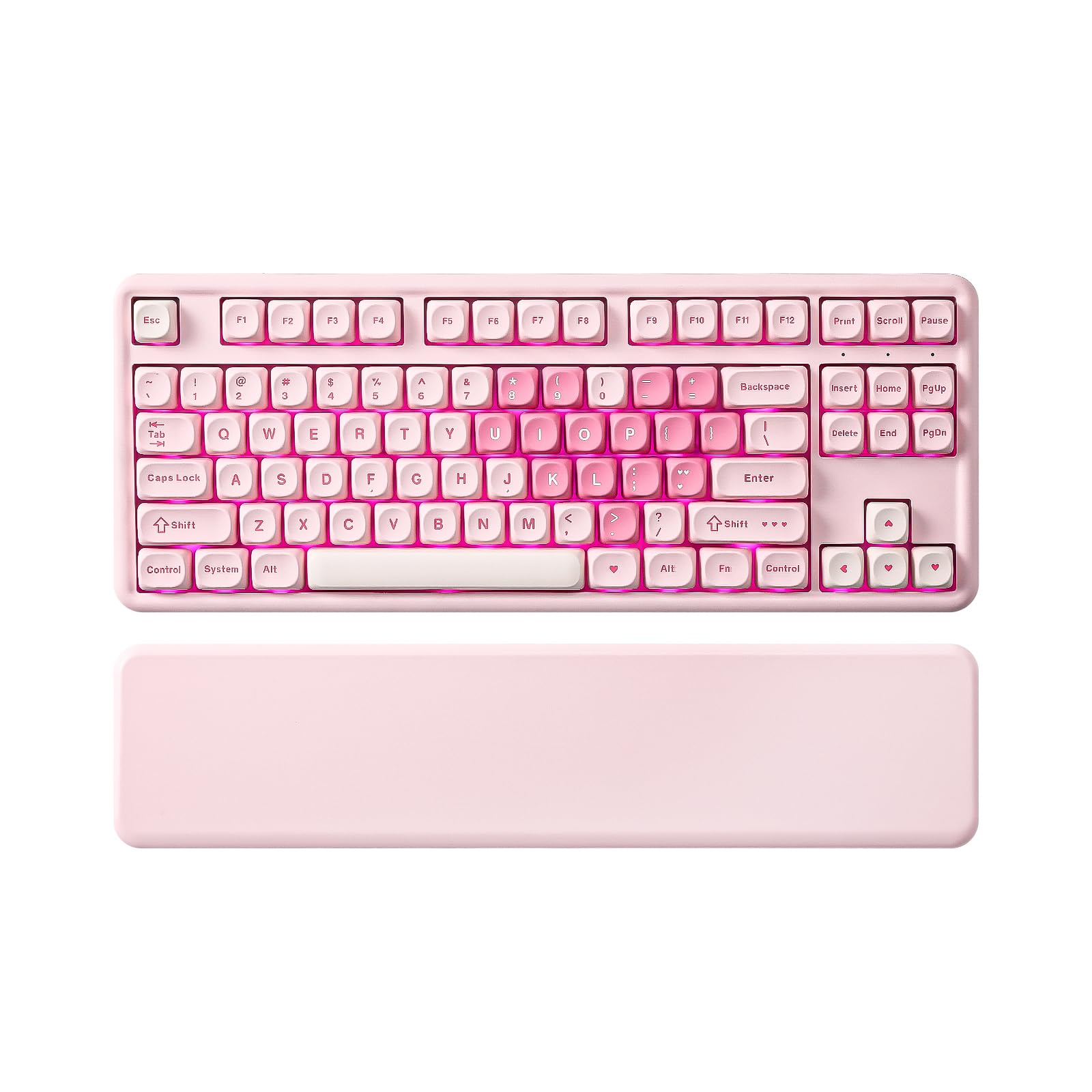
The YUNZII B87 is designed for keyboard enthusiasts who demand full control. QMK/VIA support allows browser-based key remapping, macro creation, and custom lighting layers without installing clunky software. The 87-key TKL layout with a soft-touch wrist rest offers a comfortable, space-efficient platform for programmers and heavy typists.
The gasket mount frame, filled with five foam layers, produces a creamy, thocky sound with minimal case ping. The milk V2 linear switches are pre-lubed and smooth, and the south-facing RGB LEDs ensure maximum compatibility with aftermarket keycaps. Tri-mode connectivity and a 4000 mAh battery keep it running for days.
The bear-patterned dye-sublimation PBT keycaps add a playful aesthetic that may not suit minimalist desks. The plastic case feels lighter than aluminum alternatives, and the soft-touch wrist rest, while comfortable, attracts dust and lint.
Why it’s great
- Full QMK/VIA browser-based customization
- Creamy thocky sound from 5-layer foam
- Includes a soft-touch wrist rest
Good to know
- Playful keycap art may divide opinions
- Plastic case feels lighter than metal boards
- Wrist rest attracts dust easily
5. YUNZII B75 PRO

The YUNZII B75 PRO shrinks down to a 75% layout with 82 keys, keeping the function row and arrow keys while saving significant desk space. Its multifunction knob controls volume, backlight brightness, and toggles between gaming and office modes with a long press. The gasket mount structure and pre-lubed milk switches produce a satisfying clacky-creamy sound that blends well for both work and gaming.
Tri-mode connectivity includes Bluetooth, 2.4GHz, and USB-C, and the 4000 mAh battery keeps the board running for extended sessions. The south-facing RGB LEDs shine brightly without interfering with PBT keycap compatibility, and the included dust cover protects the board when not in use.
The plastic case feels lightweight and somewhat hollow compared to heavier metal-framed alternatives. Some users report the default sleep timer activates too quickly, though the driver update can adjust it. The FN keys also do not function on Mac out of the box per the manual.
Why it’s great
- Space-saving 75% layout with dedicated arrows
- Multifunction knob for fast volume/lighting control
- Rich, creamy sound from gasket mount
Good to know
- Lightweight plastic case feels less premium
- FN keys not functional on Mac out of box
- Sleep timer is short without driver update
6. Redragon K745 PRO

The Redragon K745 PRO delivers a full-size 108-key layout with a gasket structure and five layers of noise dampening, making it one of the quietest boards in its price tier. The custom Mint Mambo linear switches are thickly lubed from the factory, producing a silky, creamy keystroke that is almost silent to the ear. It is an excellent choice for open offices or shared living spaces.
Tri-mode connectivity includes Bluetooth 3.0/5.0, 2.4GHz, and USB-C wired. The two-stage adjustable feet provide ergonomic tilt options, and the round PBT keycaps add a retro visual flair while resisting shine. The hot-swap socket accepts nearly all 3-pin and 5-pin switches for future customization.
The round keycaps, while visually distinct, may take a session or two to adjust to for precise keystrokes. The Bluetooth 3.0 fallback is older and less power-efficient than the 5.0 mode. The software driver is not as polished as premium options, limiting advanced macro editing.
Why it’s great
- Extremely quiet and creamy typing sound
- Full 108-key layout with flexible gasket mount
- Round PBT keycaps offer unique retro look
Good to know
- Round keycaps require adjustment for accuracy
- Bluetooth 3.0 mode is less efficient
- Software driver is basic compared to premium brands
7. Womier M87 Pro

The Womier M87 Pro stands out with a smart OLED color display that shows custom GIFs, connection mode, and battery status alongside a dedicated mechanical knob for quick adjustments. The 87-key TKL layout is ideal for gamers who want a clean desk aesthetic. The Outemu White switches provide a heavy, linear actuation with a thumpy, old-school sound profile.
The board features triple absorption layers (EVA foam, IXPE switch pad, and silicone case foam) plus a silenced spacebar to reduce vibration and echo. Full hot-swap support on a standard 5-pin PCB allows easy switch experimentation without soldering. The 19 RGB backlight modes are knob-switchable, and the retro grey color scheme blends into both modern and vintage setups.
Quality control concerns appear in user reviews, with some units having unresponsive keys out of the box. The proprietary software is entirely in Chinese, making customization challenging for English-speaking users. The battery life is relatively short at around two days of moderate use.
Why it’s great
- Unique OLED display for status and custom GIFs
- Dedicated knob for quick volume and light control
- Retro aesthetic with modern hot-swap flexibility
Good to know
- Inconsistent quality control reported
- Software is in Chinese, not beginner-friendly
- Battery life is short at 2-2.5 days
FAQ
Does a Bluetooth mechanical keyboard have noticeable input lag?
Can I replace the switches and keycaps on any hot-swappable board?
What battery capacity is needed for all-day wireless use?
Why does gasket mount feel different from tray mount?
Final Thoughts: The Verdict
For most users, the best bluetooth mechanical keyboard winner is the Logitech MX Mechanical because its low-profile clicky feel, multi-device switching, and smart backlighting set the professional standard for productivity. If you want the deepest creamy sound and an absurd battery life, grab the AULA F99 Pro. And for uncompromising customization and programmable layers, nothing beats the YUNZII B87.

Mo Maruf
I created WellFizz to bridge the gap between vague wellness advice and actionable solutions. My mission is simple: to decode the research and give you practical tools you can actually use.
Beyond the data, I am a passionate traveler. I believe that stepping away from the screen to explore new environments is essential for mental clarity and physical vitality.