Our readers keep the lights on and my smoothie glass nicely filled. As an Amazon Associate, I earn from qualifying purchases.
Finding the right Bluetooth keyboard can transform how you work and create, eliminating cable clutter and unlocking effortless multi-device productivity. But with so many options promising silent typing, long battery life, and seamless switching, it’s easy to feel overwhelmed by specs and marketing claims.
I’m Mohammad Maruf — the founder and writer behind WellFizz. For over a decade, I’ve specialized in dissecting product specifications and analyzing real-world performance data to cut through the noise and identify what truly matters in wellness and lifestyle tech.
This guide is the result of deep-dive research into current models, user feedback, and technical benchmarks. My analysis reveals the critical differences between average wireless keyboards and the best bluetooth keyboard for seamless multi-device productivity.
How To Choose The Best Bluetooth Keyboard
Selecting a wireless keyboard isn’t just about picking the prettiest one. Your choice should be a deliberate match for your primary devices, typing style, and workspace. Let’s break down the decision factors so you can invest confidently.
Connectivity: Bluetooth vs. 2.4GHz
Most wireless keyboards use Bluetooth, which is perfect for connecting to tablets, phones, and laptops without occupying a USB port. However, some models also include a 2.4GHz USB receiver. This option often provides a more stable, lower-latency connection ideal for desktop PCs or environments with heavy Bluetooth interference. Multi-device keyboards that support both give you the ultimate flexibility.
Key Feel and Noise Profile
Your typing experience is paramount. Slim, low-profile keyboards with scissor switches offer a quiet, laptop-like feel that’s great for offices or shared spaces. Mechanical keyboards provide distinct tactile feedback and are beloved for programming and long-form writing, but some switches can be noisy. Consider where you’ll use it—a silent keyboard might be non-negotiable in an open-plan office.
Battery and Power Management
Look for rechargeable batteries with USB-C charging for modern convenience. Battery life claims vary widely; a keyboard boasting months of use typically has aggressive power-saving sleep modes. If you hate downtime, a model that works while charging is a major plus. For number pads or travel keyboards, standard battery options can be simpler.
Layout and Form Factor
Do you need a full-size keyboard with a dedicated number pad for data entry, or would a compact tenkeyless (TKL) layout save precious desk space? Some slim keyboards integrate navigation keys into the number pad to maintain a smaller footprint. Also, consider adjustable tilt legs for ergonomic comfort during extended sessions.
Ecosystem and Compatibility
Ensure the keyboard supports your operating system’s key mappings. Some are designed exclusively for macOS, while others work across Windows, Linux, Chrome OS, and mobile devices. If you use multiple operating systems, a keyboard that automatically detects and adapts is invaluable.
Quick Comparison
On smaller screens, swipe sideways to see the full table.
| Model | Type | Best For | Key Feature | Amazon |
|---|---|---|---|---|
| Logitech Signature Slim K950 | Slim Membrane | Multi-OS productivity | Quiet typing, recycled materials | Amazon |
| Logitech MX Keys S | Low-Profile | Premium office & multi-device flow | Smart backlighting, programmable keys | Amazon |
| Keychron K10 Max | Custom Mechanical | Enthusiasts & gamers | Hot-swappable switches, QMK support | Amazon |
| Satechi SM3 | Low-Profile Mechanical | Cross-platform mechanical typing | 14 backlight patterns, 4-device connectivity | Amazon |
| Apple Magic Keyboard | Slim Scissor | Apple ecosystem users | Seamless integration, extended layout | Amazon |
| ProtoArc K310 Pro | Mechanical | Quiet mechanical feedback | 10 backlight effects, multi-device | Amazon |
| ProtoArc Backlit for Mac | Slim Backlit | Mac-only desk setup | Aluminum build, customizable backlight | Amazon |
| iClever BK10 SE | Ultra-Slim | Slim profile with numpad | Perforated metal base, 3-device BT | Amazon |
| iClever Bluetooth Number Pad | Numeric Keypad | Laptop number input | 34-key layout, USB-C rechargeable | Amazon |
| Kisnt FD17 Wireless Numpad | Mechanical Numpad | Mechanical number entry | Hot-swappable switches, gasket mount | Amazon |
| TECKNET Bluetooth Keyboard | Full-Size Membrane | Budget multi-device use | 4-mode connectivity, 12 multimedia keys | Amazon |
In‑Depth Reviews
1. Logitech Signature Slim K950 Wireless Keyboard

The Logitech Signature Slim K950 strikes a remarkable balance between premium feel, thoughtful sustainability, and effortless multi-device functionality. It connects to three devices via Bluetooth or the included Logi Bolt receiver, and switching is instantaneous with a dedicated button. The typing experience is familiar and quiet, thanks to its laptop-style scissor switches, making it suitable for shared workspaces.
Logitech’s build quality is evident in the solid, yet slim construction that uses a significant amount of post-consumer recycled plastic. The keyboard includes handy out-of-the-box shortcuts for media control and productivity tasks, which can be expanded through the Logi Options+ app for Windows and macOS. This app allows for deeper customization, including creating Smart Actions to automate repetitive workflows.
Battery life is a strong suit, powered by standard batteries that last for an exceptionally long time, eliminating frequent recharging worries. Its broad compatibility covers Windows, macOS, Chrome OS, Linux, iPadOS, iOS, and Android, making it a truly universal peripheral. For anyone needing a reliable, eco-conscious keyboard that just works across everything, the K950 is a top-tier choice.
Why it’s great
- Flawless switching between three devices across nearly any operating system.
- Quiet, comfortable typing perfect for office environments.
- Excellent battery life without the need for recharging.
- Built with recycled materials, offering a sustainable choice.
Good to know
- Lacks backlighting, which can be a drawback in dimly lit rooms.
- Full customization requires downloading the Logi Options+ software.
2. Logitech MX Keys S Wireless Keyboard

The MX Keys S is Logitech’s flagship productivity keyboard, engineered for those who demand premium performance and intelligent features. Its low-profile, spherically-dished keys are perfectly shaped for fingertips, promoting a fast, precise, and quiet typing rhythm that reduces fatigue. The build is substantial and weighty, providing a stable, desk-anchored feel that also works well on your lap.
Its standout feature is the adaptive backlighting that automatically illuminates as your hands approach and adjusts brightness based on ambient light. You can connect to up to three devices via Bluetooth Low Energy or the included Logi Bolt receiver, and the Easy-Switch button makes transitioning between them seamless. The Logi Options+ app unlocks powerful customization, including programmable Smart Actions that execute multi-step commands with one keystroke.
Battery life is impressive, offering up to months of use on a charge with backlighting off, and it supports quick USB-C charging. While it represents a premium investment, the MX Keys S delivers a refined, feature-rich experience that justifies its position at the high end of the market for professionals and power users.
Why it’s great
- Intelligent backlighting that activates automatically and adapts to surroundings.
- Exceptional typing comfort and accuracy with a solid, premium build.
- Deep customization and automation via Logi Options+ software.
- Long battery life and convenient USB-C quick charging.
Good to know
- Premium price point places it in the high-end category.
- Advanced features require the Logi Options+ app for full configuration.
3. Keychron K10 Max Wireless Custom Mechanical Keyboard

The Keychron K10 Max is a dream for keyboard enthusiasts who want a full-size, wireless mechanical keyboard without compromising on customizability. It offers triple connectivity: 2.4GHz for gaming-low latency, Bluetooth 5.1 for three devices, and wired USB-C. The pre-lubed “Super Banana” switches provide a tactile, clicky feel, but the hot-swappable PCB meansyou can easily swap them for any compatible mechanical switch.
Customization is where it shines, with support for the open-source QMK firmware and a user-friendly web app for remapping keys and creating macros on any OS. The south-facing RGB backlighting offers vibrant effects without causing interference with keycaps, and the keyboard includes extensive sound-dampening foam for a satisfying, muted acoustic profile. It’s a heavy, substantial tool that feels built to last.
While it’s an investment, the K10 Max delivers professional-grade features typically found in more expensive custom builds. It’s ideal for developers, writers, and gamers who want the flexibility of a wireless mechanical keyboard without sacrificing the ability to personalize every aspect of their typing experience.
Why it’s great
- Unmatched customizability with hot-swappable switches and QMK/VIA support.
- Triple connectivity (2.4GHz, Bluetooth, wired) for maximum flexibility.
- Premium build with excellent sound dampening and south-facing RGB.
- Includes keycaps for both Mac and Windows layouts.
Good to know
- The enthusiast-level features come with a premium cost.
- Full-size layout requires significant desk space.
- Caps Lock and Scroll Lock indicators are subtle LED lights.
4. Satechi SM3 Mechanical Keyboard for Mac and Windows

The Satechi SM3 masterfully blends the tactile satisfaction of mechanical switches with a sleek, low-profile design suitable for professional environments. It connects to up to four devices simultaneously via dual Bluetooth channels, a 2.4GHz USB receiver, or a wired USB-C connection. The low-profile brown switches offer a discernible bump without being overly loud, striking a great balance for both typing and casual gaming.
Its white LED backlighting is clean and functional, offering 14 different patterns with adjustable brightness and speed—a feature that rivals the illumination on high-end laptops. The aluminum top case gives it a premium, sturdy feel, while the included extra keycaps let you switch between Mac and Windows modifier keys instantly. The 2500mAh battery promises long life between charges.
This keyboard is for the user who wants a full mechanical experience without the bulk and noise of traditional mechanical boards. Its cross-platform prowess and elegant design make it a compelling centerpiece for a modern, multi-device desktop setup, whether you’re primarily on macOS or Windows.
Why it’s great
- Versatile 4-device connectivity across all major platforms.
- Pleasing tactile feedback with quieter, low-profile mechanical switches.
- Elegant aluminum build with sophisticated white backlighting options.
- Includes spare keycaps for easy Mac/Windows layout switching.
Good to know
- The mechanical switches, while quieter, are not silent.
- Some users note a slight input lag in Bluetooth mode for gaming.
5. Apple Magic Keyboard with Numeric Keypad

For users deeply invested in the Apple ecosystem, the Magic Keyboard with Numeric Keypad is the benchmark for integration and simplicity. It pairs instantly with your Mac, iPad, or iPhone and delivers the signature, precise scissor-switch typing experience Apple is known for. The extended layout includes a full number pad and dedicated navigation keys, which are invaluable for spreadsheet work or coding.
The design is incredibly slim and lightweight, yet it feels solid. The rechargeable internal battery lasts for about a month or more on a single charge and can be used while charging via the included Lightning cable. There’s no software to configure or buttons to map—it just works exactly as you expect, with perfect key mapping for macOS and iPadOS functions.
If your priority is flawless operation within Apple’s world, unmatched portability, and a minimalist aesthetic that complements your devices, this is the definitive choice. It forgoes flashy features like backlighting or multi-OS switching to excel at its core purpose: being the best keyboard for Apple products.
Why it’s great
- Perfect, hassle-free integration with Mac, iPad, and iPhone.
- Excellent typing feel with a stable, super-slim profile.
- Very long battery life and convenient pass-through charging.
- Includes a full number pad in a surprisingly compact form.
Good to know
- Exclusively for Apple devices; no Windows/Linux compatibility.
- Lacks backlighting and any form of key customization.
- Premium price for the Apple brand and experience.
6. ProtoArc K310 Pro Bluetooth Mechanical Keyboard

The ProtoArc K310 Pro offers a genuine mechanical typing experience at a mid-range price point, blending features typically found on more expensive boards. It uses linear red switches that are smooth and quiet, making them suitable for office use. You can connect to three devices via Bluetooth or the included 2.4GHz USB receiver, and switching is straightforward.
It features ten adjustable white backlight effects with customizable speed and brightness, adding personality without overwhelming RGB. The aluminum top plate gives it a sleek, modern look and solid feel, while the adjustable tilt legs allow for a more ergonomic typing angle. A unique bonus is macro customization support via software when using the 2.4GHz connection.
This keyboard is an excellent gateway into mechanical keyboards for those who want the tactile benefits and build quality without venturing into the complex world of custom builds. It provides great cross-platform compatibility and a feature set that punches above its weight class.
Why it’s great
- Affordable entry into full-size wireless mechanical keyboards.
- Quiet linear switches ideal for shared workspaces.
- Attractive backlighting and sturdy aluminum construction.
- Includes both Bluetooth and a 2.4GHz dongle for flexibility.
Good to know
- Macro programming is only available in 2.4GHz mode, not via Bluetooth.
- Switches are not hot-swappable for easy customization.
7. ProtoArc Backlit Wireless Keyboard for Mac
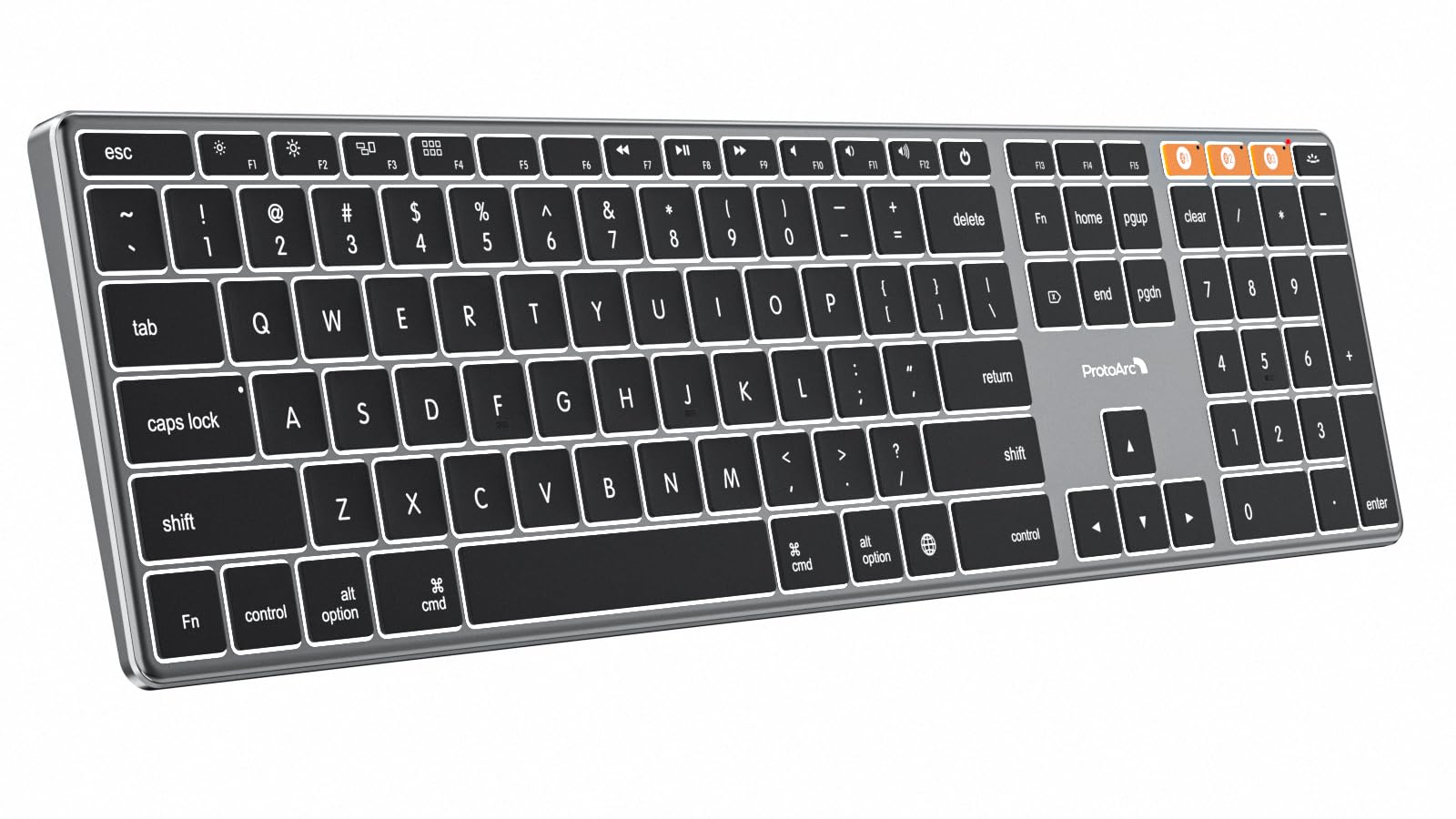
Designed specifically for Mac users, this ProtoArc keyboard is a compelling alternative to Apple’s own, offering similar aesthetics with added features. The aerospace-grade aluminum unibody is impressively slim and durable, matching the Space Gray finish of modern Macs. Its three-level adjustable white backlight is a significant advantage over the non-backlit Apple Magic Keyboard, perfect for low-light environments.
It connects to three Apple devices via Bluetooth and switches between them with a dedicated button. The scissor-switch keys provide a quiet, low-profile typing feel that Mac users will find familiar and comfortable. The large, 1800mAh rechargeable battery supports extended use, and the keyboard enters a smart sleep mode to conserve power.
If you love the Apple keyboard design but wish it had backlighting and a more accessible price, this model delivers exactly that. It’s a dedicated desk keyboard for iMac, Mac Studio, or MacBook users who want a premium, full-size typing companion.
Why it’s great
- Premium aluminum build that perfectly matches Apple aesthetics.
- Useful adjustable backlighting, a feature missing on Apple’s model.
- Comfortable, quiet typing with dedicated Mac key legends.
- Solid multi-device Bluetooth support for the Apple ecosystem.
Good to know
- Mac-only compatibility limits its use with Windows or Linux PCs.
- Does not include a Touch ID fingerprint sensor.
- Full-size layout requires considerable desk space.
8. iClever BK10 SE Bluetooth Keyboard for Mac
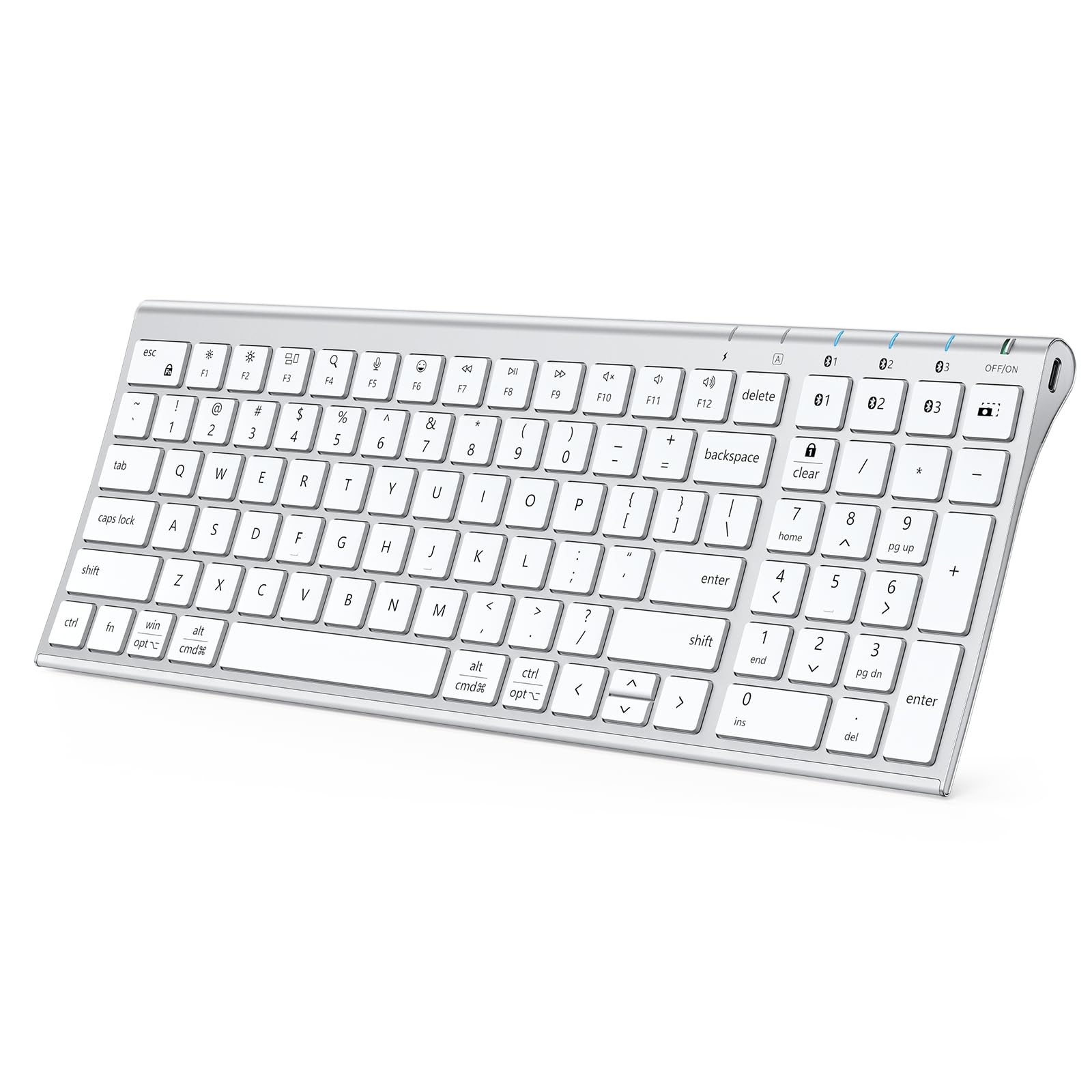
The iClever BK10 SE achieves an impressive feat: packing a full-size layout with a number pad into an ultra-slim, portable form factor. Its hybrid construction uses a perforated stainless steel base to ensure strong Bluetooth signal transmission and an ABS top for a lightweight feel. At its thinnest edge, it measures just 0.16 inches, making it exceptionally sleek.
It automatically detects and maps keys for Windows, macOS, iOS, and Android, and can remember connections to three devices. To save space, the navigation keys (Home, End, etc.) are integrated into the number pad, which requires a slight adjustment period. The standard-sized keycaps and scissor switches offer a comfortable, accurate typing experience reminiscent of a premium laptop.
This keyboard is ideal for students or professionals who need a numeric keypad for work but also value a slim, modern design that’s easy to slip into a bag. It offers excellent versatility in a very attractive package.
Why it’s great
- Remarkably slim profile despite including a full number pad.
- Intelligent perforated base design for reliable Bluetooth connectivity.
- True multi-OS compatibility with automatic key mapping.
- USB-C rechargeable with good battery life.
Good to know
- The condensed layout with integrated nav keys has a learning curve.
- Lacks backlighting.
- Arrow keys are slightly smaller than standard.
9. iClever Bluetooth Number Pad

For laptop users who miss a dedicated number pad, the iClever Bluetooth Number Pad is a game-changer. It goes beyond basic number entry with 34 keys, including calculator, page navigation (PgUp/PgDn), and editing keys (Insert, Delete). This expanded layout makes it incredibly useful for data entry, accounting, and spreadsheet work.
Its build quality is superior to many standalone keypads, featuring a stainless steel base and a slim aluminum top cover that feels solid and premium. It connects to two devices via Bluetooth and is compatible with all major operating systems. The USB-C port allows for a quick one-hour charge, providing up to 100 hours of use.
This is a focused tool that solves a specific problem elegantly. It’s perfect for financial professionals, students, or anyone whose laptop lacks a numpad, restoring efficient numeric input without tethering you with a cable.
Why it’s great
- Enhanced 34-key layout with calculator and navigation functions.
- Sturdy, premium metal construction in a slim form factor.
- Fast USB-C charging and long battery life.
- Easy Bluetooth pairing for two devices.
Good to know
- The sleep mode can be overly aggressive, causing a missed first keystroke.
- Power switch is small and can be stiff to operate.
10. Kisnt FD17 Wireless Mechanical Number Pad

The Kisnt FD17 is a numpad for keyboard enthusiasts. It brings the custom mechanical keyboard experience to your numeric input, featuring a hot-swappable PCB that accepts most 3-pin and 5-pin switches. Out of the box, it comes with pre-lubed linear switches for a smooth press, but the joy is in customizing it to your preference.
Its gasket-mounted design with multiple layers of sound-dampening foam creates a satisfying, muted “thock” sound with each press. The PBT dye-sublimated keycaps are durable and resist shine over time. It offers dual-mode wireless connectivity (Bluetooth 5.0 and 2.4GHz) and includes extra keys like Tab, Esc, and a dedicated Backspace for enhanced functionality.
If you use a compact mechanical keyboard and miss a numpad, or simply want a premium, customizable input device for numbers, the FD17 is a fantastic and fun accessory. It turns a utilitarian tool into a personalized piece of tech.
Why it’s great
- Hot-swappable design allows for endless switch customization.
- Premium typing feel with gasket mount and sound-dampening foam.
- Durable PBT keycaps and a compact, portable size.
- Dual wireless modes (Bluetooth & 2.4GHz) for wide compatibility.
Good to know
- Requires a separate AAA battery (not included).
- No backlighting and keys are not programmable.
- Num Lock is a physical switch, not a software-toggle key.
11. TECKNET Bluetooth Keyboard Rechargeable
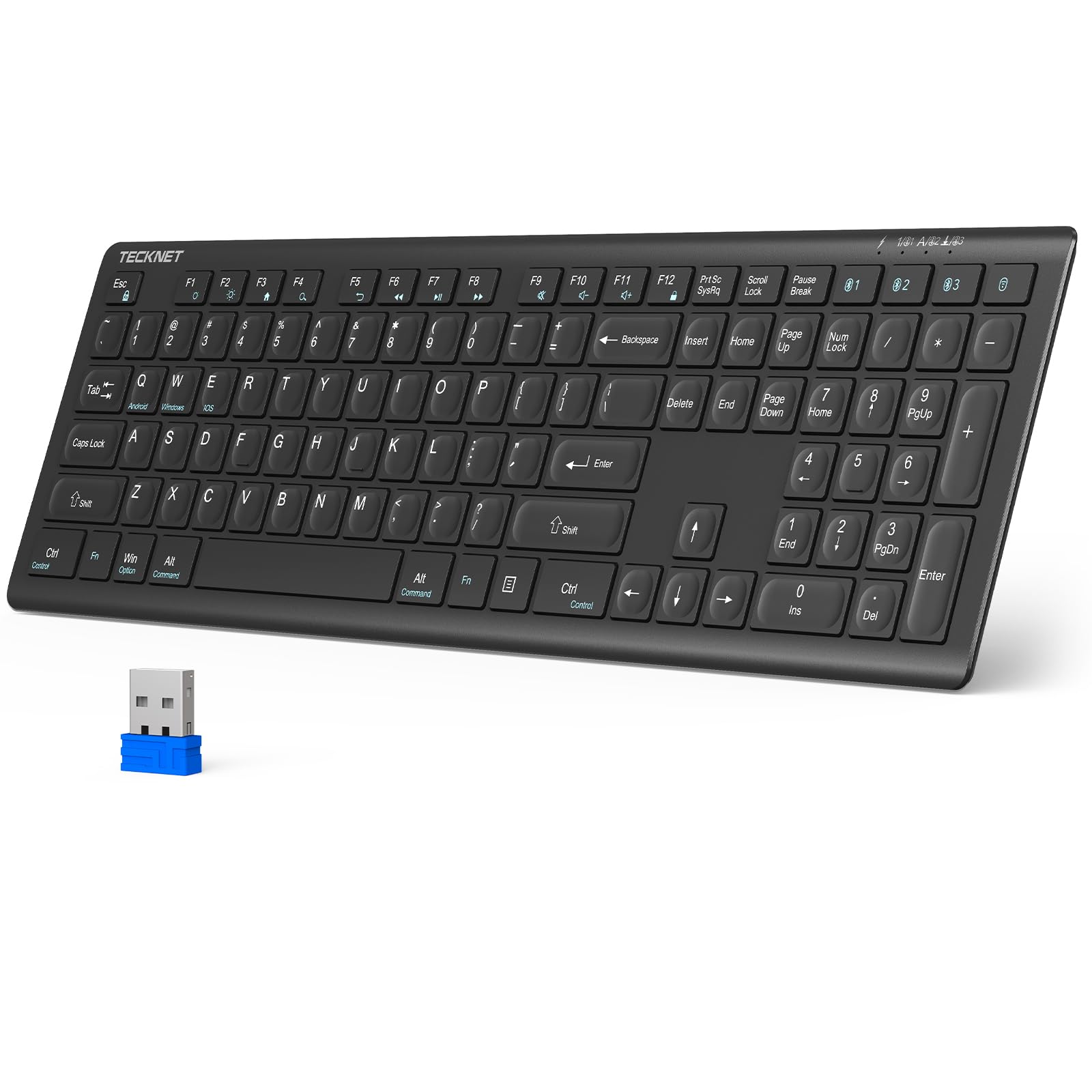
The TECKNET keyboard delivers exceptional value, packing versatile connectivity into a budget-friendly package. Its standout feature is the 4-mode connectivity: three Bluetooth channels plus a 2.4GHz USB receiver. This allows you to connect to a desktop PC (via the dongle) and three other Bluetooth devices like a laptop, tablet, and phone, all from one keyboard.
It boasts a full-size layout with 12 multimedia hotkeys and upgraded scissor switches that offer a quiet typing experience with 90% noise reduction. The built-in 500mAh battery is rechargeable via USB-C and can last up to 180 days on a single charge with moderate use. It’s broadly compatible with Windows, macOS, iOS, and Android.
For users who need a simple, reliable, and highly versatile wireless keyboard for a home office or media center setup without a large investment, the TECKNET is a remarkably capable workhorse. Its long battery life and multiple connection options make it a practical choice for managing several devices.
Why it’s great
- Unbeatable connectivity with 4 device slots (3xBT + 2.4GHz).
- Extremely quiet typing suitable for libraries or shared spaces.
- Excellent battery life and convenient USB-C recharging.
- Entry-level price for a full-featured, full-size keyboard.
Good to know
- The completely flat key profile may lead to more typos initially.
- Build materials are functional but not premium.
- Lacks backlighting and adjustable tilt.
Understanding the Specs
Connectivity Technology
This defines how the keyboard talks to your device. Bluetooth is universal and doesn’t need a dongle, perfect for tablets and phones. 2.4GHz Wireless (via a USB receiver) often provides a more stable, lower-latency connection, ideal for gaming or busy RF environments. Keyboards offering both give you the best of both worlds: flexibility and rock-solid performance.
Switch Type
The mechanism under each keycap dictates feel and sound. Scissor switches (common in slim keyboards) are quiet, low-profile, and have short travel. Mechanical switches offer distinct tactile feedback and are categorized by type: Linear (smooth press), Tactile (a noticeable bump), and Clicky (bump with an audible click). Hot-swappable means you can change switches without soldering.
Key Rollover & Polling Rate
Key Rollover (NKRO) is how many keys you can press simultaneously before the keyboard fails to register one. 6-key is standard; full N-key rollover is essential for gaming. Polling Rate (measured in Hz) is how often the keyboard reports its status to the computer. A higher rate (like 1000Hz) means lower input lag, crucial for fast-paced tasks.
Battery & Power
Look for USB-C rechargeable batteries for modern convenience. Battery life claims depend heavily on usage and backlighting. “Months of battery” usually assumes the keyboard enters a deep sleep mode after inactivity. A keyboard that operates while charging ensures you’re never interrupted. Some models use standard (e.g., AAA) batteries, which are easy to replace but less eco-friendly.
FAQ
Can a Bluetooth keyboard connect to multiple devices at once?
Why does my Bluetooth keyboard lag or disconnect sometimes?
Are mechanical Bluetooth keyboards good for office use?
Do I need a separate number pad if my laptop doesn’t have one?
Final Thoughts: The Verdict
For most people, the best bluetooth keyboard winner is the Logitech Signature Slim K950 because it masterfully balances universal compatibility, quiet productivity, and sustainable design at a mid-range point. If you want premium intelligent features and superb ergonomics, grab the Logitech MX Keys S. And for enthusiasts who crave deep customizability and a true mechanical feel, nothing beats the Keychron K10 Max.

Mo Maruf
I created WellFizz to bridge the gap between vague wellness advice and actionable solutions. My mission is simple: to decode the research and give you practical tools you can actually use.
Beyond the data, I am a passionate traveler. I believe that stepping away from the screen to explore new environments is essential for mental clarity and physical vitality.