Our readers keep the lights on and my smoothie glass nicely filled. As an Amazon Associate, I earn from qualifying purchases.
A black and white laser printer for home use is a straightforward machine: it takes toner, it prints text, and it does so without the constant anxiety of dried-out ink cartridges or smudged photos. The specific challenge for a home buyer is finding the right balance between upfront cost, footprint, and the specific connectivity (USB, Wi-Fi, Ethernet) that matches your home office setup. With speeds ranging from 28 to 42 pages per minute and paper capacities from 150 to 250 sheets, the choice often comes down to how many pages you print monthly and whether you need a scanner or fax alongside the printer.
I’m Mohammad Maruf — the founder and writer behind WellFizz. I’ve analyzed hundreds of laser printer specifications, customer feedback, and page-per-minute claims to identify which models actually deliver on their performance promises for the home user.
Whether you prioritize a compact print-only unit for a dorm desk or a full-featured all-in-one for a family home office, this guide breaks down the nine strongest contenders for the best black and white laser printer for home use in today’s market.
How To Choose The Best Black and White Laser Printer For Home Use
Sorting through the dozens of monochrome laser printers on the market starts with understanding three core factors: your monthly printing volume, the physical space you can dedicate to the machine, and whether you need the convenience of scanning or copying at home.
Print Speed vs. First Page Out
Manufacturers advertise speeds of 30 to 42 pages per minute, but for home use, the first page out time (typically 5 to 8.5 seconds) often matters more. If you print a few pages at a time, a printer with a slower PPM but a faster first-page-out will feel snappier in daily use.
Connectivity: USB, Wi-Fi, or Ethernet?
A wired USB-only printer (like the HP LaserJet M209d) is the simplest to set up and the most secure, but requires a physical connection to a computer. A Wi-Fi model (like the Canon LBP122dw) frees you to print from laptops and phones anywhere in the house. Ethernet is a middle ground, offering wired reliability without needing a direct USB cable to a single PC.
Print-Only vs. Multi-Function (All-in-One)
Single-function printers (print only) are smaller, cheaper, and have fewer moving parts to fail. Multi-function models add a flatbed scanner and often a fax line, which is valuable for families or home offices that regularly scan contracts, receipts, or homework. Bear in mind that a scanner adds height and weight, so measure your desk space before committing.
Quick Comparison
On smaller screens, swipe sideways to see the full table.
| Model | Category | Best For | Key Spec | Amazon |
|---|---|---|---|---|
| Brother HL-L2480DW | Multi-Function | Home Office Versatility | 36 ppm, 2.7″ Touchscreen | Amazon |
| Brother MFC-L2820DW | Multi-Function | Fax & Document Handling | 36 ppm, 50-page ADF | Amazon |
| HP LaserJet Pro MFP 3101fdw | Multi-Function | High-Volume Home Teams | 35 ppm, Auto Duplex | Amazon |
| Xerox B310DNI | Single Function | Pure Speed & Duty Cycle | 42 ppm, 250-sheet Tray | Amazon |
| HP LaserJet Pro 4001n | Single Function | Wired Networked Office | 42 ppm, Manual Duplex | Amazon |
| Canon imageCLASS MF275dw | Multi-Function | Affordable All-in-One | 30 ppm, 35-sheet ADF | Amazon |
| Xerox B230/DNI | Single Function | Compact Wi-Fi Printing | 36 ppm, Wi-Fi Direct | Amazon |
| Canon imageCLASS LBP122dw | Single Function | Basic Wireless Printing | 30 ppm, Duplex | Amazon |
| HP LaserJet M209d | Single Function | Wired Simplicity | 30 ppm, USB Only | Amazon |
In‑Depth Reviews
1. Brother HL-L2480DW

The Brother HL-L2480DW earns the top spot for its ideal combination of print, scan, and copy functions in a compact footprint. Its 36-ppm engine delivers quick multi-page documents, while the 2.7-inch touchscreen makes navigation feel modern compared to the button-driven interfaces on many competing home models. Users report seamless wireless setup with Apple and Android devices, with no recurring disconnection issues — a persistent complaint against several Wi-Fi printers in this tier.
The 250-sheet paper tray is generous for a home unit, and the manual feed slot handles envelopes and specialty paper without needing to swap trays. Brother’s TN830 toner yields about 1,200 pages with the starter cartridge, though the high-yield TN830XL brings the cost per page down significantly. The Refresh EZ Print subscription service is optional and can be skipped entirely; the printer functions normally without it.
Owners who use the flatbed scanner appreciate the crisp copy quality for text-dominant documents, though the scanner lacks an automatic document feeder for multi-page stacks. The footprint (roughly 15.7 x 14.3 x 8 inches) fits comfortably on a desk shelf, and the noise level — described as moderate — is on par with other monochrome lasers at this price point.
Why it’s great
- Fast 36-ppm output with true duplex printing.
- Reliable dual-band Wi-Fi with no drops reported.
- Intuitive touchscreen interface simplifies cloud printing.
Good to know
- Scanner is flatbed only (no ADF for batches).
- Starter toner yields only about 700 pages.
2. Brother MFC-L2820DW

The MFC-L2820DW builds on Brother’s proven monochrome formula by adding a 50-page automatic document feeder and a fax modem, making it the most complete all-in-one for a home office that handles multi-page scanning or legacy fax communication. The flatbed scanner delivers crisp 1200 x 2400 dpi resolution, and the ADF handles stacks of documents up to legal size without jamming — a clear advantage over the HL-L2480DW for users who regularly scan contracts or school packets.
Print speed is rated at 34 ppm with the first page out in 8.5 seconds, and the 250-sheet paper tray reduces the frequency of refills for moderate-volume homes. The 2.7-inch touchscreen provides access to cloud services like Google Drive and Dropbox for scan-to-cloud workflows. Setup is straightforward via the Brother Mobile Connect app, though a few owners noted that the printed quick-start guide is sparse; downloading the full manual from Brother’s site is recommended.
The printer supports Apple AirPrint, Mopria, and Android printing natively. Its footprint (16.1 x 15.7 x 12.2 inches) is slightly larger than print-only models, so measure your desk depth. The TN830 starter toner yields roughly 700 pages; investing in the high-yield TN830XL (about 3,000 pages) immediately lowers ongoing costs.
Why it’s great
- 50-sheet ADF simplifies batch scanning and copying.
- Built-in fax for legacy business needs.
- Rock-solid Wi-Fi and Ethernet connectivity.
Good to know
- Setup instructions are insufficient; download full manual.
- Starter toner cartridge is low-yield.
3. HP LaserJet Pro MFP 3101fdw

HP’s LaserJet Pro MFP 3101fdw targets the home office that pushes 20,000 or more pages per year. Its 35-ppm engine, combined with an automatic document feeder for scanning/copying, makes it suitable for families or small business owners who produce substantial document volumes. HP Wolf Pro Security adds a layer of protection against network intrusions — relevant if the printer sits on a home network used for sensitive work.
The printer supports Wi-Fi, Ethernet, USB, and Bluetooth for flexible connectivity. HP’s Intelligent Wi-Fi feature automatically reconnects to the strongest network band, which some users found helpful in homes with mesh systems. The 3101fdw prints on both sides automatically, and the paper input (250-sheet cassette plus multipurpose tray) handles up to legal-size sheets without issue.
Print quality is consistent and sharp, with HP’s toner producing deep black text on plain paper. The main drawback is HP’s cartridge DRM: the printer is designed to block non-HP cartridges through firmware updates. Users who plan to use third-party toner should disable automatic firmware updates. A small percentage of owners reported mechanical failures within weeks, though the majority of long-term reviews indicate reliable performance over thousands of pages.
Why it’s great
- Fast 35-ppm output with robust paper handling.
- HP Wolf Pro Security for data protection.
- Flexible connectivity: Wi-Fi, Ethernet, USB, Bluetooth.
Good to know
- Firmware updates can block third-party toner cartridges.
- Some units reported early hardware failures.
4. Xerox B310DNI
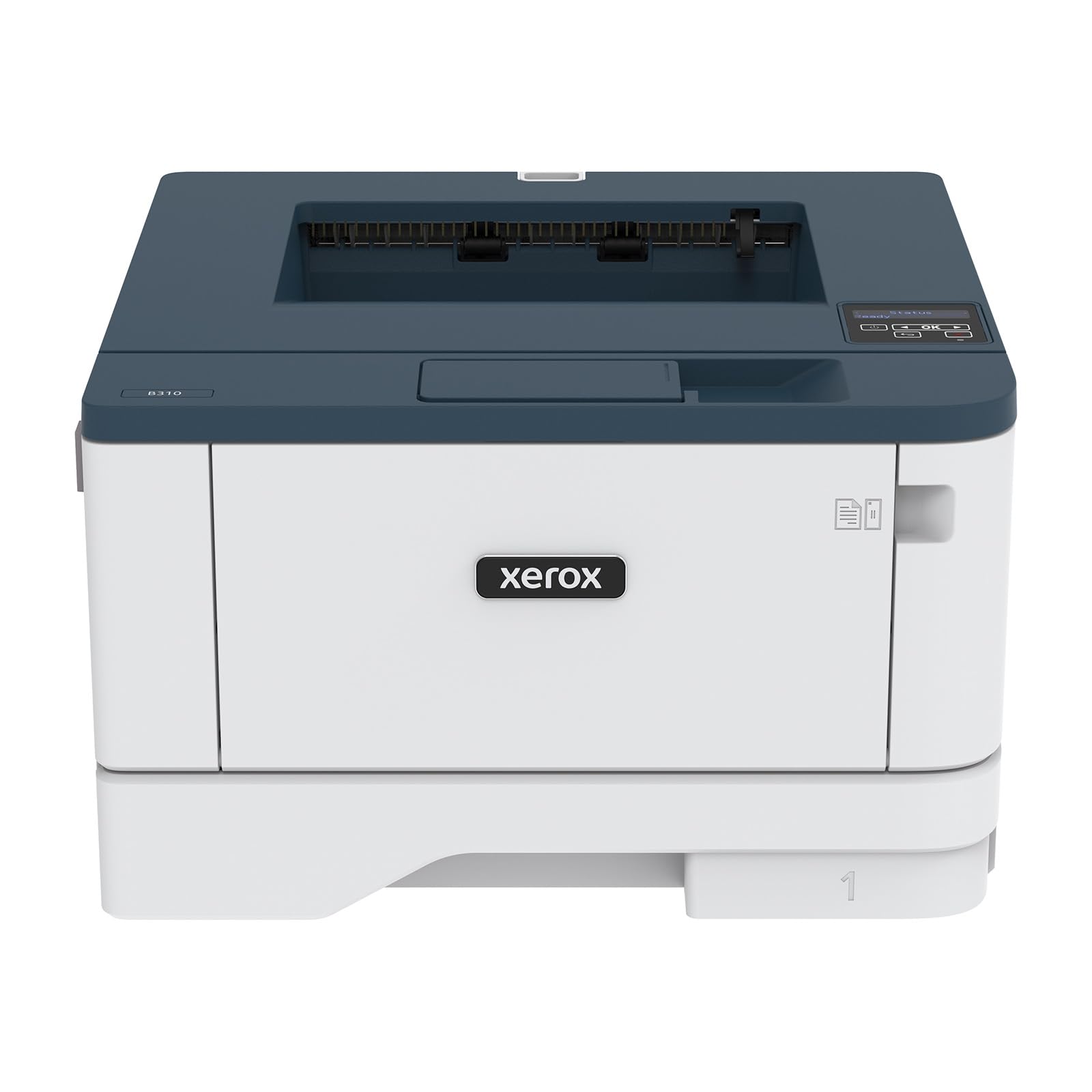
At 42 ppm, the Xerox B310DNI is the fastest print-only model on this list, making it an excellent choice for homes that churn through large text documents — think dissertation drafts, legal briefs, or multi-volume course packets. The printer supports automatic duplex printing natively, so double-sided jobs don’t require manual intervention, and the 250-sheet input tray is adequate for medium-volume workflows.
The B310DNI includes both Ethernet and Wi-Fi for network connectivity, with support for Apple AirPrint and Mopria Print Service directly out of the box. Its compact footprint (roughly 14.7 x 14.3 x 9.2 inches) fits tighter spaces than many competitor units with similar speed ratings. The 2400 x 2400 dpi resolution produces exceptionally sharp text even at smaller font sizes — a meaningful advantage for users printing documents with fine print or dense tables.
Set-up is generally smooth via the mobile app or USB/Ethernet, though a few owners found the Wi-Fi password entry on the tiny screen tedious. The starter toner cartridge is a 2,500-page unit, which is better than the 700-page starters included with many Brother and Canon models. The primary trade-off is noise: the B310DNI is audibly louder during operation than the Brother alternatives, which some users in quiet home offices found distracting.
Why it’s great
- 42 ppm output is among the fastest in its class.
- 2400 dpi resolution for razor-sharp text.
- Includes a generous 2,500-page starter toner cartridge.
Good to know
- Noticeably louder during printing than competitors.
- Wi-Fi setup can be cumbersome via small LCD screen.
5. HP LaserJet Pro 4001n
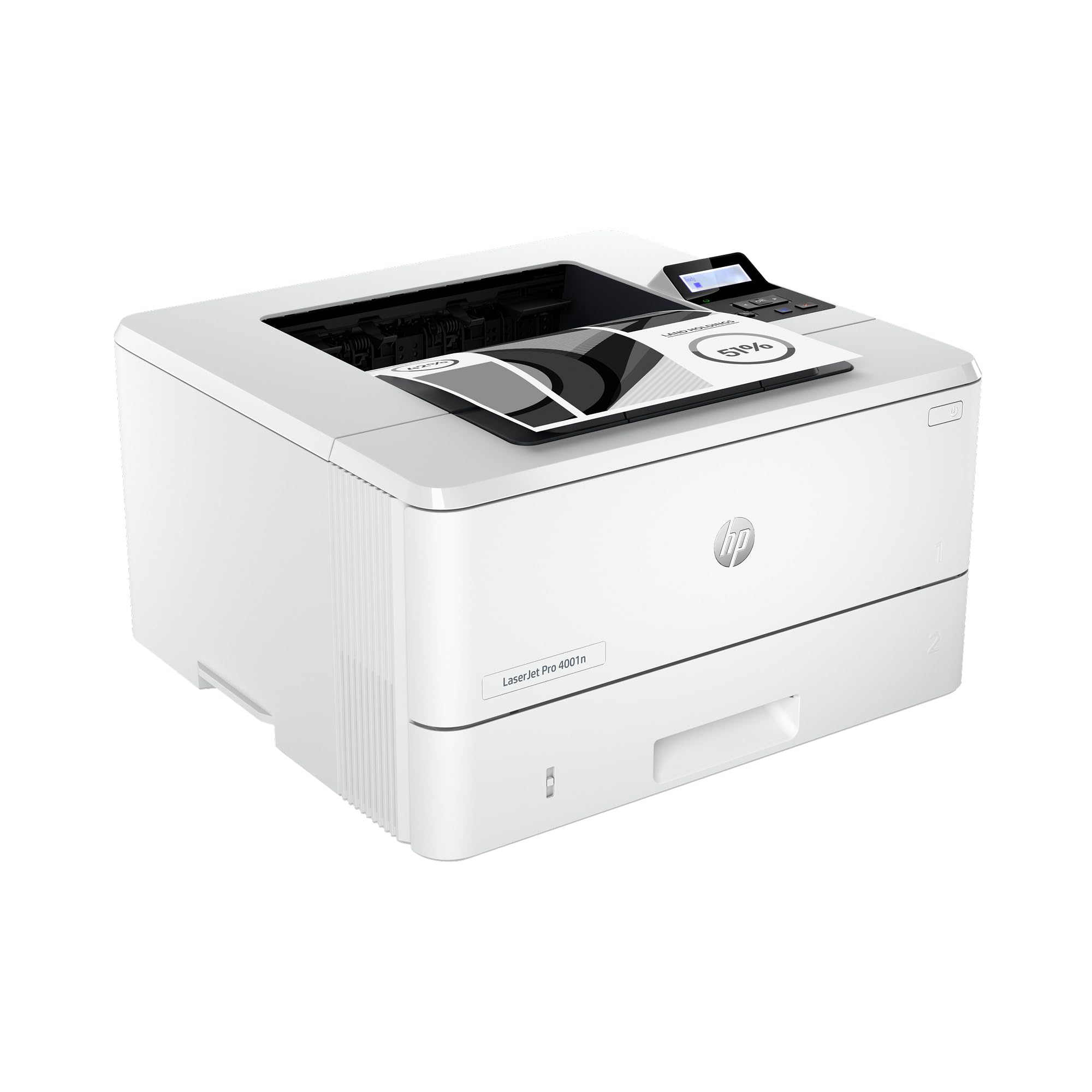
The HP LaserJet Pro 4001n is a wired-only workhorse that prioritizes reliability and speed over wireless convenience. With a rated speed of 42 ppm and a robust 2,900-page starter toner cartridge (standard), it is built for the home office that needs consistent output without the variable latency of Wi-Fi. The printer supports Ethernet and USB connections, making it a natural fit for a desk tethered to a PC or home network switch.
HP Wolf Pro Security is included out of the box, offering customizable security settings for users who handle sensitive documents on a shared home network. The paper input consists of a 250-sheet tray plus a 100-sheet multipurpose tray, allowing you to keep plain paper loaded while feeding envelopes or legal sheets separately. Automatic duplex printing is supported — but it is manual duplex, meaning you must flip the paper stack for two-sided printing, which is a notable caveat at this price tier.
The 4001n does not include a scanner, copier, or fax, and it lacks any form of wireless connectivity. Users who need simple plug-and-play printing from a wired PC will find it fast and dependable. However, the printer uses HP’s cartridge chip enforcement, so firmware updates can block third-party toner. Disabling automatic updates is recommended for those who source non-OEM cartridges.
Why it’s great
- Fast 42-ppm speed with large 250+100 sheet capacity.
- Ethernet connectivity ensures stable, low-latency printing.
- HP Wolf Pro Security for document protection.
Good to know
- Duplex printing is manual, not automatic.
- No Wi-Fi, scanning, or copying functions.
6. Canon imageCLASS MF275dw

Canon’s imageCLASS MF275dw delivers a full four-function experience — print, scan, copy, and fax — at a price that undercuts most similarly equipped Brother and HP models. Its 30-ppm engine is adequate for light to moderate home use, and the first page out time of roughly 5.3 seconds makes it feel responsive for single-page jobs. The 6-line adjustable touchscreen is a standout at this price point, providing intuitive access to scan-to-email and copy settings.
The 35-sheet automatic document feeder handles multi-page copy and scan jobs without manual page feeding, though it lacks duplex scanning (it can only scan one side at a time). The 150-sheet paper cassette is smaller than the 250-sheet trays common on the competition, so heavy users will refill it more frequently. Wireless setup via Wi-Fi is straightforward, with the Canon PRINT Business app offering a clean interface for iOS and Android users.
Print quality is sharp and consistent across various paper types, with Canon’s toner producing dense black text that doesn’t feather on cheap copy paper. The scanner delivers respectable color and grayscale output, though some reviewers noted a slight fading in black-and-white scan mode. The MF275dw is Energy Star and EPEAT Silver certified, which translates to lower power draw during idle periods.
Why it’s great
- Affordable all-in-one with print, scan, copy, and fax.
- 6-line adjustable touchscreen simplifies navigation.
- Fast 5.3-second first page out time.
Good to know
- 150-sheet paper tray is small for moderate volume.
- Scanner performs better on color than B&W documents.
7. Xerox B230/DNI

The Xerox B230/DNI is a compact, print-only monochrome laser that punches above its size with 36-ppm output and built-in Wi-Fi, Ethernet, and USB connectivity. It is one of the smaller printers on this list, making it an ideal fit for cramped dorm desks, kitchen counters, or shelf spaces where a full-size all-in-one simply won’t fit. Despite its small footprint (13.4 x 12.6 x 8.3 inches), it houses a 250-sheet paper cassette — matching the capacity of larger units.
Users who set up the B230 via Ethernet report near-instantaneous driverless printing on Windows, macOS, and Linux. Wireless setup is more involved, with owners noting the tiny LCD screen makes Wi-Fi password entry a slow process (similar to the Xerox B310). Once connected, however, connectivity remains stable, with support for Apple AirPrint, Mopria, and Chromebook printing. The 2400 x 600 dpi resolution produces crisp output, though the finer text reproduction doesn’t quite match the top-tier Xerox B310’s 2400 x 2400 dpi.
The starter toner cartridge is a non-full-capacity unit, so factor in the cost of a standard-yield (about 2,500 pages) replacement when budgeting. Xerox’s security suite is integrated for network protection, though the B230 lacks the advanced Wolf Pro features found on HP’s pro models. A small but notable number of users experienced Wi-Fi dropouts requiring re-entry of credentials, though this seems to be isolated rather than systemic.
Why it’s great
- Compact size fits tight spaces without sacrificing speed.
- Reliable Ethernet setup with multi-OS compatibility.
- 250-sheet paper tray despite small footprint.
Good to know
- Wi-Fi password entry is tedious on the small LCD.
- Starter toner cartridge is not full capacity.
8. Canon imageCLASS LBP122dw

The Canon imageCLASS LBP122dw is the most budget-friendly wireless monochrome laser on this list, offering 30-ppm output with automatic duplex printing and Wi-Fi connectivity for around the same price as a basic inkjet. It is a print-only unit with no scanner or copier, which keeps its footprint small (14.9 x 9.4 x 8.5 inches) and its mechanical complexity low. The Canon PRINT app provides a clean interface for mobile printing from Android and iOS devices.
Users who connect via USB report straightforward setup: download the driver from Canon’s website, plug in, and print. Wi-Fi setup is less intuitive — the printer requires you to enter the router password using the two-line LCD screen, which owners describe as frustrating due to the unlit, low-contrast display. Once connected, printing from iPhones, iPads, and MacBooks works reliably via AirPrint. The paper tray holds 150 sheets, which is sufficient for light home use but will need refilling for larger jobs.
Print quality is acceptable for text documents, though the 600 x 600 dpi resolution is lower than the 2400 dpi found on most competitors at higher tiers. This means fine print — such as footnotes or small spreadsheet data — appears slightly less crisp.
Why it’s great
- Very affordable entry point for wireless B&W laser printing.
- Compact footprint fits small desks and shelves.
- Automatic duplex printing saves paper.
Good to know
- Low-contrast LCD screen makes Wi-Fi setup difficult.
- Print resolution (600 dpi) is lower than competitors.
9. HP LaserJet M209d

The HP LaserJet M209d is the simplest machine on this list: a print-only, USB-connected monochrome laser with automatic duplex printing. It is the ideal choice for a user who wants a reliable, no-nonsense printer for a single computer and has no interest in network setup, mobile apps, or Wi-Fi troubleshooting. The USB cable is included, so it is truly plug-and-play for Windows machines.
Print speed is rated at 30 ppm, and the first page out is snappy thanks to HP’s fast fuser warm-up. The 150-sheet input tray is on the smaller side but acceptable for light home printing — think weekly school assignments, shipping labels, or the occasional letter. The compact design (13.98 x 8.07 x 11 inches) takes up minimal desk width, making it one of the most space-efficient models reviewed here. The smart-guided buttons on the front panel provide basic controls for canceling jobs and checking toner status.
The critical limitation is the lack of Mac compatibility for macOS 12.0 and later, which multiple verified buyers discovered after purchase. HP’s driver support for newer Mac operating systems is absent, and the company’s support channels have not offered a fix. Additionally, the printer uses HP’s cartridge DRM, meaning it will block non-HP toner cartridges through firmware updates. For Windows users seeking a low-cost, wired-only backup printer, it delivers. Mac users should steer clear.
Why it’s great
- Simple USB plug-and-play with included cable.
- Very compact design saves desk space.
- Automatic duplex printing at a low entry price.
Good to know
- Not compatible with macOS 12 or newer.
- No Wi-Fi, Ethernet, or mobile printing capability.
FAQ
How many pages per month can a home laser printer handle?
Can I use third-party toner in these printers?
Is a print-only laser printer better than an all-in-one for home use?
Final Thoughts: The Verdict
For most users, the best black and white laser printer for home use winner is the Brother HL-L2480DW because it combines fast 36-ppm printing, a modern touchscreen, reliable dual-band Wi-Fi, and flatbed scanning in a compact footprint without the cartridge lock-in found on HP models. If you need fax and a 50-page ADF for batch scanning, grab the Brother MFC-L2820DW. And for sheer speed and text sharpness at the highest page-per-minute rate, nothing beats the Xerox B310DNI.

Mo Maruf
I created WellFizz to bridge the gap between vague wellness advice and actionable solutions. My mission is simple: to decode the research and give you practical tools you can actually use.
Beyond the data, I am a passionate traveler. I believe that stepping away from the screen to explore new environments is essential for mental clarity and physical vitality.