Our readers keep the lights on and my smoothie glass nicely filled. As an Amazon Associate, I earn from qualifying purchases.
If your home office or small team burns through reams of text documents, tax forms, contracts, or invoices each month, an inkjet is the wrong tool for the job. Black and white laser all-in-one printers deliver crisp, smudge-proof pages at twice the speed and a fraction of the per-page cost, while the scanner and copier handle the rest of your document workflow. The real challenge is picking the model that balances upfront hardware cost against long-term toner economics and daily reliability.
I’m Mohammad Maruf — the founder and writer behind WellFizz. Over the past several years, I’ve analyzed thousands of printer specifications, cost-per-page calculations, and real owner experiences to separate the workhorses from the paperweights.
Whether you need a compact unit for a cramped desk or a high-volume hub for a growing team, this guide cuts through the noise to help you find the best black and white laser all-in-one printer for your specific printing habits and budget.
How To Choose The Best Black and White Laser All-In-One Printer
A monochrome laser all-in-one is a multi-year investment. Skipping the wrong spec can cost you far more in wasted toner and lost time than the initial purchase price. Focus on these three factors to avoid the common pitfalls.
Print Speed and First Page Out
Rated pages per minute (ppm) tells you the theoretical maximum, but first-page-out time determines how fast you see real results for short jobs. Look for a unit that hits under 7 seconds for the first page and at least 30 ppm for sustained runs if you regularly print multi-page documents. Models rated at 36 to 40 ppm offer a noticeable buffer for small teams sharing the printer.
Toner Economics and Cartridge Yield
A printer’s true cost is the price of its consumables over time. Standard-yield cartridges (700–1,500 pages) have a higher cost per page. High-yield or extra-high-yield cartridges (3,000+ pages) cut the per-page cost by half or more, but the printer must support them. Check the manufacturer’s page yield specs for both standard and high-capacity toner before buying.
Scanning Workflow: ADF vs. Duplex ADF
An automatic document feeder (ADF) lets you stack multi-page originals for scanning or copying. A single-pass ADF scans one side per pass, then flips the page to scan the reverse. A duplex ADF scans both sides in one pass, cutting scan time in half for two-sided documents. If you frequently digitize double-sided contracts or reports, a duplex ADF saves hours over the life of the machine.
Quick Comparison
On smaller screens, swipe sideways to see the full table.
| Model | Category | Best For | Key Spec | Amazon |
|---|---|---|---|---|
| Brother MFC-L2820DW | All-In-One | Small office with fax needs | 36 ppm, 2.7″ touchscreen | Amazon |
| HP LaserJet Pro MFP 3101fdw | All-In-One | High-volume office printing | 35 ppm, 50-sheet ADF | Amazon |
| Xerox B305/DNI | All-In-One | Speed-focused small teams | 40 ppm, 250-sheet tray | Amazon |
| Brother HL-L2480DW | 3-in-1 | Compact cloud-connected desk | 36 ppm, 2.7″ touchscreen | Amazon |
| HP LaserJet Pro MFP 3101sdw | All-In-One | Small teams, secure printing | 40 ppm, HP Wolf Security | Amazon |
| Canon imageCLASS MF284dw | 3-in-1 | Budget home office workhorse | 35 ppm, <5 sec first page | Amazon |
| Canon imageCLASS MF275dw | 4-in-1 | Fax-friendly home office | 30 ppm, 35-sheet ADF | Amazon |
| Xerox B225DNI | All-In-One | Tight-space home office | 36 ppm, duplex scanning | Amazon |
| HP Laserjet Pro 3001dw | Print Only | Budget print-only workflow | 35 ppm, 6.6 sec first page | Amazon |
In‑Depth Reviews
1. Brother MFC-L2820DW

The Brother MFC-L2820DW packs a full suite of fax, copy, scan, and print into a chassis that stays compact without sacrificing paper capacity. Its 36-ppm print engine and 50-sheet auto document feeder make short work of multi-page jobs, while the dual-band Wi-Fi ensures a stable connection even in congested airspace. Owners consistently report seamless setup with existing Brother software, and the intuitive 2.7-inch touchscreen simplifies cloud-scanning to Google Drive and Dropbox without touching a computer.
Toner economics lean heavily in your favor here. The TN830 standard cartridge keeps upfront replacement low, while the TN830XL high-yield option drops the cost per page well below budget inkjet territory. The Refresh subscription trial adds another layer of convenience, automatically shipping toner before you run dry. Initial setup instructions are sparse, but manually entering Wi-Fi credentials resolves connection issues quickly—a common theme among all laser MFPs in this class.
Build quality feels solid, and the quiet operation earns praise from users who keep the printer on the same floor as their workspace. The manual feed slot handles envelopes and heavier media without jamming, and the flatbed scan glass accommodates books or fragile originals the ADF can’t touch. Over months of daily homeschooling and office use, the MFC-L2820DW has proven itself as a low-maintenance workhorse that simply keeps running.
Why it’s great
- Full 4-in-1 functionality with fax in a compact footprint.
- Touchscreen with cloud app integration for scan-to-email or cloud storage.
- High-yield toner option slashes long-term operating costs.
Good to know
- Setup guide is minimal; expect to configure Wi-Fi manually.
- Single-pass ADF scans one side at a time for duplex originals.
2. HP LaserJet Pro MFP 3101fdw

The HP LaserJet Pro MFP 3101fdw is built for environments where every second counts. With a rated speed of 35 ppm and a first-page-out time under 7 seconds, it feels responsive from the moment you hit print. The 50-sheet auto document feeder handles multi-page contracts or double-sided originals with ease, and automatic duplex printing cuts paper waste without slowing the workflow. HP Wolf Pro Security adds a layer of firmware-level protection that small teams handling sensitive client data will appreciate.
Real-world owners report printing over 20,000 pages in nine months without a single jam, and the Economode setting nearly doubles the cartridge lifespan—one user pushed a 5,000-page cartridge past 10,000 pages before replacement. The trade-off is strict cartridge authentication: firmware updates will block non-HP chips, so plan on using OEM cartridges or declining firmware patches if you rely on third-party toner. The initial setup is straightforward via the HP Smart app, though some users find the wireless configuration smoother on the second attempt.
Print quality is crisp and consistent across plain paper, letterhead, and labels. The scanner produces clean color copies even though the printer itself is monochrome, and the fax function works reliably over standard phone lines. A minority of early units exhibited panel or Wi-Fi failures within weeks, but the majority of owners describe it as a fast, quiet replacement for aging inkjets that paid for itself in toner savings within months.
Why it’s great
- Exceptional reliability record with heavy daily printing.
- Economode doubles effective cartridge yield for draft documents.
- Fast Ethernet and intelligent Wi-Fi maintain uptime.
Good to know
- Firmware updates block non-HP toner cartridges.
- Auto feeder may jam if loaded beyond 25 sheets.
3. Xerox B305/DNI
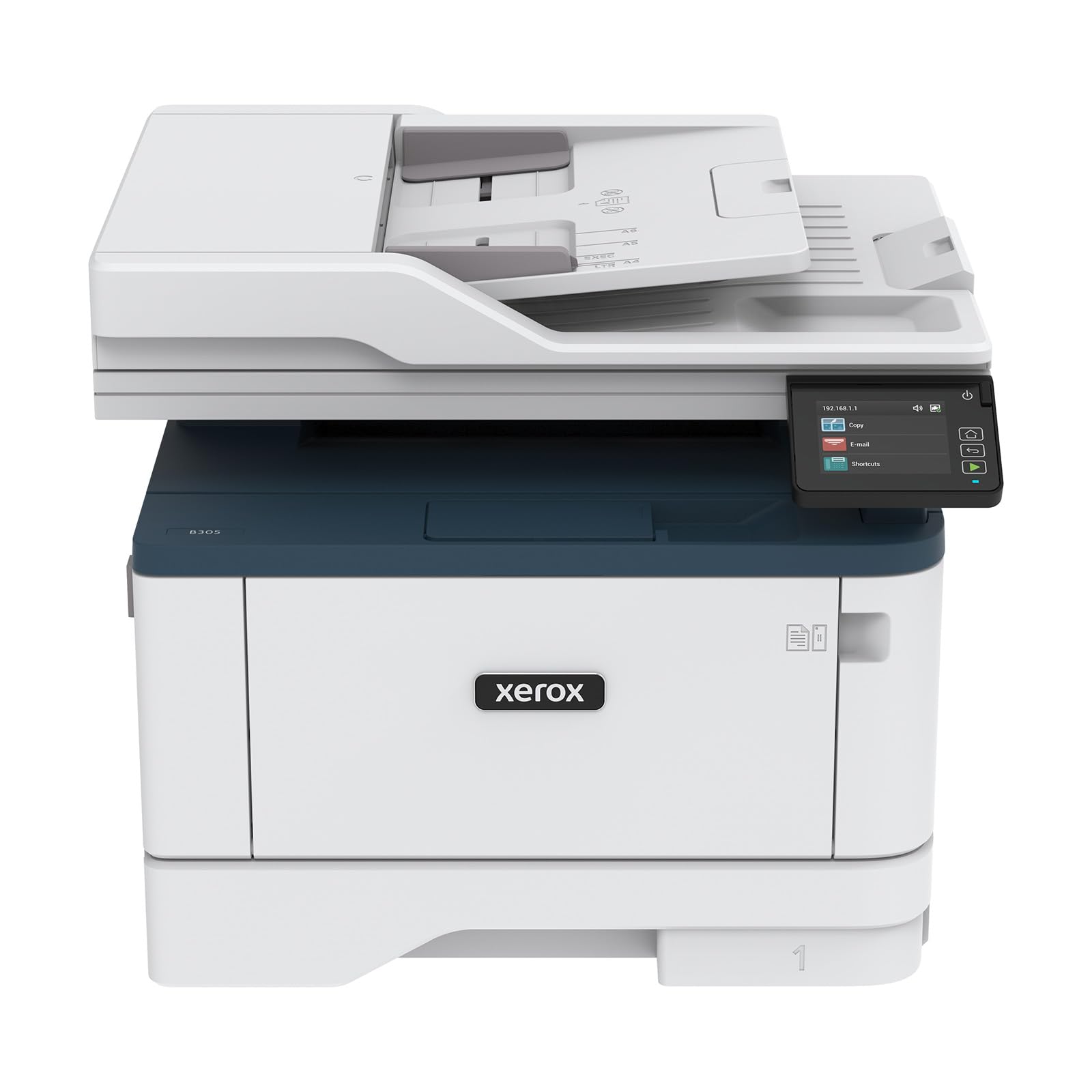
The Xerox B305/DNI is the fastest unit in this roundup, churning out 40 letter-sized pages per minute with automatic duplexing. That speed advantage matters most when multiple users queue jobs simultaneously—the 250-sheet input tray handles the load without constant refills. Its wireless connectivity supports Apple AirPrint, Mopria, and Chromebook printing right out of the box, and the installer software simplifies the driver setup for non-IT users.
Scanning and copying benefit from the same speed-oriented design. The flatbed is supplemented by a 50-sheet ADF, and the Xerox Print & Scan Experience app automates tasks like receipt cropping and auto-straightening. Off-brand toner works in this model after the starter cartridge expires, which helps offset the premium upfront cost. However, some owners have reported recurring hardware failures across multiple units, and customer support response has been inconsistent in those cases.
For users who prioritize raw throughput and need crisp monochrome output at scale, the B305 delivers. The interface is straightforward, though not as polished as the touchscreens on Brother and HP alternatives. If you can find this unit at a competitive price point and value speed above all else, it’s a compelling choice—just verify the warranty terms and return window before committing.
Why it’s great
- Fastest print speed at 40 ppm for high-volume workflows.
- Wireless setup is quick and supports all major mobile platforms.
- Off-brand toner generally works without forced firmware updates.
Good to know
- Build quality concerns reported across multiple production batches.
- Replacement toner is expensive if sticking to OEM cartridges.
4. Brother HL-L2480DW

The Brother HL-L2480DW strips away the fax module to deliver a compact 3-in-1 that focuses on print, copy, and scan with cloud connectivity. The 2.7-inch touchscreen lets you print from and scan directly to Google Drive, Dropbox, Evernote, and OneNote without a PC—a genuine time-saver for users who work across multiple devices. Print speeds hit 36 ppm, and the automatic duplex function is standard, not an added-cost upgrade.
Brother’s Refresh subscription service is baked into the experience, offering up to 50% savings on genuine toner with auto-delivery. The initial toner cartridge lasts surprisingly long; one user reported nearing the end of the first cartridge after a full year of regular home use. Setup with Apple devices is straightforward, and the dual-band Wi-Fi (2.4GHz / 5GHz) ensures the printer stays connected even through walls and floors.
Scan quality is clear for both document and photo originals, though the flatbed is the primary scanning path—the ADF is absent here, so multi-page scanning requires manual page placement. Noise levels are comparable to other Brother lasers, described as “a little noisy” but not disruptive. For small offices and work-from-home setups that prioritize cloud workflow over fax capability, this is the smartest value in the lineup.
Why it’s great
- Cloud scan-to-app functionality without a computer.
- High-yield TN830XL toner delivers sub-penny per page costs.
- Quiet operation with fast first-page output.
Good to know
- No automatic document feeder for multi-page scan jobs.
- Slightly noisier than mid-range HP counterparts during heavy print runs.
5. HP LaserJet Pro MFP 3101sdw

The HP LaserJet Pro MFP 3101sdw matches the top print speed in this guide at 40 ppm, but its real differentiator is HP Wolf Pro Security. This firmware-level protection suite monitors for threats and automatically rolls back unauthorized changes, making it a strong fit for home offices handling confidential documents or healthcare records. The 250-sheet input tray and 50-sheet ADF keep paper handling smooth, and the automatic duplex printing is standard.
Setup through the HP Smart app is fast, and the printer reconnects to Wi-Fi automatically after power outages—a small but meaningful reliability win. Print quality is sharp and consistent, and the introductory toner cartridge yields roughly 1,000 pages before needing replacement. Owners who declined firmware updates report success with generic toner cartridges, though HP’s authentication policy means future updates could block them.
The machine runs quietly even during sustained print jobs, and the LED control panel is simple to navigate. Some shipping and delivery complaints exist in the review history, but the hardware itself has proven dependable over a year of regular use. For small teams that want the fastest possible monochrome output plus enterprise-grade security in a single box, the 3101sdw justifies its position as a premium-tier option.
Why it’s great
- Top-tier print speed combined with advanced security features.
- Reliable Wi-Fi reconnection after network interruptions.
- Sharp, professional-quality output on plain paper and letterhead.
Good to know
- Firmware updates may block non-OEM toner cartridges.
- Auto document feeder may struggle with loads over 25 sheets.
6. Canon imageCLASS MF284dw

The Canon imageCLASS MF284dw delivers the fastest first-page-out time in this group at under 4.9 seconds, which translates to near-instant gratification for single-page prints. The 35-ppm engine keeps pace with the competition for longer jobs, and automatic duplex printing is built in. High-capacity toner options (Cartridge 072) keep the cost per page manageable for moderate-volume home offices.
Wireless setup requires a firmware update before the Wi-Fi function works consistently—a known quirk that a quick visit to Canon’s support site solves. Once connected, the Canon PRINT Business app and AirPrint support make mobile printing seamless. The paper cassette is a drawer-style tray that holds 250 sheets, and the 50-sheet ADF handles multi-page copying and scanning without manual intervention.
Build quality is solid, though some internal plastic components feel lighter than the Brother competition. Scan quality is good for text, and the compact footprint fits easily on a standard desk. A few units shipped as non-authorized US models, which voids warranty support, so purchase from an authorized Canon retailer to avoid issues. For buyers who value speed and Canon’s reliable print engine at an entry-level price, this is a strong contender.
Why it’s great
- Fastest first-page-out time under 5 seconds for quick print jobs.
- High-capacity toner option reduces frequency of cartridge changes.
- Compact design with a large 250-sheet paper tray.
Good to know
- Wireless setup requires a firmware update before it functions reliably.
- Some units shipped as non-US models; confirm authorized seller status.
7. Canon imageCLASS MF275dw

The Canon imageCLASS MF275dw is a true 4-in-1 that adds fax functionality to the print, copy, and scan trifecta at a price point that undercuts most fax-equipped competitors. Print speeds are a slightly more modest 30 ppm, but the 6-line adjustable touchscreen makes navigation easy whether you are sitting or standing. The 35-sheet ADF is adequate for small batch jobs, and automatic duplex printing is included.
Wireless setup works smoothly with both Windows and Android devices, and the Canon PRINT Business app enables direct printing from iPhones and iPads without a middleman. The 150-sheet cassette is smaller than average, so you will refill it more often during heavy print runs. Scanning produces crisp color images, though black-and-white scans can appear slightly faded if the contrast isn’t manually adjusted.
Cartridge 071 starter yields approximately 700 pages, and the standard-yield replacements keep operating costs low for infrequent printing. Duplex scanning is not supported—the ADF scans one side per pass—but the flatbed handles two-sided originals with manual flipping. Over months of daily use, owners describe it as the most trouble-free B&W printer they have owned, making it a smart pick for budget-conscious home offices that need fax capability.
Why it’s great
- Affordable 4-in-1 with integrated fax for legacy document workflows.
- Intuitive 6-line touchscreen adjustable for different desk heights.
- Reliable wireless connectivity with iPhone and Android devices.
Good to know
- 150-sheet cassette requires frequent refilling for high-volume use.
- B&W scan quality can be slightly faded without manual contrast adjustment.
8. Xerox B225DNI

The Xerox B225DNI is the most compact all-in-one in this roundup, yet it still delivers 36 ppm print speed and automatic duplex scanning. That duplex ADF is a standout feature at this price tier—it scans both sides of a document in a single pass, cutting scan time for double-sided originals by half. The build has a clean white-and-blue aesthetic that blends into a home office without dominating the desk.
Setting up Wi-Fi can be finicky; several users bypassed it entirely and connected via USB cable, which works reliably. The Xerox Print & Scan Experience software handles receipt auto-straightening and image cropping, taking the guesswork out of digitizing non-standard originals. Print quality is clean and professional, and the duplex printing function operates smoothly without paper jams under normal loads.
Toner life from the starter cartridge is shorter than users expect, and the low-toner warning triggers early. Replacement toner is pricey if you stick with OEM, but the machine works with third-party cartridges without firmware pushback. For buyers who need duplex scanning in the smallest possible footprint, the B225DNI delivers a feature set that larger and more expensive units can’t match.
Why it’s great
- Duplex ADF scans both sides in a single pass—rare at this price.
- Compact footprint fits small desks without sacrificing paper capacity.
- Xerox software automates receipt cropping and image straightening.
Good to know
- Wi-Fi setup can be problematic; USB connection is more reliable.
- Starter toner runs out faster than expected, raising early replacement costs.
9. HP Laserjet Pro 3001dw

The HP Laserjet Pro 3001dw is the only print-only unit in this guide, which makes it an outlier—but for users who already own a separate scanner or simply don’t need copy/scan functionality, it’s the most affordable entry point into HP’s business-class laser lineup. It prints at 35 ppm with automatic duplexing, and the first page emerges in about 6.6 seconds. Intelligent Wi-Fi automatically selects the best band to maintain a stable connection.
Setup is straightforward via the HP Smart app, and the printer supports AirPrint, Android, and Chromebook devices out of the box. The 250-sheet paper tray handles moderate volume well, and the toner cartridge—while proprietary—lasts over a year for typical home-office usage. HP Wolf Pro Security protects the device from network-based threats, a feature usually reserved for more expensive models.
The catch is clear: this is a printer only, so you still need a separate scanner or copier to complete an all-in-one workflow. A small number of owners experienced complete network failure after 10 months, leaving the unit unusable. At this entry-level price, the 3001dw works well as a dedicated print station for text-heavy environments where scanning is handled elsewhere.
Why it’s great
- Lowest cost of entry for a fast monochrome laser printer.
- Smart Wi-Fi automatically selects the best connection band.
- HP Wolf Security provides enterprise-level network protection.
Good to know
- Print-only design requires a separate scanner or copier for full MFP workflow.
- Firmware updates and network issues have bricked some units after several months.
FAQ
Can I use third-party toner in a black and white laser all-in-one printer?
What does the “duty cycle” rating actually mean for my home office?
How do high-yield toner cartridges affect the cost per page?
Final Thoughts: The Verdict
For most users, the best black and white laser all-in-one printer winner is the Brother MFC-L2820DW because it balances full 4-in-1 functionality, a responsive touchscreen, and low operating costs from high-yield toner into a compact chassis that fits any home office. If you want duplex scanning without sacrificing desk space, grab the Xerox B225DNI. And for small teams that need the fastest print speed at 40 ppm with enterprise-grade security, nothing beats the HP LaserJet Pro MFP 3101sdw.

Mo Maruf
I created WellFizz to bridge the gap between vague wellness advice and actionable solutions. My mission is simple: to decode the research and give you practical tools you can actually use.
Beyond the data, I am a passionate traveler. I believe that stepping away from the screen to explore new environments is essential for mental clarity and physical vitality.