Our readers keep the lights on and my smoothie glass nicely filled. As an Amazon Associate, I earn from qualifying purchases.
Choosing a B650 motherboard for your AM5 build means deciding which bundle of trade-offs you can live with — PCIe 5.0 for storage versus a locked GPU slot, a 12-phase VRM versus an 8-phase, or the convenience of Wi-Fi 6E versus a cleaner wired setup. Each model on this list trades something to hit its price point, and knowing which corner to cut is the difference between a system that hums and one that chokes under sustained load.
I’m Mohammad Maruf — the founder and writer behind WellFizz. I’ve spent years analyzing motherboard power-stage designs, memory topology layouts, and thermal pad coverage across the AM5 ecosystem to find which B650 boards actually deliver on their rated specs.
After comparing VRM phase counts, M.2 slot configurations, and real-world customer failure rates, these are the models that earned a spot in this guide to the best b650 mobo for builders who refuse to waste a single dollar on fluff.
How To Choose The Best B650 Mobo
The B650 chipset splits the AM5 market into two camps: boards that offer PCIe 5.0 for storage only, and the rare “B650E” variants that extend Gen5 to the primary GPU slot. Every board below follows the standard B650 spec — PCIe 5.0 on at least one M.2 slot, PCIe 4.0 for the graphics card. Your real decisions come down to VRM muscle, memory topology, and connector placement.
VRM Phase Count — Quality Over Quantity
A 12+2+2 phase design with 60A Dr.MOS can handle a Ryzen 9 7950X under sustained all-core loads far better than a 14+2 phase design that uses 50A components. Look for the amp rating printed next to the VRM MOSFETs — 80A or 90A per phase on modern boards like the ASRock Steel Legend means real headroom for overclocking. The Gigabyte AERO G’s twin 16-phase setup is overkill for a Ryzen 5 chip but guarantees silent fan curves at stock voltages.
M.2 Slot Distribution — The Gen5 Tax
Most B650 boards give you exactly one PCIe 5.0 M.2 slot and two or three PCIe 4.0 slots. The X4 lanes to the CPU are shared: plug a Gen5 drive into the primary slot and the secondary PCIe 4.0 slot may drop to x2 bandwidth. Check the block diagram in the manual — boards like the MSI Gaming Plus WiFi sidestep this issue by limiting the primary slot to Gen4, keeping all lanes unshared. If you plan to run multiple fast NVMe drives, a board with a clear lane topology matters more than raw slot count.
BIOS Flashback and Debug LEDs — The Lifesavers
A board that cannot POST without a compatible CPU installed is useless if you buy a newer Ryzen 9000 chip before the factory BIOS supports it. Q-Flash Plus or BIOS Flashback allows you to update the firmware with nothing but a USB drive and the 24-pin power connector. Debug LEDs are equally critical — when your system refuses to boot after a memory training loop, a glowing DRAM LED tells you to wait five more minutes rather than reseating the CPU under a cooler.
Quick Comparison
On smaller screens, swipe sideways to see the full table.
| Model | Category | Best For | Key Spec | Amazon |
|---|---|---|---|---|
| Gigabyte B650 AERO G | Premium | Content creators and white-build enthusiasts | Twin 16-phase VRM | Amazon |
| ASRock B650 Steel Legend WiFi | Premium | Gamers wanting PCIe 5.0 GPU support | 14+2+1 phase, 80A Dr.MOS | Amazon |
| Asus ROG Strix B650-A Gaming WiFi | Premium | ROG ecosystem fans wanting premium BIOS | 12+2 phase, 60A Dr.MOS | Amazon |
| MSI B650 Gaming Plus WiFi | Mid-Range | Reliable ATX build with strong audio | 12+2+1 Duet Rail, 2.5G LAN | Amazon |
| Gigabyte B650 Gaming X AX V2 | Mid-Range | Value-conscious builders wanting WiFi 6E | 8+2+2 phase, 3x M.2 | Amazon |
| Gigabyte B650 Gaming X AX | Mid-Range | First-time AM5 builders needing Q-Flash Plus | 8+2+1 phase, PCIe 4.0 | Amazon |
| Gigabyte B650 Eagle AX | Mid-Range | ATX builds needing plenty of fan headers | 12+2+2 phase, 1x PCIe 5.0 M.2 | Amazon |
| Gigabyte B650M AORUS Elite AX | Mid-Range | Compact mATX builds with premium VRM | 12+2+2 phase, mATX | Amazon |
| INLAND MSI PRO B650-P WiFi + Ryzen 5 7600X | Bundle | All-in-one upgrade path for new builders | 12+2+1 phase, 6-core CPU bundled | Amazon |
In‑Depth Reviews
1. Gigabyte B650 AERO G

The Gigabyte B650 AERO G is the only board on this list that pairs a twin 16-phase VRM with an all-white PCB design, making it the natural choice for content creators who want both overclocking headroom and aesthetic cohesion with a white GPU or case. The 16+2+2 power stage uses 60A Dr.MOS components, which gives you enough current to run a Ryzen 9 7950X at full PBO without throttling — something most mid-range B650 boards cannot claim. The VisionLINK USB-C port on the rear I/O delivers 15W of power delivery and DisplayPort passthrough, a rare addition that lets you drive a secondary touch display or tablet without a separate cable run.
The M.2 Thermal Guard III covers all three slots with screwless EZ-Latch clips, so you won’t need a magnetic screwdriver to swap drives. During first boot, expect roughly 40 to 50 seconds of DDR5 memory training — longer than some competitors, but the board compensates with fast, stable EXPO enablement afterward. Realtek ALC1220 audio codecs deliver cleaner signal-to-noise ratios than the budget Realtek ALC897 found on cheaper Gigabyte boards, which matters if you run studio monitors or high-impedance headphones directly off the motherboard jack.
The primary downside is the 64GB memory capacity ceiling — half of what competing boards in the same price bracket support. If you plan to populate four DIMMs with 32GB sticks each, the AERO G is not the right board. Also, the BIOS interface, while functional, lacks the visual polish of ASUS’s UEFI GUI, and the Nahimic audio software can feel intrusive during fresh installs. These are minor trade-offs for a board that handles 7000-series CPUs with the stability of a workstation platform while looking like a showpiece.
Why it’s great
- Massive twin 16-phase VRM handles 7950X without throttling
- VisionLINK USB-C with 15W PD and DisplayPort passthrough
- White PCB design fits cleanly into aesthetic-focused builds
- Screwless EZ-Latch M.2 clips speed up drive swaps
Good to know
- Memory capacity capped at 64GB versus 128GB on peers
- 40–50 second memory training on first boot
- Nahimic audio software can feel intrusive
- BIOS interface lacks polish of ASUS UEFI GUI
2. ASRock B650 Steel Legend WiFi

ASRock’s Steel Legend is the only standard B650 board in this lineup that routes PCIe 5.0 lanes to the primary GPU slot — a feature normally locked to the more expensive B650E chipset. This means you can drop in a future graphics card that runs at Gen5 x16 bandwidth without swapping the motherboard, a rare hedge against obsolescence in this segment. The 14+2+1 phase design with 80A Dr.MOS for VCore is the most robust voltage delivery system on any sub- B650 board, easily sustaining a Ryzen 7 7800X3D under continuous gaming loads without voltage droop.
The PCIe slot arrangement is equally generous: one Blazing M.2 slot at Gen5 x4, two Hyper M.2 slots at Gen4 x4, and a full PCIe 3.0 x16 slot for capture cards or network adapters. Rear I/O includes eight USB 3.2 Gen1 Type-A ports plus a single USB 3.2 Gen2x2 Type-C at 20Gbps. The Realtek ALC4082 codec delivers 7.1-channel HD audio with Nahimic processing, though purists may prefer the ALC1220 on the Gigabyte AERO G for stereo clarity. Hardware Unboxed testing has confirmed the VRM thermals stay under 62°C on a 7950X all-core load, which is class-leading for this price tier.
The biggest frustration is the Polychrome RGB software — users consistently report that OpenRGB works flawlessly while ASRock’s own utility struggles with memory module detection and color synchronization. The UEFI GUI is functional but basic, lacking the drag-and-drop fan curve controls you get on ASUS boards. A minor coil whine under heavy GPU load has been reported, though it is inaudible inside a case with case fans running. These are small concessions for a board that gives you PCIe Gen5 GPU support without paying the B650E premium.
Why it’s great
- PCIe 5.0 x16 for the GPU, a rarity on standard B650 boards
- 14+2+1 phase VRM with 80A Dr.MOS stays under 62°C under load
- Three M.2 slots (one Gen5, two Gen4) with heatsinks included
- USB 3.2 Gen2x2 Type-C rear I/O at 20Gbps
Good to know
- Polychrome RGB software is unreliable; use OpenRGB instead
- UEFI fan curve controls are basic compared to ASUS/ASRock peers
- Minor coil whine under heavy GPU load, inaudible inside case
3. Asus ROG Strix B650-A Gaming WiFi

The ROG Strix B650-A Gaming WiFi is the board you choose when the aesthetic of your build carries equal weight to its performance. The silver heatsinks, white PCB accents, and Aura Sync RGB implementation create a cohesive look that pairs naturally with white GPU shrouds and liquid-cooling loops. Under the surface, the 12+2 phase VRM with 60A Dr.MOS provides stable power delivery for Ryzen 7 and Ryzen 9 chips, though the phase count falls short of the ASRock Steel Legend’s 14+2+1 setup for extreme overclocking scenarios. The rear I/O includes a USB 3.2 Gen2x2 Type-C port at 20Gbps, dual USB 3.2 Gen2 Type-A ports, and WiFi 6E with Bluetooth 5.3.
Asus includes three M.2 slots — all operating at PCIe 4.0 x4 — plus a single PCIe 4.0 x16 slot for the GPU. The absence of any PCIe 5.0 M.2 slot is a notable gap when most B650 competitors offer at least one Gen5 storage lane. This means your fastest NVMe drive will be limited to 7,000 MB/s sequential reads rather than the 10,000 MB/s+ that Gen5 drives deliver. However, the board compensates with PCIe Slot Q-Release, a mechanical latch that releases the GPU retention lock with a single press — far more convenient than the stiff plastic tabs found on cheaper boards.
The Armoury Crate software suite handles driver installation and Aura Sync management out of the box, but it is not a lightweight package — expect background processes that consume around 300MB of RAM. The Realtek ALC1220 codec with Savitech amplification delivers excellent stereo separation, and the UEFI BIOS is the most polished in this comparison, with drag-and-drop fan curve editing and intuitive EXPO toggles. The premium price tag buys you build quality and software polish, but you sacrifice Gen5 storage and raw phase count compared to similarly priced alternatives.
Why it’s great
- Polished UEFI BIOS with drag-and-drop fan curve controls
- PCIe Slot Q-Release for easy GPU removal
- Aura Sync RGB creates cohesive white-build aesthetic
- Realtek ALC1220 codec with Savitech amplification for clean audio
Good to know
- No PCIe 5.0 M.2 slot — all Gen4 only
- Armoury Crate is RAM-intensive and runs background processes
- 12+2 phase VRM lags behind competitors at same price tier
4. MSI B650 Gaming Plus WiFi

The MSI B650 Gaming Plus WiFi delivers the most balanced feature set in the mid-range bracket, combining a 12+2+1 Duet Rail power system with dual 8-pin CPU power connectors and an extended heatsink design that uses 7W/mK MOSFET thermal pads. This VRM configuration comfortably handles a Ryzen 7 7800X3D under sustained gaming loads, and the board’s Memory Boost topology reliably runs DDR5-6000 CL30 kits with EXPO enabled — no cold-boot drama or memory training loops reported in longer-term use. The Realtek ALC1200 codec provides good imaging for a board in this price tier, though the signal-to-noise ratio sits slightly below the ALC1220 found on premium models.
Storage connectivity includes two M.2 slots — both operating at PCIe 4.0 x4 — plus six SATA 6Gb/s ports. The lack of any PCIe 5.0 M.2 slot is a concession to the price point, but the trade-off means no lane sharing issues: both M.2 slots run at full x4 bandwidth simultaneously without disabling any PCIe slots. The rear I/O provides a USB 3.2 Gen2x2 Type-C port at 20Gbps, HDMI and DisplayPort outputs, WiFi 6E with Bluetooth 5.3, and a single 2.5Gbps Ethernet jack. The board also includes a BIOS Flashback button, letting you update firmware without a CPU installed — essential if you are building with a Ryzen 9000-series chip that shipped after the board’s factory BIOS.
Some users report long boot times on initial POST — expected behavior for DDR5 memory training — but the board reliably stabilizes after the first successful boot. A subset of units has experienced M.2 drive detection failures or USB port drops, though MSI’s RMA process has generally resolved these with a replacement board. The UEFI BIOS layout is clean and responsive, with straightforward EXPO toggles and fan curve controls, but the PBO configuration menus are buried deeper than on ASUS boards. For builders who want a no-nonsense ATX board that covers all the basics without creeping toward , this is the strongest option.
Why it’s great
- Stable 12+2+1 Duet Rail VRM with high-grade thermal pads
- Dual 8-pin CPU power connectors for overclocking headroom
- BIOS Flashback for CPU-less firmware updates
- Clean UEFI BIOS with responsive EXPO toggles
Good to know
- No PCIe 5.0 M.2 slot — both slots are Gen4 only
- Long boot times on initial DDR5 memory training
- Occasional M.2 detection issues reported in early batches
5. Gigabyte B650 Gaming X AX V2
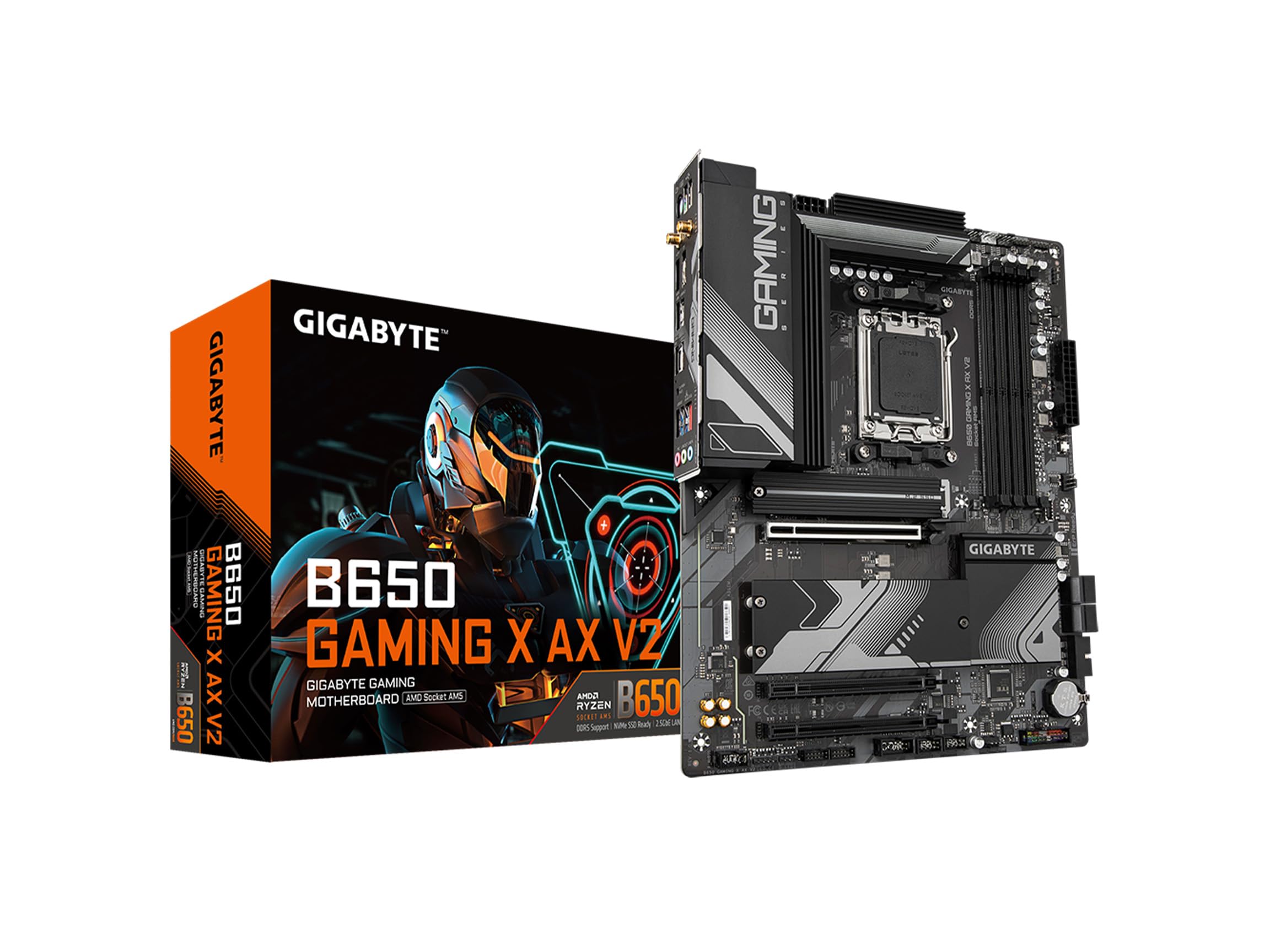
The V2 revision of Gigabyte’s Gaming X AX addresses several pain points from the original model, notably adding a second PCIe 4.0 M.2 slot and refining the VRM layout to an 8+2+2 phase design with 60A Dr.MOS. While the phase count is lower than the Gigabyte Eagle AX’s 12+2+2 configuration, the V2 compensates with direct power-stage routing and improved thermal pad coverage on the MOSFET heatsink. This board is a solid match for a Ryzen 5 7600X or Ryzen 7 7800X3D, where the VRM never breaks a sweat under stock or moderate PBO settings, but pushing a Ryzen 9 7950X to its limits would expose the power delivery ceiling.
The PCIe slot config includes one Gen5 x4 M.2 slot, two Gen4 x4 M.2 slots, and a single PCIe 4.0 x16 slot wired to the chipset — meaning the GPU slot runs at Gen4 speeds, which has zero impact on current gaming performance but closes the door on future Gen5 GPUs. Rear I/O includes a USB 3.2 Gen2x2 Type-C at 20Gbps, five USB 3.2 Gen1 Type-A ports, HDMI and DisplayPort outputs, WiFi 6E with Bluetooth, and a 2.5Gbps Ethernet controller from Realtek. The EZ-Latch system on both M.2 slots eliminates the need for a screwdriver during drive installation.
A small but honest number of buyers have reported persistent boot issues — the board fails to enter BIOS or Windows, and the DRAM LED cycles endlessly even after multiple CMOS clears. These reports are concentrated in early production runs, and many have been resolved through BIOS updates via Q-Flash Plus. The board also lacks a dedicated debug LED panel, relying instead on four single-status LEDs (CPU, DRAM, VGA, BOOT) that provide less granular fault information. For builders on a tighter budget who are comfortable with a potential first-boot BIOS update, the V2 delivers strong value, but the ASRock Steel Legend or MSI Gaming Plus WiFi offer more consistent out-of-box experiences for a modest premium.
Why it’s great
- Three M.2 slots (one Gen5, two Gen4) with EZ-Latch clips
- Q-Flash Plus for CPU-less BIOS updates
- WiFi 6E and 2.5Gbps Ethernet included at a competitive price
- Improved thermal pad coverage over the original Gaming X AX
Good to know
- 8+2+2 VRM is underpowered for Ryzen 9 under heavy load
- Some early batches have persistent boot and DRAM issues
- No multi-character debug display — only four single LEDs
6. Gigabyte B650 Gaming X AX

Gigabyte’s original Gaming X AX is the predecessor to the V2, sharing the same 8+2+1 phase VRM architecture and PCIe 4.0-only slot configuration. The board supports three PCIe 4.0 M.2 slots and one PCIe 4.0 x16 slot for the GPU, which is sufficient for all current graphics cards including the RTX 4090 and RX 7900 XTX. The DDR5 memory support is solid — the board reliably runs 6000MHz CL30 kits with EXPO enabled, though using all four DIMM slots simultaneously drops the stable frequency to around 3600MHz, a limitation shared by most dual-channel AM5 boards. The back panel includes a USB 3.2 Gen2x2 Type-C port at 20Gbps, five USB 3.2 Gen1 Type-A ports, WiFi 6E, and a 2.5Gbps Realtek LAN controller.
The standout feature is the Q-Flash Plus capability, which allows you to update the BIOS using only the 24-pin power connector and a USB drive — no CPU or RAM required. Given that many users report needing a BIOS update to properly support DDR5-6000 EXPO profiles, this is not a nice-to-have but a necessity for smooth setup. The M.2 Thermal Guard heatsinks are effective — NVMe drive temperatures stay under 50°C under extended write loads — but the screw-based retention system is more tedious than the EZ-Latch clips on newer Gigabyte boards.
A quirk specific to this board: the included WiFi antenna must be connected for Bluetooth functionality, even if you plan to use wired Ethernet for internet. Several users also note that the front panel USB 3.0 header pins feel fragile and require careful alignment during installation. The 8+2+1 VRM, while not class-leading, handles a Ryzen 7 7800X3D effortlessly and runs cool enough that the fan on the chipset rarely spins above idle RPM. For builders who don’t need PCIe 5.0 storage and prioritize a reliable, well-tested AM5 platform, this board delivers all the core functionality without any experimental hardware.
Why it’s great
- Reliable Q-Flash Plus for CPU-less BIOS updates
- Three PCIe 4.0 M.2 slots with effective Thermal Guard heatsinks
- WiFi 6E and 2.5G Ethernet included at no extra cost
- Stable DDR5-6000 EXPO support with two DIMMs installed
Good to know
- No PCIe 5.0 M.2 slot — all Gen4 only
- Front panel USB 3.0 header pins are fragile
- WiFi antenna must be connected for Bluetooth to work
7. Gigabyte B650 Eagle AX

The Gigabyte B650 Eagle AX is the budget-friendly full-ATX option that does not skimp on VRM hardware — its 12+2+2 phase digital VRM matches the phase count of boards costing significantly more, providing enough current to handle a Ryzen 9 7950X at stock settings without thermal throttling. The board includes one PCIe 5.0 M.2 slot and two PCIe 4.0 M.2 slots, giving you the highest storage flexibility in this price tier. The rear I/O features a USB 3.2 Gen2x2 Type-C port, HDMI and DisplayPort outputs, WiFi 6E, and Bluetooth, though the Ethernet is limited to Realtek GbE rather than the 2.5Gbps controllers found on more expensive siblings.
Builders routinely praise the number of fan headers — five PWM headers plus a dedicated pump header — which simplifies cable management in builds with multiple radiator fans. The Smart Fan 6 software controls fan curves with temperature source selection, though the interface is not as intuitive as ASUS’s Fan Xpert. Q-Flash Plus is present, enabling BIOS updates without a CPU, and multiple users confirm that EXPO 1 profile enabled DDR5-6000 CL30 memory without manual voltage tweaking.
The primary critique centers on the manual: the Q-Flash Plus procedure is documented incorrectly in the printed booklet, and several users had to watch a YouTube tutorial to get the BIOS update working on first boot. One reviewer found that the M.2 slot cover screw was overtightened from the factory, requiring drilling to remove — a quality-control lapse that appears in isolated units. The board also uses a single Realtek GbE LAN controller, which is fine for 1Gbps internet connections but creates a bottleneck if you transfer large files over a local 2.5Gbps network. For builders who want the most VRM and M.2 slots per dollar in a standard ATX form factor, the Eagle AX delivers unbeatable raw specs with minor quality-of-life compromises.
Why it’s great
- 12+2+2 phase VRM at a budget-friendly tier — surprising headroom
- One PCIe 5.0 M.2 plus two PCIe 4.0 M.2 slots
- Five PWM fan headers plus a pump header
- Q-Flash Plus enables CPU-less BIOS updates
Good to know
- Ethernet limited to Realtek GbE, not 2.5Gbps
- Printed Q-Flash Plus manual contains incorrect instructions
- Overtightened M.2 cover screws reported in isolated units
8. Gigabyte B650M AORUS Elite AX

The B650M AORUS Elite AX packs the same 12+2+2 phase digital VRM found in the full-size Eagle AX into a compact mATX form factor, making it the strongest small-form-factor B650 board on the market for thermal performance. The VRM uses a 6mm heatpipe connecting the MOSFET heatsinks, a feature rarely seen on mATX boards, which keeps the voltage regulators under 50°C even during extended Cinebench runs with a Ryzen 7 7800X3D. The board includes two M.2 slots — both covered by M.2 Thermal Guard heatsinks — and a single PCIe 4.0 x16 slot for the GPU, which is sufficient for single-GPU gaming builds.
Rear I/O connectivity is generous for an mATX board: one USB 3.2 Gen2x2 Type-C at 20Gbps, four USB 3.2 Gen1 Type-A ports, two USB 2.0 ports, HDMI and DisplayPort outputs, WiFi 6E, Bluetooth, and a 2.5Gbps Realtek Ethernet controller. The board supports EXPO memory profiles out of the box, with stable DDR5-6000 CL30 performance in dual-channel mode. The EZ-Latch system for the PCIe slot makes GPU removal a one-handed operation, and the Q-Flash Plus button is present for CPU-less BIOS updates, though its placement near the front-panel header cluster can cause confusion during first-time builds.
The board has a known failure pattern reported by a small number of long-term users: after roughly one year of use, the system fails to POST with a VGA debug light. Testing with multiple RAM kits, GPUs, and CPUs points to a possible socket pin degradation issue, and RMA replacements have shown mixed reliability. This appears to be a batch-specific problem rather than a systemic design flaw, but it is a data point worth noting if you plan to run this board 24/7 in a workstation. For mATX gaming builds with limited case space, the AORUS Elite AX delivers VRM performance that rivals full-size ATX boards, though the ASRock Steel Legend offers a more reliable long-term track record in the same price bracket.
Why it’s great
- 12+2+2 phase VRM with 6mm heatpipe — best-in-class for mATX
- M.2 Thermal Guard covers both M.2 slots
- 2.5Gbps Ethernet and WiFi 6E in a compact form factor
- EZ-Latch PCIe slot for tool-free GPU removal
Good to know
- Long-term VGA POST failures reported in isolated units
- Q-Flash Plus button placement confuses first-time builders
- mATX form factor limits expansion to single GPU only
9. INLAND MSI PRO B650-P WiFi + Ryzen 5 7600X

The INLAND bundle pairs the MSI PRO B650-P WiFi motherboard with a Ryzen 5 7600X processor, giving first-time AM5 builders everything they need for a platform upgrade in one box. The MSI PRO B650-P is a work-oriented board with a 12+2+1 Duet Rail power system and dual 8-pin CPU power connectors, providing stable voltage delivery for the 6-core 7600X and offering enough headroom for a future Ryzen 7 or Ryzen 9 upgrade. The board supports DDR5-6400+ memory via overclocking, with a maximum capacity of 128GB across four DIMM slots. Storage includes two M.2 PCIe 4.0 x4 slots and six SATA 6Gb/s ports, which is adequate for a gaming or productivity build.
The rear I/O includes WiFi 6E, Bluetooth 5.3, a USB 3.2 Gen2x2 Type-C port at 20Gbps, HDMI and DisplayPort outputs, and a single 2.5Gbps Realtek Ethernet port. The Audio Boost circuitry delivers studio-grade sound quality through the Realtek codec, with isolated audio traces on the PCB to reduce electrical interference. The board supports Windows 11 and Windows 10 64-bit, and the MSI Center software provides driver installation and system monitoring in a single interface. The 6-layer PCB with 2oz thickened copper improves signal integrity at higher memory frequencies.
The bundled Ryzen 5 7600X is a 6-core, 12-thread processor with a 5.3 GHz max boost clock and 38MB of total cache, delivering over 100 FPS in popular competitive titles. The key caveat: the processor does not include a cooler, so you must budget for an aftermarket solution — a single-tower air cooler like the Thermalright Peerless Assassin is sufficient. The MSI PRO B650-P has a more utilitarian appearance than the AORUS or ROG boards, with no RGB lighting and a black-on-black PCB. Some users note that the I/O shield did not align perfectly with their case cutout, requiring gentle bending of a mounting clip. For builders who want the lowest total cost of entry onto the AM5 platform without hunting for separate deals on a CPU and motherboard, this bundle eliminates the compatibility guesswork.
Why it’s great
- All-in-one bundle eliminates CPU-motherboard compatibility guesswork
- 12+2+1 Duet Rail VRM handles 7600X easily with upgrade headroom
- DDR5-6400+ support with 128GB maximum capacity
- WiFi 6E, Bluetooth 5.3, and 2.5G Ethernet all included
Good to know
- CPU does not include a cooler — factor in additional cost
- Utilitarian black design with no RGB or aesthetic accents
- I/O shield alignment may need gentle adjustment during install
FAQ
Does a B650 board work with a Ryzen 9000-series CPU out of the box?
Can I use my existing DDR4 RAM on an AM5 B650 motherboard?
Why does my B650 board take so long to boot the first time?
Is PCIe 5.0 on the GPU slot worth paying extra for on B650?
Final Thoughts: The Verdict
For most users, the best b650 mobo winner is the Gigabyte B650 AERO G because its twin 16-phase VRM, VisionLINK USB-C, and screwless M.2 clips deliver genuine workstation-grade stability and creator-focused features that no other B650 board at this level matches. If you want PCIe 5.0 support on the GPU slot without moving to B650E, grab the ASRock B650 Steel Legend. And for a compact mATX build where VRM thermal performance cannot be sacrificed, the Gigabyte B650M AORUS Elite AX packs the most power-phase density per square inch of any board in this roundup.

Mo Maruf
I created WellFizz to bridge the gap between vague wellness advice and actionable solutions. My mission is simple: to decode the research and give you practical tools you can actually use.
Beyond the data, I am a passionate traveler. I believe that stepping away from the screen to explore new environments is essential for mental clarity and physical vitality.