Our readers keep the lights on and my smoothie glass nicely filled. As an Amazon Associate, I earn from qualifying purchases.
Latency kills creativity. A single buffer underrun during a live take, a fan ramp-up captured on a condenser mic, or plugin overload in a dense mix — these are the real production killers that turn an inspiring session into a troubleshooting hell. The line between a DAW that feels instant and one that stumbles is drawn by component synergy, not just raw clock speed.
I’m Mohammad Maruf — the founder and writer behind WellFizz. My research focuses on real-world DAW benchmarks, DPC latency analysis, and power delivery stability under sustained multi-core loads — because in audio production, consistency matters more than peak performance.
Whether you are building a tracking rig, a mix station, or an all-in-one production suite, finding the right best audio workstation pc requires matching the chassis form factor to your workflow’s specific thermal and expansion demands.
How To Choose The Best Audio Workstation PC
Building or buying a PC for audio production is fundamentally different from building a gaming rig or a general office machine. The audio workflow places a unique premium on deterministic performance — the ability to process a stream of real-time audio without interruptions, regardless of what else the system is doing. This guide focuses on the five pillars that define a true audio workstation.
CPU Architecture and Core Strategy
For digital audio workstations, single-core performance is still king for most plugin chains, but multi-core utilization has grown significantly in modern DAWs like Cubase, Logic Pro, and Reaper. An Intel Core i7 or i9 with high Turbo Boost frequencies generally offers excellent single-threaded plugin throughput, while AMD Ryzen processors with higher core counts excel in track-heavy projects that spread voices across cores. Look for processors with strong, sustained boost clocks under all-core loads — not just peak speeds — as audio rendering can keep all cores engaged for minutes or hours. Avoid processors with known DPC (Deferred Procedure Call) latency spikes, often documented by the community on DAW-specific forums. For the audio workstation, the target is a processor that delivers consistent, jitter-free performance at sample buffer sizes as low as 64 or 32 samples.
RAM Capacity and Latency Considerations
Samplers and virtual instruments are voracious memory consumers. Kontakt libraries, orchestral template setups, and large convolution reverb impulse responses can easily consume 16GB just for a large template. The sweet spot for a serious audio workstation is 32GB, with 64GB being the standard for those running multiple samplers or large sample-based projects. RAM speed matters less than capacity in audio work, but faster DDR5 memory can slightly reduce system latency by improving data transfer between RAM and CPU cache. ECC (Error-Correcting Code) memory is generally unnecessary for consumer DAW use — the performance overhead is not justified by the near-zero benefit in real-time audio processing. However, for mission-critical mastering or broadcast environments, ECC may provide peace of mind against rare memory errors that could cause clicks or pops.
Storage Architecture and Audio Drive Strategy
Audio production requires high sequential read speeds for streaming sample libraries from disk, but the real differentiator is random access performance. PCIe Gen4 NVMe SSDs are the minimum standard for system and sample drives — they eliminate the loading times that plague older HDD-based workstations. For the sample library drive, a PCIe Gen3 or Gen4 NVMe drive with high random read IOPS is ideal. The system drive should also be NVMe for fast DAW launch and project loading. A separate scratch drive for recording audio tracks is a professional setup — it isolates the high-bandwidth write stream of multitrack recording from the system operations. For archiving projects, a bulk storage HDD or SATA SSD is sufficient. The key spec to look for on sample drives is sustained read bandwidth — not just peak burst speeds — as large orchestral patches can demand sustained 2-3 GB/s reads.
Connectivity and Audio Interface Compatibility
The single most common compatibility issue in audio workstations is USB audio interface dropouts. Not all USB controllers are created equal — some integrated controllers drop packets under heavy CPU load, especially on AMD AM4 and Intel LGA 1700 platforms. Dedicated USB controller chips (like those from Renesas or VIA) provide more reliable performance for audio interfaces. Thunderbolt connectivity is a premium advantage for Thunderbolt-compatible audio interfaces like Universal Audio Apollos or RME Fireface series — it offers lower latency and more stable throughput than USB 3.0. The motherboard should have at least one PCIe x16 slot available for an audio interface with a PCIe card, or for an internal sound card with high-quality converters. HDMI and DisplayPort are only relevant for secondary monitor outputs, as the audio workstation’s primary audio I/O comes from the external interface. Avoid motherboard chipsets known for audio interface driver incompatibilities — RME and Focusrite maintain public compatibility lists for specific chipsets.
Thermals and Acoustic Noise Profile
In a studio or home recording environment, acoustic noise from the computer itself is a direct liability. A fan that ramps up audibly during a quiet acoustic guitar take or a vocal overdub can ruin a performance. The ideal audio workstation uses a liquid cooler or a large, low-speed air cooler on the CPU, with case fans that have a low minimum RPM and are PWM-controlled for silent operation at idle loads. The power supply should be a quiet unit with a zero-RPM mode below a certain load threshold. System chassis should have sound-dampening material on the side panels and a design that minimizes vibration transfer to the floor or desk. For extreme silence, passive cooling builds exist, but they require careful component selection and generous thermal headroom. The noise floor of the PC should be below the ambient noise level of the studio — typically under 25 dBA at idle for a vocal booth environment.
Quick Comparison
On smaller screens, swipe sideways to see the full table.
| Model | Category | Best For | Key Spec | Amazon |
|---|---|---|---|---|
| Beelink GTR9 Pro | Ultra‑Compact | Local AI & Sample Libraries | 128GB LPDDR5X RAM | Amazon |
| Lenovo Legion Tower 5i | High‑End Tower | Mixing & Mastering | RTX 5070 Ti 16GB | Amazon |
| Dell Pro Tower i7-14700 | Professional Tower | Heavy Plugin Chains | 64GB DDR5 RAM | Amazon |
| Thermaltake View i570-170 | Performance Tower | Real‑Time Rendering | i9-14900KF + RTX 5070 | Amazon |
| STORMCRAFT Sirius AI | Gaming AI Desktop | Video Editing & Gaming | 2TB NVMe Gen4 SSD | Amazon |
| Akai MPC Live III | Standalone Production | Mobile Beatmaking | 8GB RAM, 8‑core CPU | Amazon |
| Lenovo IdeaCentre 27″ AIO | All‑in‑One | Space‑Saving Production | 32GB DDR5, i7-13620H | Amazon |
| GEEKOM A9 Max | AI Mini PC | Compact AI Workflows | AMD Ryzen AI 9 HX 370 | Amazon |
| HP Elite Mini 800 G9 | Mini Business PC | Ultra‑Quiet Office | i9-14900, 16GB DDR5 | Amazon |
| Skytech Crystal Gaming | Entry Gaming Desktop | 1080p Production | RTX 5060, 32GB DDR4 | Amazon |
| Dell Pro Tower Ultra 5 | Business Tower | Office & Light Production | 14‑Core Ultra 5 235 | Amazon |
| HP Mini i7-12700T | Compact Business | Data Processing | 3x 4K Output Support | Amazon |
| Envision S13 SFF PC | Budget SFF Desktop | Home Author Production | Ryzen 7 5700G, 32GB | Amazon |
In‑Depth Reviews
1. Beelink GTR9 Pro
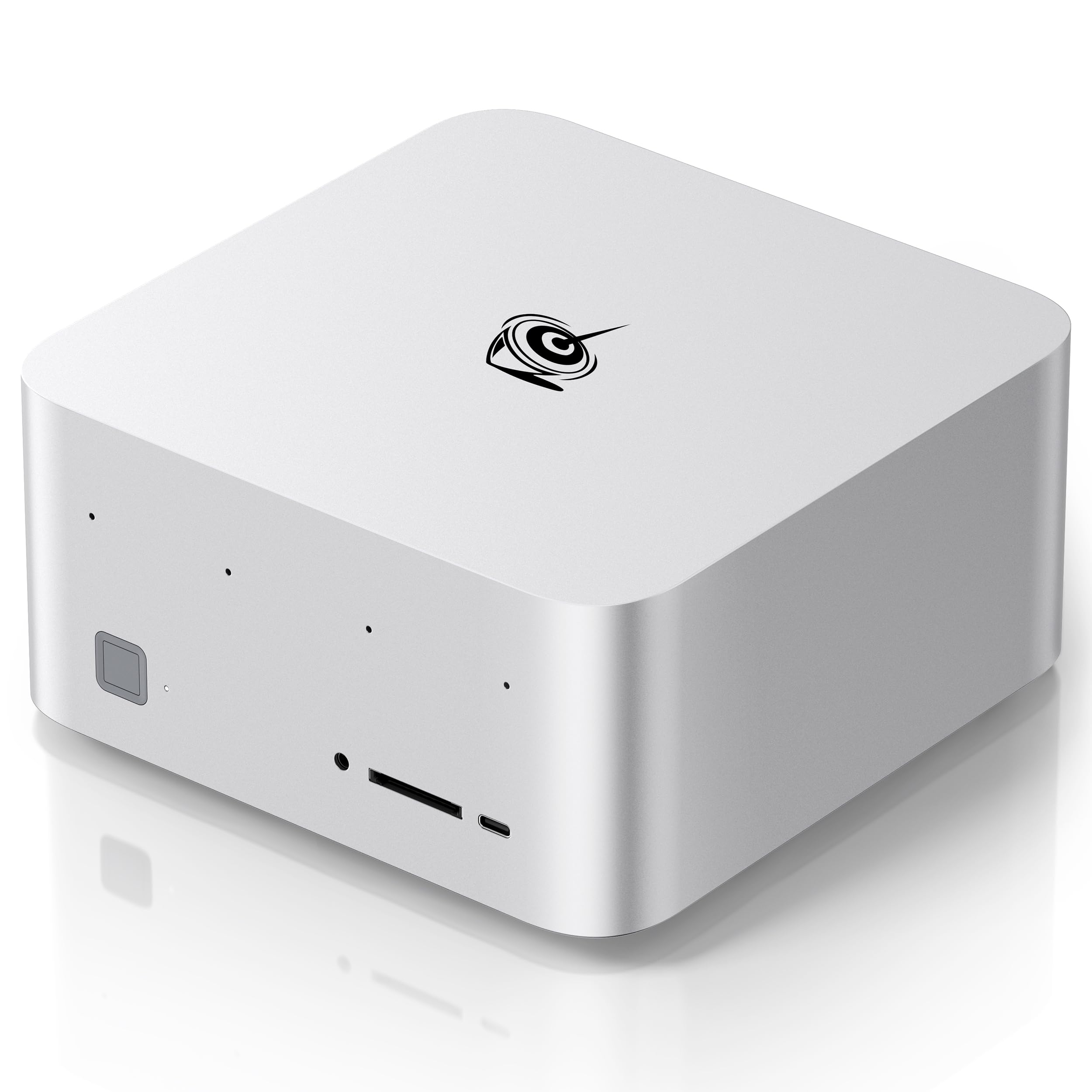
The Beelink GTR9 Pro rewrites the rulebook on what a compact audio workstation can handle. Its AMD Ryzen AI Max+ 395 processor with 16 Zen 5 cores and the Radeon 8060S iGPU deliver a staggering 126 AI TOPS, enabling local inference for AI-assisted audio tools and stem separation without cloud dependency. The 128GB of LPDDR5X RAM is overkill for most DAW tasks today, but for engineers running massive orchestral templates with 100+ Kontakt instances, it removes the memory ceiling completely.
Dual 10GbE LAN ports transform this mini PC into an AI computing hub capable of deploying local models like DeepSeek 70B — a feature that points directly to the future of on-device mixing and mastering. The quad 8K display support via dual USB4 and dual HDMI 2.1 means you can run multiple session views, mixer windows, and video reference monitors simultaneously. The 140W cooling system keeps fan noise at a claimed 32dB under load — low enough for a home studio.
The trade-off is a compact chassis with limited internal expansion — no PCIe slot for a dedicated audio interface card or internal sound module. Relying on USB-C/Thunderbolt for your audio interface is fine for most modern interfaces, but it restricts upgrade paths. For producers who prioritize massive RAM, AI capabilities, and ultra-quiet operation in a tiny footprint, this is a forward-looking choice.
Why it’s great
- Unprecedented 128GB RAM capacity for massive sample libraries
- Dual 10GbE LAN suitable for AI server clustering and high-speed networking
- Ultra-quiet 32dB cooling under load — ideal for studio use
- Quad 8K display support for expansive session views
Good to know
- No PCIe expansion slots for dedicated audio cards
- Linux support requires firmware updates and BIOS configuration
- Premium price positions it beyond entry-level budgets
2. Lenovo Legion Tower 5i

The Lenovo Legion Tower 5i bridges the gap between a gaming pedigree and audio workstation requirements with careful engineering. Its Intel Core Ultra 7 265F processor with dedicated AI acceleration handles modern DAW plugin chains with low DPC latency, while the NVIDIA RTX 5070 Ti with 16GB of VRAM can accelerate audio-to-video workflows, spectrogram visualization, and GPU-assisted reverberation for convolution reverbs. The 32GB of 5600MHz DDR5 memory is expandable to 128GB, leaving room for future template growth.
The tool-less side panel and excellent internal airflow make upgrading storage or adding an internal sound card straightforward. The 2.5G Ethernet and WiFi 6E ensure reliable connectivity for network audio transport protocols like Dante or AVB. The liquid cooling keeps the CPU cool under sustained mix-down loads, and user reports indicate fan noise is well-controlled during idle — critical for vocal recording sessions where PC noise is a distraction.
One limitation is the relatively high noise floor under full load — the liquid cooling pump and case fans are audible in a quiet room, which may be an issue for critical listening. The GPU, while powerful for video, is overkill for pure audio work and adds to the thermal output. For composers who also produce video content or game, this dual-use capability is a strength, but pure audio engineers might find the GPU cost unnecessary.
Why it’s great
- Excellent out-of-box performance with stable, low-latency operation
- Tool-less chassis for easy upgrades and internal card installation
- RTX 5070 Ti accelerates GPU-assisted audio plugins and video workflows
- Expandable to 128GB DDR5 RAM for large orchestral templates
Good to know
- Full-load fan noise may intrude on critical listening sessions
- Gaming GPU adds unnecessary cost if video work is not required
3. Dell Pro Tower i7-14700

The Dell Pro Tower is a no-nonsense business-class machine repurposed for audio production with compelling results. Its Intel Core i7-14700 with 20 cores (8 P-cores + 12 E-cores) provides strong single-threaded performance for plugin-heavy mix buses, while the 64GB DDR5 RAM is ready for the most demanding sample libraries right out of the box. The 2TB PCIe SSD offers ample space for sample libraries and project archives without immediate upgrade pressure.
Dual DisplayPort and HDMI support dual 4K displays, which is sufficient for a DAW session on one screen and plugin racks or video on another. The tower form factor provides PCIe slots for adding a dedicated sound card or audio interface card, and the internal layout is clean for maintenance. Business-class build quality means this machine is engineered for 24/7 operation in professional environments, and user reports confirm reliable performance after months of use.
The absence of built-in Wi-Fi is a notable omission — a discrete USB or PCIe Wi-Fi adapter will be required for network connectivity, which is an extra step. The system’s cooling, while adequate, is not optimized for silence under load. Some users note the fan noise becomes audible during sustained rendering, which could be problematic for a live recording studio. For a budget-conscious professional who prioritizes RAM and storage capacity over silence, this is a solid foundation.
Why it’s great
- 64GB DDR5 RAM and 2TB PCIe SSD ready for large templates
- 20-core i7-14700 delivers strong single and multi-core performance
- Tower form factor with PCIe slots for audio interface cards
- Enterprise-grade build quality for 24/7 reliability
Good to know
- No built-in Wi-Fi — requires separate adapter
- Cooling system not optimized for silent studio operation
4. Thermaltake View i570-170

The Thermaltake View i570-170 is a performance-oriented prebuilt that brings liquid cooling to the audio workstation table. Its Intel Core i9-14900KF, with 8 P-cores and 16 E-cores reaching 6.0 GHz, is one of the fastest consumer CPUs for real-time plugin processing. The RTX 5070 provides 12GB of VRAM, which is modest for modern AAA gaming but more than sufficient for audio visualization and GPU-accelerated audio processing in applications like iZotope RX or Ozone.
The 240mm liquid cooler keeps the processor at consistent temperatures under sustained load, which directly translates to lower thermal throttling and more consistent low-latency performance during long mix sessions. The 32GB of DDR5 6000MT/s memory is fast enough to prevent memory bottlenecks in dense projects. User reports note the system is remarkably quiet during idle and light loads — the liquid cooler handles low-heat situations with a near-silent pump and slow fans.
The primary drawback is the gaming-oriented design — the chassis lacks sound-dampening material, and the GPU fans do become audible under load. For a pure audio workstation, the RTX 5070 is overkill, and the performance budget could have been better allocated to more RAM or a larger SSD. However, for producers who also game or edit video, this dual-use machine delivers top-tier performance for both worlds.
Why it’s great
- i9-14900KF offers blistering single-core performance for plugins
- Liquid cooling maintains stable temps for sustained low-latency
- Fast DDR5 6000MT/s memory suitable for memory-intensive projects
- Quiet operation at idle — suitable for vocal recording
Good to know
- Gaming chassis lacks sound-dampening for critical listening
- RTX 5070 GPU is overkill for pure audio workflows
5. STORMCRAFT Sirius AI

The STORMCRAFT Sirius AI positions itself as an AI-ready desktop for content creation, and its spec sheet supports that claim. The Intel Core i7-14700F with 20 cores and 28 threads provides the compute backbone for both CPU-heavy plugin chains and GPU-assisted AI audio tools. The RTX 5060 Ti with 16GB GDDR7 is one of the first graphics cards in this price tier to offer 16GB of VRAM — useful for local AI model inference for stem separation, vocal tuning, and algorithmic mixing.
With 32GB of DDR5 6000MHz memory and a 2TB NVMe Gen4 SSD, the storage and memory configuration is generous out of the box, leaving room for large sample libraries and project archives. The 650W Gold PSU provides clean power delivery, and the five ARGB system fans offer configurable lighting — not essential for audio, but the air exchange is sufficient to keep temperatures stable under DAW loads. Users report smooth operation with DaVinci Resolve for video editing, indicating the machine handles concurrent audio and video workloads well.
The case, while well-ventilated, is not designed for silent operation — the fans, even at low RPM, produce an audible whisper in a quiet room. The integrated audio is basic Realtek, so a dedicated audio interface is mandatory for professional recording. For a content creator who needs a single machine for music production, video editing, and AI-assisted audio work, this offers strong value per dollar.
Why it’s great
- 16GB GDDR7 VRAM enables local AI audio tool inference
- 2TB NVMe Gen4 SSD provides ample sample library space
- 32GB DDR5 6000MHz memory suitable for dense template sessions
- AI rendering capability for future-proofed audio workflows
Good to know
- Fan noise audible in quiet studio environments
- Integrated audio requires external interface for professional use
6. Akai MPC Live III

The Akai MPC Live III is not a traditional PC — it is a standalone music production center that redefines the workstation concept for beatmakers and electronic producers. With an 8-core processor, 8GB of RAM, and the MPC3 operating system, it operates entirely without a computer for recording, mixing, sequencing, and sound design. The 3D-sensing MPCe pads offer velocity, pressure, and X/Y control, enabling expressive finger drumming and articulation switching that no mouse-and-keyboard workflow can replicate.
The built-in stereo monitors, integrated microphone, and rechargeable battery make it a truly portable production station — you can lay down ideas on a plane, in a hotel room, or at a jam session without any external gear. The 7-inch multi-touch display, 16-step sequencer, and performance touchstrip provide tactile control over clip launching, effects automation, and live arrangement. With 128GB of internal storage expandable via SD or SSD, and a 2-month Splice sample library subscription included, the creative potential is immediate.
The MPC Live III is not a substitute for a full DAW environment with unlimited plugin chains and deep editing capabilities. Its 8GB RAM and mobile-class processor limit track count and plugin instances compared to a tower workstation. For producers who build tracks around beats and samples, and need a tactile, portable instrument, this is a purpose-built tool — but for complex orchestral arrangements or film scoring, a traditional PC remains necessary.
Why it’s great
- Fully standalone operation — no computer required for production
- Expressive 3D-sensing pads with velocity and X/Y control
- Portable with built-in microphone, speakers, and rechargeable battery
- MPC3 OS with 32 plugin instances and Pro stems
Good to know
- Limited track count and plugin capacity versus a tower workstation
- Not suitable for orchestral or dense mixing workflows
7. Lenovo IdeaCentre 27″ AIO

The Lenovo IdeaCentre 27″ All-in-One compactifies a capable audio production setup into a single, cable-minimal unit. The Intel Core i7-13620H with 10 cores provides solid performance for moderate DAW projects — tracking, mixing, and light production with up to 50-60 plugin instances without stuttering. The 32GB DDR5-5200 RAM is adequate for most sample libraries, though large orchestral templates will push its limits. The 27-inch FHD IPS display with 99% sRGB and anti-glare coating is a good canvas for your DAW session.
The built-in 5MP webcam and dual microphones might seem unnecessary for audio production, but they enable high-quality video conferencing for collaborative sessions or online teaching. The HARMAN speakers provide adequate monitoring for reference, though you will still need dedicated studio monitors for critical listening. The space-saving design eliminates the tower footprint, ideal for small home studios or secondary production stations. The included adjustable stand provides ergonomic positioning for long mixing sessions.
The all-in-one form factor is inherently non-upgradable — you cannot swap the GPU, add RAM beyond the soldered 32GB, or replace the CPU. The integrated Intel UHD Graphics is sufficient for display but offers no GPU acceleration for audio plugins. For a producer who values simplicity and clean aesthetics over expandability, this is a tidy package, but it locks you into its original configuration permanently.
Why it’s great
- Space-saving design eliminates tower clutter in small studios
- 32GB DDR5 RAM handles moderate sample library projects
- 27-inch IPS display with 99% sRGB for accurate session views
- Built-in webcam and microphones for collaborative production
Good to know
- Non-upgradable CPU, GPU, and RAM — no future expansion
- Integrated graphics cannot accelerate audio plugins
- Some units may suffer from early hardware failures
8. GEEKOM A9 Max

The GEEKOM A9 Max leverages the AMD Ryzen AI 9 HX 370 processor with a dedicated XDNA 2 NPU delivering 50 TOPS of AI performance, making it a uniquely capable mini PC for AI-assisted audio production. Local AI tasks like stem separation (using tools like Demucs or iZotope RX’s Music Rebalance) can be offloaded to the NPU, freeing the CPU cores for your DAW and plugin chains. The 12-core, 24-thread Zen 5 CPU with Radeon 890M graphics provides strong baseline performance for audio rendering and light video work.
The IceBlast 2.0 cooling system with dual heat pipes and copper heat sinks keeps the all-metal chassis running cool under sustained AI or DAW loads. With 32GB DDR5 RAM and a 1TB SSD, this is an entry-level professional configuration, but the support for up to 128GB DDR5 and dual Gen4 SSDs means expansion is possible. Quad 8K display support via dual USB4 and HDMI 2.1 enables a multi-monitor studio setup with a tiny footprint. Dual 2.5GbE LAN ports and WiFi 7 ensure fast networking for Dante or audio-over-IP setups.
The main limitation is the absence of any PCIe slot for a dedicated audio interface card or internal sound module. All audio I/O must go through USB-C/Thunderbolt or HDMI, which is fine for most modern interfaces but restricts some pro workflows. The fan under load is more audible than the Beelink GTR9 Pro — reaching mid-30s dB — which may be noticeable in a quiet vocal booth environment. For producers who need local AI processing in a compact, upgradeable chassis, this is an innovative option.
Why it’s great
- Dedicated 50 TOPS NPU for AI-assisted audio processing
- Quad 8K display support for multi-screen studio sessions
- Upgradeable RAM up to 128GB and dual SSDs up to 8TB
- WiFi 7 and dual 2.5GbE for high-speed audio networking
Good to know
- No PCIe slot for dedicated audio interface cards
- Fan noise reaches mid-30s dB under sustained load
9. HP Elite Mini 800 G9
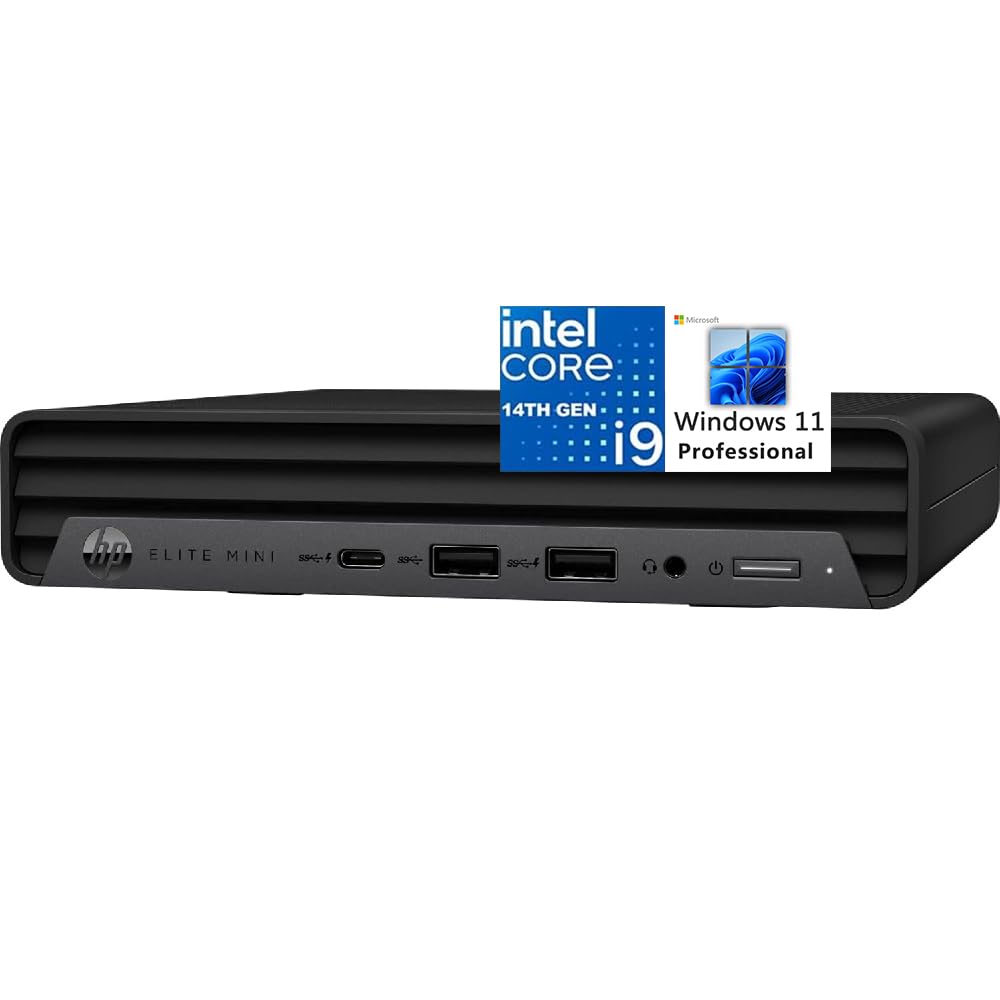
The HP Elite Mini 800 G9 proves that a business-class mini PC can serve as a capable, whisper-quiet audio workstation. Its Intel Core i9-14900 with 24 cores and a max turbo of 5.5GHz provides top-tier single-core performance that translates to low plugin latency in DAWs. The Intel UHD 770 Graphics support triple 4K displays at 60Hz over dual DisplayPort 1.4 and HDMI 2.1, enabling an efficient multi-screen monitoring setup for session view, mixer, and plugin racks.
The compact 6.97-inch footprint and ultra-quiet cooling design make it an ideal candidate for a home studio desk where space is at a premium. The 16GB DDR5 RAM is the bottleneck here — it is barely adequate for even moderate sample library usage, and the 512GB SSD fills quickly with project files and sampled instruments. However, the ability to upgrade RAM (though limited by the mobile DDR5 form factor) provides a path forward. The inclusion of Windows 11 Pro and AI-powered Copilot adds professional features for remote collaboration and session backup.
The lack of discrete graphics means no GPU acceleration for AI audio tools or video-related workflows. The mini PC form factor also eliminates any PCIe expansion for sound cards. For a producer who primarily works with audio tracks and minimal sampling, and prioritizes near-silent operation and a small footprint, this is a refined choice. The 16GB RAM ceiling will be a hard limit for any serious orchestral or synth-heavy production work.
Why it’s great
- Ultra-quiet operation ideal for vocal recording environments
- i9-14900 offers best-in-class single-core performance for plugins
- Triple 4K display support for efficient studio monitoring
- Compact design minimizes desk footprint
Good to know
- 16GB RAM is insufficient for large sample libraries
- No discrete GPU for AI audio tool acceleration
- No PCIe slots for sound card expansion
10. Skytech Crystal Gaming

The Skytech Crystal Gaming PC is essentially a gaming desktop repurposed as an entry-level audio workstation. The AMD Ryzen 7 5700 with 8 cores and 16 threads provides adequate multi-core performance for tracking and mixing up to 30-40 plugin instances, while the NVIDIA RTX 5060 delivers 8GB GDDR7 VRAM that can accelerate basic AI audio tools like voice isolation or noise reduction in iZotope RX. The 32GB DDR4-3200 RAM is a good value sweet spot for sample libraries of moderate size.
The 1TB NVMe SSD provides reasonable project storage, though large sample libraries will quickly fill the space. The Skytech Crystal case with triple tempered glass offers decent airflow, keeping the system stable under sustained DAW loads. User reports indicate out-of-box reliability and that the system arrives well-packaged with minimal bloatware. For a producer on a tight budget who needs both a gaming machine and a DAW workstation, this offers decent dual-use capabilities.
The gaming case is not designed for silent operation — fans are audible even at idle, and the AMD stock cooler can be loud under load. The RTX 5060, while good for gaming, is overkill for audio visualization tasks and adds cost and noise that pure audio users would prefer to avoid. For dedicated audio-only workstations, better value exists in RAM/storage configurations without a gaming GPU, but for a beginner who also games, this is a practical starting point.
Why it’s great
- 32GB DDR4 RAM at a budget-friendly price point
- RTX 5060 can accelerate basic AI audio processing tasks
- Adequate performance for tracking and light mixing projects
- Reliable out-of-box experience with minimal setup
Good to know
- Fan noise is audible — not suitable for silent studios
- Gaming GPU adds cost without audio-specific benefits
- Limited path to RAM and CPU upgrade
11. Dell Pro Tower Ultra 5

The Dell Pro Tower Plus with the Intel 14-Core Ultra 5 235 is a capable entry-level professional workstation for light audio production. The 14-core, 14-thread processor delivers solid single-threaded performance for plugin chains up to moderate complexity, while the 32GB DDR5 RAM offers headroom for sample libraries of standard size. The integrated Intel Graphics handle triple display output, enabling a DAW session on one screen and plugin editors on others.
The tower form factor provides genuine upgradeability — you can add a USB audio interface card, install a dedicated sound card, or expand RAM in the future. The 1TB PCIe SSD is sufficient for project storage and a moderate sample library. Dell’s enterprise build quality means this machine is designed for long, stable operation in professional environments, and users report reliable performance with zero crashes during extended sessions. The internal layout has room for two additional hard drives and additional PCIe cards.
The integrated graphics are not suitable for GPU-accelerated audio processing or 4K video editing alongside audio work. The cooling, while adequate, is tuned for quiet office use rather than complete silence — the fan does become audible under sustained CPU load. For a producer with a limited budget who needs a stable, upgradeable foundation for light production and general business tasks, this is a sensible choice.
Why it’s great
- 32GB DDR5 RAM provides headroom for moderate sample libraries
- Tower form factor allows future GPU and audio card upgrades
- Enterprise build quality for 24/7 reliability
- 14-core CPU handles plugin chains up to moderate complexity
Good to know
- Integrated graphics cannot accelerate audio plugins
- Cooling fan may be audible under sustained load
12. HP Mini i7-12700T
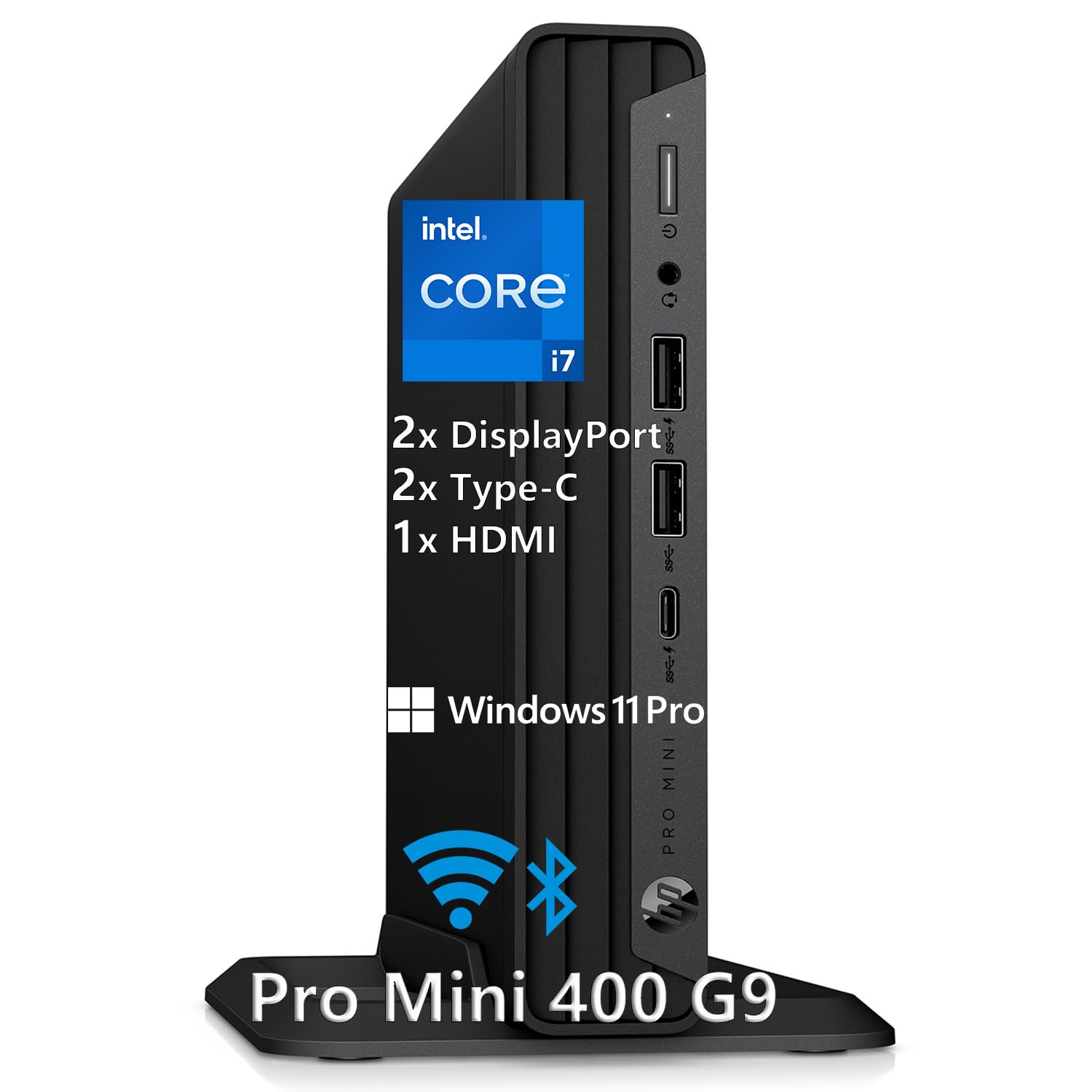
The HP Mini Desktop PC with the Intel i7-12700T is a space-efficient workstation for producers who prioritize multi-monitor productivity. The 12-core, 4.7GHz processor provides strong single-threaded performance for plugin chains, while the 32GB DDR4 RAM handles sample libraries of moderate size. The standout feature is its support for triple 4K displays via dual DisplayPort 1.4 and HDMI 2.1 — enabling a studio setup with a large DAW session view, a mixer window, and a plugin editor or video reference screen.
The whisper-quiet operation, as reported by users, makes this mini PC viable for vocal recording environments where fan noise is unacceptable. The 1TB NVMe SSD provides fast boot times and adequate project storage, though sample libraries will quickly consume space. The 7 USB ports and USB-C 20Gbps offer plenty of connectivity for audio interfaces, MIDI controllers, and external drives. The inclusion of a wired keyboard and mouse means you can start working immediately out of the box.
The main limitation is the 32GB DDR4 RAM ceiling — not expandable further, which restricts this machine to moderate template sizes. The integrated UHD 770 Graphics cannot accelerate AI audio tools, and the mini form factor eliminates PCIe expansion entirely. For a producer who works primarily with audio tracks and limited sampling, and needs a compact, multi-display setup, this is a cost-effective option.
Why it’s great
- Triple 4K display support for efficient multi-screen workflow
- Whisper-quiet operation suitable for home studio use
- 32GB RAM and 1TB SSD provide strong baseline configuration
- Includes keyboard and mouse for immediate setup
Good to know
- RAM is non-expandable — max 32GB limits template size
- No PCIe slots for audio interface upgrades
- Integrated graphics lack GPU acceleration for audio tools
13. Envision S13 SFF PC
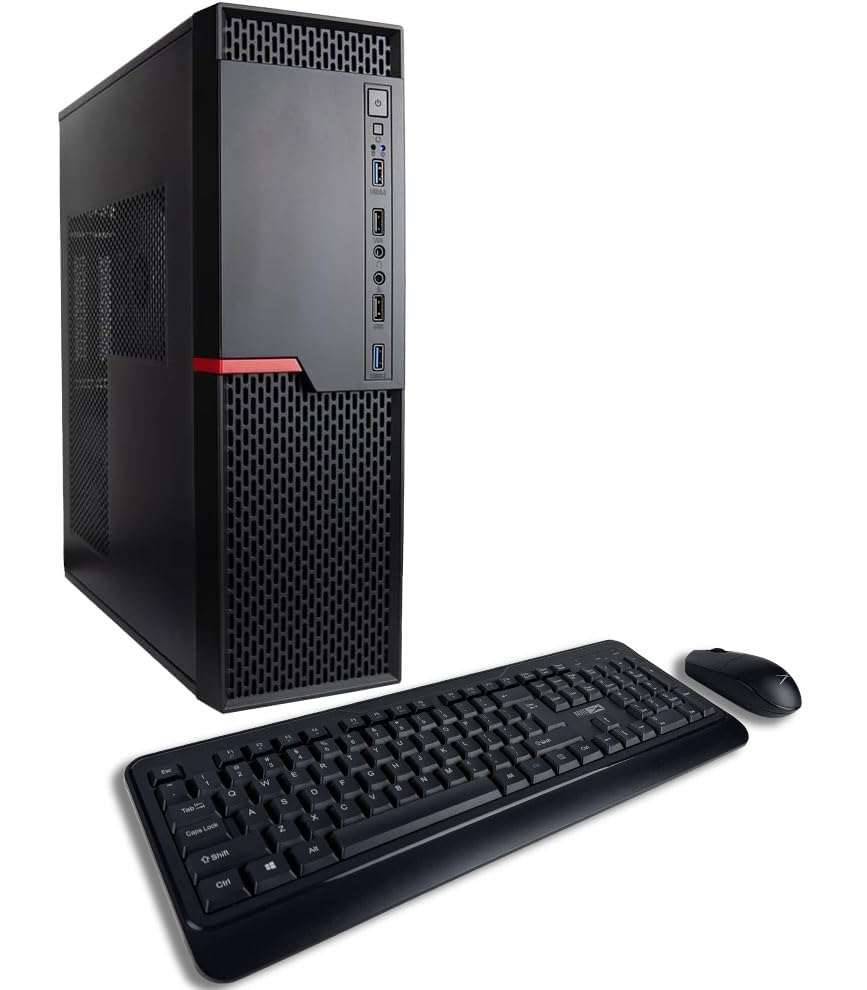
The Envision S13 SFF PC is an entry-level small form factor desktop that offers surprising capability for budget-conscious audio producers. The AMD Ryzen 7 5700G with integrated Radeon Graphics delivers 8 cores and 16 threads with a 4.6GHz boost, providing competent single and multi-core performance for tracking, basic mixing, and light production. The 32GB DDR4-3200 RAM is a solid baseline for moderate sample libraries, and the dual 512GB NVMe SSDs (1TB total) offer fast storage with the option to separate system and sample drives.
The 13-liter chassis is remarkably compact, taking up minimal desk space while offering 10 USB ports (including USB 3.0 and 2.0) for audio interfaces, MIDI controllers, and peripherals. The system is assembled in the USA and comes with lifetime technical support and a 3-year warranty, providing peace of mind that is rare at this price tier. Users report easy setup and reliable performance for home author use, light audio and video editing, and daily productivity tasks.
The integrated Radeon Graphics limit GPU-dependent audio processing — AI-powered tools like vocal tuning or stem separation will not benefit from GPU acceleration. The SFF case has limited internal expansion — some users report difficulty installing a discrete GPU due to space constraints. For a producer on a strict budget who needs a reliable, compact machine for tracking, light mixing, and daily productivity, the Envision S13 delivers exceptional value with strong warranty support.
Why it’s great
- 32GB DDR4 RAM at an exceptionally low price point
- Motherboard includes 10 USB ports for multiple peripherals
- Lifetime technical support and 3-year warranty from USA assembly
- Compact 13-liter chassis ideal for small studio desks
Good to know
- Integrated graphics limits AI audio tool performance
- Limited internal space makes GPU upgrades difficult
- Small form factor restricts future expansion options
FAQ
What is the ideal RAM capacity for an audio workstation PC?
Can a gaming PC be used effectively as an audio workstation?
Why is DPC latency important for audio recording?
Do I need a dedicated sound card for an audio workstation?
How much does the GPU matter for audio production?
Final Thoughts: The Verdict
For most producers, the best audio workstation pc winner is the Lenovo Legion Tower 5i because it balances expandability, cooling, and performance without sacrificing the ability to upgrade to 128GB RAM or add an internal audio card later. If you want massive RAM and a tiny footprint, grab the Beelink GTR9 Pro. And for a space-saving all-in-one that eliminates tower clutter, nothing beats the Lenovo IdeaCentre 27″ AIO.

Mo Maruf
I created WellFizz to bridge the gap between vague wellness advice and actionable solutions. My mission is simple: to decode the research and give you practical tools you can actually use.
Beyond the data, I am a passionate traveler. I believe that stepping away from the screen to explore new environments is essential for mental clarity and physical vitality.