Our readers keep the lights on and my smoothie glass nicely filled. As an Amazon Associate, I earn from qualifying purchases.
Whether you’re a voice actor hunting for silent preamps or a guitarist stacking DI tracks, finding an interface that delivers studio-grade conversion without eating your entire gear budget requires navigating a dense spec sheet. The difference between a muddy demo and a mix-ready take often lies in the dynamic range of your converters and the noise floor of your preamps — details that cheap units hide and smart buyers hunt for.
I’m Mohammad Maruf — the founder and writer behind WellFizz. Over the past decade I’ve analyzed hundreds of audio interfaces, cross-referencing measured EIN figures, converter chip types, and real-world latency reports to separate marketing claims from honest engineering.
This guide breaks down the nine most compelling options I’ve found within that budget, each paired with the use case it serves best, so you can find the single best audio interface under 300 for your specific recording or streaming rig.
How To Choose An Audio Interface Under 300
Choosing the right interface under isn’t about picking the most expensive model — it’s about matching your specific workflow (solo vocal takes, stereo instrument recording, multitrack podcasting) to the right combination of preamp quality, converter resolution, and routing flexibility.
Preamps and EIN
Equivalent Input Noise (EIN) tells you how clean your preamps are. Look for figures at or below -129 dBu — the quieter the preamp, the less hiss you’ll hear when recording quiet sources like spoken word or acoustic guitar. Units with built-in pad switches can also handle hotter line signals without distortion.
Converter Quality
Even at this price, conversion matters. Dynamic range around 120 dB means your recordings retain detail from whisper-loud to soft passages. Units using ESS Sabre or equivalent discrete converters can produce a noticeably wider stereo image and lower jitter than basic integrated chips.
I/O Count
A 2×2 interface works for a single mic and one instrument, but if you plan to record a stereo synth, two mics simultaneously, or a mic + line-in for live streaming, a 4×4 model gives you the extra inputs without needing a mixer. Also check if the unit has dedicated MIDI I/O if you use hardware synths.
Direct Monitoring and Loopback
Zero-latency monitoring lets you hear yourself while recording without the delay that drives vocalists crazy. Loopback channels route your computer’s audio (e.g. backing tracks, game sound) into your DAW or streaming software — essential for podcasters and live streamers who mix multiple sources.
Quick Comparison
On smaller screens, swipe sideways to see the full table.
| Model | Category | Best For | Key Spec | Amazon |
|---|---|---|---|---|
| Focusrite Scarlett 4i4 4th Gen | Premium | Multi-input recording & streaming | 120 dB dynamic range / 4-in 4-out | Amazon |
| MOTU M4 | Premium | Expanded I/O with metering | 4-in 4-out / LCD screen / loopback | Amazon |
| Solid State Logic SSL 2 MKII | Premium | Voice acting & crisp vocal takes | 32-bit AD/DA / Legacy 4K enhancement | Amazon |
| Motu M2 | Mid-Range | High-impedance headphone driving | ESS Sabre32 DAC / 120 dB dynamic range | Amazon |
| Universal Audio Volt 2 | Mid-Range | Vintage coloration & mobile recording | UA 610 preamp emulation / 24-bit 192kHz | Amazon |
| Pyle PMXU46BT | Mid-Range | Live mixing & multi-source streaming | 4-channel mixer / Bluetooth / 48V | Amazon |
| Shure MVX2U Gen 2 | Mid-Range | Portable XLR-to-USB-C setups | +60 dB gain / real-time denoiser / plug‑and‑play | Amazon |
| Focusrite Scarlett Solo 3rd Gen | Budget | Simple single-mic & DI recording | 24-bit 192kHz / Air mode / Gain Halos | Amazon |
| Behringer U-Phoria UMC204HD | Budget | Linux compatibility & budget 2-in/4-out | MIDAS preamps / 24-bit 192kHz / MIDI I/O | Amazon |
In‑Depth Reviews
1. Focusrite Scarlett 4i4 4th Gen
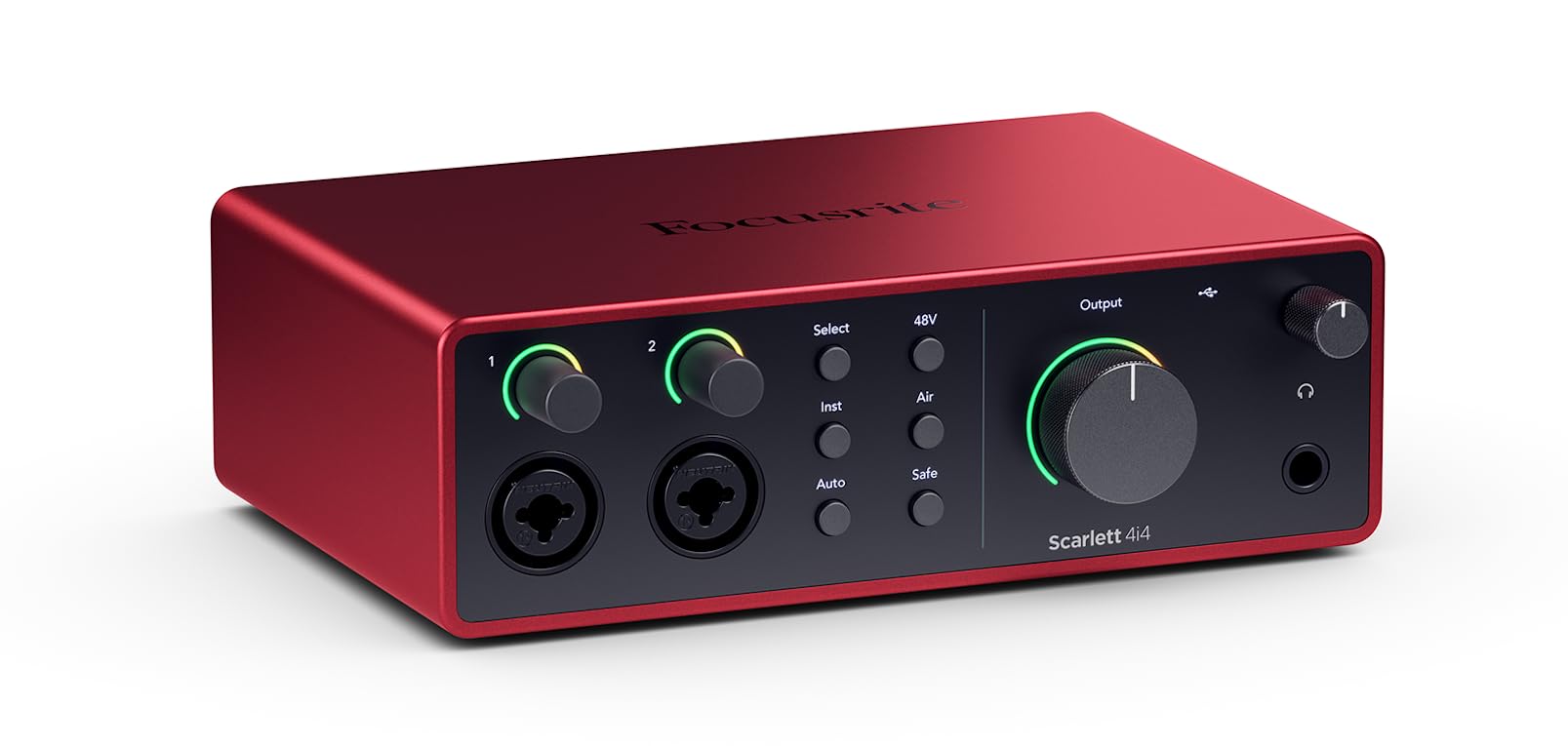
The Scarlett 4i4 4th Gen represents Focusrite’s most refined balance of I/O and converter performance under . Its dual mic preamps deliver a measured 120 dB dynamic range — the same spec found in their flagship interfaces — and the new Auto Gain and Clip Safe features let you set levels without second-guessing. The Air mode adds a pre‑emphasized high-frequency lift that pushes vocals and acoustic guitars forward in a dense mix without sounding harsh.
With four line inputs (two on the rear via TRS) plus MIDI I/O and four outputs, this unit accommodates stereo synths, a DI guitar, and a mic simultaneously. The included Focusrite Control routing software allows flexible monitoring mixes and loopback configuration for streaming. The unit ships with a generous bundle including Ableton Live Lite, Pro Tools Intro, and the Hitmaker Expansion plugin suite.
Users upgrading from older interfaces consistently note the tighter low‑end and lower noise floor compared to third‑gen Scarletts. The main limitation is that only two of the four inputs are XLR — the rear line inputs require TRS cables for balanced operation, which is typical at this price bracket but worth noting for those with multiple condenser mics.
Why it’s great
- Auto Gain/Clip Safe removes guesswork in level setting
- Full MIDI I/O for hardware synth integration
- 120 dB dynamic range equals pro‑studio converters
Good to know
- Only two XLR inputs; rear line inputs need TRS cables
- Requires USB‑C power supply (included) for full function
2. MOTU M4 4×4 USB-C Audio Interface

MOTU’s M4 squeezes professional metering into a compact bus‑powered chassis. The built‑in LCD screen displays real‑time input and output levels — a feature you’d normally find on rackmount gear — making it easy to dial in gain without guessing. Two mic preamps share the same low‑noise topology as MOTU’s larger interfaces, measured at a clean -129 dBu EIN, and the ESS Sabre32 converter chipset delivers a dynamic range that rivals units twice the price.
The M4 offers four analog inputs (two XLR combo, two line‑only ¼”) and four outputs, plus a dedicated loopback channel for streaming and podcasting. Its ASIO drivers on Windows are rock‑solid, consistently achieving sub‑10 ms round‑trip latency at 64‑sample buffers. The front‑panel 48V switches per channel and individual monitor mix control give you granular control without entering a software menu.
Long‑term users report the M4 outlasting other interfaces in their studios due to its robust build and transparent sound signature. The headphone output, while capable, is slightly lower in power than the M2’s — it drives 250‑ohm loads adequately but won’t shake high‑impedance headphones to concert levels. The LCD display adds ‑ to the cost over equivalent 4‑input units but is invaluable for live gain‑staging.
Why it’s great
- LCD level meters for precise gain‑staging
- Rock‑solid ASIO drivers with low latency
- Dedicated loopback + per‑channel 48V switches
Good to know
- Headphone output slightly lower gain than M2
- Bus‑powered but benefits from quality USB‑C cable
3. Solid State Logic SSL 2 MKII

SSL’s 2 MKII brings the legendary console manufacturer’s analog enhancement circuit into a desktop interface. The Legacy 4K button engages a two‑stage enhancement (high‑frequency presence boost plus subtle harmonic saturation) that mimics the SSL 4000 series console’s character. Voice actors and podcasters report an immediate reduction in mouth noise and a more polished vocal tone without additional plugins.
The MKII doubles the sample rate to 32‑bit / 192 kHz AD/DA conversion — not 32‑bit float recording (which prevents clipping), but 32‑bit integer converters that lower noise and increase headroom compared to typical 24‑bit designs. The preamps are exceptionally clean at -130.5 dBu EIN, and the built‑in high‑pass filter (switchable at 75 Hz) rumbles out low‑end floor noise without affecting the vocal range.
Build quality is a clear step above the competition: the all‑metal chassis feels substantial, and the oversized monitor volume knob operates with smooth resistance. The headphone output is powerful enough to drive 250‑ohm Beyerdynamic DT 990 Pros to comfortable listening levels. The only catch is that the 32‑bit converter spec can be misleading — the unit still clips analog inputs if you push past 0 dBFS, so proper gain‑staging remains necessary.
Why it’s great
- Legacy 4K adds analog console character to vocals
- 32‑bit AD/DA converters for extra headroom
- Built‑in high‑pass filter cleans up rumble instantly
Good to know
- Not 32‑bit float — analog clipping still possible
- Larger footprint than typical 2×2 interfaces
4. Motu M2 2×2 USB-C Audio Interface

The MOTU M2 is the benchmark that other sub‑ interfaces are measured against, largely due to its ESS Sabre32 Ultra DAC — the same converter technology used in high‑end mastering converters that cost thousands. This chip delivers a measured 120 dB dynamic range on the outputs and -129 dBu EIN on the mic inputs, providing a noise floor so low that even sensitive condenser mics capture silence without floor hiss.
Customer feedback consistently highlights the M2’s ability to drive high‑impedance headphones (250‑ohm and above) without an external headphone amp. The front‑panel LCD meters (inherited from MOTU’s pro line) give dual‑channel level visualization, and the loopback feature routes computer audio into your DAW or stream. The unit is bus‑powered via USB‑C, keeping your desk clean of wall warts.
Several users note that the M2 solves issues with PC electrical noise (hum from power supplies, ground loops) that plagued their previous interfaces. The only recurring criticism is that the included USB‑C cable can sometimes cause dropout — users recommend replacing it with a high‑quality shielded cable for maximum stability. The M2’s two‑input ceiling means it’s best for solo or stereo recording rather than multi‑mic sessions.
Why it’s great
- ESS Sabre32 DAC rivals converters costing 5x more
- Drives 250‑ohm headphones with authority
- LCD meters and loopback for streaming
Good to know
- 2‑input limit — no expandability beyond stereo
- Bundled USB‑C cable can cause dropouts for some users
5. Universal Audio Volt 2

Universal Audio’s Volt 2 packs the company’s renowned 610 tube preamp emulation into a compact, bus‑powered interface. The Vintage button engages a circuit that adds subtle harmonic saturation and a gentle high‑frequency lift — similar to what the UA 610 hardware does for vocals and bass. This isn’t a plugin emulation; it’s an analog circuit baked into the signal path, so the coloration prints directly to your recording without latency.
The Volt 2 supports 24‑bit / 192 kHz conversion with crystal‑clear AKM converters, and the headphone output is clean enough for critical mixing on semi‑open headphones. UA includes the LUNA DAW (a free, full‑featured recording platform) plus a bundle of UAD plugins. The unit is Class Compliant on macOS, iPad, and iPhone, and requires a driver on Windows — though Windows users report the driver is stable and lightweight.
Compared to the MOTU M2 and SSL 2, the Volt 2’s preamps measure slightly less clean on paper (around -127 dBu EIN), but the Vintage mode’s analog character often sounds more musical on voices and electric guitars. The unit lacks MIDI I/O and loopback, which limits its utility for podcasters and synth users. Build quality is solid, with a metal chassis and a satisfyingly stiff monitor knob.
Why it’s great
- Vintage button adds real analog harmonic saturation
- Class Compliant on Mac/iOS for mobile recording
- Includes LUNA DAW and UAD plugin bundle
Good to know
- No MIDI I/O or loopback for streaming
- Needs external power supply for full 48V phantom
6. Pyle PMXU46BT 4-Channel Bluetooth Studio Mixer

The Pyle PMXU46BT is not a conventional USB audio interface — it’s a 4‑channel analog mixer with a built‑in USB soundcard and Bluetooth input, making it a unique hybrid for live sound reinforcement, karaoke, and multi‑source streaming. Its two XLR/¼” combo inputs with +48V phantom power accommodate condenser mics, while two additional stereo line channels handle synths, drum machines, or phones. The Bluetooth input can stream backing tracks wirelessly directly into the mix.
Customer feedback highlights the PMXU46BT’s versatility for church PA systems, live call‑in shows, and home studios where multiple people need to be heard simultaneously. The 12‑segment LED output meter and independent channel EQs (high, mid, low) give you surprising control for the price. The USB interface routes the mixed stereo output to your computer, which is great for recording live sessions but won’t give you individual tracks — it’s a summed stereo capture only.
Build quality is plastic‑chassis, and the USB connection can sometimes be finicky (a few users report needing to reinsert the cable after power cycling). The preamps are noisier than dedicated interfaces (around -120 dBu EIN), so it’s best for loud sources like drums, amplified vocals, or backing tracks rather than quiet fingerpicking. The Bluetooth range is limited to about 15 feet, and the mixer requires a power adapter — it’s not portable.
Why it’s great
- Bluetooth input for wireless backing tracks
- 4 channels for live multi‑person setups
- Built‑in USB interface for stereo recording
Good to know
- No multitrack recording — only summed stereo out
- Preamps are noisier than dedicated audio interfaces
7. Shure MVX2U Gen 2 XLR-to-USB-C Digital Audio Interface

The Shure MVX2U Gen 2 is a purpose‑built XLR‑to‑USB‑C adapter that functions as a single‑channel audio interface with onboard Shure Digital Audio Processing. Its headline feature is Auto Level Mode, which adjusts gain in real‑time using DSP — ideal for livestreamers and podcasters who can’t watch meters while speaking. The Real‑Time Denoiser reduces background hum without affecting vocal clarity, and the Digital Popper Stopper tames plosives without a foam windscreen.
With up to +60 dB of clean gain, the MVX2U can drive passive dynamic mics (like the SM58 or SM7B) without an external Cloudlifter. The unit provides 48V phantom power for condenser mics, and the MOTIV desktop/mobile app lets you tweak EQ, compression, and limiter settings. It’s Class Compliant on macOS, Windows, iOS, and Android, and saves its settings to the unit itself — so you can unplug and reconnect without losing your configuration.
The MVX2U’s single‑channel limitation means it’s only suited for solo recording or mono streaming. You cannot record a stereo instrument pair or two guests simultaneously without buying a second unit. Build quality is typical Shure: dense, all‑metal construction with a satisfyingly heavy feel. A small minority of users reported defective units out of the box, though Shure’s warranty service is generally responsive.
Why it’s great
- Auto Level + Real‑Time Denoiser for set‑and‑forget streaming
- +60 dB gain drives passive dynamics without cloudlifter
- Settings saved onboard — works offline & on mobile
Good to know
- Single XLR input — no stereo or multi‑person recording
- Occasional QC issues reported (defective units)
8. Focusrite Scarlett Solo 3rd Gen

The Scarlett Solo 3rd Gen remains the standard entry point for musicians and podcasters who need a simple, reliable 2‑input interface. It features one XLR mic input with a switchable Air mode (a fixed high‑frequency shelf that adds presence to vocals and acoustic guitars) and one high‑headroom instrument input with Gain Halos that turn green at optimal level and red when clipping. The 24‑bit / 192 kHz converters deliver performance that exceeds what most home‑studio ears can distinguish from professional gear.
Customer longevity reports are outstanding — many users report the Solo working flawlessly after three or more years of regular use, surviving moves and daily recording sessions. The unit is bus‑powered via USB‑C (to USB‑A cable included), and the included software bundle (Ableton Live Lite, Pro Tools Intro, Cubase LE, Hitmaker Expansion) provides everything a beginner needs to start recording immediately.
The obvious limitation is I/O: only one mic input and one instrument input means you can’t record two mics (e.g., a vocal mic and an acoustic guitar mic) simultaneously without additional hardware. The 3rd Gen also lacks loopback, which streamers and podcasters rely on for mixing computer audio. These constraints are inherent to the 2‑input form factor but are worth highlighting for anyone who anticipates expanding their setup.
Why it’s great
- Proven durability — many units last 3+ years
- Air mode adds clarity to vocals and acoustics
- Generous software bundle for instant recording
Good to know
- Single mic input — no multi‑person recording
- No loopback channel for streaming
9. Behringer U-Phoria UMC204HD
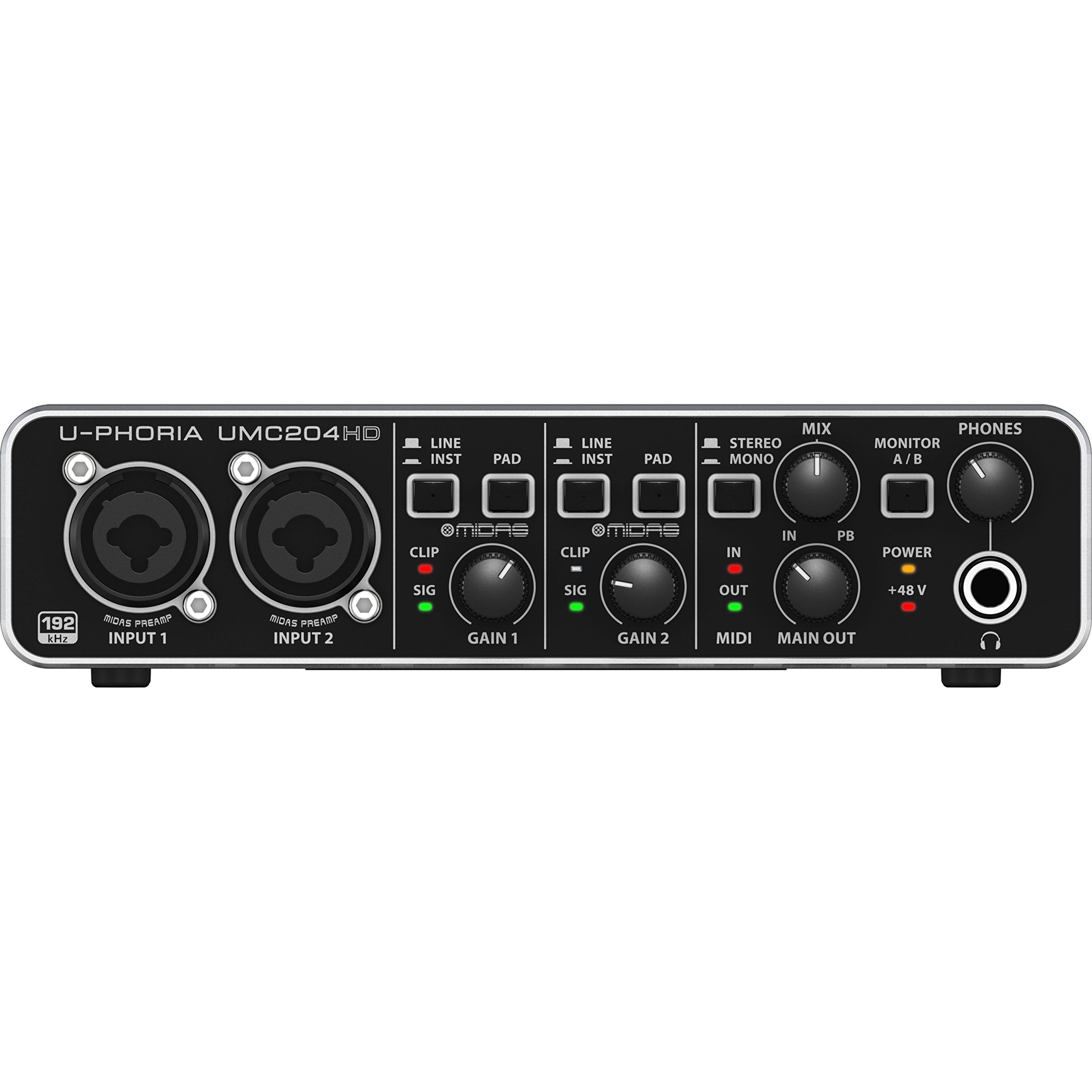
Behringer’s UMC204HD borrows the MIDAS designed preamps that gave the U‑Phoria series its reputation for punching above its price point. The 2‑input / 4‑output configuration includes two XLR/¼” combo inputs with phantom power, MIDI I/O, and insert points on each channel — unusual features at this price. The 24‑bit / 192 kHz conversion is clean enough for home demos, and the preamps measure around -126 dBu EIN, which is respectable even when compared to mid‑range competitors.
Linux users in particular praise the UMC204HD for its class‑compliant operation — it’s recognized immediately on Kubuntu and other distributions without proprietary driver hassles. The metal chassis feels solid, and the dedicated monitor mix knob allows you to blend direct input with DAW playback without opening a software mixer. Customer reviews note that the preamps can drive 250‑ohm headphones comfortably, outperforming some more expensive units in this regard.
The main trade‑offs are driver quality on Windows (some users report occasional dropouts or recognition issues that are usually solved by re‑installing drivers) and the unit’s lack of loopback or advanced routing features. The preamps also have limited input headroom compared to Focusrite or MOTU units — louder sources can clip if gain isn’t carefully managed. Still, for under , the UMC204HD offers an I/O count and build quality that makes it the best bargain in the list.
Why it’s great
- MIDAS preamps for clean gain at a low price
- MIDI I/O and insert points for studio flexibility
- Class Compliant on Linux — no driver hassle
Good to know
- Driver stability on Windows can be inconsistent
- Limited input headroom — easy to clip hot sources
FAQ
Can a ‑ interface match professional studio audio quality?
Do I need a 4‑input interface or will 2 inputs be enough?
Does 32‑bit conversion prevent clipping?
What does Air mode or Vintage mode actually do?
Will my PC or Mac need external power for these interfaces?
Final Thoughts: The Verdict
For most users, the best audio interface under 300 is the Focusrite Scarlett 4i4 4th Gen because it combines 120 dB dynamic range, dual preamps with Auto Gain and Air mode, MIDI I/O, and loopback — handling everything from solo vocal takes to multi‑instrument streaming sessions without compromise. If your priority is pristine converter performance for stereo recording and high‑impedance headphones, grab the Motu M2. And for pure voice‑over and podcasting where set‑and‑forget processing matters, nothing beats the Solid State Logic SSL 2 MKII.

Mo Maruf
I created WellFizz to bridge the gap between vague wellness advice and actionable solutions. My mission is simple: to decode the research and give you practical tools you can actually use.
Beyond the data, I am a passionate traveler. I believe that stepping away from the screen to explore new environments is essential for mental clarity and physical vitality.