Our readers keep the lights on and my smoothie glass nicely filled. As an Amazon Associate, I earn from qualifying purchases.
Your computer’s onboard audio chip is often the weakest link in your listening chain, plagued by electrical interference, low gain, and a limited frequency range. A dedicated audio interface or sound card bypasses that hiss and static, giving you full control over your headphone output, microphone input, and multi-channel speaker setup for gaming, music, or content creation.
I’m Mohammad Maruf — the founder and writer behind WellFizz. I’ve spent countless hours analyzing signal-to-noise ratios, DAC chipsets, and interface driver stability to identify which external audio devices actually deliver on their specs without breaking your workflow.
Whether you’re chasing a richer gaming soundstage or cleaner vocal recordings, finding the best audio card for pc means matching your specific input needs to the right preamp quality and surround channel support.
How To Choose The Best Audio Card For PC
Not every external audio device fits the same role. A streaming podcaster needs a quiet preamp and loopback mixing, while a gamer prioritises positional audio and low-latency headphone output. Defining your primary use case first prevents you from overpaying for channels you won’t use or undershooting on gain you’ll eventually need.
DAC Quality and Sample Rate
The digital-to-analog converter (DAC) determines the ceiling of your audio clarity. A 24-bit/192kHz DAC captures more dynamic range and frequency detail than a 16-bit/48kHz chip, but the improvement is most noticeable in music production and high-impedance headphone listening. For standard gaming headsets, a 24-bit/48kHz interface is already a major step up from onboard audio.
Preamp Gain and Phantom Power
If you plan to use an XLR microphone — especially a dynamic model like the Shure SM7B — you need an interface with at least 60dB of gain to avoid a lifeless, underpowered signal. Condenser mics require 48V phantom power, so check that the device has a dedicated switch. Without sufficient gain, your recordings will sound quiet and noisy no matter how good the DAC is.
Connectivity and Channel Count
Count your physical inputs and outputs. A solo podcaster needs one XLR input and a headphone jack; a guitarist wants a dedicated instrument input with Hi‑Z switching; a home theater user requires four to six 3.5mm jacks for a 5.1 or 7.1 speaker system. The connection type also matters — USB‑C is reversible and more durable than USB‑A for portable use.
Quick Comparison
On smaller screens, swipe sideways to see the full table.
| Model | Category | Best For | Key Spec | Amazon |
|---|---|---|---|---|
| Focusrite Vocaster One | Podcasting Interface | Solo podcasters & live streamers | Over 70dB of gain / 48kHz | Amazon |
| Mackie Onyx Artist 1-2 | Recording Interface | Home studio recording with instruments | 24-bit/192kHz / Hi‑Z instrument input | Amazon |
| MAONO PS22 Lite | Entry Interface | Beginners & content creators on a budget | 24-bit/192kHz / Loopback routing | Amazon |
| IK Multimedia iRig USB | Guitar Interface | Guitarists practicing with amp sims | 24-bit/48kHz / Amp out THRU mode | Amazon |
| Cubilux CA7 | USB Sound Card | Multi-channel speaker & headphone output | 7.1 surround / 384kHz sample rate | Amazon |
In‑Depth Reviews
1. Focusrite Vocaster One

The Vocaster One was designed specifically for solo creators who need broadcast-quality sound without a soundproof booth. Its headroom exceeds 70dB of clean gain, which means even a notoriously power-hungry dynamic mic like the PodMic reaches usable levels without an external booster. The Auto Gain button sets your level in seconds by analyzing your voice, while the Enhance knob cycles through four vocal presets to add presence or warmth on the fly.
Beyond the preamp, Focusrite packed in Stereo Loopback for streaming computer audio onto your show, a dedicated TRRS phone input for remote interviews, and a camera line‑out that sends pristine audio to your DSLR or mirrorless body. The mute button is hardware‑based and easy to reach during a live broadcast, and the USB‑C bus power means you can run the entire interface off an iPad or iPhone in a pinch.
The plastic chassis feels lighter than a metal Scarlett, and it does attract fingerprints, but the trade‑off is a footprint that slides into even a cramped desktop bag. If you podcast, stream, or record voice‑over work and want a one‑box solution that eliminates gain staging guesswork, the Vocaster One justifies its position at the top of the list.
Why it’s great
- Exceptional preamp gain handles dynamic mics without a booster
- Auto Gain and Enhance presets speed up setup for live streaming
- Stereo Loopback and phone input simplify multi-source podcasting
Good to know
- Plastic build feels less rugged than metal alternatives
- Front headphone jacks protrude, adding cable clutter to a small desk
2. Mackie Onyx Artist 1-2
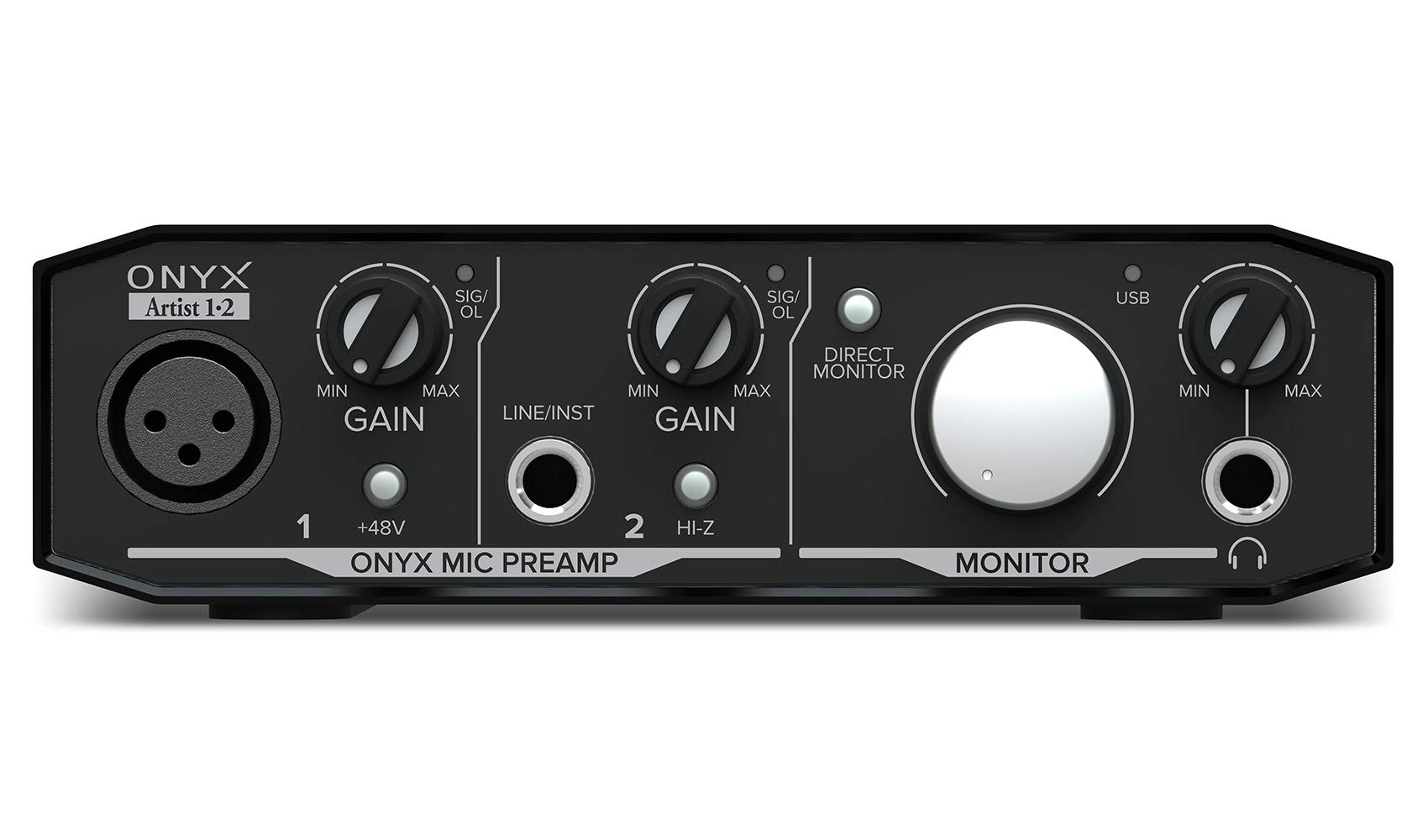
Mackie’s Onyx preamp has earned a loyal following in project studios for its clean, quiet gain and transparent sound signature. The Artist 1‑2 distills that into a two‑input box with one Onyx mic preamp and a dedicated ¼‑inch instrument input with Hi‑Z switching, so an electric guitar or bass sees the proper impedance without a DI box. The 24‑bit/192kHz conversion captures more harmonic detail than most ears can perceive, making this a legitimate option for tracking demos or recording song ideas with zero audible noise floor.
Build quality is a standout — the steel chassis is heavy enough to stay put on a cluttered desk, and the knobs feel substantial. The zero‑latency direct monitoring lets you hear yourself in real time without the DAW echo, and the separate monitor outputs with dedicated volume control make connecting powered studio monitors straightforward. The included Pro Tools First and a bundle of plugins give a new producer everything needed to start recording immediately.
Mac and Windows detect it without drivers, but installing the official ASIO driver lowers round‑trip latency enough for real‑time guitar effects. The headphone output has enough juice for 32‑ohm studio headphones, though high‑impedance models (above 150 ohms) will feel quieter than a dedicated headphone amp. If your primary goal is recording instruments or vocals with a trustworthy preamp at a mid‑range price, the Onyx Artist earns its reputation.
Why it’s great
- Boutique‑quality Onyx preamp with outstanding signal‑to‑noise ratio
- Built‑like‑a‑tank steel construction survives regular studio use
- Hi‑Z instrument input captures guitar and bass without extra gear
Good to know
- Stock knobs can be tricky to read under dim studio lighting
- Driver settings may need to be reselected after each PC reconnect
3. MAONO PS22 Lite

The PS22 Lite bridges the gap between a basic USB dongle and a full‑featured interface by offering 24‑bit/192kHz capture, a 56dB mic preamp with 48V phantom power, and a dedicated instrument input in a compact footprint. Its key differentiator is the included ProStudio Routing Software, which adds virtual loopback channels for mixing your microphone, system audio, and music into a single streaming output. That makes it especially useful for live streamers who want to play background music without a separate mixer.
Build quality is lightweight plastic, but the unit has survived in backpacks without issue, and the side‑mounted headphone jack reduces cable clutter. The dynamic LED ring around the main knob visually confirms input signal and clipping, so you can tell at a glance whether your levels are peaking. Setup is genuinely plug‑and‑play on Windows and macOS, though some users report needing to reinstall the ASIO driver after initial configuration to resolve crackling — an occasional quirk at this price tier.
Real‑world guitar recording benefits from the Hi‑Z instrument input, which handles signal pass‑through without the latency issues that plague cheaper USB dongles. For a podcaster, streamer, or musician building a first home studio, the PS22 Lite delivers the critical features (loopback, phantom, 192kHz) at an entry‑level cost, making it a smart budget‑conscious recommendation.
Why it’s great
- Included loopback routing software for seamless streaming setups
- 24‑bit/192kHz recording rivals more expensive interfaces
- Compact design with side headphone jack reduces desk cable mess
Good to know
- Plastic body feels less premium than metal options
- ASIO driver may need occasional reinstall for crackle‑free performance
4. IK Multimedia iRig USB

IK Multimedia’s iRig series has been the go‑to for guitarists who want to plug straight into a computer or iPad and use amp‑modeling apps like AmpliTube or ToneX. This USB‑C version retains the formula — a compact housing with a ¼‑inch instrument input, headphone out, and a unique Amp Out jack that sends either processed (FX) or direct (THRU) signal to a real guitar amp. That hybrid capability means you can practice silently through headphones with your favorite digital pedalboard, then flick the switch to feed your physical amp for a live jam session.
The 24‑bit/48kHz resolution is adequate for DI recording and practice, though it doesn’t push the 192kHz ceiling that producers might want for studio‑grade tracking. Latency is impressively low when paired with the ASIO driver on Windows or Core Audio on Mac, and the build is a lightweight plastic that weighs under two ounces — barely noticeable in a gig bag pocket. Included software bundles AmpliTube 5 SE and ToneX SE, giving you a usable collection of amp and effect models from day one.
The iRig USB is not a general‑purpose PC audio card; it lacks a microphone preamp, loopback, or multi‑channel speaker output. Its sole focus is guitar and bass input, and it executes that task with reliability and simplicity. If you are a musician who wants to practice, record DI tracks, or experiment with amp sims without spending on a multi‑input interface, this is the most efficient tool for the job.
Why it’s great
- Amp Out with FX/THRU switching connects to real amps or headphones
- Ultra‑lightweight and portable for travel and on‑the‑go practice
- Bundled AmpliTube and ToneX software provides pro amp sounds
Good to know
- Limited to 48kHz sample rate — not ideal for high‑resolution studio work
- No XLR mic input, so it cannot double as a podcast interface
5. Cubilux 7.1 USB Surround Sound Card

For gamers and home theater users who run a 5.1 or 7.1 speaker setup from a modern PC that lacks dedicated analog outputs, the Cubilux CA7 is a dedicated multichannel USB sound card at an entry‑level price. It provides four 3.5mm jacks for front, rear, center/sub, and line‑in, plus a separate TRRS headphone jack, letting you drive a full surround speaker array and a headset simultaneously. The full aluminum alloy casing shields the sensitive analog circuitry from the electromagnetic noise that often bleeds through cheap USB dongles.
Sample rate support goes up to an impressive 384kHz at 24‑bit for stereo headphone output, which is overkill for gaming but appreciated by users who listen to hi‑res music files. The 7.1 surround mode operates at 48kHz, which is standard for Dolby Digital content and works flawlessly with Windows Sonic or DTS Headphone:X. Setup is genuinely plug‑and‑play on Windows 10 and 11; no drivers or software need to be installed, though the device does not work with Windows 7 or 8.
Build quality is respectable — the metal shell feels dense, and the blue LED indicates power without being distracting. Several users note a brief speaker pop when the PC powers on (a pre‑POST behavior common to USB audio devices), but audio performance once booted is clean and stable. If your priority is restoring or upgrading surround sound from a compact desktop, mini‑PC, or laptop that only has a single headphone jack, the CA7 is the most practical option in this roundup.
Why it’s great
- Full 7.1 analog output for gaming speaker systems without onboard sound
- Aluminum alloy housing blocks electrical interference effectively
- 384kHz/24‑bit stereo output for hi‑res music listening
Good to know
- Not compatible with Windows 7, 8, or XP
- Loud speaker pop during system power‑on may be noticeable at high volume
FAQ
Can I use an audio interface as a sound card for gaming?
What is the difference between a USB sound card and an audio interface?
Do I need an ASIO driver for a PC audio interface?
Final Thoughts: The Verdict
For most users, the best audio card for pc winner is the Focusrite Vocaster One because it packs a studio‑grade preamp, foolproof Auto Gain, and loopback streaming into one compact box. If you want pristine instrument recording and a built‑like‑a‑tank interface, grab the Mackie Onyx Artist 1-2. And for restoring multi‑channel surround sound from a modern laptop or mini‑PC, nothing beats the Cubilux CA7.

Mo Maruf
I created WellFizz to bridge the gap between vague wellness advice and actionable solutions. My mission is simple: to decode the research and give you practical tools you can actually use.
Beyond the data, I am a passionate traveler. I believe that stepping away from the screen to explore new environments is essential for mental clarity and physical vitality.