Our readers keep the lights on and my smoothie glass nicely filled. As an Amazon Associate, I earn from qualifying purchases.
Shrinking a full-size ATX build without choking your airflow or fighting with cable management is the central puzzle of the PC industry right now. The massive glass-box towers of the past are giving way to compact mid-towers that preserve component compatibility while slashing desk footprint — a shift driven by better thermal engineering and smarter internal layouts.
I’m Mohammad Maruf — the founder and writer behind WellFizz. I’ve spent years analyzing case thermals, airflow static pressure, and build quality across hundreds of retail chassis to separate the clever designs from the cramped pitfalls.
Whether you are cooling a high-wattage GPU or building a clean desk setup, finding the best atx small case requires balancing GPU clearance, fan capacity, and radiator support in a chassis that doesn’t feel like a compromise.
How To Choose The Best ATX Small Case
Compact ATX cases walk a tightrope between space savings and thermal headroom. The wrong choice means throttled components or a build that is impossible to cable manage. Focus on these three factors to get it right.
GPU Clearance and Radiator Stacking
The single biggest limitation in any compact ATX chassis is how long a graphics card it can swallow. Most modern high-end GPUs exceed 320mm, and some push past 350mm with their shrouds. You also need to check whether the case supports a top-mounted radiator simultaneously with that GPU. If the radiator conflicts with the motherboard VRM heatsinks or the GPU length gets sandwiched by a front-mounted AIO, you have a build that won’t close. Always confirm both max GPU length and max top radiator thickness together.
Fan Positioning and Direct GPU Cooling
Traditional front-to-back airflow often leaves the graphics card starved in a compact chassis. The smartest recent designs introduce bottom-mounted fan slots that blow cold air directly onto the GPU’s intake fans. Cases with a perforated bottom panel and a PSU shroud that doesn’t block airflow can lower GPU temps by 10-15°C compared to older layouts. Look for at least two bottom 120mm fan mounts if you plan to run a high-TDP GPU.
Motherboard Layout and Cable Management Depth
Compact cases leave less room behind the motherboard tray for cable bulk. Standard ATX boards with front-panel connectors on the right edge sometimes force cables across the middle of the case. Newer back-connect motherboards (ASUS BTF, MSI Project Zero) move all headers to the rear, cleaning up the visible side entirely. If your case doesn’t support back-connect boards, look for at least 20mm of cable management depth and rubber grommets on all cutouts. A PSU shroud with a removable cover also makes routing the 24-pin cable much less frustrating.
Quick Comparison
On smaller screens, swipe sideways to see the full table.
| Model | Category | Best For | Key Spec | Amazon |
|---|---|---|---|---|
| LIAN LI O11D MINI V2 Flow | Mid Tower | Best Overall compact ATX | 5x pre-installed 120mm reverse fans | Amazon |
| LIAN LI LANCOOL 207 | Mid Tower | Best airflow layout | 2x140mm front + 2x120mm bottom fans | Amazon |
| NZXT H7 Flow 2024 | Mid Tower | Dedicated bottom GPU cooling | 3x 120mm bottom fan support | Amazon |
| HAVN HS 420 | Mid Tower | Premium dual-chamber cooling | 11x 140mm fan slots, 3x 420mm rad support | Amazon |
| Thermaltake Tower 600 | Mid Tower | Unique octagonal design | Rotational PCIe slots, 420mm rad support | Amazon |
| CORSAIR 3500X RS ARGB | Mid Tower | Panoramic glass with EATX support | 10x fan capacity, reverse board compatible | Amazon |
| MONTECH XR-B | Mid Tower | Budget-friendly ARGB value | 3x pre-installed 120mm ARGB PWM fans | Amazon |
In‑Depth Reviews
1. LIAN LI O11D MINI V2 Flow

The Lian Li O11D Mini V2 Flow packs five pre-installed 120mm reverse-blade fans into a footprint barely larger than a micro-ATX chassis, and it still accepts a standard ATX motherboard. The 10-degree slanted bottom panel forces cold air directly into the GPU intake, an engineering detail that drops GPU temperatures by measurable degrees compared to flat-bottom layouts. The pillar-less tempered glass front and side panels give you a panoramic view without obstructing airflow.
Build quality is exceptional for the price point — the frameless glass corner feels rock-solid, and the included horizontal and vertical GPU anti-sag brackets handle even the heaviest 40-series cards. Cable management is well-thought-out with tie-down points and a special bracket for the 24-pin motherboard cable that keeps the visible side clean. The case also supports back-connect ATX motherboards, giving you a truly wire-free front view if you pair it with an ASUS BTF or MSI Project Zero board.
The five included reverse-blade fans are quiet at default speeds, though they produce noticeable hum above 800 RPM. If you run a high-wattage CPU and GPU under sustained load, you may want to replace or supplement them with higher-static-pressure fans. The stock fans are color-matched and daisy-chained for clean cabling, but the limited PWM control (via motherboard header) means you cannot fine-tune each fan independently without a separate hub.
Why it’s great
- Five pre-installed 120mm reverse fans at this price is unmatched value
- 10° slanted bottom panel significantly improves GPU thermals
- Supports standard ATX, back-connect, and vertical GPU mounting out of the box
Good to know
- Stock fans get audible above 800 RPM under heavy load
- Limited space behind the motherboard tray for thick cable bundles
- No included PWM fan hub requires motherboard fan headers for all five fans
2. LIAN LI LANCOOL 207

The LANCOOL 207 redefines what a compact ATX case can do by mounting the PSU at the front and creating a direct airflow path from two 120mm bottom fans straight into the GPU. The two pre-installed 140x140x30mm front fans are thicker than standard 25mm fans, pushing higher static pressure through the mesh front panel. The recessed motherboard tray allows a full-size ATX board without overlapping the bottom fan zone.
The included GPU anti-sag bracket is adjustable across a wide range of card lengths and does not interfere with bottom fans. Cable management is clever — the front PSU location means the 24-pin cable routes a short distance, and the adapter cable lets the PSU connector face outward for easy plug access. The mesh panels on front, top, and bottom maximize dust filtration while keeping unrestricted airflow.
The four included fans provide excellent out-of-the-box cooling, but the stock front fans can produce a resonant hum at certain RPMs. Some users fixed this with rubber fan gaskets. The bottom fan mounts lack a dedicated dust filter, which is a minor oversight for a chassis built around bottom intake. Cable management behind the motherboard tray is tight — flat cables are strongly recommended.
Why it’s great
- Unique front PSU layout frees bottom space for direct GPU cooling
- Thicker 30mm front fans deliver high static pressure through mesh
- Includes a fully adjustable GPU anti-sag bracket standard
Good to know
- Front fans may resonate at certain speeds; rubber gaskets help
- No bottom intake dust filter included
- Requires modular PSU for clean front-PSU installation
3. NZXT H7 Flow 2024

The NZXT H7 Flow 2024 is a mid-tower that prioritizes GPU thermal headroom without expanding its width. Three bottom-mounted 120mm fan slots blast cold air directly at the graphics card, which is a design choice most cases in this footprint skip. The front panel supports radiators up to 420mm, and the top can take a 360mm, giving you plenty of liquid cooling flexibility for high-TDP CPUs.
The cable management system is intuitive — wide channels with built-in hooks and included Velcro straps make routing the 24-pin and GPU cables straightforward. The high-performance mesh panels on the front, top, and bottom filter dust while maintaining excellent airflow. Tool-less panel removal (front, top, side) makes building and upgrading painless.
The three included 120mm fans are non-PWM (3-pin), which means you cannot control them via DC voltage without a separate fan controller. The case lacks dedicated dust filters on the bottom intake, and the tempered glass side panel is secured by yanking it off rather than a hinge. Some builders note the H7 Flow feels more like a full tower than a mid-tower in terms of overall volume, so measure your desk space.
Why it’s great
- Three bottom 120mm fan mounts for dedicated GPU cooling
- Supports 420mm front radiator and 360mm top radiator
- Intuitive cable management channels with included straps
Good to know
- Included fans are 3-pin non-PWM, limiting speed control
- No bottom dust filters despite bottom fan mounts
- Larger than typical compact mid-towers; verify desk clearance
4. HAVN HS 420

The HAVN HS 420 is a premium dual-chamber chassis that fits eleven 140mm fans and three 420mm radiators while maintaining a mid-tower footprint. The dual-chamber design directs cool air from the bottom intake directly onto the centrally positioned GPU, a layout that keeps a flagship RTX 5090 below 61°C under sustained load. The heat-formed UniSheet glass panel curves with minimal distortion, giving a panoramic view without the visual breaks of a segmented panel.
The SimpliCable routing system uses top-to-bottom grooved guides that make cable management nearly foolproof. All fan brackets have vibration-isolating rubber pads to prevent resonance at high fan speeds. The 3-way adjustable GPU support bracket accommodates any graphics card shape, and VESA mount compatibility means you can install a portable display inside the chassis for system monitoring.
Build quality is genuinely luxury-grade — thick steel panels, rubber inserts for every screw hole, and a single-piece curved glass panel that feels substantial. The large size (nearly 18kg shipping weight) means it is not a desk-mover. The custom fan hub is pre-installed but located in a spot that can be awkward to reach for cable routing. Some users noted the top panel alignment requires patience to get perfect.
Why it’s great
- Eleven 140mm fan slots for extreme cooling capacity
- Dual-chamber design keeps GPU temps remarkably low
- Premium build with curved glass and vibration-isolated fan brackets
Good to know
- Very heavy — not suited for frequent relocation
- Fan hub placement makes some cable routing steps tedious
- Premium pricing reflects enthusiast-grade materials and design
5. Thermaltake Tower 600

The Thermaltake Tower 600 abandons traditional rectangular case design for an octagonal shape with three tempered glass panels that provide a near-360-degree view of your components. The rotational PCIe slots allow flexible GPU installation — you can mount the card horizontally, vertically, or at an angle. It supports hidden-connector motherboards (ASUS BTF, MSI Project Zero, Gigabyte Project Stealth), so the visible side remains completely cable-free.
Cooling capacity is impressive: up to nine fans and radiators up to 420mm. The floating VGA bracket eliminates GPU sag entirely because the motherboard itself is rotated 90 degrees. The tool-less panels (magnetic front, push-clip sides) make building and maintenance fast. The optional horizontal display stand lets you show the case on its side for a different aesthetic.
Airflow is slightly compromised compared to a traditional layout — some reviews report 4°C higher CPU temperatures than a conventional tower. The top fan assembly must be removed to access motherboard and GPU I/O ports, which is inconvenient for frequent cable swapping. PSU cable routing is tight; a fully modular PSU is essentially mandatory. The price reflects its unique design rather than pure cooling performance.
Why it’s great
- Unique octagonal design with three tool-less glass panels
- Rotational PCIe slots and rotated motherboard eliminate GPU sag
- Supports back-connect motherboards for clean cable-free builds
Good to know
- Airflow is slightly worse than traditional tower cases
- Top fan assembly blocks I/O access and must be removed for cable changes
- Requires fully modular PSU for manageable cable routing
6. CORSAIR 3500X RS ARGB
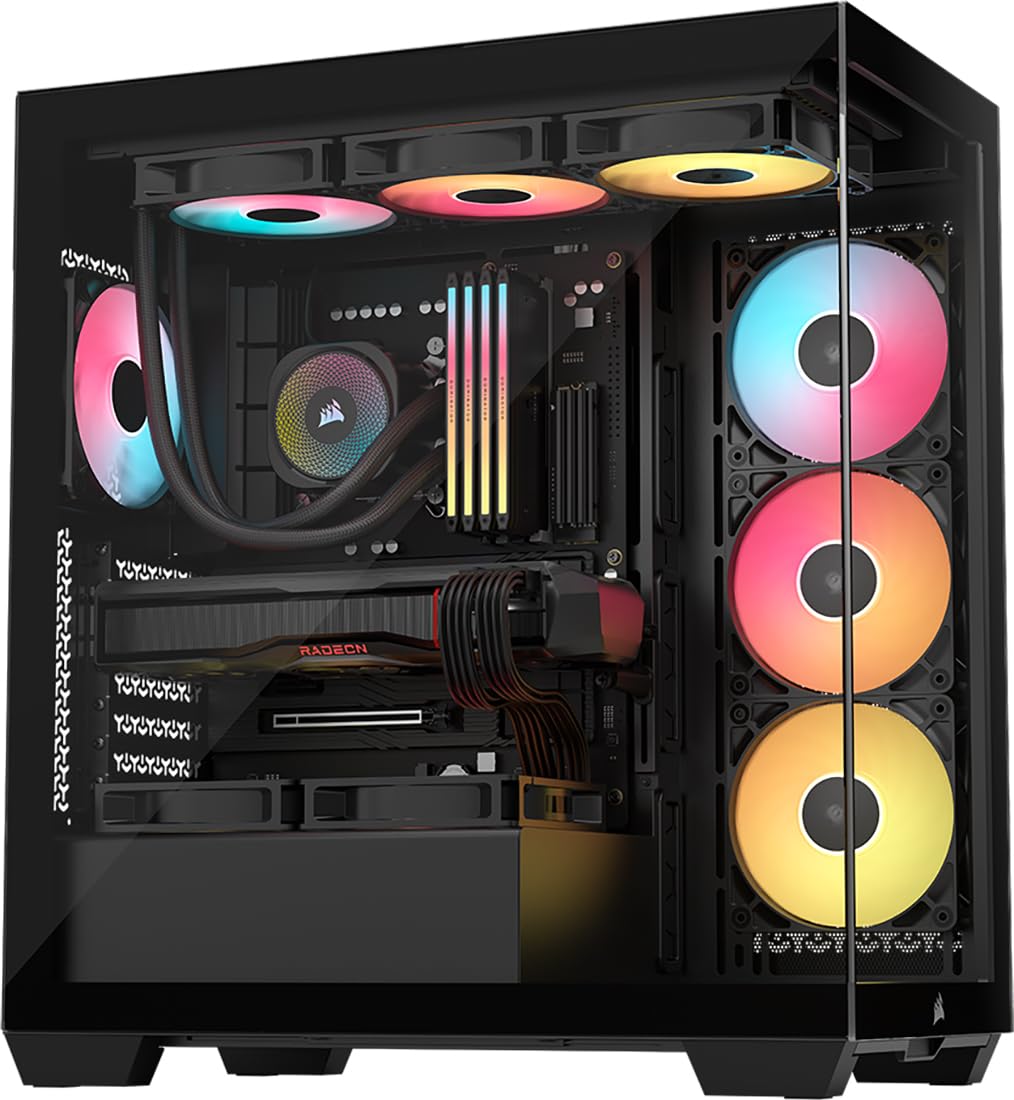
The CORSAIR 3500X RS ARGB wraps a panoramic glass front and side around an interior that fits motherboards from Mini-ITX all the way up to EATX. Three pre-installed RS120-R ARGB fans are daisy-chained for clean cable routing and controlled via a standard +5V ARGB header. The case supports up to ten 120mm fans total and accommodates 360mm radiators on the top or side.
Removable tempered glass panels (front and side) make building and cleaning straightforward. The case is validated for reverse-connection motherboards (ASUS BTF, MSI Project Zero, Gigabyte Project Stealth), so you can achieve a completely cable-free front view. The spacious interior fits large GPUs — users report installing RTX 5070 Ti cards without needing a separate GPU support bracket thanks to the built-in anti-sag mechanism.
The daisy-chained fan design simplifies cable management but means you cannot control individual fan speeds without a separate controller. The case fans produce an audible hum even at low RPM settings, which some users found annoying in quiet environments. The back panel snaps off with push-clips, but it can pop open if cables behind the tray bulge outward. SSD mounting is slightly fiddly compared to tool-less sled designs.
Why it’s great
- Panoramic glass design with EATX motherboard support
- Compatible with back-connect motherboards for clean builds
- Built-in GPU anti-sag mechanism for heavy cards
Good to know
- Pre-installed fans produce a noticeable hum even at low speeds
- Side panel may pop off if cables are not tucked cleanly
- Daisy-chained fans limit individual speed control
7. MONTECH XR-B

The MONTECH XR-B delivers a genuinely impressive feature set for its price point, including three pre-installed 120mm ARGB PWM fans (two reverse-blade on the side, one standard on the rear) and support for a 360mm top radiator. The wood-grain design on the I/O interface is an unusual aesthetic touch that blends natural texture into a gaming case, and it does not compromise port accessibility. The dual tempered glass panels (side and front) show off your components while the mesh top, bottom, and side panels keep dust at bay.
Despite its compact size, the XR-B fits high-end GPUs up to the RTX 40 series and supports up to nine fans total. The included fans are daisy-chained via a single ARGB cable, so you can control all lighting from one motherboard header. Cable management is respectable for this price tier — rubber gaskets on cutouts and tie-down points help keep the build organized.
The tempered glass panels arrived with smudges and some minor scratches in several units, so inspect them before installation. The side panel uses a push-in mechanism that is prone to fingerprints. The included fans are adequate for stock cooling but lack the static pressure needed for a thick radiator setup. The wood-grain I/O may not match all build aesthetics.
Why it’s great
- Excellent value with three pre-installed ARGB PWM fans and 360mm rad support
- Full mesh coverage (top, bottom, side) for dust filtration
- Supports modern high-end GPUs and tall CPU air coolers
Good to know
- Glass panels may arrive with smudges or minor scratches
- Included fans lack high static pressure for radiator builds
- Wood-grain I/O design may not suit all tastes
FAQ
Can I fit a 360mm radiator in a compact ATX case?
What is a reverse-blade fan and why does it matter for small cases?
Which ATX small case is best for back-connect motherboards?
How many fans do I really need in a compact ATX case?
Final Thoughts: The Verdict
For most builders, the best atx small case is the LIAN LI O11D MINI V2 Flow because it delivers five pre-installed fans, slanted GPU cooling, and ATX compatibility in a footprint that fits any desk. If you want the absolute best airflow layout with direct bottom GPU fans, grab the LIAN LI LANCOOL 207. And for a premium dual-chamber chassis that can cool a 5090 while looking like a luxury piece, nothing beats the HAVN HS 420.

Mo Maruf
I created WellFizz to bridge the gap between vague wellness advice and actionable solutions. My mission is simple: to decode the research and give you practical tools you can actually use.
Beyond the data, I am a passionate traveler. I believe that stepping away from the screen to explore new environments is essential for mental clarity and physical vitality.