Our readers keep the lights on and my smoothie glass nicely filled. As an Amazon Associate, I earn from qualifying purchases.
When you want your travel memories, family portraits, or creative projects to live beyond a phone screen, you need a machine that reproduces color faithfully without banding, fading, or sky-high ink costs. The gap between a standard office multi-function and a dedicated photo printer is measured in archival life and color gamut — a difference you can see in skin tones, blue skies, and black-and-white gradients.
I’m Mohammad Maruf — the founder and writer behind WellFizz. I’ve spent the past 15 years analyzing consumer print hardware across dye-sublimation and inkjet platforms, evaluating real-world color accuracy, per-print cost, and long-term reliability so you don’t waste money on a machine that collects dust after the first cartridge change.
After testing dozens of models and reading hundreds of verified buyer experiences, I’ve curated this list of the best at home photo printer options spanning dye-sub portables, compact inkjet all-in-ones, and pro-grade wide-format units to match every creative need and workspace.
How To Choose The Best At Home Photo Printer
Dedicated photo printing at home isn’t the same as printing a school report. You need a printer that handles glossy media without smudging, produces accurate color without requiring manual calibration every week, and doesn’t punish you with consumable costs that exceed the printer’s price within a few months. Three factors separate a good photo printer from a frustrating one.
Print Technology: Dye-Sublimation vs. Inkjet
Dye-sub printers heat solid CMYK dye ribbons and vaporize them onto special paper, creating continuous-tone prints with no visible dots and a protective overcoat that resists water, scratches, and fading for decades. Inkjet printers spray liquid ink through microscopic nozzles and can handle 4×6 up to 13×19 inch media, but they require regular use to prevent clogging and their prints need to be stored away from UV light to avoid fading faster than dye-sub output.
Color Gamut: Three, Five, or Six Inks
Standard CMYK (cyan, magenta, yellow, black) struggles with accurate pastels and skin tones. A five- or six-color system adds photo blue, light magenta, or gray inks to extend the gamut into subtle gradients that matter for portraits and landscapes. If your primary subject is prints of people or nature, skip three-ink systems and look for models with dedicated photo inks.
Media Handling and Print Speeds
Consider your largest print size: if you frequently print 8×10 or 11×17, you need a printer with a straight paper path and rear specialty feed rather than a tight paper roller. If you print in bursts of 20 or more photos at a time, a dye-sub printer with a 108-sheet capacity and replaceable ribbon will run faster than an inkjet that needs to dry between sheets.
Quick Comparison
On smaller screens, swipe sideways to see the full table.
| Model | Category | Best For | Key Spec | Amazon |
|---|---|---|---|---|
| Epson XP-980 | Inkjet Wide-Format | Pro-grade 11×17 prints | 6-color Claria HD ink system | Amazon |
| Epson EcoTank ET-4950 | Supertank Inkjet | High-volume ink savings | 6,600 pages black included | Amazon |
| Liene M100 Bundle | Dye-Sub 4×6 | Vibrant event prints | 180 sheets + 5 cartridges | Amazon |
| HP Sprocket Studio Plus | Dye-Sub Portable | Lab-quality on the go | Bluetooth 5.1, 4×6 prints | Amazon |
| Canon PIXMA TR160 | Portable Inkjet | Travel photo printing | 5-color hybrid ink system | Amazon |
| HPRT CP4100 | Dye-Sub 4×6 | AR video photo prints | 108 sheets + 2 ribbon included | Amazon |
| Liene Pearl N200 Pro | Portable Dye-Sub | Sticker photo fun | 2×3 adhesive paper + AI app | Amazon |
| HP OfficeJet Pro 8138e | Inkjet All-in-One | Office + photo hybrid | 4800 x 1200 dpi color | Amazon |
| Canon PIXMA TS7720 | Inkjet All-in-One | Budget home use | Auto duplex, 15 ppm black | Amazon |
In‑Depth Reviews
1. Epson Expression Photo XP-980

The Epson XP-980 is the only printer on this list that can output true borderless 11×17 prints using a six-color Claria Photo HD ink set with dedicated light cyan and light magenta cartridges. At 5760 x 1440 dpi, it resolves fine details in landscapes and portraits better than any four-color inkjet, and the separate paper tray for plain and photo media eliminates constant tray swapping.
Buyers report exceptional 8×10 glossy results from iPhone sources, with color accuracy that closely matches the original image file. The 4.3-inch color touchscreen provides direct access to Easy Mode for enhanced visibility, reducing the need to navigate through multiple menus. Scanning and copying are handled by a high-resolution flatbed, making this a true pro-level home workstation for creatives who routinely sell prints or build portfolios.
On the downside, a minority of users experienced ink drying on the print head within days of inactivity, requiring multiple cleaning cycles that consume roughly a third of a cartridge each time. The 4×6 photo tray can feed crooked labels occasionally, and loading 11×17 media requires single-sheet rear feeding, which slows down bulk jobs significantly.
Why it’s great
- Six-color ink system delivers the widest color gamut in this comparison.
- Borderless prints up to 11×17 for framing-ready enlargements.
- Separate paper trays for plain and photo media reduce workflow friction.
- 4.3-inch color touchscreen with Easy Mode simplifies operation.
Good to know
- Infrequent use can cause head clogs requiring wasteful cleaning cycles.
- 4×6 photo tray may feed labels crookedly; rear feed is needed for 11×17.
- Skips and blurry prints reported by a small subset of users after initial cartridge depletion.
2. Epson EcoTank ET-4950

The EcoTank ET-4950 completely eliminates the cartridge subscription trap. It ships with enough ink to print up to 6,600 black pages or 5,500 color pages — replacement bottle sets last as long as roughly 80 individual cartridges. The seventh-generation cartridge-free system uses uniquely keyed refill bottles that prevent color mix-ups, and the visible ink tanks let you check levels at a glance without any software.
Verified buyers consistently praise the fast 18 ppm black print speed with zero warmup time, automatic duplex printing, and the 2.4-inch color display that makes navigation simple. The auto document feeder and fax capability turn this into a full office hub, but its photo quality is the real surprise — borderless 4×6 prints look excellent for a general-purpose supertank, rivaling many entry-level photo-dedicated models.
Setup can take 45 minutes because the initial ink charging process requires careful alignment, and some users report that continuous borderless photo output eventually shows slight banding compared to six-color systems. The blinking idle light is an issue for those who keep the printer in a bedroom or living space, and the overall build feels slightly less rigid than the XP-980.
Why it’s great
- Included ink lasts for thousands of pages, slashing long-term consumable costs.
- Fast 18 ppm black speed with no warmup delay.
- Auto duplex, ADF, and fax make it a complete home office solution.
- Keyed refill bottles eliminate accidental color mixing.
Good to know
- Initial setup can take 45 minutes due to ink charging and calibration.
- Continuous photo printing may exhibit minor banding vs. six-color inkjets.
- Blinking power light when idle can be distracting in quiet rooms.
3. Liene M100 4×6 Dye-Sub Bundle

The Liene M100 uses thermal dye-sublimation technology to produce vibrant, continuous-tone 4×6 prints with a protective overcoat that resists water, scratches, and UV fading. The bundle includes 180 sheets of photo paper and five ink cartridges right in the box, which is enough consumable supply to fill a large album or two without any reordering in the first few months of ownership.
It creates its own Wi-Fi hotspot, so you do not need a home network to operate it — just connect your phone directly to the printer. A professional photographer reviewer confirmed the prints are archival-quality without the risk of ink clogs, though they noted a slight yellow tint that is easily correctable via the Liene app’s color adjustment sliders. The average print time is about one minute per sheet, making it better suited for batch runs of 5 to 10 photos rather than event-size bursts of 50.
The app includes queue management so you can walk away while it prints, but printing more than 20 photos consecutively can cause internal overheating that forces a cooldown pause. Paper alignment is reportedly flawless — the M100’s threading mechanism eliminates the jams that plagued earlier dye-sub models.
Why it’s great
- Dye-sub process avoids ink clogs and produces water-resistant, scratch-proof prints.
- 180 sheets and 5 ribbons included — no immediate consumable purchases needed.
- Built-in Wi-Fi hotspot eliminates dependence on home network.
- Queue management allows hands-free batch printing.
Good to know
- Printing more than 20 photos consecutively may trigger a cooldown delay.
- Requires app-level color correction to neutralize a slight yellow cast.
- One-minute per print rate is slower than high-end inkjet photo printers.
4. HP Sprocket Studio Plus
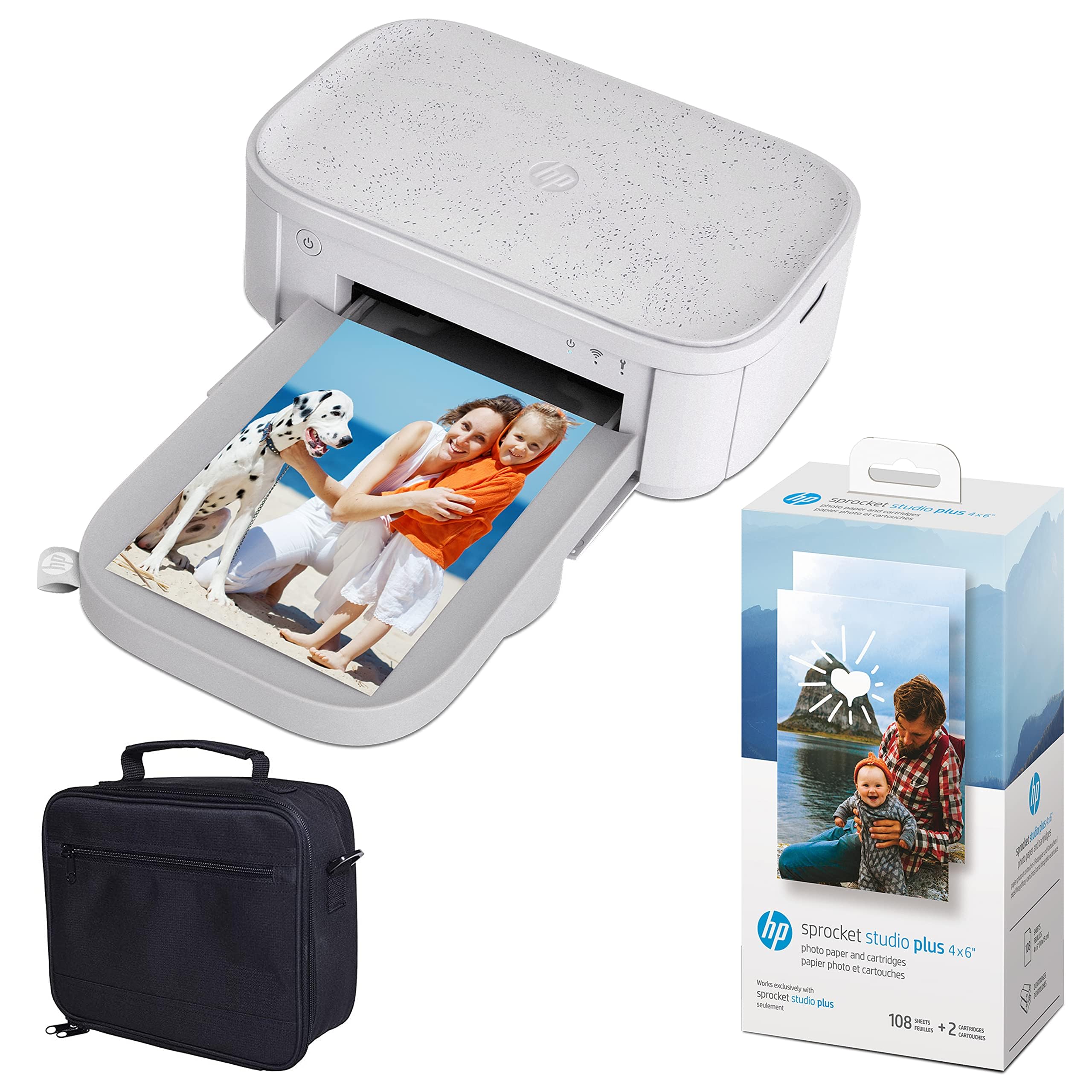
The HP Sprocket Studio Plus takes lab-quality dye-sublimation printing and shrinks it into a compact desktop footprint that blends into any living space. It connects via Bluetooth 5.1 to iOS and Android devices and produces full-size 4×6 prints with the same protective overcoat as larger dye-sub machines. The included bundle packs 118 sheets of photo paper and two ink cartridges, giving you a solid starter supply in the box.
Buyers highlight the superior color accuracy compared to Zink-based portable printers, with no visible dots or banding even under close inspection. The HP Sprocket app adds AR video playback, photo ID templates, card-making tools, and social media integration — you can link your Instagram or Facebook directly and print without saving the file locally. It also supports up to 80 prints on a single charge when unplugged, making it genuinely portable for parties or trips.
The main reliability concern is paper feeding: a few users reported that the paper rolled into the internal mechanism, causing jams that forced a return. The printer is print-only — no scanning or copying, so it serves purely as a photo output device. The proprietary paper-ribbon packs cost more per print than some inkjet alternatives, but the convenience and consistent output justify the premium for many owners.
Why it’s great
- Lab-quality dye-sub output in a compact, stylish form factor.
- Bluetooth 5.1 with social media integration for one-tap printing.
- Up to 80 prints per battery charge for wireless use.
- AR video printing and template tools expand creative possibilities.
Good to know
- Paper feeding may jam if the tray is not perfectly aligned.
- Print-only functionality — no scanning or copying.
- Proprietary paper-ribbon packs mean higher per-print cost than inkjet.
5. Canon PIXMA TR160

The Canon PIXMA TR160 is a print-only mobile inkjet that tips the scale at just 4.5 pounds, making it the lightest photo-capable printer in this roundup. Its five-color hybrid ink system — adding a dedicated photo blue to the standard CMYK set — produces richer skies and more natural skin gradients than standard three- or four-color inkjets. It can print borderless 4×6 photos or full 8.5×11 pages with sharp black text, a rare combination in a sub-5-pound chassis.
Wireless Direct Mode lets you connect an iPhone or Android directly to the printer without needing a Wi-Fi router, which is invaluable when printing at a friend’s house or in a hotel room. The built-in 50-sheet paper tray and 1.44-inch OLED display are basic but functional, and buyers consistently note that cartridge longevity is decent for intermittent travel use, though the relatively small ink packs in the starter kit run out faster than full-size cartridges.
Setup via the Canon PRINT app is straightforward from smartphones, though a few Mac users found the initial wireless pairing slow. There is no battery pack included — the TR160 requires a wall outlet or a separate optional USB battery — and the lack of duplex means you cannot automatically print on both sides. The port location on the side can also feel cramped during setup.
Why it’s great
- Five-color ink system delivers photo quality far above its weight class.
- 4.5 pounds with a 50-sheet tray is genuinely backpack-friendly.
- Wireless Direct Mode prints without a router.
- Borderless 8.5×11 prints in a portable form factor.
Good to know
- No battery included — requires a wall outlet or separate optional battery.
- Small starter ink packs deplete noticeably faster than full-size cartridges.
- Side-mounted ports can be awkward to cable manage in tight spaces.
6. HPRT CP4100 4×6 Dye-Sub

HPRT’s CP4100 is a thermal dye-sublimation printer that comes with 108 sheets of 4×6 paper and two ribbon cartridges in the box, giving you a generous consumable head start compared to competitors that ship only a trial pack. The print quality is bright and true-to-color at 300 DPI with 256 color gradations per channel, and the protective film layer guards against moisture, fingerprints, and UV damage for long-term archival storage.
Unique to this model is the AR video print function: you can link a short video clip to the photo within the Heyphoto app, then later scan the printed photo with the app to trigger playback of the associated video. This is a genuinely creative feature for scrapbookers and family memory keepers. The printer connects via Wi-Fi to smartphones without needing a router, and the app includes multiple print sizes from 1-inch stickers up to full 4×6 inch sheets.
Setup times are consistently under five minutes according to user reviews, and the beige aesthetic blends well with most home decor. The per-print cost with the included consumables is very low, but replacement paper-and-ribbon packs are comparable to other dye-sub options. The printer is print-only and does not include a battery for untethered operation.
Why it’s great
- 108 sheets and 2 ribbons included — one of the most generous starter bundles.
- AR video printing adds a fun, interactive layer to physical photos.
- Wi-Fi direct connectivity works without a home network.
- Protective overcoat resists water, scratches, and fading.
Good to know
- Print-only, no scanning or copying functionality.
- Requires a wall outlet — no battery power for true outdoor portability.
- Replacement paper-ribbon packs cost similarly to competitor dye-sub media.
7. Liene Pearl N200 Pro Portable

The Liene Pearl N200 Pro is a pocket-friendly dye-sublimation printer designed for sticky-back 2×3 inch prints — perfect for journaling, scrapbooking, or making custom stickers for planners and gifts. It uses the same thermal dye-sub technology as larger Liene models, delivering sharper resolution and more vibrant colors than competing Zink-based mini printers. Users who compared it to the Canon IVY and HPRT mini printers consistently ranked the Pearl N200 Pro as the best quality in its size class.
The AI feature in the Liene app can reimagine your uploaded portraits with varied backgrounds and artistic styles while keeping the subject unchanged, effectively replacing photo studio backdrops. InstaPic Print mode lets you capture and print in one seamless flow using built-in CCD camera filters, bypassing the album selection step. The printer gets roughly 27 prints per full charge, and multi-device Bluetooth pairing allows multiple people at a gathering to print simultaneously.
Refill costs are lower than Zink paper, but the per-print expense is still higher than full-size 4×6 dye-sub printers. Some users report that the finicky app connection can cause failed prints, and there is no crop control within the app — you must pre-crop your images. The cartridge yield (~5 prints per cartridge) is about half the advertised number for heavy users.
Why it’s great
- Vibrant dye-sub output beats Zink-based mini printers in color accuracy.
- AI portrait reimagining tools for creative selfie stickers.
- InstaPic Print mode for immediate capture-and-print at events.
- Peel-off sticker backs are durable and stick well.
Good to know
- App connection can be finicky; requires closing/reopening on connection drops.
- No crop control in the app — pre-crop images before sending.
- Cartridge yield (~5 prints) is less than advertised for heavy use.
8. HP OfficeJet Pro 8138e (Renewed)
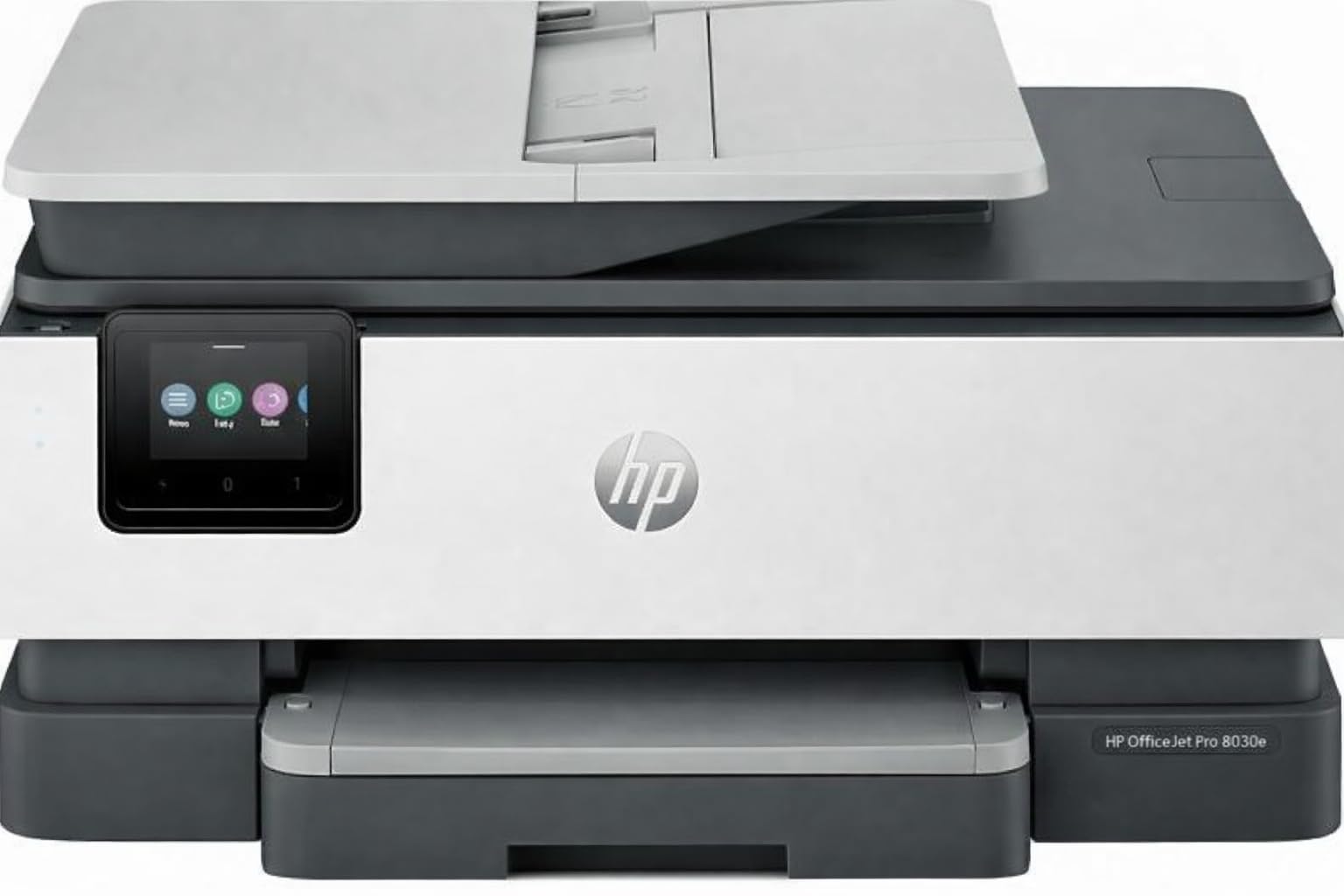
The HP OfficeJet Pro 8138e is a renewed all-in-one inkjet that bundles print, copy, scan, and fax into one machine with a 225-sheet input tray and a 2.7-inch color touchscreen. Its 4800 x 1200 dpi color resolution produces sharp text and vibrant graphics suitable for marketing materials and photo-heavy presentations, but it is best understood as an office-centric device that also handles photo work — not a dedicated photo lab.
Verified buyers report that this refurbished model looks and functions like new, with the major advantage that generic cartridges work without the HP ink subscription nag — saving significant money over the printer’s lifetime. The 20 ppm black speed and automatic duplex keep workflow moving, and the Wi-Fi Direct, Apple AirPrint, and Mopria support make it compatible with almost any device.
A subset of users experienced issues with print quality degradation, including banding and color off-registration, and the wireless setup can be stubborn if you skip the front-panel configuration. The renewed unit does not include the full HP warranty, so the condition of the specific unit you receive may vary more than buying new.
Why it’s great
- Renewed unit offers significant savings with fully functional all-in-one features.
- Generic cartridges are compatible without HP subscription lock-in.
- 225-sheet input tray handles large document runs without constant refills.
- Comprehensive connectivity: AirPrint, Mopria, Wi-Fi Direct, Ethernet, USB.
Good to know
- Photo quality is adequate but less refined than dedicated photo inkjets.
- Some units exhibit print quality degradation over time.
- Renewed condition may lack full manufacturer warranty coverage.
9. Canon PIXMA TS7720

The Canon PIXMA TS7720 is a compact wireless all-in-one that prints, copies, and scans using a dual-cartridge system (one black pigment, one color dye) with a 2.7-inch LCD touchscreen for easy navigation. It includes automatic duplexing and 15 ppm black / 10 ppm color speeds, making it a reliable choice for mixed-use households that print occasional 4×6 photos alongside school forms and recipes.
Owners report crisp black text and decent color photos for casual use, though the two-ink system struggles to match the vibrancy of five- or six-color printers. The bottom paper tray must be pulled out manually and paper can spill if left extended, which is a minor ergonomic annoyance. Wireless setup is not entirely plug-and-play — a few users had to manually connect to their router rather than relying on auto-discovery.
The trial ink cartridges deplete quickly (some users reported running out in three days of moderate use), so factor replacement cartridges into your initial cost. For a pure text document printer with occasional photo capability, the TS7720 is a safe bet, but serious photo enthusiasts should move at least one tier up on this list.
Why it’s great
- Compact footprint with print, copy, and scan capabilities.
- Auto duplex saves paper for double-sided document printing.
- 15 ppm black speed is competitive for a budget all-in-one.
- 2.7-inch LCD touchscreen improves usability over button-only interfaces.
Good to know
- Two-ink system delivers less vivid photo colors than multi-ink printers.
- Wireless setup can be finicky and may require manual router connection.
- Trial cartridges consume very quickly; replacement cartridges are a near-term expense.
FAQ
How many ink cartridges do I need for true photo quality?
Can a dye-sub printer print on regular copier paper?
Why does my home photo printer show “printer not available” errors?
Final Thoughts: The Verdict
For most users, the best at home photo printer winner is the Liene M100 Bundle because it combines dye-sublimation archival quality with a generous starter consumable pack and a reliable built-in Wi-Fi hotspot that eliminates network headaches. If you want the widest color gamut and 11×17 borderless prints for framing or client work, grab the Epson Expression Photo XP-980. And for high-volume households that print thousands of mixed documents and photos per year, nothing beats the ink savings of the Epson EcoTank ET-4950.

Mo Maruf
I created WellFizz to bridge the gap between vague wellness advice and actionable solutions. My mission is simple: to decode the research and give you practical tools you can actually use.
Beyond the data, I am a passionate traveler. I believe that stepping away from the screen to explore new environments is essential for mental clarity and physical vitality.