Our readers keep the lights on and my smoothie glass nicely filled. As an Amazon Associate, I earn from qualifying purchases.
The modern home office runs on a single, non-negotiable tool: a machine that prints, scans, copies, and faxes without becoming a daily source of frustration. An all-in-one wireless printer is supposed to simplify your workflow, but the wrong choice can strand you with slow output, flaky connectivity, or ink costs that dwarf the printer’s price tag. The key is matching the print engine to your actual volume and document type—inkjet for photo-rich pages, laser for crisp text, or an eco-tank system to kill cartridge costs forever.
I’m Mohammad Maruf — the founder and writer behind WellFizz. My research focuses on real-world durability, cost-per-page analysis, and the connectivity stability that makes or breaks a wireless workflow.
Whether you’re printing school projects, client proposals, or high-volume spreadsheets, finding the right all in one wireless printer requires understanding print speed, total cost of ownership, and whether you need color precision or monochrome speed.
How To Choose The Best All In One Wireless Printer
An all-in-one wireless printer is a long-term investment—most buyers keep theirs for three to five years. The decision comes down to three core factors: print engine type, total ink or toner cost, and connectivity reliability. Here’s how to match the machine to your daily workload.
Print Engine: Laser, Inkjet, or Supertank
Laser printers use toner powder and excel at black-and-white text—they are fast, jam-resistant, and cost-effective at high volumes. Color laser printers offer good graphics but can struggle with photo realism. Inkjet printers produce vibrant photos and rich color documents, but standard cartridge models have high per-page ink costs. Super-tank (or MegaTank) printers replace cartridges with refillable ink reservoirs, slashing color printing costs to pennies per page. For a mixed home office, a supertank inkjet or a monochrome laser combined with a separate photo printer is a strong split strategy.
Connectivity and Mobile Support
Built-in dual-band Wi-Fi (2.4GHz and 5GHz) provides more stable connections than single-band radios, especially in crowded homes. Ethernet is a must for offices where wireless interference is a problem. Look for Apple AirPrint and Mopria certification for driverless printing from phones and tablets. A dedicated companion app that supports scan-to-cloud and remote print queue management adds daily convenience.
Total Cost Per Page
The sticker price is only the entry fee. Check the yield of included starter cartridges (often half-full) and the cost of replacement toner or ink. A printer that costs less upfront may burn through your budget within six months if consumables are expensive. Super-tank models deliver the lowest per-page cost for color printing. For monochrome laser printers, high-yield toner cartridges extend the interval between replacements and bring the cost per page below two cents.
Quick Comparison
On smaller screens, swipe sideways to see the full table.
| Model | Category | Best For | Key Spec | Amazon |
|---|---|---|---|---|
| Epson EcoTank Pro ET-5800 | Supertank Inkjet | Unlimited low-cost color printing | 25 ppm black, 7,500 page black ink yield | Amazon |
| Brother MFC-L3720CDW | Color Laser | Vibrant color documents for offices | 19 ppm color, 3.5″ touchscreen | Amazon |
| Xerox C235dni | Color Laser | Reliable color laser for small offices | 24 ppm black/color, 500-page starter toner | Amazon |
| Epson EcoTank ET-4950 | Supertank Inkjet | Heavy volume with low ink refill cost | 18 ppm black, up to 6,600 page black yield | Amazon |
| HP LaserJet Pro MFP 3101sdw | Monochrome Laser | Fast B&W printing for small teams | 40 ppm black, 50-sheet ADF | Amazon |
| Brother MFC-L2820DW | Monochrome Laser | Compact B&W printing with fax | 34 ppm black, 2.7″ touchscreen | Amazon |
| Canon MegaTank GX1020 | Supertank Inkjet | Cost-effective color for high volume | 15 ppm black, 3,000 page black/color yield | Amazon |
| HP Envy Photo 7975 | Color Inkjet | Home photo printing with AI enhancement | 15 ppm black, separate photo tray | Amazon |
| Canon PIXMA TS7720 | Color Inkjet | Budget-friendly home printing | 15 ppm black, 2.7″ touchscreen | Amazon |
In‑Depth Reviews
1. Epson EcoTank Pro ET-5800

The Epson EcoTank Pro ET-5800 is a powerhouse for anyone who prints dozens of pages daily without wanting to think about ink cartridges. Its PrecisionCore Heat-Free technology delivers up to 25 ISO ppm black and eliminates warmup time—the first page out is nearly instant. The supertank system ships with enough pigment ink for up to 7,500 black pages and 6,000 color pages, which translates to roughly two years of typical home office output before refilling.
Build quality is exceptional for this class. The ET-5800 includes two front paper trays totaling 500 sheets plus a rear specialty feed, so you can keep letterhead, plain paper, and cardstock loaded simultaneously. The keyed ink bottles prevent accidental color mix-ups during refills. The pigment-based DURABrite inks produce sharp black text and instant-dry color prints that resist smudging, even on plain paper.
Print quality is excellent for documents and good for photos—not quite at dedicated photo printer level, but more than adequate for office graphics and marketing materials. The 2.4-inch color touchscreen, while not the largest on this list, is responsive. Some owners note that the output tray does not auto-retract, and the scanner software can occasionally drop the network connection, but these are minor trade-offs for the staggering long-term ink savings.
Why it’s great
- Class-leading ink yield slashes per-page cost to under two cents
- Fast 25 ppm black speed with zero warmup delay
- 500-sheet total paper capacity across three feeds
- Pigment ink resists smudging and dries instantly
Good to know
- Photo print quality is decent but not exceptional
- Output tray does not auto-retract after use
- Higher upfront investment compared to cartridge inkjets
2. Brother MFC-L3720CDW

The Brother MFC-L3720CDW delivers professional color laser output at a competitive price, making it ideal for small businesses that produce presentations, marketing collateral, and reports. Its 19 ppm color and black speeds are consistent across paper types, and the 50-sheet auto document feeder handles multi-page scans without jamming. The 3.5-inch color touchscreen is the largest in this comparison and supports 48 customizable shortcuts for one-touch access to frequent tasks.
Connectivity is robust with dual-band Wi-Fi (2.4GHz/5GHz), Wi-Fi Direct, Ethernet, and USB, plus support for Apple AirPrint and Mopria. The companion app allows remote monitoring of toner levels and queued jobs. Toner costs are reasonable with high-yield TN229XL series cartridges, though each color is separate, so replacement frequency varies by usage pattern.
Photo quality is acceptable for office use but falls short of inkjet or supertank models—color gradients can appear slightly banded. Some units experience paper feed issues with heavier stock, particularly when the paper is freshly opened. The initial starter toner yield is lower than standard cartridges, so you’ll need to budget for replacements sooner than expected.
Why it’s great
- Sharp, vibrant color output that professional presentation demand
- Large 3.5″ touchscreen with customizable one-touch shortcuts
- Dual-band Wi-Fi and Ethernet for flexible office networking
- Reliable auto document feeder for multi-page scanning
Good to know
- Print speed drops noticeably in color mode
- Genuine toner uses chips that prevent third-party cartridge use
- Includes starter toner with limited page yield
3. Xerox C235dni

Xerox builds the C235dni around a 24 ppm color laser engine that produces consistent, professional-quality output for small offices and home-based businesses. The initial setup is streamlined through the Xerox Easy Assist App, which eliminates the need for a CD-ROM driver installation. Built-in dual-band Wi-Fi and Ethernet keep the connection stable even during large batch jobs.
The starter toner yields approximately 500 pages per color, which is standard for this price tier. High-yield cartridges bring the per-page cost down significantly. The front-facing USB port supports walk-up printing from thumb drives without a computer. The auto duplex function works reliably for both printing and scanning.
Some users report that the scanner driver on Windows 11 can be finicky to install, and the default Eco mode produces overly light prints on generic copy paper. Switching to a standard 24 lb laser paper and disabling Eco mode resolves the issue. The app-based setup can fail if the phone loses Wi-Fi during configuration.
Why it’s great
- Fast 24 ppm color and black speed for productive daily use
- Smartphone-based setup bypasses traditional driver hurdles
- Ethernet and dual-band Wi-Fi ensure office-ready connectivity
Good to know
- Starter toner cartridges have limited yield (~500 pages per color)
- Eco mode reduces density too much for some document types
- Windows 11 driver installation can require manual troubleshooting
4. Epson EcoTank ET-4950

The Epson EcoTank ET-4950 represents the seventh generation of Epson’s cartridge-free system, and it shows in the refinements. The refillable ink tanks are now larger, and the EcoFit bottles have unique keys that prevent you from accidentally pouring magenta into the cyan tank—a common frustration with earlier supertanks. The ET-4950 yields up to 6,600 black pages and 5,500 color pages from the included ink bottles, effectively eliminating ink purchases for years.
Print speeds of 18 ppm black and 9 ppm color are competitive for this class, and the zero-warmup design means the first page prints almost instantly. The auto document feeder handles up to 35 sheets, and the 250-sheet paper tray supports legal-size paper. The 2.4-inch color display is clear and responsive, though some users find the menu structure slightly deep for advanced settings.
Setup took roughly 45 minutes in testing, partially due to the initial ink charging process that requires a four-minute wait. The wireless connectivity is stable on both 2.4GHz and 5GHz bands. The print head alignment and calibration can be finicky if the printer is moved after setup. Some users report a persistent blinking light when idle that is distracting in a quiet room.
Why it’s great
- Massive ink yield eliminates cartridge anxiety for years
- Keyed ink bottles make refilling completely mess-free
- Fast first-page print with zero warmup delay
- Reliable dual-band wireless connectivity
Good to know
- Initial setup takes up to 45 minutes including ink charging
- Blinking idle light can be distracting in quiet spaces
- Print head calibration can drift if printer is frequently moved
5. HP LaserJet Pro MFP 3101sdw

The HP LaserJet Pro MFP 3101sdw is built for small teams that burn through black-and-white documents at high volume. Its 40 ppm black print speed is the fastest on this list, and the first page prints in just 7 seconds. The 250-sheet input tray and 50-sheet auto document feeder support continuous work without frequent paper refills. The 2.7-inch color touchscreen is intuitive for walk-up copying and scanning.
Wireless connectivity is dependable, with automatic band selection that picks the clearest Wi-Fi channel. Ethernet is available for wired office networks. The included starter toner yields approximately 1,000 pages, and high-yield replacement cartridges are cost-effective. The printer is designed to use genuine HP toner cartridges with chips; third-party cartridges are blocked by firmware, which is standard for modern HP units.
The noise level during printing is moderate—quieter than some competitors but not silent. The auto document feeder occasionally jams when loaded with more than 25 sheets of lightweight paper. Some users note that firmware updates can occasionally reset custom settings, requiring reconfiguration of network and security preferences.
Why it’s great
- Blazing 40 ppm black speed for high-volume document printing
- First page in 7 seconds with fast duplex output
- Reliable auto-switching Wi-Fi and Ethernet connectivity
- Includes a 50-sheet auto document feeder for efficient scanning
Good to know
- Firmware blocks third-party toner cartridges
- ADF can jam if loaded beyond 25 sheets of light paper
- Firmware updates may reset custom network and security settings
6. Brother MFC-L2820DW

The Brother MFC-L2820DW brings solid monochrome laser performance to a compact footprint that fits on a small desk without sacrificing paper capacity. At 34 ppm black, it’s slightly slower than the HP 3101sdw but still fast enough for most small offices. The 2.7-inch touchscreen supports direct printing from cloud services like Google Drive and Dropbox, which reduces the need for a connected computer.
Connectivity options are complete: dual-band Wi-Fi, Ethernet, and USB. The Brother Mobile Connect app provides remote monitoring, toner level tracking, and print queue management. The Refresh EZ Print subscription trial automates toner delivery before you run out, though you can opt out and buy standard cartridges anytime. The TN830 and TN830XL toner cartridges are widely available and reasonably priced.
Setup can be confusing for first-time laser printer buyers—the sparse manual and initial Wi-Fi configuration are not as streamlined as newer models from HP or Epson. The paper tray holds 250 sheets, and the 50-sheet ADF handles multi-page documents reliably. Some units have been reported to develop paper curl after heavy use, which Brother support typically resolves with a roller replacement under warranty.
Why it’s great
- Reliable 34 ppm monochrome speed in a compact desktop footprint
- Direct cloud printing from Google Drive and Dropbox via touchscreen
- Dual-band Wi-Fi, Ethernet, and USB for flexible connectivity
- Refresh subscription option simplifies toner replenishment
Good to know
- Setup instructions are sparse and can be confusing for new buyers
- Some units develop paper curl after extended high-volume use
- Not suitable for color printing—monochrome-only output
7. Canon MegaTank GX1020
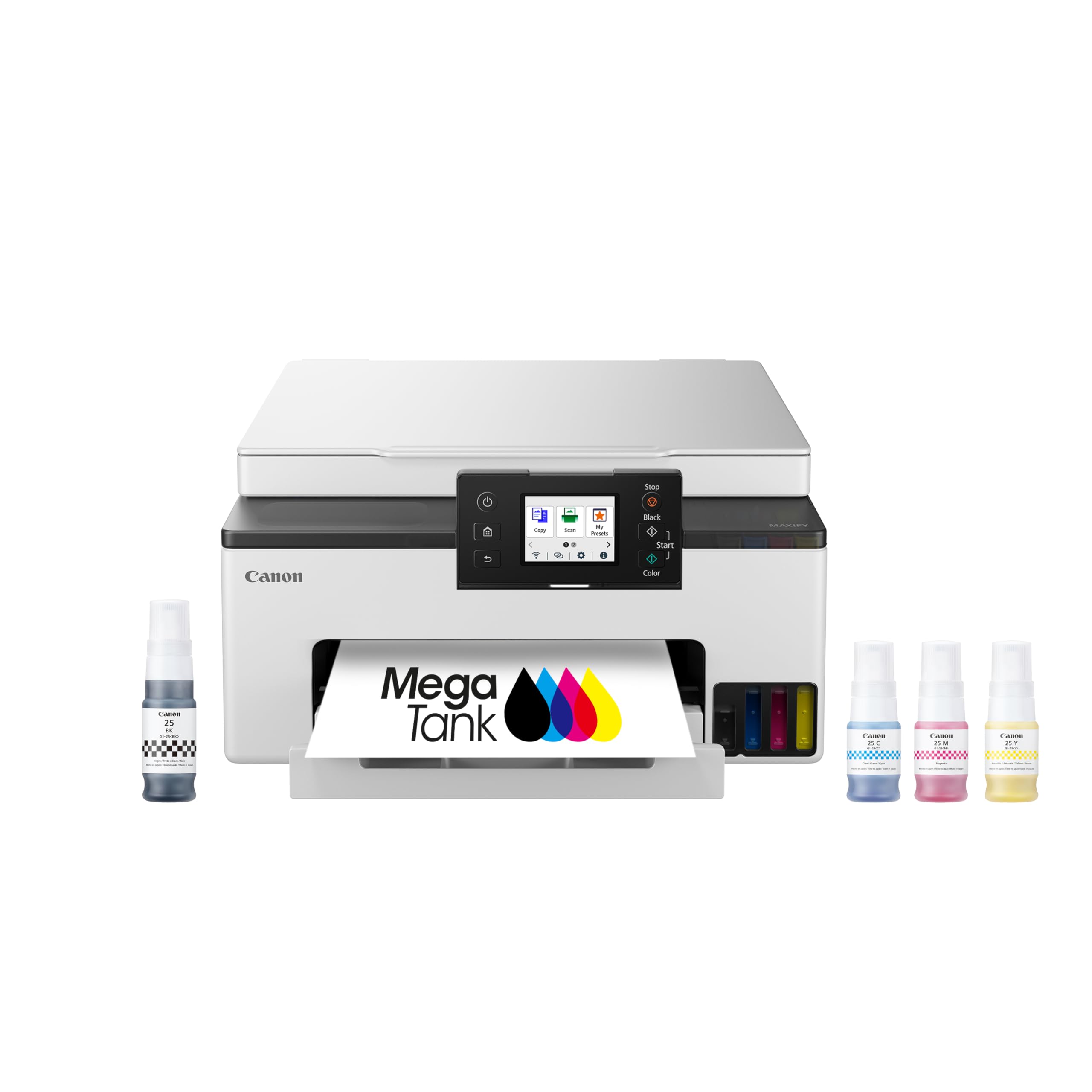
The Canon MegaTank GX1020 delivers supertank ink economics at a lower entry price than Epson’s ET-4950, making it a strong option for budget-conscious offices that print moderate volume. The included GI-25 ink bottles yield 3,000 black and 3,000 color pages—enough for most small offices to run for six months to a year before refilling. The refill process is clean and simple, with no-spill bottle nozzles that fit securely into the tank openings.
The 2.7-inch color LCD touchscreen is responsive and gives clear previews of scanned documents. Auto duplex printing works reliably, and the print speeds of 15 ppm black and 10 ppm color are adequate for typical office tasks. The printer supports wireless connectivity via 2.4GHz and 5GHz bands, and the Canon PRINT app provides basic remote functionality.
Some users report that the 2.4GHz Wi-Fi connection can drop at distances beyond 50 feet, especially through thick walls. The printer does not include an auto document feeder, so multi-page scanning must be done one page at a time. The ink level detection system does not use chips in the ink bottles, which means the printer relies on approximate page counts rather than actual ink level sensing—a trade-off that can lead to unexpected ink depletion warnings.
Why it’s great
- Low per-page cost with 3,000 page black and color ink yield
- Mess-free refill bottle design with no ink chips to track
- Responsive 2.7″ color touchscreen with preview capability
- Auto duplex printing for two-sided document output
Good to know
- No auto document feeder—scanning multi-page documents is manual
- 2.4GHz Wi-Fi range can be inconsistent beyond 50 feet
- Ink level warnings based on page count, not actual ink remaining
8. HP Envy Photo 7975

The HP Envy Photo 7975 is a dedicated home printer that prioritizes photo quality and ease of use. Its AI-enhanced auto format feature intelligently removes unwanted content from web pages and emails before printing, saving paper and frustration. The separate photo tray allows you to load 5×7 or 4×6 glossy paper without swapping the main paper tray, making photo printing convenient for family albums and school projects.
Print speeds of 15 ppm black and 10 ppm color are acceptable for home use, though not extraordinary. The HP Smart app simplifies mobile printing and scanning, and the included three-month Instant Ink trial covers your first 700 pages. The front-facing USB port supports direct photo printing from cameras or thumb drives. The 2.7-inch touchscreen is intuitive and responsive.
Some units experience reliability issues after extended use—reports of false “out of paper” errors and paper jams affecting up to 75% of attempted prints suggest quality control varies between batches. The quiet print mode cannot be fully disabled, and the printer is audibly louder than competitors when operating at standard speed. The starter cartridges are deliberately low-yield, so you will need to replace them soon after setup.
Why it’s great
- AI Smart Print removes web clutter from printed pages
- Separate photo tray eliminates paper type switching during projects
- HP Smart app provides intuitive mobile scanning and printing
- Three-month Instant Ink trial included for initial cost relief
Good to know
- Starter cartridges have very low page yield
- Some batches suffer from false paper-out errors and high jam rates
- Quiet print mode cannot be fully turned off
- Audibly louder than similarly-priced inkjet competitors
9. Canon PIXMA TS7720

The Canon PIXMA TS7720 is the most affordable entry point on this list, designed for households that need basic print, copy, and scan functions without high volume. The two-cartridge system (one black, one color) simplifies ink replacement, and the 2.7-inch LCD touchscreen provides easy navigation. Auto duplex printing is included, allowing for two-sided documents without manual page flipping. Print speeds reach 15 ppm black and 10 ppm color, sufficient for homework and occasional photos.
Setup requires manual Wi-Fi configuration—there is no one-touch WPS or automatic app discovery, which some users find frustrating. The printer default auto-power-off occurs after four hours of inactivity, so you must enable auto-power-on in the settings if you want remote printing at any time. The flatbed scanner lacks an auto document feeder, so scanning multi-page documents is a page-by-page process.
The PG-285 and CL-286 ink cartridges are reasonably priced, but the included starter cartridges are low-yield and run out quickly. Photo quality on 4×6 glossy paper is decent but not as vivid as five-ink Canon models. The printer’s small footprint fits tight desks, and the overall build quality is adequate for light home use. Some units have been reported to lose Wi-Fi connection after firmware updates, requiring re-pairing.
Why it’s great
- Low entry price makes it accessible for basic home printing needs
- Compact footprint fits small desk spaces easily
- Auto duplex printing included at this price tier
- Two-cartridge system simplifies replacement logistics
Good to know
- Wi-Fi setup requires manual configuration, no automatic discovery
- No auto document feeder for scanning multi-page documents
- Starter ink cartridges have minimal page yield
- Wi-Fi connection can drop after firmware updates
FAQ
What is the difference between a supertank printer and a standard inkjet?
Can I use third-party ink or toner in my wireless printer?
Why does my printer keep disconnecting from Wi-Fi?
How many pages should starter ink or toner last?
What does auto duplex mean and do I need it?
Final Thoughts: The Verdict
For most users, the all in one wireless printer winner is the Epson EcoTank Pro ET-5800 because its supertank system eliminates the single biggest pain point of home printing: recurring ink cartridge costs. If you need vibrant color output for professional presentations and brochures, grab the Brother MFC-L3720CDW. And for a compact, monochrome-only office that cranks out text documents, nothing beats the speed and reliability of the HP LaserJet Pro MFP 3101sdw.

Mo Maruf
I created WellFizz to bridge the gap between vague wellness advice and actionable solutions. My mission is simple: to decode the research and give you practical tools you can actually use.
Beyond the data, I am a passionate traveler. I believe that stepping away from the screen to explore new environments is essential for mental clarity and physical vitality.