Our readers keep the lights on and my smoothie glass nicely filled. As an Amazon Associate, I earn from qualifying purchases.
An all-in-one touch screen computer removes the clutter of a separate tower while putting navigation directly at your fingertips. The challenge is finding a model that balances a responsive touch panel with enough processing power for your daily workload without breaking your budget.
I’m Mohammad Maruf — the founder and writer behind WellFizz. I analyze hardware specifications and real-world performance data across dozens of models to identify which all-in-one systems deliver genuine long-term value for home offices, creative work, and family use.
Whether you need a space-saving desktop for remote work or a versatile machine for the whole family, this guide covers the key specs and trade-offs to help you pick the right all in one touch screen computer for your specific needs.
How To Choose The Best All In One Touch Screen Computer
Choosing an all-in-one touch screen computer means weighing screen quality, internal components, and physical design. The right pick depends on how you plan to use the machine daily.
Touch Panel Quality & Display Resolution
The touch experience lives or dies by the panel technology. IPS panels offer wide viewing angles and consistent color, while anti-glare coatings reduce reflections in bright rooms. Full HD (1920×1080) remains the standard, and it pairs well with 24-inch and 27-inch screens. Always check for a responsive multi-touch digitizer that does not introduce noticeable input lag.
Processor, RAM, and Storage for Your Workflow
A modern Intel Core or AMD Ryzen 5 processor handles office tasks, web browsing, and streaming without strain. Upgrading to 16 GB of RAM ensures smooth multitasking, while 512 GB to 1 TB of SSD storage provides fast boot times and enough space for daily files. Creative users or those running virtual machines should look for 32 GB or more RAM and a higher-core-count processor.
Ergonomics and Adjustability
Many all-in-one models have fixed stands, but height-adjustable or tiltable screens reduce neck strain during extended use. A built-in pop-up or privacy camera adds security for video calls, and a VESA mount option lets you attach the computer to a monitor arm for maximum flexibility. Check whether the included keyboard and mouse are wired or wireless, as this affects desk clutter.
Quick Comparison
On smaller screens, swipe sideways to see the full table.
| Model | Category | Best For | Key Spec | Amazon |
|---|---|---|---|---|
| ASUS V470VA-MS504T | Mid-Range | Home office with vibrant display | 27″ FHD Anti-Glare Touch, i5-13420H | Amazon |
| HP 24-cr0140 | Mid-Range | Everyday multitasking with touch | 23.8″ FHD Touch, Ryzen 5 7520U | Amazon |
| Dell EC24250 | Mid-Range | Comfort-focused work and streaming | 23.8″ FHD Touch, Intel Core 5 120U | Amazon |
| HP 27″ Ryzen 5 7520U | Premium | Larger screen for open-plan offices | 27″ FHD Touch, 1TB SSD, 16GB RAM | Amazon |
| HP 27″ Ryzen 5 (Pro) | Premium | Professional multitasking | 27″ FHD Touch, Ryzen 5 7520U, 16GB | Amazon |
| HP 24″ Touch N100 | Mid-Range | School and home productivity | 23.8″ FHD Touch, Intel N100, 1TB | Amazon |
| HP 24-dp0160 | Premium | Upgradeable hardware design | 23.8″ FHD Touch, Ryzen 5 4500U | Amazon |
| Dell Inspiron 7700 | Premium | Heavy multitasking with 32GB RAM | 27″ FHD Touch, i7-1165G7, 32GB | Amazon |
| HP Ultra 7 155U | Premium | Demanding creative workflows | 27″ FHD Touch, Ultra 7, 32GB DDR5 | Amazon |
| HP 64GB / 4TB Ultra 7 | Premium | Power users and content creators | 27″ FHD Touch, Ultra 7, 64GB, 4TB | Amazon |
| Lenovo 24″ N100 | Budget | Basic computing at a low entry point | 23.8″ FHD, 16GB, 512GB, Non-touch | Amazon |
In‑Depth Reviews
1. ASUS V470 All-in-One, 27″ FHD Anti-Glare Touch Display

The ASUS V470VA-MS504T stands out with a 27-inch Full HD anti-glare touch display that reduces reflections and keeps colors accurate across a wide viewing angle. The Intel Core i5-13420H processor with 8 cores handles office suites, video conferencing, and light content creation without hesitation, while 16 GB of DDR5 RAM provides faster data transfer than older DDR4 configurations.
Storage comes in the form of a 1 TB PCIe SSD, giving you room for applications and project files without worrying about constant cleanup. The 1080p Full HD camera with AI noise-canceling technology improves meeting clarity, and the built-in Dolby Atmos speakers deliver fuller sound than most all-in-one systems in this category.
Wired keyboard and mouse are included out of the box, and the back I/O includes HDMI-out, three USB 3.2 Gen 1 Type-A ports, and a USB-C port. Wi-Fi 6E ensures fast wireless connectivity, and the Firmware TPM 2.0 adds enterprise-grade security for business use.
Why it’s great
- Anti-glare 27-inch touchscreen with accurate color reproduction
- DDR5 RAM and PCIe Gen 4 storage for snappy responsiveness
- AI noise-canceling microphone for crisp video calls
- Dolby Atmos speakers produce room-filling audio
Good to know
- Stand is not height-adjustable out of the box
- Wired peripherals may feel limiting to some users
- Integrated graphics limit high-end gaming
2. HP 23.8 inch All-in-One Desktop PC, FHD Touchscreen, AMD Ryzen 5 7520U
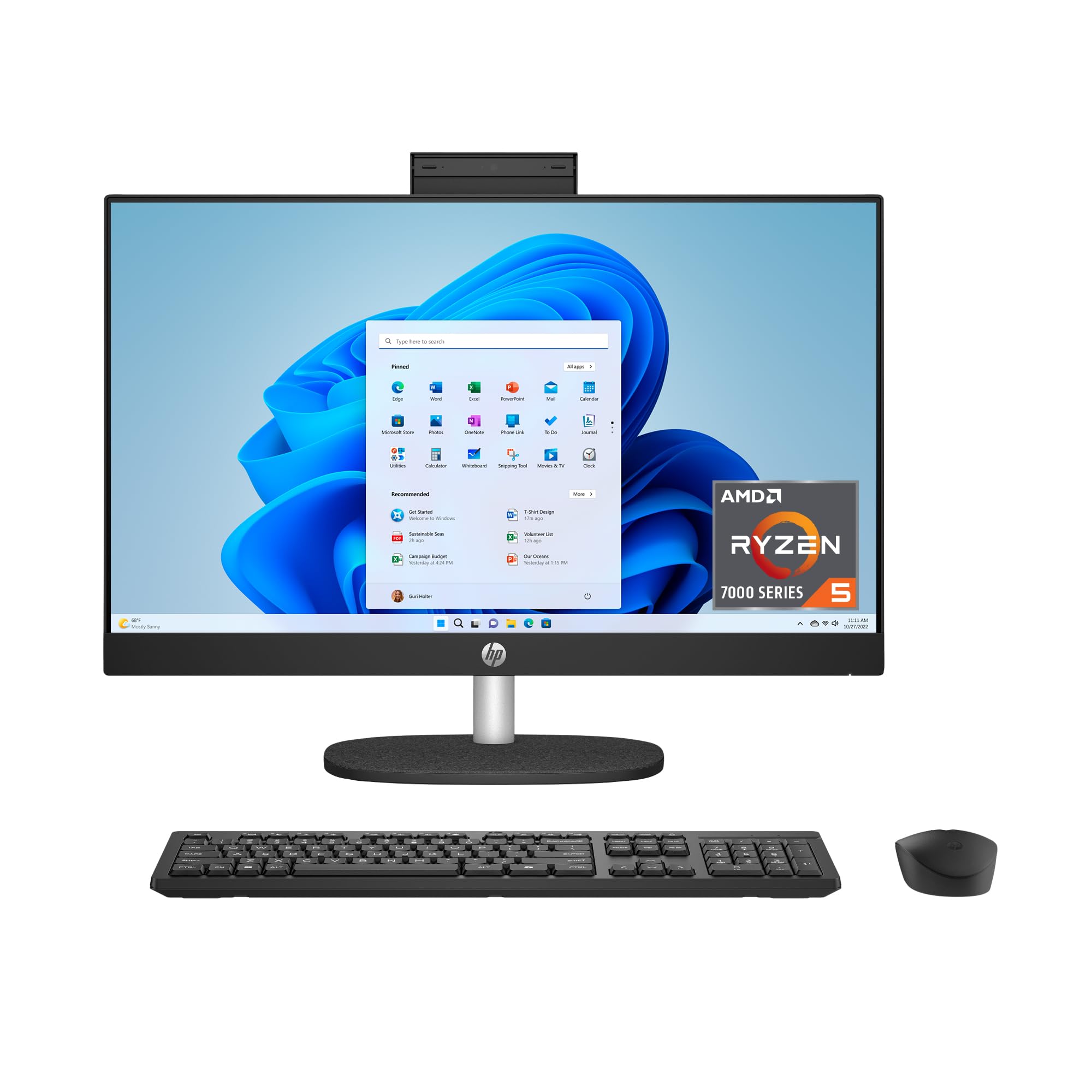
With a three-sided micro-edge FHD touchscreen that achieves up to an 89 percent screen-to-body ratio, the HP 24-cr0140 maximizes the 23.8-inch display area in a compact chassis. The AMD Ryzen 5 7520U quad-core processor paired with 16 GB of LPDDR5 RAM makes this a capable pick for running multiple productivity applications and browser tabs simultaneously.
The 1 TB solid-state drive is 15 times faster than a traditional hard drive, meaning near-instant boot times and quick file access. A tiltable pop-up privacy camera with HP Video Controls gives you control over your video feed, and the dual array microphones with advanced noise reduction technology ensure clear audio during virtual meetings.
DC Dimming technology eliminates screen flicker for reduced eye strain during long work sessions. The system is built with post-consumer recycled and ocean-bound plastics, carries EPEAT Gold certification, and is ENERGY STAR certified for energy efficiency.
Why it’s great
- High screen-to-body ratio for an immersive display
- Pop-up privacy camera with temporal noise reduction
- Flicker-free IPS panel with DC Dimming technology
- Environmentally responsible construction with recycled materials
Good to know
- Limited to two USB-A 5Gbps ports and one USB-C
- Some users reported difficulty switching out of S Mode
- No optical disc drive built in
3. Dell 24 All-in-One Desktop EC24250, 23.8-inch FHD Touch Display

The Dell EC24250 prioritizes comfort with Dell ComfortView Plus, which reduces harmful blue light emissions without washing out colors. The 23.8-inch FHD IPS display covers 99 percent of the sRGB color space and offers 50 percent higher contrast than previous Dell all-in-one generations, making text and images crisp and vibrant.
Under the hood, an Intel Core 5 120U processor with 12 MB cache handles everyday computing with ease. The 16 GB of DDR5 RAM and 512 GB SSD keep applications responsive, and a 5 MP IR camera with HDR technology adjusts exposure automatically in low-light conditions, helping you look professional on video calls even in dim rooms.
A 66 percent higher refresh rate than the previous generation provides smoother scrolling and cursor movement. The system includes a one-year onsite service warranty and six months of Dell Migrate for easy file transfers from your old PC.
Why it’s great
- Dell ComfortView Plus reduces blue light without color distortion
- 5MP IR camera with HDR for clear video in low light
- Dolby Atmos spatial sound via dual Bluetooth speakers
- Onsite service warranty included for one year
Good to know
- 512 GB SSD may fill up quickly for media-heavy users
- Camera angle is not adjustable
- No height-adjustable stand
4. HP 27″ FHD Touchscreen All-in-One Desktop Computer, Ryzen 5 7520U

Expanding to a 27-inch FHD IPS touchscreen, this HP all-in-one gives you more screen real estate for side-by-side documents or video editing timelines. The AMD Ryzen 5 7520U processor and AMD Radeon integrated graphics handle streaming, casual gaming, and productivity tasks reliably.
A 2 TB PCIe SSD provides double the storage of many competitors at this tier, which matters for users who store large photo libraries or offline video content. The pop-up privacy camera tucks away when not in use, and the 250-nit anti-glare screen performs well in brightly lit rooms without significant reflection.
Connectivity includes USB-C, four USB-A ports, HDMI, and an Ethernet port. The bundle includes a PLUSERA 8-in-1 hub, expanding your port options for external drives, monitors, and peripherals right out of the box.
Why it’s great
- Large 27-inch touchscreen for increased productivity
- 2 TB PCIe SSD storage for media-heavy users
- Pop-up privacy camera provides physical security
- Includes 8-in-1 hub for expanded connectivity
Good to know
- Wireless mouse can be erratic at initial login
- Screen quality issues reported on individual units
- Not suited for heavy gaming or 3D rendering
5. HP 27 inch All-in-One Desktop PC, FHD Touchscreen, AMD Ryzen 5 7520U, Windows 11 Pro

Shipping with Windows 11 Pro, this HP 27-inch all-in-one targets professionals who need domain join capabilities and advanced security features. The AMD Ryzen 5 7520U processor with 16 GB of LPDDR5 RAM provides smooth multitasking, while the 1 TB PCIe NVMe SSD keeps boot times and file transfers rapid.
The 27-inch FHD IPS touchscreen with anti-glare coating and 99 percent sRGB color accuracy suits design reviews and spreadsheet work alike. A 1080p FHD IR tilt privacy camera supports Windows Hello facial recognition for passwordless logins, and the dual array digital microphones capture clear audio from across the room.
The white wireless keyboard and mouse combination reduces cable clutter on your desk. Build quality is solid, and the system carries the same ENERGY STAR certification and EPEAT Gold rating found on other HP enterprise-tier hardware.
Why it’s great
- Windows 11 Pro for business network integration
- IR camera with Windows Hello facial recognition
- 99 percent sRGB color gamut on a 27-inch panel
- Wireless keyboard and mouse included
Good to know
- RAM is onboard and not user-upgradeable
- A small number of units reported motherboard failure early on
- Power cord not included in every shipment according to some buyers
6. HP 24 Touchscreen All-in-One Desktop Computer, Intel Processor N100

The HP 24-inch touchscreen all-in-one balances a 23.8-inch IPS Full HD touch display with the Intel Processor N100, a quad-core chip that draws minimal power while handling web browsing, office apps, and schoolwork. The anti-glare coating keeps the screen visible in bright rooms, and the 720p HD privacy camera slides shut when not in use.
With 16 GB of DDR4 RAM and a 1 TB PCIe NVMe SSD, this system offers more storage than many entry-level competitors. The combination is responsive for typical home tasks — video calls, document editing, and media streaming — without the noise or heat of a more powerful desktop.
Port selection includes a USB Type-C port at 5Gbps, two USB Type-A 5Gbps ports, and two USB 2.0 Type-A ports. Realtek Wi-Fi 6 and Bluetooth 5.3 keep wireless connections stable, and the wired HP white keyboard and mouse are simple to set up.
Why it’s great
- Responsive touchscreen with anti-glare IPS panel
- 1 TB SSD provides generous storage for a compact system
- Privacy camera slides shut physically
- USB-C port for modern peripherals
Good to know
- Intel N100 is not suited for heavy workloads or gaming
- 720p camera is lower resolution than competitors
- Wired peripherals add to desk cable clutter
7. HP 24-inch All-in-One Touchscreen Desktop Computer, AMD Ryzen 5 4500U

The HP 24-dp0160 features a unique panel design that can be removed in three simple steps, allowing easier access to internal components than most all-in-one systems. This makes it one of the few touchscreen desktops in this range where you can upgrade memory yourself — it ships with 12 GB of DDR4-3200 SDRAM and supports up to 32 GB.
The AMD Ryzen 5 4500U processor with six cores provides strong multi-threaded performance for office productivity and light creative work. The 23.8-inch FHD IPS ZBD anti-glare touchscreen uses WLED backlighting, and the system is low-halogen with mercury-free and arsenic-free display materials.
Stereo speakers provide decent volume for media consumption, and the pop-up HP Privacy Camera only enables when physically deployed. Windows 10 Home comes pre-installed, with a free upgrade path to Windows 11.
Why it’s great
- Tool-less panel removal for hardware upgrades
- 6-core Ryzen 5 processor for heavy multitasking
- RAM expandable up to 32 GB
- Environmentally conscious materials and construction
Good to know
- Fan noise noted by some users under load
- Microsoft Office is cloud-only, no local installation
- Integrated graphics limit 3D and gaming performance
8. DELL 2022 Inspiron 7700 All-in-One Desktop, 27″ FHD Touch Display

The Dell Inspiron 7700 delivers a serious performance punch with an 11th Gen Intel i7-1165G7 processor and 32 GB of RAM. This configuration is built for power users who juggle multiple virtual machines, run large spreadsheets, or work with memory-intensive creative applications like Photoshop and Lightroom.
The 27-inch FHD touch display uses an IPS panel for wide viewing angles, and the Intel Iris Xe integrated graphics provide enough horsepower for 4K video playback and light photo editing. Wi-Fi 6 ensures fast wireless transfers, and the IR camera enables facial recognition login through Windows Hello.
A wireless keyboard and mouse are included in the box. The sleek design fits well into professional office environments, and the 1 TB SSD provides fast storage for your operating system and primary applications.
Why it’s great
- 32 GB of RAM for demanding multitasking and virtual machines
- Intel Iris Xe graphics handle 4K media smoothly
- IR camera for Windows Hello facial recognition
- Spacious 27-inch touch display
Good to know
- Components are not user-upgradeable after purchase
- Pop-up camera mechanism feels somewhat fragile
- Only one generation behind current processors
9. HP All in One Desktop Computer 27 Inch, Intel Ultra 7-155U
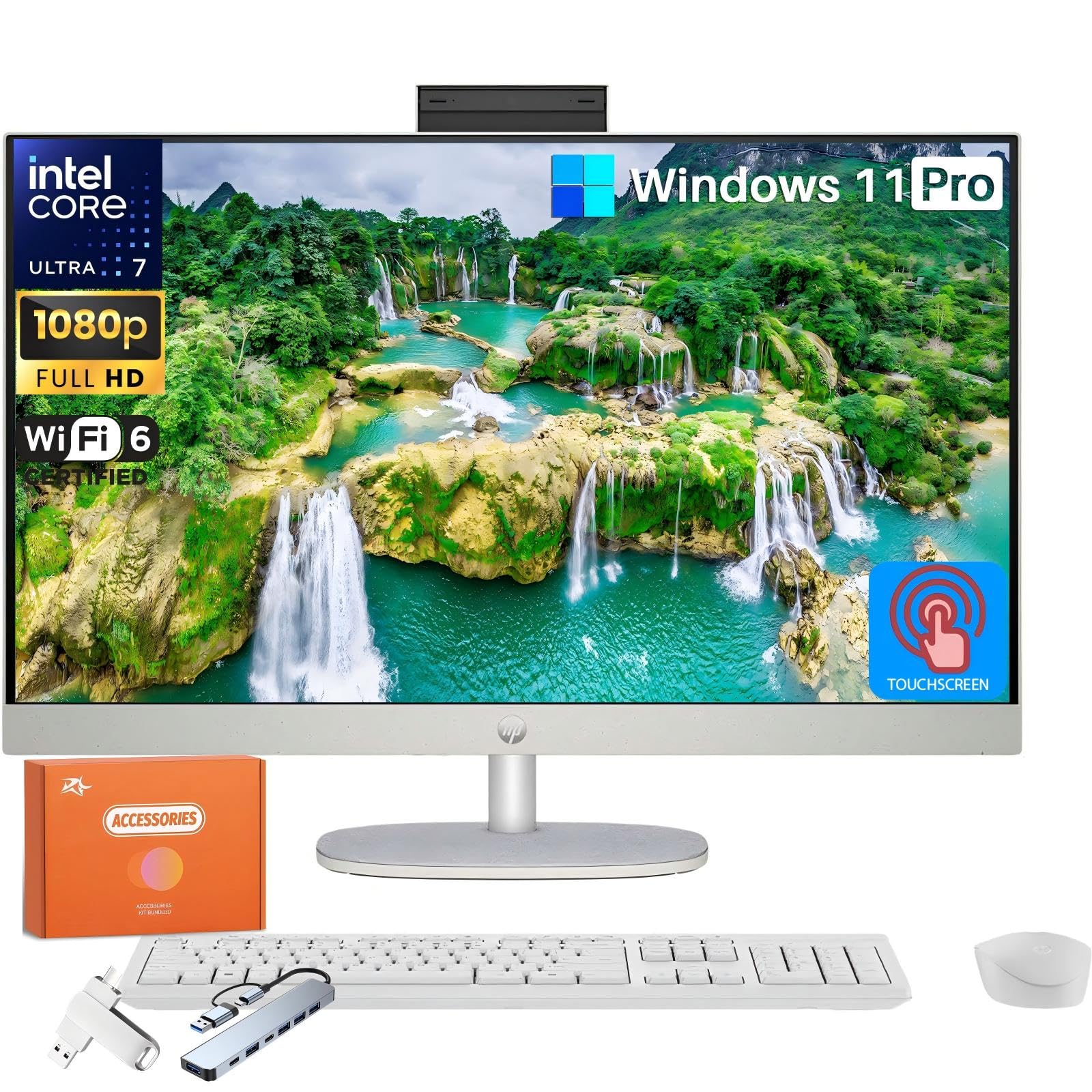
The HP Ultra 7 155U brings Intel’s latest 12-core architecture (6 Performance-cores and 8 Efficient-cores) to an all-in-one form factor, with a max turbo frequency of 4.8 GHz. This processor excels in burst workloads like compiling code, batch photo editing, or running AI-assisted tools, while 32 GB of DDR5 memory keeps data flowing quickly.
The 27-inch Full HD IPS touchscreen features a three-sided micro-edge bezel and anti-glare coating. A height-adjustable stand lets you set the screen at the perfect ergonomic position, reducing neck strain during long work sessions. The HP True Vision 1080p IR camera with an 88-degree wide-angle lens supports Windows Hello for instant facial recognition.
Windows 11 Pro is pre-installed, and the built-in AI engine assists with voice recognition and image processing tasks. Five USB ports, including a USB-C 5Gbps port, give you flexibility for connecting peripherals and external displays.
Why it’s great
- Intel Core Ultra 7 with 12 cores for high-performance tasks
- Height-adjustable stand for ergonomic comfort
- 32 GB of fast DDR5 RAM for heavy workloads
- Windows 11 Pro with built-in AI acceleration
Good to know
- Camera quality is only average for a premium system
- Wired mouse and keyboard have short cables
- Integrated graphics, not discrete GPU
10. HP All-in-One 27″ Touchscreen Desktop Computer, Intel 12-Core Ultra 7-155U, 64 GB DDR5 RAM, 4 TB SSD

This is the top-spec configuration of HP’s 27-inch all-in-one line, packing 64 GB of DDR5 RAM and a 4 TB PCIe SSD alongside the Intel Core Ultra 7-155U processor. It is designed for content creators, data analysts, and professionals who run memory-hungry applications like virtual machines, large datasets, or 4K video editing suites without compromise.
The 27-inch FHD IPS touchscreen with three-sided micro-edge bezels delivers wide viewing angles up to 178 degrees, and the height-adjustable stand allows precise screen positioning. The HP True Vision FHD IR camera supports secure Windows Hello logins and is Zoom Certified for reliable video conferencing quality.
Wi-Fi 6 and Bluetooth 5.3 handle wireless connectivity, while USB Type-C and Type-A ports each support 5Gbps data rates. The system includes a one-month Xbox Game Pass subscription for high-quality gaming titles, and the AI processing power accelerates creative workflows in compatible software.
Why it’s great
- 64 GB of DDR5 RAM for extreme multitasking
- 4 TB SSD eliminates external storage needs
- Height-adjustable stand for ergonomic flexibility
- Zoom Certified camera for professional video calls
Good to know
- Some units shipped with Ryzen instead of Intel, requiring verification
- Keyboard lacks dedicated function keys, which may frustrate power users
- Integrated graphics, no discrete GPU option
11. Lenovo 24″ FHD All-in-One Desktop Computer, Intel 4-Core Processor

The Lenovo 24-inch all-in-one offers the lowest entry point for buyers who want a clutter-free desktop but do not need a touchscreen. The 23.8-inch FHD IPS panel with 250 nits brightness and 99 percent sRGB coverage delivers respectable image quality for everyday browsing, document editing, and video streaming.
Powered by the Intel Processor N100 — a quad-core chip with a 3.40 GHz max turbo frequency — and paired with 16 GB of DDR4 RAM, this machine handles basic productivity tasks without lag. The 512 GB PCIe NVMe SSD provides fast boot times and enough space for essential applications and files.
Connectivity includes Wi-Fi 6, Bluetooth 5.2, two USB 3.2 Gen 2 ports, two USB 2.0 ports, and an HDMI 1.4b output for an external monitor. Windows 11 Pro is pre-installed, and a wired keyboard and mouse are included.
Why it’s great
- Very low cost for an all-in-one form factor
- 16 GB of RAM at an entry-level price point
- Windows 11 Pro for advanced security features
- Wi-Fi 6 and Bluetooth 5.2 included
Good to know
- Non-touch display — no touchscreen functionality
- Intel N100 is underpowered for heavy multitasking
- Stand lacks height adjustment
- Wired peripherals only
FAQ
Can I upgrade the RAM or storage in an all-in-one touch screen computer?
How does an anti-glare touchscreen compare to a glossy one for daily use?
Final Thoughts: The Verdict
For most users, the best all in one touch screen computer is the ASUS V470 All-in-One because it combines a large 27-inch anti-glare touchscreen, DDR5 memory, and a fast Intel Core i5 at a mid-range price point that fits home offices and families. If you need maximum RAM for heavy multitasking, grab the Dell Inspiron 7700. And for a premium system with the latest Intel Ultra 7 processor and height-adjustable ergonomics, the HP Ultra 7 155U is the clear choice.

Mo Maruf
I created WellFizz to bridge the gap between vague wellness advice and actionable solutions. My mission is simple: to decode the research and give you practical tools you can actually use.
Beyond the data, I am a passionate traveler. I believe that stepping away from the screen to explore new environments is essential for mental clarity and physical vitality.