Our readers keep the lights on and my smoothie glass nicely filled. As an Amazon Associate, I earn from qualifying purchases.
The coffee table is a graveyard of clickers. One for the TV, one for the soundbar, that weird one for the streaming stick, and the one whose purpose nobody remembers. You just want to watch a movie without juggling three plastic wands. An all in one remote promises to replace that pile with a single, decisive controller—but only if it speaks the right language to every piece of gear in your cabinet.
I’m Mohammad Maruf — the founder and writer behind WellFizz. I’ve spent years analyzing universal remote IR databases, comparing macro programming logic, and stress-testing button layouts to separate the truly unified controllers from the ones that just trade one headache for another.
This guide breaks down the top contenders by signal technology, device capacity, and ease of setup, helping you find the one controller that finally clears your table. Let’s find your all in one remote match and put those extra remotes in a drawer forever.
How To Choose The Best All In One Remote
The perfect universal remote is invisible in your hand—it just works. Finding that one depends on signal type, device count, programming method, and physical feel. Here’s what separates a seamless controller from a frustrating one.
Signal Technology – IR vs Bluetooth vs Wi-Fi
Infrared (IR) is the standard for TVs and soundbars; it requires line of sight. Bluetooth handles devices like streaming sticks that hide behind the TV. Wi-Fi with a hub (like the SofaBaton X1S) lets you control everything without aiming, even from another room. If your components are inside a closed cabinet, you need Bluetooth or a hub with IR blasters—not plain IR.
Device Capacity and Macro Programming
How many gadgets you control matters less than how you control them. A remote that handles 15 devices (SofaBaton U2) is powerful, but without macro programming, you still press multiple buttons to watch a movie. Look for “activity” or “macro” buttons that turn on the TV, switch the soundbar input, and fire up the streaming stick in one press. That’s the real clutter killer.
Button Layout and Backlighting
A crowded button grid ruins any remote. Check for well-spaced, tactile buttons with a logical layout—volume near the center, number pad at the top or hidden. Non-backlit remotes are a nightmare in a dark room. Prioritize models with full backlighting or an OLED screen that lights up when you pick it up.
Quick Comparison
On smaller screens, swipe sideways to see the full table.
| Model | Category | Best For | Key Spec | Amazon |
|---|---|---|---|---|
| SofaBaton X1S | Hub-based | Whole-home automation | IR/Bluetooth/Wi-Fi + RF hub | Amazon |
| Logitech Harmony 650 | Legacy Premium | Activity-based home theater | Color screen, 8-device IR | Amazon |
| SofaBaton U2 | App-controlled | Multi-device via app | Bluetooth+IR, 15 devices | Amazon |
| One For All URC7880 | Multi-brand | 8-device family rooms | 48 buttons, smart app setup | Amazon |
| Anderic RRU401 | Learning Remote | 4-device setups with macros | Learning + backlit keys | Amazon |
| One For All Urc1810 | TV Specific | Samsung TV replacement | No setup, original functions | Amazon |
| Saysurey 10-Pack | Bulk Basic | Hotels or nursing homes | 25 buttons, 8-meter IR | Amazon |
In‑Depth Reviews
1. SofaBaton X1S Smart Remote with Hub
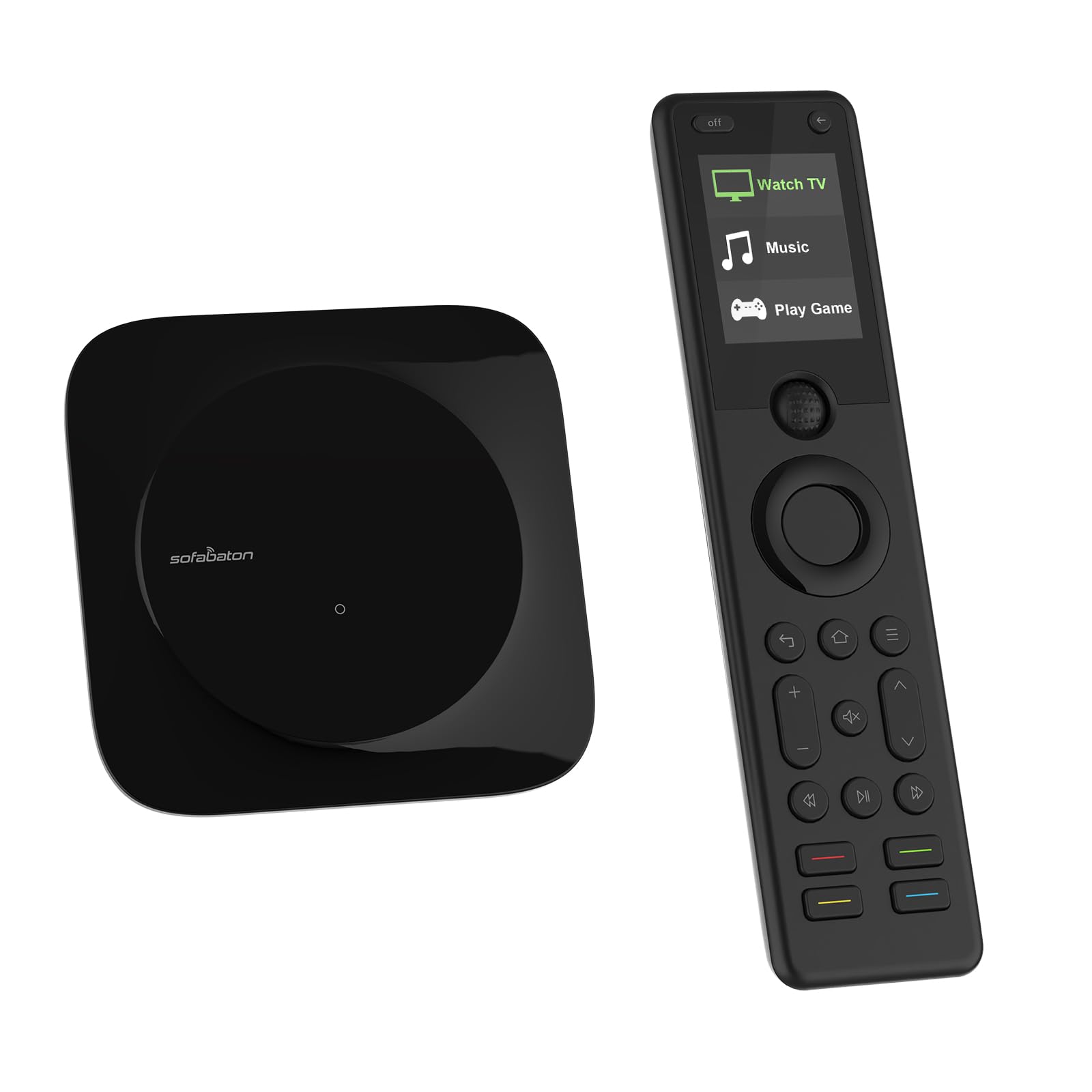
The X1S is the closest thing to a total system commander without building a custom Crestron rig. Its hub talks IR, Bluetooth, and Wi-Fi, meaning you can stash the TV and cable box inside a closed cabinet and still maintain flawless control via the included IR blasters. The OLED screen wakes when you pick it up, and the backlit buttons make late-night viewing effortless. The “find my remote” feature alone saves you from a half-hour couch cushion excavation.
Setup is surprisingly smooth through the SofaBaton app—you type your device brand and model, and the database handles the rest. The macro system lets you create one-touch activities like “Movie Night” that dim the lights (via smart home API), power the receiver, switch the TV input, and launch your streaming stick. This is the only remote on this list that doesn’t force you to aim.
Drawbacks include a slightly higher price point, and some users report that the hub’s IR blaster range is adequate but not enormous—larger rooms may need the included extension blasters placed strategically. The build quality feels solid, though the plastic clamps on the charging cradle can be fragile if handled roughly.
Why it’s great
- True multi-tech (IR, Bluetooth, Wi-Fi) means no line-of-sight hassles
- One-touch macro activities simplify complex setups
- Backlit buttons and raise-to-wake screen work perfectly in dark rooms
Good to know
- Hub IR blaster range is moderate; may need extension blasters for large rooms
- Charging cradle clamps are somewhat delicate
- Premium cost compared to IR-only remotes
2. Logitech Harmony 650 (Renewed)

The Harmony 650 is a legacy legend that still outperforms many modern competitors. Its one-touch activity buttons—like “Watch a Movie” or “Play a Game”—automatically switch the TV, receiver, and streaming device to the correct inputs and power states. The bright color screen displays favorite channel icons and custom commands, making navigation feel more like a smartphone than a clicker.
With compatibility spanning over 225,000 devices from 5,000+ brands, the 650 is unlikely to meet a gadget it can’t control. The software setup, while a bit dated, lets you create custom macros and assign specific power commands to fix common toggle issues. The tactile button feel is satisfyingly clicky, and the ergonomic shape fits naturally in hand.
The trade-offs: it’s a renewed unit, so battery life and cosmetic condition vary. Some users report the included battery arrives corroded or dead. The setup software requires a Windows or Mac computer (no phone app), which feels archaic in 2025. Also, the remote is IR-only, so it won’t work with Bluetooth-dependent devices like a Fire Stick without additional hardware.
Why it’s great
- Activity-based automation simplifies complex home theater setups
- Color screen displays channel icons and custom commands
- Massive device database covers virtually every brand
Good to know
- Renewed unit; battery quality and cosmetic condition are inconsistent
- Setup requires a computer, not a mobile app
- IR-only control; no Bluetooth for streaming sticks
3. SofaBaton U2 Universal Remote

The SofaBaton U2 strikes a smart balance between device capacity and ease of use. It supports up to 15 devices via infrared and Bluetooth, which means you can finally retire that dedicated Fire TV stick remote along with the TV and soundbar clickers. The companion app lets you reassign buttons, create custom macros, and reorder the button layout—all without digging through a paper manual.
One major upgrade over the previous U1 model is the doubled IR signal distance, achieved through multiple built-in infrared receivers. The scroll wheel and OLED display make navigating streaming services feel natural, and the ergonomic design with larger buttons reduces misclicks during a movie. The macro button is a standout—press once to turn on the TV, switch the receiver to HDMI 2, and launch Netflix with a 5-second delay.
Downsides include a non-backlit button surface, which makes it hard to find the right key in a dark room unless you memorize the layout. The app, while functional, has a slightly clunky interface and occasional Bluetooth pairing drops. A few users report sporadic double-clicking on certain buttons, though this seems to affect a minority of units.
Why it’s great
- Controls up to 15 devices with IR and Bluetooth
- App-based configuration allows button reassignment and macros
- Scroll wheel and OLED screen enhance streaming navigation
Good to know
- Buttons are not backlit, which is inconvenient in low light
- App interface is basic and pairing can be temperamental
- Occasional double-click issues reported on some units
4. One For All URC7880 Universal Smart Remote

The One For All URC7880 is designed for the person who wants a straightforward, app-guided setup without sacrificing device capacity. It manages up to 8 devices and works with over 7,000 brands, including most TVs, soundbars, satellite boxes, and streaming players. The free setup app walks you through code entry and lets you label each device, so you always know which component you’re controlling.
With 48 buttons, the URC7880 has one of the most comprehensive layouts in its class. Dedicated shortcut keys for Amazon Prime, YouTube, and Netflix sit right below the screen, and the learning feature lets you copy any function from your original remote that isn’t in the database. The punch-through feature is a hidden gem—you can set volume to always control your soundbar, even when you’re navigating the TV menu.
Where it falls short is ergonomics: the button layout crowds keypad digits at the top and places frequently used controls like channel and volume near the bottom, which feels upside-down for some users. There is no backlighting, so using it in a dark room requires memorization. Additionally, the build quality feels a bit hollow compared to the SofaBaton or Harmony options.
Why it’s great
- Smartphone app makes setup fast, no code hunting
- 48-button layout with dedicated streaming shortcut keys
- Learning feature copies functions not in the database
Good to know
- No backlighting complicates dark-room use
- Button layout feels inverted; keypad at the top is awkward
- Build quality is slightly plasticky compared to premium options
5. Anderic RRU401 4-in-1 Universal Remote
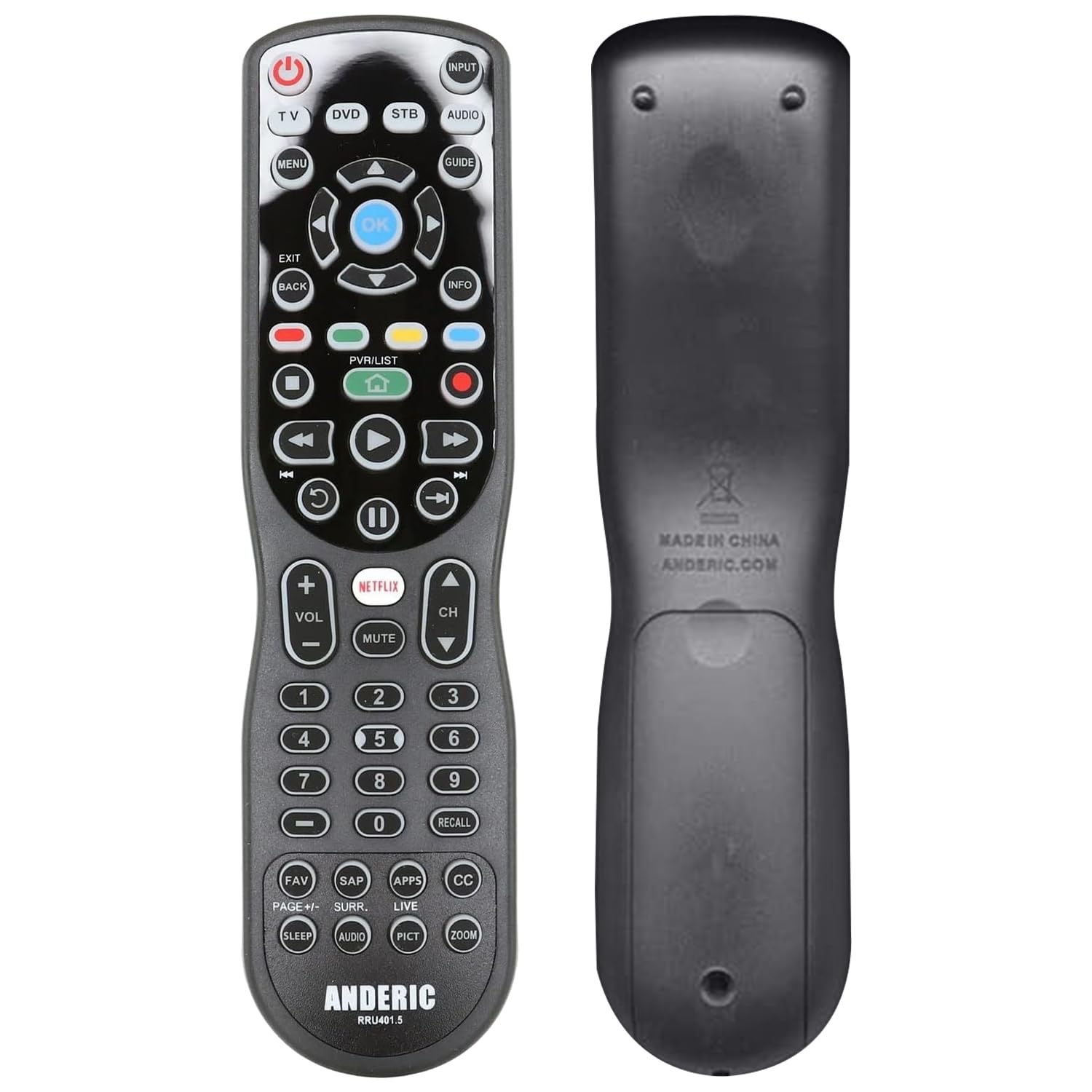
The Anderic RRU401 proves you don’t need to spend a fortune for a fully backlit, learning-capable universal remote. It controls up to 4 devices—perfect for a bedroom setup with a TV, soundbar, streaming stick, and Blu-ray player. The full key backlighting is a rare feature at this price point and makes late-night channel changes genuinely pleasant.
The learning feature lets you teach the remote any function your original remotes can do, including obscure commands like display mode or subtitle switching. Macro programming allows you to link the power of multiple devices to a single button, so one press turns off the TV, soundbar, and streaming device together. The punch-through feature keeps volume locked to your audio system regardless of which device you’re controlling.
Its limitations become apparent with more complex setups. The programming process is finicky—the instructions are vague, and finding the right IR codes can take trial and error. The button layout places volume and channel far from the directional pad, forcing hand movement during navigation. Some users report the IR beam is directional and weak, requiring precise aiming toward the sensor.
Why it’s great
- Full key backlighting is excellent for dark rooms
- Learning mode copies any IR function from original remotes
- Macro and punch-through features work reliably after setup
Good to know
- Programming is cryptic and the manual lacks clarity
- Button layout feels awkward; volume is far from the D-pad
- IR beam is directional, requiring accurate aiming
6. One For All Samsung TV Replacement Remote (Urc1810)

If you just need a direct replacement for a lost or broken Samsung TV remote—no multi-device ambitions, no macros—the Urc1810 is the simplest option on this list. Insert batteries, point it at the TV, and every button works exactly as the original did, including the Smart Hub, Menu, and HDMI switching. There is zero programming, and it’s compatible with every Samsung TV type: LED, LCD, and Plasma.
The learning feature adds a surprising layer of flexibility for such a simple remote. If your Samsung TV has a function the Urc1810 doesn’t cover by default, you can teach it using the original remote. The ergonomic shape and 33-button layout are nearly identical to the factory remote, making the transition invisible to muscle memory.
The catch is obvious: it only controls a single Samsung TV. This is not a universal remote—it replaces exactly one remote control. If you need to manage a soundbar, streaming stick, or cable box alongside your TV, you’ll need a separate controller for each. It also lacks backlighting, and the IR range is a modest 10 meters, which is fine for most living rooms but may struggle in very large spaces.
Why it’s great
- Absolutely zero setup—insert batteries and it works
- Supports all Samsung TV functions including Smart Hub and HDMI
- Learning feature can copy missing IR commands from the original
Good to know
- Controls only one Samsung TV; not a multi-device universal remote
- No backlighting makes dark-room use difficult
- IR range is limited to 10 meters
7. Saysurey 10-Pack Universal TV Remote

The Saysurey 10-pack is not a remote for your living room—it’s a logistical solution for hotels, nursing homes, or property managers who need a bunch of functional clickers at a low per-unit cost. Each remote uses 25 simple buttons, an ABS plastic shell, and silicone keypads that handle repeated pressing without wearing out. The infrared range reaches 8 meters, which is sufficient for a standard guest room.
Setup uses two methods (auto-search or manual code entry), and the remotes claim compatibility with “all models” of smart TVs, including LED, LCD, and HDTV series. In practice, they work reliably with major brands but may struggle with lesser-known or hotel-proprietary models like the onn brand. The lightweight build makes them easy to distribute and store, while the soft silicone buttons are quiet and comfortable.
The trade-offs are significant for individual use: only 25 buttons means no dedicated streaming shortcuts or advanced functions like HDMI-CEC control. The build is distinctly budget-tier, with a hollow feel and no backlighting or ergonomic shaping. Some units from the pack may arrive with inconsistent code coverage—about a quarter of users report that certain TVs require multiple programming attempts before accepting the remote.
Why it’s great
- Extremely cost-effective per unit for bulk purchasing
- Silicone buttons feel soft and withstand heavy use
- Two setup methods (auto-search and manual) cover most brands
Good to know
- Only 25 basic buttons; no streaming or advanced controls
- Budget build quality feels hollow and lacks backlighting
- Compatibility varies; some brands require multiple programming attempts
FAQ
Can an all in one remote control a Fire TV Stick or Roku that uses Bluetooth?
Why do some universal remotes require a smartphone app for setup?
How many devices can a typical all in one remote handle before it becomes confusing?
Final Thoughts: The Verdict
For most users, the all in one remote winner is the SofaBaton U2 because it blends Bluetooth and IR control for up to 15 devices with an intuitive app for macro programming and button reassignment—all without a hub. If you want seamless whole-home control with zero line-of-sight aiming, grab the SofaBaton X1S. And for a single-room home theater with one-touch activities, nothing beats the dated but polished Logitech Harmony 650 renewed unit.

Mo Maruf
I created WellFizz to bridge the gap between vague wellness advice and actionable solutions. My mission is simple: to decode the research and give you practical tools you can actually use.
Beyond the data, I am a passionate traveler. I believe that stepping away from the screen to explore new environments is essential for mental clarity and physical vitality.