Our readers keep the lights on and my smoothie glass nicely filled. As an Amazon Associate, I earn from qualifying purchases.
A home computer is the hub of family life — managing schedules, streaming movies, helping kids with homework, and keeping the household budget in check. But a bulky tower and a tangle of cables can turn a shared desk into an eyesore. That is where the all-in-one design shines, packing everything into the back of the display. The challenge is finding the one with the right screen size, processor muscle, and memory capacity for how your family actually works — without overspending on specs you will never use.
I’m Mohammad Maruf — the founder and writer behind WellFizz. I research each all-in-one by its processor generation, RAM configuration, storage type, display quality, and port selection, comparing them against real home-use workloads so you do not have to guess.
After comparing processor speeds, memory capacities, and display sizes across eleven models, this guide helps you find the right all in one computer for home use that fits your desk and your daily routine.
How To Choose The Best All In One Computer For Home Use
An all-in-one is a long-term investment for your household. Getting the right balance of screen size, processor power, memory, and storage ensures the machine stays responsive for years. Here are the key factors to consider.
Screen Size and Resolution
Most home all-in-ones offer a 23.8-inch or 27-inch full HD (1920×1080) display. A 23.8-inch model fits comfortably on a standard desk and keeps the overall footprint small. A 27-inch panel provides more screen real estate for side-by-side windows and is better for streaming or photo editing. Look for IPS panels for wider viewing angles and anti-glare coatings if the computer sits near a window.
Processor and RAM
For general home use — browsing, streaming, email, and Office apps — an Intel Core i5 or AMD Ryzen 5 processor paired with 16GB of RAM is the sweet spot. Entry-level models with Intel N100 or AMD Athlon processors handle basic tasks but may feel sluggish when multiple apps are open. Avoid anything with less than 8GB of RAM if multiple family members share the machine.
Storage Type and Capacity
Solid-state drives (SSD) are essential; they make booting up and opening apps instantaneous. A 512GB SSD is a good minimum for a home computer. If you store lots of photos or videos, consider a model with a 1TB SSD or a dual-drive setup that combines a fast SSD for the operating system with a larger hard drive for files.
Connectivity and Ports
Check for Wi-Fi 6 or Wi-Fi 6E for faster and more reliable wireless connections, especially if your router supports it. At least one USB-C port and multiple USB-A ports are useful for connecting printers, external drives, and peripherals. An HDMI-out port allows you to connect a second monitor, which many home users find valuable.
Quick Comparison
On smaller screens, swipe sideways to see the full table.
| Model | Category | Best For | Key Spec | Amazon |
|---|---|---|---|---|
| ASUS V470VA-MS504T | Mid-Range | Home office & entertainment | 27″ FHD Touch, 16GB DDR5, 1TB SSD | Amazon |
| HP 27-cr0012 | Premium | Powerful multitasking | 27″ FHD, Ryzen 7 7730U, 32GB RAM, 1TB SSD | Amazon |
| Lenovo IdeaCentre 27 | Premium | Content creation & productivity | 27″ FHD, Core i7-13620H, 512GB SSD | Amazon |
| Dell Inspiron 7710 | Premium | Demanding home workloads | 27″ FHD Touch, i7-1255U, 32GB, 1TB SSD, MX550 | Amazon |
| Dell Inspiron 7700 | Premium | Touchscreen versatility | 27″ FHD Touch, i7-1165G7, 12GB RAM, 256GB+1TB | Amazon |
| Dell 24 EC24250 | Mid-Range | Family & remote learning | 23.8″ FHD, Core 3 100U, 8GB DDR5, 512GB SSD | Amazon |
| Acer Aspire C24-2G-UR15 | Mid-Range | Responsive everyday use | 23.8″ FHD 120Hz, Ryzen 5 7430U, 16GB, 512GB SSD | Amazon |
| Lenovo 24 IdeaCentre | Budget | Basic home tasks | 23.8″ FHD, Intel N100, 16GB DDR4, 512GB SSD | Amazon |
| Fusion5 A7 N6 | Budget | Kids & general family use | 23.8″ FHD, Intel N150, 16GB LPDDR4, 512GB SSD | Amazon |
| HP 24 Touchscreen | Mid-Range | Touchscreen simplicity | 23.8″ FHD Touch, Intel N100, 16GB, 1TB SSD | Amazon |
| HP 24-dd0010 | Budget | Light computing & media | 23.8″ FHD, Athlon Silver 3050U, 8GB, 256GB SSD | Amazon |
In‑Depth Reviews
1. ASUS V470VA-MS504T

The ASUS V470 stands out for home use with its 27-inch full HD IPS touchscreen, which makes navigating Windows 11 feel intuitive for all ages. The anti-glare coating helps reduce reflections in brightly lit rooms, and the 1080p pop-up webcam with built-in array microphones keeps video calls clear. Under the hood, the Intel Core i5-13420H processor provides enough power for streaming, Office work, and light photo editing without noticeable lag.
The 16GB of DDR5 RAM and 1TB PCIe SSD mean you can keep dozens of browser tabs open and still boot up in seconds. ASUS also includes Dolby Atmos speakers that deliver richer audio than most built-in computer speakers, which matters for movie nights and music streaming. The AI noise-canceling technology is a practical touch for households with ambient noise during video calls.
Connectivity is well covered with Wi-Fi 6E, Bluetooth 5.3, and a reasonable selection of ports including USB-C and HDMI-out for a second monitor. The wired keyboard and mouse are functional but many users will swap them for wireless. The non-adjustable height is a minor ergonomic limitation for taller users.
Why it’s great
- Large 27-inch touchscreen with anti-glare coating
- Spacious 1TB SSD with fast DDR5 memory
- Excellent built-in speakers with Dolby Atmos
- Pop-up webcam for privacy
Good to know
- Fixed height stand; not height-adjustable
- Includes wired peripherals; plan to upgrade
- Some pre-installed software (bloatware)
2. HP 27-cr0012 All-in-One Desktop

The HP 27-cr0012 brings serious processing power to a home desk with the AMD Ryzen 7 7730U, a processor that handles multitasking across heavy spreadsheets, video conferencing, and casual photo editing without complaint. The 32GB of RAM is overkill for most home users now, but future-proofs the machine for years of updates and increasingly demanding web applications. The 1TB NVMe SSD provides fast storage and plenty of room for family photo libraries and media files.
The 27-inch three-sided micro-edge display offers a 90 percent screen-to-body ratio, so the bezels are slim and the viewing experience is immersive. The tiltable pop-up privacy camera keeps the lens hidden when not in use, which is a thoughtful security feature. Dual-array microphones with noise reduction help your voice come through clearly during calls.
Some users report random shutdowns related to thermal management, which is a concern for a premium-tier machine. The lack of a touchscreen and non-adjustable stand height are also notable omissions at this price level. If raw performance and memory capacity are your top priorities, this model delivers, but check the return policy carefully.
Why it’s great
- Exceptional Ryzen 7 processor for demanding workloads
- 32GB RAM for serious multitasking
- 1TB SSD with room to spare
- Pop-up privacy webcam
Good to know
- Potential overheating and random shutdown issues reported
- No touchscreen support
- Display height is not adjustable
3. Lenovo IdeaCentre 27 All-in-One

The Lenovo IdeaCentre 27 offers a compelling mix of a large screen and a powerful 10-core Intel Core i7-13620H processor that can hit 4.9GHz. This CPU is overkill for basic browsing but shines when handling photo editing, light video work, or multiple productivity apps running simultaneously. The 27-inch full HD IPS display with 99 percent sRGB color accuracy and anti-glare coating is great for extended work sessions, and the hardware low blue light technology genuinely reduces eye strain.
The 8GB of DDR5 RAM is the weak point here — it is the bare minimum for a machine with this processor. You may find yourself closing background apps when multitasking heavily. The 512GB PCIe 4.0 NVMe SSD delivers fast load times, but power users will want more storage. The Harman speakers produce clear audio, and the 5MP webcam with dual microphones is above average for video calls.
Connectivity is robust with Wi-Fi 6, USB-C, HDMI-in and HDMI-out ports, and an RJ-45 Ethernet jack. The sleek Luna Grey design looks professional on any desk. One buyer reported a defective unit with blue-screen issues shortly after purchase, so quality control may be inconsistent.
Why it’s great
- Powerful Core i7 processor with 10 cores
- Large, accurate 27-inch IPS display with low blue light
- Premium Harman speakers and 5MP webcam
- Versatile ports including HDMI-in/out
Good to know
- Only 8GB RAM limits heavy multitasking
- 512GB storage is modest for the price tier
- Reported quality control issues in some units
4. Dell Inspiron 7710 All-in-One

The Dell Inspiron 7710 is the most premium model in this lineup, pairing a 27-inch full HD touchscreen with an Intel Core i7-1255U processor, 32GB of DDR4 RAM, and a 1TB SSD. The inclusion of the NVIDIA GeForce MX550 dedicated graphics card makes this the only model here capable of light gaming and GPU-accelerated creative tasks. The touchscreen is responsive and useful for quick gestures, and the narrow bezel design gives it a modern look.
The 32GB of RAM ensures you can run multiple virtual desktops or memory-intensive applications without hiccup. The stand has an innovative design that allows you to park the keyboard underneath, reducing clutter. The built-in speakers are decent, and the Wi-Fi 6E support future-proofs wireless connectivity. Dell also includes a one-year on-site service warranty, which adds peace of mind for a big purchase.
The main trade-off is the price, which places it in the highest tier of home all-in-ones. Some users find the included keyboard and mouse feel cheap for this price point. The lack of an HDMI-out port means you cannot easily add a second monitor without using a USB-C adapter.
Why it’s great
- Dedicated NVIDIA MX550 graphics for light gaming
- 32GB RAM and 1TB SSD for serious workloads
- 27-inch touchscreen with narrow bezels
- Innovative keyboard-parking stand design
Good to know
- Premium price point
- Included peripherals feel low quality
- No dedicated HDMI-out port
5. Dell Inspiron 7700 AIO Desktop

The Dell Inspiron 7700 features a 27-inch Infinity touchscreen that delivers vibrant colors and intuitive touch navigation, making it ideal for households that value direct interaction with the display. The 11th Gen Intel Core i7-1165G7 processor still holds up well for home tasks, though it is a generation behind the latest chips. The dual-drive setup — a 256GB NVMe SSD for the operating system and a 1TB HDD for files — gives you a fast boot drive plus ample storage for media.
The 12GB of DDR4 RAM is an unusual configuration; it works for multitasking but is neither the standard 8GB nor 16GB. The Intel Iris Xe integrated graphics handle 4K streaming and casual gaming at lower settings. The silver design with a slim profile looks clean on a desk, and the included wireless keyboard and mouse match the aesthetic. Users also appreciate the quiet fan operation.
Some buyers reported issues with the forced Windows 11 upgrade causing instability, and the pop-up camera design prevents the screen from being placed under low kitchen cabinets. All USB ports are located on the back, making it difficult to swap peripherals without reaching around the screen.
Why it’s great
- Large, vibrant 27-inch touchscreen display
- Dual-drive setup for speed and capacity
- Quiet fan and sleek silver design
- Good wireless keyboard and mouse included
Good to know
- 11th Gen processor is older
- All USB ports on the back
- Pop-up camera limits placement options
6. Dell 24 EC24250 All-in-One

The Dell 24 EC24250 is a well-rounded all-in-one for home use, built around a 23.8-inch full HD IPS display with 99 percent sRGB color accuracy and 50 percent higher contrast than previous generations. The ComfortView Plus feature reduces blue light emissions without washing out colors, which matters for families who spend long hours on the computer. The Intel Core 3 100U processor handles everyday tasks smoothly, and the 8GB of DDR5 RAM is a nice generational upgrade over DDR4.
The 512GB PCIe NVMe SSD provides snappy boot times and ample room for documents and apps. The dual Bluetooth speakers with Dolby Atmos spatial sound deliver surprisingly clear audio for video calls and streaming. The 5MP infrared camera supports Windows Hello face login, making access fast and secure. The white design with a tilt-adjustable stand fits cleanly into modern home decor.
The 8GB RAM may become a constraint if multiple users with heavy workloads share the machine. Dell’s one-year on-site service is a genuine advantage — if something breaks, a technician comes to your home rather than requiring a shipped repair. Some buyers noted that the included keyboard uses only one USB receiver, so the keyboard and mouse share a single slot.
Why it’s great
- Excellent color-accurate display with eye comfort tech
- 5MP infrared camera with Windows Hello
- Dolby Atmos spatial audio
- 1 Year on-site service included
Good to know
- 8GB RAM may limit heavy multitasking
- Keyboard and mouse share one USB receiver
- Not a touchscreen model
7. Acer Aspire C24-2G-UR15

The Acer Aspire C24 distinguishes itself with a 23.8-inch full HD IPS display that runs at 120Hz, double the refresh rate of typical all-in-one screens. This makes scrolling through web pages feel noticeably smoother, and casual games look more fluid. The AMD Ryzen 5 7430U hexa-core processor paired with 16GB of DDR4 RAM and a 512GB PCIe SSD provides responsive performance for multitasking across Office apps, streaming, and browser-based work.
The front I/O access is a smart design choice — you can plug in a USB drive or headphones without reaching around the back. The built-in 2MP webcam includes a physical privacy shutter, and the dual microphones pick up voices clearly. The Wi-Fi 6E support ensures fast wireless connectivity, and the inclusion of a USB-C port adds future-proofing. The included wired keyboard and mouse are basic but functional.
Multiple buyers noted that the internal fan runs loudly, especially during initial setup or updates. Adjusting the power settings to a balanced mode helps, but the fan noise is a known design characteristic. The display is limited to 250 nits brightness, which may look dim in very bright rooms.
Why it’s great
- Smooth 120Hz display for fluid scrolling
- Ryzen 5 processor with 16GB RAM
- Convenient front I/O ports
- Physical webcam privacy shutter
Good to know
- Fan can be loud out of the box
- 250 nits brightness; dim in bright rooms
- Wired peripherals only
8. Lenovo 24 IdeaCentre All-in-One

The Lenovo 24 IdeaCentre offers a practical entry point into all-in-one computing with its 23.8-inch full HD IPS display and 16GB of DDR4 RAM — double what most budget machines provide. This makes it one of the better choices for households that keep many tabs and apps open simultaneously. The 512GB PCIe SSD ensures quick boot times, and the Intel N100 processor handles web browsing, email, and streaming without frustration.
The inclusion of Wi-Fi 6 provides faster and more stable wireless connections than older Wi-Fi 5 routers. The wired keyboard and mouse that come in the box are quiet and functional, though some users prefer wireless for a cleaner desk. The 250-nit display is adequate for indoor use but may struggle in direct sunlight. The integrated graphics are fine for video playback but not for gaming beyond very basic titles.
Setup is straightforward, and the small footprint leaves plenty of desk space. The main limitation is the Intel N100 processor — it lacks the cores and threads for heavy multitasking or demanding creative software. This model is best for light home use: browsing, streaming, and Office documents.
Why it’s great
- Generous 16GB DDR4 RAM for the price
- Wi-Fi 6 support for reliable connectivity
- Compact design with small desk footprint
- Very easy to set up
Good to know
- Intel N100 processor is entry-level
- Not suitable for gaming or heavy multitasking
- Wired keyboard and mouse only
9. Fusion5 A7 N6 All-in-One
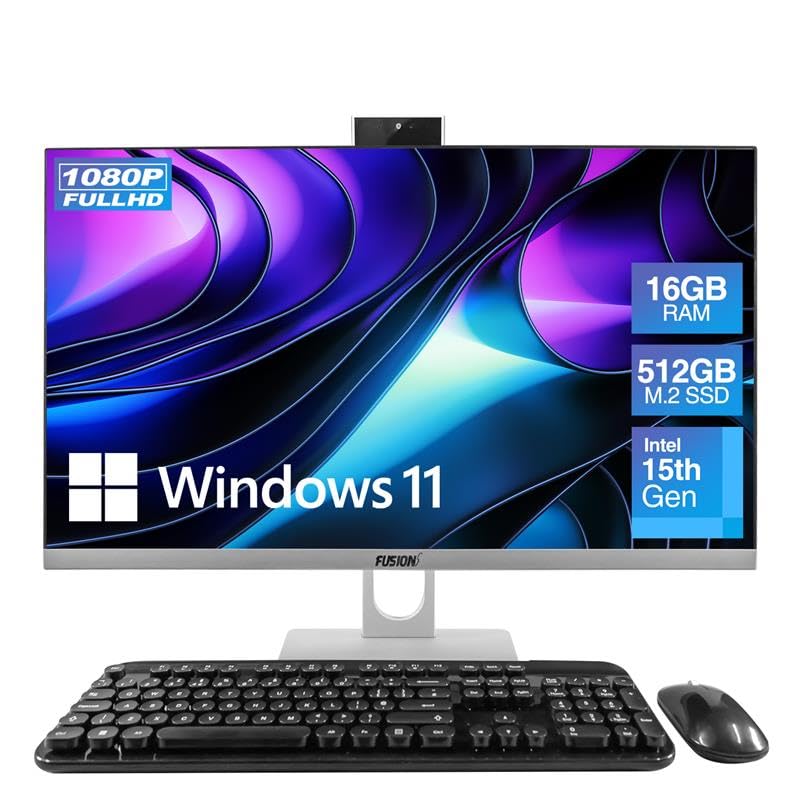
The Fusion5 A7 N6 is a budget-oriented all-in-one designed for general family use, powered by Intel’s 15th Gen N150 quad-core processor. It handles web browsing, emails, streaming services, and basic Office tasks capably. The 23.8-inch full HD IPS display offers clear visuals with decent color reproduction, and the integrated Intel UHD graphics can manage light casual gaming.
The 16GB of LPDDR4 RAM is a strong point for this price range, allowing for smoother multitasking than similarly priced models with 8GB. The 512GB SATA SSD provides adequate storage, though SATA is slower than the PCIe NVMe drives found in pricier models. The package includes a wireless keyboard and mouse, a 3MP pop-up webcam, and built-in Wi-Fi and Bluetooth — everything needed to get started out of the box.
The wired keyboard that uses a single USB dongle for both keyboard and mouse is a minor inconvenience. Some users noted that the rounded keycaps require a short adjustment period if you are used to standard keyboards. The plastic build feels less premium than metal-chassis models, but at this budget tier that is expected.
Why it’s great
- 16GB RAM for smooth multitasking
- Includes wireless keyboard, mouse, and webcam
- Clear 23.8-inch IPS display
- Great value for general family use
Good to know
- SATA SSD is slower than PCIe NVMe
- Rounded keycaps take some getting used to
- Plastic construction feels less durable
10. HP 24 Touchscreen All-in-One

The HP 24 Touchscreen all-in-one is a compelling mid-range option for families who appreciate touch interaction. The 23.8-inch full HD IPS touchscreen with anti-glare technology responds accurately to taps and swipes, making photo zooming, scrolling, and app navigation feel natural. The Intel N100 processor and 16GB of DDR4 RAM handle everyday tasks capably, and the 1TB PCIe NVMe SSD provides generous storage space for family photos, videos, and documents.
The HP True Vision 720p HD privacy camera includes temporal noise reduction and a physical shutter, keeping the lens covered when not in use. The integrated dual-array microphones pick up voices clearly during video calls. Connectivity is solid with Wi-Fi 6, Bluetooth 5.3, a USB-C port, and an RJ-45 Ethernet jack. The white design with matching keyboard and mouse looks clean and modern on a home desk.
The 720p webcam resolution is lower than the 1080p cameras found on some competitors, which matters if you do frequent video calls. The Intel N100 processor limits this machine to light productivity — it is not suited for heavy multitasking or creative work. Some users reported a short learning curve transitioning from Windows 10 to Windows 11.
Why it’s great
- Responsive 23.8-inch touchscreen display
- Large 1TB SSD for ample storage
- Privacy camera with physical shutter
- Wi-Fi 6 and Bluetooth 5.3
Good to know
- 720p webcam is lower resolution
- Intel N100 processor limits heavy tasks
- Not suitable for gaming or video editing
11. HP 24-dd0010 All-in-One

The HP 24-dd0010 is an older model that runs Windows 10 Home and includes a DVD drive — a rarity in modern all-in-ones that appeals to users with a collection of CDs or DVDs. Its AMD Athlon Silver 3050U dual-core processor and 8GB of RAM are suitable for very basic tasks: email, web browsing, and document editing. The 23.8-inch full HD VA display offers good contrast ratios, though the viewing angles are narrower than IPS panels.
The 256GB PCIe NVMe SSD provides fast boot times but limited storage; you will need external drives for large media libraries. The pop-up privacy camera is a nice security touch, and the stereo speakers are adequate for casual listening. The white design with micro-edge bezels looks modern, and the included wired keyboard and mouse are functional. The 8GB of RAM is shared with the integrated graphics, leaving about 6GB usable for applications.
The main drawbacks are the weak processor, which will struggle with multiple apps open, and the Windows 10 operating system, which is no longer the latest version. The lack of an HDMI-out port means you cannot easily add a second monitor. This model is best as a secondary family computer or for a user with very light computing needs.
Why it’s great
- Includes a DVD drive for physical media
- Pop-up privacy webcam
- Fast PCIe SSD boot drive
- Compact and modern design
Good to know
- Athlon Silver processor is very basic
- 8GB RAM shared with graphics (6GB effective)
- No HDMI-out for second monitor
- Runs Windows 10, not Windows 11
FAQ
Can I upgrade the RAM or storage in an all-in-one computer?
Are all-in-one computers good for gaming?
How long does an all-in-one computer typically last?
Should I get a 23.8-inch or 27-inch screen for home use?
Final Thoughts: The Verdict
For most households, the best all in one computer for home use winner is the ASUS V470VA-MS504T because it combines a large 27-inch touchscreen, 16GB of DDR5 RAM, and a 1TB SSD at a balanced mid-range price that covers everything a family needs. If you want a premium machine with dedicated graphics for occasional gaming or creative work, grab the Dell Inspiron 7710. And for a budget-friendly option that handles browsing and streaming without fuss, nothing beats the Fusion5 A7 N6.

Mo Maruf
I created WellFizz to bridge the gap between vague wellness advice and actionable solutions. My mission is simple: to decode the research and give you practical tools you can actually use.
Beyond the data, I am a passionate traveler. I believe that stepping away from the screen to explore new environments is essential for mental clarity and physical vitality.