Our readers keep the lights on and my smoothie glass nicely filled. As an Amazon Associate, I earn from qualifying purchases.
A small office color laser printer is one of the few office investments that either saves you hours every week or quietly drains your budget through expensive toner replacements and constant paper jams. The difference between a smart buy and a regrettable one comes down to understanding total cost per page, print engine reliability, and whether the scanner and duplexer actually work under daily use. With the right model, you get fast, professional color documents that set your business apart — without the headaches of clogged inkjets or exorbitant running costs.
I’m Mohammad Maruf — the founder and writer behind WellFizz. I specialize in deep market analysis of office technology and supply chains, evaluating print engine durability and cost-per-page economics across dozens of all-in-one color laser printers.
After analyzing thousands of reviews and technical specifications across the full price spectrum, I’ve identified the models that deliver genuine productivity for small offices. Here is my definitive guide to finding the best all-in-one color laser printer for small office needs based on real-world performance and running costs.
How To Choose The Best All-In-One Color Laser Printer For Small Office
Choosing a color laser printer for a small office means balancing upfront hardware cost against long-term toner expenses, print speed against paper capacity, and features against reliability. Here are the critical factors to evaluate before you buy.
Cost Per Page and Toner Yield
The purchase price is just the entry fee. The real expense lies in replacement toner cartridges. Look for printers that offer high-yield or extra-high-yield cartridges — these significantly lower your cost per page. Starter cartridges included in the box typically last only 500–1,500 pages, so calculate your monthly volume against standard or high-yield toner prices. A model with a cost per page under 4 cents for black and under 10 cents for color is ideal for small offices printing 1,000–2,500 pages per month.
Print Speed and First Page Out
Print speed, measured in pages per minute (ppm), directly affects wait times during busy periods. For a small office, 19–35 ppm is a practical range. Equally important is the first page out time — how quickly the printer wakes from sleep and starts printing. A fast first page out time under 10 seconds saves cumulative time when printing short jobs throughout the day.
Automatic Duplex and Document Feeder
An automatic duplexer for two-sided printing halves paper usage and gives documents a professional feel. For scanning and copying, a single-pass automatic document feeder (ADF) with duplex scanning is a major productivity booster — it scans both sides of a stack of pages in one pass, saving you from manually flipping each page.
Connectivity and Mobile Support
In a small office, multiple people need to print from laptops, phones, and tablets. Look for dual-band wireless networking (supporting both 2.4GHz and 5GHz bands), Ethernet for wired reliability, and mobile printing standards like Apple AirPrint, Mopria, and the printer brand’s own mobile app. Wi-Fi Direct allows printing without a local network when clients or guests need to quickly print a document.
Paper Handling and Monthly Duty Cycle
A 250-sheet input tray is the minimum for a small office, but a model with an additional multipurpose tray or an optional second cassette reduces the frequency of reloading. The recommended monthly page volume — not the maximum duty cycle — is the figure to trust. For a small office of up to 5 people, a recommended volume of 600–2,500 pages per month is a good match.
Quick Comparison
On smaller screens, swipe sideways to see the full table.
| Model | Category | Best For | Key Spec | Amazon |
|---|---|---|---|---|
| Brother MFC-L3780CDW | All-in-One | High-speed workflow | 31 ppm; single-pass duplex scan | Amazon |
| Canon imageCLASS MF753Cdw | All-in-One | Expandable paper capacity | 35 ppm; up to 850-sheet capacity | Amazon |
| HP Color LaserJet Pro MFP 3301fdw | All-in-One | Brand trust & setup ease | 26 ppm; dual-band Wi-Fi with self-reset | Amazon |
| HP Color LaserJet Pro MFP 4301fdw | All-in-One | High-volume small teams | 35 ppm; HP Wolf Pro Security | Amazon |
| Canon imageCLASS MF644Cdw | All-in-One | 3-year warranty value | 22 ppm; Application Library UI | Amazon |
| Brother MFC-L3720CDW | All-in-One | Smart shortcuts & cloud | 19 ppm; 3.5″ color touchscreen | Amazon |
| Xerox C235dni | All-in-One | Low startup investment | 24 ppm; smartphone setup app | Amazon |
| Canon MegaTank MAXIFY GX2020 | MegaTank | Ultra-low refill cost | 15 ppm BW; 6,000 page ink yield | Amazon |
| Lexmark CX331adwe | All-in-One | Steel frame durability | 26 ppm; steel chassis | Amazon |
| Lexmark CS331dw | Print Only | Compact print-only office | 26 ppm; 1 GHz dual-core processor | Amazon |
| Xerox C320dni | Print Only | Budget high-speed printing | 35 ppm; 2,500 page monthly volume | Amazon |
In‑Depth Reviews
1. Brother MFC-L3780CDW

The Brother MFC-L3780CDW is the strongest all-around choice for a small office that needs fast, reliable color printing combined with efficient scanning. Its single-pass duplex automatic document feeder scans both sides of a page in one pass, saving considerable time when digitizing multi-page contracts or reports. At 31 pages per minute for both black and color, it keeps up with busy periods without slowing down.
Print quality is crisp for business documents — text is sharp and color graphics are vibrant enough for client-facing materials. The printer supports dual-band wireless, Gigabit Ethernet, Wi-Fi Direct, and USB connectivity, making it flexible for any office network setup. The 3.5-inch color touchscreen with customizable shortcuts lets users access frequent tasks like scan-to-email or cloud uploads with a single tap.
Users report reliable wireless performance and no paper jams even after extended use. The included starter toner lasts a reasonable number of pages, and the availability of high-yield TN229XL and super-high-yield TN229XXL cartridges keeps long-term cost per page manageable. Some caution around the Brother Refresh subscription program exists, but the printer functions well without enrolling. The quiet operation and fast wake-from-sleep time make it unobtrusive in a shared office space.
Why it’s great
- Fast 31 ppm print speed with single-pass duplex scanning boosts daily productivity
- Dual-band Wi-Fi and Gigabit Ethernet provide reliable connectivity for multiple users
- High-yield toner options keep cost per page low for moderate print volumes
Good to know
- Brother Refresh subscription has reported infrastructure issues; best used outside the program
- Starter toner page yield is modest; factor in replacement cartridge costs early
2. Canon imageCLASS MF753Cdw

The Canon imageCLASS MF753Cdw is built for small offices that print at high volume and need a printer that can grow with them. With a standard 250-sheet cassette and a 50-sheet multipurpose tray, the base paper capacity is already solid. Adding the optional PF-K1 cassette expands it to 850 sheets — enough to handle a full day’s work without reloading.
Print speed reaches 35 pages per minute for both black and color, and the first print time is notably fast. The one-pass duplex ADF scans both sides of a document simultaneously, which is a major time-saver for offices that frequently copy or archive double-sided documents. Print quality is excellent for a color laser — text is razor-sharp, and color output is consistent across the page.
User feedback highlights the excellent print quality, quiet operation, and reliable performance. The main concern is the cost of genuine Canon toner, especially the 069 and 069 High Capacity cartridges, which are expensive. Additionally, some units sold through third-party sellers have been gray-market imports that cannot be registered for the US warranty. Buyers should verify the seller’s authorization status before purchasing. The touchscreen interface has a learning curve, but once configured, the printer runs smoothly.
Why it’s great
- 35 ppm print speed and one-pass duplex scanning maximize office throughput
- Expandable paper capacity up to 850 sheets reduces reloading interruptions
- Three-year limited warranty provides peace of mind for a high-investment device
Good to know
- Genuine Canon toner is expensive; non-OEM cartridges are blocked by firmware
- Some units sold online are gray-market; confirm warranty eligibility at purchase
3. HP Color LaserJet Pro MFP 3301fdw

The HP Color LaserJet Pro MFP 3301fdw delivers the polish and ease-of-use that HP is known for, combined with solid all-in-one functionality for a small office. Its dual-band Wi-Fi with a self-reset feature automatically detects and resolves connection drops, which is a practical benefit in busy offices where network interruptions can stall work. Print speeds hit 26 ppm for both black and color, and the automatic duplexer works reliably.
HP’s TerraJet toner technology produces vivid colors and sharp black text on plain paper. The 250-sheet input tray combined with a 50-sheet ADF is adequate for teams of up to five users. The setup process is simpler than previous HP generations, and the HP Smart app makes scanning and monitoring from a mobile device intuitive. The printer also supports AirPrint, Mopria, and Ethernet for wired connections.
Users consistently praise the ease of setup, fast print speeds, and professional-quality output. The printer is compact compared to many office laser printers, saving desk space. However, HP enforces its dynamic security firmware, which blocks non-HP toner cartridges. The introductory toner cartridges yield only about 50 pages for color before needing replacement, so budget for full-size cartridges immediately. Some early units had support delays from HP, but the hardware itself is reliable for long-term office use.
Why it’s great
- Dual-band Wi-Fi with auto-reset maintains connectivity in dynamic office environments
- Fast, easy setup and intuitive HP Smart app for mobile management
- Professional print quality with vivid TerraJet color toner for business documents
Good to know
- Dynamic security firmware blocks third-party toner, increasing long-term supply cost
- Introductory color toner depletes very quickly; plan to buy full-yield cartridges immediately
4. HP Color LaserJet Pro MFP 4301fdw

The HP Color LaserJet Pro MFP 4301fdw is the high-speed flagship for small teams that need both volume and security. Printing up to 35 color pages per minute, it is one of the fastest color laser all-in-ones in its class and includes HP Wolf Pro Security for data protection — an important feature for offices handling sensitive client information.
Paper handling is robust with a 250-sheet input tray, a 50-sheet multipurpose tray, and an automatic duplexer. The single-pass ADF scans both sides of a document in one pass. Connectivity options are comprehensive: dual-band Wi-Fi, Ethernet, Bluetooth, and USB. The printer supports AirPrint, Android, Chromebook, and Microsoft environments, making it suitable for mixed-device offices.
Users report that the printer is quiet, fast, and integrates seamlessly with existing HP setups. The introductory toner yields 1,200 pages for black and 1,000 pages for color, which is more generous than many competitors. The main drawback is the high cost of replacement toner — full-yield color cartridges can be expensive, and HP continues to block third-party toner through firmware updates. A minority of users experienced hardware failures, but these appear to be isolated cases rather than widespread defects.
Why it’s great
- Blazing 35 ppm color print speed suitable for high-demand small offices
- HP Wolf Pro Security adds enterprise-level protection for sensitive documents
- Generous starter toner yields compared to other HP models
Good to know
- High replacement toner cost and firmware blocks on non-HP cartridges
- Some reported reliability issues after extended use; warranty support is recommended
5. Canon imageCLASS MF644Cdw

The Canon imageCLASS MF644Cdw is a workhorse that combines reliable all-in-one functionality with a generous three-year limited warranty. Its 22 ppm print speed is adequate for small offices that prioritize reliability over raw speed. The 5-inch color touchscreen runs Canon’s Application Library, which allows customization of the home screen with shortcuts to frequently used tasks like scan-to-email, copy, or cloud uploads.
Print quality is excellent — Canon’s color laser engine produces sharp text and vibrant color that rivals higher-end models. The automatic duplexer works smoothly, and the 50-sheet ADF handles multi-page scanning and copying efficiently. Wi-Fi Direct enables direct connections from mobile devices without needing an office network. The printer also supports AirPrint and Canon PRINT Business for mobile workflows.
Users with updated hardware report no issues with Wi-Fi sleep mode dropping connections, a known problem on earlier production runs. The build quality is robust and heavy, contributing to stable operation. The main downside is the price of genuine Canon 054 toner, which is on the higher side. Third-party toner may work but can affect print quality. The slower speed compared to premium models may be noticeable in offices with frequent large print jobs.
Why it’s great
- Three-year warranty provides exceptional long-term protection compared to competitors
- Customizable touchscreen with Application Library streamlines daily workflow
- Excellent print and copy quality that rivals more expensive printers
Good to know
- Genuine Canon toner is expensive; budget for ongoing supply costs
- 22 ppm speed is adequate but slower than higher-tier models for high-volume offices
6. Brother MFC-L3720CDW

The Brother MFC-L3720CDW is designed for small offices that want smart integration with cloud services and a straightforward printing experience. Its 3.5-inch color touchscreen supports up to 48 customizable shortcuts, allowing users to program one-tap access to Google Drive, Dropbox, OneNote, and other cloud destinations for scanned documents. Print speeds of 19 ppm are modest, but the printer compensates with reliable, consistent output.
Wireless connectivity includes dual-band networking (2.4GHz and 5GHz), Wi-Fi Direct, and USB 2.0. The 50-sheet ADF and 250-sheet paper tray support moderate-volume office workflows. Automatic duplex printing is standard, and the printer supports AirPrint, Mopria, and the Brother Mobile Connect app for remote monitoring and printing.
Users appreciate the easy setup, quiet operation, and sharp print quality for documents. The color output is vibrant enough for presentations and brochures, though not suitable for photo printing. The main concerns revolve around toner cost and Brother’s toner level system, which on some units marks cartridges as empty based on page count rather than actual toner remaining. Some users report that the Bluetooth feature did not work reliably. The included starter toner yield is reasonable, but replacement TN229 series cartridges are a significant ongoing expense.
Why it’s great
- Cloud service shortcuts on the touchscreen simplify scanning to Google Drive, Dropbox, and more
- Dual-band Wi-Fi supports stable connections in busier office environments
- Quiet operation and fast wake time keep the printer unobtrusive during the workday
Good to know
- Toner replacement cost is high; some units report page-count-based toner cutoff
- 19 ppm is slower than competing models for high-volume print needs
7. Xerox C235dni

The Xerox C235dni offers a genuine all-in-one experience — print, scan, copy, and fax — at a price point that makes color laser accessible for budget-conscious small offices. Print speeds of 24 ppm for both black and color are respectable, and the automatic duplexer is included. The Xerox Easy Assist App simplifies guided setup from a smartphone, bypassing CD-based driver installation.
Wireless connectivity supports AirPrint and Mopria, and the printer connects via USB and Ethernet for wired setups. The 250-sheet paper input tray and automatic document feeder handle moderate office volumes. Print quality is sharp for text, and color output is suitable for business presentations and reports.
User feedback highlights the easy setup and reliable print quality. The compact footprint fits on a standard desk without dominating the space. However, several reviewers report that the scanner performs poorly — copies and scans come out too light with white banding, and the Windows driver installation can fail on systems without an optical drive. The included starter toner yields only 500 pages, so replacement toner costs should be factored in early. Overall, it is a capable basic all-in-one but not a scanner-first device.
Why it’s great
- Full all-in-one functionality (print, scan, copy, fax) at an accessible price
- Smartphone app setup removes the need for CD-based driver installation
- Compact design and fast 24 ppm speed suit small desks and moderate workloads
Good to know
- Scanner quality is inconsistent — reports of light copies and banding issues
- Starter toner yield is very low at 500 pages; plan for immediate cartridge replacements
8. Canon MegaTank MAXIFY GX2020

The Canon MegaTank MAXIFY GX2020 is not a laser printer — it is an inkjet with a refillable tank system that delivers the lowest cost per page of any color printer on this list. For small offices that print up to 3,000 black pages or 3,000 color pages per set of ink bottles, the running cost is dramatically lower than any toner-based competitor. This makes it an attractive alternative for cost-sensitive offices that do not need laser’s faster speeds.
The GX2020 includes print, copy, scan, and fax functions, plus a 35-sheet automatic document feeder and auto duplex printing. The 2.7-inch color touchscreen provides intuitive control. Wireless connectivity supports AirPrint and Mopria. Print speeds of 15 ppm for black and 10 ppm for color are slower than laser printers, but the tradeoff is exceptional ink economy — the included GI-25 bottles yield thousands of pages before needing refills.
Users love the low ink cost and easy setup. Print quality is excellent for documents and surprisingly good for photos. The main drawbacks are performance on thick media like cardstock — which can curl and cause streaks — and the printer’s occasional need for deep cleaning cycles that waste ink. For plain paper document printing, it is a reliable, cost-effective workhorse. The slower speed means it is not ideal for high-volume burst printing, but for a small office with regular daily loads, it is a strong value.
Why it’s great
- Extremely low cost per page with the refillable MegaTank system — thousands of pages per ink set
- Reliable wireless setup and intuitive touchscreen controls
- Excellent print quality for documents and photos on plain paper
Good to know
- Slower print speeds (15 ppm BW / 10 ppm color) versus laser competitors
- Cardstock printing causes curl and streaking; best for standard paper use only
9. Lexmark CX331adwe

The Lexmark CX331adwe is built around a steel frame designed for long-term durability — a meaningful differentiator in a category where many printers feel plasticky and fragile. This all-in-one prints, copies, scans, and faxes at 26 ppm for both black and color. Lexmark’s full-spectrum security architecture protects data on the device, over the network, and at all points in between, making this a compelling choice for offices with data privacy requirements.
Wireless connectivity is standard, along with USB and Ethernet. The printer supports the Lexmark Mobile Print app, Mopria, and AirPrint. Automatic duplex printing helps reduce paper consumption. The compact footprint and sustainable design — the printer supports up to 100% recycled paper and offers free cartridge recycling — appeal to eco-conscious offices.
Users note that the printer produces excellent print quality and feels solidly constructed. The scanner and copy functions work well once configured, though the scan-to-computer utility has a peculiar setup flow that takes some getting used to. Lexmark toner is also very expensive, which is a recurring complaint. For offices that prioritize build quality and security over service cost, this remains a solid mid-range option.
Why it’s great
- Steel frame construction provides superior durability over plastic competitors
- Full-spectrum security features protect sensitive office data
- Sustainable design with recycled paper support and free cartridge recycling
Good to know
- Lexmark toner is very expensive, driving up cost per page
- Some units have reported complete failure within a year; reliability can be inconsistent
10. Lexmark CS331dw

The Lexmark CS331dw is a print-only color laser printer, making it a focused choice for offices that do not need scanning or copying. Its compact dimensions and 250-sheet tray make it easy to place on a crowded desk. A 1 GHz dual-core processor and 512 MB of memory drive print speeds of 26 ppm for both black and color, with automatic duplexing as a standard feature.
Wireless setup via standard Wi-Fi is straightforward, and the printer supports USB and Ethernet connectivity. Mobile printing is available through the Lexmark Mobile Print app, Mopria, AirPrint, and Google Cloud Print. The recommended monthly page volume of 600–2,500 pages aligns well with small office usage. EPEAT Silver and ENERGY STAR certifications reflect efficient power consumption.
Users praise the excellent print quality and reliable duplex operation with no paper jams. The printer handles periods of inactivity well — even after months idle, it prints color without the clogs that plague inkjets. The main issues are the steep cost of replacement toner and the lack of a USB cable in the box. Driver installation without an optical drive requires manual downloads from the Lexmark website. For print-only needs, it is a capable, fast option that delivers professional results at a reasonable hardware price.
Why it’s great
- Compact footprint fits well on small desks while delivering 26 ppm speed
- Excellent print quality with no ink clogs — reliable even after extended idle periods
- Dual-core processor and 512 MB memory handle complex print jobs without slowing
Good to know
- Print-only model — no scanner, copier, or fax functions included
- Toner replacement cost is very high, rivaling the price of the printer itself
11. Xerox C320dni
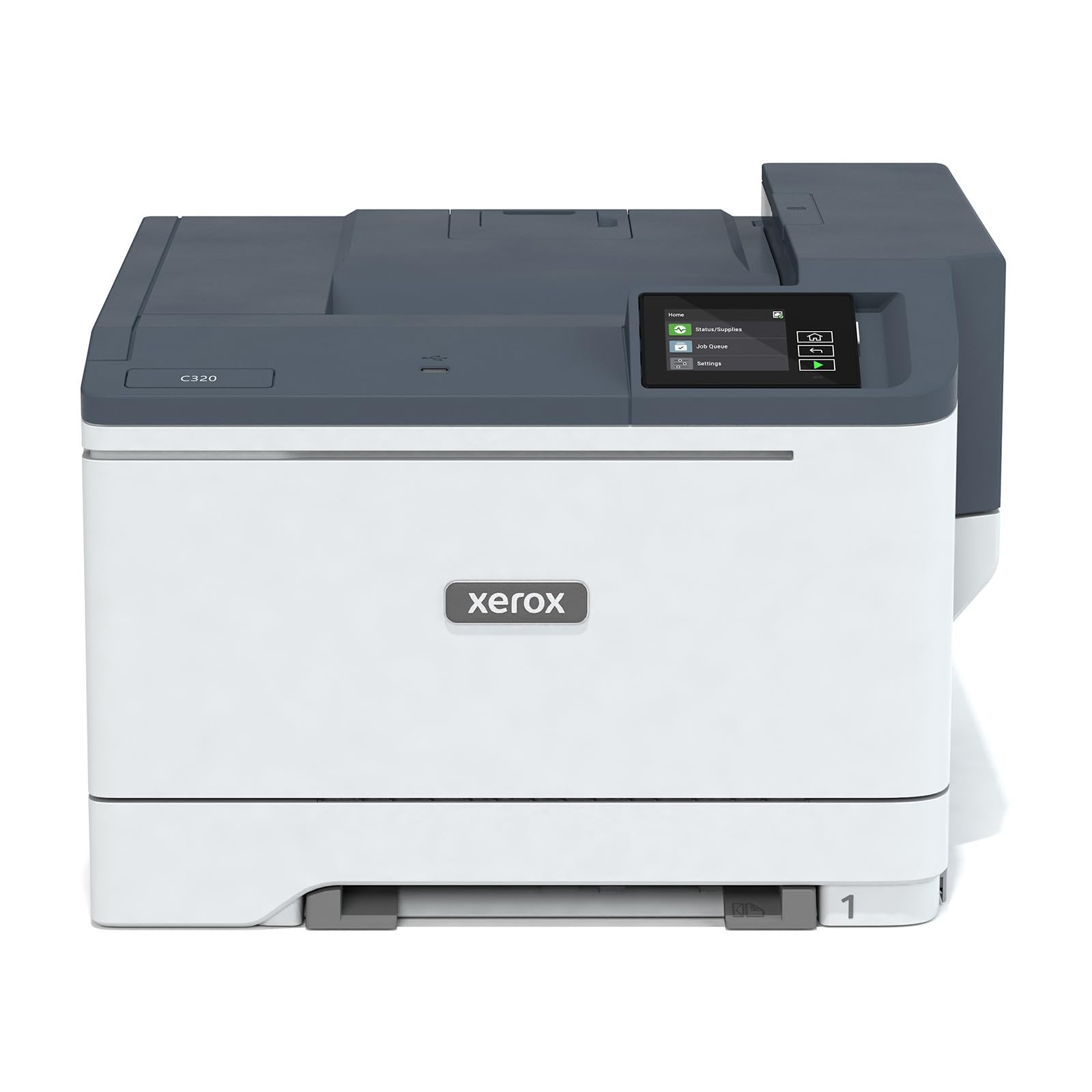
The Xerox C320dni offers an impressive 35 ppm print speed at an entry-level price point, making it one of the fastest budget color lasers available. It is a print-only device, so offices with scanning or copying needs will need a separate solution. The printer is designed for heavy-duty use, with a recommended monthly page volume of up to 2,500 pages.
Wireless connectivity includes built-in Wi-Fi, Apple AirPrint, and Mopria. The Xerox Easy Assist App simplifies smartphone setup. Automatic duplex printing is standard. The printer includes starter toner yielding 1,500 black pages and 1,000 color pages, which is generous for a budget model. High-yield cartridges are available to reduce ongoing costs for offices that exceed the starter yields.
User reviews reveal a split between those who find the printer excellent for the price and those who encounter significant defects. Positive reports highlight fast printing, good print quality, and easy wireless setup. Negative reports mention frequent glitches — phantom missing tray errors, false low-toner warnings, envelope feed misalignment, and a scanner that does not copy properly despite the listing omitting scanner functions. It is a high-speed option best suited for offices that primarily print and have a tolerance for occasional quirks.
Why it’s great
- Fast 35 ppm print speed at a very accessible price point
- Generous starter toner yield for both black and color cartridges
- High-yield toner options available to reduce cost per page over time
Good to know
- Print-only device — no scanning, copying, or fax functions
- Some units have reported glitches with tray detection and toner monitoring
- Replacement toner cost is very high; third-party options may be necessary to control expenses
FAQ
How much does it cost per page to run a color laser printer for a small office?
Is an all-in-one color laser printer more expensive to maintain than a black-and-white laser?
Can I use third-party toner cartridges in a new color laser printer?
What is the difference between a standard-yield and high-yield toner cartridge?
Do I need a duplex scanning ADF for my small office printer?
Final Thoughts: The Verdict
For most users, the best all-in-one color laser printer for small office winner is the Brother MFC-L3780CDW because it combines fast 31 ppm print speeds, a single-pass duplex ADF, and reliable wireless connectivity at a price that reflects genuine value for daily office work. If you want expandable paper capacity and the highest print speed, grab the Canon imageCLASS MF753Cdw. And for ultra-low running costs where laser speed is not critical, nothing beats the Canon MegaTank MAXIFY GX2020 for sheer economy per page.

Mo Maruf
I created WellFizz to bridge the gap between vague wellness advice and actionable solutions. My mission is simple: to decode the research and give you practical tools you can actually use.
Beyond the data, I am a passionate traveler. I believe that stepping away from the screen to explore new environments is essential for mental clarity and physical vitality.