Our readers keep the lights on and my smoothie glass nicely filled. As an Amazon Associate, I earn from qualifying purchases.
The modern home office demands a machine that can print, scan, copy, and fax without turning your desk into a tangled mess of cables and half-empty ink cartridges. Finding a unit that balances speed, print quality, and long-term operating cost under one roof is the real challenge.
I’m Mohammad Maruf — the founder and writer behind WellFizz. I’ve spent years analyzing the hardware specifications, ink economics, and real-world performance metrics that separate a smart long-term investment from a desk ornament that bleeds your wallet dry.
Whether you need crisp monochrome documents for client reports or vibrant color graphics for presentations, this guide cuts through the marketing noise to deliver the best aio printer options for every setup and budget.
How To Choose The Best AIO Printer
Selecting a multifunction printer starts with identifying your primary output: monochrome documents, color graphics, or occasional photos. This choice decides whether laser or inkjet technology suits your workflow and dictates your long-term ink or toner expenses.
Understanding Print Technology
Laser printers excel at sharp black text and high-volume monochrome jobs, delivering faster page-per-minute speeds and lower per-page costs when you print mostly documents. Inkjet models, especially cartridge-free supertank variants, offer superior color reproduction for graphics and photos, but may have slower output and higher per-page costs if you print infrequently.
Critical Specs for Daily Use
Pay close attention to automatic duplex printing (saves paper), an automatic document feeder (ADF) for multi-page scanning or copying, and wireless connectivity with dual-band support to avoid drop-offs. A responsive touchscreen interface and mobile app integration (AirPrint, Mopria, or proprietary apps) also reduce friction during everyday tasks.
Total Cost Per Page
The sticker price is just the entry fee. Cartridge-based printers often lure buyers with low upfront costs but charge heavily for replacement ink. Supertank models and high-yield laser toner cartridges lower the cost per page significantly, making them more economical for users who print more than a few hundred pages per month.
Quick Comparison
On smaller screens, swipe sideways to see the full table.
| Model | Category | Best For | Key Spec | Amazon |
|---|---|---|---|---|
| Brother MFC-L3720CDW | Color Laser | Vibrant color documents | 19 ppm color, 3.5″ touchscreen | Amazon |
| HP LaserJet Pro MFP 3101fdw | Mono Laser | High-volume office printing | 35 ppm, auto duplex, ADF | Amazon |
| Epson EcoTank ET-4950 | Supertank Inkjet | Extreme ink savings | 6,600 page black yield, ADF | Amazon |
| Brother MFC-L2820DW | Mono Laser | Compact home office | 34 ppm, 2.7″ touchscreen | Amazon |
| Canon Megatank GX1020 | Supertank Inkjet | Low-cost color printing | 3,000 page black yield, duplex | Amazon |
| HP LaserJet Pro MFP 3101sdw | Mono Laser | Small team productivity | 40 ppm, 250-sheet tray | Amazon |
| Epson Workforce WF-2930 | Color Inkjet | Entry-level home office | 10 ppm black, ADF, fax | Amazon |
| Canon PIXMA TS7720 | Color Inkjet | Budget home photo printing | 15 ppm black, 2.7″ touchscreen | Amazon |
| Xerox C325dni | Color Laser | High-speed color business | 35 ppm color, 4.3″ touchscreen | Amazon |
In‑Depth Reviews
1. Brother MFC-L3720CDW

The Brother MFC-L3720CDW is the most well-rounded color laser AIO printer for a small office that needs professional-quality documents and graphics. It outputs sharp text and vibrant color at 19 ppm for both black and color, with a 50-sheet auto document feeder that handles multi-page copies and scans efficiently. The 250-sheet adjustable paper tray supports letter and legal sizes, minimizing refill interruptions during busy workdays.
The 3.5-inch color touchscreen offers 48 customizable shortcuts, letting you bypass nested menus for frequent tasks like two-sided scanning or cloud uploads to Google Drive and Dropbox. Dual-band wireless (2.4 GHz and 5 GHz) provides reliable connectivity even in crowded office environments, and the Brother Mobile Connect app gives you remote monitoring of toner levels and print management.
User reports indicate consistently crisp output with no paper jams over extended use, and the four separate toner cartridges (TN229 series) allow replacement of only the color that runs out. Some users note that the fuser can cause slight paper curl on heavy stock, and the printer may stop mid-print when a toner chip reports a low level, even if residual toner remains. Overall, it remains a top-tier option for color document workflows.
Why it’s great
- Fast 19 ppm color output with sharp text and vivid graphics
- Intuitive 3.5″ touchscreen with 48 customizable shortcuts
- Reliable dual-band wireless and mobile app integration
Good to know
- Toner chip may halt printing before cartridge is truly empty
- Fuser can curl heavier paper stock
- Photo quality lags behind dedicated inkjet printers
2. HP LaserJet Pro MFP 3101fdw

The HP LaserJet Pro MFP 3101fdw is built for teams that rely on fast, high-volume monochrome printing. It churns out up to 35 pages per minute with automatic duplexing, and the 50-sheet auto document feeder accelerates scanning and copying of multipage contracts. HP Wolf Pro Security adds a layer of data protection with customizable settings, making it suitable for offices handling sensitive documents.
Intelligent Wi-Fi scans for the best connection, and the printer supports Ethernet, USB, Bluetooth, and mobile protocols including AirPrint and Android. The Economode feature effectively doubles cartridge life, with one user reporting over 20,000 pages in nine months with only two cartridge changes and zero jams. The setup process is straightforward, and the control panel with its LCD display provides clear navigation.
Some users experienced unreliable wireless setup and a few units failed early, with unresponsive panels and poor Wi-Fi connectivity. HP firmware updates can block third-party cartridges, so you must avoid updates if you use non-OEM toner. For offices that print primarily black-and-white documents at high volume, this machine delivers exceptional speed and low per-page cost when using Economode.
Why it’s great
- Blazing 35 ppm print speed with automatic duplexing
- Economode extends toner life significantly
- HP Wolf Pro Security for data protection
Good to know
- Firmware updates may block third-party toner cartridges
- Some units reported early hardware failure
- Wireless setup can be finicky for some users
3. Epson EcoTank ET-4950

The Epson EcoTank ET-4950 redefines cost efficiency with its cartridge-free supertank design, delivering enough ink to print up to 6,600 black pages and 5,500 color pages right out of the box. The uniquely keyed EcoFit bottles prevent messy refills and accidental color mix-ups, and the high-capacity 250-sheet paper tray paired with an auto document feeder supports uninterrupted productivity for home office users.
Print speeds reach 18 ppm for black and 9 ppm for color with zero warmup time, and the 2.4-inch color display provides clear navigation. The seventh-generation EcoTank technology is refined, with users reporting seamless wireless setup via the Epson Smart Panel app and impressive print quality for both documents and borderless photos. The visible ink tanks make it easy to monitor levels at a glance.
Initial setup can take up to 45 minutes due to ink charging and alignment steps, and the plastic chassis feels lighter than premium laser machines. Some users report a slight lag before the first print emerges from sleep mode. The blinking idle light can be distracting in a quiet room. For anyone printing more than 500 pages per month, the long-term ink savings make this an unbeatable choice.
Why it’s great
- Massive ink yield — up to 6,600 black pages included
- Simple, mess-free refill with keyed bottles
- Excellent print quality for documents and photos
Good to know
- Setup process takes up to 45 minutes
- Plastic build feels less robust than laser alternatives
- First print delay from sleep mode
4. Brother MFC-L2820DW

The Brother MFC-L2820DW packs laser-grade monochrome printing, scanning, copying, and faxing into a compact footprint ideal for small offices with limited desk space. It prints at 34 ppm with automatic duplexing, and the 50-sheet auto document feeder simplifies multi-page workflows. The 2.7-inch color touchscreen provides intuitive access to cloud apps like Google Drive and Dropbox.
Dual-band wireless (2.4 GHz and 5 GHz) plus Ethernet and USB give flexible connectivity, and the Brother Mobile Connect app allows remote printing and toner monitoring. Users report that this model is quieter than previous Brother lasers and produces sharp text with no command delays. The compact design leaves a small footprint without sacrificing paper capacity, with a 250-sheet input tray.
Setup instructions are sparse, and some users found the initial Wi-Fi configuration confusing without manually entering network details. Mobile printing via the app can feel clunky compared to native AirPrint. One user noted that the scanner on a previous Brother model failed after 11 years, suggesting long-term reliability but not indestructibility. For a budget-friendly monochrome laser that saves space, this machine delivers consistent performance.
Why it’s great
- Space-saving design with 34 ppm print speed
- Intuitive 2.7″ touchscreen with cloud app access
- Quiet operation and reliable wireless connectivity
Good to know
- Setup instructions are minimal and unclear
- Mobile printing experience is less smooth than direct AirPrint
- Print speed slightly slower than higher-tier models
5. Canon Megatank GX1020
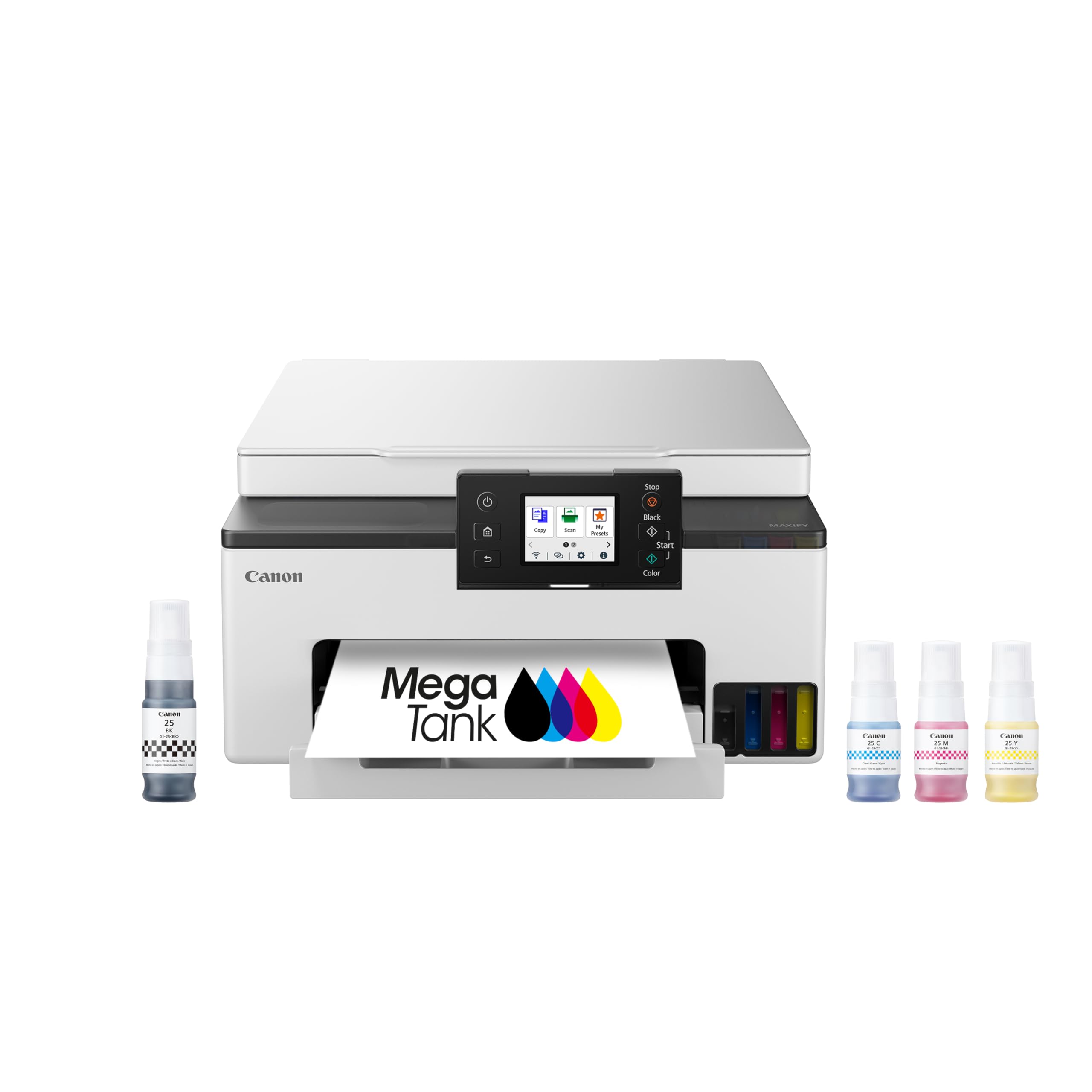
The Canon Megatank GX1020 is a cartridge-free supertank printer that cuts consumable costs dramatically, yielding up to 3,000 black and 3,000 color pages per ink bottle set. It supports print, copy, and scan functions with automatic duplex printing, and the 2.7-inch LCD color touchscreen simplifies navigation. The pigment-based GI-25 ink bottles deliver water-resistant prints suitable for documents and graphics.
Users consistently praise the copy quality, noting that originals and copies are nearly indistinguishable. The ink filling process is clean and foolproof, with no cartridge recognition issues. Setup is quick, though the automatic Wi-Fi detection sometimes fails, requiring a manual connection. The printer handles photo printing on plain paper better than many cartridge-based inkjets in its class.
AirPrint from iPad Pro may be unreliable, forcing users to rely on the Canon Print app for iOS. The 2.4 GHz Wi-Fi can drop signal beyond 50 feet, and 5 GHz is recommended for stable connections. Duplex printing works well, but the bottom paper tray must be manually extended. For users who print color documents and graphics regularly, the low cost per page makes this an excellent long-term investment.
Why it’s great
- Extremely low cost per page with included ink bottles
- Excellent copy quality with crisp text and graphics
- Easy, mess-free ink refill system
Good to know
- AirPrint can be unreliable with iPad Pro
- 2.4 GHz Wi-Fi range is limited
- Automatic Wi-Fi setup may require manual intervention
6. HP LaserJet Pro MFP 3101sdw

The HP LaserJet Pro MFP 3101sdw is a monochrome laser designed for small teams that need fast, reliable document output. It prints at up to 40 ppm with automatic duplexing, and the 250-sheet input tray plus a 50-sheet auto document feeder keep workflow moving without constant reloading. The introductory toner cartridge yields approximately 1,000 pages, and high-yield replacements are available for lower per-page costs.
Users highlight the effortless installation and crisp print quality, with one buyer purchasing three units after positive experiences. The HP Smart app enables wireless printing from any device, and the printer maintains stable connections even after power outages. The LED display offers straightforward navigation, and the build quality feels solid for a mid-range office machine.
The auto document feeder can jam when loaded with more than 25 sheets of paper, requiring you to stay within the recommended limit. HP firmware updates are designed to block generic toner cartridges, so you must skip firmware updates if you use third-party supplies. Some users reported Wi-Fi drops that were resolved by adjusting router settings. For a fast, dedicated monochrome printer, this model delivers reliable performance.
Why it’s great
- Top-tier 40 ppm print speed for high throughput
- Reliable Wi-Fi connection that reconnects after power loss
- Sharp, professional-quality black text output
Good to know
- ADF jams with more than 25 sheets
- Firmware updates block third-party toner cartridges
- Some users experienced intermittent Wi-Fi drops
7. Epson Workforce WF-2930

The Epson Workforce WF-2930 is an affordable entry-level color inkjet that packs print, scan, copy, and fax functions with a 30-sheet auto document feeder. It delivers 10 ppm for black and 5 ppm for color, making it suitable for light home office use. Automatic duplex printing helps reduce paper waste, and the 1.4-inch color display provides basic navigation.
Setup is straightforward via the Epson Smart Panel app, and the printer supports voice-activated printing through Alexa and Siri. Individual ink cartridges (T232 series) let you replace only the color that runs out. Users appreciate the reliable wireless connection and the overall value, with many noting that it simply works without fuss for everyday document tasks.
The flimsy plastic build feels cheap compared to laser alternatives, and the print speed is noticeably slower for color jobs. Epson firmware updates have been known to reject third-party cartridges, locking you into genuine Epson supplies. The scanner is adequate but lacks the resolution for detailed photo scans. For budget-conscious users who need basic color printing and scanning occasionally, this printer gets the job done.
Why it’s great
- Very affordable upfront cost for a color all-in-one
- Voice-activated printing with Alexa and Siri
- Individual ink cartridges reduce waste
Good to know
- Plastic build feels cheap and flimsy
- Firmware updates can block third-party ink cartridges
- Color print speed is slow at 5 ppm
8. Canon PIXMA TS7720

The Canon PIXMA TS7720 is a compact wireless inkjet that handles print, copy, and scan duties with automatic duplex printing. It prints at 15 ppm for black and 10 ppm for color, and the 2.7-inch LCD touchscreen offers intuitive control. The two-cartridge system (one black, one color) keeps replacement simple, and the printer supports a variety of media sizes including borderless photo paper.
Users praise the reliable wireless setup and the crisp text output for everyday documents. The compact footprint fits easily on a desk, and the Canon PRINT app integrates well with smartphones for mobile printing. Photo quality is decent for 4×6 prints but falls short of dedicated photo printers for larger sizes. The scanner is functional but lacks an automatic document feeder, limiting batch scanning.
Some users experienced frustrating connectivity issues, particularly with AirPrint on iOS devices, and the printer defaults to auto power-off after four hours, requiring a manual setting change to avoid waking it up. The ink consumption can be high, with one user reporting depleted cartridges in three days of moderate photo printing. For basic home printing with occasional photos, this is a capable and affordable option.
Why it’s great
- Compact design with 2.7″ touchscreen interface
- Automatic duplex printing saves paper
- Decent photo quality for small prints
Good to know
- No automatic document feeder for batch scanning
- Auto power-off setting can be inconvenient
- Ink consumption is high for photo-heavy use
9. Xerox C325dni

The Xerox C325dni is a high-speed color laser all-in-one that delivers 35 ppm for both black and color, making it one of the fastest options for busy offices. The 4.3-inch color touchscreen provides a modern interface, and the 250-sheet paper tray with automatic duplexing supports uninterrupted workflow. Built-in Wi-Fi, Apple AirPrint, and Mopria enable seamless mobile printing.
The starter toner yields 1,500 black and 1,000 color pages, and high-yield replacements lower the per-page cost for ongoing use. Users report excellent print quality on plain paper and card stock, with sharp text and vibrant color graphics. The duplex scanning and copying work reliably, and the compact footprint keeps output within the printer’s boundaries, saving desk space.
The web-based interface for setup and network configuration is clunky, requiring some patience to navigate. Toner cartridges are expensive, and some users found that the rated page yields were not achievable in real-world use, with color cartridges running out before the estimated 1,800 pages. Customer service has been criticized for being unhelpful with hardware or toner issues. For offices that prioritize speed and print quality over consumable costs, the C325dni is a strong contender.
Why it’s great
- Blazing 35 ppm color print speed
- Large 4.3″ touchscreen for easy navigation
- Excellent print quality on diverse media types
Good to know
- Toner cartridges are expensive and yield less than rated
- Web-based setup interface is clunky
- Customer support has received negative feedback
FAQ
Is laser or inkjet better for an AIO printer?
What does automatic duplex printing mean?
What is an automatic document feeder used for?
Final Thoughts: The Verdict
For most users, the best aio printer winner is the Brother MFC-L3720CDW because it combines fast color laser output, a responsive touchscreen, and reliable wireless connectivity at a mid-range price point. If you want extreme ink savings and print mostly color documents, grab the Epson EcoTank ET-4950. And for high-volume monochrome office printing, nothing beats the speed and per-page economy of the HP LaserJet Pro MFP 3101fdw.

Mo Maruf
I created WellFizz to bridge the gap between vague wellness advice and actionable solutions. My mission is simple: to decode the research and give you practical tools you can actually use.
Beyond the data, I am a passionate traveler. I believe that stepping away from the screen to explore new environments is essential for mental clarity and physical vitality.