Our readers keep the lights on and my smoothie glass nicely filled. As an Amazon Associate, I earn from qualifying purchases.
The moment you feed a premium glossy sheet into a photo-capable AIO, the difference between a snapshot and a frame-worthy print becomes brutally clear. Most multi-function printers can print a document, but a true AIO photo printer must lay down smooth, continuous gradations across 4×6 up to 8.5×11 without visible banding or dull highlights. The gap between a versatile home hub and a dedicated photo machine is measured in ink channels and dot placement accuracy.
I’m Mohammad Maruf — the founder and writer behind WellFizz. I’ve spent months analyzing print engine specs, ink chemistry, dot-rendering algorithms, and real-world fade resistance data across the major brands to separate the machines that truly handle photos from those that merely tolerate them.
Whether you need borderless 8×10 prints for portfolios or quick 4×6 snapshots for the fridge, finding the right best aio photo printer means balancing print quality against long-term ink economics and connectivity that doesn’t fight you every step of the way.
How To Choose The Best AIO Photo Printer
Buying a photo-capable all-in-one means navigating trade-offs between print quality, speed, paper handling, and the long-term cost of consumables. Here are the decision points that matter most for real photo output.
Ink Engine: 2-Cartridge vs 5-Ink vs 6-Ink
The simplest metric for photo quality is the number of separate ink channels. Entry-level 2-cartridge printers mix cyan, magenta, and yellow in a single tri-color cartridge, which wastes ink when you only need one color and can produce grainy skies or patchy skin tones. Printers with four or five individual tanks — especially those adding light cyan and light magenta — deliver smoother transitions and finer highlight detail. Six-ink systems like the Epson Claria Photo HD line add a fourth gray or second black, dramatically improving black-and-white photo depth.
Borderless Print Sizes and Paper Paths
Verify which paper sizes the printer supports borderless. Many budget AIOs only handle borderless 4×6, while mid-range and premium models print edge-to-edge on 5×7, 8.5×11, and sometimes 11×17 or 13×19. A rear straight-through paper path is critical for thick photo papers (above 250 gsm) because a curved feed path can cause creases or paper jams on glossy stock.
Cost Per Print: Cartridges vs Ink Tanks vs Dye-Sub
Standard ink cartridges yield 100–300 4×6 prints before replacement, costing roughly – per print. Supertank ink systems like Epson EcoTank drop that to around – per 4×6 by using refillable bottles that last 6,000+ pages. Dye-sublimation printers such as the KODAK Dock Plus bundle ink and paper in single kits, with a per-print cost of about – per 4×6 but with zero ink waste and no clogging risk. Calculate using your monthly photo volume.
Connectivity and App Integration
Wi-Fi Direct and Bluetooth are essential if you want to print from a smartphone without a router. Apple AirPrint and Mopria Print Service guarantee seamless output from iOS and Android without a proprietary app. Some HP models include AI-powered formatting that strips clutter from web pages before printing — a small but real convenience for project photos and school assignments.
Quick Comparison
On smaller screens, swipe sideways to see the full table.
| Model | Category | Best For | Key Spec | Amazon |
|---|---|---|---|---|
| Epson Expression Photo XP-970 | Premium Inkjet | Gallery-quality 8×10 color prints | 6-color Claria Photo HD ink set | Amazon |
| Epson EcoTank ET-4950 | Supertank AIO | High-volume photo & document printing | 6,600-page black / 5,500-page color ink bundle | Amazon |
| HP Envy Photo 7975 | Mid-Range Inkjet | Family photo & document all-in-one | Separate photo tray + auto document feeder | Amazon |
| Canon PIXMA TR160 | Portable Inkjet | Travel & on-the-go photo printing | 5-color hybrid ink system | Amazon |
| KODAK Dock Plus | Dye-Sub Photo | Instant 4×6 prints from smartphone | 4PASS dye-sublimation with lamination | Amazon |
| Brother DCP-L2640DW | Monochrome Laser | Black & white document speed | 36 ppm black-only laser engine | Amazon |
| Brother MFC-J1360DW | Value Inkjet | Home office with moderate photo needs | 20-sheet ADF + auto duplex | Amazon |
| HP Envy 6155 | Budget AIO | Casual everyday home printing | Dual-band Wi-Fi + AI web formatting | Amazon |
| Canon PIXMA TS7720 | Entry-Level AIO | Basic home printing with occasional photos | 2-cartridge system (1 black, 1 tri-color) | Amazon |
In‑Depth Reviews
1. Epson Expression Photo XP-970
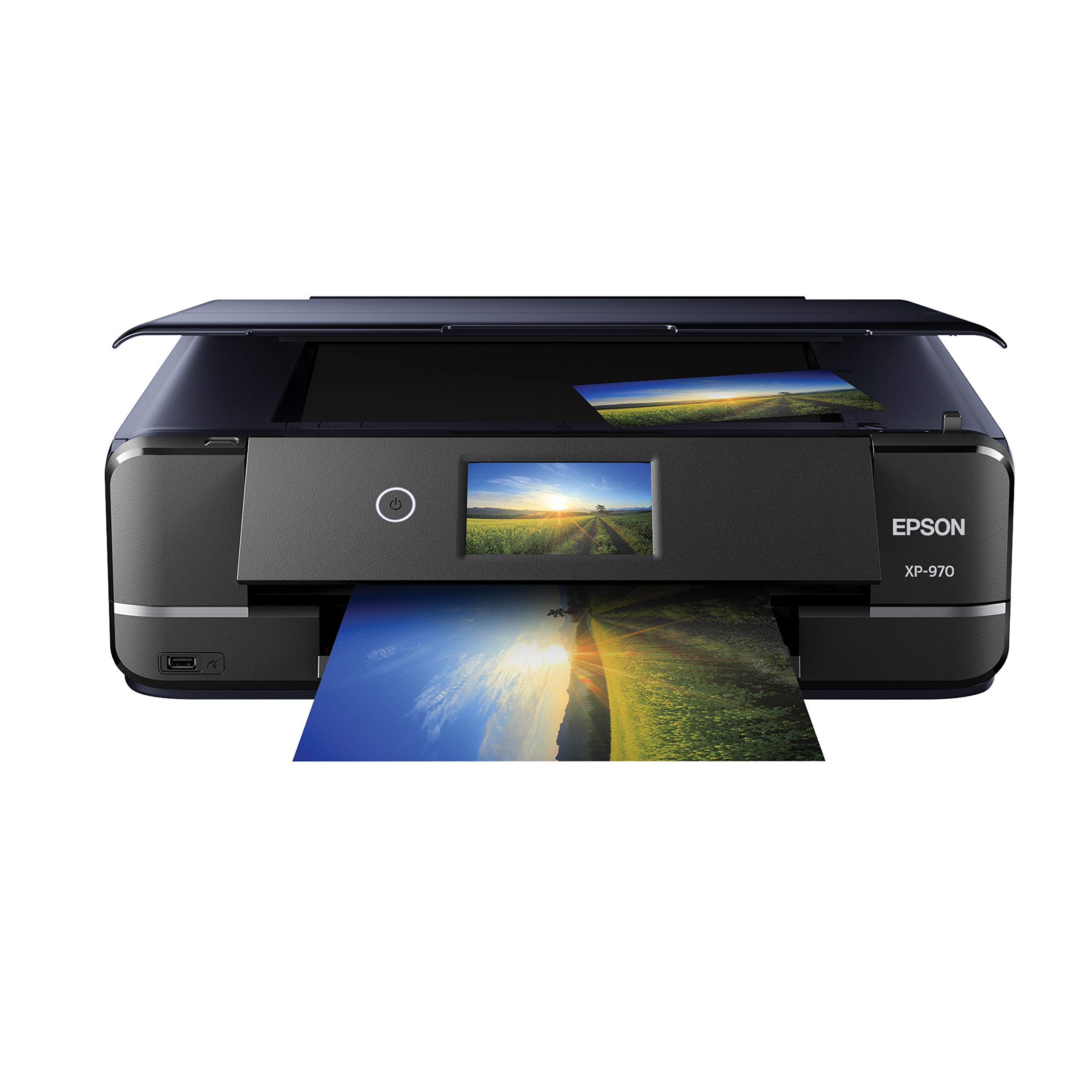
The XP-970 is the only AIO in this lineup with a dedicated 6-ink Claria Photo HD system — black, cyan, magenta, yellow, plus light cyan and light magenta — which eliminates the granularity you get from dithering with fewer colors. Print quality is genuinely gallery-grade: skin tones stay natural, skies hold smooth gradients, and 8×10 glossy sheets come out with zero visible banding when printed at the highest quality setting.
Setup is straightforward via the Epson website, and the fold-over scan lid holds thick originals flat without distortion. The scanner software auto-correction can over-darken prints, but that’s adjustable. The photo tray is the main ergonomic weak point — loading 4×6 sheets into the front slot feels finicky compared to a top-loading cassette — and the printer requires genuine Epson cartridges or it may experience print head clogs.
Ink dries on the print head during idle periods; heavy users report needing 3+ cleaning cycles after a week of non-use, which wastes roughly one-third of a cartridge. For weekly or daily photo output, this printer produces the best color fidelity of any AIO here, but it demands consistent use and a willingness to pay for OEM 6-color cartridges.
Why it’s great
- Six individual ink tanks deliver unmatched color gradation and highlight detail on glossy photo paper
- Wi-Fi setup is smooth once connected; prints beautifully from iPhone and Android via the Epson app
- Borderless printing on 8.5×11 and 4×6 with rich, true-to-original output
Good to know
- Photo tray design is awkward and requires careful paper alignment
- Ink tends to dry on the print head if the printer sits unused for a week or more
- Locked to genuine Epson cartridges, which adds up for high-volume users
2. Epson EcoTank ET-4950

The ET-4950 completely redefines the economics of AIO photo printing: the included ink bottles yield 6,600 black and 5,500 color pages before you need to buy a ink set. That’s equivalent to roughly 80 ink cartridges worth of printing, dropping the per-4×6 cost to pennies. Photo quality is good but not at the level of the 6-ink XP-970 — you lose the light cyan and light magenta channels, so fine highlight detail and skin tone smoothness are slightly less resolved on glossy paper.
Setup takes about 45 minutes and includes a 20-minute ink charging process. The machine itself is fast, with 18 ppm black and 9 ppm color, and the 250-sheet paper tray handles both plain and photo stock. The auto document feeder makes multi-page scanning seamless, which is missing from pure photo-oriented printers. Wireless connectivity is excellent, and the smartphone app works reliably for remote printing.
Print quality on plain paper is sharp and well-saturated, but on glossy 4×6 paper the output shows minor grain compared to dye-sub or 6-color inkjet. The ET-4950 is the right choice if you print heavy volumes of documents plus occasional photos and want ink costs that don’t spike with every holiday card season.
Why it’s great
- Ink bottles included with printer last over a year for most home users
- Fast monochrome speed at 18 ppm with zero warm-up time
- Auto document feeder, duplex, and 250-sheet tray make it a true office-ready AIO
Good to know
- Photo output on glossy paper shows visible grain versus 6-color or dye-sub printers
- Initial setup is lengthy — budget 45 minutes for ink charging and alignment
- Plastic body feels less substantial than premium Brother or Canon laser models
3. HP Envy Photo 7975

The Envy Photo 7975 lives in the sweet spot between a general-purpose AIO and a photo-focused machine. It includes a dedicated photo tray that holds 4×6 glossy paper separately from the main 100-sheet input tray, so you don’t have to swap paper when switching from documents to prints. Print quality is noticeably better than the entry-level TS7720 or Envy 6155 — colors are punchy and skin tones look natural rather than washed out.
Setup takes under 10 minutes using the HP Smart app, and the printer connects reliably to dual-band Wi-Fi. The auto document feeder handles multi-page scans and copies, a feature usually omitted from photo-centric AIOs. The Instant Ink trial gives you 3 months of automatic cartridge delivery, but after that the subscription fee applies unless you cancel. Print speeds are 15 ppm black and 10 ppm color, which is competitive for a photo-capable machine in this price tier.
The main compromise is the 4-cartridge system (CMYK) — you miss the light magenta and light cyan that high-end photo printers use for smooth transitions. Blacks and dark areas look solid, but wide sky or background gradients can show subtle banding. For a family that prints 50/50 documents and photos, the 7975 is a balanced, hassle-free pick that doesn’t require a second job to fund ink.
Why it’s great
- Dedicated photo tray eliminates paper-swapping hassle between document and photo prints
- Wi-Fi setup via HP Smart app is fast and reliable on dual-band networks
- Auto document feeder adds genuine scanning productivity for multi-page documents
Good to know
- 4-color ink system lacks light cyan/magenta for the smoothest photo gradients
- Instant Ink subscription is cost-effective but locks you into HP cartridge ecosystem
- Some units have reported scanning issues; HP support response quality varies
4. Canon PIXMA TR160

The TR160 is a print-only portable AIO that weighs 4.5 pounds and fits into a standard backpack. It uses Canon’s 5-color hybrid ink system — including a pigment black for sharp text and dye-based colors for vivid photos — which is rare in a device this portable. Print quality on 8.5×11 glossy photo paper is impressive for the size, with rich colors and minimal grain up to 4×6 prints.
Connectivity is flexible: Bluetooth, Wi-Fi, USB-C, and direct wireless mode work without a router. The Canon PRINT app is reliable for iOS and Android, though the printer sometimes drops the connection if you step away. The 1.44-inch OLED display is monochrome and basic — you can check ink levels and printer status, but you won’t want to navigate menus on it. The 50-sheet paper tray is adequate for travel but feels flimsy.
The major limitation is that there is no scanner or copier. If you need a true all-in-one, this isn’t it. Additionally, the optional battery pack adds cost and weight, but without it you’re tethered to a power outlet anyway. For a traveler who needs to print photo handouts, field reports, or family pictures on the road, the TR160 is unmatched in its size class.
Why it’s great
- 5-color ink system produces surprisingly rich prints for a 4.5-pound portable printer
- Bluetooth and wireless direct mode work without a router; USB-C adds flexibility
- Compact enough for a backpack; optional battery enables true untethered use
Good to know
- Print-only — no scanner, copier, or ADF, so it functions as a dedicated printer, not an AIO
- Connectivity can occasionally drop when switching between devices
- Black ink cartridge may need replacement before a full ream of paper is used
5. KODAK Dock Plus

The KODAK Dock Plus uses genuine 4PASS dye-sublimation technology, which applies three color layers plus a clear protective laminate onto 4×6 paper. The result is a print that resists fingerprints, water splashes, and UV fading better than any inkjet photo in this list. Each 4×6 takes about 55 seconds, and the output is consistently smooth with zero banding or ink nozzle issues because there are no liquid inks to clog.
Setup genuinely takes seconds: power on, open Bluetooth, and print from the KODAK Photo Printer app for iOS/Android. The dock design charges your phone while printing, which is a thoughtful touch. The paper/ink bundle system means you buy consumables as a single kit, so there’s no guessing which cartridge is low. However, this also means your per-print cost is roughly – per 4×6, which is higher than inkjet for the same size.
Color reproduction is slightly cool-toned compared to original screen images, and you lose shadow detail in dark photos because the dye-sub process compresses the dynamic range. The printer only handles 4×6 prints — no 5×7, no 8.5×11, no document printing. For pure snapshot printing from a smartphone or tablet, the Dock Plus is fast, fuss-free, and produces durable prints that last.
Why it’s great
- Dye-sub technology produces water-resistant, fingerprint-proof, smudge-free 4×6 prints
- Extremely simple setup and operation; no ink cartridges to manage or nozzles to clean
- Dock design charges phone during printing; prints are consistently smooth without banding
Good to know
- Limited to 4×6 prints only — no letter-size, no documents, no scanning or copying
- Per-print cost is higher than inkjet for 4×6 size; consumables are sold in bundled kits
- Color reproduction is slightly cool-toned versus the original screen image
6. Brother DCP-L2640DW

The DCP-L2640DW is a monochrome laser that produces zero color — no photo output at all. What it does deliver is reliable, lightning-fast black-and-white document printing at 36 ppm with automatic duplex and a 50-sheet auto document feeder. For a home office that prints high volumes of text documents alongside occasional photos from a dedicated photo printer, this is the perfect complementary machine. Toner economics are outstanding: the TN830XL cartridge yields roughly 3,000 pages at about 2 cents per page.
Setup is simple via the Brother Mobile Connect app or a USB connection. The 1.8-inch color touchscreen gives you direct access to copy, scan, and settings menus without needing a phone. Wireless connectivity works well on both 2.4 GHz and 5 GHz networks, and Ethernet is available for wired office setups. Users consistently report these units lasting 5–10 years with minimal maintenance.
The scanner software from Brother is functional but not polished — some users report freezing when saving to a PC folder. Paperport software included with the printer is widely considered weak. The physical unit is compact for a laser, but the fold-out paper tray output tab feels fragile. If your primary need is crisp documents and you already own a dedicated photo printer, this is a near-perfect companion.
Why it’s great
- Blazing fast monochrome printing at 36 ppm with automatic duplex as standard
- Extremely low running cost with high-yield TN830XL toner at ~2 cents per page
- 50-sheet auto document feeder makes multi-page scanning and copying effortless
Good to know
- Strictly monochrome — completely unsuitable for any color photo or document
- Scanning software has reported glitches when saving to PC; Paperport software is weak
- Paper output tray tab is flimsy and prone to breaking with frequent use
7. Brother MFC-J1360DW

The MFC-J1360DW is the most productivity-oriented value inkjet in this list. It packs a 20-sheet auto document feeder, automatic duplex printing, and a 150-sheet paper tray into a compact body that costs very little upfront. Print speeds of 16 ppm black and 9 ppm color are respectable, and the 1.8-inch color display makes navigation simple. Brother inkjet output is reliably crisp — text is sharp and colors are well-saturated for casual 4×6 photo prints and marketing materials.
Setup requires a smartphone and a 2.4 GHz Wi-Fi connection, which can be frustrating if your dual-band router doesn’t isolate bands easily. Once connected, the Brother Mobile Connect app works well for printing, scanning, and monitoring ink levels via Page Gauge. The ink is on the expensive side for replacement cartridges, though third-party options are available and generally work without firmware blocks.
The photo output on glossy paper is good but not outstanding — you lose some shadow detail with the 4-color CMYK ink set, and borderless printing is not available on all paper sizes. The paper output tray is a fold-out extension that feels like it could snap with heavy use. For a home office that prints a mix of documents and occasional color photos, this is a well-rounded, reliable workhorse with genuine productivity features.
Why it’s great
- 20-sheet ADF and auto duplex deliver real scanning and printing efficiency
- Sharp, well-saturated color output for documents and casual photo prints
- Brother Mobile Connect app provides solid mobile printing and ink monitoring
Good to know
- Requires 2.4 GHz Wi-Fi for initial setup; dual-band networks may cause frustration
- Replacement ink is expensive, though third-party options are available
- Paper output tray feels flimsy and may not hold up to heavy daily use
8. HP Envy 6155

The Envy 6155 is an entry-level AIO that handles the basics — print, copy, scan, and duplex — with a 2.4-inch color touchscreen and dual-band Wi-Fi that reliably auto-detects connection issues. Print speeds are modest at 10 ppm black and 7 ppm color, and photo output on glossy 4×6 paper is acceptable for casual snapshots but visibly less vibrant and less detailed than mid-range models. The HP Smart app is genuinely easy to use, and the AI web formatting feature actually works well for trimming ads and navigation from web pages before printing.
The 3-month Instant Ink trial is included with starter cartridges that have limited yield — roughly 120 black and 75 color pages. After the trial, you either pay a monthly subscription or buy HP 68-series cartridges at standard retail prices. The printer is firmware-locked to reject non-HP cartridges, which eliminates the budget option of refills or compatibles. Setup is generally fast, but a minority of users report multi-hour struggles with connectivity, especially on mixed-band networks.
Photo print quality is the biggest compromise: the 2-cartridge system (black + tri-color) means color mixing happens at the print head, wasting ink when you only need one color. Skin tones can look slightly artificial, and fine details in bright areas are lost. For a home that prints homework, forms, and the occasional 4×6 birthday party photo, the 6155 is functional and affordable up front, but the ink subscription cost erodes any upfront savings over 12 months.
Why it’s great
- Dual-band Wi-Fi with auto-issue detection makes wireless setup easier than most budget printers
- HP Smart app provides intuitive mobile printing and scanning from anywhere
- AI web formatting removes ads and clutter from web pages before printing
Good to know
- 2-cartridge system results in ink waste and less vibrant photo output versus 4+ tank models
- Firmware-locked against third-party ink; Instant Ink subscription becomes a long-term cost trap
- Connectivity setup fails for a meaningful minority of users; no auto document feeder
9. Canon PIXMA TS7720

The PIXMA TS7720 is Canon’s entry-level wireless AIO with a 2.7-inch color touchscreen and automatic duplex printing. For document printing and very occasional 4×6 photo snaps, it delivers passable results. Text is crisp for homework and office forms, and setup is reasonably quick via the touchscreen interface. The printer accepts a wide range of media, including envelopes and photo paper up to 8.5×11.
The 2-cartridge system is the core limitation: one black pigment cartridge and one tri-color cartridge that mixes cyan, magenta, and yellow. When you print photos, the print head has to cycle through multiple passes for color mixing, which slows output and causes noticeable banding in large dark areas. Several users report that 8×10 color prints come out muted and hazy compared to their expectations, especially on glossy paper. The scanner lacks an auto document feeder, so multi-page copying requires manual handling.
The default auto-off timer activates after four hours of inactivity, which frustrates users who want instant print access. You must manually toggle Auto Power On in the printer settings to change this. Ink consumption is surprisingly high for a 2-cartridge printer — several reviews note depleted cartridges within a few days of moderate photo printing. For simple home document printing with the occasional small photo, the TS7720 is adequate, but anyone prioritizing photo output should look at models with at least four individual ink tanks.
Why it’s great
- Large 2.7-inch color touchscreen provides intuitive navigation without a phone app
- Automatic duplex printing saves paper for document-heavy households
- Compact footprint fits well on a small desk or shelf
Good to know
- 2-cartridge system produces muted, hazy 8×10 photos; not suitable for serious photo work
- Default 4-hour auto-off timer is a daily annoyance; must be manually disabled in settings
- Starter ink cartridges run out quickly with even moderate photo printing
FAQ
Why do 4×6 photo prints look grainy on my 2-cartridge AIO printer?
How many 4×6 prints should I expect from a standard color cartridge set?
Is a photo AIO or a dedicated dye-sub printer better for print longevity?
Can I print borderless 8.5×11 photos on a budget AIO photo printer?
Final Thoughts: The Verdict
For most users, the best aio photo printer winner is the Epson Expression Photo XP-970 because its 6-color ink system produces gallery-grade 8.5×11 glossies that no other AIO in this price tier can match. If you want the lowest long-term ink cost and print documents alongside photos, grab the Epson EcoTank ET-4950. And for pure hassle-free 4×6 snapshots from your smartphone, nothing beats the KODAK Dock Plus.

Mo Maruf
I created WellFizz to bridge the gap between vague wellness advice and actionable solutions. My mission is simple: to decode the research and give you practical tools you can actually use.
Beyond the data, I am a passionate traveler. I believe that stepping away from the screen to explore new environments is essential for mental clarity and physical vitality.