Our readers keep the lights on and my smoothie glass nicely filled. As an Amazon Associate, I earn from qualifying purchases.
Specs are compiled from manufacturer listings and verified buyer reviews and can change over time — please confirm the key details on the product page before buying.
You know the old tower under the desk — that dusty box full of cables, fans, and hum that somehow always feels slower than it should. The best AIO computer kills all of that: the whole machine lives inside the monitor, so you get a clean desk, fewer wires, and one plug to the wall. But not every all-in-one delivers the speed or screen quality you are hoping for — especially when you pay for a name and end up with entry-level parts. This guide walks through eleven real options, from a powerhouse 2024 Apple iMac to budget Windows machines, and shows exactly where each one earns its spot — or falls short.
I’m Mohammad Maruf — the founder and writer behind WellFizz. This guide is built by comparing the manufacturers’ published specifications and the patterns across verified customer reviews, so you get each pick’s real strengths and trade-offs instead of marketing spin.
Whether you are buying for a home office, remote schoolwork, creative projects, or general family use, the right aio computer saves desk space and frustration — if you pick one whose processor and memory actually match what you do every day.
Our Picks at a Glance



How To Choose The Best AIO Computer
An all-in-one desktop is a bet on simplicity — you are trading future upgrade flexibility for a cleaner desk today. The processor, memory, and storage you pick at purchase are what you will live with for years, so the choice matters more than with a traditional tower.
Processor Tells You The Speed Ceiling
The CPU (the brain of the computer) decides how fast apps open, how many browser tabs you can stack before things stutter, and whether video editing is smooth or a slideshow. Entry-level chips like the Intel N5095 or N100 handle email, web browsing, and Office documents without drama. Step up to a Core i5 or Ryzen 5, and you get comfortable multitasking — a dozen tabs, a spreadsheet, and a video call all at once. The Core i7 and the Apple M4 are for heavy lifting: creative suites, 4K video, data analysis, and years of future-proof speed.
RAM Is Your Real Multitasking Limit
RAM is the desk space your computer works on — the more you have, the more programs it can keep open without piling things up and slowing down. The data shows a huge gap: an entry-level model ships with 4GB, while premium machines pack 32GB. For basic browsing and email, 8GB is the realistic minimum today. For serious work with many apps or heavy files, aim for 16GB or more. The difference between 4GB and 24GB is a six-times gap in memory — that is the jump between frustration and freedom.
Storage Type Dictates Boot Time and App Launches
Nearly every modern AIO uses a solid-state drive (SSD) instead of an old spinning hard drive. An SSD loads Windows in seconds and opens programs nearly instantly. All the models in this guide have SSDs with capacities from 128GB to 1TB. A 128GB drive fills up fast once you install a few apps and save some photos. 512GB is the balance for most households. 1TB gives you breathing room for large media files and games.
Screen Size, Touch, and Panel Quality
Most all-in-ones land at 23.8 or 27 inches diagonally. The larger screen makes split-window work and movie watching more comfortable. Touch capability adds convenience for scrolling and tapping, but it also raises the price. Look for an IPS (In-Plane Switching) panel — it keeps colors accurate when you are not sitting dead-center. Anti-glare coating cuts reflections in bright rooms, and Full HD (1920×1080) is the standard resolution across these picks, while the iMac offers a sharper 4.5K Retina display.
Quick Comparison
| Model | Best For | Processor | RAM / Storage | Screen Size | Amazon |
|---|---|---|---|---|---|
| Apple 2024 iMac M4★ Best Overall | Creative Powerhouse | Apple M4 (10-core) | 24GB / 512GB SSD | 24″ 4.5K Retina | Amazon |
| MECHAZER 23.8″ CurvedCurved Budget Pick | Budget Curved Display | Core i7 7700HQ (3.8 GHz) | 16GB / 512GB SSD | 23.8″ Curved LED | Amazon |
| Core Innovations 24″Entry Level | Price-Sensitive Buyer | Intel Celeron N5095 (2.9 GHz) | 4GB / 128GB SSD | 24″ FHD IPS | Amazon |
| Lenovo IdeaCentre 24″ | Dependable Home Office | Intel N100 (3.4 GHz) | 8GB / 512GB SSD | 23.8″ FHD IPS | Amazon |
| HP 24 Touchscreen | Versatile Family Use | Intel N100 (3.4 GHz) | 16GB / 1TB SSD | 23.8″ FHD Touch LCD | Amazon |
| ASUS V470 27″ | Performance + Touch | Core i5-13420H (4.6 GHz) | 16GB / 1TB SSD | 27″ FHD Touch IPS | Amazon |
| HP 27″ Ryzen 5 Touch | Large Touch for Home | Ryzen 5 7520U | 16GB / 1TB SSD | 27″ FHD Touch IPS | Amazon |
| HP 27″ Ryzen 7 AIO | Muscle for Productivity | AMD Ryzen 7 7730U | 32GB / 1TB SSD | 27″ FHD LED | Amazon |
| Lenovo IdeaCentre 27″ | Professional Workhorse | Core i7-13620H (4.9 GHz) | 32GB / 1TB SSD | 27″ FHD IPS | Amazon |
| Dell 27 (Core 7) | Premium Home Office | Intel Core 7 150U | 16GB / 1TB SSD | 27″ FHD IPS | Amazon |
| Dell 27 Touch (Core 7) | Top-Tier Speed + Touch | Intel Core 7 150U (5.5 GHz) | 32GB / 1TB SSD | 27″ FHD Touch IPS | Amazon |
In‑Depth Reviews
1. Apple 2024 iMac All-in-One Desktop Computer with M4 chip with 10-core CPU and 10-core GPU, 24-inch Retina Display, 24GB Unified Memory, 512GB SSD Storage; Silver
Our pick — over 4.5★ from 150+ verified ratings; the strongest balance of quality and price.
The only all-in-one that runs creative apps, games, and a dozen tabs without ever feeling hot or slow.
This iMac skips the tower entirely and packs an Apple M4 chip with a 10-core CPU and a 10-core GPU into a 9.77-pound frame that is strikingly thin. The 24-inch 4.5K Retina display pushes 500 nits of brightness — enough to work near a bright window — and covers up to 1 billion colors, which matters if you edit photos or watch high-quality video. The crowd favorite performance is clear: buyers report the iMac handles heavy multitasking — two websites, Canva, AI tools, image transfers, and many browser tabs — without lag or freezing. It even runs World of Warcraft fine, which is more than most all-in-ones can claim.
The 24GB of unified memory means you never have to think about closing apps to free up RAM. Everything stays open and responsive. The 12MP Center Stage camera follows your face during video calls, and the six speakers with Spatial Audio fill a room. It also has four Thunderbolt 4 ports, Wi-Fi 6E, and Bluetooth 5.3 — so connecting fast external storage or a second 6K display is easy. At 24GB of unified memory, it holds a six-times memory advantage over entry-level 4GB models, and the 512GB SSD provides fast boot times and app launches. The build quality is the best you will find in this category.
What Wins People Over
- Apple M4 chip delivers desktop-class performance with zero fan noise under load
- 24GB unified memory handles professional apps and dozens of browser tabs simultaneously
- 24-inch 4.5K Retina display with 500 nits brightness and 1 billion colors is industry-leading for an AIO
- Thunderbolt 4 ports, Wi-Fi 6E, and Bluetooth 5.3 provide future-proof connectivity
Consider This If
- macOS is not for everyone — if your workflow requires Windows-only software, this is not the right fit
- The 512GB SSD fills faster than a 1TB drive if you store many large video files locally
Reach for this when: you want the most powerful, quietest, and best-looking AIO on the market — especially for creative work, multitasking, and longevity.
Look elsewhere if: you need Windows for specific business or gaming software, or your budget is limited.
2. All-in-One Desktop Computer 23.8 Inch Curved Display Core i7 7700HQ(up to 3.8Ghz) 16GB RAM 512GB SSD Dual-Band WiFi Bluetooth 5.0 Complete with Wired Keyboard & Mouse
A curved display at this price is rare — and the Core i7 processor gives it surprising muscle for daily tasks.
The curved 23.8-inch LED screen on this MECHAZER machine wraps around your field of view slightly, which makes spreadsheets and browser windows feel more rich than a flat panel. Under the hood sits a Core i7 7700HQ processor that can turbo up to 3.8 GHz — a 31% higher clock speed than the 2.9 GHz Celeron found in some budget alternatives. That older i7 still has four cores and eight threads, which handles multitasking better than a modern entry-level chip. Combined with 16GB RAM and a 512GB SSD, this machine has enough memory and storage for home office work, web browsing, and media consumption without the slowdowns that come with 4GB machines.
The connectivity is generous for a budget-tier machine: dual-band WiFi, Bluetooth 5.0, four USB 3.0 ports, HDMI, VGA, and even a LAN port. It includes a wired keyboard and mouse, plus a fingerprint reader for quick sign-ins. That said, reliability is a mixed bag. While many owners mention easy setup and solid basic performance, a few units have exhibited random restarts shortly after unboxing — one reviewer noted the machine “restarting itself for no reason” within a day. The chipset is now a generation behind, so it does not match the efficiency or graphics of newer CPUs. For the price, though, the curved panel and 16GB RAM are tough to top.
Best for budget desks: If you want a large curved screen and enough RAM to keep multiple apps open without spending a lot, this delivers. The processor may be older, but it still outperforms entry-level chips in raw speed.
The honest trade-off: Quality control is inconsistent — a small number of units arrive with issues, so buy from a seller with a solid return policy.
Go for it if: you want a curved display and 16GB RAM without jumping into premium pricing.
skip it if: you need rock-solid reliability for a business critical workstation — invest in a brand with a longer support history.
3. 24″ All-in-One Desktop PC with Windows 11
If your budget stops here, this machine works for basic email and web browsing — but do not expect more.
This Core Innovations all-in-one runs on an Intel Celeron N5095 processor clocked at 2.9 GHz with just 4GB of RAM and 128GB of storage. The 24-inch 1920×1080 FHD IPS display is genuinely decent for the price — sharp text and good viewing angles. Setup is easy and owners who use it for light school work or a single web-based task find it acceptable for the money. It includes Windows 11, a mouse, and a keyboard, so you are ready to go from the start.
The honest picture, however, is sobering. The most-discussed aspect among buyers is functionality — and the feedback is mixed. Some find it works fine for basic needs, while others describe it as unusable. More concerning is the reliability: a notable number of customers note that these machines stop working within a year of light use. As one owner put it bluntly: “In under a year both of these computers have stopped working. They were only used for email and web based data input.” The screen also does not tilt, and the stand arrives at a fixed angle that some find awkward. For occasional light use by a single person, it could be acceptable. For anything more, the risk of early failure is real.
Best for occasional browsing: If you need a cheap second computer for checking email in the kitchen, this fits that narrow use case. The IPS display is the highlight.
The hard limit: 4GB RAM and 128GB storage mean you cannot run modern apps comfortably, and reliability reviews suggest it may not last.
Buy it for: a truly minimal budget where any functioning screen-and-computer combo is an upgrade over nothing.
Avoid it for: any daily driver role, small business use, remote work, or anything beyond a single browser window.
4. Lenovo IdeaCentre All-in-One Desktop Computer, 24″ FHD Anti-Glare IPS Display, 8GB RAM, 512GB PCIe SSD, Intel 4-Core Processor, Wi-Fi 6, Bluetooth 5.2, Windows 11 Home, Everyday Use AIO

A Lenovo with 8GB RAM and a 512GB SSD that does not break the bank — this is the baseline you should aim for.
The Lenovo IdeaCentre V100 runs on an Intel N100 processor with four cores that can turbo up to 3.4 GHz. That is a modest chip, but paired with 8GB of DDR4 RAM and a 512GB PCIe SSD, it reaches a real-world threshold: enough memory to keep several browser tabs and an Office document open without choking. The 23.8-inch IPS display is anti-glare, which cuts reflections in a bright room, and covers 99% sRGB, making colors look accurate from the start. Owners consistently praise its performance for basic tasks — it is fast enough for home office use, student work, and web browsing. Setup is straightforward, and the Eclipse Black finish looks clean on any desk.
Connectivity is modern: Wi-Fi 6, Bluetooth 5.2, and a USB-C port running at 10Gbps mean you can hook up fast external drives. There are also two USB-A 10Gbps ports, HDMI-out for a second display, and Gigabit Ethernet. The system supports up to 32GB total RAM, so you could upgrade later. One recurring owner note is that the USB ports on the back are awkwardly placed — you may need to reach around the monitor to plug things in. For the money, though, this Lenovo delivers the most balanced mix of performance, storage, and screen quality at the entry-level price tier.
Smart starting point: 8GB RAM and a 512GB SSD are the minimum for a usable modern experience. This machine handles everyday tasks without the frustration of 4GB models.
The catch: The N100 processor is fine for Office and browsing, but it lacks the power for video editing, design work, or heavy multitasking.
Choose this for: a home office or student computer where reliability and a 23.8-inch anti-glare screen matter more than raw power.
Pass if: you run demanding creative apps or want to game — look at the Core i5 or i7 models instead.
5. HP 24 Touchscreen All-in-One Desktop Computer for Home and School, Intel Processor, 23.8 FHD Display, 16GB DDR4 RAM, 1TB PCIe SSD, WiFi 6, Bluetooth 5.3, Windows 11 Home, Business AIO, White

A touchscreen with 16GB RAM and a full terabyte of storage — this one balances family features with real memory.
The HP 24 Touchscreen runs on an Intel N100 processor with 16GB of DDR4 RAM and a large 1TB PCIe SSD. The N100 is the same entry-level chip found in cheaper machines, but here it is paired with twice the RAM and ten times the storage of budget alternatives — 16GB RAM versus 4GB, and 1TB versus 128GB. That combination means you can keep many apps open and store years of family photos and videos without running out of space. The 23.8-inch touchscreen IPS display responds to taps and swipes, which makes navigating Windows 11 feel natural, especially for kids or anyone used to a tablet. Owners praise the performance for everyday use, the easy setup, and the “crisp” picture quality.
The HP True Vision 720p privacy camera with a physical shutter is a thoughtful addition for remote school and video calls. Wi-Fi 6 and Bluetooth 5.3 keep wireless connections fast and stable. The white design blends into a bright home office. The trade-off is the processor: the N100 is efficient but not powerful — it will not run demanding creative software or modern games smoothly. As owners note, this machine is “for basic use.” It arrives with an HP wired keyboard and mouse in white. If you want a touch-enabled family computer with enough RAM to feel responsive for years, this HP makes a strong case.
The Highlights
- 16GB RAM and 1TB SSD provide real multitasking headroom and generous file storage
- 23.8-inch touchscreen is responsive and makes everyday navigation quicker for all ages
- HP True Vision 720p privacy camera with shutter adds security for video calls
- Wi-Fi 6 and Bluetooth 5.3 deliver modern wireless connectivity
The Limits
- Intel N100 processor is entry-level — it handles Office and browsing but falters under heavy creative workloads
- Not suitable for gaming or professional video/photo editing
Best suited for: families and home-school setups where touch input, ample storage, and easy setup are the priorities.
Not for: power users who need a Core i5 or i7 for demanding apps — this HP is built for light-to-moderate daily use.
6. ASUS V470 All-in-One, 27” FHD Anti-Glare Touch Display, 16GB DDR5 RAM, 1TB SSD, Intel Core i5-13420H Processor, Windows 11 Home, Wired Keyboard and Mouse Included, V470VA-MS504T, Black

A 27-inch touchscreen with a true Core i5 processor — this is where entry-level ends and real performance begins.
The ASUS V470 jumps ahead of most budget AIOs with an Intel Core i5-13420H processor — an 8-core chip that can boost up to 4.6 GHz. That is a significant step up from the N100 or Celeron chips found in lower-priced models. Backed by 16GB of DDR5 RAM (the faster current-generation memory) and a 1TB PCIe SSD, this machine handles split-screen multitasking, photo editing, and even some light video work without hesitation. The 27-inch Full HD touchscreen has an anti-glare coating, so reflections do not interfere with your work. The extra screen real estate compared to 23.8-inch models makes a real difference when you have two documents side by side.
ASUS included thoughtful touches that owners love: a 1080p Full HD camera that tucks away into the chassis when not in use, AI Noise-Canceling Technology for clearer video calls, and speakers tuned by Dolby Atmos that deliver surprisingly rich sound. The side I/O includes a USB 2.0 port and a headphone jack, while the back offers three USB 3.2 Gen 1 Type-A ports, a USB-C port, HDMI-out, and Gigabit Ethernet. Wi-Fi 6E and Bluetooth 5.3 round out the wireless package. Owners consistently describe it as “quiet, fast, and good looking.” The only downer: the height is not adjustable, so you may need a riser or a stack of books to get the screen at eye level.
The performance balance: A true Core i5 processor, 16GB of DDR5 RAM, and a 1TB SSD meet the needs of most home office and creative users without overspending.
The ergonomic gap: No height adjustment means you should plan your desk setup — a monitor riser solves it easily.
Perfect for: anyone who wants a 27-inch touchscreen with real processing power for multitasking, design work, and video calls. The camera privacy is a bonus.
Not ideal if: you need adjustable height or plan to do heavy 4K video editing — the integrated graphics have limits.
7. HP 27″ FHD Touchscreen All-in-One Desktop Computer, Quad-Cores Ryzen 5 7520U, 16GB RAM 1TB SSD, Windows 11, Wireless Keyboard & Mouse, PLUSERA 8-in-1 Hub Included, White

A generous 27-inch touchscreen plus a Ryzen 5 processor and 16GB RAM — strong specs for a busy household.
This HP all-in-one uses an AMD Ryzen 5 7520U processor with four cores, paired with 16GB of RAM and a 1TB SSD. The Ryzen 5 handles everyday multitasking — web apps, Office, streaming, video calls — with a smoothness that entry-level Intel chips cannot match. The 27-inch touchscreen IPS panel has a three-sided micro-edge design and anti-glare coating, which helps in bright rooms. The large screen is the standout feature: owners call it “perfect for my classes and remote job” and appreciate that it does not eat up desk space like a tower setup would.
One thoughtful design choice is the pop-up privacy camera — it hides inside the chassis when not in use, which owners love for the sense of security it provides. The included wireless keyboard and mouse reduce cable clutter, and an extra PLUSERA 8-in-1 hub gives you more port options. The main trade-off surfaces in a few owners’ experiences: while most report excellent performance, a small number describe reliability issues, with one buyer reporting the touchscreen and peripherals failing intermittently. It is note the top aspects are positive (performance and touchscreen), but reliability draws mixed feedback. For a busy home or student setup where the 27-inch screen is the priority, this HP still delivers strong value — just ensure you have a solid return window.
Generous screen for the money: 27 inches of touch-responsive IPS panel at this price is uncommon, and the Ryzen 5 provides enough power for daily tasks.
The reliability question: Most units perform well, but a fraction of reviewers point out issues — buy from a retailer with a low-maintenance return policy.
Ideal for: a home or student computer where a large touchscreen and wireless peripherals create a clean, spacious desk.
Consider alternatives if: you need mission-critical reliability for a business — the mixed reliability feedback makes it a stronger fit for lower-stakes use.
8. HP 27 inch All-in-One Desktop PC, FHD Display, AMD Ryzen 7 7730U, 32 GB RAM, 1 TB SSD, AMD Radeon Graphics, Windows 11 Home, 27-cr0012 (2024)

32GB of RAM and a Ryzen 7 processor mean this desktop does not slow down — even when you push it hard all day.
The HP 27-cr0012 is built for serious productivity. The AMD Ryzen 7 7730U provides eight cores that tear through heavy multitasking, and 32GB of RAM means you can leave dozens of browser tabs, a spreadsheet, project management software, and a video call open simultaneously without hesitation. The 1TB SSD is 15 times faster than an old spinning hard drive, according to HP, so the system boots in seconds. The 27-inch FHD display has an ultra-slim three-sided micro-edge bezel with a 90% screen-to-body ratio, making the screen feel larger than its 27-inch diagonal. The pop-up privacy camera tilts and includes HP Video Controls and dual-array microphones with noise reduction.
Owners consistently describe this machine as “really powerful” and note that it “does not slow down or hesitate like my old one.” Setup is straightforward, and the white design is clean and modern. The honest concession is that a small number of units experience random shutdowns due to a thermal safety mechanism — the computer shuts off when it gets too hot and needs to be unplugged to reset. That is not a common complaint, but it is note if you run the machine in a poorly ventilated space. For the price, the Ryzen 7 with 32GB RAM is outstanding value for anyone who needs a workhorse for spreadsheets, data analysis, or creative multitasking.
What Makes It a Beast
- AMD Ryzen 7 7730U with 32GB RAM handles heavy multitasking and demanding productivity apps without lag
- 1TB SSD is among the fastest storage options in this category
- 90% screen-to-body ratio on a 27-inch display reduces bezel distraction
- Pop-up privacy camera with noise-reduction microphones is ideal for remote work
A Note of Caution
- An occasional unit triggers a thermal shutdown under sustained load — keep the vents clear and the area well-ventilated
- No touchscreen — a minor miss for some home users
Buy this for: power-hungry productivity — number crunching, large spreadsheets, research, or running multiple business apps at once.
Think twice if: you need a touchscreen for creative work or if your desk is cramped with poor airflow.
9. Lenovo IdeaCentre 27″ All-in-One Desktop PC, Intel Core i7-13620H 10-Core 4.9GHz, 32GB DDR5 RAM, 1TB PCIe SSD, 5MP Webcam, Harman Audio, WiFi 6, Windows 11 Pro, Luna Grey AIO 27

A 10-core i7 and 32GB of DDR5 memory make this Lenovo a serious machine for content creation and data work.
The Lenovo IdeaCentre 27 runs an Intel Core i7-13620H processor with 10 cores (6 performance, 4 efficiency) that can turbo up to 4.9 GHz. That is the kind of processor you buy when you know you will be editing video, rendering 3D models, or juggling enormous datasets. The 32GB of DDR5 RAM is the fastest memory standard currently available, and the 1TB PCIe SSD provides quick file access. The 27-inch IPS display covers 99% sRGB with 300 nits brightness, and the anti-glare coating plus hardware low blue light technology keeps your eyes comfortable during long sessions. Harman-tuned speakers deliver premium audio for video calls and entertainment.
For professional use, the Windows 11 Pro operating system adds business-grade security features like BitLocker and remote desktop support. The 5MP webcam with dual microphones captures sharp video, and connectivity includes WiFi 6, Bluetooth 5.2, USB-C at 10Gbps, USB-A at 10Gbps, HDMI-in and HDMI-out 2.1, and RJ-45 Ethernet. Owners in business settings describe these Lenovo machines as “quick and reliable” and note they “get the job done.” The Luna Grey finish with an adjustable stand is professional-looking. The only real question is if you need that much processing power — if your daily tasks max out at Word and Chrome, you are paying for silicon you will never use.
Professional-grade power: The 10-core i7-13620H and 32GB DDR5 RAM are overkill for browsing but perfect for creators, analysts, and power users.
One considerate caveat: The integrated Intel UHD Graphics works for standard displays but is not built for heavy gaming or 3D rendering — you would want a dedicated GPU for that.
Reach for this if: you work with demanding apps — video editing, 3D modeling, software development, or massive spreadsheets — and need a machine that keeps up for years.
pass on it if: your workload is limited to email, web, and Office — you can spend less and get identical everyday performance.
10. Dell 27 All-in-One Desktop pc27-FHD, Intel Core 7 Processor 150U, 16GB DDR5 RAM, 1TB SSD, Windows 11 Home, Onsite Service, White

Dell brings its signature build quality and an innovative keyboard-storage stand to a clean 27-inch all-in-one.
The Dell ec27250 runs on an Intel Core 7 processor 150U — a chip designed for efficient performance in slim desktops. It comes with 16GB of DDR5 RAM and a 1TB SSD, which is a well-balanced configuration for a home office or professional workstation. The 27-inch FHD IPS display covers 99% sRGB and delivers 50% higher contrast than the previous generation, according to Dell. A 5MP IR camera with HDR adjusts to tricky lighting, and the display includes ComfortView Plus, which reduces harmful blue light emissions without making the screen look yellow. The 66% higher refresh rate over the last generation makes scrolling feel noticeably smoother.
The standout design feature is the stand: it holds your keyboard underneath the display, hiding clutter when not in use. Dual Bluetooth speakers with Dolby Atmos deliver clear, room-filling audio. Dell includes 1 Year Onsite Service — a technician comes to your home if a hardware issue cannot be fixed remotely — plus 6 months of Dell Migrate for transferring files. Owners consistently praise the easy setup and note that the “design is compact and was very easy to setup.” The screen does not tilt much, and you may need to adjust your chair height. Overall, this Dell offers the reassurance of a major brand with onsite service support.
Brand confidence: Dell’s 1 Year Onsite Service is rare in the AIO category and gives confidence that a repair is a call away.
The honest trade-off: 16GB RAM is adequate for most, but power users who run heavy apps simultaneously will prefer the 32GB configuration in the Dell model below.
Ideal for: buyers who want a reliable, serviceable 27-inch desktop from a major brand with on-site support — especially if you value a clean desk.
Not for: creative professionals who need a touchscreen or more than 16GB of RAM for video editing or 3D work.
11. Dell 27 All-in-One Desktop Computer, Core 7 150U(Up to 5.5 GHz), 27″ FHD IPS Touch Display, Windows 11 Pro, 32GB DDR5, 1TB SSD, Wireless KB & Mouse, NVIDIA GeForce MX570A GDDR6, Wi-Fi 6E
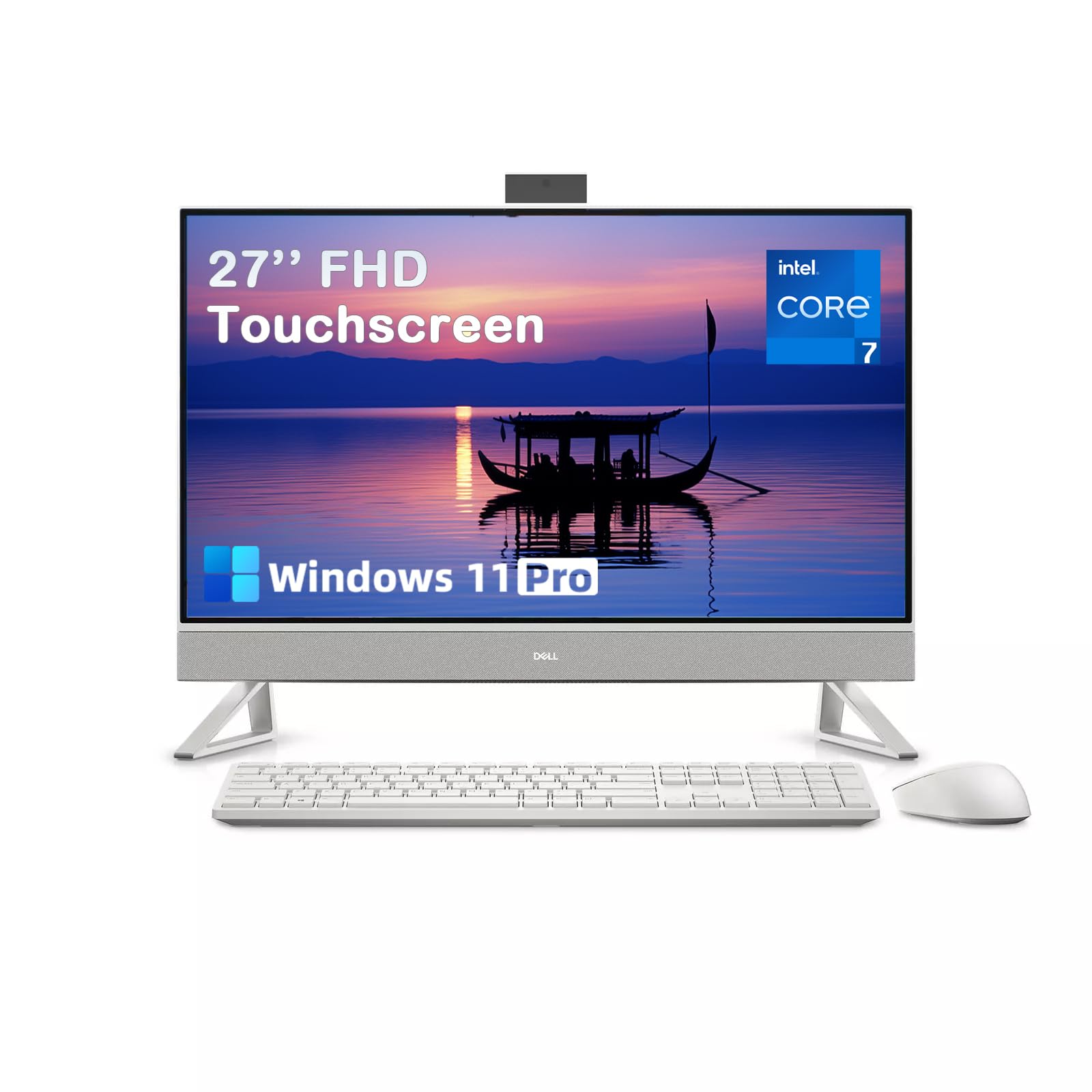
The only AIO with a dedicated NVIDIA graphics card — this is the one for creative work and casual gaming on a big touchscreen.
This Dell 27 is the most powerful all-in-one on this list after the iMac, and the only one with a dedicated GPU — the NVIDIA GeForce MX570A with 2GB of GDDR6 memory. That dedicated graphics chip makes a real difference: video timelines scrub without stutter, photo filters apply instantly, and you can play modern games at reasonable settings. The Intel Core 7 processor 150U can boost up to 5.5 GHz and is paired with 32GB of DDR5 RAM and a 1TB PCIe NVMe SSD. The 27-inch Full HD touchscreen runs at a 100Hz refresh rate — 66% higher than the previous generation — with a 1500:1 contrast ratio and 99% sRGB color accuracy.
The 5MP IR pop-up camera with HDR keeps you looking good in low-light video calls, and the dual speakers with Dolby Atmos spatial audio fill a room. The innovative keyboard-storage stand hides the included wireless keyboard underneath the display, keeping the desk spotless. Dell uses recycled materials in the build, and packaging is 97% recycled or renewable content. Owners call it “extremely fast and reliable” and describe it as “versatile, fast, good looking.” No AIO in this class is fully user-upgradable, so consider buying the configuration with the RAM and storage you need from the start. This Dell justifies its premium with a tangible performance edge.
Why It Leads the Windows Pack
- NVIDIA GeForce MX570A dedicated GPU is unique in this category — enables light gaming and smooth creative work
- 32GB DDR5 RAM and 1TB SSD provide top-tier multitasking and storage
- 27-inch touchscreen with 100Hz refresh rate and 99% sRGB delivers fluid, color-accurate visuals
- Innovative keyboard-storage stand and Wi-Fi 6E complete a premium packageInnovative keyboard-storage stand and Wi-Fi 6E complete a premium package
The Premium Trade-Offs
- Not user-upgradeable after purchase — configure RAM and storage at checkout
- Pop-up camera mechanism is fragile; treat it gently during daily use
Choose this for: the buyer who wants the most powerful Windows all-in-one available — it handles creative apps, gaming, and heavy multitasking better than any other non-Apple AIO here.
Pass if: your budget does not stretch to premium pricing, or you do not need a dedicated GPU for your daily tasks — you can get excellent performance for less.
Understanding the Specs
Processor (CPU) — The Brain
The CPU (central processing unit) determines how quickly your computer responds to every click, keystroke, and command. Entry-level chips like the Intel Celeron N5095 or N100 are fine for email and web browsing. A Core i5 or Ryzen 5 handles multitasking comfortably. Core i7, Core i7-13620H, and Apple M4 chips handle demanding creative work and data analysis without slowing down. The clock speed (measured in GHz) tells you how fast each core works, but the number of cores matters too — more cores mean better multitasking.
RAM — The Workspace
RAM (Random Access Memory) is the short-term memory your computer uses to keep apps and browser tabs active. More RAM means you can keep more programs open at once without the system slowing down. The data shows a huge spread: 4GB is barely enough for a single browser, 8GB is the realistic minimum today, 16GB handles heavy multitasking, and 32GB is future-proof for power users. The type also matters — DDR5 is faster and more efficient than DDR4.
Storage — SSD vs. HDD
All the AIOs in this guide use solid-state drives (SSDs), which load Windows in seconds and launch apps nearly instantly. An SSD is dramatically faster than an old spinning hard drive (HDD). The capacity you need depends on your files: 128GB fills up fast with a few apps and photos; 512GB is the comfortable balance; 1TB gives room for games, videos, and large project files. You cannot easily upgrade the storage in most AIOs, so buy enough from the start.
Display — Size, Touch, and Panel Type
Most all-in-ones have 23.8-inch or 27-inch screens. The 27-inch models give you more room for split-window work. Touch capability adds convenience for scrolling and tapping but raises the price. IPS (In-Plane Switching) panels keep colors consistent from wide viewing angles. Anti-glare coatings cut reflections. The Apple iMac uses a 4.5K Retina display with 500 nits brightness, which is sharper and brighter than the standard 1920×1080 Full HD panels found on most Windows AIOs.
FAQ
Can I upgrade the RAM or storage in an all-in-one computer later?
How much RAM do I really need for an AIO desktop in 2024?
Is an all-in-one computer good for gaming?
What is the difference between an Intel Core i5 and an Intel Core i7 in an AIO?
Does an AIO computer need a separate tower or CPU box?
Can I use an all-in-one as a second monitor for a laptop?
Is Windows 11 Home enough, or do I need Windows 11 Pro?
How long should an all-in-one desktop computer last?
Are touchscreen AIO computers worth the extra cost?
What does Wi-Fi 6E give me that regular Wi-Fi 6 does not?
Final Thoughts: The Verdict
For the majority of shoppers, the best AIO computer winner is the Apple 2024 iMac M4 because it delivers class-leading performance, a gorgeous 24-inch 4.5K Retina display, and silent operation in a thin design — supported by overwhelmingly positive owner feedback. If you want a 27-inch touchscreen with true multitasking power, the ASUS V470 with its Core i5-13420H and 16GB DDR5 RAM is the smart mid-range pick. And for the power user who needs a dedicated NVIDIA graphics card, maximum RAM, and a 100Hz touch display, the Dell 27 Touch (Core 7) is the one to reach for.
How We Picked
We do not accept paid placement. Every pick is matched to a real buyer and a real use-case; we do not hands-on test units.
Sources & Methodology
Specifications: manufacturer listings and product documentation. Review insights: verified customer reviews, as of July 2026. Pricing: not shown on this page (it changes often); check the current price via the retailer link.
As an Amazon Associate, WellFizz earns from qualifying purchases. This does not affect which products we feature.
Related Guides

Mo Maruf
I created WellFizz to bridge the gap between vague wellness advice and actionable solutions. My mission is simple: to decode the research and give you practical tools you can actually use.
Beyond the data, I am a passionate traveler. I believe that stepping away from the screen to explore new environments is essential for mental clarity and physical vitality.