Our readers keep the lights on and my smoothie glass nicely filled. As an Amazon Associate, I earn from qualifying purchases.
Getting into garment decoration or personalized gift making on a budget means finding a printer that can handle dye-sublimation ink without clogging after a week of sitting idle. The market is flooded with converted standard inkjets, purpose-built machines, and super-tank systems, each with different trade-offs in print resolution, ink cost per page, and long-term reliability. A wrong choice here doesn’t just waste cash — it produces faded transfers that ruin blanks and kill your profit margin on every project.
I’m Mohammad Maruf — the founder and writer behind WellFizz. I’ve spent hundreds of hours analyzing printhead technologies, ink formulation chemistry, and real-world user failure patterns across the full spectrum of sublimation-ready hardware.
Every recommendation here is based on consistent transfer quality, ink efficiency, and the machine’s ability to handle the specific demands of heat-activated dye migration. This guide cuts through the noise to help you find the best affordable sublimation printer for your exact project volume and workspace.
How To Choose The Best Affordable Sublimation Printer
Sublimation printing requires ink that turns into gas under heat and bonds with polyester polymers. A standard document printer will fail here because its pigment ink sits on top of the fabric rather than bonding into it. You need a machine designed — or reliably converted — to handle water-based sublimation dye without corroding internal components or producing inconsistent color density across the transfer sheet.
Printhead Technology & Clog Resistance
The printhead is the heart of any sublimation system. Epson’s Micro Piezo technology uses a piezoelectric crystal to fire ink droplets, which handles the thinner viscosity of sublimation ink better than thermal bubble-jet systems found in many HP and Canon models. A piezo head is less prone to clogging when the printer sits unused for a week, and it typically delivers more consistent droplet placement across 5760 x 1440 dpi prints. For affordable options, look for a machine with a proven piezo printhead that has an established track record in the sublimation community rather than a brand-new, unproven architecture.
Ink Delivery System & Bottle Capacity
Cartridge-based sublimation printers like the Sawgrass SG500 use small-volume cartridges (31–41 ml) that cost significantly more per milliliter than bottle-fed super-tank systems. A super-tank machine such as the Epson EcoTank ET-2800 holds enough ink for roughly 4,500 black pages or 7,500 color pages from a single set of bottles — translating to dramatically lower cost per transfer over the first year of operation. However, converted super-tanks require manual filling with third-party sublimation ink, and not all conversion kits seal properly. Evaluate whether the convenience of a dedicated cartridge system justifies the higher per-milliliter cost against the volume of transfers you realistically produce each month.
Paper Handling & Media Size
Most affordable sublimation printers cap out at 8.5 x 14 inches, which limits your transfer to roughly an 11 x 14 inch platen on a heat press. If you plan to produce full-back designs on adult XXL t-shirts, you need a printer with a bypass tray that accepts longer media — some models support banner-length paper up to 47 inches. Also check whether the paper path is straight or curved: a straight-through rear feed handles thicker sublimation paper (125–150 gsm) without jamming, while a curved path from a front tray often causes misfeeds on stiffer substrates.
Quick Comparison
On smaller screens, swipe sideways to see the full table.
| Model | Category | Best For | Key Spec | Amazon |
|---|---|---|---|---|
| Sawgrass SG500 | Dedicated Pro | Professional-grade print quality with anti-clog tech | Anti-Clog; 31ml SubliJet UHD inks included | Amazon |
| Epson SureColor F170 | Dedicated Compact | Reliable OEM sublimation with PrecisionCore printhead | PrecisionCore; 150-sheet dust-resistant tray | Amazon |
| Brother Sublimation Printer | Dedicated User-Friendly | Hobbyists wanting Artspira app integration | Fast speeds; self-cleaning printhead | Amazon |
| Pinckney Super-Tank (Renewed) | Converted Pro | High-volume use with ADF & Ethernet | 5760 x 1440 dpi; 250-sheet tray | Amazon |
| Pinckney Super-Tank (White) | Converted Standard | Large ink bottles for extended use | 5760 x 1440 dpi; 127ml black ink | Amazon |
| Cartridge-Free Super-Tank (New) | Converted Entry | Budget-conscious beginners testing sublimation | 70ml ink bottles; wireless super-tank | Amazon |
| Epson EcoTank ET-2800 | Convertible Base | DIY conversion with massive ink capacity | 4500 pages black; 7500 pages color | Amazon |
| OIIEE 5-in-1 Heat Press | Heat Press | Heat transfer pressing for blanks up to 15×15 | 360° swing-away; 15×15 plate | Amazon |
| Canon PIXMA TR160 | Portable | Travel printing with optional battery | 5-Color Hybrid Ink; 1.44″ OLED | Amazon |
In‑Depth Reviews
1. Sawgrass SG500 Sublimation Printer Bundle
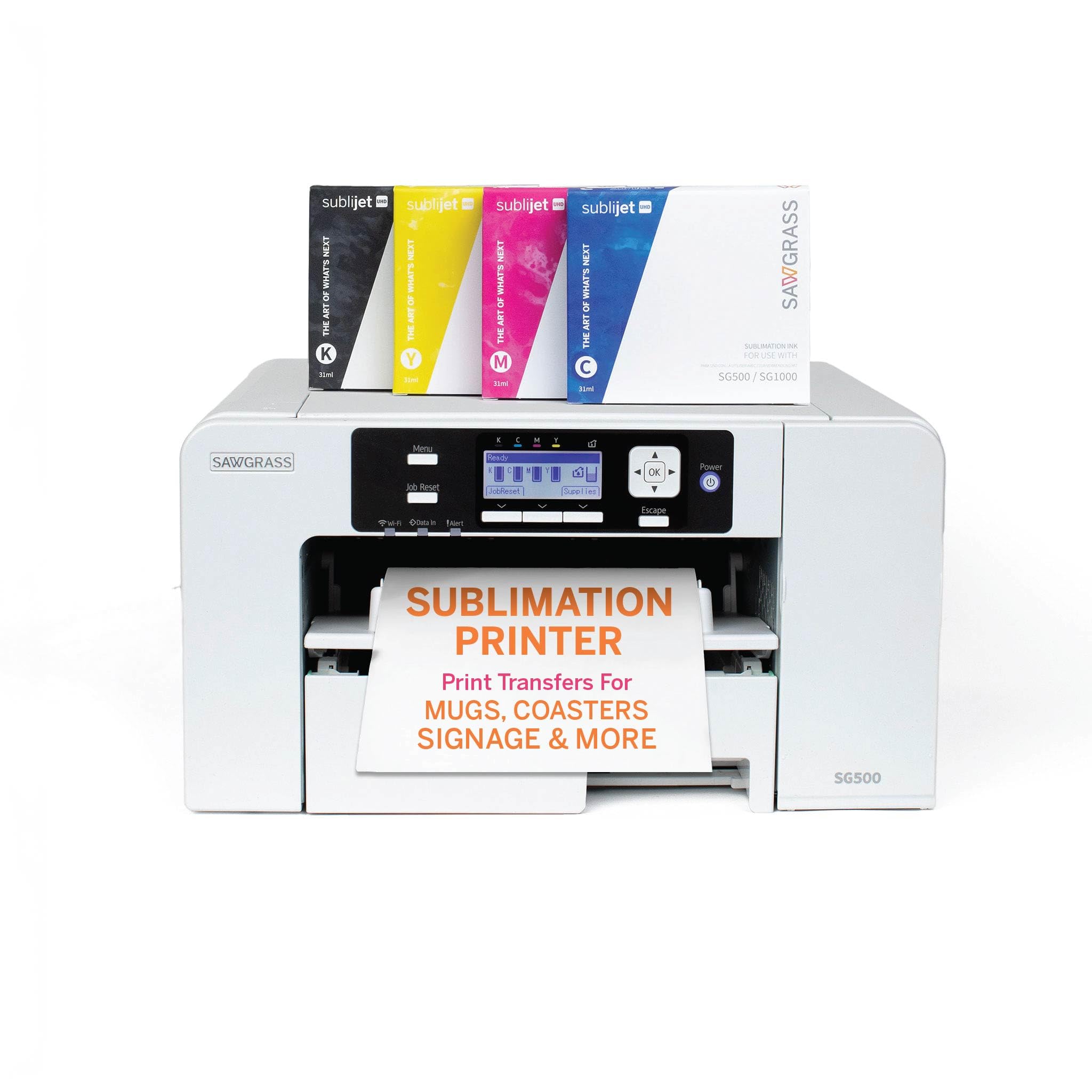
The Sawgrass SG500 is one of the few printers engineered exclusively for dye-sublimation from the ground up, not a repurposed document machine. Its built-in anti-clog technology performs automatic printhead maintenance cycles that keep the nozzles clear even if you go a week between transfer runs — a genuine advantage over converted systems that require manual head cleaning or risk permanent clogging. The included SubliJet UHD ink set (31 ml per cartridge) delivers consistent, rich CMYK color across both hard substrates like ceramic mugs and soft substrates like polyester fabric, and users consistently report that final transfer results are noticeably more vibrant than what they achieved with converted EcoTank models.
Print speed tops out at 25 pages per minute in black and 10 ppm in color, making it fast enough for a small business handling multiple orders per day. The maximum media size is 8.5 x 14 inches through the standard tray, but the bypass tray accepts banner-length media up to 8.5 x 51 inches — crucial for producing full-length back designs on large t-shirts. The downside is that the proprietary Sawgrass ink cartridges are significantly more expensive per milliliter than third-party bulk ink for super-tank systems, so heavy-volume users may find their per-transfer ink cost challenging to keep competitive.
Setup is more involved than a consumer printer — installation requires creating a MySawgrass account, downloading the Print Utility software, and running a full calibration cycle — but once configured, the SG500 produces professional-grade results with minimal tweaking. The Wi-Fi connectivity is reliable, and the printhead auto-maintenance feature means you don’t have to worry about ink drying up during short breaks. For users who have fought with clog-prone converted printers, the SG500 represents a genuine upgrade in reliability and color fidelity.
Why it’s great
- Dedicated sublimation printhead with anti-clog maintenance prevents expensive downtime
- Bypass tray handles banner media up to 51 inches for large apparel designs
- SubliJet UHD ink produces consistent, vibrant color across all polyester-coated substrates
Good to know
- Proprietary cartridge system creates a much higher per-milliliter ink cost than converted super-tanks
- Max standard print width is 8.5 inches, which limits single-sheet transfer size
- Setup process requires online account creation and specialized software installation
2. Epson SureColor F170 Dye-Sublimation Printer

The Epson SureColor F170 is a dedicated sublimation printer that ships with OEM Epson sublimation ink and the PrecisionCore printhead — the same printhead technology used in Epson’s professional large-format printers. The PrecisionCore design uses a thin-film piezoelectric actuator for extremely precise droplet placement, which translates to sharp text edges and smooth gradient transitions in photographic transfers. The ink set is OEKO-TEX ECO PASSPORT certified, meaning it meets strict safety standards for textile contact, so you can confidently sell garments to customers with sensitive skin without worrying about heavy-metal residue.
One standout design choice is the dust-resistant closed paper tray that holds 150 sheets. Sublimation paper is more absorbent than standard copy paper, and airborne dust settling on the paper surface can create white spots in solid color fills during transfer. The closed tray minimizes this risk, saving you from having to wipe down every sheet before loading. The auto-stop ink bottles also prevent overfilling — each bottle has a keyed nozzle that stops dispensing when the tank reaches capacity, eliminating the messy spill risk that plagues third-party refill kits on converted printers.
The main trade-off with the F170 is speed: it prints at roughly 1 page per minute in both black and color, which means a 50-transfer order will take nearly an hour of continuous printing. It also lacks duplex printing, and the unit is print-only — no scanner or copier — so you need a separate device for digitizing designs. Users consistently praise the F170 for its out-of-box reliability and vibrant results, but note that Wi-Fi connectivity can be finicky and often requires a wired Ethernet connection for consistent operation.
Why it’s great
- OEM Epson ink and PrecisionCore printhead deliver industry-leading color accuracy and clog resistance
- Dust-resistant paper tray and auto-stop ink bottles reduce contamination and mess
- OEKO-TEX certified ink is safe for textile applications and apparel sales
Good to know
- Extremely slow print speed — roughly 1 ppm — which limits production volume
- Print-only unit with no scanner or copier, requiring external digitizing equipment
- Wi-Fi connectivity issues often force users to rely on Ethernet connection
3. Brother Sublimation Printer (SP1)

Brother’s entry into the sublimation space is a dedicated printer that comes pre-loaded with genuine Brother sublimation ink (cyan, magenta, yellow, black) and includes a starter pack of sublimation paper. The self-cleaning printhead cycles automatically when the printer is powered on, which significantly reduces the risk of nozzle clogging compared to older conversion models. Users who have switched from converted EcoTank machines consistently describe the print quality as noticeably more vibrant, with deeper black density and smoother skin tones in photographic designs — likely because the ink formulation and printhead are designed as a unified system rather than a retrofit.
The Artspira mobile app serves as the primary design interface, offering over 100 pre-loaded sublimation design templates and the ability to import up to 20 saved images. The workflow is straightforward: design or select an image in Artspira, transfer it to the printer, output the transfer sheet, and press it onto your blank using a heat press (sold separately). The app’s design library is useful for beginners who lack graphic design skills, though experienced users may find the limited import count and mobile-only interface restrictive when working on complex multi-layer designs that require desktop software.
Fast print speeds allow you to produce multiple transfers quickly — the rated speeds suggest roughly 10 ppm in color, which is significantly faster than the Epson F170. The rear feed tray accepts thicker sublimation paper without jamming, and the front tray handles standard media up to 8.5 x 14 inches. Some users report occasional connectivity issues with the Artspira app, but Brother’s chat support is generally responsive. The main drawback is that the ink cartridges hold 41 ml each — larger than Sawgrass’s 31 ml but still more expensive per millimeter than super-tank refill bottles.
Why it’s great
- Self-cleaning printhead reduces clog risk and maintenance effort for intermittent users
- Includes 100+ Artspira design templates, lowering the barrier to entry for beginners
- Fast print speed and rear paper feed handle production runs efficiently
Good to know
- Artspira app is mobile-only, limiting advanced design capabilities for experienced users
- Cartridge-based ink delivery costs more per milliliter than super-tank systems
- Some users experience app connectivity issues that require chat support to resolve
4. Pinckney Super-Tank Printer with Sublimation Ink (Renewed)

The Pinckney Super-Tank (Renewed) starts life as an Epson ET-3850 or ET-3843 all-in-one and is filled with Pinckney-branded sublimation ink before being sold as a ready-to-use sublimation machine. This approach gives you the massive ink capacity of a super-tank system — 127 ml black plus 85 ml each of cyan, magenta, and yellow — combined with business-class features like a 250-sheet paper tray, an automatic document feeder for scanning multi-page originals, and an Ethernet port for wired networking. The print resolution goes up to 5760 x 1440 dpi using Epson’s Micro Piezo printhead, which provides excellent detail for photo-realistic transfers.
The renewed unit comes with all four ink bottles pre-filled and tested, so you avoid the potential pitfalls of doing a DIY conversion yourself — incorrect ink formulation, air bubbles in the line, or damage from using the wrong ink viscosity. The ADF and Ethernet connection make this model particularly suited for a small business where multiple users need to send prints from different workstations, or where scanning design templates quickly is part of the daily workflow. The automatic duplex printing also saves paper when printing design proofs before committing to a final transfer.
Reliability is the biggest variable with renewed machines. While many users report the unit works well straight out of the box, others experience persistent Wi-Fi disconnections, paper jams in the duplex path, or streaky prints that require multiple head cleanings. The 1-year limited warranty provides some peace of mind, but the return process for a heavy printer can be cumbersome. If you have the technical patience to troubleshoot occasional connectivity issues, this machine delivers the lowest per-transfer ink cost of any printer on this list.
Why it’s great
- Pre-filled with sublimation ink, avoiding messy DIY conversion risks and filling errors
- 250-sheet tray and ADF support high-volume business workflows
- Automatic duplex printing saves paper during the design proofing stage
Good to know
- Renewed condition means variable reliability — some units suffer persistent connectivity issues
- Heavy and bulky form factor makes it difficult to relocate or return
- Wi-Fi performance may require a wired Ethernet connection for stable operation
5. Pinckney Super-Tank Printer with Sublimation Ink (White)

The white version of the Pinckney Super-Tank printer follows the same conversion formula as the renewed model but starts from an Epson ET-2800 base, which is a more compact and slightly less feature-rich platform. You still get the same 5760 x 1440 dpi Micro Piezo printhead and the same generous ink quantities — 127 ml black and 85 ml each of cyan, magenta, and yellow — but the paper tray holds fewer sheets (roughly 100) and there is no ADF or duplex printing. What you gain is a smaller footprint that fits on a standard 24-inch-deep desk without overhang, making it a better choice for home crafters who don’t need office-class paper handling.
Fill-wise, the auto-stop nozzles on the ink bottles match the ET-2800’s tank inlets perfectly, so you can top up without syringes or mess. Users who received units with properly sealed ink bottles report excellent print quality and vivid color after heat pressing, with deep black fills and no banding even on large-area transfers. The wireless connectivity is straightforward for most users — the process involves installing the Epson driver, connecting to Wi-Fi via the printer’s LCD panel, and then sending prints from a phone, tablet, or laptop.
The consistency of the conversion is the main concern. Several users reported receiving a unit where a black ink bottle had leaked during shipping, creating a sticky mess inside the printer compartment that required extensive cleanup. Others noted that the print results were duller than expected until they ran multiple head cleaning cycles, suggesting that the printhead may have been stored with residual ink from the conversion process. Despite these variability issues, the majority of buyers rate the printer highly for its affordability and ink capacity, making it one of the most popular entry points into sublimation.
Why it’s great
- Massive 127 ml black ink bottle yields hundreds of transfers before needing a refill
- Compact footprint fits comfortably on a standard desk without taking over the workspace
- 5760 x 1440 dpi resolution delivers sharp, banding-free results on detailed designs
Good to know
- Ink bottle seals can fail during shipping, causing leaks that require extensive cleanup
- No ADF, duplex printing, or Ethernet port — strictly a basic all-in-one feature set
- Some units require multiple head cleaning cycles before achieving optimal print density
6. Cartridge-Free Super-Tank Printer with Sublimation Ink (New)
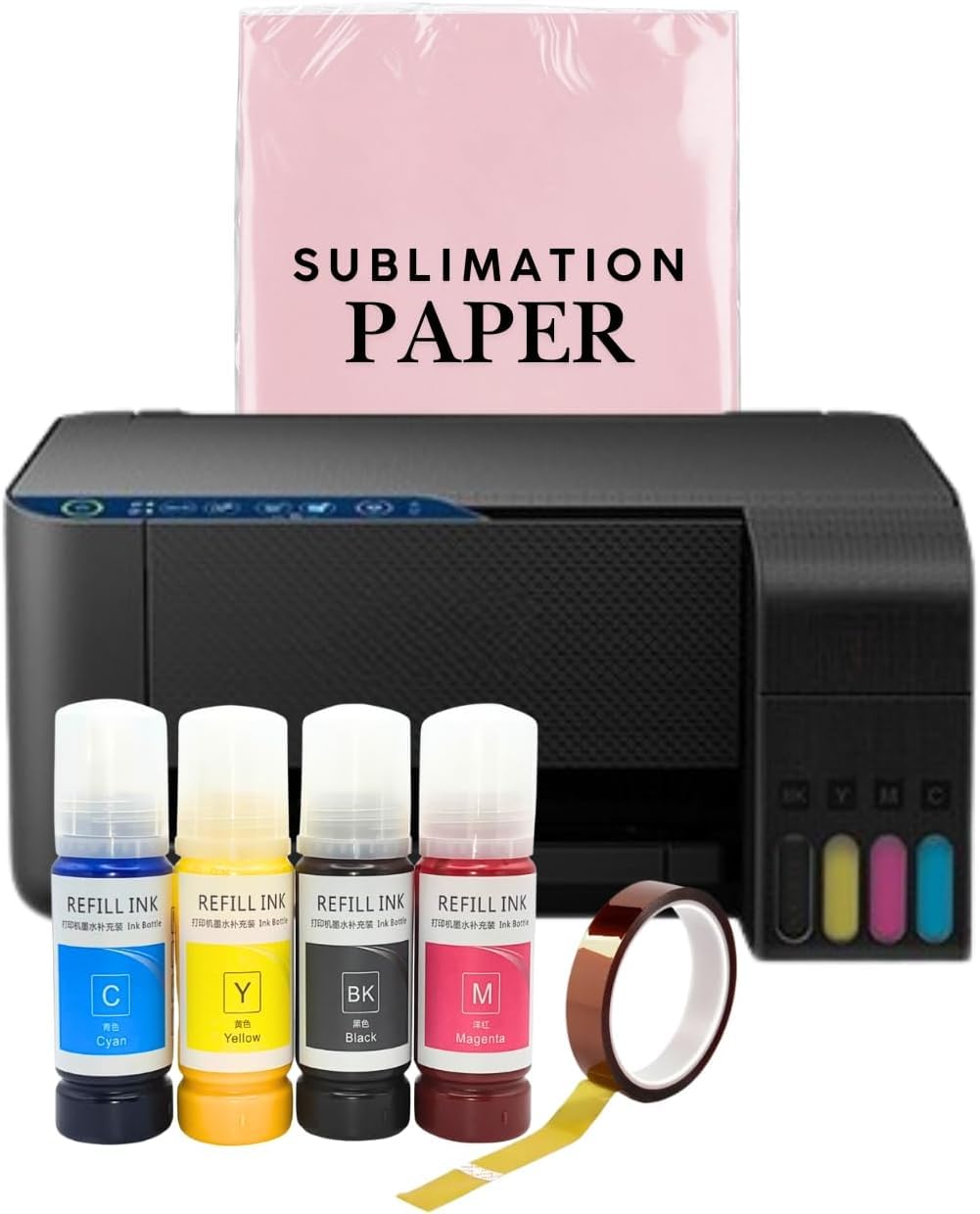
This unbranded super-tank printer is marketed explicitly as a sublimation conversion machine, arriving with four 70 ml bottles of sublimation ink (black, cyan, magenta, yellow) and a wireless all-in-one base unit with scanner and copier. The 70 ml bottle size is smaller than the Pinckney offerings but still represents many more prints than a typical cartridge system — roughly 3,000 to 4,000 pages per color depending on design coverage. The auto-fill nozzle on each bottle is keyed to prevent cross-contamination between colors, and the refill process requires no syringes or squeezing, reducing the mess factor for beginners.
The base printer appears to be an Epson EcoTank variant or a direct clone, using the same Micro Piezo printhead architecture that handles sublimation ink well. The maximum print resolution should reach 5760 x 1440 dpi, though the listing does not explicitly confirm this. The unit prints, scans, and copies, making it a fully functional all-in-one when you aren’t producing sublimation transfers. Because this is a new product with no customer reviews available, the long-term reliability and actual color quality after transfer remain unverified.
The main value proposition here is price: you get a full sublimation setup — printer, ink, and all-in-one functionality — for a lower initial investment than most dedicated sublimation machines. The trade-off is that you are betting on an unreviewed conversion job with no track record. The ink quality, color consistency across batches, and printhead longevity are unknowns. Buyers who want the lowest possible entry cost and are comfortable troubleshooting should consider this option, but anyone who needs reliable daily performance should look at the Pinckney or Sawgrass models instead.
Why it’s great
- Lowest entry price for a complete sublimation-ready printer and ink bundle
- All-in-one functionality includes scanner and copier for general home office use
- Auto-fill ink nozzles reduce spill risk and simplify the refill process
Good to know
- Zero customer reviews mean print quality and long-term reliability are unconfirmed
- 70 ml ink bottles are smaller than competitors, requiring more frequent refills
- Unbranded conversion may use inconsistent ink formulations across batches
7. Epson EcoTank ET-2800 Wireless All-in-One (Conversion Base)

The Epson EcoTank ET-2800 is the most popular base platform for DIY sublimation conversions because of its proven Micro Piezo printhead, massive ink capacity, and low purchase price. In stock form, it ships with pigment-based EcoTank ink in four bottles that together yield up to 4,500 black pages or 7,500 color pages — far more than any cartridge-based system. Converting it to sublimation requires draining the pigment ink, flushing the tanks and printhead with distilled water or cleaning solution, and refilling with water-based sublimation ink, typically from a third-party supplier like Cosmos or Hiipoo.
The conversion process itself is straightforward for someone comfortable with basic maintenance, but it does carry risk. Residual pigment ink can contaminate the sublimation ink and cause dull transfers, and the fill holes on the ET-2800 are small enough that spills are common. Once converted successfully, the ET-2800 prints vivid photo-quality transfers at 5760 x 1440 dpi, handling both letter-size and legal-size media. The integrated scanner and copier remain fully functional after conversion, and the compact footprint — 14.8 x 13.7 x 7.4 inches — fits in most craft rooms without issue.
The most common user frustration is connectivity. The ET-2800 relies on Epson’s software suite, which has a reputation for unreliable Wi-Fi detection — multiple users report having to manually assign a static IP address or connect via USB to get the printer working consistently. Once connected, the printer produces excellent results with no banding or streaking, and users who have made it past the first few hundred prints report that the ink economy alone justifies the effort. This option is best for the tinkerer who values low operating costs over plug-and-play convenience.
Why it’s great
- Micro Piezo printhead handles sublimation ink viscosity better than thermal inkjet alternatives
- Low cost per page after conversion makes it economical for high-volume transfer production
- Compact, all-in-one design saves desk space while retaining scanner and copier functions
Good to know
- Requires manual conversion with pigment ink flushing — not a plug-and-play sublimation solution
- Wi-Fi connectivity is unreliable and often requires manual IP address configuration
- Risk of ink contamination during conversion can cause permanent color quality issues
8. OIIEE 5-in-1 Heat Press Machine (Companion Tool)

No sublimation printer setup is complete without a heat press, and the OIIEE 5-in-1 offers five different pressing attachments in one unit: a 15 x 15 inch flat platen for t-shirts and tote bags, an 11 oz mug press, a hat press, and two plate attachments for 6-inch and 8-inch substrates. The 360-degree swing-away arm allows the upper heating element to rotate fully away from the lower platen, which means you can position a decorated t-shirt or a bulky hoodie without burning your hands on the hot upper plate. The slide-out base tray also provides a flat workspace directly in front of the press, reducing the need to hold items in place while the arm descends.
The digital control panel uses an LCD display to set temperature (up to 482°F) and timer, and an audible alarm signals when the pressing cycle ends. The double-tube heating element paired with a Teflon-coated surface distributes heat evenly across the 15 x 15 platen, which is essential for avoiding cold spots that result in patchy sublimation transfer. The built-in overheat protection circuit automatically shuts off the machine if voltage spikes or temperatures exceed safe limits — a practical safety feature given that many craft rooms share outlets with other high-draw equipment.
The main trade-off for the multi-function design is build quality consistency. The included attachments swap out easily, but the press itself is heavy — roughly 33 pounds — and the instruction manual lacks detail on optimal time and temperature settings for different substrates. Users who crafted before buying this press found their own settings (around 275°F for 10–15 seconds on polyester t-shirts) produced better results than the manufacturer’s generic recommendations of 338°F for 25 seconds. For the price, the 5-in-1 capability is a genuine value for a beginner who wants to experiment with different product types without buying separate presses.
Why it’s great
- Five pressing attachments in one box cover t-shirts, mugs, hats, and plates for less than a single dedicated press
- 360-degree swing-away arm prevents burns during material positioning
- Double-tube heating element with Teflon coating produces even heat distribution across the 15×15 platen
Good to know
- Manufacturer’s recommended time and temperature settings are often too aggressive for polyester blends
- Heavy at 33 pounds and the instruction manual lacks detailed substrate-specific guidance
- Heats up slower than higher-end single-function presses, which can slow down production runs
9. Canon PIXMA TR160 Wireless Portable Printer

The Canon PIXMA TR160 is a lightweight, ultraportable inkjet printer weighing only 4.5 pounds with dimensions small enough to fit inside a standard backpack. It uses a 5-Color Hybrid Ink System — dye-based for vibrant photo colors and pigment-based for sharp black text — and prints up to 8.5 x 11 inch borderless pages at 9 ppm black and 5.5 ppm color. The 1.44-inch monochrome OLED display provides real-time status updates on ink levels and connectivity without requiring a phone app. Wireless Direct Mode lets you print by connecting your device directly to the printer’s Wi-Fi signal even when there is no router available, which is useful for craft fairs or on-location event printing.
Important for the sublimation context: the PIXMA TR160 is NOT a sublimation printer. It uses standard hybrid ink that is not designed to convert into gas under heat, and the thermal inkjet printhead architecture used by Canon does not handle sublimation ink viscosity reliably. Attempting to use sublimation ink in this printer will likely cause immediate printhead clogging, uneven color distribution, and potentially permanent damage to the internal ink delivery mechanism. The printer is included in this guide as a comparison point for portable document and photo printing only.
The optional LK-72 battery (sold separately) enables truly wireless operation without a power cord, making it ideal for mobile use at vendor events where you need to print pricing sheets or product labels on the spot. Users praise the easy setup via the Canon PRINT app, the compact form factor, and the very low ink consumption for standard document printing. The main drawback is the small ink cartridge capacity — users report running through cartridges relatively quickly compared to super-tank systems — and the lack of duplex printing. This machine is a companion device for sublimation business logistics, not a transfer printer itself.
Why it’s great
- Extremely portable at 4.5 pounds — fits in a backpack for on-the-go event printing
- Wireless Direct Mode allows printing without a router, ideal for mobile vending setups
- 5-Color Hybrid Ink produces crisp black text and vibrant borderless photo prints
Good to know
- NOT compatible with sublimation ink — using dye-sublimation ink will damage the printhead
- Small ink cartridges run out quickly, making it expensive for high-volume printing
- No duplex printing or scanner functionality — strictly a single-function print device
FAQ
Can I use any Epson EcoTank printer for sublimation after conversion?
How often should I print to prevent the printhead from clogging in a sublimation printer?
Why do my sublimation prints look dull on paper but bright after heat transfer?
What is the difference between a dedicated sublimation printer and a converted one?
How many transfers can I expect from a single set of sublimation ink bottles in a super-tank printer?
Final Thoughts: The Verdict
For most users, the best affordable sublimation printer winner is the Epson SureColor F170 because it combines genuine OEM sublimation hardware and ink with a proven PrecisionCore printhead, delivering consistent, vibrant transfers right out of the box without any messy conversion process. If you want minimal per-transfer ink cost and don’t mind a bit of setup, grab the Pinckney Super-Tank (White) — its 127 ml black ink bottle will keep you printing for months without reaching for a refill. And for professional-grade reliability with anti-clog technology that keeps you running through busy production weeks, nothing beats the Sawgrass SG500.

Mo Maruf
I created WellFizz to bridge the gap between vague wellness advice and actionable solutions. My mission is simple: to decode the research and give you practical tools you can actually use.
Beyond the data, I am a passionate traveler. I believe that stepping away from the screen to explore new environments is essential for mental clarity and physical vitality.