Our readers keep the lights on and my smoothie glass nicely filled. As an Amazon Associate, I earn from qualifying purchases.
Printing your own photos at home means skipping the drugstore kiosk line and keeping full control over color, cropping, and paper type. The difference between a smart buy and a money pit comes down to ink system architecture, per-print cost, and how the printer handles borderless media.
I’m Mohammad Maruf — the founder and writer behind WellFizz. I dig into print engine specs, thermal vs. inkjet trade-offs, and real-world ownership costs so you don’t get blindsided by a cheap chassis that bleeds you dry on consumables.
This guide walks through nine models spanning inkjet all-in-ones and dedicated dye-sublimation units, helping you find the best affordable photo printer that balances upfront price against long-term printing economics.
How To Choose The Best Affordable Photo Printer
Photo printing demands accurate color reproduction, wide color gamut, and media that resists fading. The technology choice — inkjet or dye-sublimation — dictates print longevity, per-page cost, and maintenance headaches. Understanding your volume and output size narrows the field quickly.
Inkjet vs. Dye-Sublimation
Inkjet all-in-ones print documents and photos from the same machine, making them versatile for mixed home use. They use hybrid ink systems where pigment black handles sharp text while dye-based colors handle vivid photo output. The trade-off: inkjets can clog if left idle for weeks, and genuine cartridges add recurring cost. Dye-sublimation printers, in contrast, use thermal transfer to infuse dye into a protective layer on specialty paper, producing waterproof, smudge-proof, and fade-resistant prints. These units are print-only — no scanning or copying — but they deliver consistent glossy results with zero nozzle maintenance.
Per-Print Cost and Included Media
Pay attention to how much paper and ink come in the box. Dedicated photo printers often bundle 50 to 180 sheets with matching cartridges, giving you a clear upfront cost per print. Inkjet machines typically ship with starter cartridges that hold about half the ink of standard replacements, so factor that into your first-year budget. For occasional printing — a dozen photos a month — a dye-sub bundle can be cheaper per print than constantly replacing split inkjet cartridges.
Connectivity and App Features
Wireless reliability varies widely. Dual-band Wi-Fi (2.4GHz and 5GHz) prevents interference from other home network devices, while direct Wi-Fi hotspot mode bypasses your router entirely, useful in places with flaky internet. The companion app matters: look for cropping tools, filters, collage templates, and AR video features that turn printed photos into interactive memories when scanned. Some photo-specific apps also support ID photo layouts and batch queue management.
Paper Size and Borderless Support
Dedicated photo printers typically max out at 4×6 inches, ideal for albums and frames. Inkjet all-in-ones support up to 8.5×11 inches, enabling larger prints and multi-purpose document work. Borderless printing on standard letter size is common, but check if the machine handles 4×6 borderless without manual trimming — many cheaper inkjets require you to cut away white margins.
Quick Comparison
On smaller screens, swipe sideways to see the full table.
| Model | Category | Best For | Key Spec | Amazon |
|---|---|---|---|---|
| Canon PIXMA TS6520 | Inkjet All-in-One | Home office & photo mix | Auto duplex, 1.42″ OLED | Amazon |
| YOTON Photo Printer | Dye-Sub 4×6 | AR video prints on the go | Built-in Wi-Fi hotspot | Amazon |
| Brother MFC-J1360DW | Inkjet All-in-One | High-volume home office | 20-sheet ADF, 16ppm B&W | Amazon |
| HP Envy 6155 | Inkjet All-in-One | AI-powered web print | 2.4″ touchscreen, P3 color | Amazon |
| Canon PIXMA TR7120 | Inkjet All-in-One | Scanning & duplex printing | Auto Document Feeder | Amazon |
| iDPRT CP4100 | Dye-Sub 4×6 | Bundled value prints | 108 sheets + 2 ribbons | Amazon |
| HPRT CP4100 | Dye-Sub 4×6 | Waterproof, scratch-proof | 300dpi, 108 sheets + 2 inks | Amazon |
| HP Sprocket Studio Plus | Dye-Sub 4×6 | Compact desktop style | Smudge-proof, waterproof | Amazon |
| Liene M100 Bundle | Dye-Sub 4×6 | High-count starter kit | 180 sheets + 5 cartridges | Amazon |
In‑Depth Reviews
1. Canon PIXMA TS6520

The TS6520 combines affordable versatility with a compact white chassis that fits any desk. Its hybrid ink system uses a pigment black tank for crisp text and a dye-based color tank for vivid 4×6 borderless photos. Dual-band Wi-Fi (2.4GHz and 5GHz) keeps the connection stable, while automatic two-sided printing cuts paper use for everyday documents.
The 1.42-inch monochrome OLED display gives you instant ink level and status checks without needing a computer screen. Setup takes under ten minutes, and the Canon PRINT App works with Apple AirPrint and Mopria for direct mobile output. It prints up to 14 pages per minute in black and 9 in color, though photo-heavy jobs slow the pace to match resolution needs.
Owners consistently praise the fast setup, clear output, and low noise floor. The starter ink tanks (PG-295 black and CL-286 color) get you printing immediately, but expect to replace the color cartridge sooner than black if you print many photos. It’s not built for high-volume office use — no fax or ADF — but as a home photo and document hybrid, it hits an impressive value point.
Why it’s great
- Automatic duplex saves paper and speeds up multi-page jobs
- Compact footprint with a clean, modern look
- Reliable dual-band Wi-Fi for hassle-free mobile printing
Good to know
- Starter ink cartridges have lower page yield than standard replacements
- No automatic document feeder for multi-page scanning
2. YOTON Photo Printer

YOTON’s dedicated photo printer brings dye-sublimation technology to a compact 7.1×4.9×2.2-inch frame weighing just 970 grams. It prints 4×6 photos with vivid colors and fine texture, using one ink ribbon per 40-50 prints. The built-in Wi-Fi acts as a direct hotspot, so you don’t need an active internet connection — ideal for travel or remote events.
The standout feature is AR video printing: capture up to 15 seconds of video through the companion app, print the photo, then scan it later to play the original clip. The bundle includes 54 sheets of photo paper and one ink ribbon, giving you a solid start. Setup requires a 2.4GHz connection during initial pairing, and the printer uses a standard AC charger rather than a battery.
Reviewers note that print quality rivals full-size printers once connected, though the initial Wi-Fi handshake can be finicky — the app demands location permissions and a stable 2.4GHz signal. The chassis feels lightweight, but the output quality justifies the trade-off for users who prioritize portability and interactive prints over build heft.
Why it’s great
- AR video feature brings printed photos to life on your phone
- Direct Wi-Fi hotspot works without home internet
- Dye-sub delivers waterproof, scratch-proof prints
Good to know
- Setup requires patience with 2.4GHz-only connection
- App needs location and camera permissions during pairing
3. Brother Work Smart 1360 (MFC-J1360DW)

Brother’s MFC-J1360DW targets the home office user who needs frequent scanning, copying, and printing without sacrificing photo quality. The 20-sheet automatic document feeder handles multi-page stacks, and automatic duplex printing cuts paper usage in half. Print speeds hit 16 pages per minute in black and 9 in color — faster than typical photo-oriented inkjets.
The 1.8-inch color display provides clear menu navigation, and the Brother Mobile Connect App includes a Page Gauge to track ink levels remotely. It uses LC501 series ink cartridges, which are widely available and reasonably priced. The paper tray holds 150 sheets, reducing refill frequency for busy households. Cloud app connections include Google Drive, Dropbox, and OneDrive for direct document scanning.
Users report flawless wireless performance and crisp color prints after setup, though initial configuration can be tricky — the printer only supports 2.4GHz Wi-Fi, and some routers require a cable during the first connection. The scanner produces clean copies, and the ADF feeds without jamming. It’s not the smallest unit on this list, but the feature-per-dollar ratio is strong for mixed document-photo use.
Why it’s great
- 20-sheet ADF simplifies multi-page scanning and copying
- Fast print speeds for a color inkjet in this class
- Brother Mobile Connect app with Page Gauge for ink monitoring
Good to know
- Wi-Fi limited to 2.4GHz; initial setup may need a USB cable
- Paper output tray feels slightly flimsy under load
4. HP Envy 6155

The HP Envy 6155 combines a white Portobello finish with HP’s P3 wide-color technology, producing borderless photos that closely match on-screen colors. The 2.4-inch color touchscreen simplifies navigation, and dual-band Wi-Fi automatically resolves connection hiccups. AI-powered print formatting removes unwanted web page content when printing articles, saving paper and ink.
It ships with HP 68 setup cartridges — a black rated for ~120 pages and a tri-color rated for ~75. The included three-month Instant Ink trial delivers replacements before you run out, though you must cancel to avoid ongoing fees. Auto two-sided printing works reliably, and the input tray holds 100 sheets, adequate for moderate home use.
Setup is generally smooth through the HP Smart app, though some users report the app requirement as a minor annoyance. Print quality for both text and photos earns consistent praise, and the compact footprint fits well on a small desk. Build quality feels lighter than older HP Envy models, but operational speed and wireless stability have improved.
Why it’s great
- P3 color gamut for vibrant photo reproduction
- AI web page formatting prevents wasted ink and awkward layouts
- Dual-band Wi-Fi with automatic issue detection
Good to know
- Setup requires the HP app for full functionality
- Starter cartridges have lower page yield than retail replacements
5. Canon PIXMA TR7120

The PIXMA TR7120 upgrades the TS6520 formula by adding an Auto Document Feeder, making it a stronger choice for multi-page scanning and copying. It retains the 1.42-inch monochrome OLED display, dual-band Wi-Fi, and automatic duplex printing. The 2-cartridge hybrid ink system (PG-295 black, CL-286 color) delivers the same sharp text and vivid photo output.
Print speeds match the TS6520 at 14 pages per minute black and 9 color, and the compact white design keeps desk clutter low. It supports borderless 8.5×11 photos, and mobile printing works via the Canon PRINT App, Apple AirPrint, and Mopria. The ADF handles about 20 sheets, sufficient for light home office scanning.
Users love the easy Wi-Fi setup and professional-quality print results. The main complaint centers on ink cost — the single tri-color cartridge forces replacement of all three colors at once, even if only one runs low. For light photo printing this is manageable, but frequent users should consider a model with individual color tanks. The unit feels well-built and operates quietly.
Why it’s great
- Auto Document Feeder enables efficient multi-page scanning
- Compact footprint with reliable dual-band Wi-Fi
- Borderless 8.5×11 photo printing capability
Good to know
- Tri-color cartridge means wasteful replacement if one color depletes
- Starter cartridges included have limited yield
6. iDPRT CP4100 4×6 Photo Printer

The iDPRT CP4100 is a dedicated 4×6 dye-sublimation printer that bundles 108 sheets of photo paper and two ink ribbons right in the box. The thermal dye-sub process applies a protective layer that makes prints waterproof, scratch-proof, and fade-resistant — no smudging or color shifting over time. It prints a full 4×6 in roughly 60 seconds at 300 dpi.
The companion “HeyPhoto” app supports Bluetooth-triggered Wi-Fi direct connection, so you don’t need your home network. The app includes filters, text overlays, stickers, and AR video functionality — scan a printed photo to replay the original 15-second clip. At 10.4x7x5.5 inches and 4 pounds, it’s portable enough to move between rooms.
Most users report easy setup and excellent picture quality out of the box. The AR feature draws particular praise for adding a interactive element to gifts and albums. A small number of units have arrived with defects, but manufacturer support responds within 24-48 hours. The high sheet count in the bundle makes this one of the best per-print-value entries in the dedicated photo printer space.
Why it’s great
- 108 sheets and 2 ribbons included for immediate high-volume use
- Protective coating yields waterproof, scratch-proof prints
- AR video feature adds interactive value to printed photos
Good to know
- Print-only device — no scanning or copying functions
- Rare quality control issues reported in early batches
7. HPRT CP4100 4×6 Photo Printer
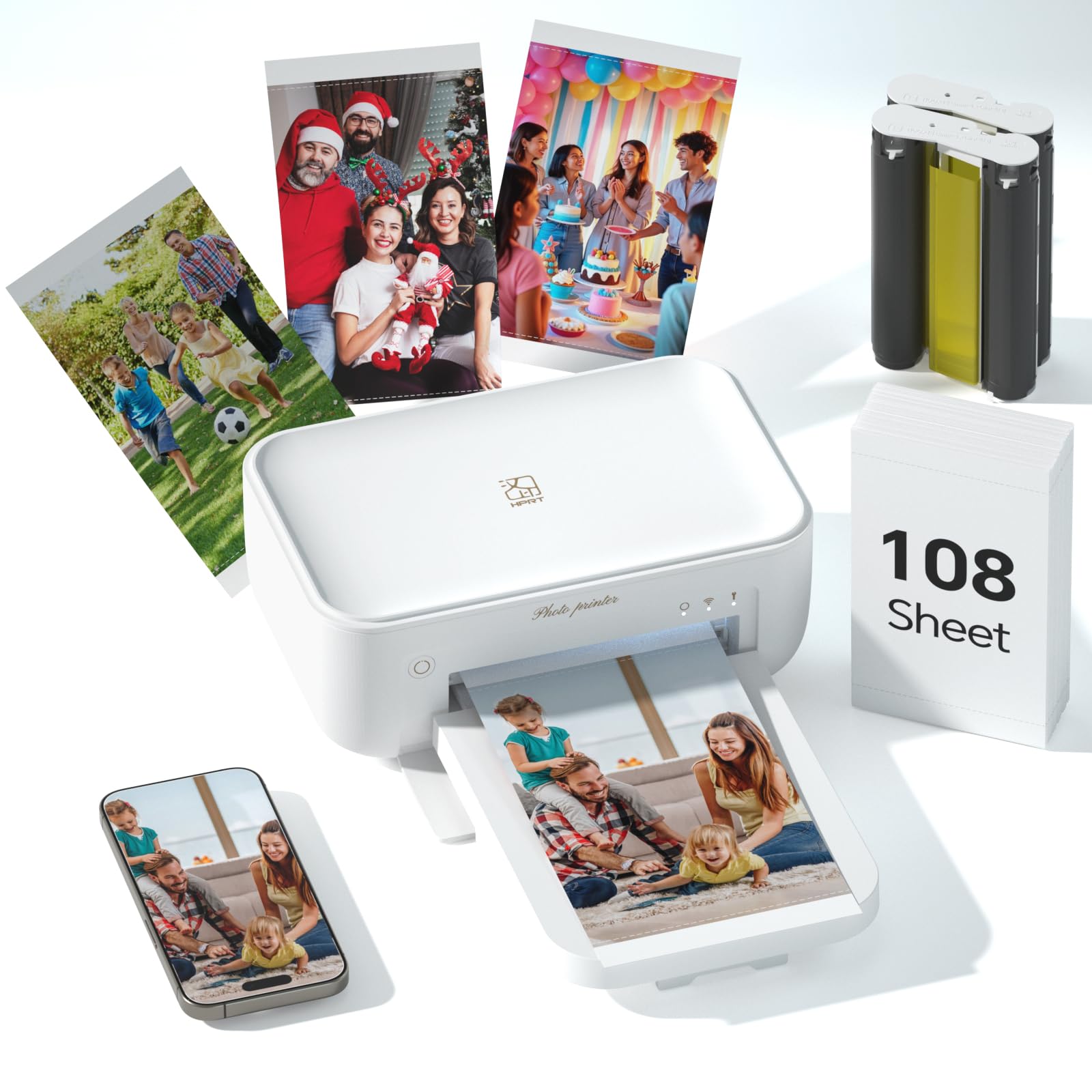
HPRT’s CP4100 uses industrial-grade dye-sublimation technology to reproduce 16.7 million colors at 300 dpi, with an automatic protective layer that makes prints waterproof, scratch-proof, and fade-proof. The kit includes 108 sheets of 4×6 photo paper and two high-capacity color cartridges, giving you a substantial head start on your first album.
Wireless connection works via 2.4GHz Wi-Fi (avoid SSIDs with “5G” in the name) or a direct Wi-Fi hotspot between phone and printer. The HeyPhoto app handles standard prints, collages, ID badges, and AR video — you can embed 15-second clips that replay when scanned. The vertical design minimizes desk footprint, and the unit requires a wall outlet (no battery operation).
Users consistently rate print quality as excellent, especially after adjusting source photo brightness. Setup can take two people the first time — the Bluetooth-to-Wi-Fi handoff isn’t as seamless as some competitors. Once connected, the machine runs quietly and reliably. The 108-sheet bundle with two cartridges offers strong immediate value, though refills will be a recurring expense.
Why it’s great
- Archival-quality prints with waterproof and scratch-proof coating
- Large starter bundle with 108 sheets and 2 cartridges
- AR video function creates interactive photo experiences
Good to know
- Initial Bluetooth pairing can be tricky
- Must stay on 2.4GHz Wi-Fi — 5GHz networks cause connection drops
8. HP Sprocket Studio Plus

The HP Sprocket Studio Plus is a dedicated 4×6 photo printer designed for users who want tear-resistant, smudge-proof, and waterproof output from their smartphone. It uses dye-sublimation technology with a glossy finish, and the HP Sprocket app provides stickers, frames, filters, and collage templates. The printer connects via Wi-Fi and produces dry-to-the-touch photos instantly.
At less than 5 pounds, the Sprocket Studio Plus is highly portable. It includes 10 sheets and one starter cartridge — just enough for a test run before buying a larger bundle. The app supports photobooth mode and ID photo creation, adding utility beyond standard prints. The printer is simplex-only (no duplex) and print-only (no scanning or copying).
Owner feedback is split: many love the compact size, vibrant colors, and easy Bluetooth setup, while others report poor print quality at higher resolutions and an app that occasionally fails to connect. The ongoing cost of HP-branded paper and ink packs is higher than some competitors, so heavy users should calculate per-print costs before committing. It’s best suited for occasional printing of phone snapshots.
Why it’s great
- Truly pocketable size for a 4×6 printer
- Smudge-proof and waterproof output from day one
- App includes collage, photobooth, and ID photo modes
Good to know
- Starter bundle includes only 10 sheets — refill costs add up
- App reliability and connection stability vary by user reports
9. Liene M100 4×6 Photo Printer Bundle

The Liene M100 delivers the most generous starter bundle in this lineup: 180 sheets of 4×6 photo paper and five ink cartridges, enough for 180 prints straight out of the box. Thermal dye-sublimation technology produces vibrant, waterproof, scratch-proof, and fade-resistant prints. The protective layer applied during the final pass ensures long archival life.
The printer creates its own Wi-Fi hotspot, so you can connect directly without a home network — supporting up to five devices simultaneously. The companion app provides step-by-step error navigation, cropped margins on the paper to avoid fingerprints, and a queue feature for batch printing. Each print takes roughly one minute, and the unit is compact enough for desktop or travel use.
Users report excellent image quality once they learn the app’s color science — without the app, prints can appear grainy or discolored. The printer is not designed for event-level volume; printing more than 20 photos consecutively risks overheating. But for home album building and occasional gifts, the combination of low per-print cost and generous initial media makes the M100 a smart entry point for dye-sub photo printing.
Why it’s great
- 180 sheets and 5 ink ribbons included — highest bundle count
- Built-in Wi-Fi hotspot supports up to 5 simultaneous devices
- Dye-sub output is waterproof, scratch-proof, and archival
Good to know
- Requires app for correct color — direct prints look grainy
- Not built for high-volume continuous printing (overheats past 20 prints)
FAQ
Why do dye-sublimation photo prints last longer than inkjet?
Can I print borderless 4×6 photos on a standard inkjet all-in-one?
What is the “AR video” feature found on some photo printers?
Final Thoughts: The Verdict
For most users, the best affordable photo printer winner is the Canon PIXMA TS6520 because it combines versatile document printing with vivid photo output at a low entry cost while avoiding the subscription trap. If you want a dedicated printer with zero nozzle maintenance and waterproof prints, grab the iDPRT CP4100 for its generous 108-sheet bundle and AR video feature. And for high-volume scanning and printing in a home office, nothing beats the Brother MFC-J1360DW with its fast print speeds and automatic document feeder.

Mo Maruf
I created WellFizz to bridge the gap between vague wellness advice and actionable solutions. My mission is simple: to decode the research and give you practical tools you can actually use.
Beyond the data, I am a passionate traveler. I believe that stepping away from the screen to explore new environments is essential for mental clarity and physical vitality.