Our readers keep the lights on and my smoothie glass nicely filled. As an Amazon Associate, I earn from qualifying purchases.
Finding a mouse that delivers sub-millisecond response and tournament-grade tracking without emptying your wallet used to be a fantasy. Today, the sensor war has trickled down to the point where a shell can pack a PAW3311 or even a PAW3395 optical sensor—specs that were locked inside flagships just two years ago. The catch? You have to know which compromises are worth taking and which ones ruin the experience.
I’m Mohammad Maruf — the founder and writer behind WellFizz. I’ve spent hundreds of hours cross-referencing sensor datasheets, switch actuation curves, battery chemistries, and real-user latency reports to separate the genuine performance outliers from the cheap shells that look fast on paper but feel mushy in your hand.
This guide cuts through the noise to deliver the honest breakdown of the best affordable gaming mouse options that actually compete with premium-tier hardware in the specs that matter most.
How To Choose The Best Affordable Gaming Mouse
Every budget gaming mouse is a balancing act between sensor fidelity, wireless latency, switch longevity, and weight. Below are the four non-negotiable factors that define whether a sub- mouse feels like a bargain or a burden.
Sensor Generation — The Real Performance Ceiling
The optical sensor is the heart of the mouse. Ignore marketed DPI ceilings (anything above 12,000 is marketing fluff) and focus on the sensor model instead. The PAW3395 is the current king — it tracks 650 IPS at 26,000 DPI with zero smoothing. The PAW3311 is a close, more affordable cousin that still delivers 300 IPS and a 1000Hz polling rate. Older sensors like the Hero 25K or the Razer Focus+ are still highly competitive if found at the right price. Avoid unbranded sensors under — they introduce acceleration and jitter that kill precision.
Wireless Polling & Latency — Wired Reliability Without the Cable
A true competitive gaming mouse must sustain a 1000Hz report rate (1ms response) over wireless. Many budget tri-mode mice drop to 125Hz over Bluetooth, which introduces noticeable cursor stutter during fast flicks. Look for mice that maintain 1000Hz in 2.4GHz mode. A few outliers now support 4000Hz or 8000Hz polling via a dedicated receiver, but 1000Hz is the baseline you need for reliable aim tracking in shooters like Valorant or Apex Legends.
Weight, Balance, and Shape — The Feel Factor
Weight determines how quickly you can initiate and stop micro-adjustments. Sub-60g mice feel almost weightless but can feel unstable with a stiff cable; 70g-90g is a sweet spot that still feels nimble without being twitchy. Shape is personal — right-handed ergonomic shells with a thumb rest support palm grips, while symmetrical ambidextrous shapes favor claw and fingertip grips. A honeycomb shell sacrifices some structural rigidity but can shave 15-20g off the total weight.
Switch Durability and Battery Architecture
Mechanical switches rated for 20 million to 90 million clicks are common in this tier, but the actual feel varies widely. Huano switches offer crisp tactile feedback, while Omron switches tend to develop double-click issues faster under heavy use. For battery, internal lithium-ion packs (250mAh to 1000mAh) keep the weight low but degrade over time and can’t be hot-swapped. A single AA battery solution like the G305 provides instant replacement but adds weight. Decide whether you prefer the convenience of USB-C recharging or the infinite lifespan of replaceable cells.
Quick Comparison
On smaller screens, swipe sideways to see the full table.
| Model | Category | Best For | Key Spec | Amazon |
|---|---|---|---|---|
| Logitech G502 Hero | Wired / Premium | Customizable weight and workflow macros | 25,600 DPI / 11 buttons / adjustable weights | Amazon |
| Razer Basilisk V3 | Wired / Mid-Range | HyperScroll wheel and RGB immersion | 26K DPI Focus+ / 11 buttons / free-spin scroll | Amazon |
| VGN Dragonfly F1 Pro | Wireless / Premium | Ultra-light competitive esports | 49g / PAW3395 / 8K polling support | Amazon |
| Logitech G305 Lightspeed | Wireless / Mid-Range | Months-long battery on single AA | 12,000 DPI Hero / 250h / 6 buttons | Amazon |
| DIERYA M1 | Wireless / Budget | Long runtime with full RGB | 24,000 DPI / 180h / 1000mAh battery | Amazon |
| AULA SC580 | Wireless / Budget | Grip tape comfort and multi-device switching | 12,000 DPI / 500mAh / 82g | Amazon |
| RK ROYAL KLUDGE RK M30 | Wireless / Entry-Level | Ultra-light 43g tri-mode portability | 24,000 DPI PAW3311 / 43g / 1ms response | Amazon |
In‑Depth Reviews
1. Logitech G502 Hero

The G502 Hero remains the benchmark for wired versatility in the affordable tier. Its Hero 25K sensor delivers 25,600 DPI with zero smoothing, and the adjustable weight system (five 3.6g cartridges) lets you dial in a balance that no fixed-weight shell can match. The metal spring tensioning on the left and right clicks produces a crisp, tactile feedback that resists the mushiness common in cheaper Omron switches.
With 11 programmable buttons and a dual-mode Hyper-Fast scroll wheel that switches between notched and free-spin, this mouse excels equally in productivity workflows and battle royale inventories. The right-handed sculpt is generous — wide enough to support palm grips for medium-to-large hands without crowding the thumb. The braided cable adds a bit of drag resistance that some users counter with a mouse bungee.
On-board memory saves your DPI profiles and lighting settings directly to the mouse, so you can plug into any tournament PC without installing G Hub. The main downside is the weight floor — even without any added cartridges, the G502 sits around 121g, which feels sluggish compared to the sub-60g ultra-light trend. If you prefer a planted, deliberate aim style rather than frantic flicking, this trade-off is worth it.
Why it’s great
- Customizable weight tuning with 5 x 3.6g cartridges
- Hero 25K sensor with sub-micron tracking
- On-board memory for portable profile storage
Good to know
- 121g base weight feels heavy for fast-twitch aiming
- G Hub software can be buggy; Onboard Memory Manager is preferred
2. Razer Basilisk V3

The Basilisk V3 brings the HyperScroll tilt wheel into the affordable conversation — a mechanical marvel that toggles between tactile notched scrolling and completely frictionless free-spin rotation with a single button. The Focus+ 26K DPI optical sensor tracks flawlessly across cloth, hard, and glass pads, and the Gen-2 optical mouse switches actuate at 0.2ms with zero risk of double-click degradation over time.
Eleven programmable buttons wrap around a right-handed ergonomic shell with a pronounced thumb rest that reduces drag fatigue during long gaming sessions. The RGB lighting spans 11 independently addressable zones — far more granular than the single-zone glow found on most budget mice. Razer Synapse handles the customization, though the software is Windows-only and uses a cloud-based profile system that can be slow to load on fresh installs.
The wired USB connection keeps latency at an absolute minimum and eliminates battery anxiety entirely. At roughly 101g, the Basilisk V3 is lighter than the G502 but still firmly in the mid-weight category. The rubberized side grips resist sweat buildup well, and the scroll wheel’s free-spin mode is genuinely addictive for quickly scanning through inventory or long web pages.
Why it’s great
- HyperScroll tilt wheel with free-spin and tactile modes
- Optical Gen-2 switches eliminate double-click failure
- 11 programmable buttons with ergonomic thumb rest
Good to know
- Proprietary software is Windows-only and cloud-dependent
- Shape runs slightly large for small hands
3. VGN Dragonfly F1 Pro
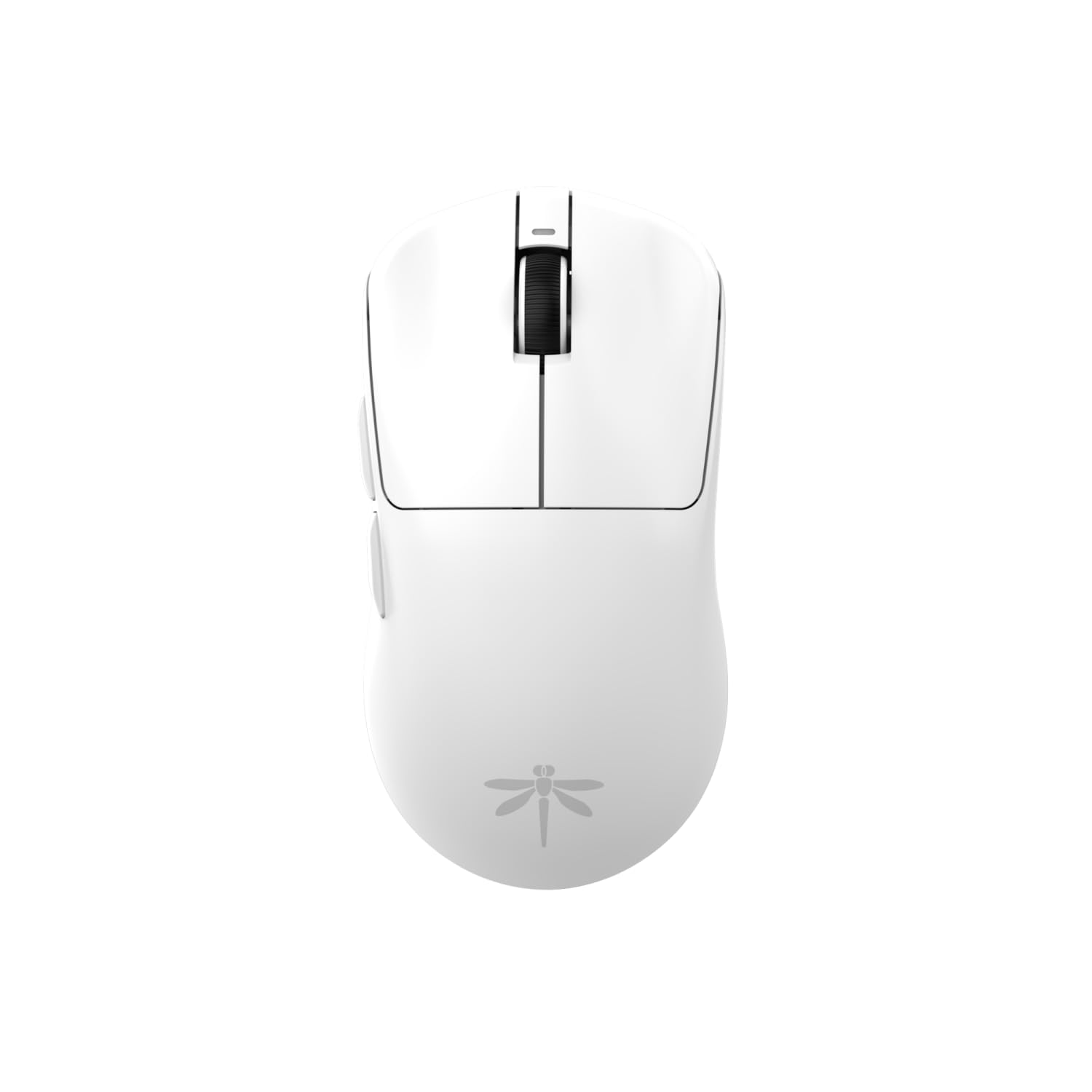
At just 49g, the Dragonfly F1 Pro competes directly with mice that cost three times its price. The PAW3395 optical sensor is the current gold standard — 26,000 DPI native, 650 IPS tracking, and zero smoothing across the entire sensitivity range. With the optional 8KHz receiver, the polling rate jumps to 8000Hz, dropping response time to 0.125ms. That level of fluidity eliminates micro-stutter in high-refresh-rate displays and makes tracking moving targets feel almost telepathic.
The white symmetrical shell is designed for claw and fingertip grips. The main clicks use mechanical micro-switches rated for 90 million actuations, and the tactile feel is crisp with minimal pre-travel. Battery life sits at around 85 hours of continuous use with the stock 1000Hz polling rate, and the included paracord cable is flexible enough for low-drag charging sessions. The pre-installed 100% PTFE feet glide effortlessly on cloth pads, though some users swap in aftermarket skates for an even smoother feel.
The compromises are minor but real: the side buttons are functional but don’t have the satisfying snap of the main clicks, and the driver software is basic compared to Logitech G Hub or Razer Synapse. The ambidextrous shape lacks a thumb rest, which may tire palm grippers during marathon sessions. For competitive esports players who want the lightest possible shell with a flagship sensor, this mouse punches absurdly above its price tier.
Why it’s great
- 49g ultra-lightweight with PAW3395 flagship sensor
- 8KHz polling support for 0.125ms response
- 90-million-click rated mechanical switches
Good to know
- Side buttons feel less premium than main clicks
- Basic software with limited macro customization
4. Logitech G305 Lightspeed

The G305 Lightspeed has been the reliability king of affordable wireless gaming since its release. Its Hero sensor delivers 12,000 DPI with 400 IPS tracking and 1ms report rate, and the single AA battery provides up to 250 hours of continuous gaming. In Endurance mode via G Hub, that extends to roughly nine months — meaning you swap the battery maybe once or twice a year. No internal lithium-ion pack to degrade, no USB-C charging tether needed.
The compact symmetrical shape works well for claw and fingertip grips, and the matte plastic shell resists fingerprints and sweat marks. Six programmable buttons are mapped via Logitech G Hub, and the on-board memory keeps your DPI settings stored locally. The nano receiver stores inside the mouse body, making it a genuinely portable travel companion for laptop gaming setups. At 99g with the AA battery installed, the weight is reasonable for the category.
The lack of RGB keeps the battery draw minimal, but it also means the aesthetic is purely functional. The mechanical Omron switches are rated for 10 million clicks and are known to develop double-click issues after a year or two of heavy use — a common failure mode that can be mitigated by swapping in aftermarket switches if you’re handy with a soldering iron. For a no-fuss wireless mouse that just works for years, the G305 remains the value baseline.
Why it’s great
- 250-hour battery life on a single AA battery
- Hero sensor with 1ms LIGHTSPEED wireless
- On-board memory and nano receiver storage
Good to know
- Omron switches prone to double-click over time
- No RGB lighting or scroll wheel illumination
5. DIERYA M1
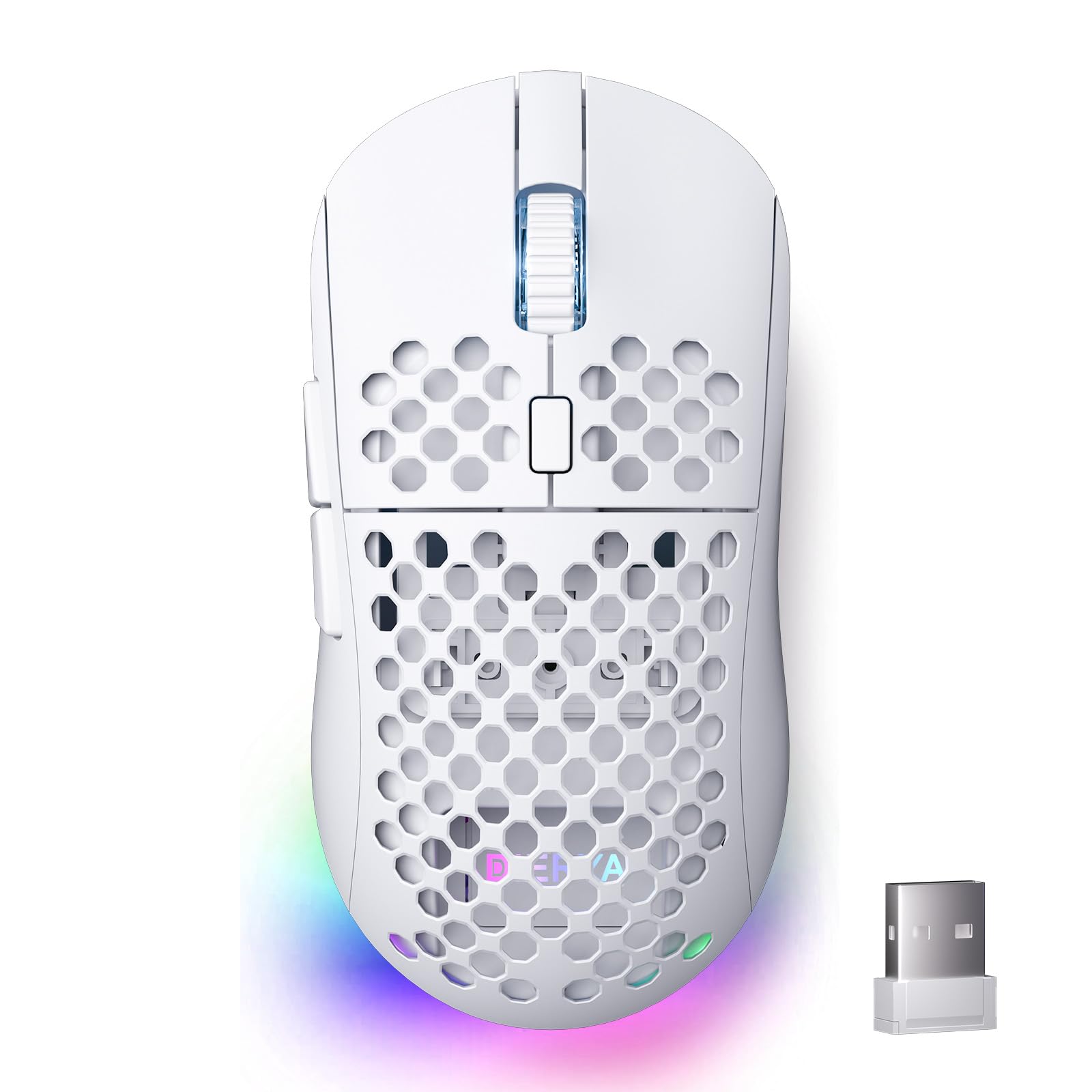
The DIERYA M1 packs a massive 1000mAh rechargeable battery into a 90g symmetrical shell, delivering up to 180 hours of operation in ECO mode and 48 hours with full RGB lighting. That battery capacity is double what most competitors in this tier offer, and the USB-C charging fills it completely in about an hour. The six DPI preset levels range from 400 to 24,000, and the scroll wheel LED changes color to indicate your current sensitivity at a glance.
The honeycomb texture on the shell reduces sweat buildup and improves grip without needing adhesive grip tape. Huano micro switches provide a clean tactile bump with 20 million clicks of rated lifespan, and the PTFE feet ensure smooth gliding on most mouse pads. The tri-mode connectivity — 2.4GHz at 1000Hz polling, Bluetooth 5.2 at 125Hz, and wired USB-C — covers all the bases for switching between gaming PC and tablet work. The software is basic but functional, allowing DPI adjustment, macro assignment, and sleep timer configuration.
Some units exhibit a squeaking noise from the main button housing under heavy use, though customer service responses suggest this is addressed with replacements. The honeycomb shell collects dust in the crevices and requires occasional cleaning with a soft brush. If you want a wireless mouse with genuinely long runtime and don‘t mind a slightly plasticky build, the M1 delivers absurd battery capacity for the price.
Why it’s great
- 1000mAh battery for 180-hour ECO runtime
- Honeycomb texture improves sweat resistance
- Tri-mode connection with 2.4GHz 1000Hz polling
Good to know
- Some units develop squeaky main button housing
- Honeycomb design collects dust in crevices
6. AULA SC580

The AULA SC580 distinguishes itself with included anti-slip grip stickers — a thoughtful addition that improves control during sweaty gaming sessions without requiring a separate purchase. The 82g symmetrical shell is designed for right-handed users and feels solid in hand, with a weight that splits the difference between featherlight competitors and heavier ergonomic options. The PAW3311-derived sensor provides 12,000 DPI with six adjustable levels via the DPI button on top.
The 500mAh rechargeable battery delivers roughly 10 to 14 days of mixed use, and the tri-mode connectivity (2.4GHz, Bluetooth 5.0, and wired USB-C) supports up to four paired devices with quick bottom-switch toggle. The software allows macro customization for the six programmable buttons, but it only works on Windows and only in 2.4GHz or wired mode — Bluetooth mode is excluded from driver support. The build quality feels above average for the price, with no creaking or flex in the shell.
The scroll wheel is smooth but the middle-click requires a firm press that some users find fatiguing during extended sessions. Battery life reports vary wildly — some users report months between charges while others find themselves recharging every few days, likely depending on whether they stick to 2.4GHz mode or let Bluetooth polling drain the cell. If grip security is your priority, the included tape and the comfortable right-handed contour make this a solid entry-level option.
Why it’s great
- Pre-applied anti-slip grip stickers included in box
- Comfortable right-handed contour at 82g
- Tri-mode with support for 4 paired devices
Good to know
- Driver software limited to Windows and 2.4GHz mode
- Middle-click requires a heavy actuation force
7. RK ROYAL KLUDGE RK M30

The RK M30 is the lightest mouse in this roundup at just 43 grams — so light it initially feels disorienting coming from a standard 90g shell. That weight reduction comes from a minimalist design that removes honeycomb cutouts at the cost of some structural rigidity. The PAW3311 sensor tracks up to 24,000 DPI with 300 IPS and 35G acceleration, and the 1000Hz polling rate over 2.4GHz ensures the responsiveness needed for competitive shooters.
The 250mAh internal battery is the smallest capacity in this lineup, delivering roughly 19 hours at the default 1000Hz polling rate and up to 36 hours at 125Hz. That means you’ll be reaching for the USB-C cable every couple of days if you play heavily. The tri-mode connectivity — 2.4GHz, Bluetooth 5.1, and wired — covers all the common scenarios, and the five programmable buttons handle basic macros through RK‘s software. The white matte finish looks clean but shows wear over time.
The plastic shell flexes slightly under firm grip pressure, which can create an unsettling feeling during intense gaming moments. The DPI adjustment switch is located on the underside, requiring you to flip the mouse to change sensitivity mid-game. The RK M30 is a niche option for players who prioritize absolute minimum weight above all else and are willing to trade away structural heft and battery longevity for that 43g feel.
Why it’s great
- Extremely light 43g build for fatigue-free flicking
- PAW3311 sensor with 24,000 DPI and 1ms polling
- Tri-mode wireless with Bluetooth 5.1 support
Good to know
- 250mAh battery needs charging every 1-2 days
- DPI switch is inconveniently mounted on the underside
FAQ
Is a wired or wireless gaming mouse better for competitive FPS games under?
What DPI should I actually use for gaming?
How do I tell if a sensor has smoothing or acceleration?
Can I replace the switches when they wear out?
Final Thoughts: The Verdict
For most users, the best affordable gaming mouse winner is the Logitech G502 Hero because it combines the Hero 25K sensor, adjustable weight tuning, and 11 programmable buttons at a price that undercuts premium brands while delivering on-board memory and software-independent profile storage. If you want a featherlight wireless shell with a flagship sensor, grab the VGN Dragonfly F1 Pro. And for marathon battery life with zero cable tethering, nothing beats the Logitech G305 Lightspeed.

Mo Maruf
I created WellFizz to bridge the gap between vague wellness advice and actionable solutions. My mission is simple: to decode the research and give you practical tools you can actually use.
Beyond the data, I am a passionate traveler. I believe that stepping away from the screen to explore new environments is essential for mental clarity and physical vitality.