Our readers keep the lights on and my smoothie glass nicely filled. As an Amazon Associate, I earn from qualifying purchases.
Starting your digital art journey shouldn’t require a massive investment, but with so many options, it’s easy to feel overwhelmed by specs and brand names.
I’m Mohammad Maruf — the founder and writer behind WellFizz. My focus is on deep market research, analyzing specification data and user feedback to identify where performance and value genuinely intersect in wellness and lifestyle tech.
This guide is built from that analytical approach, breaking down exactly what makes a tablet work for you, not just what’s marketed to you. After analyzing dozens of models, I’ve identified the key features that define the perfect best affordable drawing tablet for beginners and pros alike.
How To Choose The Best Affordable Drawing Tablet
Selecting the right tablet isn’t about finding the cheapest option; it’s about matching core specifications to your creative process. Ignore the flashy claims and focus on these fundamental aspects.
Pressure Sensitivity: The Heart of Line Control
Measured in levels (like 4096, 8192, or 16384), this spec determines how accurately the tablet translates pen pressure into line weight or opacity. For most beginners, 8192 levels are more than sufficient for natural-feeling art. Higher levels, like 16384, offer hyper-nuanced control for detailed professional work.
Active Drawing Area: Your Digital Canvas
This is the actual space where your pen registers movement, not the physical size of the tablet. A larger area (like 10×6 inches) allows for broad, sweeping arm movements, while a smaller one (like 6×4 inches) is more portable and may feel familiar if you’re used to sketching in a notebook.
Shortcut Keys and Dials: Your Workflow Accelerators
Programmable buttons and scroll wheels let you map common actions like undo, zoom, or brush size changes. A physical dial can dramatically speed up adjustments compared to reaching for the keyboard. Consider how many shortcuts you routinely use in your software.
Connectivity: Wired Consistency vs. Wireless Freedom
USB connections offer reliable, lag-free performance. Bluetooth adds portability and reduces cable clutter, but may introduce slight latency or require battery management. Some tablets offer both, giving you the best of both worlds.
Compatibility: The Non-Negotiable Check
Always verify that the tablet works with your operating system (Windows, macOS, ChromeOS, Android, Linux) and your primary creative software like Photoshop, Krita, or Clip Studio Paint. Driver support is crucial for full functionality.
Quick Comparison
On smaller screens, swipe sideways to see the full table.
| Model | Type | Best For | Key Feature | Amazon |
|---|---|---|---|---|
| HUION Inspiroy 2 Medium | Graphics Tablet | Overall Value & Features | Unique Scroll Wheel | Amazon |
| VEIKK A15Pro | Graphics Tablet | Beginners Needing Space | 12 Shortcut Keys + Quick Dial | Amazon |
| Wacom Intuos Small Bluetooth | Graphics Tablet | Brand Reliability & Portability | Wireless Bluetooth Option | Amazon |
| HUION Inspiroy H1161 | Graphics Tablet | Large Active Area Users | Touch Strip & 10 Shortcut Keys | Amazon |
| XP-PEN Deco 03 | Graphics Tablet | Wireless Creativity | 2.4G Wireless & Multi-function Dial | Amazon |
| XP-PEN Deco Pro Medium | Graphics Tablet | Efficiency-Focused Artists | Double Wheel Design | Amazon |
| XPPen Deco Pro LW 2nd | Graphics Tablet | Premium Wireless Workflow | Bluetooth 5.0 & Mini Key-dial | Amazon |
| XPPen Artist12 Pro | Pen Display | First Pen Display Experience | 11.6″ Full-Laminated Screen | Amazon |
| Wacom Intuos Pro Small | Graphics Tablet | Professional-Grade Precision | Pro Pen 3 & ExpressKey Dial | Amazon |
| HUION Kamvas 13 (Gen 3) | Pen Display | Color-Accurate Screen Drawing | Anti-Sparkle Glass & 16384 Pressure | Amazon |
| XPPen Artist Pro 14 Gen2 | Pen Display | High-End Color & Detail Work | 16K Pressure & 123% sRGB Coverage | Amazon |
In‑Depth Reviews
1. HUION Inspiroy 2 Medium Drawing Tablet

The HUION Inspiroy 2 Medium strikes a remarkable balance between useful features and accessible pricing, making it a standout in the mid-range category. Its upgraded PenTech 3.0 technology delivers precision with minimal lag, and the inclusion of a dedicated scroll wheel—a rarity at this point—adds a layer of workflow efficiency typically found in more expensive models.
With eight customizable keys and a battery-free stylus that supports 60-degree tilt, it caters to both drawing and general computer navigation. The active area is spacious enough for comfortable arm movement without dominating your desk, and its cross-platform compatibility ensures it works with nearly any device you own, from Windows PCs to Android phones.
Feedback highlights its role as a reliable Wacom alternative, with users praising the programmable buttons and the scroll function for zooming during projects. The build is lightweight yet feels solid, and the package includes extra pen nibs, addressing a common consumable need for digital artists.
Why it’s great
- Unique scroll wheel for efficient zoom and brush control
- Excellent cross-platform compatibility with Android support
- Battery-free pen with tilt function for natural shading
- Strong value proposition with a comprehensive feature set
Good to know
- Lacks Bluetooth connectivity for a wireless setup
- Some users note the pen nibs can wear with heavy use
2. VEIKK A15Pro Graphics Drawing Tablet

The VEIKK A15Pro is a feature-packed entry-level tablet that gives you a surprisingly large drawing area and an abundance of shortcut keys without stretching your budget. Its 10×6 inch active surface is ideal for artists who feel constrained by smaller pads, allowing for more expansive and natural drawing motions.
It comes with a battery-free stylus boasting 8192 levels of pressure sensitivity and includes a generous 28 spare nibs, which is a huge perk for long-term use. The twelve programmable soft keys and a quick dial provide ample customization for streamlining your workflow in various drawing and design applications.
User reviews consistently call it a fabulous choice for beginners, citing its ease of use, lightweight design, and out-of-the-box support for Linux systems. It performs well for sketching, line art, and online teaching, offering a smooth introduction to digital creation.
Why it’s great
- Exceptionally large active area for the price point
- Includes a massive 28 spare pen nibs in the box
- Great Linux compatibility right from the start
- High number of shortcut keys for workflow customization
Good to know
- May not achieve ultra-precise line accuracy for technical drafting
- The stylus is noted by some to feel very light in the hand
3. Wacom Intuos Small Bluetooth Graphics Drawing Tablet

Wacom’s Intuos Small brings the reliability and industry-standard EMR pen technology to an entry-level format, complete with the convenience of Bluetooth wireless connectivity. Its 4096 levels of pressure sensitivity are proven and effective, providing a natural pen-on-paper feel that has defined the brand for decades.
This tablet is incredibly portable and designed for creators on the move, whether you’re taking notes in class, sketching on the sofa, or marking up documents. The package includes access to creative software and online training, adding significant value for those just starting their digital art library.
Long-term users report impressive durability, with some tablets lasting for years with minimal wear. While the active area is compact, it’s efficient for note-taking, photo editing, and as a high-precision replacement for a mouse, especially when paired with its four customizable ExpressKeys.
Why it’s great
- Wireless Bluetooth connectivity for a clean, portable setup
- Includes reputable creative software with registration
- Known for exceptional long-term durability and driver stability
- Textured surface mimics the feeling of drawing on paper
Good to know
- Some users report intermittent Bluetooth pairing issues
- Lower pressure sensitivity (4096 levels) compared to newer rivals
4. HUION Inspiroy H1161 Graphics Drawing Tablet

The HUION H1161 is a workhorse tablet built for those who prioritize a large, unobstructed drawing surface. Its 11×6.87active area provides ample room for detailed work and reduces wrist strain. Beyond just size, it features a touch strip alongside ten hard keys, offering nuanced control over zoom, scroll, or brush adjustments with a swipe.
It utilizes a reliable battery-free stylus with 8192 levels of pressure and tilt support. The build is sturdy, and the driver software allows for deep customization of the express keys for different applications, a feature that users swapping from older Wacom tablets particularly appreciate.
Feedback confirms it as a robust and affordable upgrade, with many noting its superior pressure sensitivity compared to older Intuos models. The inclusion of 16 soft express keys that won’t trigger accidentally is a thoughtful design touch for artists who rest their hands on the tablet.
Why it’s great
- Very large active drawing area for expansive, comfortable work
- Innovative touch strip provides smooth scrolling and zooming
- High level of key customization with both hard and soft keys
- Consistently praised as a high-value upgrade from older tablets
Good to know
- Some users find the pen body feels lightweight or slightly cheap
- Pen holder included in the package is noted to be somewhat flimsy
5. XP-PEN Deco 03 Drawing Tablet

The XP-PEN Deco 03 delivers a premium wireless experience at a mid-range point, thanks to its stable 2.4G wireless connection. This frees you from cable constraints entirely, offering true desktop mobility for drawing or using it as a presentation tool.
Its standout feature is the multi-function red dial, which can be assigned to control brush size, zoom, canvas rotation, or scrolling. Combined with six programmable express keys, it creates a highly efficient control hub. The battery-free pen is well-balanced and comfortable for long sessions.
Users are often surprised by the solid, high-quality build and the generous accessory package that includes a screen protector, drawing glove, and spare nibs. Setup is straightforward, and the wireless performance is noted to be reliable with minimal lag for everyday creative work.
Why it’s great
- True cable-free operation with a reliable 2.4G wireless dongle
- Versatile central dial that controls multiple parameters
- Comes with a generous set of useful artist accessories
- Solid, premium-feeling construction defies its category
Good to know
- Some note the pen nibs can wear unevenly with a specific drawing style
- The large size may require you to map only a portion of the surface
6. XP-PEN Deco Pro Medium Drawing Tablet

The XP-PEN Deco Pro Medium is designed for artists who want to maximize workflow efficiency. Its innovative double-wheel system combines a mechanical outer wheel for brush/zoom control with an inner touch-sensitive wheel that functions as a trackpad, allowing for navigation without ever leaving the tablet.
With a spacious 11×6 inch active area and eight customizable express keys, it provides both the physical room and the control shortcuts needed for complex projects. The build is ultrathin yet robust, and the battery-free stylus offers excellent pressure and tilt response.
Feedback highlights the smooth, paper-like texture of the drawing surface and the precision of the pressure sensitivity. While the array of features has a slight learning curve, users who master the dual-wheel setup find it dramatically speeds up their creative process.
Why it’s great
- Unique dual-wheel design merges adjustment dial with a touchpad
- Large, high-quality active area suitable for detailed professional work
- Ultrathin and stylish design with a solid construction
- Excellent pressure sensitivity and a natural drawing feel
Good to know
- The driver setup and feature customization can be initially complex
- Only includes a basic set of pen nibs
7. XPPen Deco Pro LW 2nd Wireless Drawing Tablet

Positioned at the higher end of screenless tablets, the Deco Pro LW 2nd offers a comprehensive wireless creative station. It supports modern Bluetooth 5.0 for universal connectivity and includes a separate Mini Key-dial remote, putting ten customizable shortcuts and a dial right under your non-dominant hand.
The upgraded X3 Pro stylus boasts an impressive 16,000 levels of pressure sensitivity and includes an eraser end. The tablet itself features a sleek, one-piece design with a metal backplate for better heat dissipation and a comfortable wrist-rest edge.
Users who install the latest drivers report superb responsiveness and precision, with pen stabilization features that can assist artists with less steady hands. It represents a significant step up in both price and professional features, bridging the gap to high-end brands.
Why it’s great
- Includes a separate wireless shortcut remote for ultimate control
- High 16K pressure sensitivity and eraser on the stylus
- Premium build with metal components and ergonomic design
- Long battery life and reliable Bluetooth 5.0 connectivity
Good to know
- Bluetooth is not compatible with Android or Linux systems
- Driver software can be buggy on macOS without proper permissions
8. XPPen Artist12 Pro 11.6″ Drawing Tablet with Screen

The XPPen Artist12 Pro is the most accessible gateway into the world of pen displays, where you draw directly on a screen. Its 11.6-inch fully-laminated display minimizes the parallax (gap between pen tip and cursor) for a true pen-on-paper feeling.
It includes a practical adjustable stand, eight customizable shortcut keys, and a useful red dial for zoom and brush control. The 1080p resolution and good color coverage make it suitable for both drawing and as a secondary monitor for your computer.
Beginners transitioning from screenless tablets praise the immediate intuitiveness of drawing directly on their artwork. The setup is relatively simple with the included 3-in-1 cable, and it provides a professional feature set at a fraction of the cost of equivalent branded displays.
Why it’s great
- Most affordable way to experience a drawing-on-screen workflow
- Fully-laminated screen significantly reduces distracting parallax
- Includes a stand and has programmable buttons/dial
- Doubles as a functional secondary computer monitor
Good to know
- Requires a connection to a computer; not a standalone device
- Color accuracy, while good, isn’t at professional grading level
9. Wacom Intuos Pro Small Professional Graphic Drawing Tablet
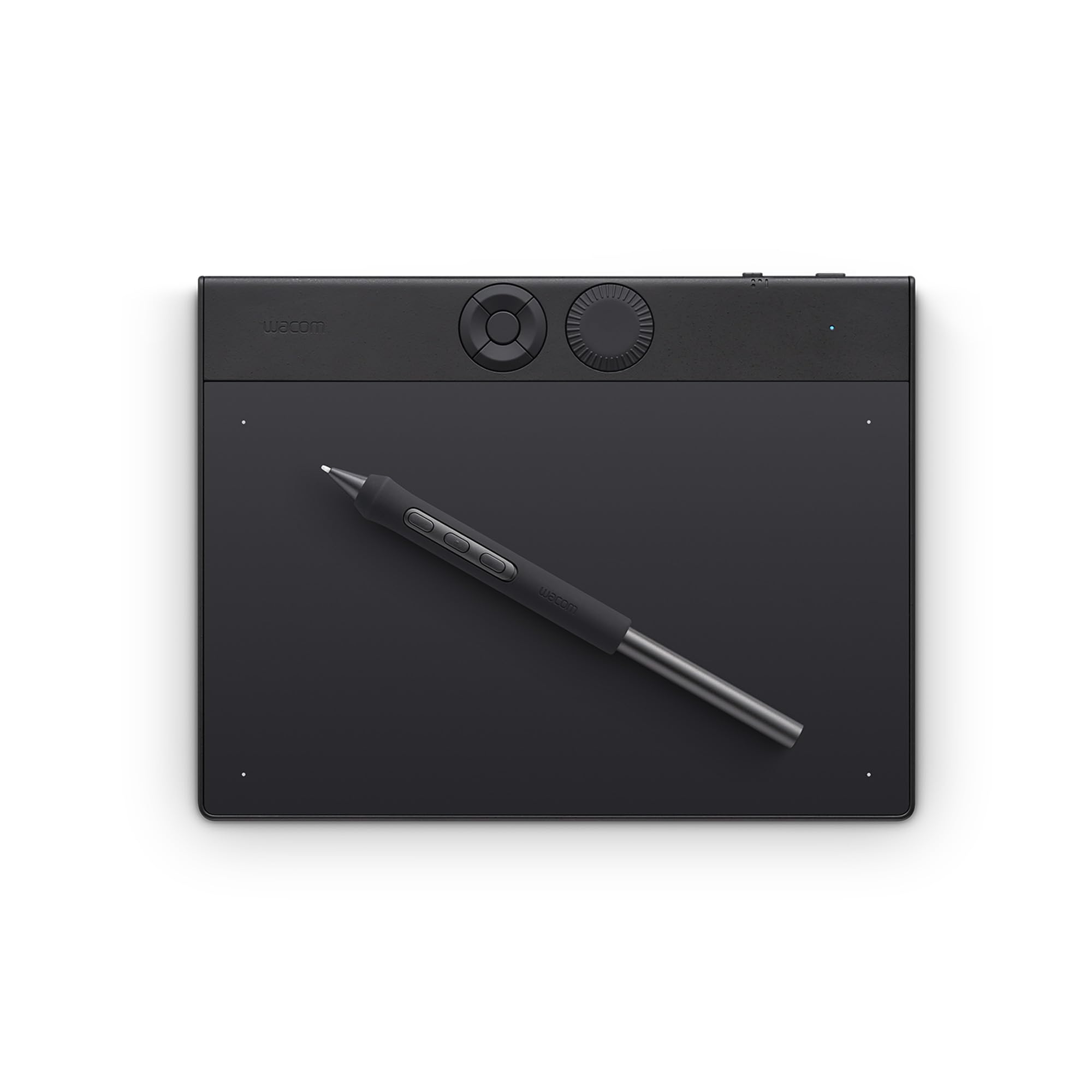
The Wacom Intuos Pro Small represents the pinnacle of screenless tablet technology from the industry leader. It’s built for professionals who demand uncompromising precision, ergonomics, and seamless integration. The Pro Pen 3 is legendary for its feel, accuracy, and customizable grips.
Its compact footprint houses a generously sized active area, and the inclusion of an ExpressKey dial alongside five customizable keys puts critical controls at your fingertips. The build is an ultra-thin, durable magnesium, making it equally suited for a studio desk or a travel bag.
Users upgrading from older Intuos models note the improved Bluetooth connectivity and the quality-of-life enhancements. It’s the choice for those whose livelihood depends on their tools and who value Wacom’s renowned driver stability and professional ecosystem.
Why it’s great
- Industry-leading Pro Pen 3 with exceptional balance and feel
- Premium, ultra-thin magnesium build that’s highly portable
- Reliable Bluetooth and versatile connectivity options
- Excellent driver support and professional-grade reliability
Good to know
- Positioned at a premium price point within the category
- Some driver issues have been reported on Windows 11
10. HUION Kamvas 13 (Gen 3) Drawing Tablet with Screen

The HUION Kamvas 13 (Gen 3) is a significant evolution in budget-friendly pen displays, featuring advanced PenTech 4.0 with 16,384 levels of pressure sensitivity and exceptional color accuracy. Its new anti-sparkle Canvas Glass 2.0 reduces glare while providing a pleasant textured drawing surface.
With 99% sRGB color gamut coverage and a factory calibration report, it appeals to artists who care about color fidelity. The design includes a USB-C single-cable connection option, five shortcut keys, and a unique dual-dial layout for efficient parameter control.
Reviews from seasoned artists are glowing, with many noting it eliminates the rainbow pixelation (sparkle) common in earlier etched glass displays. It’s seen as a direct, high-value challenger to more expensive pen displays, offering a buttery smooth drawing experience that inspires confidence.
Why it’s great
- Advanced anti-sparkle glass for a clear, comfortable viewing experience
- High 16K pressure sensitivity and excellent color accuracy out of the box
- Convenient USB-C single-cable connection capability
- Includes a fully adjustable stand for ergonomic positioning
Good to know
- The 3-in-1 cable routing can be fiddly to manage neatly
- On-screen buttons and dials may have limited functionality in Linux
11. XPPen Artist Pro 14 Gen2 Drawing Tablet with Screen

The XPPen Artist Pro 14 Gen2 sits at the top of the affordable display category, boasting professional-grade specifications that rival devices costing significantly more. Its headline feature is the X3 Pro stylus with a groundbreaking 16,000 levels of pressure sensitivity, enabling hyper-nuanced line control.
The 14-inch full-laminated display offers a 16:10 aspect ratio, 123% sRGB color gamut area, and TÜV-certified low blue light emission. It includes a wireless shortcut remote, a foldable stand, and an ergonomic wrist rest, creating a complete creative workstation.
Professional and enthusiast artists are impressed by its color vibrancy, crisp resolution, and the overall quality of the drawing experience. It demonstrates that high-end performance is increasingly accessible, providing a compelling alternative for those who need pro features without the pro brand price tag.
Why it’s great
- Industry-leading 16K pressure sensitivity for ultimate line control
- Exceptional color performance with wide gamut coverage
- Includes a wireless shortcut remote for detached control
- Comprehensive package with stand, wrist rest, and premium accessories
Good to know
- Pen calibration may need occasional re-adjustment
- Driver compatibility can be tricky with specific 3D software like Maya
Understanding the Specs
Pressure Sensitivity Levels
This number (e.g., 8192) indicates how many levels of pressure the pen can detect between the lightest touch and the hardest press. Higher numbers allow for more nuanced control over line weight and opacity, mimicking real art tools more closely. For most users, 8192 is the modern sweet spot, while 4096 can feel less dynamic, and 16384 offers ultra-fine control for detailed work.
Active Area vs. Screen Size
The “Active Area” is the critical measurement—it’s the specific rectangle where your pen inputs are registered. The overall “Screen Size” or tablet dimensions include bezels and non-active spaces. A tablet with a large active area relative to its footprint gives you more creative room without cluttering your desk. For screen-based tablets, this area is the display itself.
FAQ
Do I need a drawing tablet with a screen?
What does ‘battery-free stylus’ mean?
Can I use a drawing tablet with my phone?
Is more pressure sensitivity always better?
Final Thoughts: The Verdict
For most people, the best affordable drawing tablet winner is the HUION Inspiroy 2 Medium because it delivers an exceptional mix of premium features like a scroll wheel, high pressure sensitivity, and broad compatibility at a mid-range point. If you want the intuitive experience of drawing directly on your artwork, grab the HUION Kamvas 13 (Gen 3). And for proven brand reliability and wireless freedom, nothing beats the Wacom Intuos Small Bluetooth.

Mo Maruf
I created WellFizz to bridge the gap between vague wellness advice and actionable solutions. My mission is simple: to decode the research and give you practical tools you can actually use.
Beyond the data, I am a passionate traveler. I believe that stepping away from the screen to explore new environments is essential for mental clarity and physical vitality.