Our readers keep the lights on and my smoothie glass nicely filled. As an Amazon Associate, I earn from qualifying purchases.
A stack of paper on your desk isn’t just clutter — it’s a backlog of decisions you can’t make until the information is digital. An ADF document scanner turns that waiting stack into searchable, organized files without the tedium of a flatbed. The real question is which one can keep pace with your actual workflow without jamming, misfeeding, or bogging you down with bad software.
I’m Mohammad Maruf — the founder and writer behind WellFizz. I’ve spent hundreds of hours analyzing the specifications, real-world durability reports, and software ecosystems of dedicated document scanners to separate the reliable workhorses from the frustrating paper-eaters.
Whether you’re digitizing a decade of client files, clearing a home office of receipts and tax documents, or setting up a paperless workflow for a small business, finding the best adf document scanner means looking closely at duplex speed, sheet capacity, and software that actually works.
How To Choose The Best ADF Document Scanner
An ADF document scanner is a specialized tool designed for one job: feeding stacks of paper through a sensor array and producing clean digital images at speed. The buying decision comes down to how fast and reliably it can handle your specific documents — mixed sizes, double-sided pages, and the occasional receipt or business card.
Duplex scanning speed and duty cycle
Duplex speed is measured in images per minute (ipm), which doubles the page-per-minute rating when scanning two sides. A 40ppm duplex scanner produces 80 ipm. For high-volume users, the rated daily duty cycle — usually 1,500 to 5,000 pages — predicts how long the pick-up rollers and motor will hold up. Exceeding it regularly leads to premature wear.
ADF capacity and paper handling
The sheet feeder capacity (20 to 100 pages) determines how often you need to reload. Ultrasonic double-feed detection is a critical feature: it senses when two pages stick together and stops the feed before you lose content. Look for models that accept mixed paper types — letter, legal, business cards, and receipts — in a single batch without manual sorting.
Software ecosystem and connectivity
The scanner is only half the system. The bundled software handles OCR, auto-crop, deskew, blank page removal, and export to searchable PDFs, Word, Excel, and cloud services. Some models include TWAIN drivers for integration with document management software; others rely on proprietary apps. Wi-Fi models add convenience but can complicate initial setup — USB models are typically more plug-and-play reliable.
Quick Comparison
On smaller screens, swipe sideways to see the full table.
| Model | Category | Best For | Key Spec | Amazon |
|---|---|---|---|---|
| ScanSnap iX2500 | Premium | High-volume wireless scanning | 45ppm duplex, 100-sheet ADF | Amazon |
| Fujitsu fi-7160 | Professional | Enterprise-grade durability | 60ppm duplex, 5,000 pages/day duty cycle | Amazon |
| ScanSnap iX2400 | Mid-Range | Fast one-touch desktop scanning | 45ppm duplex, 100-sheet ADF | Amazon |
| Canon imageFORMULA R50 | Mid-Range | Mixed media and touchscreen control | 40ppm duplex, 60-sheet ADF, Wi-Fi | Amazon |
| Brother ADS-3100 | Mid-Range | Small office and USB workflow | 40ppm duplex, 60-sheet ADF | Amazon |
| Epson WorkForce ES-580W | Premium | 100-sheet batch and touchscreen | 35ppm duplex, 100-sheet ADF, 4.3″ touchscreen | Amazon |
| Epson WorkForce ES-500W II | Mid-Range | Wireless mobile scanning | 35ppm duplex, 50-sheet ADF | Amazon |
| Canon imageFORMULA R30 | Budget | Plug-and-play simplicity | 25ppm duplex, 60-sheet ADF | Amazon |
| Doxie Pro | Budget | Compact home office and receipts | Duplex, 20-sheet ADF, direct feed | Amazon |
In‑Depth Reviews
1. Canon imageFORMULA R50
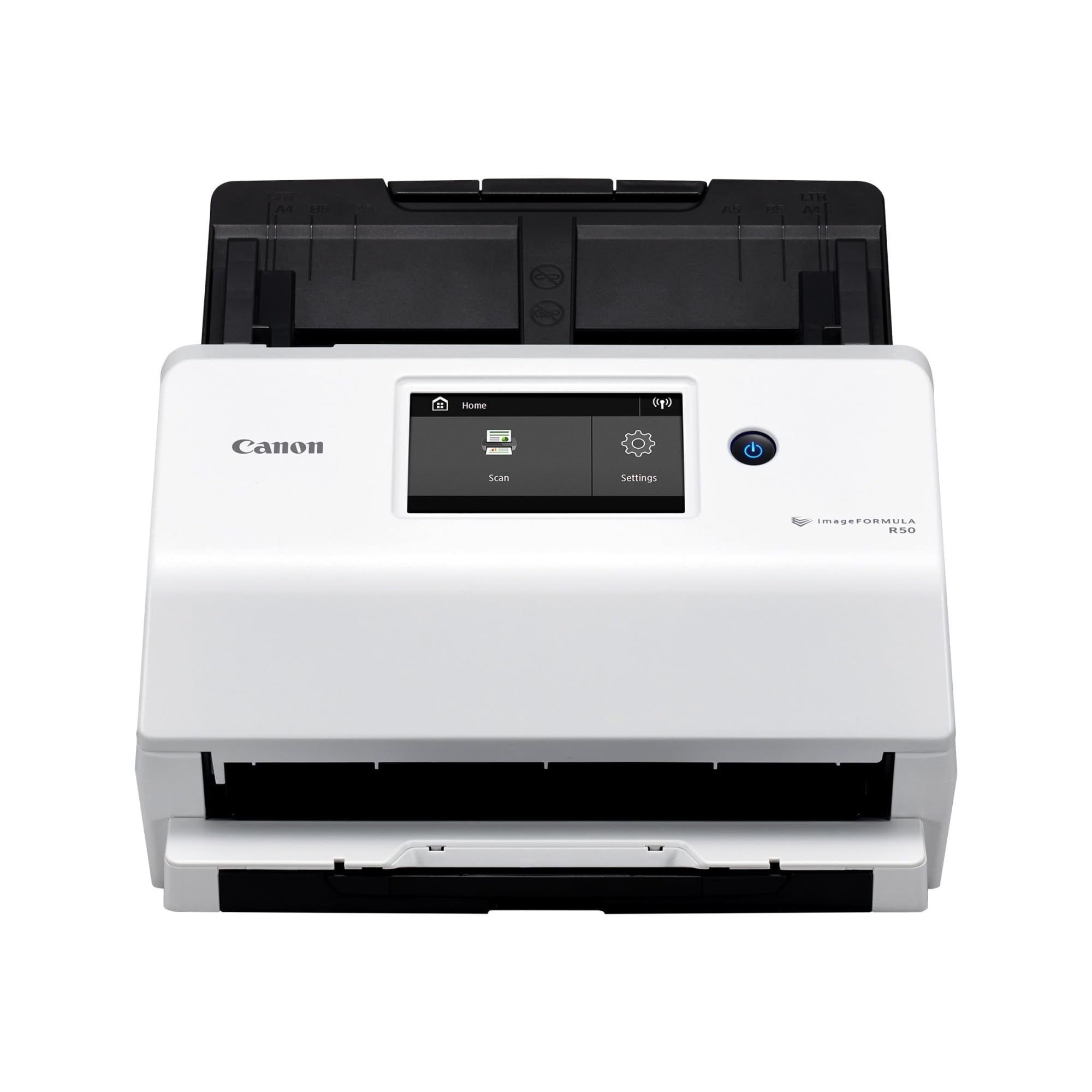
The Canon imageFORMULA R50 hits a sweet spot in the document scanner market by pairing reliable duplex performance with a large color touchscreen and flexible connectivity. Its 40ppm duplex speed — 80 ipm — handles mixed batches of letter, legal, business cards, and thick paper without requiring manual sorting, thanks to the slide-out output tray and ultrasonic sensor that can be disengaged for thicker items.
Users consistently praise the effortless setup and consistent feed roller pull that handles hundreds of pages without slipping. The bundled software includes TWAIN drivers for document management integration and a straightforward scan-to-cloud workflow. The touchscreen simplifies switching between scan profiles, though some find the settings menu fragmented across nine entries. The output tray feels a bit light but works fine with careful handling.
At 7.4 pounds with a compact footprint, the R50 is easy to reposition on a shared desk. The Wi-Fi connectivity allows multiple users on a network to access it, and USB mode remains an option for those who prefer a direct, more predictable connection. Its 60-sheet ADF is adequate for most small office and home office workloads, though heavy-volume users may want a higher capacity.
Why it’s great
- Large color touchscreen for quick profile switching
- Reliable feeding across mixed paper sizes and thicknesses
- Fast 40ppm duplex with strong OCR and auto-rotate
Good to know
- User interface has multiple menu layers to navigate
- Output tray feels thin and needs careful handling
2. Fujitsu fi-7160

The Fujitsu fi-7160 is the workgroup benchmark that sets the performance standard for professional desktop scanners. Its 60ppm duplex scanning — one double-sided page per second at 300 dpi — is genuinely transformative for anyone processing thousands of sheets weekly. The rated daily duty cycle of 5,000 pages means this scanner is engineered for continuous, heavy-volume use that would quickly wear out a consumer model.
Build quality is exceptional: the chassis weighs 9.3 pounds and the paper path is designed with superior pick-up and separation technologies that minimize jams even with delicate or wrinkled originals. Users report scanning tens of thousands of pages with only occasional misfeeds, usually traced back to stapled or folded documents that the ultrasonic detection misses. The included PaperStream software is powerful but has a steep learning curve — profiles can be lost if not explicitly saved.
The fi-7160 connects via USB 3.0 and integrates with TWAIN and ISIS drivers, making it compatible with virtually any document management system. It lacks direct network or cloud connectivity, so it’s best suited for a dedicated workstation where the software handles the routing. The support team is consistently praised as knowledgeable and responsive, which matters when uptime is critical.
Why it’s great
- Industry-leading 60ppm duplex speed for high-volume throughput
- 5,000-page daily duty cycle for demanding professional use
- Excellent TWAIN/ISIS integration and responsive support
Good to know
- Steep learning curve with PaperStream software
- No direct network or cloud scanning capabilities
3. ScanSnap iX2500

The ScanSnap iX2500 is the most advanced model in PFU Limited’s consumer line, packing a 5-inch touchscreen, Wi-Fi 6, and a 100-sheet ADF into a compact chassis. Its 45ppm duplex speed translates to 90 ipm, making it one of the fastest options in this price tier. The brake roller system and multi-feed sensor work together to prevent jams and paper damage, a significant upgrade over earlier models that were prone to occasional misfeeds.
Users coming from the longstanding iX500 series appreciate the speed and wireless convenience but note the iX2500 feels less robust — the ADF lacks a proper extension, the output tray is thinner, and the plastic casing has a lighter feel. Setup is straightforward on macOS and Windows, but the ScanSnap Home software, while powerful for organizing scans, adds unnecessary clicks for those who just want to scan to a folder. Wireless performance is about 10% slower than wired USB-C.
The auto-orientation and deskew features work reliably, and scanning mixed document sizes — receipts, business cards, and letter — is handled smoothly. The unit is not designed for high-resolution photo work; a flatbed remains better for that task. For tax documents, invoices, and general correspondence, the iX2500 delivers fast, accurate results with searchable OCR.
Why it’s great
- Fast 45ppm duplex with 100-sheet ADF for large batches
- Wi-Fi 6 and USB-C for flexible, modern connectivity
- Large touchscreen with customizable profiles
Good to know
- Build feels lighter and less durable than iX500 predecessors
- Home software adds complexity and frequent update prompts
4. ScanSnap iX2400

The ScanSnap iX2400 is the wired-only sibling in the next-generation ScanSnap line, delivering the same 45ppm duplex engine and 100-sheet ADF as the pricier iX2500 without the touchscreen or Wi-Fi. This makes it a straightforward choice for users who want maximum scanning speed at a more accessible price point. The one-touch button triggers the Quick Menu, allowing you to scan-drag-drop files to your most-used applications immediately.
Users transitioning from older S-series or iX500 models report dramatic speed improvements — scanning 500 pages in about an hour, including duplex and automatic cleanup. The auto-crop, deskew, blank page removal, and color detection all work reliably without manual intervention. A minor but real annoyance is the occasional upside-down scan when the orientation sensor misreads a page, and the lack of TWAIN support means the iX2400 cannot integrate with non-ScanSnap document management software.
For professionals and home office users with a dedicated workspace, the iX2400’s consistent USB performance represents a smart trade-off: you give up wireless convenience but gain stable, predictable throughput. The 7.1-pound chassis is solid, and the paper handling is trustworthy enough to let you walk away while a stack feeds through.
Why it’s great
- 45ppm duplex speed equals premium models at a lower cost
- 100-sheet ADF handles large stacks without reloading
- Reliable USB connection avoids wireless setup issues
Good to know
- No TWAIN driver limits software integration options
- Occasional orientation errors with mixed page directions
5. Epson WorkForce ES-580W

The Epson WorkForce ES-580W combines a 100-sheet ADF with a 4.3-inch color touchscreen and wireless connectivity, making it a strong contender for busy offices that need to scan directly to cloud services, email, or USB without a computer. Its 35ppm duplex speed is slightly slower than some competitors, but the batch capacity means you can load a larger stack and work on other tasks until the scanning completes.
Users in professional settings — particularly notaries and medical offices — report that the ES-580W handles high volumes reliably with features like ultrasonic double-feed detection, blank page skip, and automatic color detection. The touchscreen allows creating and selecting presets, which can send scans directly to email as organized PDFs. The staple detection feature prevents damage when a stapled document accidentally enters the feeder, though some users say it doesn’t catch every staple.
The network setup is more involved than a simple USB connection, and some users experienced initial driver installation headaches. Once configured, the direct scan-to-cloud feature works well for common services like Dropbox, Google Drive, and OneDrive. The 3.7-kilogram unit is compact enough for a shared desk, and the rear paper output keeps the front clear for the touchscreen interaction.
Why it’s great
- 100-sheet ADF for true walk-away batch scanning
- 4.3-inch touchscreen with customizable scan presets
- Direct scan to cloud, email, or USB without a computer
Good to know
- Initial network setup can be tricky and time-consuming
- No Ethernet port; Wi-Fi only for network connectivity
6. Brother ADS-3100

The Brother ADS-3100 is a compact, no-nonsense scanner built for small office and work-from-home users who need fast duplex scanning with straightforward installation. Its 40ppm speed and 60-sheet ADF handle typical business volumes of invoices, contracts, and correspondence without the bulk of larger models. The USB 3.0 connectivity ensures fast data transfer, and the scanner can also save directly to a USB drive — useful for users who prefer to keep the scanning station separate from a primary computer.
Users consistently note the ease of operation — blank page skip, duplex scanning, and multiple media type handling work reliably out of the box. The included suite of seven software applications covers OCR, document management, and workflow customization. However, a few reports mention feeding issues with certain paper types, where the pickup roller grabs multiple pages at once. Brother support didn’t resolve these cases to users’ satisfaction.
At 6.1 pounds with a 11.7-inch footprint, the ADS-3100 occupies minimal desk space. The triple layer security features — secure scan to USB, network authentication, and data encryption — make it a solid option for handling sensitive documents in legal, medical, or financial contexts. For users who don’t need wireless scanning or a touchscreen, this wired model delivers strong performance at a reasonable price.
Why it’s great
- Fast 40ppm duplex with USB 3.0 for quick transfers
- Compact footprint ideal for small desks
- Triple layer security for sensitive document handling
Good to know
- Some users report multi-page feeding issues
- Support response for feeding problems can be inconsistent
7. Epson WorkForce ES-500W II

The Epson WorkForce ES-500W II brings a CCD optical sensor — unusual at this price point — for sharper depth of field and better performance with crumpled or textured documents. Its 35ppm duplex speed and 50-sheet ADF suit small- to mid-volume workflows, particularly for mobile professionals who want to trigger scans from a smartphone or tablet using the Epson Smart Panel app. The wireless connectivity allows scanning directly to cloud services, email, or a network folder without a dedicated computer.
Users praise the ultrasonic double-feed detection for preventing missed pages, and the TWAIN driver integration makes it compatible with most document management systems. The scanner handled a massive photo-digitizing project with consistent batch scanning, though some experienced memory overflow issues with large legal-size color scans. A driver update in 2025 resolved those issues, but the initial installation process is notably more involved than a simple plug-and-play experience — several users describe it as a nightmare to configure across multiple computers.
At 8.1 pounds, the ES-500W II feels sturdy and includes a reliable paper feeding system that handles extra-long pages up to 240 inches. The auto-crop, blank page skip, and background removal features streamline the digitization process. For users willing to invest time in the initial setup, this scanner offers excellent OCR quality and durable build for mobile notary and home office applications.
Why it’s great
- CCD sensor provides superior image quality for textured documents
- Wi-Fi plus mobile app for scanning from anywhere
- TWAIN driver supports broad document management integration
Good to know
- Initial driver and network setup is frustratingly complex
- 50-sheet ADF may feel limiting for high-volume users
8. Canon imageFORMULA R30

The Canon imageFORMULA R30 is the most accessible entry point for dedicated document scanning, delivering plug-and-scan simplicity at a budget-friendly price. Its key innovation: the scanning software is built into the hardware itself. Simply plug in the USB cable, and the computer recognizes it as a drive — no driver installation, no disc, no download. This makes it ideal for non-technical users or those who want to hand the scanner to multiple people without managing software installs on each machine.
Users report scanning projects of over 1,000 pages in roughly two hours, thanks to the 25ppm duplex speed and the 60-sheet ADF that handles mixed single-sided and double-sided pages without manual sorting. The auto-crop, deskew, and blank page skip features are reliable. The output is saved as searchable PDFs, and the automatic software updates happen in the background. A small but vocal minority reports a critical driver bug that requires reinstalling the software on every reboot, though this does not appear to affect the majority of users.
The R30 is limited to USB-only connectivity and cannot scan bound books due to the fixed ADF design. The lack of Wi-Fi or network features keeps the workflow simple: connect, load paper, and scan. At 6.6 pounds with a fairly compact footprint, it’s a solid choice for home offices, small nonprofits, and anyone whose priority is reliable, straightforward digitization of double-sided documents.
Why it’s great
- True plug-and-play with no software installation required
- Reliable duplex scanning with blank page skip
- Handles large projects quickly with a 60-sheet ADF
Good to know
- Some users experience a persistent driver reinstallation bug
- No Wi-Fi or network connectivity; USB only
9. Doxie Pro

The Doxie Pro is a specialized tool for users who need to scan a steady but moderate volume of documents, receipts, and photos with a tiny desktop footprint. Its collapsible ADF holds 20 pages, and a direct feed slot allows scanning thick, delicate items like folded maps, glossy photos, or small cards without bending. The duplex scanning with auto-crop, rotation, and contrast boost delivers crisp results with minimal manual adjustment required.
Users praise the Doxie software for its straightforward interface and real-time editing capability — adjustments like contrast or gamma can be applied during scanning rather than requiring a separate editing step. The scanner saves to JPG, PNG, PDF, and OCR PDF, and the software integrates with Dropbox, Evernote, OneNote, and iCloud. Setup takes about three minutes: connect the USB-C cable, install the software, and start scanning. The ability to batch scan and organize later makes it efficient for receipt management.
The obvious trade-off is the 20-page feeder, which requires frequent reloading for large projects. The scanner is also USB-only with no SD card slot or wireless options. At 3 pounds and 12 inches wide, it’s easy to pack away between uses. For users whose document volume is limited to daily mail, expense receipts, and occasional multi-page contracts, the Doxie Pro offers a polished, compact solution.
Why it’s great
- Ultra-compact build with collapsible feeder for easy storage
- Direct feed slot handles thick or delicate originals
- Intuitive software with real-time editing during scan
Good to know
- 20-page ADF requires frequent reloading for larger batches
- No wireless connectivity, SD card slot, or Chromebook support
FAQ
Can an ADF document scanner handle mixed paper sizes in one batch?
How often do the pickup rollers need to be replaced on a document scanner?
What is the difference between CIS and CCD optical sensors in document scanners?
Final Thoughts: The Verdict
For most users, the best adf document scanner winner is the Canon imageFORMULA R50 because it balances fast 40ppm duplex scanning, a useful touchscreen interface, and both USB and Wi-Fi connectivity in a reliable package that handles mixed paper types without fuss. If you need maximum batch capacity without a computer, grab the Epson WorkForce ES-580W with its 100-sheet ADF. And for uncompromised professional throughput at enterprise volumes, nothing beats the Fujitsu fi-7160 with its 60ppm speed and 5,000-page daily duty cycle.

Mo Maruf
I created WellFizz to bridge the gap between vague wellness advice and actionable solutions. My mission is simple: to decode the research and give you practical tools you can actually use.
Beyond the data, I am a passionate traveler. I believe that stepping away from the screen to explore new environments is essential for mental clarity and physical vitality.