Our readers keep the lights on and my smoothie glass nicely filled. As an Amazon Associate, I earn from qualifying purchases.
Finding the right Augmentative and Alternative Communication (AAC) device can transform silent frustration into confident expression, giving a voice to those who need it most. This guide is designed to cut through the noise and help you identify the tools that truly work for daily life.
I’m Mohammad Maruf — the founder and writer behind WellFizz. My expertise lies in deep market research and rigorously analyzing product specifications and user data to separate effective solutions from marketing hype.
We’ve systematically evaluated devices based on critical factors like physical accessibility, sound clarity, and customizability. Prioritize button ease and voice customization when selecting AAC devices. best aac devices reduce frustration by matching the user’s physical abilities.
How To Choose The Best AAC Device
Selecting an AAC device isn’t about finding the most buttons or the flashiest screen; it’s about matching the tool to the individual’s physical capabilities, cognitive level, and daily environment. A device that’s difficult to press or too quiet will be abandoned, no matter how advanced its features.
Assess Physical Accessibility First
Before looking at vocabulary, consider the user’s motor skills. Can they press a flat button, or do they need a raised, tactile surface? Is a grip handle or lanyard necessary for stability? Devices with adjustable button pressure sensitivity and ergonomic designs support long-term use and reduce fatigue.
Prioritize Core Customization
The ability to record custom phrases in a familiar voice is invaluable for personalizing communication. Look for a balance between helpful pre-set phrases and programmable buttons. More recording slots allow for tailoring to routines, names, and specific requests, making the device feel like an extension of the user.
Evaluate Output and Portability
Clear, adjustable volume is non-negotiable. The device must be audible in a noisy classroom but not overwhelming in a quiet room. Similarly, consider size and weight. A portable device with a protective case or clip encourages use across all settings—home, school, therapy, and outings.
Quick Comparison
On smaller screens, swipe sideways to see the full table.
| Model | Type | Best For | Key Feature | Amazon |
|---|---|---|---|---|
| HuLiPaLi Grip Handle | Multi-Button | Daily use & motor challenges | 40 presets, 8 recordable, grip handle | Amazon |
| MibbyTalk | Multi-Button | Beginners & durability | 32 presets, 11 recordable, silicone case | Amazon |
| Subao Portable | Compact | On-the-go communication | 20 presets, 4 recordable, spring lanyard | Amazon |
| AAC 63 Buttons | High-Capacity | Extensive vocabulary needs | 52 presets, 7 recordable, 8 languages | Amazon |
| TalkingTiles Tablet | Touchscreen | Advanced, customizable communication | 10.1″ screen, unlimited tiles, voice recording | Amazon |
| AbleNet BIGmack | Single Button | Simple cause & effect | One large button, 2-minute recording | Amazon |
| Joyreal AAC | Multi-Button | Balanced starter device | 24 presets, 6 recordable | Amazon |
| AAC Device (14 Button) | Basic | Initial AAC introduction | 14 presets, 2 recordable | Amazon |
| AAC Device (23 Button) | Multi-Button | Budget-friendly essentials | 23 presets, 6 recordable, storage bag | Amazon |
| Talker Buddy | Multi-Button | Simple, pre-programmed use | Pre-installed vocabulary, travel bag | Amazon |
| KidBloom AAC | Multi-Button | Young children ages 3-7 | 20 presets, 6 recordable, lightweight | Amazon |
In‑Depth Reviews
1. AAC Device for Autism with Grip Handle
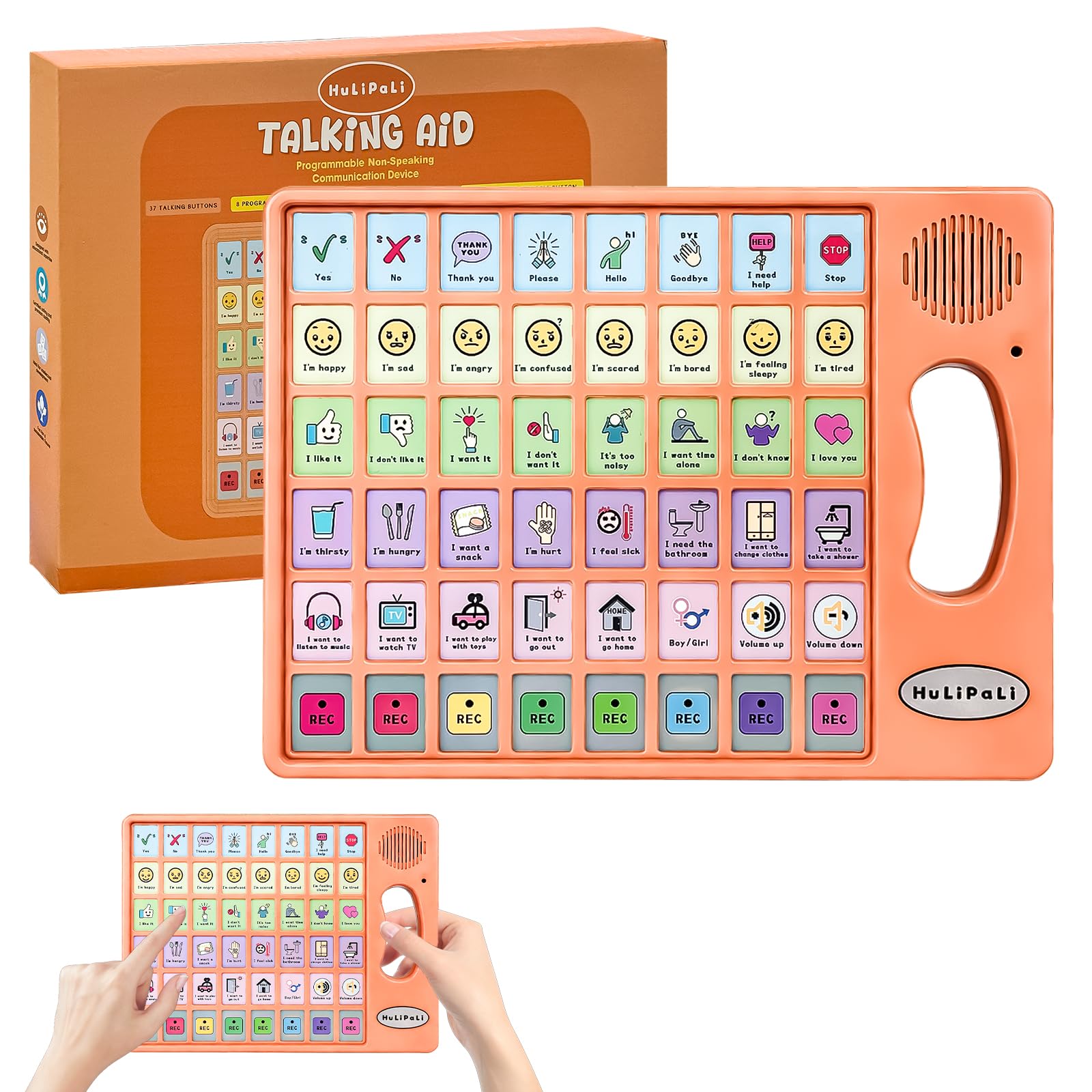
This mid-range device stands out for its thoughtful design that addresses common physical challenges. The exclusive grip handle on the right side provides exceptional stability for users with fine motor difficulties or limb weakness,making it more reliable than smooth, handheld rectangles. With 40 pre-installed buttons, it offers one of the largest built-in vocabularies in its class, reducing the immediate need for custom recordings.
The eight programmable buttons and the ability to switch between a boy or girl voice add meaningful personalization. Stepless volume adjustment ensures the output is clear in noisy environments without being jarring in quiet ones. The included storage bag enhances its portability for therapy or outings.
User feedback highlights its immediate utility for non-verbal children and stroke survivors, with particular praise for the grip handle and the emotional impact of an “I love you” button. It represents a significant step up in capability without venturing into the premium tier.
Why it’s great
- Ergonomic grip handle supports users with motor challenges.
- Extensive pre-set vocabulary of 40 phrases covers many daily needs.
- High level of customization with eight recordable buttons and dual voice modes.
Good to know
- The build quality, while functional, can feel somewhat lightweight to some users.
- Requires a screwdriver to access the battery compartment, which is secure but less convenient.
2. MibbyTalk AAC Device
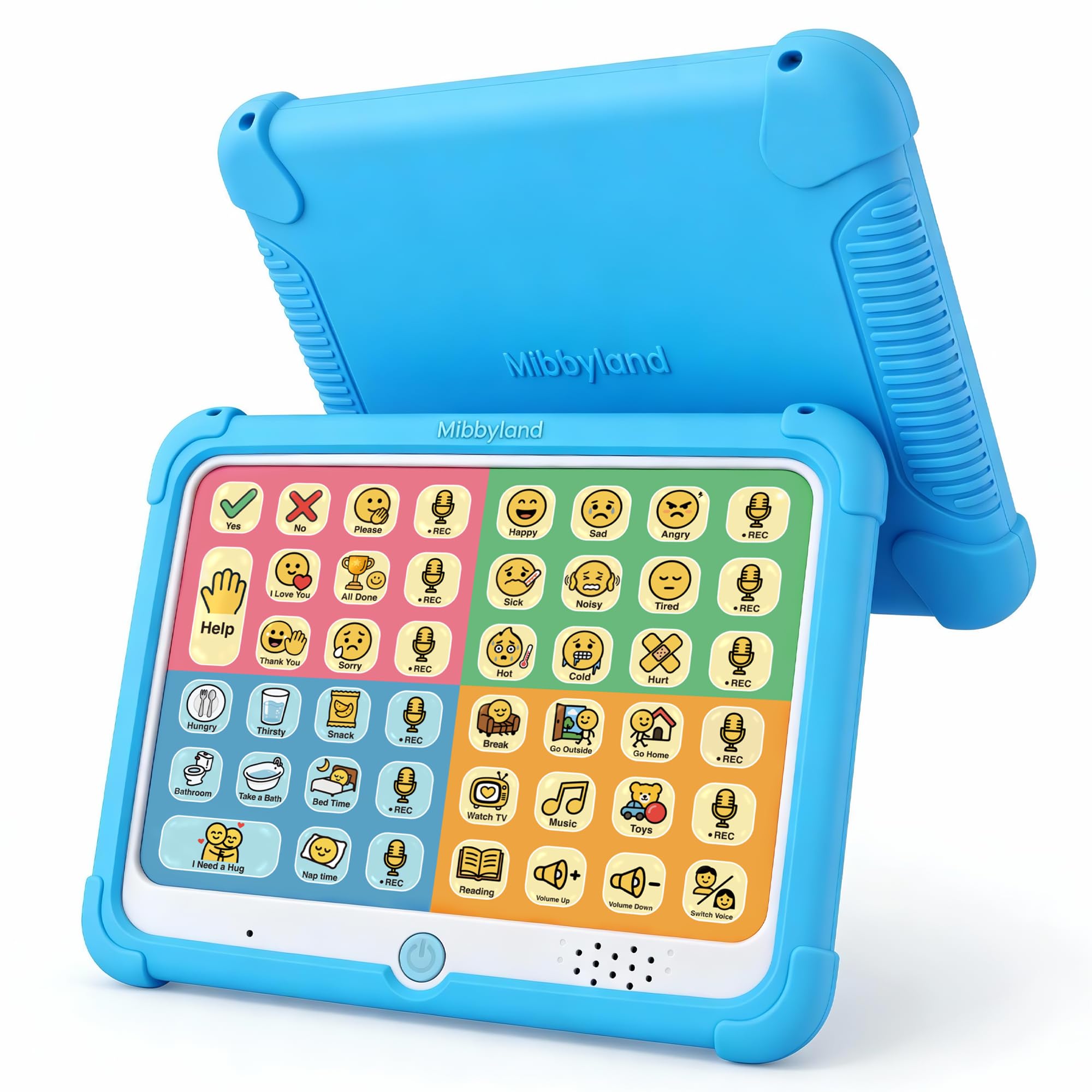
MibbyTalk is expertly designed as a starter device that doesn’t feel like a compromise. Its textured silicone case provides a superior grip and serious drop protection, which is crucial for young users. The 32 preset buttons are intelligently color-coded by category (social, feelings, needs, activities), speeding up the learning process.
With 11 recording buttons—the highest count in this guide—it offers exceptional room for growth and personalization. The included sheet of printed and blank stickers helps keep custom phrases organized. The raised, tactile buttons require only light pressure, accommodating users with limited hand strength.
It serves as a perfect bridge from PECS cards or a dependable backup to a tablet-based system. Its thoughtful design prioritizes durability and ease of use, making it a reliable workhorse for home, school, and community settings.
Why it’s great
- Durable silicone case offers excellent protection against drops.
- Outstanding customizability with 11 recordable buttons and organizational stickers.
- Intuitive color-coded layout helps users locate phrases quickly.
Good to know
- As a dedicated low-tech device, it lacks the infinite expansion of a tablet.
- The audio quality on custom recordings can sometimes sound slightly compressed.
3. Subao Portable AAC Device
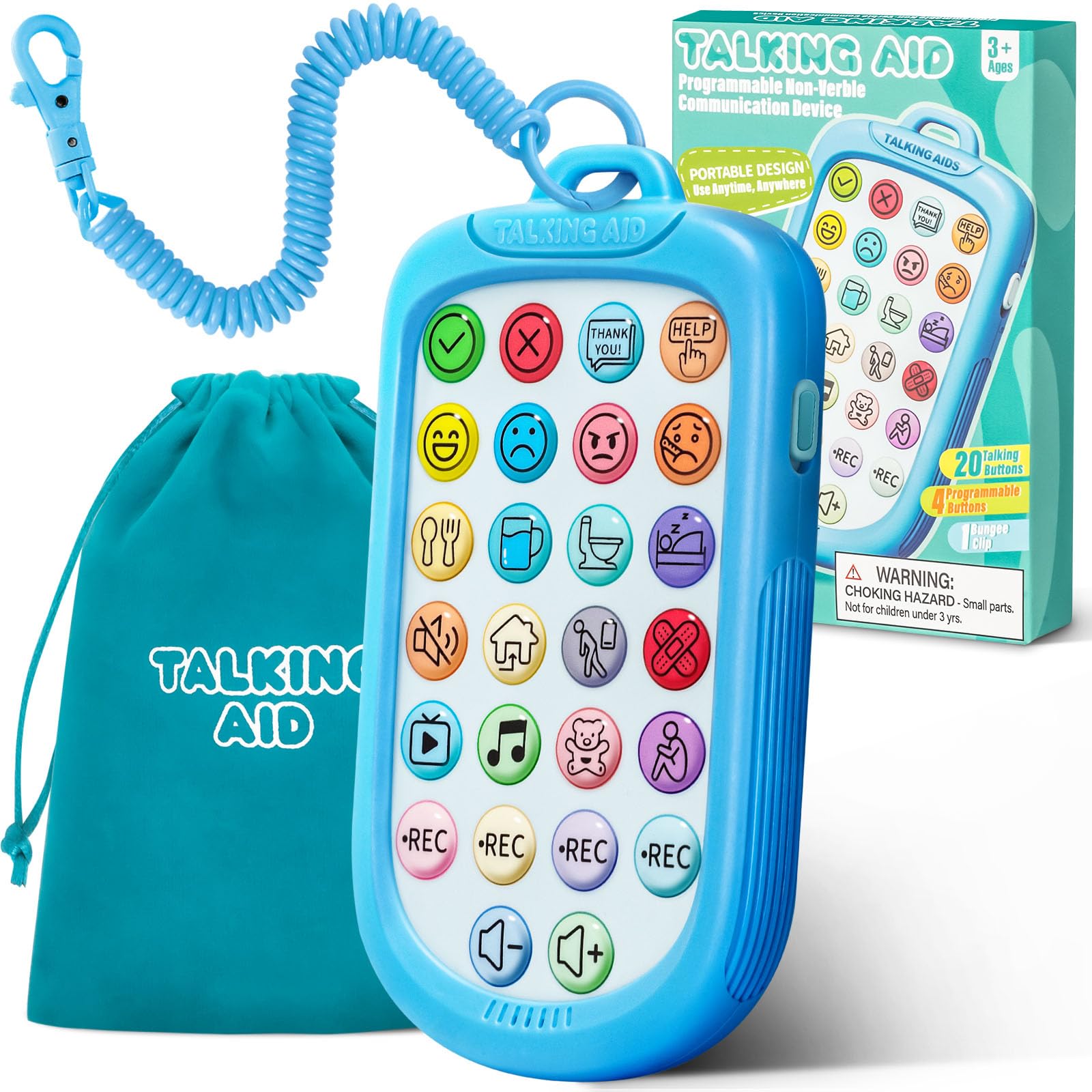
For communication on the move, the Subao device excels with its highly compact, phone-sized design. The integrated spring lanyard is a game-changer, allowing it to be clipped to a belt loop, backpack, or wheelchair, ensuring it’s always accessible and harder to lose.
It features 20 common pre-set phrases and four programmable buttons. The five adjustable volume levels provide flexibility for different environments. Its small size and protruding buttons make it easy for small hands to hold and operate, though the buttons themselves are on the smaller side.
This device is ideal as a secondary, ultra-portable option for quick outings or as a primary device for users who need a very simple, direct vocabulary. It proves that effective AAC doesn’t have to be bulky.
Why it’s great
- Extremely compact and lightweight with a convenient spring-loaded lanyard.
- Good volume control with five distinct levels.
- Rounded, durable body design withstands bumps and scratches.
Good to know
- Small button size can be challenging for some adults or those with dexterity issues.
- The recording quality for custom messages is not as clear as the pre-set phrases.
4. AAC 63 Buttons Device
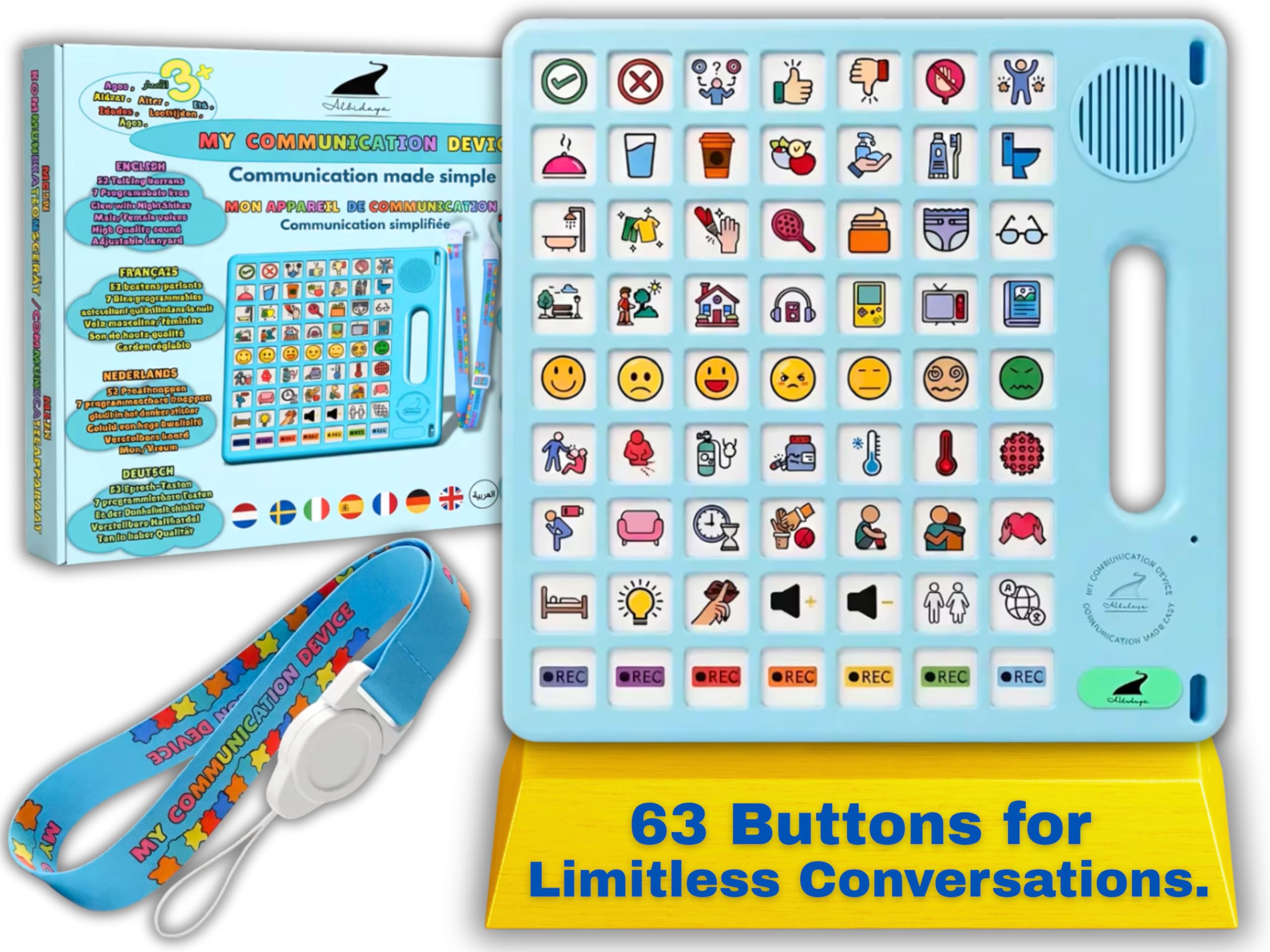
This device is for users ready for a expansive vocabulary without moving to a touchscreen. With 52 pre-installed picture-based buttons and seven programmable slots (each allowing up to 10-second recordings), it offers remarkable breadth. The option to switch between eight languages and male/female voices makes it uniquely versatile for multilingual households or therapy settings.
The adjustable lanyard and dust bag add to its practicality for daily use. A subtle glow-in-the-dark sticker aids location in low light. The phrases are delivered with polite language (e.g., “I want to play, please”), which caregivers appreciate.
It’s a robust mid-range option that feels substantial and well-made, suitable for users who have outgrown basic devices but may not need the complexity of a full tablet system.
Why it’s great
- Extensive pre-set vocabulary with polite phrasing.
- Multilingual support and voice gender options offer exceptional flexibility.
- Long custom recording time (70 seconds total) for detailed messages.
Good to know
- The sheer number of buttons can be visually overwhelming for some new users.
- Speaker may struggle to be heard clearly in very noisy environments.
5. TalkingTiles AAC Tablet
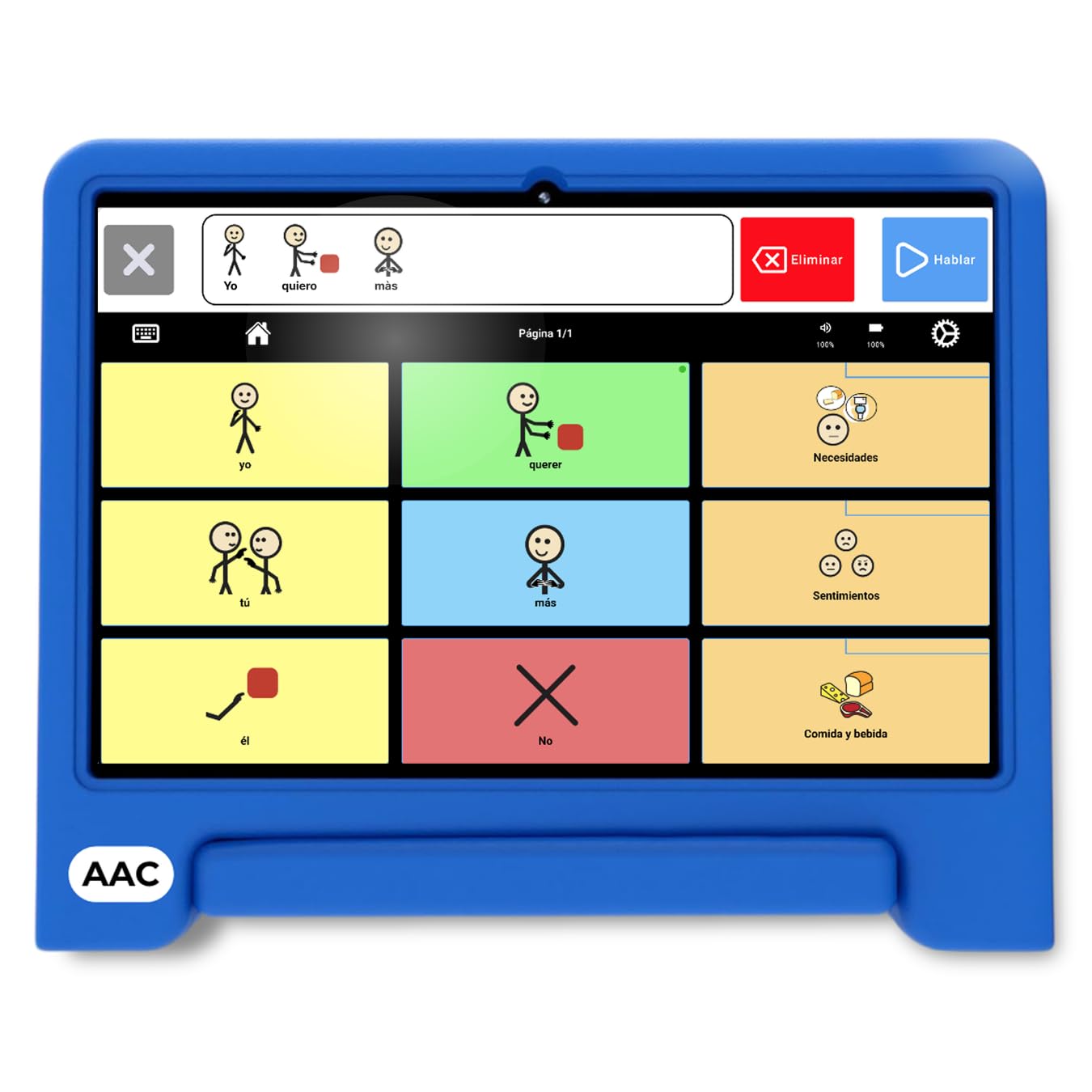
The TalkingTiles tablet represents the premium, high-tech end of the spectrum. It’s a dedicated Android tablet pre-loaded with a customizable AAC app, featuring a large, clear 10.1-inch screen. You can create unlimited pages with up to 56 tiles each, using thousands of pre-configured images or your own photos and voice recordings.
Its “walled garden” design—it doesn’t browse the web or run other apps—eliminates distractions and makes it a secure, focused communication tool. The long battery life and durable build are noted by users, as is the volume improvement over earlier models.
This is for individuals who need a vast, evolving vocabulary and the ability to construct sentences. It’s a legitimate, more affordable alternative to expensive iPad-based AAC setups, offering professional-grade customization without monthly software fees.
Why it’s great
- Fully customizable with unlimited vocabulary expansion.
- Large, responsive touchscreen is accessible for many users.
- Dedicated communication device with no distracting apps or internet.
Good to know
- A significant investment compared to button-based devices.
- The interface has a learning curve for the person setting it up.
6. AbleNet BIGmack

The BIGmack is a classic, single-message communicator built for durability and simplicity. Its large, colorful button is easy to target and press, making it ideal for teaching the fundamental cause-and-effect of communication: press button, get a result. It can record a single message up to two minutes long.
It’s widely used in educational and therapeutic settings for activating switches, participating in group activities, or making simple requests. The built-in mounting plate allows for secure attachment to tables or wheelchairs.
While it offers no vocabulary variety on its own, its focused purpose is its strength. It’s a professional-grade tool for building foundational skills or for individuals who communicate effectively with one repeated phrase or message.
Why it’s great
- Excellent for teaching basic communication concepts.
- Very durable construction built for institutional use.
- Versatile mounting options for accessibility.
Good to know
- Premium price for a single-message device.
- Some users report that the internal components can be fragile if dropped on a hard surface.
7. Joyreal AAC Device

Joyreal offers a well-rounded entry point into multi-button AAC devices. It provides a solid foundation with 24 pre-programmed phrases and a generous six recordable buttons. The layout is straightforward, and the buttons are reported to be easy to press, which lowers the barrier to immediate use.
It includes adjustable volume and a storage bag, covering the essentials for home, school, or travel. Users have found it particularly helpful as a reliable backup when a primary, more complex device is charging or unavailable.
This device represents a sweet spot for those seeking more capability than a basic model without the extra features that can increase cost or complexity. It’s a practical, no-fuss option that delivers core functionality effectively.
Why it’s great
- Good balance of pre-set and customizable phrases.
- Simple interface with easy-to-press buttons.
- Portable and includes essential accessories like a storage bag.
Good to know
- Sound output may not be as powerful as some other models in noisy settings.
- The size might be slightly large for very small hands.
8. AAC Device (14 Button)

This device is purpose-built for introducing the concept of a high-tech communicator. With only 14 pre-programmed buttons and two for custom recording, it minimizes overwhelm. Its small, remote-control size is durable and easily portable.
The pre-set phrases are full sentences (e.g., “I want to watch TV”), which can be beneficial for language modeling. However, it’s important to note the voice has a British accent and lacks volume control, which can be a significant limitation for some users.
It serves a specific niche: a low-risk trial device, a short-term solution, or a simple backup. For those needing only a handful of phrases, it can be profoundly effective, as evidenced by emotional user testimonials.
Why it’s great
- Extremely simple and unintimidating for first-time users.
- Durable, compact build similar to a TV remote.
- Uses full sentences for better language modeling.
Good to know
- British accent and lack of volume control are notable drawbacks for some.
- Very limited vocabulary and customizability.
9. AAC Device (23 Button)
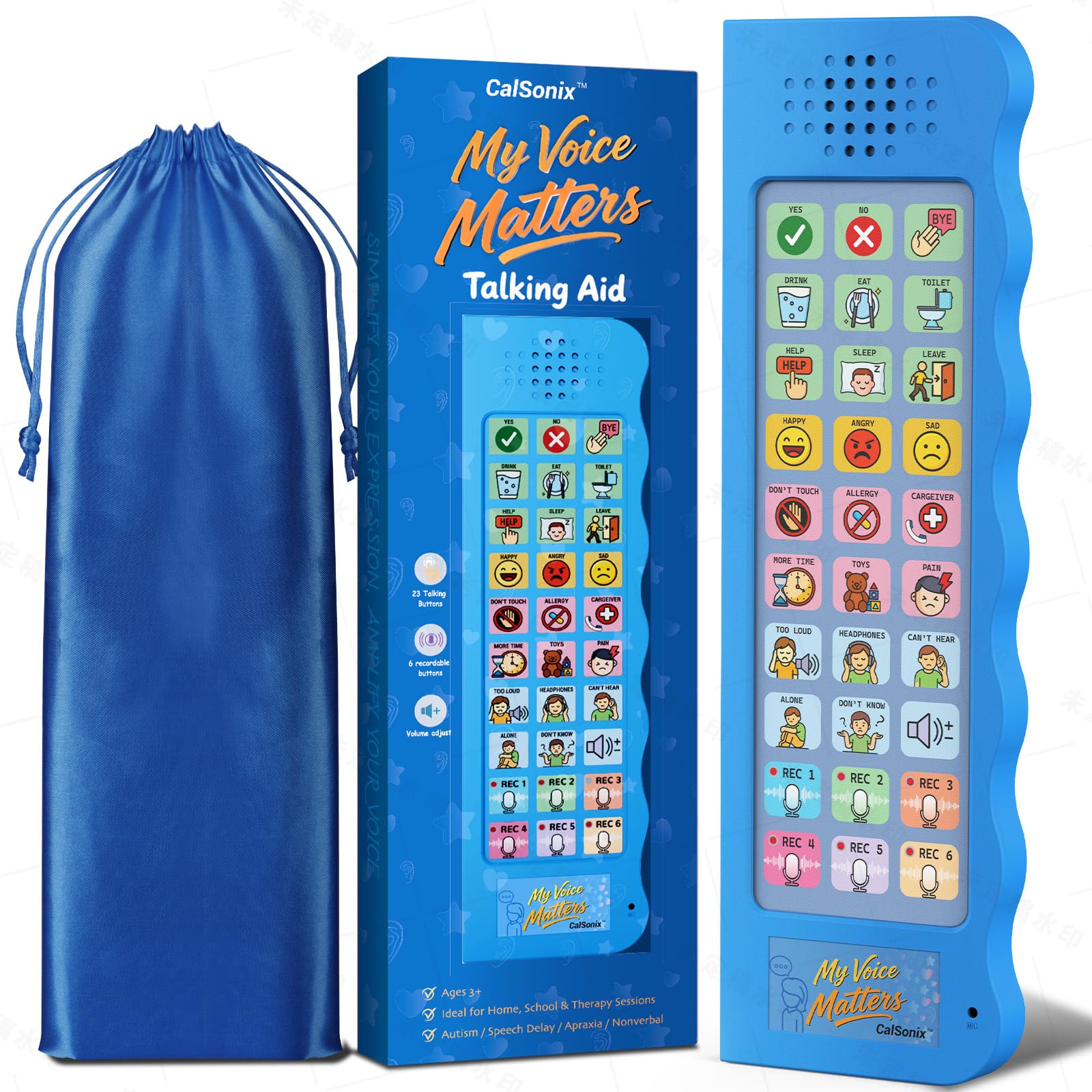
This entry-level device delivers remarkable value, providing a full suite of essential features. The 23 pre-programmed buttons cover critical needs, and the six recordable buttons allow for meaningful personalization in a caregiver’s voice.
It includes four adjustable volume levels and comes with a storage bag, making it a complete, ready-to-use kit. User reviews frequently mention its louder, clearer output compared to other models in its category, which is a crucial advantage.
For families or therapists needing an affordable, effective tool to bridge a communication gap immediately, this device is a standout. It proves that a limited budget does not have to mean limited capability.
Why it’s great
- Excellent value with a strong set of core features.
- Surprisingly loud and clear speaker for its category.
- Includes useful accessories like a storage bag.
Good to know
- Buttons may require a firmer press, which could challenge some users.
- Plastic build is functional but not as robust as higher-end models.
10. Talker Buddy

The Talker Buddy is designed for maximum simplicity out of the box. It comes with a set of pre-installed vocabulary covering common situations, requiring no setup or recording to begin use. The soft-touch button layout is intuitive and minimizes the learning curve.
Its included travel bag enhances its portability for school, therapy, or errands. For individuals who respond well to a straightforward, no-frills device or as a very first step into aided communication, it serves its purpose well.
It’s important to note that the phrases cannot be changed or recorded over, which limits its long-term adaptability. This makes it best suited for specific, temporary needs or as an introductory tool.
Why it’s great
- Ready to use immediately with no programming needed.
- Simple, clean layout with soft-touch buttons.
- Portable and comes with a protective travel bag.
Good to know
- Lacks any customizability; phrases are fixed.
- Vocabulary is limited to the pre-programmed set.
11. KidBloom AAC Device
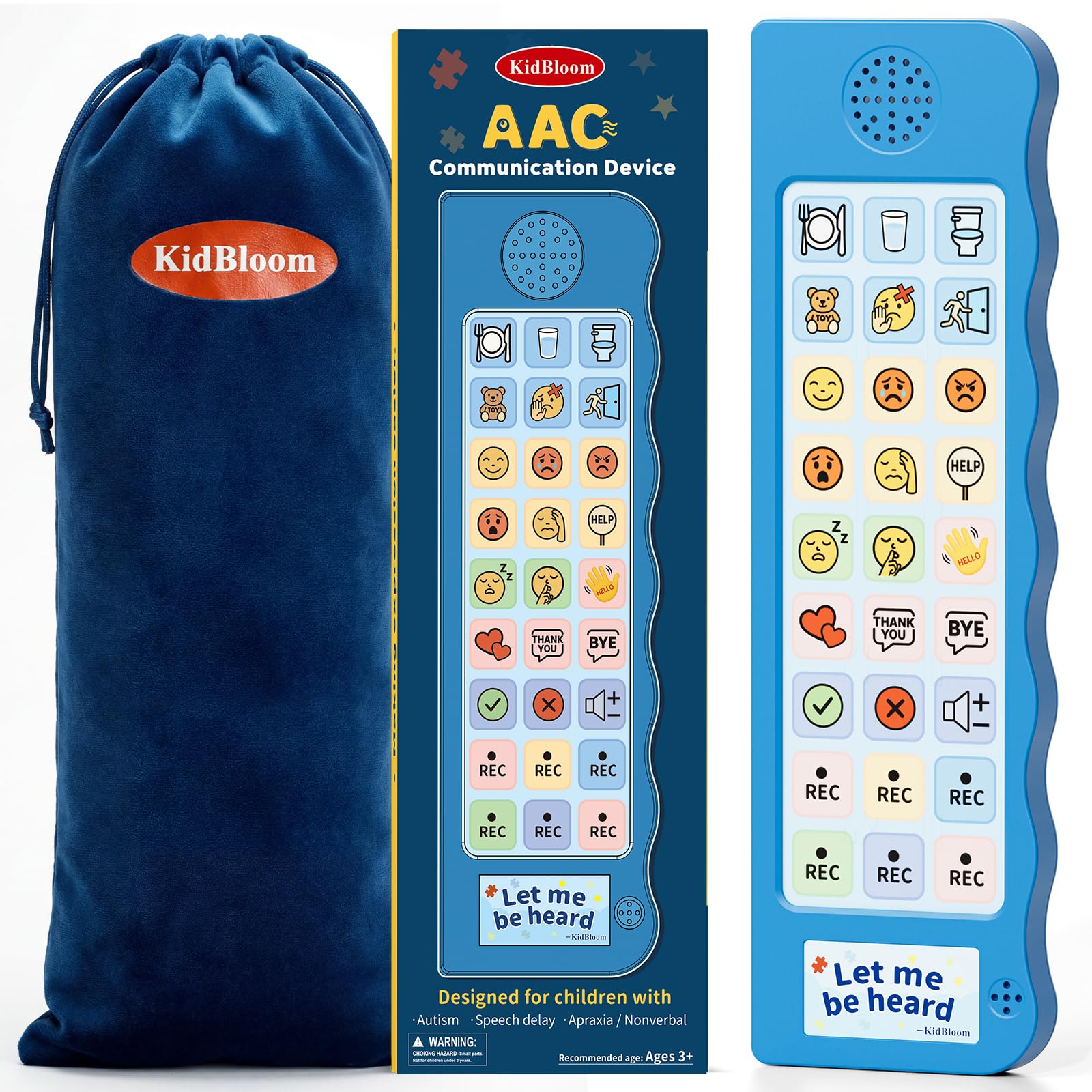
Tailored for preschoolers and young children, the KidBloom device is exceptionally lightweight and sized for small hands. Its 20 color-coded buttons and six recordable slots provide a manageable vocabulary set that can grow with the child.
It features two volume settings and a soft pouch for carrying. A note for buyers: it ships with one of two battery types at random (button cell or AA), so it’s wise to check what you receive. The simple, focused design helps young users engage without distraction.
This device is an ideal first communicator for a non-verbal child, offering a gentle introduction to the power of having a “voice” in a format they can physically manage.
Why it’s great
- Perfect size and weight for children aged 3-7.
- Clear, simple layout with helpful color-coding.
- Includes a soft carrying pouch for portability.
Good to know
- Battery type is variable (either button cell or AA).
- Buttons may require a firmer press than some children can easily manage.
Understanding the Specs
Pre-Programmed vs. Programmable Buttons
Pre-programmed buttons offer instant use with common phrases, reducing setup time. Programmable (recordable) buttons are critical for personalization, allowing you to add names, specific requests, or comforting phrases in a familiar voice. A balance of both types offers the best foundation for growth.
Physical Design & Accessibility
This encompasses button size, press resistance, grip handles, lanyards, and overall weight. These factors determine whether a user can physically operate the device independently. Ergonomic designs and features that aid stability are non-negotiable for users with motor challenges.
FAQ
What is the main difference between a button AAC device and a tablet?
How do I introduce an AAC device to a non-verbal child?
Can AAC devices hinder natural speech development?
Final Thoughts: The Verdict
For most people, the best aac devices winner is the AAC Device with Grip Handle because it masterfully balances a large vocabulary with essential accessibility features at a mid-range point. If you want a durable, highly customizable starter device with excellent protection, grab the MibbyTalk. And for advanced, unlimited communication needs on a dedicated touchscreen, nothing beats the TalkingTiles Tablet.

Mo Maruf
I created WellFizz to bridge the gap between vague wellness advice and actionable solutions. My mission is simple: to decode the research and give you practical tools you can actually use.
Beyond the data, I am a passionate traveler. I believe that stepping away from the screen to explore new environments is essential for mental clarity and physical vitality.