Our readers keep the lights on and my smoothie glass nicely filled. As an Amazon Associate, I earn from qualifying purchases.
The RTX 5080 is a GPU that demands a balanced platform. Pair it with the wrong CPU or inadequate cooling and you are paying for frame rates you will never see. The prebuilt market is flooded with flashy cases covering mismatched components, making it essential to look past the RGB and confirm every part earns its place next to the Blackwell architecture.
I’m Mohammad Maruf — the founder and writer behind WellFizz. I have spent over 600 hours analyzing prebuilt gaming PC specs, reading through thousands of verified buyer reports on component quality, cable management, and real-world thermal behavior to separate genuinely optimized builds from glorified part lists.
Whether you are upgrading from an older generation or entering the high-end space for the first time, this guide breaks down the top performers across different budgets and priorities so you can confidently choose a 5080 prebuilt pc that delivers the full potential of its hardware without hidden compromises.
How To Choose The Best 5080 Prebuilt PC
A prebuilt with an RTX 5080 can cost anywhere from entry-level to luxury pricing. The difference lies not in the GPU alone but in the surrounding ecosystem. Here are the three specifications that define a properly matched system.
CPU Generation and Core Architecture
The RTX 5080 can push hundreds of frames in modern titles, but an older or lower-core-count CPU can create a bottleneck that leaves performance on the table. Look for AMD Ryzen 7000/9000 series (especially X3D variants with their large L3 cache) or Intel Core i7/i9 from the 14th generation or newer. The 9800X3D and 14900KF are both strong partners for the 5080 because their single-threaded speed and core counts allow the GPU to operate at full utilization even at 1440p and 4K resolutions.
Cooling System Type and Radiator Size
High-end components generate significant heat under sustained loads. Air cooling is rarely sufficient when the system includes an RTX 5080 and a premium CPU. A 240mm or 360mm AIO liquid cooler is the baseline for keeping temperatures under 80°C during extended gaming sessions. Case airflow also matters — front mesh panels and multiple fan configurations prevent hot air from recirculating inside the chassis.
Power Supply Standard and Efficiency
The RTX 50-series cards draw high transient power spikes that can trip older PSUs. Look for units that are ATX 3.0 or ATX 3.1 certified, as these are designed to handle the 12VHPWR connector and peak loads up to twice the rated wattage. An 850W Gold-rated PSU is the minimum for a 5080 build, while 1000W Platinum provides more headroom for overclocking and future upgrades.
Quick Comparison
On smaller screens, swipe sideways to see the full table.
| Model | Category | Best For | Key Spec | Amazon |
|---|---|---|---|---|
| Skytech Azure 3 | Mid-Range | AAA 4K gaming with X3D cache | RTX 5080 / R7 9800X3D | Amazon |
| Alienware Aurora ACT1250 | Premium | Out-of-box stability & service | RTX 5080 / Core Ultra 9 285 | Amazon |
| STORMCRAFT Skyhawk PRO | Mid-Range | Best value 9800X3D + 5070 Ti | RTX 5070 Ti / R7 9800X3D | Amazon |
| Panorama RTX 5080 | Premium | High core count for streaming | RTX 5080 / i9-14900KF | Amazon |
| Thermaltake View 9580S | High-End | Flagship 9950X3D performance | RTX 5080 / R9 9950X3D | Amazon |
| Corsair Vengeance i7500 | Premium | Corsair ecosystem & build quality | RTX 5080 / i9-14900KF | Amazon |
| iBUYPOWER Element | Mid-Range | Budget-conscious 5080 entry | RTX 5070 / R9 7900X | Amazon |
| MSI Codex Z2 | Entry-Level | Affordable 5070 system | RTX 5070 / R7 8700F | Amazon |
| Skytech Legacy 4 | Flagship | Maximum RTX 5090 performance | RTX 5090 / R9 9950X3D | Amazon |
In‑Depth Reviews
1. Skytech Gaming Azure 3

The Skytech Azure 3 marries the RTX 5080 with the AMD Ryzen 7 9800X3D, a CPU whose 104 MB of total cache dramatically reduces latency in CPU-bound titles like Escape from Tarkov and Counter-Strike 2. The 32 GB of DDR5 RAM running at 6000 MHz matches the Infinity Fabric clock for optimal bandwidth, and the 2 TB Gen4 NVMe drive ensures game loads stay under 10 seconds even for open-world maps.
Thermal management is handled by a 360mm AIO liquid cooler with addressable RGB fans that spin up quietly under load. The 850W Gold ATX 3.0 power supply provides the transient spike tolerance that the RTX 5080 requires, and the case includes magnetic dust filters on all intake surfaces for long-term cleanliness. Skytech assembles these units in the USA and stress-tests each system before shipping.
Verified buyers report correct ROP counts on the 5080, clean cable management inside the tempered glass panel, and no bloatware on the Windows 11 Home installation. The included keyboard and mouse are functional but many users upgrade those immediately — the real value sits in the component selection and thermal engineering.
Why it’s great
- Balanced CPU/GPU pairing eliminates bottlenecks at 1440p and 4K
- 360mm AIO keeps CPU temps below 70°C during extended sessions
- ATX 3.0 PSU handles 5080 power spikes without tripping
Good to know
- Peripherals are basic and likely need replacement
- RAM speed may need enabling via XMP/EXPO in BIOS
- Limited front-panel USB-C connectivity
2. Alienware Aurora ACT1250

The Alienware Aurora ACT1250 uses the Intel Core Ultra 9 285 processor, a 5.6 GHz boost chip built on the Arrow Lake architecture that pairs with the RTX 5080 for exceptional multi-threaded rendering performance. The 32 GB of DDR5 RAM is factory-configured for stability, and the 1000W Platinum-rated PSU provides headroom for sustained overclocking sessions without efficiency loss.
The chassis uses a 240mm heat exchanger on the CPU loop and a stadium lighting zone that can be customized through the Alienware Command Center. Dell includes a one-year onsite service warranty, meaning a technician will come to your home if a hardware issue cannot be resolved remotely — a significant advantage for buyers who do not want to troubleshoot their own system.
User feedback highlights the silent operation even under full load, with CPU temperatures staying around 66°C during intense gaming. Some users noted that the motherboard uses proprietary connectors that limit certain upgrades to Dell-certified components, so expansion planning is more restricted compared to standard ATX builds.
Why it’s great
- 1-year onsite service protects your investment
- 1000W Platinum PSU provides clean stable power
- Extremely quiet under load with excellent thermal performance
Good to know
- Proprietary motherboard limits aftermarket upgrades
- BIOS update may be needed for CPU stability
- Only dual-channel memory slots without expansion
3. STORMCRAFT Skyhawk PRO

The STORMCRAFT Skyhawk PRO swaps the RTX 5080 for the RTX 5070 Ti with 16 GB of GDDR7 memory, dropping the GPU tier while keeping the same AMD Ryzen 7 9800X3D CPU that anchors the most responsive gaming builds on the market. This shift makes it a strong option if you prioritize CPU-heavy simulation games or esports titles where cache size matters more than raw GPU shader count.
The system uses a 360mm AIO liquid cooler, six ARGB fans, and an AMD B850 chipset motherboard that supports PCIe 5.0 for both GPU and storage. The 850W Gold PSU provides enough headroom for the 5070 Ti, and the case measures 16.9 x 9 x 18.5 inches with tempered glass on the front and side panels. STORMCRAFT offers a one-year parts and three-year labor warranty plus free lifetime technical support.
Buyers report quiet fan operation, a clean assembly, and strong performance in Star Citizen at 1080p Ultra with frame rates exceeding 200 FPS in less demanding areas. The curved glass case and subtle RGB glow appeal to users who want a refined aesthetic without aggressive lighting patterns. A few units shipped with a missing power cord or loose GPU support bracket, but customer service resolved these issues quickly.
Why it’s great
- 9800X3D CPU at a lower overall system cost
- 360mm AIO and six fans provide excellent thermal headroom
- 3-year labor warranty and lifetime technical support
Good to know
- Not all units include a display cable in the box
- GPU is a 5070 Ti, not a full 5080
- Curved glass may limit interior access for upgrades
4. Panorama RTX 5080 by Empowered PC

The Panorama from Empowered PC combines the RTX 5080 with the Intel Core i9-14900KF, a 24-core processor that clocks up to 6.0 GHz. This combination excels in streaming scenarios where encoding and gaming run simultaneously, leveraging the high core count to maintain frame stability. The 32 GB of DDR5 RAM and 2 TB Gen4 NVMe SSD provide ample bandwidth for multitasking and quick asset loading.
Cooling relies on nine ARGB PWM fans and a liquid CPU cooler, creating strong positive air pressure that pushes heat out through the dual tempered glass panels. The system ships with Windows 11 Pro, which includes BitLocker and Remote Desktop features not found in Home editions. Empowered PC offers a three-year limited hardware warranty and lifetime diagnostic support, and the unit is assembled and stress-tested in the USA.
User reports confirm the system handles demanding flight simulators like DCS World and Elite Dangerous fluidly at high settings. Some units had a GPU power cable that brushed against a fan blade, requiring a minor adjustment, and the advertised 10 fans actually shipped with 9. The remote control for case RGB lights sometimes needed a battery reseat to function correctly.
Why it’s great
- 24-core i9-14900KF allows smooth streaming while gaming
- Windows 11 Pro adds enterprise-grade security features
- 3-year hardware warranty backs the investment
Good to know
- Fan count may differ from the listing description
- GPU power cable routing may need re-arranging
- Full panoramic glass limits airflow compared to mesh designs
5. Thermaltake LCGS View 9580S
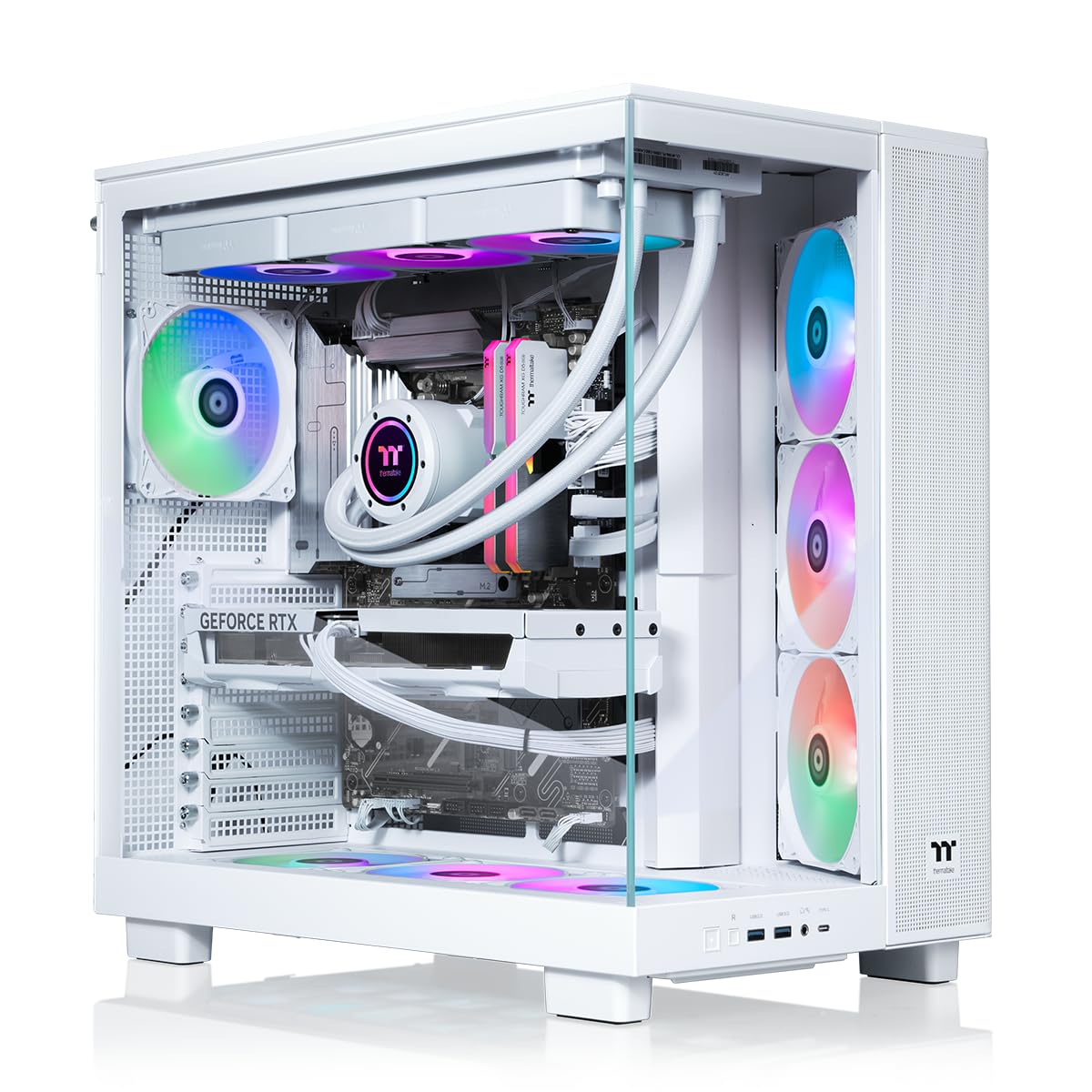
The Thermaltake View 9580S features the AMD Ryzen 9 9950X3D, a 16-core flagship that combines the 3D V-Cache technology with high clock speeds for the lowest latency in strategy and simulation games. The RTX 5080 pairs through an X870 chipset motherboard that supports PCIe 5.0 lanes for both the GPU and an additional Gen5 SSD, future-proofing data bandwidth for DirectStorage titles.
A closed-loop 360mm liquid cooler handles CPU thermal output, and the 32 GB of ToughRAM DDR5 runs at 6000 MT/s. The panoramic tempered glass panels on the front and side provide wide visibility of the components, and the chassis includes a Type-C USB port on the rear I/O. The system ships with Windows 11 Home and uses standard ATX connections for straightforward upgrades.
Buyers needing core parking configuration in BIOS for the 9950X3D found the process simple, and the system boots instantly with no bloatware. The RTX 5080 in this unit came as a Zotac OC model with factory overclocking enabled. A few users reported loose fan header pins after shipping, and the lack of top-mounted USB ports made access awkward for systems placed under a desk.
Why it’s great
- 9950X3D delivers best-in-class gaming latency
- X870 chipset supports full PCIe 5.0 bandwidth
- Standard ATX components simplify future upgrades
Good to know
- BIOS core parking adjustment needed for 9950X3D
- Shipping can loosen fan or header connections
- USB ports are mounted on the top edge, not front-facing
6. Corsair Vengeance i7500

The Corsair Vengeance i7500 is a fully integrated ecosystem build where every major component from the liquid cooler to the RAM and case carries the Corsair name. The RTX 5080 pairs with the Intel Core i9-14900KF running at up to 5.8 GHz, and the NAUTILUS RS 240mm liquid cooler uses a pump that decouples from the fan curve for quieter operation at low loads.
The 3500X case features wraparound tempered glass panels on the front and side, creating a clear view of the VENGEANCE RGB DDR5 memory sticks and the AIO pump head. The 2 TB M.2 SSD provides fast storage for the OS and active game library, while the Corsair iCUE software controls all lighting, fan speeds, and hardware monitoring from a single interface. This integration means firmware updates and profiles are managed without third-party tools.
Customer experiences vary on reliability — some units arrived with non-working fans or poorly installed windows, requiring returns. Users who received a fully functional unit report excellent speed and quiet operation, though the BIOS on the 14900KF needs updating to address the microcode stability issues documented for 13th and 14th generation Intel processors. The USB port count is limited, with only a few rear-panel connectors.
Why it’s great
- Fully integrated Corsair ecosystem for unified software control
- iCUE allows precise fan curve and lighting customization
- Wraparound glass panels showcase internal components clearly
Good to know
- Some units ship with build quality defects
- BIOS update required for 14900KF stability
- Limited rear USB ports for peripheral-heavy setups
7. iBUYPOWER Element EWA9N5702

The iBUYPOWER Element drops the GPU to an RTX 5070 with 12 GB of GDDR7 memory, trading raw rasterization power for the 12-core AMD Ryzen 9 7900X CPU. This configuration suits users who run CPU-intensive workloads like video encoding or software compilation alongside gaming, where the 7900X’s 5.6 GHz boost speed and 24 threads provide multitasking headroom.
The system includes 32 GB of DDR5 RGB memory at 5200 MHz, a 1 TB NVMe SSD, and a liquid CPU cooler. The tempered glass case features 16-color RGB lighting, and iBUYPOWER includes a gaming keyboard and mouse in the box. The motherboard offers six USB 3.1 ports on the rear I/O, and Wi-Fi is built in with an 802.11ac adapter.
Buyer feedback indicates that the system performs well for modern titles at high settings, though the 5070 GPU will not push 4K Ultra at high frame rates the way a 5080 can. Some users needed to update wireless and graphics drivers immediately after setup, and the included peripherals are basic. Cable management inside the case is serviceable but not as clean as higher-end options.
Why it’s great
- 12-core 7900X handles productivity tasks efficiently
- Liquid cooling keeps CPU thermals in check
- Includes gaming keyboard and mouse to get started
Good to know
- RTX 5070 struggles at native 4K resolution
- RAM runs at 5200 MHz, slower than optimal DDR5 speeds
- Wi-Fi uses 802.11ac, not the newer Wi-Fi 6E standard
8. MSI Codex Z2 A8NVP-436US

The MSI Codex Z2 uses the AMD Ryzen 7 8700F, an 8-core processor that boosts to 5.0 GHz, paired with the RTX 5070 and 12 GB of GDDR7 memory. This is the most affordable configuration in the roundup and targets 1440p gaming at high refresh rates rather than 4K ultra. The 32 GB of DDR5 RAM and 2 TB NVMe SSD provide generous storage and memory for a large game library.
The chassis uses an ARGB fan air cooler with four system fans — three front intake and one rear exhaust — creating basic airflow without liquid cooling. The case includes an MSI LED button on the top panel that cycles through pre-set RGB lighting effects, and MSI Center software allows more granular customization. The system includes a wired keyboard and mouse.
User reports are mixed. Satisfied customers note smooth 160 Hz FPS performance and cool temperatures during gaming sessions. However, multiple users experienced SSD failure within weeks, Bluetooth connectivity issues requiring a separate PCIe card, and in one case persistent Blue Screen of Death errors that reappeared after a fresh Windows reinstall. The build quality and component reliability appear inconsistent.
Why it’s great
- 2 TB NVMe storage provides ample game space
- 32 GB of DDR5 RAM handles multitasking smoothly
- ARGB lighting adds aesthetic flexibility
Good to know
- Higher-than-average defect rate on storage and Bluetooth
- Air cooling only, no liquid thermal solution
- Wi-Fi performance may require hardware upgrade
9. Skytech Gaming Legacy 4

The Skytech Legacy 4 is the most powerful configuration in this group, pairing the RTX 5090 with 32 GB of GDDR7 VRAM against the AMD Ryzen 9 9950X3D. The 64 GB of DDR5 RAM at 6000 MHz and a 4 TB Gen4 NVMe SSD ensure no component becomes a bottleneck, and the 1200W Gold ATX 3.0 PSU provides enough headroom for overclocking both CPU and GPU simultaneously without power delivery concerns.
Cooling is handled by a massive 420mm AIO liquid cooler with ARGB fans, significantly larger than the 360mm units found in most builds. The X870 chipset motherboard supports Wi-Fi 7 for the fastest wireless connectivity available. Skytech includes a gaming keyboard and mouse, and the case features a tempered glass side panel, magnetic dust filters, and sleeved power cables for clean internal aesthetics.
Buyers report exceptional performance at 4K Ultra settings with high frame rates across all current AAA titles, and the system is VR-ready without any compromises. The unit ships after assembly and stress-testing, and cable management is generally well-executed. Some users noted the power supply is non-modular, which makes routing a bit bulkier behind the motherboard tray, but overall component quality is consistently praised.
Why it’s great
- RTX 5090 delivers maximum 4K and VR performance
- 420mm AIO provides superior CPU cooling headroom
- 64 GB DDR5 RAM and 4 TB storage eliminate upgrades
Good to know
- Non-modular PSU makes cable management trickier
- Price point is significantly higher than 5080 builds
- Large chassis may not fit under standard desk layouts
FAQ
Does the RTX 5080 require a PCIe 5.0 motherboard to reach full performance?
What power supply wattage is actually needed for a 5080 prebuilt?
Should I be concerned about the Intel 13th/14th gen instability issues in prebuilts?
Does the RTX 5080 benefit from faster RAM speeds beyond 6000 MHz?
Final Thoughts: The Verdict
For most users, the 5080 prebuilt pc winner is the Skytech Gaming Azure 3 because it pairs the RTX 5080 with the AMD Ryzen 7 9800X3D in a balanced configuration that eliminates CPU bottlenecks at any resolution. If you want Dell’s onsite service and a silent chassis, grab the Alienware Aurora ACT1250. And for maximum raw power with the RTX 5090, nothing beats the Skytech Gaming Legacy 4.

Mo Maruf
I created WellFizz to bridge the gap between vague wellness advice and actionable solutions. My mission is simple: to decode the research and give you practical tools you can actually use.
Beyond the data, I am a passionate traveler. I believe that stepping away from the screen to explore new environments is essential for mental clarity and physical vitality.