Our readers keep the lights on and my smoothie glass nicely filled. As an Amazon Associate, I earn from qualifying purchases.
The jump from a standard 1080P webcam to a true 4K sensor is the single most noticeable upgrade you can make to your home office or streaming setup. Grainy, muddy video from built-in laptop cameras is easily outclassed by a dedicated 4K webcam, which packs four times the pixels and delivers the sharp, detailed image that clients, audiences, and teammates will actually respect.
I’m Mohammad Maruf — the founder and writer behind WellFizz. I’ve spent years analyzing the imaging pipeline for USB cameras, from sensor size and autofocus speed to noise reduction and codec support, to separate genuine performance from marketing hype.
To help you navigate this increasingly crowded market, I’ve put together this detailed guide on finding the best 4k webcam for your specific needs, covering everything from autofocus performance to low-light capability.
How To Choose The Best 4K Webcam
A 4K webcam is a long-term investment in how you present yourself online, so understanding the hardware that determines image quality is critical. The three pillars are the physical sensor, the autofocus system, and the lens field of view.
Sensor Size and Pixel Pitch
The physical size of the CMOS sensor — measured in inches — is the single best predictor of low-light performance. A larger sensor (like 1/1.2” or 1/1.28”) captures more light per pixel, reducing grain and preserving detail when your desk lamp is off. Pixel pitch, measured in micrometers, matters too: bigger individual pixels (2.9 µm vs. 1.4 µm) absorb light more efficiently, giving you a cleaner image in dim environments.
Autofocus: PDAF vs. Contrast Detection
Phase-Detection Autofocus (PDAF) is the gold standard for webcams because it calculates focus distance instantly without the hunting visible in contrast-detection systems. Some premium units combine PDAF with an auxiliary AI camera to lock focus in 0.2 seconds, which is essential for streamers who move around or product demos where the subject changes distance rapidly.
Field of View and PTZ Tracking
Field of view (FOV) determines how much of your background is visible. A 78° to 90° range is ideal for a single-person close-up, while wider angles (100°+) are useful for group meetings. PTZ (Pan-Tilt-Zoom) cameras add a motorized gimbal that physically follows you around the room, which is vastly superior to digital zoom for maintaining 4K resolution during movement.
Quick Comparison
On smaller screens, swipe sideways to see the full table.
| Model | Category | Best For | Key Spec | Amazon |
|---|---|---|---|---|
| Razer Kiyo Pro Ultra | Premium | Pro-grade content creation | 1/1.2″ STARVIS 2 Sensor | Amazon |
| Insta360 Link 2 Pro | Premium | AI PTZ Tracking | 1/1.3″ Sensor, 4K 30fps | Amazon |
| OBSBOT Tiny 3 | Premium | Spatial Audio & Tracking | 1/1.28″ CMOS, 4K 30fps | Amazon |
| Elgato Facecam 4K | High-End | Streamers & filter users | 49mm lens filter thread | Amazon |
| iContact Camera Pro | Mid-Range | Natural eye contact on calls | Retractable eye-contact arm | Amazon |
| Dell UltraSharp WB7022 | Mid-Range | Business conferencing | Sony STARVIS, 4K 30fps | Amazon |
| NexiGo N950P | Mid-Range | Remote-controlled meetings | 5X Digital Zoom, RF Remote | Amazon |
| Angetube 4K Webcam | Mid-Range | AI tracking on a budget | 10X Digital Zoom, RF Remote | Amazon |
| EMEET PIXY | Budget-Friendly | Entry-level PTZ features | Dual-camera AI, 0.2s AF | Amazon |
In‑Depth Reviews
1. Razer Kiyo Pro Ultra

The Razer Kiyo Pro Ultra sits at the top of the 4K webcam food chain, and the reason is its massive 1/1.2-inch Sony STARVIS 2 sensor with 2.9 µm pixels. This sensor area is nearly double what you find in typical premium webcams, which translates directly into cleaner shadows and less noise when you’re working in a home office without perfect lighting. The custom F/1.7 aperture lens lets in abundant light, allowing the camera to maintain a crisp, detailed image even in near-dark conditions.
Its AI-powered face tracking keeps autofocus locked on your face while automatically adjusting exposure to prevent blown-out highlights from a window behind you. The webcam also delivers true-to-life HDR color at 30fps, and the portrait-mode bokeh effect creates a natural background blur without relying on software trickery. For streamers and content creators who need uncompressed 4K output, the on-board memory saves your last configuration, so settings remain intact across reboots.
The main drawback is software dependency: advanced customization requires the Synapse app on Windows, and Mac users will need to purchase a third-party tool for full control. The unit is physically larger than most webcams, resembling a compact prime lens, but the metal build and twist-to-close iris privacy cover feel premium and durable.
Why it’s great
- Best-in-class low-light performance due to large sensor
- Uncompressed 4K output for professional streams
- Natural bokeh effect without software processing
Good to know
- Windows software required for full customization
- Bulkier form factor than standard webcams
2. Insta360 Link 2 Pro

The Insta360 Link 2 Pro is a PTZ powerhouse that uses a 1/1.3-inch sensor to deliver sharp 4K video with excellent low-light performance. The gimbal-based physical tracking is a game-changer: instead of cropping into a wide shot, the camera pan-tilts to follow you across the room, keeping the full sensor resolution intact. AI tracking locks onto your face even when you walk to a whiteboard or stand up during a presentation.
Audio quality matches the visual side with a beamforming dual-mic system that isolates your voice from keyboard clatter and room noise. Professional features like natural bokeh mode, whiteboard detection, and gesture control make it suitable for both corporate meetings and creative streaming. Elgato Stream Deck integration allows you to switch camera presets mid-meeting with a single keystroke, and the companion Link Controller software gives granular control over exposure, zoom, and tracking sensitivity.
It does require decent ambient lighting for optimal tracking, and the magnetic mount, while elegant, may not grip ultra-thin laptop lids as securely as a traditional clip. Users on ARM-based Windows systems should note current compatibility limitations.
Why it’s great
- Physical PTZ tracking preserves 4K resolution
- Beamforming mics with excellent noise isolation
- Natural bokeh and whiteboard modes built-in
Good to know
- Requires decent lighting for best tracking
- Not compatible with ARM-based Windows systems
3. OBSBOT Tiny 3

The OBSBOT Tiny 3 packs a surprising amount of hardware into a body that is 48% smaller than its predecessor. The 1/1.28-inch CMOS sensor with dual all-pixel PDAF ensures sharp 4K video, and the wide ISO range of 0-12800 means it handles dimly lit rooms better than most webcams twice its size. It can output 1080P at 120fps for super-smooth motion in fast-paced streaming scenarios.
Audio is where the Tiny 3 truly stands apart: the tri-mic array combines an omnidirectional mic for full-room capture with two MEMS directional mics for voice pin pointing. The result is five specialized audio modes that adapt to live streaming, podcasting, or quiet meetings. AI Tracking 2.0 can lock onto over 200 types of objects, and voice or gesture control lets you command the camera hands-free. The included hardshell travel case makes it genuinely portable for creators on the move.
Mounting on extra-wide monitors can be tricky, requiring adhesive Velcro for a secure fit. The unit runs warm during extended use, and the advanced software features (like VR Avatar integration) may overwhelm users who just want plug-and-play simplicity.
Why it’s great
- Professional spatial audio from a tri-mic array
- Compact and portable with included travel case
- Wide ISO range for challenging lighting
Good to know
- Mounting on wide monitors may need extra adhesive
- Operates warm during extended use
4. Elgato Facecam 4K

The Elgato Facecam 4K takes a DSLR-inspired approach to webcam design. It features a Sony STARVIS 2 CMOS sensor paired with Elgato’s prime lens and a standard 49mm filter thread, allowing you to attach polarizers or ND filters just like you would on a camera lens. It outputs uncompressed 4K video with HDR support, giving you the cleanest possible signal for post-processing in OBS or other streaming software.
The camera uses manual focus, which eliminates the focus-hunting problems common with autofocus webcams. Once you set your depth of field, it stays locked — ideal for streamers who sit in a fixed position and want consistent sharpness. The built-in flash memory saves your settings to the camera itself, so plugging into a different computer retains your exposure and white balance profiles. The eco-friendly build uses low-waste materials without sacrificing the all-metal monitor mount.
The trade-off for manual focus is that you need to physically adjust the lens ring or use Camera Hub software to change focus, which is inconvenient if you switch between close-up and wide setups frequently. The 20mm lens is quite wide, so digital zoom is required for head-and-shoulders framing, which will drop you out of true 4K resolution.
Why it’s great
- DSLR-like 49mm filter compatibility for creative effects
- Uncompressed 4K video with HDR support
- Settings saved to onboard flash memory
Good to know
- Manual focus requires physical lens adjustment
- Wide lens necessitates digital zoom for tight framing
5. iContact Camera Pro
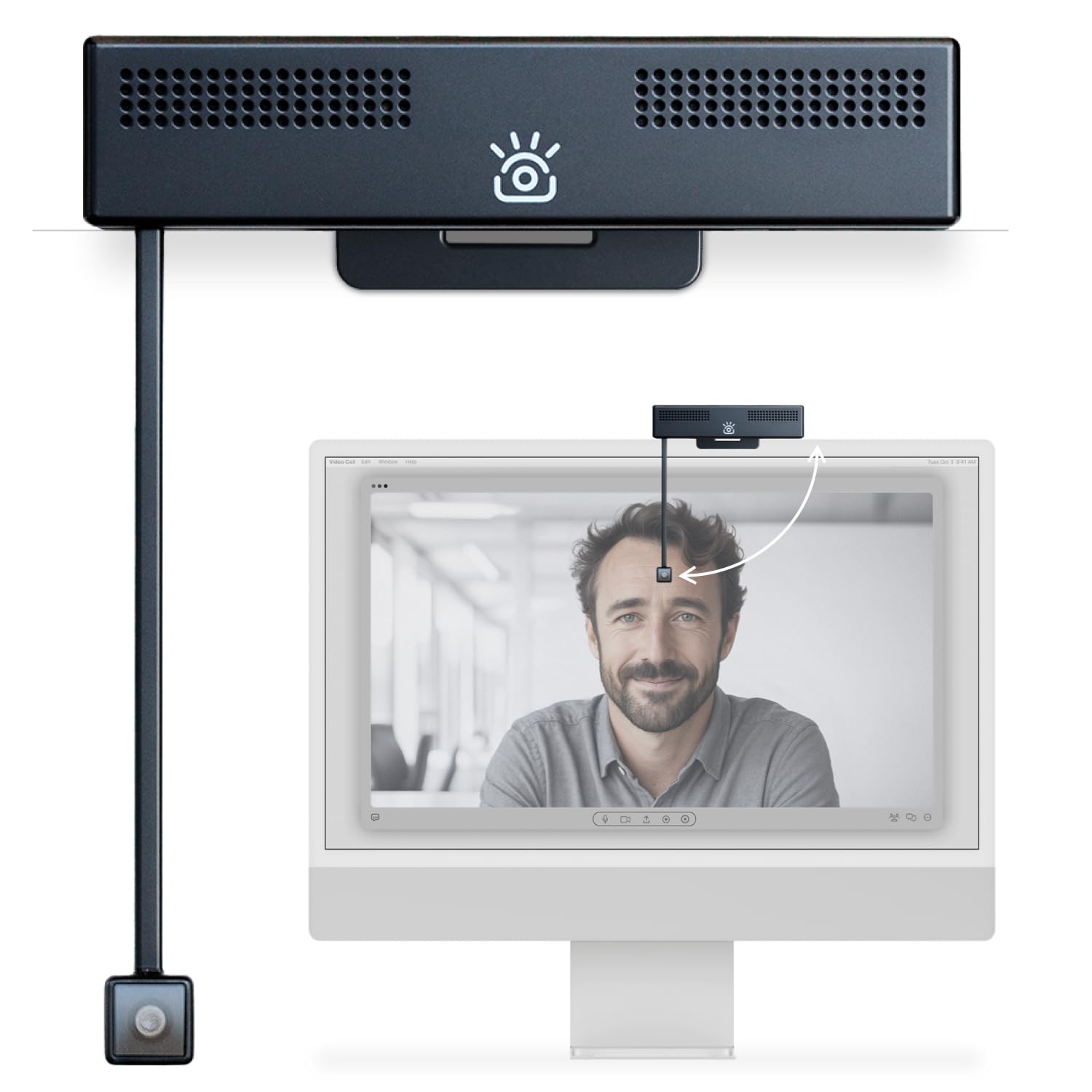
Solving a problem most users don’t realize they have, the iContact Camera Pro uses a retractable arm to bring the lens down to the bottom edge of your monitor — directly in line with your eye line. This physical design eliminates the down-ward angle of standard webcams that makes it appear you are looking at the keyboard instead of the person you’re speaking with. The 12-megapixel sensor captures 4K at 30fps with a 78° field of view that feels natural for one-on-one conversations.
The built-in dual noise-cancelling microphones capture clear audio, and the free iContact Control app allows fine-tuning of brightness, contrast, color temperature, and even skin tone. It is Zoom-certified and works plug-and-play across Windows, macOS, and Chrome OS. For professionals who spend 6+ hours per day on video calls, the eye-contact improvement is immediately noticeable in how engaged colleagues seem.
The retractable arm feels fragile, and reviews report inconsistent build quality, with some units failing after a couple of weeks (though customer service handles replacements quickly). The magnetic mount is best suited for monitors up to 24 inches; larger screens may not accommodate the arm’s reach optimally.
Why it’s great
- Physical eye-contact alignment for natural conversations
- Dual noise-cancelling mics with clear pickup
- Dedicated control app for fine-tuning image
Good to know
- Retractable arm may feel fragile over time
- Best suited for monitors up to 24 inches
6. Dell UltraSharp WB7022

The Dell UltraSharp WB7022 is a purpose-built business conferencing webcam that prioritizes reliability and image consistency. It uses a large Sony STARVIS CMOS sensor coupled with Advanced Digital Overlap HDR, which balances highlights and shadows in extreme lighting — like sitting with a bright window in the background. The AI auto-framing keeps you centered as you shift in your chair, and you can choose between 65°, 78°, and 90° field of view presets.
The build quality is exceptional: a premium aluminum chassis with a smooth metallic finish that looks unobtrusive on a monitor. It is certified for Microsoft Teams and Zoom, so you can trust the plug-and-play functionality in enterprise environments. The magnetic lens cover provides privacy without the cheap plastic feel of included shutters on budget models.
The primary limitation for Mac users is the absence of macOS support for the Dell Peripheral Manager software, meaning you lose access to custom image tuning. Some users have reported driver issues on Windows 11 white-box PCs, though standard configurations work flawlessly. The lack of a built-in microphone means you must rely on a separate headset or desk mic.
Why it’s great
- Best-in-class HDR for high-contrast lighting
- Premium aluminum build with magnetic privacy cover
- Microsoft Teams and Zoom certified
Good to know
- No built-in microphone
- No macOS software support for custom controls
7. NexiGo N950P (Gen 2)

The NexiGo N950P delivers 4K resolution via an 8.5-megapixel Sony STARVIS sensor that keeps image noise low in office lighting. The headline feature is the included RF wireless remote, which lets you zoom in 5x at 1080P, mute the mic, and flip the image without touching your computer. This is extremely useful for presenters who walk away from the desk during meetings or need to show a close-up of a document.
It ships with both USB-A and USB-C cables, along with a privacy cover, making it compatible with nearly any PC or laptop right out of the box. The built-in dual omnidirectional mics with noise cancellation improve audio clarity over standard laptop mics, though users report that the mic quality is adequate rather than exceptional. The automatic low-light correction does a good job of brightening dim scenes without introducing visible grain.
The autofocus system can struggle when you move quickly, occasionally losing lock and requiring a manual tap to regain focus. The fixed focus at the wide end means you cannot rely on it to track a moving subject smoothly, so it is best for static desk setups. The remote control is convenient but limited in range compared to Bluetooth-based controls.
Why it’s great
- Wireless RF remote for zoom, mute, and flip control
- Dual USB-A and USB-C cables included
- Low-light correction maintains image quality
Good to know
- Autofocus can hunt during quick movements
- Built-in mic is adequate but not studio-grade
8. Angetube 4K Webcam with AI Tracking
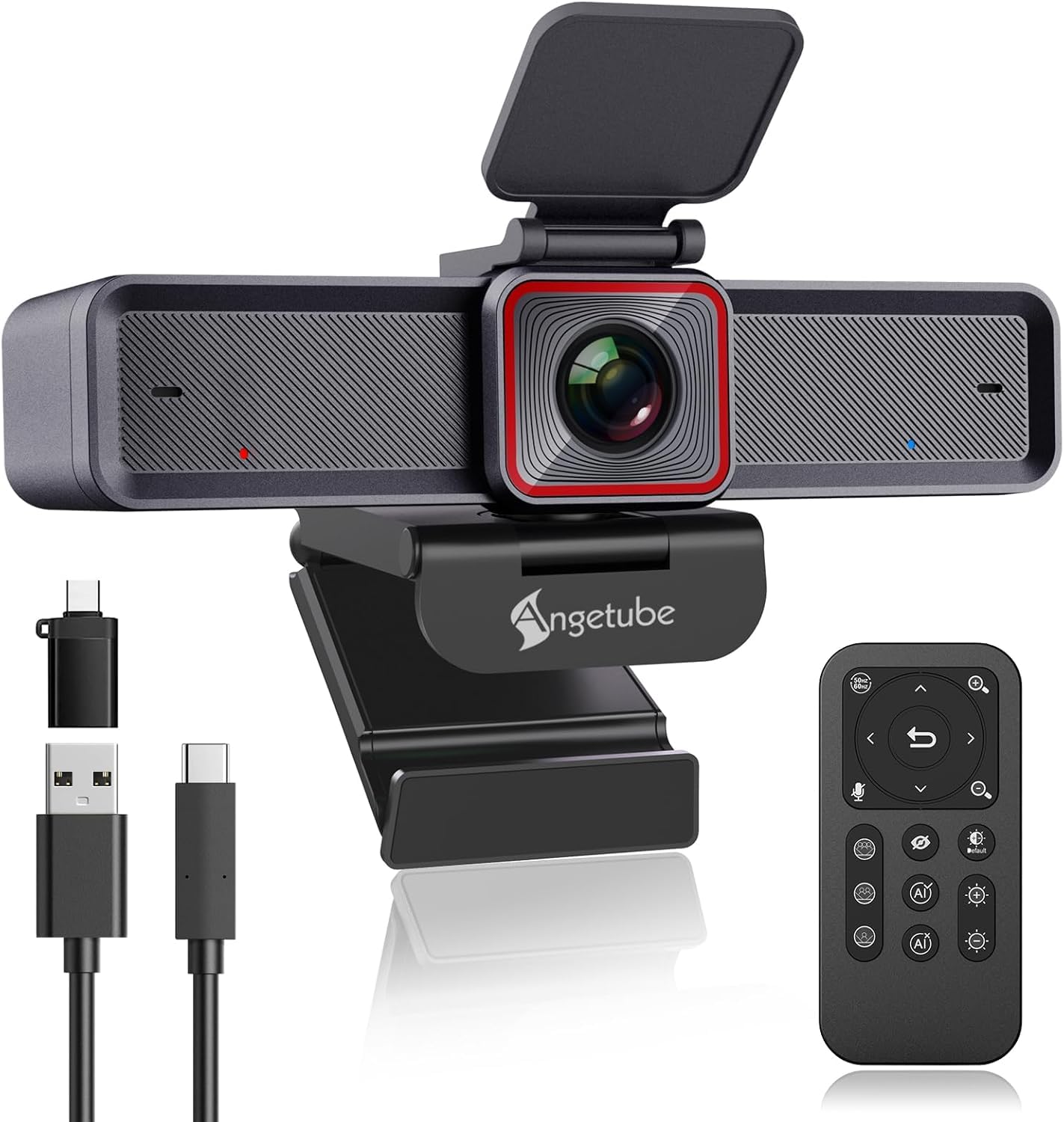
The Angetube 913AI King packs an astonishing number of features into a mid-range price bracket. Its 1/2.8-inch sensor delivers genuine 4K at 30fps with HDR support that prevents window overexposure. The AI tracking system intelligently frames group meetings and can follow an individual speaker — a capability usually reserved for webcams costing three times as much. The 18-key RF remote control provides 360-degree operation, letting you adjust 10X digital zoom, mute the mic, and switch field of view between 70°, 80°, and 90° without software.
Audio is handled by dual noise-canceling microphones that filter out keyboard clicks and ambient hum with surprising effectiveness, picking up clear sound from up to 16.4 feet away. USB 3.0 connectivity ensures fast data transfer speeds, and the unit is fully plug-and-play across major video platforms including Zoom, Skype, and Teams. Customer support is notably responsive, with reports of free replacement cables and genuine problem-solving.
The AI tracking can lag behind fast-moving subjects like young children, so it is optimized for the moderate movement of an adult presenter. The remote control uses RF rather than Bluetooth, which means it needs line of sight for reliable function. The build feels slightly less premium than aluminum-body competitors, but the functionality per dollar is hard to beat.
Why it’s great
- AI tracking and group framing at a competitive price
- Comprehensive RF remote with 10X digital zoom
- Excellent customer support for any issues
Good to know
- AI tracking may lag behind fast-moving subjects
- RF remote requires line of sight
9. EMEET PIXY Dual-Camera AI-Powered PTZ

The EMEET PIXY introduces a unique dual-camera approach: a primary 4K imaging camera with PDAF and a secondary AI camera dedicated to face detection. This allows the autofocus to lock in 0.2 seconds, compared to the 1.1 second average of competing webcams. The Sony 1/2.55-inch sensor produces rich color and detail, and the 3-chip AI system (imaging, motion prediction, PTZ control) enables 310° pan and 180° tilt for smooth tracking.
Gesture control is genuinely useful: holding an open palm in the center of the frame for two seconds activates tracking, and you can zoom or switch to Whiteboard Mode without touching a button. The three-microphone array offers three sound modes — Live, Noise Canceling, and Original Sound — adapting to your environment whether you’re streaming, podcasting, or in a quiet meeting. The EMEET STUDIO software provides preset positions and privacy mode.
The tracking performance is sensitive to lighting conditions; in dim rooms, the AI can lose the subject when they stand up or move casually. The software can feel unpolished, and the installation instructions are sparse, requiring a visit to the support site for proper setup. The 5-foot USB-C cable is adequate for most desks but may be short for complex cable routing.
Why it’s great
- Dual-camera system for 0.2s PDAF autofocus
- Gesture control and hands-free operation
- Triple-mic array with three sound modes
Good to know
- AI tracking degrades in poor lighting
- Documentation is sparse and software feels unpolished
FAQ
Why does my 4K webcam look worse than my phone camera at 1080P?
Can I use a 4K webcam in 1080P mode for higher frame rates?
Do I need a dedicated microphone with a 4K webcam?
What is PTZ and do I need it for video conferencing?
Final Thoughts: The Verdict
For most users, the 4k webcam winner is the Insta360 Link 2 Pro because it combines a large 1/1.3-inch sensor with fluid PTZ tracking and professional beamforming audio, covering every use case from meetings to streaming. If you want best-in-class low-light performance and uncompressed 4K output for content creation, grab the Razer Kiyo Pro Ultra. And for a feature-rich mid-range option with AI tracking and a functional remote, nothing beats the Angetube 4K Webcam.

Mo Maruf
I created WellFizz to bridge the gap between vague wellness advice and actionable solutions. My mission is simple: to decode the research and give you practical tools you can actually use.
Beyond the data, I am a passionate traveler. I believe that stepping away from the screen to explore new environments is essential for mental clarity and physical vitality.