Our readers keep the lights on and my smoothie glass nicely filled. As an Amazon Associate, I earn from qualifying purchases.
The difference between a good ultrawide and a great one isn’t just the curve—it’s how that curve handles the pixels. At 4K territory, you’re demanding sharp text clarity, accurate color reproduction, and a refresh rate that keeps motion fluid. Most buyers scan the resolution number and stop there, missing the panel technology that actually determines whether your investment will glow or ghost.
I’m Mohammad Maruf — the founder and writer behind WellFizz. I’ve spent years analyzing display hardware, pixel density charts, and real-world user feedback to understand exactly which specs separate a long-term keeper from a return label.
This deep-dive guide evaluates eleven models to help you find the best 4k ultrawide monitor that fits your workspace, gaming habits, and budget without falling for marketing traps.
How To Choose The Best 4K Ultrawide Monitor
Ultrawide monitors in the 4K class combine generous horizontal workspace with the pixel density needed for crisp text and detailed game worlds. The catch is that this category spans huge variety in panel quality, refresh speed, and connectivity standards. Understanding the three most critical specs will prevent a costly mismatch between your GPU and your new display.
Panel Technology: OLED vs Mini-LED vs VA
This is the single most impactful decision. QD-OLED panels (seen on the ASUS ROG Strix and Alienware AW3425DW) deliver infinite contrast with true blacks and vibrant colors, but they carry burn-in risk if you display static taskbars for 8+ hours daily. Mini-LED displays like the Acer Predator Z57 use thousands of local dimming zones to produce deep blacks with no burn-in worry, though you may notice some blooming around bright objects in dark scenes. VA panels offer decent contrast at a lower cost but often suffer from slower pixel response, which manifests as motion blur in fast-paced games.
Refresh Rate and Adaptive Sync
A true 4K ultrawide—especially at resolutions like 5120×2160 or 7680×2160—demands serious GPU power to hit 120Hz or higher. If you play competitive shooters, look for 165Hz or 240Hz panels with both G-Sync Compatible and FreeSync Premium Pro support. For professional workflows, 60Hz is still acceptable, but 120Hz noticeably improves cursor fluidity and scrolling comfort. Always verify that your graphics card can drive the monitor’s native resolution at your target frame rate before buying.
Connectivity Standards
Older monitors rely on HDMI 2.0 or DisplayPort 1.4, which can cap resolution and refresh rate. For the highest-end models—Samsung Odyssey Neo G9 or LG 45GX950A—DisplayPort 2.1 is essential to reach full bandwidth without chroma subsampling. A USB-C port with Power Delivery (65W or 90W) is a major convenience for laptop users, enabling single-cable charging and display output. Built-in KVM switches are valuable if you switch between a desktop and a work laptop, letting you share a single keyboard and mouse across both machines.
Quick Comparison
On smaller screens, swipe sideways to see the full table.
| Model | Category | Best For | Key Spec | Amazon |
|---|---|---|---|---|
| LG 45GX950A-B | Premium OLED | Pro gaming & sharp text work | 5120×2160 / 125 PPI | Amazon |
| Samsung Odyssey Neo G9 | Flagship Mini-LED | Ultra-wide dual 4K immersion | 7680×2160 / 240Hz | Amazon |
| ASUS ROG Strix XG34WCDG | QD-OLED | Color-accurate competitive play | 3440×1440 / 0.03ms | Amazon |
| Alienware AW3425DW | Premium QD-OLED | HDR gaming & content creation | 3440×1440 / 240Hz | Amazon |
| Samsung Odyssey OLED G9 | Ultrawide OLED | Immersive 32:9 gaming | 5120×1440 / 144Hz | Amazon |
| Acer Predator Z57 | Mini-LED Beast | DUHD console & PC gaming | 7680×2160 / 120Hz | Amazon |
| Dell UltraSharp U4025QW | Professional IPS Black | Color-critical productivity | 5120×2160 / 120Hz | Amazon |
| Dell U-Series U3818DW | Classic Ultrawide | Dual-PC KVM workflows | 3840×1600 / 60Hz | Amazon |
| INNOCN 45C1R | Value Ultrawide | Budget 32:9 productivity | 5120×1440 / 120Hz | Amazon |
| CRUA 45″ Curved | Entry-Level 32:9 | High-refresh budget gaming | 5120×1440 / 240Hz | Amazon |
| LG 34G630A-B | Mid-Range 21:9 | Competitive 240Hz esports | 3440×1440 / 240Hz | Amazon |
In‑Depth Reviews
1. LG 45GX950A-B 45″ Ultragear 5K2K OLED

This monitor redefines what ultrawide clarity can look like. The 5K2K WUHD (5120×2160) resolution on a 45-inch OLED panel hits 125 pixels per inch, which reduces the color fringing that plagued earlier OLED ultrawides. Text looks sharp enough for coding and document work, while the 800R curve wraps the image around your peripheral vision for genuine immersion.
Dual-mode operation lets you switch between 5K2K at 165Hz and Wide FHD at 330Hz with a single hotkey, catering to both cinematic AAA titles and competitive shooters. The DisplayPort 2.1 input ensures you get full bandwidth without compression, and the 90W USB-C power delivery keeps a laptop charged through one cable. G-Sync and FreeSync Premium Pro compatibility covers both major GPU ecosystems.
Real users consistently praise the deep blacks and vibrant HDR performance, though some note that the aggressive 800R curve takes a day to adjust to. A few reviewers mention finicky sleep-wake behavior and awkward input switching, but firmware updates are gradually addressing these quirks. The built-in speakers are loud enough for casual use but shouldn’t replace dedicated desktop audio.
Why it’s great
- Highest pixel density in a large OLED ultrawide reduces color fringing
- Dual-mode (165Hz / 330Hz) adapts to both story and esports gaming
- DisplayPort 2.1 and 90W USB-C eliminate bandwidth bottlenecks
Good to know
- 800R curve is the steepest on this list and not everyone finds it comfortable
- Input source switching requires menu navigation; no dedicated remote
- Premium panel commands a premium price appropriate for pro users
2. Samsung 57″ Odyssey Neo G9 (G95NC)

The world’s first Dual UHD monitor packs 7680×2160 pixels across a 57-inch 32:9 canvas, effectively giving you two 4K monitors side-by-side with no bezel. Quantum Mini-LED technology with 2,392 local dimming zones produces deep blacks and 1,000-nit peak brightness, earning its VESA DisplayHDR 1000 certification. The 1000R curve matches the natural shape of the human visual field, making this feel like a wrap-around window rather than a flat panel.
Gaming performance is anchored by a 240Hz refresh rate and 1ms GtG response time, but reaching that refresh at full resolution requires a DisplayPort 2.1 connection. AMD FreeSync Premium Pro handles frame synchronization, and the Picture-by-Picture mode lets you view two input sources in their native resolution simultaneously—a godsend for day traders or console-plus-PC setups. The 40-pound weight and massive footprint mean you need a sturdy desk and at least 32 inches of depth.
Customer feedback highlights the sharp text and lack of visible blooming during HDR content, but several users note that firmware bugs—especially wake-from-sleep issues and short included cables—can be frustrating. The stand feels slightly flimsy for a monitor of this weight, so a heavy-duty VESA arm is a smart upgrade. For users who can drive the full resolution, this is an unmatched productivity and gaming experience.
Why it’s great
- True Dual 4K resolution in a single seamless curve
- 2,392-zone Mini-LED dimming with virtually no blooming
- 240Hz with DisplayPort 2.1 is future-proof for next-gen GPUs
Good to know
- Extremely heavy and wide; requires a deep desk and strong monitor arm
- Wake-from-sleep firmware bugs reported by multiple owners
- Only one DisplayPort 2.1 input; maxing refresh rate demands it
3. ASUS ROG Strix 34″ XG34WCDG QD-OLED

ASUS delivers a 34-inch QD-OLED with 3440×1440 resolution, 175Hz refresh, and a blistering 0.03ms response time that eliminates ghosting entirely. The panel covers 99.3% DCI-P3 with Delta E < 2 color accuracy straight out of the box, making this a rare crossover monitor that serves both competitive gaming and color-critical photo editing. VESA DisplayHDR 400 True Black compliance means deep blacks without the crushed shadow detail that plagues lesser HDR displays.
The OLED Care Pro suite includes a Neo Proximity Sensor that detects when you step away and dims the screen to reduce burn-in risk. ASUS also provides a three-year warranty that explicitly covers burn-in, which is the reassurance most buyers need when investing in OLED. The DisplayWidget Center software lets you tweak settings with a mouse instead of fumbling with an on-screen display joystick.
Users upgrading from older LCD ultrawides report a dramatic improvement in contrast and color vibrancy, especially in HDR games and movies. One common complaint is the lack of built-in speakers and an unreliable 3.5mm audio passthrough—you will need external speakers or a headset. The Neo Proximity Sensor can be overly sensitive, occasionally blanking the screen during a quick stretch break.
Why it’s great
- Industry-leading 0.03ms response time with no perceivable ghosting
- Factory-calibrated Delta E < 2 color accuracy for creative work
- Three-year burn-in warranty included with OLED Care Pro
Good to know
- No built-in speakers; audio passthrough via 3.5mm is inconsistent
- Proximity sensor can trigger black screen unexpectedly
- ELMB only works via DisplayPort with VRR disabled
4. Alienware 34″ AW3425DW QD-OLED

Alienware’s 34-inch QD-OLED pairs a 3440×1440 panel with a silky 240Hz refresh rate and a 1800R curve that is gentle enough for all-day use. The DCI-P3 99.3% color coverage and Delta E < 2 accuracy rival professional-grade reference monitors, while VESA DisplayHDR TrueBlack 400 ensures that dark scenes retain detail without grayish blacks. The glossy coating produces deeper blacks than matte OLEDs and maintains color saturation even from extreme viewing angles.
Adaptive sync support spans G-Sync Compatible, FreeSync Premium Pro, and VESA AdaptiveSync, eliminating tearing regardless of your GPU brand. The physical design includes a sturdy stand with height, tilt, and swivel adjustments, plus a built-in cable management channel. The included microfiber cloth is a thoughtful touch for keeping the glossy panel clean without scratching the delicate coating.
Customers consistently describe the image quality as a “huge leap” over VA and IPS panels, with particular praise for HDR performance in games like Cyberpunk 2077 and Microsoft Flight Simulator. Some users note that the glossy screen can reflect bright room lighting, and the 250-nit typical brightness feels dim in sunlit rooms. A few reports mention slight text clarity issues due to the OLED subpixel layout, though the 240Hz motion clarity mostly makes up for it.
Why it’s great
- Glossy QD-OLED panel produces deeper blacks and richer colors than matte
- 240Hz refresh with triple adaptive sync compatibility
- Gentle 1800R curve comfortable for both gaming and office work
Good to know
- Low 250-nit typical brightness struggles in bright rooms
- Glossy finish reflects overhead lights and windows
- Subpixel layout can make text look slightly soft at native resolution
5. Samsung 49″ Odyssey OLED G9 (G91SD)

Samsung squeezes its QD-OLED panel into a 49-inch 32:9 format with 5120×1440 resolution, delivering the equivalent of two 27-inch QHD monitors with no seam. The 0.03ms response time and 144Hz refresh rate provide smooth motion, and the 1,000,000:1 contrast ratio makes blacks truly infinite. The 1800R curve wraps the wide canvas around your field of view without introducing distortion at the edges.
Built-in OLED burn-in prevention includes a pixel shift feature and a screen saver that activates after ten minutes of inactivity. The ergonomic stand offers height, tilt, and swivel adjustments, and the monitor is relatively lightweight for its size at just under 16 pounds without the stand. Picture-in-Picture works well for monitoring a secondary source like a streaming box or console while gaming on the main input.
Real-world reviews highlight the spectacular color and HDR performance, with several users calling it a “game-changer” for both productivity and gaming. However, some units have exhibited a slight brightness mismatch between the two panel halves on dim gray backgrounds, and the power cable is frustratingly short at only about 4 feet. Samsung’s customer service has been polarizing—some owners report excellent on-site warranty repair while others describe a difficult claims process.
Why it’s great
- Dual QHD resolution gives you two monitors worth of screen real estate
- True OLED contrast with HDR that rivals premium TVs
- Lightweight design for a 49-inch panel simplifies mounting
Good to know
- Some units show subtle brightness mismatch between left and right panel halves
- Only one DisplayPort input; HDMI may not reach full resolution at 144Hz
- Power cable is short; plan your outlet placement accordingly
6. Acer Predator Z57 57″ Mini-LED

Acer takes the dual-4K concept and implements it with 2,304-zone Mini-LED local dimming on a 57-inch VA panel. The DUHD (7680×2160) resolution paired with 1000 nits peak brightness and VESA DisplayHDR 1000 certification makes this one of the brightest and most detailed ultrawides available. The 1000R curve follows the Neo G9’s contour, ensuring that the image wraps around you evenly across the entire 32:9 screen.
Connectivity is generous: two HDMI 2.1 ports, one DisplayPort 1.4, and a USB Type-C with 90W power delivery. The integrated KVM switch lets you control two connected PCs with a single keyboard and mouse, which is a huge time-saver for hybrid setups. Dual 10-watt speakers provide respectable audio for a monitor—loud enough for movies and casual gaming without external speakers.
Customer experiences are mixed in a telling way: those who receive a defect-free unit describe it as “incredible” for both gaming and productivity, praising the deep blacks and minimal halo effect. However, several users report dead pixels, severe ghosting in older titles, and flickering that required returns. Acer’s support receives poor marks for handling these defects, making this a high-risk, high-reward choice that should ideally be purchased from a retailer with a generous return policy.
Why it’s great
- 2,304-zone Mini-LED delivers excellent contrast without burn-in risk
- Two HDMI 2.1 ports and 90W USB-C support multi-platform setups
- Built-in 10W speakers are genuinely usable for media consumption
Good to know
- Quality control issues—dead pixels and ghosting—reported by multiple buyers
- Acer customer support is difficult to work with for warranty claims
- VA panel viewing angles are narrower than IPS or OLED alternatives
7. Dell UltraSharp U4025QW 40″ 5K2K

Dell’s UltraSharp series targets the professional who needs high pixel density without OLED burn-in risk. The 40-inch IPS Black panel delivers 5120×2160 resolution (5K2K) at 120Hz with a 2000:1 contrast ratio—double that of standard IPS panels—resulting in noticeably deeper blacks while maintaining the wide viewing angles IPS is known for. The 600-nit brightness ensures readability in well-lit office environments.
The built-in KVM switch handles up to two computers, maintaining a stable 2.5-gigabit Ethernet connection when switching sources. USB-C with Thunderbolt support provides 90W charging for a MacBook Pro or Windows laptop, and the downstream USB hub includes four USB-A ports and one USB-C upstream. Dell’s Display Manager software allows easy window snapping and color profile switching.
Users in creative fields consistently praise the color fidelity—”excellent color and clarity on a huge canvas” is a recurring sentiment. Some note that the IPS Black technology, while improved, still doesn’t match OLED contrast in a dark room. The build quality feels slightly plasticky for the price point, and there is no remote control included. The stand is large and requires a deep desk, but the ergonomic adjustments (height, tilt, swivel) are smooth and precise.
Why it’s great
- IPS Black panel achieves 2000:1 contrast without OLED burn-in worries
- Thunderbolt 90W charging and 2.5Gb Ethernet in a single-cable setup
- 120Hz refresh provides smooth cursor motion for productivity
Good to know
- IPS contrast still can’t match OLED for true blacks in a dark room
- Plastic chassis feels less premium than the price suggests
- Stand footprint is large; requires a deep desk or monitor arm
8. Dell U-Series 38″ U3818DW

This 38-inch WQHD+ (3840×1600) monitor from Dell is a veteran of the ultrawide category, offering a 16:9-like vertical resolution with extra horizontal space for timeline-based editing and spreadsheet work. The 2300R curve is subtle enough to feel natural but adds a touch of immersion. The Infinity Edge design minimizes bezels, making this a popular choice for multi-monitor arrays despite being a single ultrawide replacement.
The integrated KVM feature lets you control two connected PCs with one keyboard and mouse, and the USB Type-C connection delivers power, video, and data over a single cable to compatible laptops. Dell Easy Arrange software helps organize windows into predefined grid layouts. The monitor ships with a factory calibration report and includes a full suite of cables in the box.
Long-term users report that this monitor has held up well over years of daily use, with consistent color accuracy and no backlight bleed issues. The 60Hz refresh rate is the biggest limitation—gamers will notice the lack of smooth motion compared to 120Hz+ panels. Some MacBook Pro owners note intermittent sleep-wake issues when connected via USB-C, though a firmware update often resolves it. The speakers are adequate for video calls but lack bass for music.
Why it’s great
- Proven reliability and consistent color performance over years of use
- KVM switch and single USB-C cable simplify dual-PC workflows
- Infinity Edge design works well in multi-monitor setups
Good to know
- 60Hz refresh rate feels dated for gaming and fluid scrolling
- USB-C bandwidth limits USB 3.0 speed when also transmitting video
- Intermittent sleep-wake issues reported with some MacBook models
9. INNOCN 45C1R 45″ 5K2K Ultrawide

INNOCN offers a 45-inch VA panel with 5120×1440 resolution (Dual QHD) in a 32:9 aspect ratio, positioning itself as a budget-friendly entry into super-ultrawide territory. The 1500R curve and 120Hz refresh rate provide a respectable balance for both productivity and gaming. The 3000:1 native contrast ratio of the VA panel delivers decent black levels without the expense of Mini-LED or OLED.
Connectivity is the standout feature here: two HDMI 2.1 ports, one DisplayPort 1.4, USB-C with 65W power delivery, USB-A hub, USB-B upstream, and even an RJ45 Ethernet jack. Picture-in-Picture and Picture-by-Picture modes let you view two sources simultaneously, which is useful for monitoring a second PC or console. The stand offers tilt, swivel, and height adjustment.
User feedback is primarily positive for the price, with buyers calling it a “game-changer for productivity” and praising the PIP functionality. However, several owners report that the built-in speakers died after a few months, and the mounting system has a deep circular recess that makes VESA arm installation difficult. The anti-glare coating causes noticeable graininess that some users find distracting on solid backgrounds. Backlight glare can also be an issue when the monitor is hit by direct sunlight.
Why it’s great
- Full connectivity suite including HDMI 2.1, USB-C 65W, and RJ45
- PIP/PBP modes handle dual-source workflows natively
- VA panel’s 3000:1 contrast produces deeper blacks than IPS
Good to know
- Built-in speakers prone to failure after a few months
- VESA mounting is complicated by a recessed circular slot design
- Anti-glare coating introduces visible graininess on uniform colors
10. CRUA 45″ Curved 5120×1440 240Hz
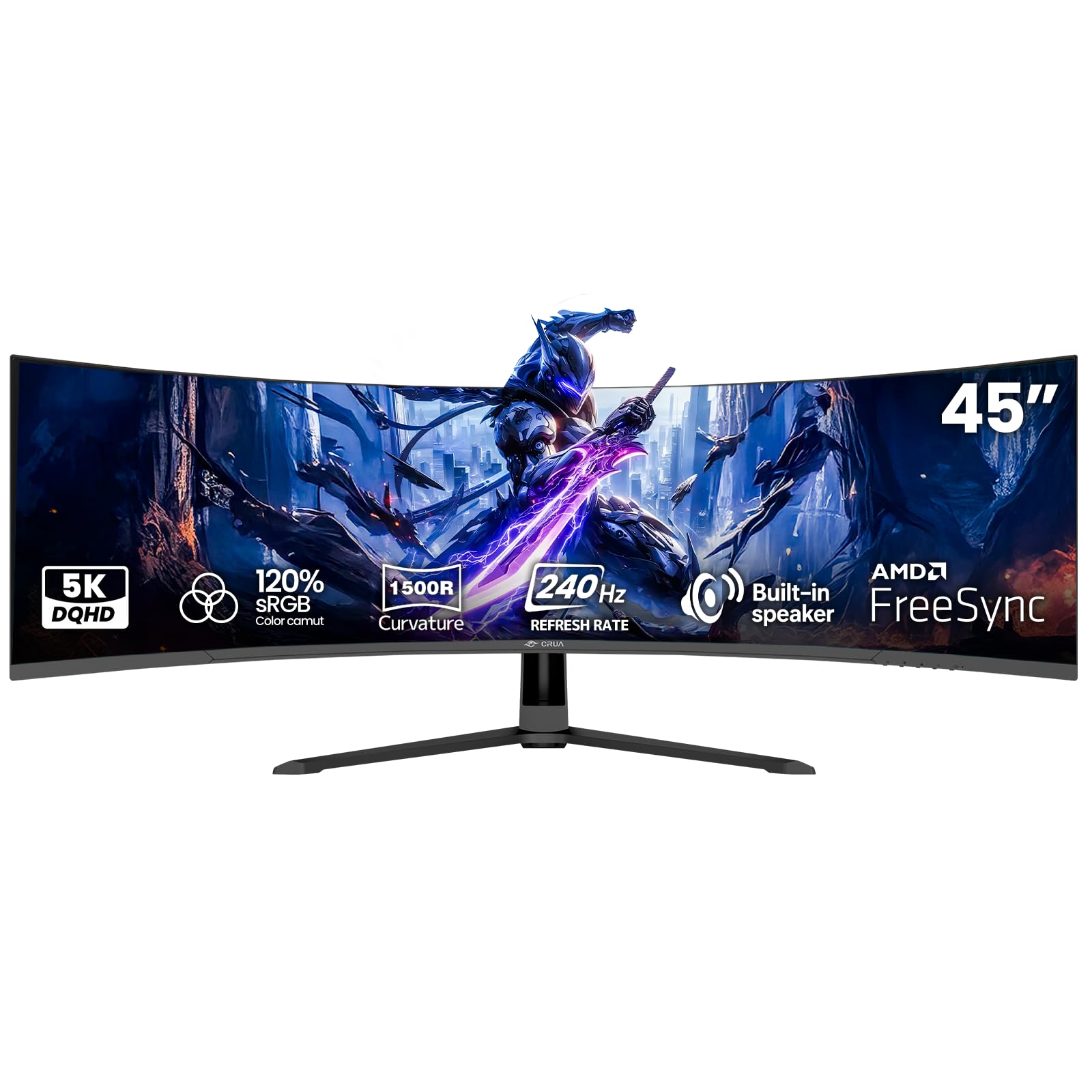
CRUA enters the super-ultrawide market with a 45-inch VA panel that pushes 240Hz at 5120×1440 resolution—an unusual combination at this price tier. The 1500R curve, 120% sRGB color gamut, and 3000:1 contrast ratio make it a compelling option for gamers who want maximum screen width without maxing out their budget. AMD FreeSync compatibility helps reduce tearing, though the sync range is narrower than premium competitors.
The monitor includes HDMI 2.1 and DisplayPort 1.4 inputs, with 100x100mm VESA mount support for desk-bounded arm users. The built-in speakers are functional for system sounds and YouTube, but they lack any low-end presence. The stand is basic with tilt-only adjustment, so you will likely want a monitor arm for proper ergonomics.
Customer experiences are split along clear lines. Happy owners report “no dead pixels, no flickering, great value” and praise the blue-light filter for reducing eye strain during long sessions. But critical reviews describe a high-pitched whine from the power adapter, dull color reproduction, and a “cheap feel” compared to established brands. Reaching the full 240Hz refresh rate requires a DisplayPort 1.4 cable—HDMI is limited to 144Hz at this resolution—and the monitor has a tendency to hijack the Windows audio device, which can be confusing for less technical users.
Why it’s great
- 240Hz at 5120×1440 is an unusually high refresh for a budget-tier panel
- VA contrast provides solid black levels for dark scene gaming
- Wall-mountable and competitively priced for the size and specs
Good to know
- Some units suffer from a high-pitched coil whine from the external power adapter
- Dull factory color calibration out of the box requires manual tweaking
- Tilt-only stand; budget for a quality monitor arm from day one
11. LG 34G630A-B 34″ Ultragear WQHD

LG’s 34-inch Ultragear brings a 240Hz VA panel with 3440×1440 resolution (WQHD) and a 1ms GtG response time to the competitive gaming crowd. The 21:9 aspect ratio provides extra peripheral vision without the heavy GPU demands of 32:9 panels, making this a practical choice for esports titles like Valorant, Apex Legends, and Overwatch 2. FreeSync Premium compatibility ensures tear-free gameplay with AMD GPUs.
The VA panel covers 95% DCI-P3 color gamut and holds VESA DisplayHDR 400 certification, which is passable for HDR content though not transformative. The slim bezel design and adjustable stand (height, tilt, swivel) offer solid ergonomics without taking up excessive desk space. USB Type-C with 15W power delivery is useful for connecting a secondary laptop, though the low wattage won’t charge devices under heavy load.
User reviews highlight the “stunning picture quality” and “buttery smooth” 240Hz motion handling, with many calling it an excellent value for the price. The built-in speakers receive consistent criticism for being “basic” and lacking volume, but that’s expected in a gaming monitor. Some users returning the unit cited size as the reason—at 34 inches, this is still a substantial desk presence. The stand is heavy and stable, requiring a solid desk to avoid wobble during intense gaming sessions.
Why it’s great
- 240Hz refresh with 1ms response makes this ideal for fast-twitch competitive games
- VA panel delivers 95% DCI-P3 color coverage for vibrant visuals
- Fully adjustable stand (height, tilt, swivel) is rare at this price tier
Good to know
- Built-in speakers are functional but lack volume and clarity
- USB-C only provides 15W charging—too low for power-hungry laptops
- HDR 400 certification offers minimal real-world HDR improvement
FAQ
What does 5K2K resolution mean and how is it different from 4K?
Will the LG 45GX950A-B work with an M4 MacBook Pro over USB-C?
Is the Samsung Odyssey Neo G9 compatible with the Xbox Series X at full resolution?
How does the ASUS ROG Strix XG34WCDG handle OLED burn-in prevention?
Can the Dell U4025QW drive a second 4K monitor via its Thunderbolt daisy chain?
Final Thoughts: The Verdict
For most users, the best 4k ultrawide monitor winner is the LG 45GX950A-B because it combines the highest pixel density in its class with OLED contrast and a flexible dual-mode refresh rate that handles both productivity and competitive gaming. If you want the absolute widest canvas without burn-in, grab the Samsung Odyssey Neo G9—its 57-inch Mini-LED panel delivers dual 4K resolution with no risk of image retention. And for color-critical professional work with a built-in KVM that simplifies a dual-PC desk, nothing beats the Dell UltraSharp U4025QW.

Mo Maruf
I created WellFizz to bridge the gap between vague wellness advice and actionable solutions. My mission is simple: to decode the research and give you practical tools you can actually use.
Beyond the data, I am a passionate traveler. I believe that stepping away from the screen to explore new environments is essential for mental clarity and physical vitality.